Volvo XC40 (2021 year). Manual in english - page 28
AUDIO, MEDIA AND INTERNET
* Option/accessory.
474
Using the wireless phone charger
*
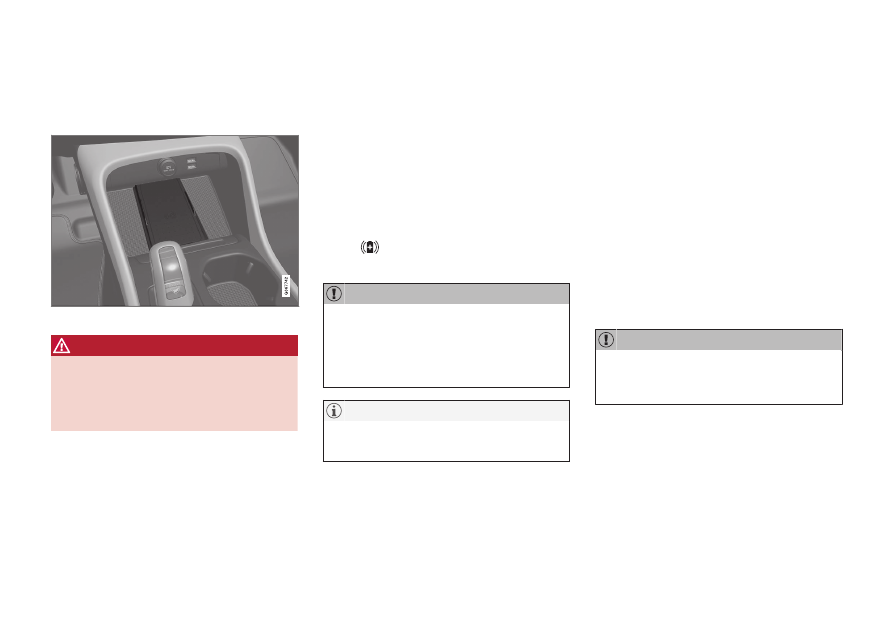
The rubber pad below the center display can
be used to charge a phone without having to
connect its cord.
Wireless phone charger in front of gear selector
WARNING
Wireless charging can affect the operation
of an implanted pacemaker or other medi-
cal devices. If you have one, it is recom-
mended to consult with your doctor before
using the wireless charging system.
The charging plate can be switched on and off
via the center display's Function view. The
charging plate's default mode is activated.
When the charging plate is switched on, a
message will appear describing the risks for
users with pacemakers or other implanted
devices who could be affected by the plate.
Tap the center display to confirm that the
charging plate should be switched on.
To use the wireless charging plate:
1. Make sure that the charging plate is
switched on in the center display's Func-
tion view.
2. Remove all objects from the charging pad
and place the phone in the center of the
pad.
> The phone will begin charging and the
symbol will appear at the top of
the center display.
Do not place cards with NFC (Near Field
Communication), e.g. debit cards for con-
tactless payment, next to the phone. This
type of card could be destroyed during
charging.
Some cellular phones may become warm
during wireless charging. This is normal.
If the phone is not charging:
•
Make sure that the charging plate is
switched on in the center display's Func-
tion view.
•
Make sure there are no other objects on
the charging pad.
•
Make sure the phone supports wireless
charging (Qi).
•
If the phone has a phone case, remove it.
•
Lift up the phone and then put it back on
the center of the charging pad.
•
Make sure the ignition is on.
If the phone is incorrectly positioned or an
object prevents charging on the charge pad, a
message is shown on the center display.
Keep cellular phones and charger stations
away from other objects while charging to
help avoid overheating.
Related information
•
•
•
Certificate for wireless charger (p. 475)
•