Volvo XC40 (2021 year). Manual in english - page 17
||
DRIVER SUPPORT
* Option/accessory.
296
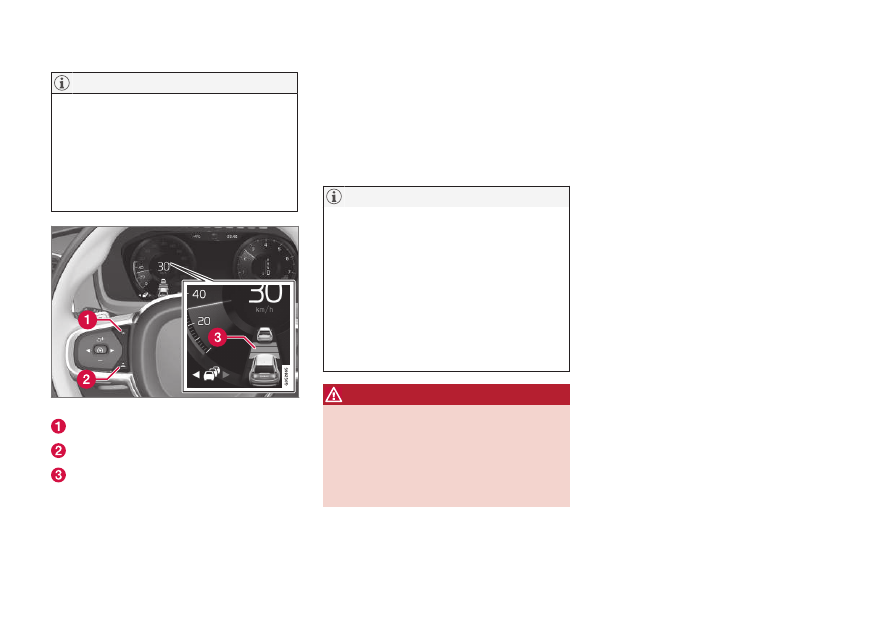
When the symbol in the instrument panel
shows two vehicles, Adaptive Cruise Con-
trol is following the vehicle ahead at a pre-
set time interval.
When only one vehicle is shown, there is
no vehicle ahead within a reasonable dis-
tance.
Controls for setting a time interval.
Reduce the time interval
Increase the time interval
Distance indicator
–
Press the (1) or (2) button to decrease or
increase the time interval.
> The distance indicator (3) shows the
current time interval.
In order to help your vehicle follow the vehicle
ahead as smoothly and comfortably as possi-
ble, Adaptive Cruise Control allows the time
interval to vary noticeably in certain situations.
At low speeds, when the distance to the vehi-
cle ahead is short, Adaptive Cruise Control
increases the time interval slightly.
•
The greater the vehicles' speed, the
greater the distance between them for
a set time interval.
•
Only use the time intervals permitted
by local traffic regulations.
•
If driver support does not seem to
respond with a speed increase when
activated, it may be because the time
interval to the vehicle ahead is shorter
than the set time interval.
WARNING
•
Only use a time interval suitable for the
current traffic conditions.
•
The driver should be aware that short
time intervals give them limited time to
react and act to any unforeseen traffic
situation.
Related information
•
Drive modes when using time interval to
vehicle (p. 297)
•
Driver support systems (p. 254)
•
•