Volvo S90 (2021 year). Manual in english - page 19
DRIVER SUPPORT
* Option/accessory.
330
Selecting and activating Pilot
Assist
*
71
Pilot Assist must first be selected and then
activated to be able to control speed and dis-
tance and to give steering assistance.
Green steering wheel indicates that Pilot Assist is
providing steering assistance.
In order to start the Pilot Assist it is required
that.
•
The driver's seatbelt must be buckled and
the driver's door must be closed.
•
The lane's edge markings must be clear
and must be detected by the car.
•
There must be a vehicle (the "target vehi-
cle") within reasonable distance in front of
the car, or the current speed must be at
least 15 km/h (9 mph).
•
The speed must not exceed 140 km/h (87
mph).
•
The driver must keep his/her hands on the
steering wheel.
•
There must be a vehicle (the "target vehi-
cle") within reasonable distance in front of
the car, or the current speed must be at
least 15 km/h (9 mph).
•
For cars with manual gearbox. Speed
must be at the lowest 30 km/h (20 mph).
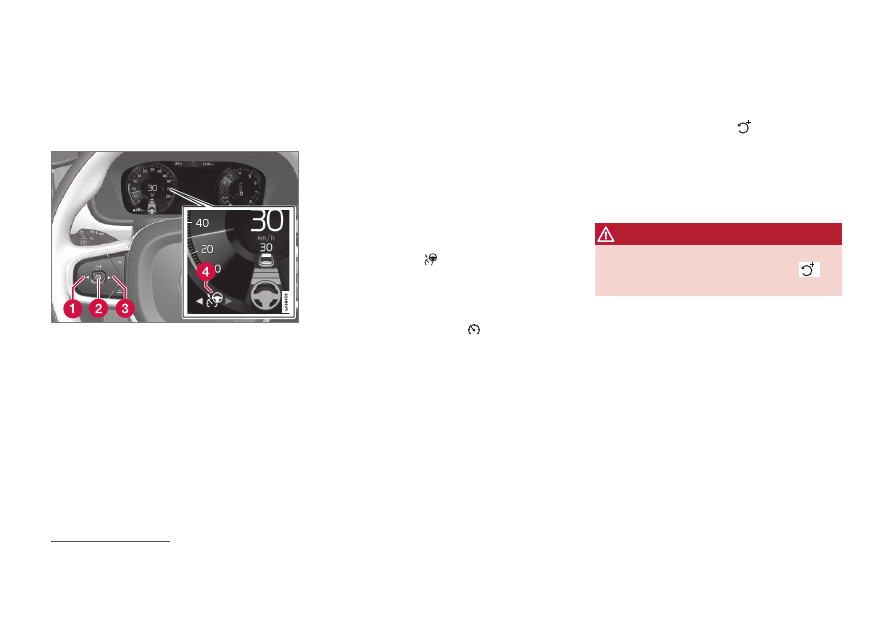
1. Press
◀
(1) or
▶
(3) to scroll to the symbol
for Pilot Assist
(4).
> The symbol is grey – Pilot Assist is in
standby mode.
2. When Pilot Assist is selected – press the
steering wheel button
(2) to activate.
> The symbol is white – Pilot Assist is
started and the current speed is stored
as maximum speed.
Reactivating Pilot Assist to last stored
speed
–
When Pilot Assist is selected – press the
steering wheel button
to activate.
> The cruise control markings and sym-
bols in the driver display change colour
from GREY to WHITE — the car will
now follow the most recently stored
speed again.
WARNING
A significant increase in speed may follow
when the speed is resumed with the
steering wheel button.
Related information
•
•
•
71
This function can be either standard or optional, depending on market.