Volvo V60 Twin Engine (2020 year). Manual in english - page 6
DISPLAYS AND VOICE CONTROL
}}
* Option/accessory.
113
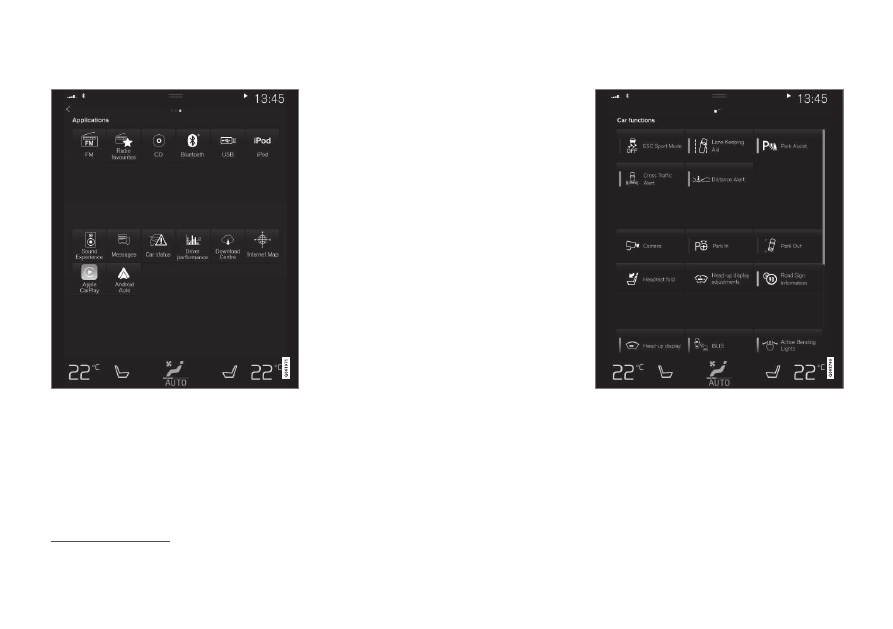
Application view
Application view with the car's apps.
Swipe from right to left
6
across the screen in
order to access the application view (app
view) from the home view. Apps that have
been downloaded (third-party apps) and apps
for embedded functions, such as
FM radio
,
are found here. Certain apps show brief infor-
mation directly in the app view, such as the
number of unread text messages for
Messages
.
Tap on an app to open it. The app then opens
in the tile to which it belongs, e.g.
Media
.
You can scroll down in the app view, depend-
ing on the number of apps. Do this by swip-
ing/dragging from the bottom and up.
Go back to the home view again by swiping
from left to right
6
across the screen, or by
pressing the home button.
Function view
The function view with buttons for different car func-
tions.
Swipe from left to right
6
across the screen in
order to access the function view from the
home view. From here you can activate or
deactivate different car functions, e.g.
BLIS
*
,
Lane Keeping Aid
*
and
Park Assist
*
.
6
Applies to left-hand drive cars. For right-hand drive cars - swipe in the opposite direction.