Volvo S90 Twin Engine (2020 year). Manual in english - page 5
DISPLAYS AND VOICE CONTROL
88
Show trip data in the driver display
The trip computer's recorded and calculated
values can be shown in the driver display.
The values are saved in a trip computer app.
Via the app menu, you can choose which
information is shown on the driver display.
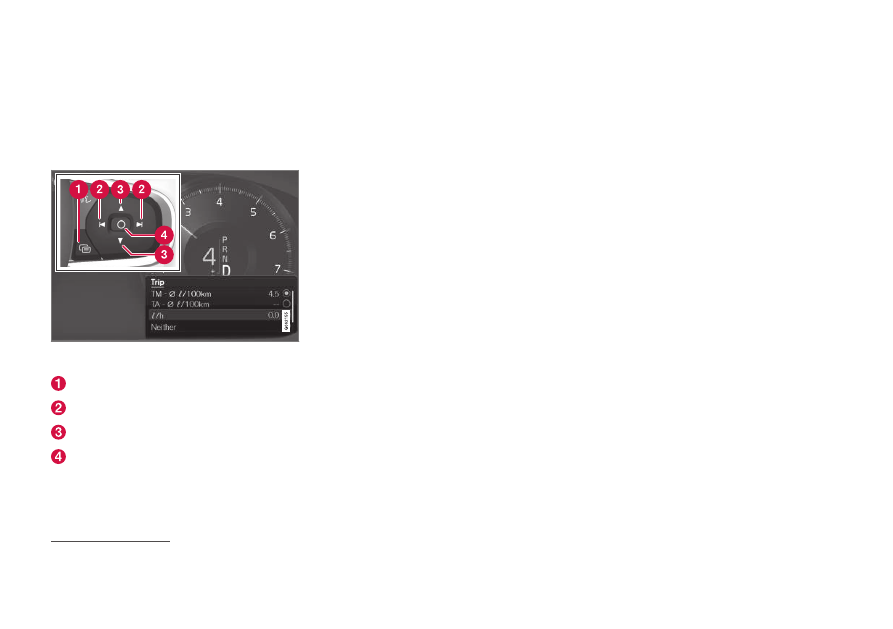
Open and navigate in the app menu
1
using the right-
hand steering wheel keypad.
App menu
Left/right
Up/down
Confirm
1. Open the app menu in the driver display
by pressing (1).
(It is not possible to open the app menu
while there is an unacknowledged mes-
sage in the driver display. The message
first has to be confirmed by pressing the
O
button (4) before the app menu can be
opened.)
2. Navigate to the trip computer app to left
or right with (2).
> The top four menu rows show meas-
ured values for trip meter TM. The next
four menu rows show measured values
for trip meter TA. Scroll up or down in
the list with (3).
3. Scroll down to the option buttons to
select which information to show in the
driver display:
•
Odometer
•
Distance to empty tank
•
Distance to empty battery
•
Tourist (alternative speedometer)
•
Mileage for trip meter TM, TA, or no
display of mileage
•
Instantaneous fuel consumption, aver-
age consumption for TM or TA, alterna-
tively, no display of fuel consumption
Select or deselect an option with the
O
button (4). The change is made immedi-
ately.
Related information
•
•
Resetting the trip meter (p. 89)
1
The figure is schematic - parts may vary depending on car model.