Toyota Camry (2024 year). Manual in english - page 8
 

  Index      Toyota     Toyota Camry (2024 year). Manual in english


Search            copyright infringement  


Content      ..     6      7      8      9     ..


Toyota Camry (2024 year). Manual in english - page 8


224

4-2. Driving procedures

CAMRY_U

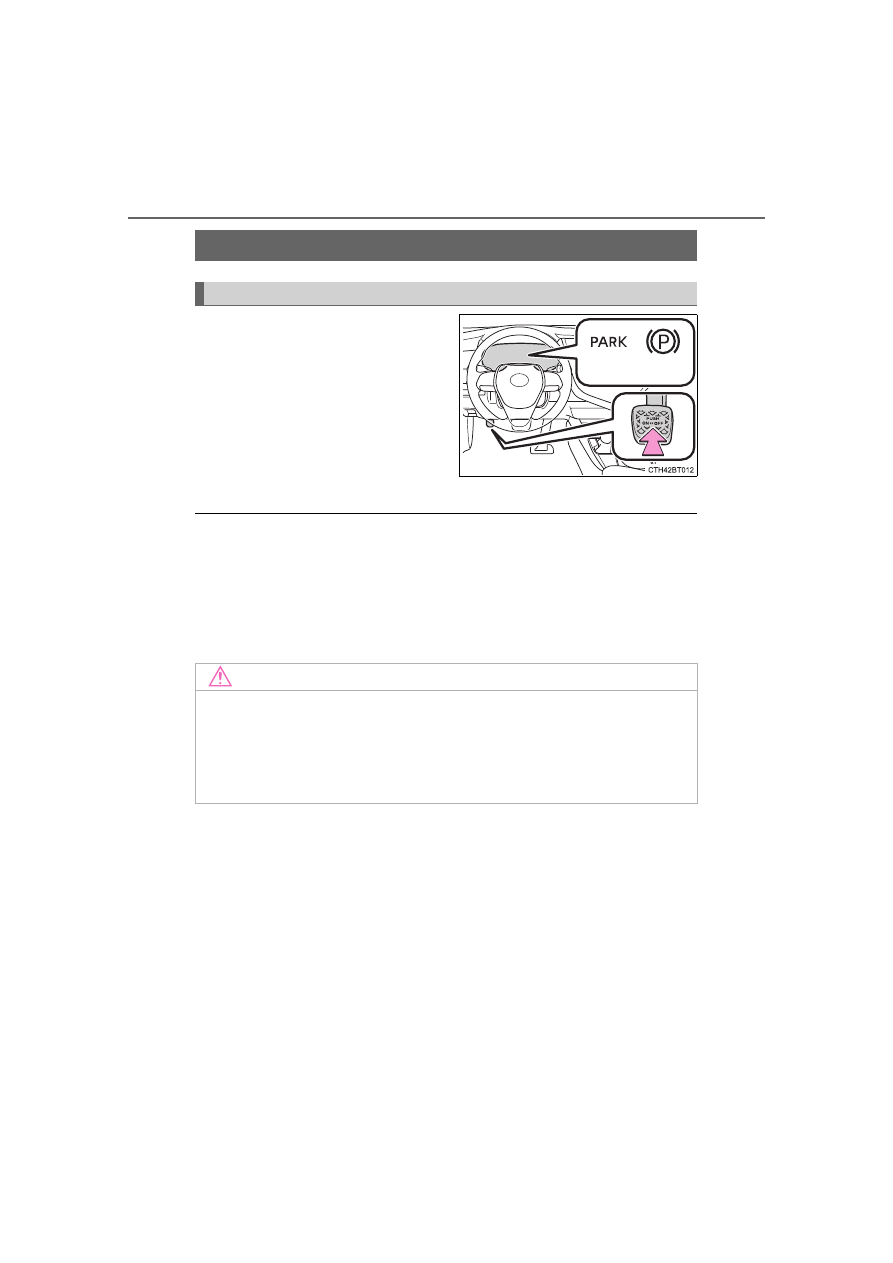
To set the parking brake, fully

depress the parking brake pedal

with your left foot while depress-

ing the brake pedal with your right

foot.

(Depressing the pedal again

releases the parking brake.)

*

1

: For U.S.A.

*

2

: For Canada

Parking the vehicle

P. 194

Parking brake engaged warning buzzer

A buzzer will sound if the vehicle is driven with the parking brake engaged.

“Release Parking Brake” is displayed on the multi-information display.

Usage in winter time

P. 377

Parking brake

: If equipped

Operating instructions

*

1

*

2

NOTICE

Before driving

Fully release the parking brake.

Driving the vehicle with the parking brake set will lead to brake components

overheating, which may affect braking performance and increase brake

wear.

225

4-2. Driving procedures

4

Drivin

g

CAMRY_U

The parking brake is set or released automatically according to the
shift lever operation. 
Even when in automatic mode, the parking brake can be set and
released manually. (

P. 226)

Turns automatic mode on
(while the vehicle is stopped,
pull and hold the parking brake
switch until a message is
shown on the multi-information
display)

• When the shift lever is moved

out of P, the parking brake will
be released, and the parking
brake indicator light and parking
brake light turn off.

• When the shift lever is moved

into P, the parking brake will be
set, and the parking brake indi-
cator light and parking brake
light turn on.

Operate the shift lever with the
brake pedal depressed.

Turns automatic mode off
(while the vehicle is stopped,
press and hold the parking
brake switch until a message is
shown on the multi-information
display)

Operate the parking brake switch while depressing the brake pedal.

*

1

: For  U.S.A.

*

2

: For Canada

Electric parking brake

: If equipped

A mode can be selected from the following modes.

Automatic mode

*

1

*

2

Parking 
brake light

1

2

226

4-2. Driving procedures

CAMRY_U

The parking brake can be set and released manually. 

Sets the parking brake

The parking brake indicator light
and parking brake light will turn on.

Pull and hold the parking brake
switch if an emergency occurs and
it is necessary to operate the park-
ing brake while driving.

Releases the parking brake

Operate the parking brake switch
while depressing the brake pedal.
Make sure that the parking brake
indicator light or parking brake light
turn off.

If the parking brake indicator light
or parking brake light flashes,
operate the switch again. 
(

P. 529)

*

1

: For  U.S.A.

*

2

: For Canada

Manual mode

*

1

*

2

Parking 
brake light

1

2

227

4-2. Driving procedures

4

Drivin

g

CAMRY_U

Parking the vehicle

P. 194

Parking brake operation

When the engine switch is not in IGNITION ON mode, the parking brake
cannot be released using the parking brake switch.

When the engine switch is not in IGNITION ON mode, automatic mode
(automatic brake setting and releasing) is not available.

Automatic release function

The parking brake is automatically released when slowly depress the acceler-
ator pedal.

The parking brake will be released automatically under the following condi-
tions:

The driver’s door is closed.

The driver’s seatbelt is fastened.

Shift the shift lever is in a forward or reverse position.

The malfunction indicator lamp or brake system warning light is not illumi-
nated.

If the automatic release function does not operate, manually release the park-
ing brake.

If “Parking Brake Temporarily Unavailable” is displayed on the multi-
information display

If the parking brake is operated repeatedly over a short period of time, the
system may restrict operation to prevent overheating. If this happens, refrain
from operating the parking brake. Normal operation will return after about 1
minute.

If “Parking Brake Unavailable” is displayed on the multi-information dis-
play

Operate the parking brake switch. If the message does not disappear after
operating the switch several times, the system may be malfunctioning. Have
the vehicle inspected by your Toyota dealer immediately.

Parking brake operation sound

When the parking brake operates, a motor sound (whirring sound) may be
heard. This does not indicate a malfunction.

Parking brake indicator light and parking brake light

Depending on the engine switch mode, the parking brake indicator light and
parking brake light will turn on and stay on as described below:

IGNITION ON mode: Comes on until the parking brake is released.
Not in IGNITION ON mode: Stays on for approximately 15 seconds.

When the engine switch is turned off with the parking brake set, the parking
brake indicator light and parking brake light will stay on for about 15 sec-
onds. This does not indicate a malfunction.

228

4-2. Driving procedures

CAMRY_U

Parking brake engaged warning buzzer

A buzzer will sound if the vehicle is driven with the parking brake engaged.

“Release Parking Brake” is displayed on the multi-information display.

Warning messages and buzzers

Warning messages and buzzers are used to indicate a system malfunction or

to inform the driver of the need for caution. If a warning message is shown on

the multi-information display, read the message and follow the instructions.

If the brake system warning light comes on

P. 528

Usage in winter time

P. 377

WARNING

When parking the vehicle

Do not leave a child in the vehicle alone. The parking brake may be

released unintentionally and there is the danger of the vehicle moving that

may lead to an accident resulting in death or serious injury.

Parking brake switch

Do not set any objects near the parking brake switch. Objects may interfere

with the switch and may lead the parking brake to unexpectedly operate.

NOTICE

When parking the vehicle

Before you leave the vehicle, shift the shift lever to P, set the parking brake

and make sure that the vehicle does not move.

When the system malfunctions

Stop the vehicle in a safe place and check the warning messages.

When the parking brake cannot be released due to a malfunction

Driving the vehicle with the parking brake set will lead to brake components

overheating, which may affect braking performance and increase brake

wear. Contact your Toyota dealer immediately if this occurs.

229

4-2. Driving procedures

4

Drivin

g

CAMRY_U

Turns the brake hold system on

The brake hold standby indicator
(green) comes on. While the sys-
tem is holding the brakes, the
brake hold operated indicator (yel-
low) will illuminate.

*

1

: Brake hold standby indicator

*

2

: Brake hold operated indicator

Brake hold system operating conditions

The brake hold system cannot be turned on in the following conditions:

The driver’s door is not closed.

The driver’s seat belt is not buckled.

If either of the above is detected when the brake hold system is enabled, the
system will turn off and the brake hold standby indicator light will go off. In
addition, if any of the conditions are detected while the system is holding the
brakes, a warning buzzer will sound and a message will be shown on the
multi-information display. The parking brake will then be set automatically.

Brake hold function

If the brake pedal is left released for a period of about 3 minutes after the
system has started holding the brakes, the parking brake will be set auto-
matically. In this case, a warning buzzer sounds and a message is shown on
the multi-information display.

To turn the system off while the system is holding the brakes, firmly depress
the brake pedal and press the switch again.

The brake hold function may not hold the vehicle when the vehicle is on a
steep incline. In this situation, it may be necessary for the driver to apply the
brakes. A warning buzzer will sound and the multi-information display will
inform the driver of this situation. If a warning message is shown on the
multi-information display, read the message and follow the instructions.

Brake Hold

The brake hold system keeps the brake applied when the shift
lever is in D, S or N with the system on and the brake pedal has
been depressed to stop the vehicle. The system releases the
brake when the accelerator pedal is depressed with the shift
lever in D or S to allow smooth start off.

*

1

*

2

: If equipped

230

4-2. Driving procedures

CAMRY_U

When the parking brake is set automatically while the system is holding

the brakes

Perform any of the following operations to release the parking brake.

Depress the accelerator pedal. (The parking brake will not be released auto-

matically if the seat belt is not fastened.)

Operate the parking brake switch with the brake pedal depressed.

Make sure that the parking brake indicator light goes off. (

P. 225)

When an inspection at your Toyota dealer is necessary

When the brake hold standby indicator (green) does not illuminate even when

the brake hold switch is pressed with the brake hold system operating condi-

tions met, the system may be malfunctioning. Have the vehicle inspected at

your Toyota dealer.

Warning messages and buzzers

Warning messages and buzzers are used to indicate a system malfunction or

to inform the driver of the need for caution. If a warning message is shown on

the multi-information display, read the message and follow the instructions.

If the brake hold operated indicator flashes

P. 529

WARNING

When the vehicle is on a steep incline

When using the brake hold system on a steep incline, exercise caution. The

brake hold function may not hold the vehicle in such a situation.

When stopped on a slippery road

The system cannot stop the vehicle when the gripping ability of the tires has

been exceeded. Do not use the system when stopped on a slippery road.

NOTICE

When parking the vehicle

The brake hold system is not designed for use when parking the vehicle for

a long period of time. Turning the engine switch off while the system is hold-

ing the brakes may release the brakes, which would cause the vehicle to

move. When operating the engine switch, depress the brake pedal, shift the

shift lever to P and set the parking brake.

231

4

Drivin

g

CAMRY_U

4-3. Operating the lights and wipers

Operating the 

 switch turns on the lights as follows:

For U.S.A.

The headlights, day-
time running lights (

P.

233) and all the lights
listed below turn on and
off automatically.
(Vehicles without a
smart key system:
When the engine
switch is in the “ON”
position) 
(Vehicles with a smart
key system: When the
engine switch is in
IGNITION ON mode)

The side marker, parking, tail, license plate, instrument
panel lights, and daytime running lights (

P. 233) turn on. 

The headlights and all the lights listed above (except day-
time running lights) turn on. 

The daytime running lights turn off.

Headlight switch

The headlights can be operated manually or automatically. 

Operating instructions

1

2

3

4

232

4-3. Operating the lights and wipers

CAMRY_U

For Canada

The headlights, day-
time running lights (

P.

233) and all the lights
listed below turn on and
off automatically.
(Vehicles without a
smart key system:
When the engine
switch is in the “ON”
position) 
(Vehicles with a smart
key system: When the
engine switch is in
IGNITION ON mode)

The side marker, parking, tail, license plate, instrument
panel lights, and daytime running lights (

P. 233) turn on. 

The headlights and all the lights listed above (except day-
time running lights) turn on.

With the headlights on, push
the lever away from you to turn
on the high beams. 

Pull the lever toward you to the
center position to turn the high
beams off.

Pull the lever toward you and
release it to flash the high
beams once. 

You can flash the high beams with the headlights on or off.

1

Turning on the high beam headlights

2

3

1

2

233

4-3. Operating the lights and wipers

4

Drivin

g

CAMRY_U

Daytime running light system

Type A: 
The daytime running lights illuminate using the same lights as the headlights
and illuminate darker than the headlights. 
Type B: 
The daytime running lights illuminate using the same lights as the parking
lights and illuminate brighter than the parking lights.

To make your vehicle more visible to other drivers during daytime driving,
the daytime running lights turn on automatically when all of the following
conditions are met. (The daytime running lights are not designed for use at
night.)

• The engine is running
• The parking brake is released

• The headlight switch is in the 

 or 

*

 position

*

: When the surroundings are bright

The daytime running lights remain on after they illuminate, even if the parking
brake is set again.

For U.S.A.: Daytime running lights can be turned off by operating the switch.

Compared to turning on the headlights, the daytime running light system
offers greater durability and consumes less electricity, so it can help improve
fuel economy.

Headlight control sensor

The sensor may not function properly if an
object is placed on the sensor, or anything
that blocks the sensor is affixed to the
windshield. 
Doing so interferes with the sensor
detecting the level of ambient light and
may cause the automatic headlight sys-
tem to malfunction. 

234

4-3. Operating the lights and wipers

CAMRY_U

Automatic light off system

Vehicles without a smart key system

When the headlights are on: The headlights and tail lights turn off 30 sec-
onds after the engine switch is turned to the “ACC” or “LOCK” position and a

door is opened and closed. (The lights turn off immediately if 

 on the

key is pressed twice after all the doors are closed.)

When only the tail lights are on: The tail lights turn off automatically if the
engine switch is turned to the “ACC” or “LOCK” position and the driver’s
door is opened.

To turn the lights on again, turn the engine switch to “ON” position, or turn the

light switch off once and then back to 

or

.

If any of the doors or trunk lid is kept open, the lights automatically turn off
after 20 minutes.

Vehicles with a smart key system

When the headlights are on: The headlights and tail lights turn off 30 sec-
onds after the engine switch is turned to ACCESSORY mode or turned off
and a door is opened and closed. (The lights turn off immediately if 
on the key is pressed twice after all the doors are closed.)

When only the tail lights are on: The tail lights turn off automatically if the
engine switch is turned to ACCESSORY mode or turned off and the driver’s
door is opened.

To turn the lights on again, turn the engine switch to IGNITION ON mode, or

turn the light switch off once and then back to 

or

.

If any of the doors or trunk lid is kept open, the lights automatically turn off
after 20 minutes.

Light reminder buzzer (except when the light switch is in 

)

Vehicles without a smart key system:

A buzzer sounds when the engine switch is turned to the “LOCK” or “ACC”
position and the driver's door is opened with the key removed from the engine
switch while the lights are turned on.

Vehicles with a smart key system:

A buzzer sounds when the engine switch is turned off or turned to ACCES-
SORY mode and the driver's door is opened while the lights are turned on.

235

4-3. Operating the lights and wipers

4

D

riv

ing

CAMRY_U

Windshield wiper linked headlight illumination

When driving during daytime with the headlight switch turned to 

, if the

windshield wipers are used, the headlights will turn on automatically after

several seconds to help enhance the visibility of your vehicle.

Battery-saving function

In the following conditions, the remaining lights will go off automatically after

20 minutes in order to prevent the vehicle battery from being discharged:

The headlights and/or tail lights are on.

Vehicles without a smart key system: 

The engine switch is in the “ACC” or “LOCK” position. 

Vehicles with a smart key system: 

The engine switch is in ACCESSORY mode or turned off.

This function will be canceled in any of the following situations:

Vehicles without a smart key system: 

When the engine switch is turned to the “ON” position. 

Vehicles with a smart key system: 

When the engine switch is turned to IGNITION ON mode.

When the light switch is operated

When a door or the trunk is opened or closed

Customization

Some functions can be customized. (

P. 606)

NOTICE

To prevent battery discharge

Do not leave the lights on longer than necessary when the engine is not

running.

236

4-3. Operating the lights and wipers

CAMRY_U

Turn the headlight switch to the 

 or 

 position. 

(

P. 231)

Press  the Automatic  High

Beam switch.

When the headlight switch lever is

in the low beam position, the AHB

system will be enabled and the

AHB indicator will illuminate.

AHB (Automatic High Beam)

The Automatic High Beam uses a front camera located behind

the upper portion of the windshield to assess the brightness of

the lights of vehicles ahead, streetlights, etc., and automatically

turns the high beams on or off as necessary.

WARNING

Limitations of the Automatic High Beam

Do not overly rely on the Automatic High Beam. Always drive safely, taking

care to observe your surroundings and turning the high beams on or off

manually if necessary.

To prevent incorrect operation of the Automatic High Beam system

Do not overload the vehicle.

Activating the Automatic High Beam

1

2

237

4-3. Operating the lights and wipers

4

Drivin

g

CAMRY_U

Switching to the high beams

Push the lever away from you.

The Automatic High Beam indi-
cator will turn off and the high
beam indicator will turn on.

Pull the lever to its original posi-
tion to activate the Automatic
High Beam system again.

Switching to the low beams

Press the Automatic High
Beam switch.

The Automatic High Beam indi-
cator will turn off.

Press the switch to activate the
Automatic High Beam system
again.

Temporarily switching to the low beams

Pull the lever toward you and
then return it to its original posi-
tion.

The high beams are on while
the lever is pulled toward you.
However, after the lever is
returned to its original position,
the low beams remain on for a
certain amount of time. After-
wards, the Automatic High
Beam will be activated again.

Temporarily switching to the low beams

It is recommended to switch to the low beams when the high beam may
cause problems or distress to other drivers or pedestrians nearby.

Turning the high beams on/off manually

238

4-3. Operating the lights and wipers

CAMRY_U

Conditions to turn the high beams on/off automatically

When all of the following conditions are met, the high beams will be turned
on automatically (after approximately 1 second):

• The vehicle speed is approximately 21 mph (34 km/h) or more.
• The area ahead of the vehicle is dark.
• There are no vehicles ahead with headlights or tail lights turned on.
• There are few streetlights on the road ahead.

If any of the following conditions is met, the high beams will turn off automat-
ically:

• The vehicle speed is below approximately 17 mph (27 km/h).
• The area ahead of the vehicle is not dark.
• Vehicles ahead have their headlights or tail lights turned on.
• There are many streetlights on the road ahead.

Front camera detection information

The high beams may not be automatically turned off in the following situa-
tions:

• When a vehicle suddenly appears from around a curve
• When the vehicle is cut in front of by another vehicle
• When vehicles ahead cannot be detected due to repeated curves, road

dividers or roadside trees

• When vehicles ahead appear in a faraway lane on a wide road
• When the lights of vehicles ahead are not on

The high beams may be turned off if a vehicle ahead that is using fog lights
without its headlights turned on is detected.

House lights, street lights, traffic signals, and illuminated billboards or signs
and other reflective objects may cause the high beams to change to the low
beams, or the low beams to remain on.

The following factors may affect the amount of time taken for the high
beams to turn on or off:

• The brightness of the headlights, fog lights, and tail lights of vehicles

ahead

• The movement and direction of vehicles ahead
• When a vehicle ahead only has operational lights on one side
• When a vehicle ahead is a two-wheeled vehicle
• The condition of the road (gradient, curve, condition of the road surface,

etc.)

• The number of passengers and amount of luggage in the vehicle

The high beams may turn on or off unexpectedly.

Bicycles or similar vehicles may not be detected.

239

4-3. Operating the lights and wipers

4

Drivin

g

CAMRY_U

In the following situations the system may not be able to correctly detect the
surrounding brightness level. This may cause the low beams to remain on
or the high beams to flash or dazzle pedestrians or vehicles ahead. In such
a case, it is necessary to manually switch between the high and low beams.

• When driving in inclement weather (heavy rain, snow, fog, sandstorms,

etc.)

• When the windshield is obscured by fog, mist, ice, dirt, etc.
• When the windshield is cracked or damaged
• When the front camera is deformed or dirty
• When the temperature of the front camera is extremely high
• When the surrounding brightness level is equal to that of headlights, tail

lights or fog lights

• When headlights or tail lights of vehicles ahead are turned off, dirty,

changing color, or not aimed properly

• When the vehicle is hit by water, snow, dust, etc. from a preceding vehi-

cle

• When driving through an area of intermittently changing brightness and

darkness

• When frequently and repeatedly driving ascending/descending roads, or

roads with rough, bumpy or uneven surfaces (such as stone-paved
roads, gravel roads, etc.)

• When frequently and repeatedly taking curves or driving on a winding

road

• When there is a highly reflective object ahead of the vehicle, such as a

sign or mirror

• When the back of a preceding vehicle is highly reflective, such as a con-

tainer on a truck

• When the vehicle's headlights are damaged or dirty, or are not aimed

properly

• When the vehicle is listing or titling due to a flat tire, a trailer being towed,

etc.

• When the headlights are changed between the high beams and low

beams repeatedly in an abnormal manner

• When the driver believes that the high beams may be flashing or dazzling

pedestrians or other drivers

Temporarily lowering sensor sensitivity

The sensitivity of the sensor can be temporarily lowered.

Turn the engine switch off while the following conditions are met.

• The headlight switch is in the 

 or 

 position.

• The headlight switch lever is in the original position.

Turn the engine switch to the “ON” position (vehicles without a smart key
system) or IGNITION ON mode (vehicles with a smart key system).

Within 60 seconds after 

, repeat pushing the headlight switch lever to the

high beam position then pulling it to the original position quickly 10 times,
then leave the lever in the original position.

1

2

3

2

240

4-3. Operating the lights and wipers

CAMRY_U

Operating the 

 lever operates the wipers or washer as follows.

When intermittent windshield wiper operation is selected, the wiper
interval can be also adjusted.

*

1

 or 


*

2

Intermittent windshield
wiper operation 
The intermittent wind-
shield wiper operates
more frequently as vehi-
cle speed becomes
higher.

*

1

 or 


*

2

Low speed windshield
wiper operation

*

1

 or 


*

2

High speed windshield
wiper operation

*

1

 or 


*

2

Temporary operation

*

1

: For  U.S.A.

*

2

: For Canada

Wiper intervals can be adjusted when intermittent operation is
selected.

Increases the intermittent wind-
shield wiper frequency

Decreases the intermittent
windshield wiper frequency

Windshield wipers and washer

Operating the wiper lever

1

2

3

4

5

6

241

4-3. Operating the lights and wipers

4

D

riv

ing

CAMRY_U

Washer/wiper dual oper-

ation

Pulling the lever operates the wip-

ers and washer.
Wipers will automatically operate a

couple of times after the washer

squirts. 

(After operating several times, the

wipers operate once more time

after a short delay to prevent drip-

ping. However, the dripping pre-

vention does not operate while the

vehicle is moving.)

The windshield wiper and washer can be operated when

Vehicles without a smart key system: 

The engine switch is in the “ON” position.
Vehicles with a smart key system: 

The engine switch is in IGNITION ON mode.

If no windshield washer fluid sprays

Check that the washer nozzles are not blocked if there is washer fluid in the

windshield washer fluid reservoir.

When stopping the engine in an emergency while driving

If the windshield wipers are operating when the engine is stopped, the wind-

shield wipers will operate in high speed operation. After the vehicle is

stopped, operation will return to normal when the engine switch is turned to

“ON” position (vehicles without a smart key system) or IGNITION ON mode

(vehicles with a smart key system), or operation will stop when the driver’s

door is opened.

7

WARNING

Caution regarding the use of washer fluid

When it is cold, do not use the washer fluid until the windshield becomes

warm. The fluid may freeze on the windshield and cause low visibility. This

may lead to an accident, resulting in death or serious injury.

242

4-3. Operating the lights and wipers

CAMRY_U

When the windshield wipers are not being used, they retract to below

the hood. To enable the windshield wipers to be lifted when parking in

cold conditions or when replacing a windshield wiper insert, change

the rest position of the windshield wipers to the service position using

the wiper lever.

Raising the wipers to the service position

Within approximately 45 sec-

onds of turning the engine

switch off, move the wiper lever

to the 


*

1

 or 


*

2

position and hold it for approxi-

mately 2 seconds or more.

The wipers will move to the ser-

vice position.

*

1

: For U.S.A.

*

2

: For Canada

NOTICE

When the windshield is dry

Do not use the wipers, as they may damage the windshield.

When the washer fluid tank is empty

Damage to the washer fluid pump may be caused if the lever is pulled

toward you and held continually.

When a nozzle becomes blocked

In this case, contact your Toyota dealer.

Do not try to clear it with a pin or other object. The nozzle will be damaged.

Changing the windshield wiper rest position/Lifting the wind-

shield wipers

243

4-3. Operating the lights and wipers

4

D

riv

ing

CAMRY_U

Lifting the windshield wipers

While holding the hook portion

of the wiper arm, lift the wind-

shield wiper from the wind-

shield.

Lowering the windshield wipers to the retracted position

With the windshield wipers placed on the windshield, turn the engine switch

to “ON” position (vehicles without a smart key system) or IGNITION ON mode

(vehicles with a smart key system) and then move the wiper lever to an oper-

ating position. When the wiper switch is turned off, the windshield wipers will

stop at the retracted position.

Hook portion

NOTICE

When lifting the windshield wipers

Do not lift the windshield wipers when they are in the retracted position

below the hood. Otherwise, they may contact the hood, possibly resulting

in damage to a windshield wiper and/or the hood.

Do not operate the wiper lever when the windshield wipers are lifted. Oth-

erwise, the windshield wipers may contact the hood, possibly resulting in

damage to the windshield wipers and/or hood.

244

CAMRY_U

4-4. Refueling

Close all the doors and windows, and turn the engine switch off.

Confirm the type of fuel.

Fuel types

P. 590

Fuel tank opening for unleaded gasoline

To help prevent incorrect fueling, your vehicle has a fuel tank opening that
only accommodates the special nozzle on unleaded fuel pumps.

If the malfunction indicator lamp illuminates

The malfunction indicator lamp may illuminate erroneously if refueling is per-
formed repeatedly when the fuel tank is nearly full.

Opening the fuel tank cap

Perform the following steps to open the fuel tank cap: 

Before refueling the vehicle

245

4-4. Refueling

4

D

riv

ing

CAMRY_U

WARNING

When refueling the vehicle

Observe the following precautions while refueling the vehicle. Failure to do

so may result in death or serious injury.

After exiting the vehicle and before opening the fuel door, touch an

unpainted metal surface to discharge any static electricity. It is important to

discharge static electricity before refueling because sparks resulting from

static electricity can cause fuel vapors to ignite while refueling.

Always hold the grips on the fuel tank cap and turn it slowly to remove it. 

A whooshing sound may be heard when the fuel tank cap is loosened.

Wait until the sound cannot be heard before fully removing the cap. In hot

weather, pressurized fuel may spray out the filler neck and cause injury.

Do not allow anyone that has not discharged static electricity from their

body to come close to an open fuel tank.

Do not inhale vaporized fuel.

Fuel contains substances that are harmful if inhaled.

Do not smoke while refueling the vehicle.

Doing so may cause the fuel to ignite and cause a fire.

Do not return to the vehicle or touch any person or object that is statically

charged.

This may cause static electricity to build up, resulting in a possible ignition

hazard.

When refueling

Observe the following precautions to prevent fuel overflowing from the fuel

tank:

Securely insert the fuel nozzle into the fuel filler neck.

Stop filling the tank after the fuel nozzle automatically clicks off.

Do not top off the fuel tank.

NOTICE

Refueling

Do not spill fuel during refueling. 

Doing so may damage the vehicle, such as causing the emission control

system to operate abnormally or damaging fuel system components or the

vehicle’s painted surface.

246

4-4. Refueling

CAMRY_U

Press and hold the opener
switch to open the fuel filler
door.

Turn the fuel tank cap slowly to
remove it and hang it on the
back of the fuel filler door.

After refueling, turn the fuel tank
cap until you hear a click. Once
the cap is released, it will turn
slightly in the opposite direction.

Opening the fuel tank cap

1

2

Closing the fuel tank cap

247

4-4. Refueling

4

D

riv

ing

CAMRY_U

If the fuel filler door cannot be opened

When “Check Fuel Cap” is displayed on the multi-information display

The fuel tank cap may be unfastened or loose. Turn the engine switch off,

check the cap and tighten it securely. If the message remains, wait a few sec-

onds and then turn the engine switch off once again.

Remove the cover inside the trunk and

pull the lever.

WARNING

When replacing the fuel tank cap

Do not use anything but a genuine Toyota fuel tank cap designed for your

vehicle. Doing so may cause a fire or other incident which may result in

death or serious injury.

248

CAMRY_U

4-5. Using the driving support systems

PCS (Pre-Collision System)

P. 254

LTA (Lane Tracing Assist)

P. 270

AHB (Automatic High Beam)

P. 236

RSA (Road Sign Assist) (if equipped)

P. 285

Dynamic radar cruise control with full-speed range (if

equipped)

P. 290

Dynamic radar cruise control (if equipped)

P. 306

Toyota Safety Sense 2.5+

The Toyota Safety Sense 2.5+ consists of the following drive

assist systems and contributes to a safe and comfortable driv-

ing experience:

Driving assist system

WARNING

Toyota Safety Sense 2.5+

The Toyota Safety Sense 2.5+ is designed to operate under the assumption

that the driver will drive safely, and is designed to help reduce the impact to

the occupants and the vehicle in the case of a collision or assist the driver in

normal driving conditions. 
As there is a limit to the degree of recognition accuracy and control perfor-

mance that this system can provide, do not overly rely on this system. The

driver is always responsible for paying attention to the vehicle's surround-

ings and driving safely.

249

4-5. Using the driving support systems

4

D

riv

ing

CAMRY_U

Two types of sensors, located behind the front grille and windshield,

detect information necessary to operate the drive assist systems.

Radar sensor
Front camera

Sensors

1

2

WARNING

To avoid malfunction of the radar sensor

Observe the following precautions.
Otherwise, the radar sensor may not operate properly, possibly leading to

an accident resulting in death or serious injury.

Keep the radar sensor and the radar sensor cover clean at all times.

Do not attach accessories, stickers (including transparent stickers) or

other items to the radar sensor, radar sensor cover or surrounding area.

Do not subject the radar sensor or its surrounding area to a strong impact. 

If the radar sensor, front grille, or front bumper has been subjected to a

strong impact, have the vehicle inspected by your Toyota dealer.

Do not disassemble the radar sensor.

Do not modify or paint the radar sensor or radar sensor cover.

In the following cases, the radar sensor must be recalibrated. Contact your

Toyota dealer for details.
• When the radar sensor or front grille are removed and installed, or

replaced

• When the front bumper is replaced

Radar sensor
Radar sensor cover

If the front of the radar sensor or the

front or back of the radar sensor cover

is dirty or covered with water droplets,

snow, etc., clean it.
Clean the radar sensor and radar sen-

sor cover with a soft cloth to avoid

damaging them.

1

2

250

4-5. Using the driving support systems

CAMRY_U

WARNING

To avoid malfunction of the front camera

Observe the following precautions.
Otherwise, the front camera may not operate properly, possibly leading to

an accident resulting in death or serious injury.

Keep the windshield clean at all times.
• If the windshield is dirty or covered with an oily film, water droplets,

snow, etc., clean the windshield.

• If a glass coating agent is applied to the windshield, it will still be neces-

sary to use the windshield wipers to remove water droplets, etc. from

the area of the windshield in front of the front camera.

• If the inner side of the windshield where the front camera is installed is

dirty, contact your Toyota dealer.

B: Approximately 7.9 in. (20 cm) (Approximately 4.0 in. [10 cm] to the right

and left from the center of the front camera)

If the part of the windshield in front of the front camera is fogged up or cov-

ered with condensation or ice, use the windshield defogger to remove the

fog, condensation or ice. (

P. 383, 389, 397)

If water droplets cannot be properly removed from the area of the wind-

shield in front of the front camera by the windshield wipers, replace the

wiper insert or wiper blade.

Do not attach window tint to the windshield.

Replace the windshield if it is damaged or cracked.

After replacing the windshield, the front camera must be recalibrated. Con-

tact your Toyota dealer for details.

Do not allow liquids to contact the front camera.

Do not allow bright lights to shine into the front camera.

Do not dirty or damage the front camera. 

When cleaning the inside of the windshield, do not allow glass cleaner to

contact the lens of the front camera. Also, do not touch the lens. 

If the lens is dirty or damaged, contact your Toyota dealer.

Do not attach objects, such as stickers,

transparent stickers, etc., to the outer

side of the windshield in front of the

front camera (shaded area in the illus-

tration).
A: From the top of the windshield to

approximately 0.4 in. (1 cm) below

the bottom of the front camera

251

4-5. Using the driving support systems

4

D

riv

ing

CAMRY_U

WARNING

Do not subject the front camera to a strong impact.

Do not change the installation position or direction of the front camera or

remove it.

Do not disassemble the front camera.

Do not modify any components of the vehicle around the front camera

(inside rear view mirror, etc.) or ceiling.

Do not attach any accessories to the hood, front grille or front bumper that

may obstruct the front camera. Contact your Toyota dealer for details.

If a surfboard or other long object is to be mounted on the roof, make sure

that it will not obstruct the front camera.

Do not modify the headlights or other lights.

252

4-5. Using the driving support systems

CAMRY_U

If a warning message is displayed on the multi-information display

A system may be temporarily unavailable or there may be a malfunction in
the system.

In the following situations, perform the actions specified in the table. When
the normal operating conditions are detected, the message will disappear
and the system will become operational.

If the message does not disappear, contact your Toyota dealer.

Situation

Action

When the area around a camera is
covered with dirt, moisture (fogged
up, covered with condensation, ice,
etc.), or other foreign matter

Using the wiper and A/C function,
remove the dirt and other attached
matter. (

P. 383, 389, 397)

When the temperature around the
front camera is outside of the opera-
tional range, such as when the vehi-
cle is in the sun or in an extremely
cold environment

If the front camera is hot, such as
after the vehicle had been parked in
the sun, use the air conditioning sys-
tem to decrease the temperature
around the front camera.
If a sunshade was used when the
vehicle was parked, depending on
its type, the sunlight reflected from
the surface of the sunshade may
cause the temperature of the front
camera to become excessively high.

If the front camera is cold, such after
the vehicle is parked in an extremely
cold environment, use the air condi-
tioning system to increase the tem-
perature around the front camera.

The area in front of the front camera
is obstructed, such as when the
hood is open or a sticker is attached
to the part of the windshield in front
of the front camera.

Close the hood, remove the sticker,
etc. to clear the obstruction.

When “Pre-Collision System Radar
In Self Calibration Unavailable See
Owner’s Manual” is displayed

Check whether there is attached
materials on the radar sensor and
radar sensor cover, and if there is,
remove it.

253

4-5. Using the driving support systems

4

Drivin

g

CAMRY_U

In the following situations, if the situation has changed (or the vehicle has
been driven for some time) and the normal operating conditions are
detected, the message will disappear and the system will become opera-
tional.

If the message does not disappear, contact your Toyota dealer.

• When the temperature around the radar sensor is outside of the opera-

tional range, such as when the vehicle is in the sun or in an extremely
cold environment

• When the front camera cannot detect objects in front of the vehicle, such

as when driving in the dark, snow, or fog, or when bright lights are shining
into the front camera

• Depending on the conditions in the vicinity of the vehicle, the radar may

judge the surrounding environment cannot be properly recognized. In
that case, “Pre-Collision System Unavailable See Owner's Manual” is dis-
played.

254

4-5. Using the driving support systems

CAMRY_U

The system can detect the following (The detectable objects differs
depending on the function.):

Vehicles

Bicyclists

Pedestrians

Pre-collision warning

When the system determines
that the possibility of a frontal
collision is high, a buzzer will
sound and a warning message
will be displayed on the multi-
information display to urge the
driver to take evasive action.

Pre-collision brake assist

When the system determines that the possibility of a frontal colli-
sion is high, the system applies greater braking force in relation to
how strongly the brake pedal is depressed.

PCS (Pre-Collision System)

The pre-collision system uses a radar sensor and front camera
to detect objects (

P. 254) in front of the vehicle. When the sys-

tem determines that the possibility of a frontal collision with an
object is high, a warning operates to urge the driver to take eva-
sive action and the potential brake pressure is increased to help
the driver avoid the collision. If the system determines that the
possibility of a frontal collision with an object is extremely high,
the brakes are automatically applied to help avoid the collision
or help reduce the impact of the collision.

The pre-collision system can be disabled/enabled and the warning
timing can be changed. (

P. 259)

Detectable objects

System functions

255

4-5. Using the driving support systems

4

Drivin

g

CAMRY_U

Pre-collision braking

If the system determines that the possibility of a frontal collision is
extremely high, the brakes are automatically applied to help avoid
the collision or reduce the impact of the collision.

Emergency steering assist

If the system determines that the possibility of a frontal collision is
high and that there is sufficient space for the vehicle to be steered
into within its lane, and the driver has begun evasive maneuver or
steering, emergency steering assist will assist the steering move-
ments to help enhance the vehicle stability and for lane departure
prevention.

During operation, the indicator
will illuminate in green.

Intersection right/left turn assistance

If the system determines that there is a high possibility of a collision
in the following situations, it will assist with Pre-collision warning
and, if necessary Pre-collision braking.

Depending on the configuration of the intersection, it may not be
possible to support.

When you turn right/left at an
intersection and cross the
path of an oncoming vehicle


Content      ..     6      7      8      9     ..