Toyota Tacoma (2023 year). Manual in english - page 30
 

  Index      Toyota     Toyota Tacoma (2023 year). Manual in english


Search            copyright infringement  


Content      ..     28      29      30      31     ..


Toyota Tacoma (2023 year). Manual in english - page 30


495

7-2. Steps to take in an emergency

7

W

hen
 troub

le arises

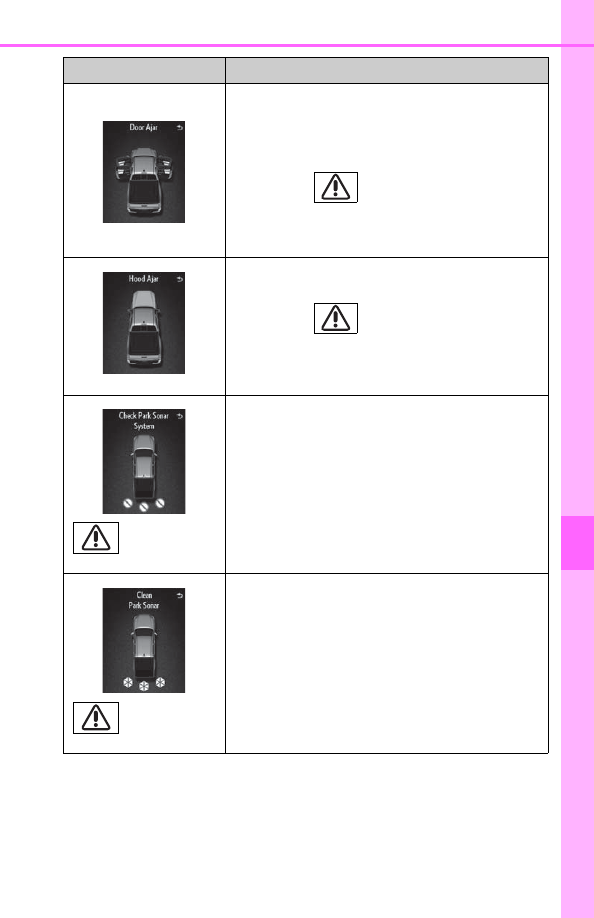
Indicates that one or more of the doors is not fully
closed.

The system also indicates which doors are not
fully closed.
If  the  vehicle  reaches  a  speed  of  3  mph

(5 km/h), 

  flashes  and  a  buzzer

sounds  to  indicate  that  the  door(s)  are  not
yet fully closed.

Make sure that all the doors are closed.

(If equipped)

Indicates that the hood is not fully closed.

If  the  vehicle  reaches  a  speed  of  3  mph

(5 km/h), 

  flashes  and  a  buzzer

sounds  to  indicate  that  the  hood  is  not  yet
fully closed.

Close the hood.

(If equipped)

Indicates  a  malfunction  in  the  intuitive  parking
assist.

The malfunctioning assist-sensor is flashing.

Have the vehicle inspected by your Toyota
dealer immediately.

(If equipped)

Indicates  that  intuitive  parking  assist  is  dirty  or
covered with ice.

Clean the sensor.

Warning message

Details/Actions

496

7-2. Steps to take in an emergency

Indicates that the parking brake is still engaged.

If  the  vehicle  reaches  a  speed  of  3  mph

(5 km/h), 

  flashes  and  a  buzzer

sounds  to  indicate  that  the  parking  brake  is
still engaged.

Release the parking brake.

(If equipped)

Indicates a malfunction in the smart key system.

A buzzer also sounds.

Have the vehicle inspected by your Toyota
dealer.

(If equipped)

Indicates that a Blind Spot Monitor sensor or the
surrounding  area  on  the  bumper  is  dirty  or  cov-
ered with ice.

A buzzer also sounds.

Clean the sensor and its surrounding area
on the bumper.

(If equipped)

Indicates  a  malfunction  in  the  BSM  (Blind  Spot
Monitor) system.

A buzzer also sounds.

Have the vehicle inspected by your Toyota
dealer.

Warning message

Details/Actions

(U.S.A.)

(Canada)

(Flashes)

497

7-2. Steps to take in an emergency

7

W

hen
 troub

le arises

Indicates  that  the  engine  switch  is  turned  to  the
“LOCK”  or  “ACC”  position  (vehicles  without  a
smart key system), or off or ACCESSORY mode
(vehicles  with  a  smart  key  system)  and  the
driver’s door is opened while the lights are turned
on.

Turn the lights off.

(If equipped)

Indicates  that  the  moon  roof  is  not  fully  closed
(with the engine switch off, and the driver’s door
open).

A buzzer also sounds.

Close the moon roof.

(If equipped)

Indicates that the Crawl Control is not available.

Select  the  four-wheel  drive  control  switch
in “4L” and shift the shift lever to D or R.

(If equipped)

Indicates that the Crawl Control is not available.

Confirm  the  operating  conditions  of  Crawl
Control. (

P. 318)

Warning message

Details/Actions

(Flashes)

(Flashes)

498

7-2. Steps to take in an emergency

(U.S.A. only)

Indicates  that  all  maintenance  according  to  the
driven  distance  on  the  maintenance  schedule

*

should be performed soon.
Comes  on  approximately  4500  miles  (7200  km)
after the message has been reset.

If necessary, perform maintenance.

(U.S.A. only)

Indicates that all maintenance is required to cor-
respond  to  the  driven  distance  on  the  mainte-
nance schedule

*

2

.

Comes  on  approximately  5000  miles  (8000  km)
after the message has been reset. (The indicator
will  not  work  properly  unless  the  message  has
been reset.)

Perform the necessary maintenance.
Please reset the message after the mainte-
nance is performed. (

P. 410)

(U.S.A. only)

Indicates that the system fails to reset.

A buzzer also sounds.

Resetting the maintenance data again. 
(

P. 410)

(If equipped)

Indicates  that  the  transfer  mode  needs  to  be
changed to “4L”.

Turn the front-wheel drive control switch to
“4L”.

(If equipped)

Indicates that the VSC and active traction control
cannot  be  disabled  while  Multi-terrain  Select  is
operating.

While the Multi-terrain Select is in use, VSC
and  active  traction  control  cannot  be
turned off.

Warning message

Details/Actions

499

7-2. Steps to take in an emergency

7

W

hen
 troub

le arises

(If equipped)

Indicates  that  the  Multi-terrain  Select  cannot  be
operated  because  the  VSC  and/or  4WD  system
may be malfunctioning.

Contact your Toyota dealer.

(If equipped)

Indicates that the Multi-terrain Select is canceled
while in use.

A buzzer also sounds.

Use  the  Multi-terrain  Select  under  the
proper operating conditions. (

P. 314)

(If equipped)

Indicates  that  the  Multi-terrain  Select  cannot  be
operated because Crawl Control is operating.

Turn Crawl Control off. (

P. 318)

(If equipped)

Indicates that your vehicle is nearing the vehicle
ahead  (in  vehicle-to-vehicle  distance  control
mode).

A buzzer also sounds.

Slow the vehicle by applying the brakes.

(If equipped)

Indicates a malfunction in the LDA (Lane Depar-
ture Alert).

A buzzer also sounds.

Have the vehicle inspected by your Toyota
dealer.

Warning message

Details/Actions

(Yellow)

500

7-2. Steps to take in an emergency

(If equipped)

Indicates  that  the  LDA  (Lane  Departure  Alert)
system  cannot  be  used  as  the  vehicle  speed  is
lower than approximately 32 mph (50 km/h).

Drive the vehicle at approximately 32 mph
(50 km/h) or more.

(If equipped)

Indicates that LDA (Lane Departure Alert) system
cannot  be  used  due  to  the  vehicle  speed  being
too high.

Slow down.

(If equipped)

Indicates that:

• There  is  a  high  possibility  of  a  frontal  colli-

sion; or

• The  pre-collision  braking  function  is  operat-

ing.

A buzzer also sounds.

Slow the vehicle by applying the brakes.

(If equipped)

The  operation  conditions  of  the  front  camera
(temperature, etc.) are not met.

When the operation conditions of the front
camera (temperature, etc.) are met, the fol-
lowing systems will become available.

• PCS (Pre-Collision System)
• LDA (Lane Departure Alert) system
• Automatic High Beam

Warning message

Details/Actions

(Yellow)

501

7-2. Steps to take in an emergency

7

W

hen
 troub

le arises

(If equipped)

Indicates that dirt, rain, condensation, ice, snow,
etc., are present on the windshield in front of the
front camera. The following systems may be sus-
pended until the problem shown in the message
is resolved. (

P. 257, 482)

• PCS (Pre-Collision System)
• LDA (Lane Departure Alert) system
• Automatic High Beam

Turn the system off, remove any dirt, rain,
condensation,  ice,  snow,  etc.,  from  the
windshield, and then turn the system back
on.

(If equipped)

Indicates a malfunction in the PCS (Pre-Collision
System).

A buzzer also sounds.

Have the vehicle inspected by your Toyota
dealer.

(If equipped)

Indicates  that,  since  the  VSC  (Vehicle  Stability
Control)  system  was  turned  off,  the  pre-collision
brake system operation is stopped.

Turn the VSC on. (

P. 324, 325)

(If equipped)

Indicates  that  the  pre-collision  system  is  tempo-
rarily unavailable.

Please wait until the system returns. If the
message  does  not  disappear,  the  system
may  be  malfunctioning.  Have  the  vehicle
inspected  by  your  Toyota  dealer  immedi-
ately.

Warning message

Details/Actions

(Yellow)

(Flashes)

502

7-2. Steps to take in an emergency

(If equipped)

Indicates  that  the  pre-collision  system  sensor  is
dirty, covered with ice, etc.

Remove any dirt, ice, etc.

(If equipped)

Indicates a malfunction in:

• The automatic headlight leveling system; or
• The Automatic High Beam system.
A buzzer also sounds.

Have the vehicle inspected by your Toyota
dealer.

(If equipped)

Indicates that the Automatic High Beam switch is
pressed while the headlights are in low beam.

Turn the high beam on and press the Auto-
matic High Beam switch again.

(If equipped)

Indicates that rader cruise control sensor is dirty
or covered with ice.

A buzzer also sounds.

Clean the sensor.

Warning message

Details/Actions

503

7-2. Steps to take in an emergency

7

W

hen
 troub

le arises

*

1

: The  buzzer  sounds  when  Multi-terrain  Select  or  active  traction  control  is

equipped.

*

2

: Refer to the separate “Scheduled Maintenance Guide” or “Owner’s Manual

Supplement” for the maintenance interval applicable to your vehicle.

(If equipped)

Indicates  that  the  dynamic  radar  cruise  control
system  cannot  be  used  temporarily  due  to  bad
weather.

A buzzer also sounds.

Use  the  dynamic  radar  cruise  control  sys-
tem when it becomes available again.

Indicates a malfunction in the Drive-Start Control.

A buzzer also sounds.

Have the vehicle inspected by your Toyota
dealer immediately.

Indicates that the shift position was changed and
Drive-Start Control was operated while depress-
ing the accelerator pedal.

A buzzer also sounds.

Momentarily release the accelerator pedal.

Warning message

Details/Actions

(Flashes)

504

7-2. Steps to take in an emergency

Warning message in radar cruise mode (if equipped)

In  the  following  cases,  the  warning  message  may  not  be  displayed  even  if
vehicle-to-vehicle distance decreases:

When your vehicle and the vehicle ahead are traveling at the same speed or
the vehicle ahead is traveling more quickly than your vehicle

When the vehicle ahead is traveling at a very low speed

Immediately after cruise control speed is set

At the instant the accelerator pedal is depressed

Conditions  that  the  tire  pressure  warning  system may  not function

properly (vehicles with the tire pressure warning system)

P. 436

Warning buzzer

P. 486

505

7-2. Steps to take in an emergency

7

W

hen
 troub

le arises

After  taking  the  specified  steps  to  correct  the  suspected  problem,
check that the warning message and light go off.

Have  the  malfunction  repaired  immediately.  (vehicles  with  a
smart key system)

Interior

buzzer

Exterior

buzzer

Warning message

Details/Actions

Contin-
uous

The driver’s door was opened
when the shift lever was not in
P  and  the  engine  switch  was
not turned off.

Shift the shift lever to P.

Contin-
uous

Contin-
uous

The driver’s door was opened
and  closed  while  the  elec-
tronic key was not in the vehi-
cle, the shift lever was not in P
and the engine switch was not
turned off.

Shift the shift lever to P.

Bring  the  electronic  key
back into the vehicle.

(Flashes)

(Displayed alternately)

(Flashes)

506

7-2. Steps to take in an emergency

Once

3 times

The driver’s door was opened
and  closed  while  the  elec-
tronic key was not in the vehi-
cle,  the  shift  lever  was  in  P
and the engine switch was not
turned off.

Turn  the  engine  switch
off.

Bring  the  electronic  key
back into the vehicle.

The electronic key was carried
outside the vehicle and a door
other  than  the  driver’s  door
was opened and closed while
the  engine  switch  was  in  a
mode other than off.

Bring  the  electronic  key
back into the vehicle.

Once

Contin-
uous

An  attempt  was  made  to  exit
the vehicle with the electronic
key and lock the doors without
first  turning  the  engine  switch
off when the shift lever was in
P.

Turn  the  engine  switch
off  and  lock  the  doors
again.

Interior

buzzer

Exterior

buzzer

Warning message

Details/Actions

(Flashes)

(Displayed alternately)

(Flashes)

507

7-2. Steps to take in an emergency

7

W

hen
 troub

le arises

Once

The  electronic  key  is  not
detected  when  an  attempt  is
made to start the engine.

Start  the  engine  with  the
electronic key present.

9 times

An attempt was made to drive
when  the  electronic  key  was
not inside the vehicle.

Confirm  that  the  elec-
tronic  key  is  inside  the
vehicle.

Contin-
uous

An  attempt  was  made  to  lock
the doors using the smart key
system  while  the  electronic
key was still inside the vehicle.

Retrieve  the  electronic
key  from  the  vehicle  and
lock the doors again.

Once

Contin-
uous

An  attempt  was  made  to  lock
either front door by opening a
door  and  putting  the  inside
lock button into  the  lock posi-
tion, then closing the door with
the  electronic  key  still  inside
the vehicle.

Retrieve  the  electronic
key  from  the  vehicle  and
lock the doors again.

Interior

buzzer

Exterior

buzzer

Warning message

Details/Actions

(Flashes)

(Flashes)

(Flashes)

(Flashes)

508

7-2. Steps to take in an emergency

Once

The  electronic  key  has  a  low
battery.

Replace  the  electronic
key battery. (

P. 451)

Once

The steering lock could not be
released  within  3  seconds  of
the  engine  switch  being
pressed.

Press  the  engine  switch
while 

depressing 

the

brake  pedal  and  moving
the  steering  wheel  left
and right.

Once

• When  the  doors  were

unlocked  with  the  mechani-
cal key and then the engine
switch  was  pressed,  the
electronic  key  could  not  be
detected in the vehicle.

• The electronic key could not

be  detected  in  the  vehicle
even after the engine switch
was  pressed  two  consecu-
tive times.

Touch  the  electronic  key
to  the  engine  switch
while 

depressing 

the

brake pedal.

Interior

buzzer

Exterior

buzzer

Warning message

Details/Actions

(Flashes)

509

7-2. Steps to take in an emergency

7

W

hen
 troub

le arises

Once

Indicates that:
• With  the  engine  switch  off,

the  doors  were  unlocked
and  then  the  driver’s  door
was opened and closed

• The  engine  switch  was

turned 

to  ACCESSORY

mode  without  starting  the
engine

Press  the  engine  switch
while 

depressing 

the

brake pedal.

Once

The  engine  switch  has  been
turned off with the shift lever in
a position other than P.

Shift the shift lever to P.

Once

After  the  engine  switch  has
been  turned  off  with  the  shift
lever  in  a  position  other  than
P,  the  shift  lever  has  been
shifted to P.

Turn  the  engine  switch
off.

Power  was  turned  off  due  to
the  automatic  power  off  func-
tion.

Next  time  when  starting
the  engine,  increase  the
engine speed slightly and
maintain  that  level  for
approximately  5  minutes
to recharge the battery.

Interior

buzzer

Exterior

buzzer

Warning message

Details/Actions

(Flashes)

(Flashes)

510

7-2. Steps to take in an emergency

Warning buzzer

P. 486

Once

During  a  engine  starting  pro-
cedure  in  the  event  that  the
electronic  key  was  not  func-
tioning properly (

P. 528), the

engine  switch  was  touched
with the electronic key.

Press  the  engine  switch
within  10  seconds  of  the
buzzer sounding.

Interior

buzzer

Exterior

buzzer

Warning message

Details/Actions

(Flashes)


Content      ..     28      29      30      31     ..