Toyota Sienna Hybrid (2023 year). Manual in english - page 9
 

  Index      Toyota     Toyota Sienna Hybrid (2023 year). Manual in english


Search            copyright infringement  


Content      ..     7      8      9      10     ..


Toyota Sienna Hybrid (2023 year). Manual in english - page 9


143

3-2. Opening, closing and locking the doors

3

Before 

driving

The situations in which the slid-

ing door does not open com-

pletely

The left side sliding door does not 

open completely when the fuel filler 

door is opened.

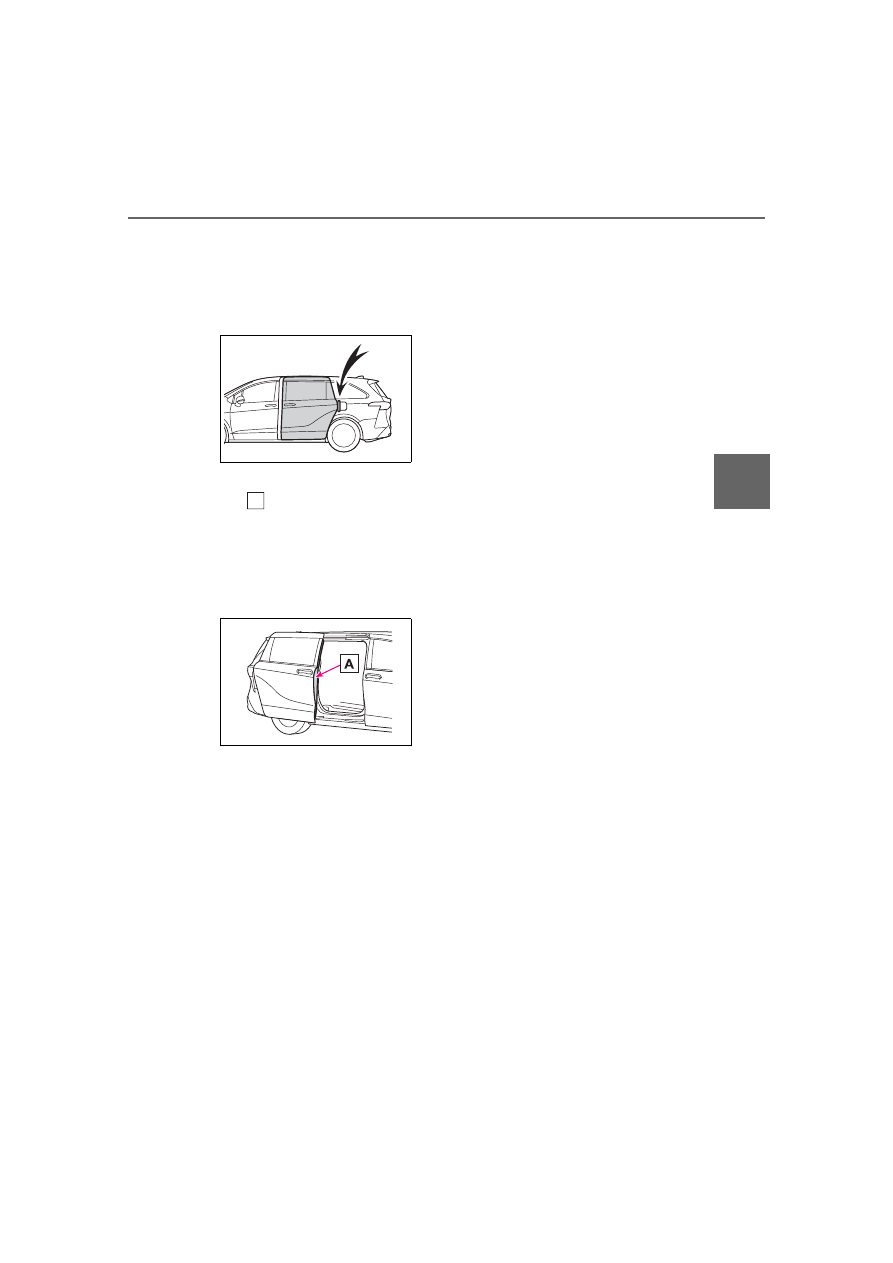
Jam protection function

Sensor 

 is attached to the front 

edge of the power sliding door. If 
any object obstructs the power slid-
ing door when closing, the power 
sliding door will stop after reversing 
approximately 3.9 in. (10 cm).

Sliding door reserve lock func-

tion

This function is a function which 

reserves locking of all doors before-

hand, when the power sliding door 

is open.
When the following procedure is 

performed, all the doors except the 

power sliding door are locked and 

then power sliding door will also be 

locked at the same time it is closed.

1

Close all doors, except the 

power sliding door.

2

During the power sliding door 

closing operation, lock the doors 

using the smart key system from 

the front doors (

P.132) or the 

wireless remote control. 

(

P.132)

A buzzer sounds and the emer-

gency flashers flash to indicate that 

all the doors have been closed and 

locked.

If the electronic key is placed 

inside the vehicle after starting a 

close operation via the door 

reserve lock function, the elec-

tronic key may become locked 

inside the vehicle. Make sure to 

always carry the electronic key on 

your person.

If the power sliding door does not 

fully close due to the operation of 

the jam protection function, etc., 

while the sliding door is automati-

cally closing after a door reserve 

lock operation is performed, the 

door reserve lock function is can-

celed and all the doors will unlock.

Before leaving the vehicle, make 

sure that all the doors are closed 

and locked.

Power sliding door brake func-

tion

When the power sliding door 

detects an abnormality and stops 

operating, power sliding door brake 

function may be activated. When 

brake function is activated, door 

movement is restricted by the brake 

and motion may appear to be not 

smooth. This is not malfunction. 

Move the door to fully closed posi-

tion to reset the system and normal 

power sliding door function will 

resume.

Sliding door closer

In the event that the sliding door is 

left slightly open, the sliding door 

closer will automatically close it to 

the fully closed position.

Power sliding door operation

Wireless remote control: Even if the 

door is locked, pressing and holding 

the sliding door buttons will unlock 

all doors and start open operation.

A

144

3-2. Opening, closing and locking the doors

If the power sliding door is 

inoperative

When the power sliding door 

detects an abnormality and stops 

opening and can not be completely 

closed manually, turn the inside lock 

button to “LOCK” position to cancel 

the function and close the door 

manually. After that, have the vehi-

cle inspected and repaired by your 

Toyota dealer.

Kick sensor operating condi-

tions (vehicles with Hands Free 

Power Sliding Doors)

The Hands Free Power Sliding Door 

will open/close automatically when 

the following conditions are met:

The kick sensor operation is 

enabled (

P.112)

The front door (the same side of 

the sliding door you open) is 

closed.

The electronic key is within the 

operational range. (

P.165)

A foot is put under the portion with 

a label on the rocker moulding 

and moved away from the rocker 

moulding.

The power sliding door may also 

be operated by putting a hand, an 

elbow, a knee, etc. under the por-

tion with a label on the rocker 

moulding and moving it away from 

the rocker moulding. Make sure to 

put it close enough to the center 

part of the rocker moulding.

Situations in which the Hands 

Free Power Sliding Door may 

not operate properly (vehicles 

with Hands Free Power Sliding 

Doors)

In the following situations, the 

Hands Free Power Sliding Door 

may not operate properly:

When a foot remains under the 

rocker moulding

If the rocker moulding is strongly 

hit with a foot or is touched for a 

while

If the rocker moulding has been 
touched for a while, wait for a short 
time before attempting to operate 
the Hands Free Power Sliding Door 
again.

When operated while a person is 

too close to the rocker moulding

When an external radio wave 

source interferes with the commu-

nication between the electronic 

key and the vehicle (

P.166)

When the vehicle is parked near 

an electrical noise source which 

affects the sensitivity of the Hands 

Free Power Sliding Door, such as 

a pay parking spot, gas station, 

electrically heated road, or fluo-

rescent light

When the vehicle is near a TV 

tower, electric power plant, radio 

station, large display, airport or 

other facility that generates strong 

radio waves or electrical noise

When a large amount of water is 

applied to the rocker moulding, 

such as when the vehicle is being 

washed or in heavy rain

When mud, snow, ice, etc. is 

attached to the rocker moulding

When the vehicle has been 

parked for a while near objects 

that may move and contact the 

rocker moulding, such as plants

When an accessory is installed to 

the rocker moulding

If an accessory has been installed, 
turn the Hands Free Power Sliding 
Door (kick sensor) operation setting 
off.

Preventing unintentional opera-

tion of the Hands Free Power 

Sliding Door (vehicles with 

Hands Free Power Sliding 

Doors)

When an electronic key is in the 

operation range, the Hands Free 

Power Sliding Door may operate 

unintentionally, so be careful in the 

145

3-2. Opening, closing and locking the doors

3

Before 

driving

following situations.

When a large amount of water is 

applied to the rocker moulding, 

such as when the vehicle is being 

washed or in heavy rain

When dirt is wiped off the rocker 

moulding

When a small animal or small 

object, such as a ball, moves 

under the rocker moulding

When an object is moved from 

under the rocker moulding

If someone is swinging their legs 

while sitting on the rocker mould-

ing

If the legs or another part of some-

one’s body contacts the rocker 

moulding while passing by the 

vehicle

When the vehicle is parked near 

an electrical noise source which 

affects the sensitivity of the Hands 

Free Power Sliding Door, such as 

a pay parking spot, gas station, 

electrically heated road, or fluo-

rescent light

When the vehicle is near a TV 

tower, electric power plant, radio 

station, large display, airport or 

other facility that generates strong 

radio waves or electrical noise

When the vehicle is parked in a 

place where objects such as 

plants are near the rocker mould-

ing

If luggage, etc. is set near the 

rocker moulding

If accessories or a vehicle cover is 

installed/removed near the rocker 

moulding

When the vehicle is being towed

To prevent unintentional operation, 
turn the Hands Free Power Sliding 
Door (kick sensor) operation setting 
off. (

P.112)

Automatic car washes

P.396

Conditions affecting the opera-

tion of the smart key system or 

wireless remote control

P.166

Customization

Settings (e.g. opening and closing 

operation) can be changed. (Cus-

tomizable features: 

P.543)

WARNING

Sliding door closer

In the event that the sliding door 

is left slightly open, the sliding 

door closer will automatically 

close it to the fully closed posi-

tion. It takes several seconds 

before the sliding door closer 

begins to operate. Be careful 

not to catch fingers or anything 

else in the sliding door, as this 

may cause bone fractures or 

other serious injuries.

Use caution when using the 

sliding door closer. The sliding 

door closer operates even when 

the power sliding door system is 

canceled.

Power sliding doors

Observe the following precautions 

when the power sliding door sys-

tem is enabled. Failure to do so 

may cause death or serious 

injury.

146

3-2. Opening, closing and locking the doors

WARNING

Do not get in and out of the 

vehicle while the power sliding 

door is being operated.

When using the door handle to 

open or close the power sliding 

door, remove your hand from 

the door handle immediately 

after starting power sliding door 

operation. If you leave your 

hand on the door handle during 

operation, your hand, fingers, 

wrist etc. may be subjected to 

an excessive amount of force.

Check the safety of the sur-

rounding area to make sure 

there are no obstacles or any-

thing that could cause any of 

your belongings to get caught.

If anyone is in the vicinity, make 

sure they are safe and let them 

know that the sliding door is 

about to open or close. Also, do 

not operate the power sliding 

door if anyone inside or outside 

the vehicle is leaning against 

the vehicle in the area around 

the sliding door.

If the power sliding door system 

is disabled with the main switch 

while the sliding door is operat-

ing automatically, the automatic 

operation is stopped. The slid-

ing door then has to be oper-

ated manually. Take extra care 

when on an incline, as the slid-

ing door may open or close 

unexpectedly.

If the operating conditions of the 

power sliding door are no longer 

met, a buzzer may sound and 

the sliding door may stop open-

ing or closing. The sliding door 

then has to be operated manu-

ally. Take extra care when on 

an incline, as the sliding door 

may open or close abruptly.

On an incline, a sliding door 

may close by itself after it opens 

automatically. Make sure the 

sliding door is fully open and 

secure.

In the following situations, the 

power sliding door may detect 

an abnormality and automatic 

operation may be stopped. In 

this case, the sliding door has to 

be operated manually. Take 

extra care when on an incline, 

as the sliding door may open or 

close abruptly.

• When the sliding door contacts 

an obstacle

• When the 12-volt battery volt-

age suddenly drops, such as 

when the power switch is turned 

to ON or the hybrid system is 

started during automatic opera-

tion

Do not attach any accessories 

other than genuine Toyota parts 

to the power sliding door. The 

power sliding door may not 

operate, causing itself to mal-

function, or the power sliding 

door may close again after it is 

opened.

147

3-2. Opening, closing and locking the doors

3

Before 

driving

WARNING

When the sliding door child-pro-

tector locks are set, make sure 

to disable the power sliding door 

system with the main switch in 

order to totally disable the sys-

tem.

Jam protection function

Observe the following precau-

tions. Failure to do so may cause 

death or serious injury.

Never use any part of your body 

to intentionally activate the jam 

protection function.

The jam protection function may 

not work if something gets 

caught just before the power 

sliding door fully closes. Be 

careful not to catch fingers or 

anything else.

The jam protection function may 

not work depending on the 

shape of the object that is 

caught. Be careful not to catch 

fingers or anything else.

Hands Free Power Sliding 

Doors (if equipped)

Observe the following precautions 

when operating the Hands Free 

Power Sliding Door. Failure to do 

so may cause death or serious 

injury.

Check the safety of the sur-

rounding area to make sure 

there are no obstacles or any-

thing that could cause any of 

your belongings to get caught.

Do not leave the electronic key 

within the effective range 

(detection area) of the power 

sliding door.

NOTICE

Sliding door

Make sure magazines are not 

bent or protruding from the sliding 

door pockets. Do not insert any-

thing too big so that the shape of 

the sliding door pockets is dis-

torted. Such objects may obstruct 

the opening/closing of the sliding 

doors, damage the sliding door 

pockets or the vehicle body, and 

may result in a malfunction.

Sliding door closer

Do not apply excessive force to 

the sliding door while the sliding 

door closer is operating.

The sliding door closer may not 

operate when you repeat open-

ing/closing in a short period of 

time. To operate again, open 

the power sliding door once and 

then close after a while.

To prevent damage to your 

vehicle

Do not apply excessive force 

when the sliding door is operat-

ing.

Do not place your hand or foot 

near door hinges or rollers when 

the sliding door is operating.

Avoid forcibly opening the left 

side sliding door fully when the 

fuel filler door is opened. Other-

wise, the fuel filler door may be 

damaged.

148

3-2. Opening, closing and locking the doors

The power sliding door system 
can be enabled/disabled by 
using the power sliding door 

NOTICE

Take care not to damage the 

sensors (installed on the front 

edge of the power sliding door) 

with a knife or other sharp 

object.

Make sure there is nothing in 

the doorway before closing.

Do not close the sliding door by 

applying the brakes. Doing so 

could cause the sliding door to 

be damaged.

Hands Free Power Sliding 

Doors precautions (if 

equipped)

The kick sensors are located 

behind the portions with labels on 

the rocker mouldings. Observe 

the following to ensure that the 

Hands Free Power Sliding Door 

function operates properly:

Keep the portions with labels on 

the rocker mouldings clean at all 

times.

If the portions with labels on the 

rocker mouldings are dirty or 

covered with snow or mud, the 

kick sensors may not operate. 

In this situation, clean off the dirt 

or snow, move the vehicle from 

the current position and then 

check if the kick sensors oper-

ate.

If they do not operate, have the 

vehicle inspected by your 

Toyota dealer.

Do not apply coatings that have 

a rain clearing (hydrophilic) 

effect, or other coatings, to the 

portions with labels on the 

rocker mouldings.

Do not park the vehicle near 

objects that may move and con-

tact portions with labels on the 

rocker mouldings, such as 

grass or trees.

If the vehicle has been parked 

for a while near objects that 

may move and contact the por-

tions with labels on the rocker 

mouldings, such as grass or 

trees, the kick sensors may not 

operate. In this situation, move 

the vehicle from the current 

position and then check if the 

kick sensors operate. If they do 

not operate, have the vehicle 

inspected by your Toyota 

dealer.

Do not subject the kick sensors 

or their surrounding areas to a 

strong impact.

If the kick sensors or their sur-

rounding areas have been sub-

jected to a strong impact, the 

kick sensors may not operate 

properly. If the kick sensors do 

not operate in the following situ-

ations, have the vehicle 

inspected by your Toyota 

dealer.

• The kick sensors or their sur-

rounding areas have been sub-

jected to a strong impact.

• The portions with labels on the 

rocker mouldings are scratched 

or damaged.

Do not disassemble the rocker 

mouldings.

Do not attach an accessory con-

taining metal or apply metallic 

paint to the rocker mouldings.

Canceling the power slid-
ing door system

149

3-2. Opening, closing and locking the doors

3

Before 

driving

main switch or on the multi-infor-
mation display. However, when 
the power sliding door system is 
disabled by the main switch, the 
setting of the power sliding door 
system cannot be changed on 
the multi-information display.

Using the multi-information 
display

The power sliding door system 
can be enabled/disabled on the 
multi-information display. 
(

P.112)

Using the power sliding 
door main switch

Use the main switch to disable 
the power sliding door system.

1

The power sliding door sys-
tem is enabled.

*

2

The power sliding door sys-
tem is disabled.

The sliding doors can only be 
opened and closed manually.

*

: The orange line 

 of the switch 

indicates that the power sliding 
door system is enabled.

Operate the sliding door handle 
or inside door handle, when the 
power sliding door system is off.

Sliding door handle

Inside door handle

A

Opening/closing the slid-
ing door manually

A

B

150

3-2. Opening, closing and locking the doors

Back door

The back door can be 
locked/unlocked and 
opened/closed by the fol-
lowing procedures.

WARNING

Before driving

Make sure that the back door is 

fully closed. 

If the back door is not fully closed, 

it may open unexpectedly while 

driving and hit near-by objects or 

luggage in the luggage compart-

ment may be thrown out, causing 

an accident.

When children are in the vehi-

cle

Observe the following precau-

tions. Failure to do so may result 

in death or serious injury.

Do not allow children to play in 

the luggage compartment.

If a child is accidentally locked 

in the luggage compartment, 

they could get heat exhaustion 

or other injuries.

Do not allow a child to open or 

close the back door.

Doing so may cause the back 

door to operate unexpectedly, 

or cause the child’s hands, 

head, or neck to be caught by 

the closing back door.

Caution while driving

Keep the back door closed 

while driving.

If the back door is left open, it 

may hit near-by objects or lug-

gage in the luggage compart-

ment may be thrown out, 

causing an accident.

Never let anyone sit in the lug-

gage compartment. 

In the event of sudden braking, 

sudden swerving or a collision, 

they are susceptible to death or 

serious injury.

Back door handle

Do not hang any object to the 

back door handle.

If any object is hung, the back 

door may suddenly shut, causing 

parts of the body to be caught, 

resulting in death or serious 

injury.

Operating the back door

Observe the following precau-

tions. 

Failure to do so may cause parts 

of the body to be caught, resulting 

in death or serious injury.

Remove any heavy loads, such 

as snow and ice, from the back 

door before opening it. Failure 

to do so may cause the back 

door to suddenly shut again 

after it is opened.

When opening or closing the 

back door, thoroughly check to 

make sure the surrounding area 

is safe.

If anyone is in the vicinity, make 

sure they are safe and let them 

know that the back door is 

about to open or close.

Use caution when opening or 

closing the back door in windy 

weather as it may move 

abruptly in strong wind.

151

3-2. Opening, closing and locking the doors

3

Before 

driving

Using the entry function (if 
equipped)

Carry the electronic key to 
enable this function.

WARNING

Vehicles without power back 

door: The back door may sud-

denly shut if it is not opened 

fully. It is more difficult to open 

or close the back door on an 

incline than on a level surface, 

so beware of the back door 

unexpectedly opening or closing 

by itself. Make sure that the 

back door is fully open and 

secure before using the luggage 

compartment.

Vehicles with power back door: 

The back door may suddenly 

shut if it is not opened fully, 

while on a steep incline. Make 

sure that the back door is 

secured before using the lug-

gage compartment.

When closing the back door, 

take extra care to prevent your 

fingers, etc. from being caught.

Vehicles without power back 

door: When closing the back 

door, make sure to press it 

lightly on its outer surface. If the 

back door handle is used to fully 

close the back door, it may 

result in hands or arms being 

caught.

Do not pull on the back door 

damper stay (vehicles without 

power back door) (

P.153) or 

back door spindle (vehicles with 

power back door) (

P.161) to 

close the back door, and do not 

hang on the back door damper 

stay (vehicles without power 

back door) or back door spindle 

(vehicles with power back door).

Doing so may cause hands to 

be caught or the back door 

damper stay (vehicles without 

power back door) or back door 

spindle (vehicles with power 

back door) to break, causing an 

accident.

Do not attach a heavy acces-

sory part to the back door. If a 

bicycle carrier or similar heavy 

object is attached to the back 

door, it may suddenly shut 

again after being opened, caus-

ing someone’s hands, head or 

neck to be caught and injured.

NOTICE

Operating the back door

Do not attach a heavy accessory 

part to the back door. Doing so 

may cause the back door to be 

damaged.

Unlocking and locking the 
back door from the out-
side

152

3-2. Opening, closing and locking the doors

Unlocks all the doors

The doors cannot be unlocked for 3 
seconds after the doors are locked.

Using the wireless remote 
control

P.132

Operation signals

A buzzer sounds and the emer-

gency flashers flash to indicate that 

the doors have been 

locked/unlocked. (Locked: once; 

Unlocked: twice)

Security feature

If a door is not opened within 

approximately 60 seconds after the 

vehicle is unlocked, the security fea-

ture automatically locks the vehicle 

again.

Using the door lock switch

P.135

Open

Raise the back door while 

pressing up the back door 
opener to release the lock to 
open the back door.

Close

Lower the back door using the 
back door handle 

, and make 

sure to push the back door 
down from the outside to close 
it.

Be careful not to pull the back door 
sideways when closing the back 
door with the handle.

Luggage compartment light

P.156

If the back door opener is inop-

erative

The back door can be unlocked 

from the inside.

1

Remove the both side covers.

Unlocking and locking the 
back door from the inside

Opening/closing the back 
door (vehicles without 
power back door)

A

153

3-2. Opening, closing and locking the doors

3

Before 

driving

2

Remove the bolts with a socket 

wrench of an appropriate size.

3

Remove the inside panel.

4

Move the lever.

Open door warning buzzer

P.136

Using the wireless remote 
control

Press and hold the switch.

The power back door automatically 
opens/closes.
Pressing the switch again while the 
power back door is operating will 

NOTICE

Back door damper stays

The back door is equipped with 

damper stays that hold the back 

door in place.

Observe the following precau-

tions. 

Failure to do so may cause dam-

age to the back door damper stay, 

resulting in malfunction.

Do not attach any foreign 

objects, such as stickers, plastic 

sheets, or adhesives to the 

damper stay rod.

Do not touch the damper stay 

rod with gloves or other fabric 

items.

Do not attach any accessories 

other than genuine Toyota parts 

to the back door.

Do not place your hand on the 

damper stay or apply lateral 

forces to it.

Opening/closing the back 
door (vehicles with power 
back door)

154

3-2. Opening, closing and locking the doors

cause the operation to reverse. 
However, the reverse operation 
cannot be performed for the first 
second after automatic operation 
starts, even if the wireless remote 
control switch is pressed again.

Using the power back door 
switch from front seats

Press and hold the switch to 
open/close the back door.
Pressing the switch again while 
the power back door is closing 
will cause it to open again.
However, the reverse operation 
cannot be performed for the first 
second after automatic opera-
tion starts even if the switch is 
pressed again.

Using the back door opener 
switch

When the back door is 
unlocked: Press the back door 

opener switch.
When the back door is locked: 
While carrying the electronic key 
on your person, press and hold 
the back door opener switch.

The power back door automatically 
opens.
Pressing the switch while the power 
back door is opening/closing stops 
the operation.

Using the power back door 
switch on the back door

Close

Press the switch.
The power back door automatically 
closes.
Pressing the switch while the power 
back door is operating will stop the 
operation.
When the switch is pressed again 
during the halted operation, the 
back door will perform the reverse 

155

3-2. Opening, closing and locking the doors

3

Before 

driving

operation.

Close the back door and lock 
all doors (close & lock func-
tion)

Press the switch twice.
A different buzzer than the normal 
one will sound and the power back 
door will begin closing automati-
cally. When the power back door is 
closed, all of the doors will lock 
simultaneously and operation sig-
nals will indicate that all of the 
doors have been locked.
If the switch is pressed while the 
power back door is closing, the 
operation will stop.
Pressing the switch again will close 
the power back door automatically.

Using the back door handle

Lower the back door using the 
back door handle 

, then a 

buzzer sounds and the back 
door automatically closes.

Using the kick sensor (vehi-
cles with Hands Free Power 
Back Door)

The Hands Free Power Back 
Door enables automatic opening 
and closing of the power back 
door by putting your foot near 

the lower center part of the rear 
bumper and moving it away 
from the rear bumper. When 
operating the Hands Free 
Power Back Door, make sure 
that the power switch is in OFF, 
the kick sensor operation is 
enabled (

P.112) and you are 

carrying an electronic key.

1

While carrying an electronic 
key, stand within the smart 
key system operation range, 
approximately 11.8 to 19.7 in. 
(30 to 50 cm) from the rear 
bumper.

Kick sensor

Hands Free Power Back 
Door operation detection 
area

Smart key system operation 
detection area (

P.165)

2

Perform a kick operation by 
moving your foot to within 
approximately 3.9 in. (10 cm) 
of the rear bumper and then 
pulling it back.

• When the kick sensor detects 

your foot, the buzzer will 
sound.

• Perform the entire kick opera-

A

A

B

C

156

3-2. Opening, closing and locking the doors

tion within approximately 1 
second.

• The back door will not start 

operating if your foot remains 
and is detected under the rear 
bumper.

• Operate the Hands Free 

Power Back Door without 
contacting the rear bumper 
with your foot.

• If another electronic key is in 

the cabin or luggage compart-
ment, it may take slightly lon-
ger than normal for the 
operation to occur.

Kick sensor

Hands Free Power Back 
Door operation detection 
area

3

When the kick sensor detects 
that your foot is pulled back, 
a buzzer will sound and the 
back door will automatically 
fully open/close.

If a foot is moved under the rear 

bumper while the back door is 

opening/closing, the back door will 

stop moving.
If a foot is moved under the rear 

bumper again during the halted 

operation, the back door will per-

form the reverse operation.

Luggage compartment light

The luggage compartment light 

turns on when the back door is 

opened with the luggage compart-

ment light switch on.
When the power switch is turned to 

OFF, the light will go off automati-

cally after 20 minutes.

1

On

2

Off

Back door closer

In the event that the back door is left 

slightly open, the back door closer 

will automatically close it to the fully 

closed position.
Whatever the state of the power 

switch, the back door closer oper-

ates.

Power back door operating con-

ditions

The power back door can automati-

cally open and close under the fol-

lowing conditions:

When the power back door sys-

tem is enabled. (

P.112)

When the back door is unlocked.

Vehicles with entry function: How-

ever, if the back door opener switch 

is pressed and held while carrying 

the electronic key on your person, 

the power back door will be oper-

ated even if the back door is locked. 

(

P.154)

When the power switch is in ON, 

in addition to the above for the 

opening operations, the back door 

A

B

157

3-2. Opening, closing and locking the doors

3

Before 

driving

operates for any of the following 

conditions:

• Parking brake is engaged

• The brake pedal is depressed

• The shift lever is in P.

Operation of the power back 

door

A buzzer sounds and the emer-

gency flashers flash twice to indi-

cate that the back door is 

opening/closing.

When the power back door sys-

tem is disabled, the power back 

door does not operate but it can 

be opened and closed by hand.

When the power back door auto-

matically opens, if an abnormality 

due to people or objects is 

detected, operation will stop.

Jam protection function

Sensors are equipped on both sides 

of the power back door. If anything 

obstructs the power back door while 

it is closing, the back door will auto-

matically operate in the opposite 

direction or stop.

Fall-down protection function

While the power back door is open-

ing automatically, applying exces-

sive force to it will stop the opening 

operation to prevent the power back 

door from suddenly shutting.

Back door reserve lock function

This function is a function which 

reserves locking of all doors, before-

hand, when the power back door is 

open.
When the following procedure is 

performed, all the doors except the 

power back door are locked and 

then power back door will also be 

locked at the same time it is closed.

1

Close all doors, except the back 

door.

2

During the power back door clos-

ing operation, lock the doors 

using the smart key system from 

the front doors (

P.132) or the 

wireless remote control. 

(

P.132)

A buzzer sounds and the emer-

gency flashers flash to indicate that 

all the doors have been closed and 

locked.

If the electronic key is placed 

inside the vehicle after starting a 

close operation via the door 

reserve lock function, the elec-

tronic key may become locked 

inside the vehicle.

If the power back door does not 

fully close due to the operation of 

the jam protection function, etc., 

while the back door is automati-

cally closing after a door reserve 

lock operation is performed, the 

door reserve lock function is can-

celed and all the doors will unlock.

Before leaving the vehicle, make 

sure that all the doors are closed 

and locked.

Close & lock function

When the power back door is open, 

this function closes the power back 

door and then locks all of the doors 

simultaneously.
When the following procedures are 

performed and there are no elec-

tronic keys for the vehicle within the 

vehicle, all of the doors will lock 

when the power back door is com-

pletely closed.

1

Close all of the doors except the 

power back door.

2

While carrying an electronic key, 
press the 

 switch twice on the 

lower part of the power back 
door (

P.154).

158

3-2. Opening, closing and locking the doors

A different buzzer than the normal 

one will sound and then the power 

back door will begin closing auto-

matically. When the power back 

door is closed, all of the doors will 

lock simultaneously and operation 

signals will indicate that all of the 

doors have been locked.

Situations in which the close & 

lock function may not operate 

properly

In the following situations, the close 

& lock function may not operate 

properly:

If the 

 switch on the lower part 

of the power back door (

P.154) 

is pressed by a hand which is 
holding an electronic key

If the 

 switch on the lower part 

of the power back door (

P.154) 

is pressed when the electronic key 
is in a bag, etc. that is placed on 
the ground

If the 

 switch on the lower part 

of the power back door (

P.154) 

is pressed with the electronic key 
not near the vehicle

Kick sensor operating condi-

tions (vehicles with Hands Free 

Power Back Door)

The Hands Free Power Back Door 

will open/close automatically when 

the following conditions are met:

The kick sensor operation is 

enabled (

P.112)

The electronic key is within the 

operational range. (

P.165)

A foot is put near the lower center 

part of the rear bumper and 

moved away from the rear 

bumper.

The power back door may also be 

operated by putting a hand, an 

elbow, a knee, etc. near the lower 

center part of the rear bumper and 

moving it away from the rear 

bumper. Make sure to put it close 

enough to the center part of the 

rear bumper.

Situations in which the Hands 

Free Power Back Door may not 

operate properly (vehicles with 

Hands Free Power Back Door)

In the following situations, the 

Hands Free Power Back Door may 

not operate properly:

When a foot remains under the 

rear bumper

If the rear bumper is strongly hit 

with a foot or is touched for a while

If the rear bumper has been touched 
for a while, wait for a short time 
before attempting to operate the 
Hands Free Power Back Door 
again.

When operated while a person is 

too close to the rear bumper

When an external radio wave 

source interferes with the commu-

nication between the electronic 

key and the vehicle (

P.166)

When the vehicle is parked near 

an electrical noise source which 

affects the sensitivity of the Hands 

Free Power Back Door, such as a 

pay parking spot, gas station, 

electrically heated road, or fluo-

rescent light

When the vehicle is near a TV 

tower, electric power plant, radio 

station, large display, airport or 

other facility that generates strong 

radio waves or electrical noise

When a large amount of water is 

applied to the rear bumper, such 

as when the vehicle is being 

washed or in heavy rain

When mud, snow, ice, etc. is 

attached to the rear bumper

When the vehicle has been 

parked for a while near objects 

that may move and contact the 

rear bumper, such as plants


Content      ..     7      8      9      10     ..