Toyota Sequoia Hybrid (2023 year). Manual in english - page 5
 

  Index      Toyota     Toyota Sequoia Hybrid (2023 year). Manual in english


Search            copyright infringement  


Content      ..     3      4      5      6     ..


Toyota Sequoia Hybrid (2023 year). Manual in english - page 5


78

1-4. Hybrid system

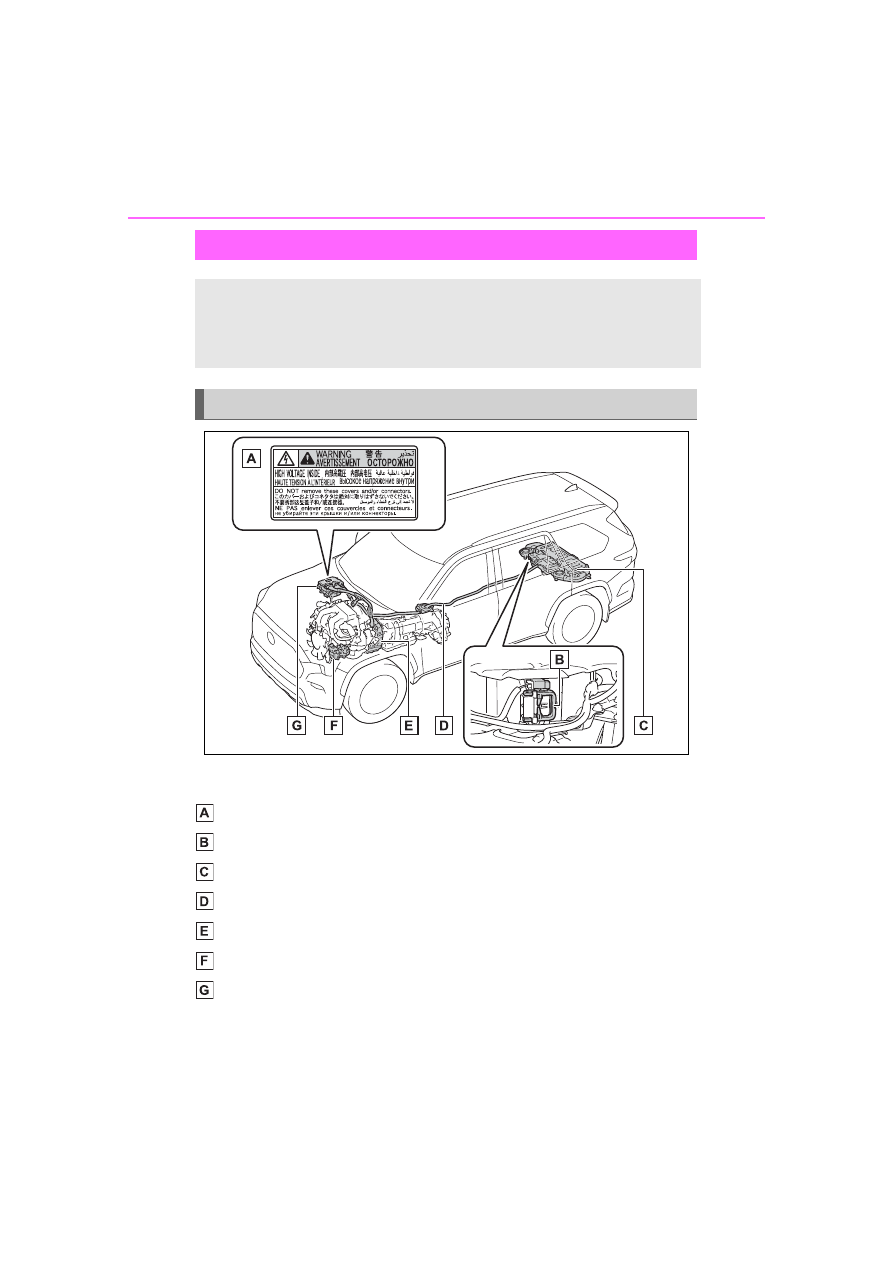
The illustration is an example for explanation and may differ from the actual 
item.

Warning label

Service plug

Hybrid battery (traction battery)

High voltage cables (orange)

Electric motor (traction motor)

Air conditioning compressor

Power control unit

Hybrid system precautions

Take care when handling the hybrid system, as it is a high 
voltage system as well as contains parts that become 
extremely hot when the hybrid system is operating. Obey the 
warning labels attached to the vehicle.

System components

79

1-4. Hybrid system

1

For
 safety and secu

rity

Running out of fuel

When the vehicle has run out of fuel 

and the hybrid system cannot be 

started, refuel the vehicle with at 

least enough gasoline to make the 

low fuel level warning light (

P.515

go off. If there is only a small 

amount of fuel, the hybrid system 

may not be able to start. (The stan-

dard amount of fuel is about 15.2 L 

[4.0 gal., 3.3 Imp. gal.] when the 

vehicle is on a level surface. This 

value may vary when the vehicle is 

on a slope. Add extra fuel when the 

vehicle is inclined.)

Electromagnetic waves

High voltage parts and cables on 

Hybrid Electric Vehicles incorpo-

rate electromagnetic shielding, 

and therefore emit approximately 

the same amount of electromag-

netic waves as conventional gaso-

line powered vehicles or home 

electronic appliances.

Your vehicle may cause sound 

interference in some third party-

produced radio parts.

Hybrid battery (traction battery)

The hybrid battery (traction battery) 

has a limited service life. The lifes-

pan of the hybrid battery (traction 

battery) can change in accordance 

with driving style and driving condi-

tions.

Starting the hybrid system in an 

extremely cold environment

When the hybrid battery (traction 

battery) is extremely cold (below 

approximately -31°F [-35°C]) under 

the influence of the outside tem-

perature, it may not be possible to 

start the hybrid system. In this case, 

try to start the hybrid system again 

after the temperature of the hybrid 

battery increases due to the outside 

temperature increase etc.

WARNING

High voltage precautions

This vehicle has high voltage DC 

and AC systems as well as a 12-

volt system. DC and AC high volt-

age is very dangerous and can 

cause severe burns and electric 

shock that may result in death or 

serious injury.

Never touch, disassemble, 

remove or replace the high volt-

age parts, cables or their con-

nectors.

The hybrid system will become 

hot after starting as the system 

uses high voltage. Be careful of 

both the high voltage and the 

high temperature, and always 

obey the warning labels 

attached to the vehicle.

Never try to open the service 

plug access hole located under 

the right side of the rear seat. 

The service plug is used only 

when the vehicle is serviced 

and is subject to high voltage.

Road accident cautions

Observe the following precautions 

to reduce the risk of death or seri-

ous injury:

Stop the vehicle in a safe place 

to prevent subsequent acci-

dents. While depressing the 

brake pedal, apply the parking 

brake and shift the shift lever to 

P to stop the hybrid system. 

Then, slowly release the brake 

pedal

80

1-4. Hybrid system

WARNING

Do not touch the high voltage 

parts, cables and connectors.

If electric wires are exposed 

inside or outside your vehicle, 

an electric shock may occur. 

Never touch exposed electric 

wires.

If a fire occurs in the Hybrid 

Electric Vehicle, leave the vehi-

cle as soon as possible. Never 

use a fire extinguisher that is 

not meant for electric fires. 

Using even a small amount of 

water may be dangerous.

If your vehicle needs to be 

towed, do so with the rear 

wheels (2WD models) or four 

wheels (4WD models) raised. If 

the wheels connected to the 

electric motor (traction motor) 

are on the ground when towing, 

the motor may continue to gen-

erate electricity. This may cause 

a fire. (

P.505)

Carefully inspect the ground 

under the vehicle. If you find 

that liquid has leaked onto the 

ground, the fuel system may 

have been damaged. Leave the 

vehicle as soon as possible.

If a fluid leak occurs, do not 

touch the fluid as it may be 

strong alkaline electrolyte from 

the hybrid battery (traction bat-

tery). If it comes into contact 

with your skin or eyes, wash it 

off immediately with a large 

amount of water or, if possible, 

boric acid solution. Seek imme-

diate medical attention.

Hybrid battery (traction bat-

tery)

Never resell, hand over or mod-

ify the hybrid battery. To prevent 

accidents, hybrid batteries that 

have been removed from a dis-

posed vehicle are collected 

through your Toyota dealer. Do 

not dispose of the battery your-

self.

Unless the battery is properly col-
lected, the following may occur, 
resulting in death or serious 
injury:

• The hybrid battery may be ille-

gally disposed of or dumped, 

and it is hazardous to the envi-

ronment or someone may touch 

a high voltage part, resulting in 

an electric shock.

• The hybrid battery is intended to 

be used exclusively with your 

Hybrid Electric Vehicle. If the 

hybrid battery is used outside of 

your vehicle or modified in any 

way, accidents such as electric 

shock, heat generation, smoke 

generation, an explosion and 

electrolyte leakage may occur.

When reselling or handing over 

your vehicle, the possibility of an 

accident is extremely high 

because the person receiving the 

vehicle may not be aware of these 

dangers.

If your vehicle is disposed of 

without the hybrid battery hav-

ing been removed, there is a 

danger of serious electric shock 

if high voltage parts, cables and 

their connectors are touched. In 

the event that your vehicle must 

be disposed of, the hybrid bat-

tery must be disposed of by 

your Toyota dealer. If the hybrid 

battery is not disposed of prop-

erly, it may cause electric shock 

that can result in death or seri-

ous injury.

81

1-4. Hybrid system

1

For
 safety and secu

rity

There are the air intake vents 
both sides of the behind the sec-
ond seat for the purpose of cool-
ing the hybrid battery (traction 
battery). If the vents becomes 
blocked, the hybrid battery (trac-
tion battery) input and output 
may be reduced.

When a certain level of impact is 
detected by the impact sensor, 
the emergency shut off system 
blocks the high voltage current 
and stops the fuel pump to mini-
mize the risk of electrocution 
and fuel leakage. If the emer-
gency shut off system activates, 
your vehicle will not restart. To 
restart the hybrid system, con-
tact your Toyota dealer.

A message is automatically dis-
played when a malfunction 
occurs in the hybrid system or 
an improper operation is 
attempted.
If a warning message is shown 
on the multi-information display, 

NOTICE

Hybrid battery (traction bat-

tery) air intake vents

Do not carry large amounts of 

water such as water cooler bottles 

in the vehicle. If water spills onto 

the hybrid battery (traction bat-

tery), the battery may be dam-

aged. Have the vehicle inspected 

by your Toyota dealer.

Hybrid battery (traction 
battery) air intake vents

NOTICE

Hybrid battery (traction bat-

tery) air intake vents

Make sure that the air intake 

vents are not blocked, such as 

by a seat cover, plastic cover, or 

luggage. If the vents are 

blocked, the hybrid battery 

(traction battery) input and out-

put may be restricted, possibly 

leading to a malfunction.

Clean the air intake vents regu-

larly to prevent the hybrid bat-

tery (traction battery) from 

overheating.

Do not get water or foreign 

materials in the air intake vents 

as this may cause a short circuit 

and damage the hybrid battery 

(traction battery).

A filter is installed to the air 

intake vents. When the filter 

remains noticeably dirty even 

after cleaning the air intake 

vents, filter cleaning or replace-

ment is recommended. Refer to 

P.489 for details on how to 

clean the filters.

Emergency shut off sys-
tem

Hybrid warning message

82

1-4. Hybrid system

read the message and follow the 
instructions.

If a warning light comes on, a 

warning message is displayed, 

or the 12-volt battery is discon-

nected

The hybrid system may not start. In 

this case, try to start the system 

again. If the “READY” indicator does 

not come on, contact your Toyota 

dealer.

83

1-5. Theft deterrent system

1

For
 safety and secu

rity

1-5.Theft deterrent system

The indicator light flashes after 
the power switch has been 
turned off to indicate that the 
system is operating.
The indicator light stops flashing 
after the power switch has been 
turned to ACC or ON to indicate 
that the system has been can-
celed.

System maintenance

The vehicle has a maintenance-free 

type immobilizer system.

Conditions that may cause the 

system to malfunction

If the grip portion of the key is in 

contact with a metallic object

If the key is in close proximity to or 

touching a key to the security sys-

tem (key with a built-in transpon-

der chip) of another vehicle

Certification

P.618

Immobilizer system

The vehicle’s keys have 
built-in transponder chips 
that prevent the hybrid sys-
tem from starting if a key 
has not been previously 
registered in the vehicle’s 
on-board computer.

Never leave the keys inside 
the vehicle when you leave 
the vehicle.

This system is designed to 
help prevent vehicle theft 
but does not guarantee 
absolute security against all 
vehicle thefts.

Operating the system

NOTICE

To ensure the system oper-

ates correctly

Do not modify or remove the sys-

tem. If modified or removed, the 

proper operation of the system 

cannot be guaranteed.

84

1-5. Theft deterrent system

Items to check before lock-
ing the vehicle

To prevent unexpected trigger-
ing of the alarm and vehicle 
theft, make sure of the following:

Nobody is in the vehicle.

The windows and the moon 
roof (if equipped) or the pan-
oramic moon roof (if 
equipped) are closed before 
the alarm is set.

No valuables or other per-
sonal items are left in the 
vehicle.

Setting

Close the doors, back door, 
glass hatch and hood, and lock 

all the doors. The system will be 
set automatically after 30 sec-
onds.

The indicator light changes from 
being on to flashing when the sys-
tem is set.

Deactivating or stopping

Do one of the following to deac-
tivate or stop the alarms:

Unlock the doors or open the 
back door using the entry 
function or wireless remote 
control.

Start the hybrid system. (The 
alarm is activated and will be 
released/stopped after a few 
seconds.) 
If the alarm does not stop, 
turn the power switch to OFF 
and unlock the door using the 
wireless remote control. If it 
still does not stop, keep the 
power switch OFF and wait 
until it stops.

Setting the alarm

The alarm can be set if all the doors 

are closed even with the hood open.

System maintenance

The vehicle has a maintenance-free 

type alarm system.

Alarm

The alarm uses light and 
sound to give an alert when 
an intrusion is detected. 
The alarm is triggered in the 
following situations when 
the alarm is set:

A locked door, back door or 
glass hatch is unlocked or 
opened in any way other 
than using the entry func-
tion or wireless remote con-
trol. (The doors will lock 
again automatically.)

The hood is opened.

Setting/deactivating/stop-
ping the alarm system

85

1-5. Theft deterrent system

1

For
 safety and secu

rity

Triggering of the alarm

The alarm may be triggered in the 

following situations: 

(Stopping the alarm deactivates the 

alarm system.)

The doors are unlocked using the 

mechanical key.

When a person remaining in the 

vehicle opens a door, the back 

door, hood, unlocks, turns the 

power switch to ON, or starts the 

hybrid system.

The 12-volt battery is recharged or 

replaced when the vehicle is 

locked. (

P.540)

Alarm-operated door lock

In the following cases, depending 

on the situation, the door may auto-

matically lock to prevent improper 

entry into the vehicle:

When a person remaining in the 

vehicle unlocks the door and the 

alarm is activated.

While the alarm is activated, a 

person remaining in the vehicle 

unlocks the door.

When recharging or replacing the 

12-volt battery.

If a door is unlocked with the 
mechanical key while the alarm 
is being set, the pre-alarm will 
sound for 10 seconds.
After pre-alarm sounding for 10 
seconds, alarm will sound.
Do any of the following in order 
to deactivate or stop the pre-
alarm:

Close the doors, and lock all 
doors by smart key system or 
wireless remote control.

Unlock the doors or open the 
back door using the entry 
function or wireless remote 
control.

Start the hybrid system. (After 
the alarm will be activated, it 
will be deactivated and stop 
after a few seconds.)

NOTICE

To ensure the system oper-

ates correctly

Do not modify or remove the sys-

tem. If modified or removed, the 

proper operation of the system 

cannot be guaranteed.

Pre-alarm

87

2

2

Vehicle

 statu

s information an

d in
dicator

s

Vehicle status informa-

tion and indicators

2-1. Instrument cluster

Warning lights and indica-

tors ...............................

88

Gauges and meters .......

93

Multi-information display

97

Head-up display ..........

104

Fuel consumption informa-

tion ............................

108

88

2-1. Instrument cluster

2-1.Instrument cluster

For the purpose of explanation, the following illustrations display all 
warning lights and indicators illuminated.

The units used on the meters and some indicators may differ depending on 
the target region.

Warning lights and indicators

The warning lights and indicators on the instrument cluster, 
overhead console and outside rear view mirrors inform the 
driver of the status of the vehicle’s various systems.

Instrument cluster

89

2-1. Instrument cluster

2

Vehicle

 statu

s information an

d in
dicator

s

Warning lights inform the driver 
of malfunctions in the indicated 
vehicle’s systems.

Warning lights

(U.S.A.)

Brake system warn-
ing light

*1

 (

P.509)

(Canada)

(Red)

Brake system warn-
ing light

*1

 (

P.509)

(Yellow)

Brake system warn-
ing light

*1

 (

P.509)

High coolant tempera-
ture warning light

*2


(

P.509)

Charging system 
warning light

*2


(

P.510)

Low engine oil pres-
sure warning light

*2


(

P.510)

(U.S.A.)

Malfunction indicator 
lamp

*1

 (

P.510)

(Canada)

Malfunction indicator 
lamp

*1

 (

P.510)

SRS warning light

*1


(

P.510)

(U.S.A.)

ABS warning light

*1


(

P.511)

(Canada)

ABS warning light

*1


(

P.511)

(Red)

Electric power steer-
ing system warning 
light

*1

 (

P.511)

(Yellow)

Electric power steer-
ing system warning 
light

*1

 (

P.511)

(Flashes or 

illuminates)

PCS warning light

*1


(

P.511)

(Orange)

LTA indicator 
(

P.512)

(Flashes)

Intuitive parking assist 
OFF indicator

*3


(

P.512)

(Flashes)

PKSB OFF indica-
tor

*1

 (if equipped) 

(

P.512)

(Flashes)

“RCTA OFF” indica-
tor

*1

 (

P.513)

Slip indicator light

*1


(

P.513)

Inappropriate pedal 
operation warning 
light

*2

 (

P.513)

(Flashes)

Brake hold operated 
indicator

*1

 (

P.514)

(U.S.A.)

(Flashes)

Parking brake indica-
tor (

P.514)

(Canada)
(Flashes)

Parking brake indica-
tor (

P.514)

90

2-1. Instrument cluster

*1

:These lights turn on when the 

power switch is turned to ON to 
indicate that a system check is 
being performed. They will turn 
off after the hybrid system is 
started, or after a few seconds. 
There may be a malfunction in a 
system if the light does not come 
on, or turn off. Have the vehicle 
inspected by your Toyota dealer.

*2

:This light illuminates on the 

multi-information display with a 
message.

*3

:Intuitive parking assist OFF indi-

cator turns on when the power 
switch is turned to ON while the 
Intuitive parking assist function is 
on. It will turn off after a few sec-
onds.

(Flashes)

Rear differential lock 
indicator (if equipped) 
(

P.514)

Tire pressure warning 
light

*1

 (

P.514)

Low fuel level warn-
ing light (

P.515)

Driver’s and front pas-
senger’s seat belt 
reminder light 
(

P.515)

Rear passengers’ seat 
belt reminder lights 
(

P.515)

Air suspension mal-
function indicator (if 
equipped) (

P.516)

Trailer brake warning 
light (

P.516)

WARNING

If a safety system warning 

light does not come on

Should a safety system light such 

as the ABS and SRS warning light 

not come on when you start the 

hybrid system, this could mean 

that these systems are not avail-

able to help protect you in an acci-

dent, which could result in death 

or serious injury. Have the vehicle 

inspected by your Toyota dealer 

immediately if this occurs.

91

2-1. Instrument cluster

2

Vehicle

 statu

s information an

d in
dicator

s

The indicators inform the driver 
of the operating state of the 
vehicle’s various systems.

Indicators

Turn signal indicator 
(

P.221)

(U.S.A.)

Headlight indicator 
(

P.228)

(Canada)

Tail light indicator 
(

P.228)

Headlight high beam indi-
cator (

P.230)

Automatic High Beam 
indicator (

P.231)

Front fog light indicator 
(

P.231)

Smart key system indica-
tor

*1

 (

P.212)

“READY” indicator 
(

P.212)

Cruise control indicator 
(

P.275)

Dynamic radar cruise 
control indicator 
(

P.275)

Cruise control “SET” indi-
cator (

P.275)

(

*2

)

LTA indicator (

P.250, 

267)

Intuitive parking assist 
OFF indicator

*3, 4


(

P.294)

PKSB OFF indicator

*3, 5


(if equipped) (

P.308)

(Flashes)

Slip indicator light

*5


(

P.383)

VSC OFF indicator

*3, 5


(

P.384)

PCS warning light

*3, 5


(

P.253)

BSM outside rear view 
mirror indicators

*5, 6


(

P.287, 301)

BSM OFF indicator

*3, 5


(

P.288)

“RCTA OFF” indicator

*3, 5


(

P.302)

Brake hold standby indi-
cator

*5

 (

P.225)

Brake hold operated indi-
cator

*5

 (

P.225)

Security indicator

*7


(

P.83, 84)

Low outside temperature 
indicator

*8

 (

P.94)

(U.S.A.)

Parking brake indicator 
(

P.222)

(Canada)

Parking brake indicator 
(

P.222)

“ECO” mode indicator 
(

P.366)

“SPORT” mode indicator 
(if equipped) (

P.366)

“SPORT S” mode indica-
tor (if equipped) (

P.366)

“SPORT S+” mode indi-
cator (if equipped) 
(

P.366)

92

2-1. Instrument cluster

*1

:This light illuminates on the 

multi-information display with a 
message.

*2

:Depending on the operating con-

ditions of the system, the color 
and state (illuminated/blinking) of 
the indicator change.

*3

:The light comes on when the 

system is turned off.

*4

:Intuitive parking assist OFF indi-

cator turns on when the power 
switch is turned to ON while the 
Intuitive parking assist function is 
on. It will turn off after a few sec-
onds.

*5

:These lights turn on when the 

power switch is turned to ON to 
indicate that a system check is 
being performed. They will turn 
off after the hybrid system is 
started, or after a few seconds. 
There may be a malfunction in a 
system if the lights do not turn 
on, or turn off. Have the vehicle 
inspected by your Toyota dealer.

*6

:This light illuminates on the out-

side rear view mirrors.

*7

:This light illuminates on the over-

head console.

*8

:When the outside temperature is 

approximately 37°F (3°C) or 
lower, the indicator will flash for 
approximately 10 seconds, then 
stay on.

“COMFORT” mode indi-
cator (if equipped) 
(

P.366)

“CUSTOM” mode indica-
tor (if equipped) (

P.366)

Downhill assist control 
system indicator

*6

 (if 

equipped) (

P.380)

Air suspension indicator 
(if equipped) (

P.363)

“4H” indicator (if 
equipped) (

P.369)

“4L” indicator (if 
equipped) (

P.369)

“AUTO LSD” indicator

*5


(if equipped) (

P.371)

Rear differential lock indi-
cator (if equipped) 
(

P.372)

Crawl Control indicator

*5


(if equipped) (

P.373)

Crawl Control speed level 
indicator (if equipped) 
(

P.373)

AUTO mode indicator (if 
equipped) (

P.377)

DIRT mode indicator (if 
equipped) (

P.377)

SAND mode indicator (if 
equipped) (

P.377)

MUD mode indicator (if 
equipped) (

P.377)

DEEP SNOW mode indi-
cator (if equipped) 
(

P.377)

“TOW HAUL” indicator 
(

P.220)

“TOW+” indicator 
(

P.220)

“AIR  BAG  ON/OFF”
indicator

*3, 7

 (

P.47)

93

2-1. Instrument cluster

2

Vehicle

 statu

s information an

d in
dicator

s

The units used on the meter and display may differ depending on the target 
region.

Multi-information display

Presents the driver with a variety of driving-related data (

P.97)

Displays warning messages if a malfunction occurs (

P.519)

Outside temperature (

P.94)

Tachometer

Displays the engine speed in revolutions per minute

Clock (

P.94)

Time displayed is linked to the multimedia system. For details, refer to 
“MULTIMEDIA OWNER’S MANUAL”.

Right Side Gauges

Presents the driver with a variety of vehicle states data (

P.96)

Shift position and shift range display

Displays the selected shift position or selected shift range (

P.217)

Fuel gauge

Displays the quantity of fuel remaining in the tank

Gauges and meters

The meters display various drive information.

Meter display

94

2-1. Instrument cluster

Engine coolant temperature gauge

Displays the engine coolant temperature

Speedometer

Displays the vehicle speed

Voltmeter

Displays the charge state

Engine oil pressure gauge

Displays the engine oil pressure

Odometer and trip meter (

P.95)

The meters and display illumi-

nate when

The power switch is in ON.

Tachometer needle feature

The tachometer needle will fade in 

or out during the engine starting or 

stopping, respectively.

The needle is completely visible 

after the engine is turned on or 

turned off.

Clock settings screen

If clock setting item is displayed 
when 

 is selected on the multi-

information display, the system may 
be malfunctioning. Have the vehicle 
inspected by your Toyota dealer.

Outside temperature display

In the following situations, the cor-

rect outside temperature may not 

be displayed, or the display may 

take longer than normal to 

change.

• When stopped, or driving at low 

speeds (less than 12 mph [20 

km/h])

• When the outside temperature 

has changed suddenly (at the 

entrance/exit of a garage, tunnel, 

etc.)

When “--” or “E” is displayed, the 

system may be malfunctioning.

Take your vehicle to your Toyota 

dealer.

Displays the outside temperature 

within the range of -40°F (-40°C) 

to 122°F (50°C).

When the outside temperature is 
approximately 37°F (3°C) or 
lower, the indicator 

 will flash 

for approximately 10 seconds, 
then stay on.

Liquid crystal display

P.98

Customization

Settings (e. g. meter display) can be 
changed on 

 screen of the multi-

information display. (

P.101)

WARNING

The information display at 

low temperatures

Allow the interior of the vehicle to 

warm up before using the liquid 

crystal information display. At 

extremely low temperatures, the 

information display monitor may 

respond slowly, and display 

changes may be delayed.


Content      ..     3      4      5      6     ..