Toyota Mirai (2023 year). Manual in english - page 6
 

  Index      Toyota     Toyota Mirai (2023 year). Manual in english


Search            copyright infringement  


Content      ..     4      5      6      7     ..


Toyota Mirai (2023 year). Manual in english - page 6


97

3-1. Instrument cluster

3

Vehicle

 statu

s information an

d in
dicator

s

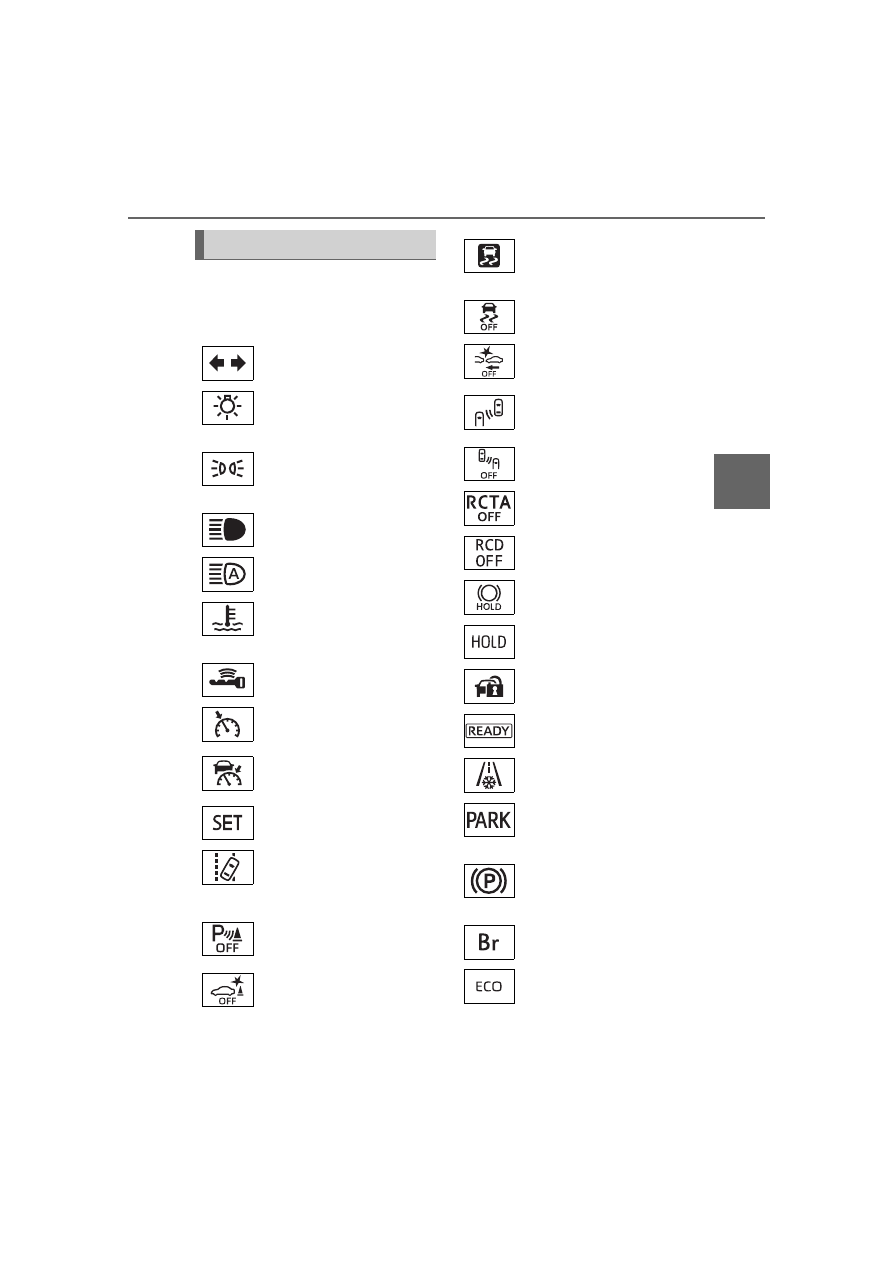
The indicators inform the driver 
of the operating state of the 
vehicle’s various systems.

Indicators

Turn signal indicator 
(

P.190)

(U.S.A.)

Headlight indicator 
(

P.198)

(Canada)

Tail light indicator 
(

P.198)

Headlight high beam indi-
cator (

P.200)

AHB indicator (

P.200)

(Blue)

Low coolant temperature 
indicator

*1

Smart key system indica-
tor

*2

 (

P.180)

Cruise control indicator 
(

P.244)

Dynamic radar cruise 
control indicator 
(

P.244)

Cruise control “SET” indi-
cator (

P.244)

(

*

3)

LTA indicator (

P.220, 

236)

Intuitive parking assist 
OFF indicator

*4, 5

 (if 

equipped) (

P.262)

PKSB OFF indicator

*4, 6


(if equipped) (

P.283)

(Flashes)

Slip indicator light

*6


(

P.323)

VSC OFF indicator

*4, 6


(

P.323)

PCS warning light

*4, 6


(

P.222)

BSM outside rear view 
mirror indicators

*6, 7

 (if 

equipped) (

P.257, 272)

BSM OFF indicator

*4, 6

 (if 

equipped) (

P.257)

RCTA OFF indicator

*4, 6


(if equipped) (

P.273)

RCD OFF indicator

*4

 (if 

equipped) (

P.278)

Brake hold standby indi-
cator

*6

 (

P.194)

Brake hold operated indi-
cator

*6

 (

P.194)

Security indicator

*8


(

P.70, 71)

“READY” indicator 
(

P.180)

Low outside temperature 
indicator

*9

 (

P.100)

(U.S.A.)

Parking brake indicator 
(

P.191)

(Canada)

Parking brake indicator 
(

P.191)

Br mode indicator 
(

P.185)

Eco drive mode indicator 
(

P.320)

98

3-1. Instrument cluster

*1

:Indicates the coolant tempera-

ture is cool.

*2

:This light illuminates on the 

multi-information display with a 
message.

*3

:Depending on the operating con-

ditions of the system, the color 
and state (illuminated/blinking) of 
the indicator change.

*4

:The light comes on when the 

system is turned off.

*5

:Intuitive parking assist OFF indi-

cator turns on when the power 
switch is turned to ON while the 
Intuitive parking assist function is 
on. It will turn off after a few sec-
onds.

*6

:These lights turn on when the 

power switch is turned to ON to 
indicate that a system check is 
being performed. They will turn 
off after the fuel cell system is 
on, or after a few seconds. There 
may be a malfunction in a sys-
tem if the lights do not turn on, or 
turn off. Have the vehicle 
inspected by your Toyota dealer.

*7

:This light illuminates on the out-

side rear view mirrors.

*8

:This light illuminates on the cen-

ter panel.

*9

:When the outside temperature is 

approximately 37°F (3°C) or 
lower, the indicator will flash for 
approximately 10 seconds, then 
stay on.

*10

: Refer to “Toyota Teammate 

Advanced Drive OWNER’S 
MANUAL” at Toyota.com.

Sport mode indicator 
(

P.320)

Snow mode indicator 
(

P.321)

“AIRBAG ON/OFF” indi-
cator

*6, 8

 (

P.46)

Advanced Drive indica-
tor

*10

 (if equipped)

99

3-1. Instrument cluster

3

Vehicle

 statu

s information an

d in
dicator

s

The units used on the meter and display may differ depending on the target 
region.

Fuel gauge/Driving range (

P.101)

Multi-information display

Presents the driver with a variety of driving-related data (

P.105)

Displays warning messages if a malfunction occurs (

P.464)

Speedometer

Displays the vehicle speed

Clock (

P.100)

Time displayed is linked to the multimedia system. For details, refer to 
“MULTIMEDIA OWNER’S MANUAL”.

Shift position indicator

Displays the selected shift position (

P.185)

Odometer and trip meter (

P.100)

Outside temperature (

P.100)

Gauges and meters (with 8-inch multi-information 

display)

The meters display various drive information.

Meter display

100

3-1. Instrument cluster

The meters and display illumi-

nate when

The power switch is in ON.

When changing driving mode

Background color of the multi-infor-

mation display is changed following 

the selected driving mode. (

P.320, 

321)

Clock settings screen

If “Clock :00” is displayed when 


is selected on the multi-information 
display, the system may be malfunc-
tioning. Have the vehicle inspected 
by your Toyota dealer.

Outside temperature display

In the following situations, the cor-

rect outside temperature may not 

be displayed, or the display may 

take longer than normal to 

change.

• When stopped, or driving at low 

speeds (less than 12 mph [20 

km/h])

• When the outside temperature 

has changed suddenly (at the 

entrance/exit of a garage, tunnel, 

etc.)

When “--” or “E” is displayed, the 

system may be malfunctioning.

Take your vehicle to your Toyota 

dealer.

Displays the outside temperature 

within the range of -40°F (-40°C) 

to 122°F (50°C).

When the outside temperature is 
approximately 37°F (3°C) or 
lower, the indicator 

 will flash 

for approximately 10 seconds, 
then stay on.

Liquid crystal display

P.106

Customization

Settings (e. g. meter display) can be 
changed on 

 screen of the multi-

information display. (

P.512)

Display items

Odometer

Displays the total distance the vehi-
cle has been driven.

Trip meter A/Trip meter B

Displays the distance the vehicle 
has been driven since the meter 
was last reset. Trip meters A and B 
can be used to record and display 
different distances independently.

Changing the display

Each time the “ODO/TRIP” 
switch is pressed, the displayed 
item will be changed. When the 
trip meter is displayed, pressing 
and holding the switch will reset 
the trip meter.

The brightness of the instrument 
panel lights can be adjusted.

Odometer and trip meter 
display

Instrument panel light 
control

101

3-1. Instrument cluster

3

Vehicle

 statu

s information an

d in
dicator

s

1

Brighter

2

Darker

Instrument cluster brightness 

adjustment

The instrument cluster brightness 

levels when the tail lights are on and 

off can be adjusted individually. 

However, when the surroundings 

are bright (daytime, etc.), turning on 

the tail lights will not change the 

instrument cluster brightness.

Fuel gauge

Displays the quantity of fuel 
remaining in the tank

Driving range

Displays the possible driving 
distance computed from the 
fuel consumption studied from 
the driving history and the 
current remaining amount of 
fuel.

When the air conditioning sys-
tem is operating, 

 is dis-

played below the driving 
range and this will be the driv-
ing range with the air condi-

tioning system on is 
displayed.

When the low fuel level warning 

light turns on

The low fuel level warning light turns 

on (

P.460) when the fuel gets low. 

In that case, refuel the vehicle.

Possible Driving Distance

The actual possible driving dis-

tance may differ as fuel consump-

tion changes, depending on 

driving environment (weather, traf-

fic, etc.) and conditions (sudden 

acceleration, air conditioning, 

etc.).

The driving range may shorten 

even when not driving due to 

power consumption by the sys-

tem.

The possible driving distance will 

be displayed as “--- miles (--- km)” 

in the following cases:

• When the remaining fuel is being 

calculated (short time).

• When the remaining fuel total 

reaches “E”.

• When a malfunction occurs where 

the possible driving distance can-

not be calculated.

Fuel gauge and driving 
range

102

3-1. Instrument cluster

The units used on the meter and display may differ depending on the target 
region.

Multi-information display

Presents the driver with a variety of driving-related data (

P.105)

Displays warning messages if a malfunction occurs (

P.464)

Outside temperature (

P.103)

Speedometer

Displays the vehicle speed

Clock (

P.103)

Time displayed is linked to the multimedia system. For details, refer to 
“MULTIMEDIA OWNER’S MANUAL”.

Fuel gauge/Driving range (

P.104)

Shift position indicator

Displays the selected shift position (

P.185)

Fuel cell System Indicator

Displays the Fuel cell System Indicator (

P.103)

Gauges and meters (With 12.3-inch multi-informa-

tion display)

The meters display various drive information.

Meter display

103

3-1. Instrument cluster

3

Vehicle

 statu

s information an

d in
dicator

s

Odometer and trip meter (

P.104)

Displayed items when using 

Advanced Drive (if equipped)

When using Advanced Drive, the 

displayed items and their location 

will differ. Refer to “Toyota Team-

mate Advanced Drive OWNER’S 

MANUAL” at Toyota.com for details.

The meters and display illumi-

nate when

The power switch is in ON.

When changing driving mode

Background color of the multi-infor-

mation display is changed following 

the selected driving mode. (

P.320, 

321)

Fuel cell System Indicator

Charge area

Shows regeneration

*

 status.

Regenerated energy will be used to 
charge the traction battery.

Eco area

Shows that the vehicle is being 
driven in an Eco-friendly manner. By 
keeping the indicator needle within 
Eco area, more Eco-friendly driving 
can be achieved.

Power area

Shows that an Eco-friendly driving 
range is being exceeded (during full 
power driving, etc.)

*

: When used in this manual, “regen-

eration” refers to the conversion of 
energy created by the movement 
of the vehicle into electrical 
energy.

In the following situation, the Fuel 

cell System Indicator does not oper-

ate.

“READY” indicator is not illumi-

nated.

The shift position is in a range 

other than D or Br mode.

Clock settings screen

If “Clock :00” is displayed when 


is selected on the multi-information 
display, the system may be malfunc-
tioning. Have the vehicle inspected 
by your Toyota dealer.

Outside temperature display

In the following situations, the cor-

rect outside temperature may not 

be displayed, or the display may 

take longer than normal to 

change.

• When stopped, or driving at low 

speeds (less than 12 mph [20 

km/h])

• When the outside temperature 

has changed suddenly (at the 

entrance/exit of a garage, tunnel, 

etc.)

When “--” or “E” is displayed, the 

system may be malfunctioning.

Take your vehicle to your Toyota 

dealer.

Displays the outside temperature 

within the range of -40°F (-40°C) 

to 122°F (50°C).

When the outside temperature is 
approximately 37°F (3°C) or 
lower, the indicator 

 will flash 

for approximately 10 seconds, 
then stay on.

104

3-1. Instrument cluster

Liquid crystal display

P.106

Customization

Settings (e. g. meter display) can be 
changed on 

 screen of the multi-

information display. (

P.512)

Display items

Odometer

Displays the total distance the vehi-
cle has been driven.

Trip meter A/Trip meter B

Displays the distance the vehicle 
has been driven since the meter 
was last reset. Trip meters A and B 
can be used to record and display 
different distances independently.

Changing the display

Each time the “ODO/TRIP” 
switch is pressed, the displayed 
item will be changed. When the 
trip meter is displayed, pressing 
and holding the switch will reset 
the trip meter.

The brightness of the instrument 
panel lights can be adjusted.

1

Brighter

2

Darker

Instrument cluster brightness 

adjustment

The instrument cluster brightness 

levels when the tail lights are on and 

off can be adjusted individually. 

However, when the surroundings 

are bright (daytime, etc.), turning on 

the tail lights will not change the 

instrument cluster brightness.

Fuel gauge

Displays the quantity of fuel 
remaining in the tank

Driving range

Displays the possible driving 
distance computed from the 
fuel consumption studied from 
the driving history and the 
current remaining amount of 
fuel.

Odometer and trip meter 
display

Instrument panel light 
control

Fuel gauge and driving 
range

105

3-1. Instrument cluster

3

Vehicle

 statu

s information an

d in
dicator

s

When the air conditioning sys-
tem is operating, 

 is dis-

played next to the driving 
range and this will be the driv-
ing range with the air condi-
tioning system on is 
displayed.

When the low fuel level warning 

light turns on

The low fuel level warning light turns 

on (

P.460) when the fuel gets low. 

In that case, refuel the vehicle.

Possible Driving Distance

The actual possible driving dis-

tance may differ as fuel consump-

tion changes, depending on 

driving environment (weather, traf-

fic, etc.) and conditions (sudden 

acceleration, air conditioning, 

etc.).

The driving range may shorten 

even when not driving due to 

power consumption by the sys-

tem.

The possible driving distance will 

be displayed as “--- miles (--- km)” 

in the following cases:

• When the remaining fuel is being 

calculated (short time).

• When the remaining fuel total 

reaches “E”.

• When a malfunction occurs where 

the possible driving distance can-

not be calculated.

Following information is dis-
played on the multi-information 
display.

With 8-inch multi-informa-
tion display

Driving support system infor-
mation

Displays an image when the follow-
ing systems are operating and a 
menu icon other than 

 is 

selected:

• LTA (Lane Tracing Assist) 

(

P.230)

• Dynamic radar cruise control with 

full-speed range (

P.244)

Multi-information dis-

play

The multi-information dis-
play is used to display fuel 
efficiency related informa-
tion and various types of 
driving-related information. 
The multi-information dis-
play can also be used to 
change the display settings 
and other settings.

Display contents

106

3-1. Instrument cluster

• RSA (Road Sign Assist) (if 

equipped) (

P.241)

Information display area

A variety of information can be dis-
played by selecting a menu icon.
Additionally, warning or sugges-
tion/advice pop-up displays will be 
displayed in some situations.

Menu icons (

P.107)

With 12.3-inch multi-infor-
mation display

By selecting menu icons 
(

P.107) on the multi-informa-

tion display, a variety of driving-
related information can be dis-
played. The multi-information 
display can also be used to 
change display settings and 
other vehicle settings. Warning 
or suggestion/advice pop-up 
displays are also displayed in 
certain situations.

The multi-information display is 

displayed when

The power switch is in ON.

When changing driving mode

Background color of the multi-infor-

mation display is changed following 

the selected driving mode. (

P.320, 

321)

Liquid crystal display

Small spots or light spots may 

appear on the display. This phenom-

enon is characteristic of liquid crys-

tal displays, and there is no problem 

continuing to use the display.

The multi-information display is 
operated using the meter control 
switches.

Scroll the screen

*

/switch the 

display

*

/move the cursor

Press: Enter/Set
Press and hold: Reset/Dis-
play customizable items

Return to the previous screen

Call sending/receiving and 
history display

Linked with the hands-free system, 
sending or receiving call is dis-
played. For details regarding the 
hands-free system, refer to the 
“MULTIMEDIA OWNER’S MAN-
UAL”.

*

: On screens where the screen can 

be scrolled and the display can 
be switched, a scroll bar or a 
round icon that shows the num-
ber of registered screens is dis-
played.

Changing the display

107

3-1. Instrument cluster

3

Vehicle

 s

ta

tu

s information an

d in
dicat

or

s

Information related to each icon 
can be displayed by selecting 
the icon with the meter control 
switches.

Some of the information may be 
displayed automatically depending 
on the situation.

*1

:Vehicles with 8-inch multi-infor-

mation display

*2

:Vehicles with 12.3-inch multi-

information display

Select to display fuel consump-
tion data in various forms.

Fuel Economy

Following information is dis-
played.

Current fuel economy

Displays the instantaneous current 
fuel Economy.

Average fuel economy

To reset the average fuel economy 
display, press and hold the 


meter control switch.

The average fuel economy dis-
play can be changed in 

(

P.111)

Average fuel economy (after 
start)

Displays the average fuel con-
sumption since fuel cell system 
start.

WARNING

Caution for use while driving

For safety, avoid operating the 

meter control switch while driving 

as much as possible, and do not 

look continuously at the multi-

information display while driving. 

Stop the vehicle and operate the 

meter control switch. Failure to do 

so may cause a steering wheel 

operation error, resulting in an 

unexpected accident.

Menu icons

Icon

Display

Driving information dis-
play (

P.107)

Driving support system 
information display

*1


(

P.110)

Navigation system-linked 
display

*2

 (

P.110)

Audio system-linked dis-
play (

P.111)

Vehicle information dis-
play (

P.111)

Settings display 
(

P.111)

Warning message dis-
play (

P.112)

Driving information dis-
play

108

3-1. Instrument cluster

Average fuel economy (after 
refuel)

Displays the average fuel con-
sumption since the vehicle was 
refueled.

Fuel cell System Indicator 
(with 8-inch multi-informa-
tion display)

Charge area

Shows regeneration

*

 status. 

Regenerated energy will be used to 
charge the traction battery.

Eco area

Shows that the vehicle is being 
driven in an Eco-friendly manner. 
By keeping the indicator needle 
with in Eco area, more Eco-friendly 
driving can be achieved.

Power area

Shows that an Eco-friendly driving 
range is being exceeded (during full 
power driving, etc.)

*

: When used in this manual, 

“regeneration” refers to the con-
version of energy created by the 
movement of the vehicle into 
electrical energy.

In the following situation, the 
Fuel cell System Indicator indi-
cator does not operate.

“READY” indicator is not illu-
minated.

The shift position is in a range 
other than D or Br mode.

ECO Accelerator Guid-
ance/Eco Score

Displays a reference operation 
range for using the accelerator 
pedal according to driving condi-
tions, and a score result that 
evaluates the current driving 
status.

With 8-inch multi-information 
display

With 12.3-inch multi-informa-
tion display

ECO Accelerator Guidance

Eco Score

ECO Accelerator Guidance

109

3-1. Instrument cluster

3

Vehicle

 statu

s information an

d in
dicator

s

With 8-inch multi-information 
display

With 12.3-inch multi-informa-
tion display

ECO area

Shows that the vehicle is being 
driven in an Eco-friendly manner.

Power area

Shows that an Eco-friendly driving 
range is being exceeded (during full 
power driving, etc.).

Current acceleration

Reference operation range

A zone is displayed in blue under 
the Eco area which can be used as 
a reference operation range for 
using the accelerator pedal accord-
ing to driving conditions such as 
starting off and cruising.
The ECO Accelerator Guidance 
display changes according to the 
driving status, such as when start-

ing off or cruising.
It is easier to drive in an Eco-
friendly manner by driving accord-
ing to the display showing the 
accelerator pedal operations and 
staying within the reference opera-
tion range.

Eco Score

The following 3 Eco driving meth-
ods are evaluated in 5 levels: 
Smooth start-off acceleration, driv-
ing without sudden acceleration, 
and smooth stopping. When the 
vehicle is stopped, an Eco score 
out of 100 points will be displayed.

Score result

Eco start status

Eco cruise status

Eco stop status

How to read the bar display:

After starting off, Eco Score display 
does not start until the vehicle 
speed exceeds approximately 19 

Score

Bar display

Unrated

Low

High

110

3-1. Instrument cluster

mph (30km/h).
The Eco Score is reset each time 
the vehicle starts off to start a new 
evaluation.
When the fuel cell system stops, 
the current total score result is dis-
played.

*

*

: The score result is displayed only 

when “Eco Score” is selected for 
“Trip Summary”. (

P.111)

ECO Accelerator Guidance/Eco 

Score will not operate when

The ECO Accelerator Guidance/Eco 

Score will not operate in the follow-

ing situations:

The Fuel cell System Indicator is 

not operating.

The vehicle is being driven using 

the dynamic radar cruise control 

with full-speed range.

Driving support system 
information display

Select to display the operational 
status of the following systems:

LTA (Lane Tracing Assist)

*


(

P.230)

Dynamic radar cruise control 
with full-speed range

*


(

P.244)

*

: Vehicles with Toyota Teammate 

Advanced Drive, refer to “Toyota 
Teammate Advanced Drive 
OWNER’S MANUAL”.

Navigation system-linked 
display (if equipped)

Select to display the following 
navigation system-linked infor-
mation.

Route guidance

Compass display (north-up 
display/heading-up display)

Select to display the following 
navigation system-linked infor-
mation.

Route guidance

Compass display (north-up 
display/heading-up display)

Select to enable selection of an 
audio source or track on the dis-
play.

Drive information

2 items that are selected using 
the “Drive Info Items” setting 
(average speed, distance and 
total time) can be displayed ver-
tically.
The displayed information 

Driving support system 
information display

Navigation system-linked 
display (Vehicles with 
12.3-inch multi-informa-
tion display)

Audio system-linked dis-
play

Vehicle information dis-
play

111

3-1. Instrument cluster

3

Vehicle

 statu

s information an

d in
dicator

s

changes according to the “Drive 
Info Type” setting (since the sys-
tem was started or between 
resets). (

P.111)

Use the displayed information as a 
reference only.
Following items will be displayed.

“Trip”

• “Average Speed”: Displays the 

average vehicle speed since fuel 
cell system start

*

• “Distance”: Displays the distance 

driven since fuel cell system start

*

• “Total Time”: Displays the elapsed 

time since fuel cell system start

*

*

: These items are reset each time 

the fuel cell system stops.

“Total”

• “Average Speed”: Displays the 

average vehicle speed since the 
display was reset

*

• “Distance”: Displays the distance 

driven since the display was 
reset

*

• “Total Time”: Displays the elapsed 

time since the display was reset

*

*

: To reset, display the desired item 

and press and hold 

.

Energy monitor

P.119

Tire inflation pressure

Displays inflation pressure of 
each tire.

Meter display settings that 
can be changed

Language

Select to change the language on 
the multi-information display.

Units

Select to change the units of mea-
sure displayed.

 (Driving information dis-

play settings)

Select to set up the following items.
• Fuel cell system
Select to enable/disable the ECO 
Accelerator Guidance (

P.108).

• Fuel Economy
Select to change the display on 
Fuel Economy (

P.107).

Settings display

112

3-1. Instrument cluster

 (Audio settings)

Select to enable/disable 


screen.

 (Vehicle information dis-

play settings)

• Display Contents
Select to set up the following items.
Energy monitor:
Select to enable/disable the Energy 
monitor (

P.119)

• Drive Info Type
Select to change the drive informa-
tion type display between trip and 
total. (

P.111).

• Drive Info Items
Select to set the items on the upper 
and lower side of the drive informa-
tion screen from three items, aver-
age speed, distance and total time.

Trip Summary

Select to set the items displayed 
when the power switch is turned off.

Pop-Up Display

Select to enable/disable pop-up 
displays for each relevant system.

Multi-information display off

Select to turn the multi-information 
display off.
To turn the multi-information display 
on again, press any of the meter 
control switches.

Default Settings

Select to reset the meter display 
settings.

Suspension of the settings dis-

play

In the following situations, opera-

tion of the settings display will be 

temporarily suspended.

• When a warning message 

appears on the multi-information 

display

• When the vehicle begins to move

Settings for functions not 

equipped to the vehicle are not 

displayed.

When a function is turned off, the 

related settings for that function 

are not selectable.

Select to display warning mes-
sages and measures to be 
taken if a malfunction is 
detected. (

P.464)

Displays suggestions to the 
driver in the following situations. 
To select a response to a dis-
played suggestion, use the 
meter control switches.

Suggestion to turn on the 
headlights

If the headlight switch is in other 
than 

 or 

, and the vehicle 

speed is 3 mph (5 km/h) or 

NOTICE

During setting up the display

To prevent 12-volt battery dis-

charge, ensure that the fuel cell 

system is operating while setting 

up the display features.

Warning message display

Suggestion function


Content      ..     4      5      6      7     ..