Toyota C-HR (2023 year). Manual in english - page 20
 

  Index      Toyota     Toyota C-HR (2023 year). Manual in english


Search            copyright infringement  


Content      ..     18      19      20      21     ..


Toyota C-HR (2023 year). Manual in english - page 20


395

4-5. Using the driving support systems

4

D

riv

in

g

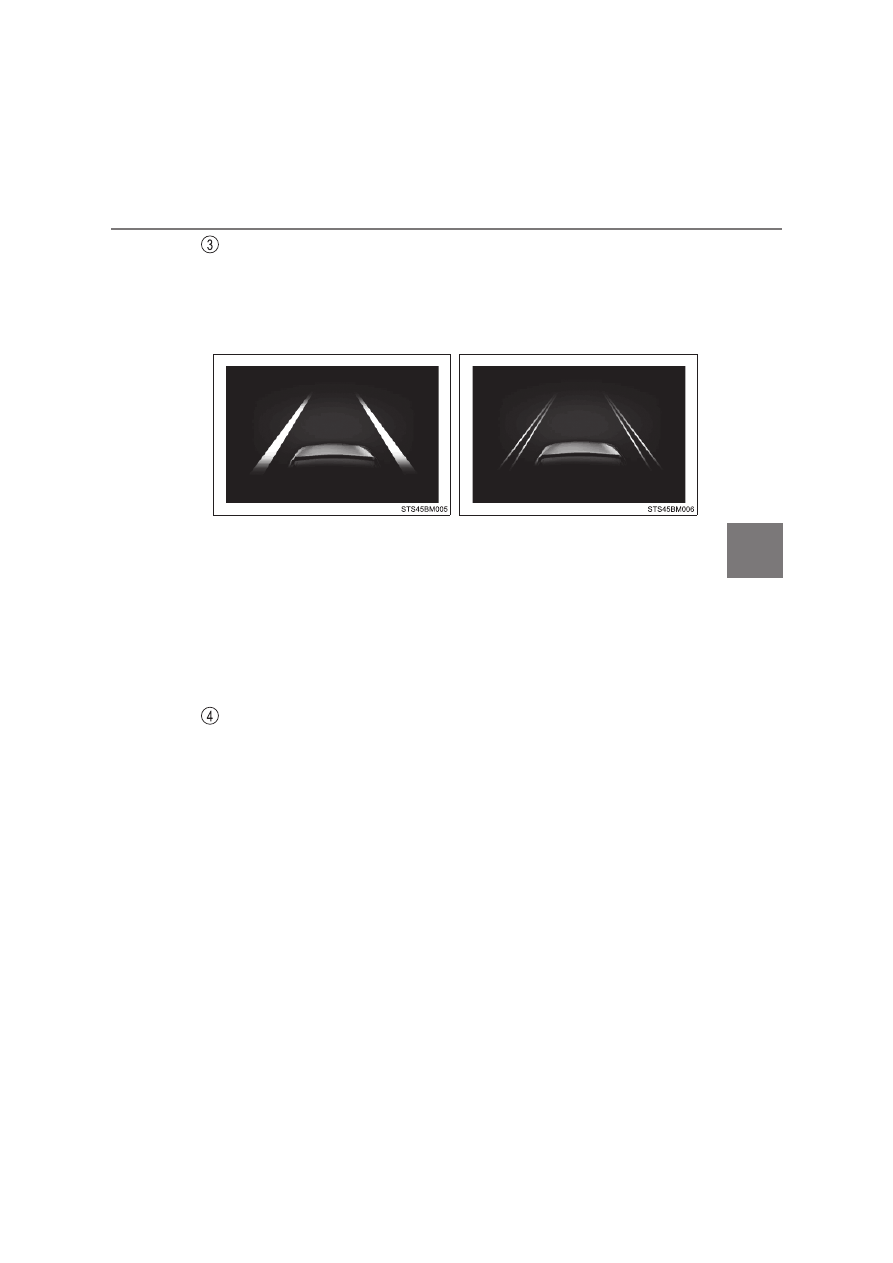
Lane departure alert function display

Displayed  when  the  multi-information  display  is  switched  to  the  driving
assist system information display.

*

: Boundary between asphalt and the side of the road, such as grass, soil, or

a curb

Follow-up cruising display
Displayed  when  the  multi-information  display  is  switched  to  the
driving assist system information display.

Indicates that steering assist of the lane centering function is operating by
monitoring the position of a preceding vehicle.
When the follow-up cruising display is displayed, if the preceding vehicle
moves, your vehicle may move in the same way. Always pay careful atten-
tion to your surroundings and operate the steering wheel as necessary to
correct the path of the vehicle and ensure safety.

Inside  of  displayed  lines  is
white

Inside  of  displayed  lines  is
black

Indicates that the system is recog-
nizing  white  (yellow)  lines  or  a
course

*

When 

the 

vehicle

departs  from  its  lane,  the  white
line  displayed  on  the  side  the
vehicle  departs  from  flashes
orange.

Indicates  that  the  system  is  not
able  to  recognize  white  (yellow)
lines or a course

*

 or is temporar-

ily canceled.

396

4-5. Using the driving support systems

Operation conditions of each function

Lane departure alert function
This function operates when all of the following conditions are met.
• LTA is turned on.
• Vehicle speed is approximately 50 km/h (32 mph) or more

*

1

.

• System recognizes white (yellow) lane lines or a course

*

2

. (When a white

[yellow] line or course

*

2

 is recognized on only one side, the system will

operate only for the recognized side.)

• Width of traffic lane is approximately 3 m (9.8 ft.) or more.
• Turn  signal  lever  is  not  operated.  (Vehicle  with  BSM:  Except  when

another vehicle is in the lane on the side where the turn signal was oper-
ated)

• Vehicle is not being driven around a sharp curve.
• No system malfunctions are detected. (

P. 399)

*

1

: The  function  operates  even  if  the  vehicle  speed  is  less  than  approxi-

mately 50 km/h (32 mph) when the lane centering function is operating.

*

2

: Boundary between asphalt and the side of the road, such as grass, soil,

or a curb

Steering assist function
This function operates when all of the following conditions are met in addi-
tion to the operation conditions for the lane departure alert function.
• Vehicle is not accelerated or decelerated by a fixed amount or more.
• Steering  wheel  is  not  operated  with  a  steering  force  level  suitable  for

changing lanes.

• ABS, VSC, TRC and PCS are not operating.
• TRC or VSC is not turned off.
• Hands off steering wheel warning is not displayed. (

P. 398)

Vehicle sway warning function
This function operates when all of the following conditions are met.

• Setting for “Sway Warning” in 

 on the multi-information display is set

to “ON”. (

P. 786)

• Vehicle speed is approximately 50 km/h (32 mph) or more.
• Width of traffic lane is approximately 3 m (9.8 ft.) or more.
• No system malfunctions are detected. (

P. 399)

397

4-5. Using the driving support systems

4

D

riv

in

g

Lane centering function
This function operates when all of the following conditions are met.
• LTA is turned on.

• Setting for “Lane Centering” in 

 of the multi-information display is set

to “ON”. (

P. 786)

• This function recognizes white (yellow) lane lines or the position of a pre-

ceding  vehicle  (except  when  the  preceding  vehicle  is  small,  such  as  a
motorcycle).

• The  dynamic  radar  cruise  control  with  full-speed  range  is  operating  in

vehicle-to-vehicle distance control mode.

• Width of traffic lane is approximately 3 to 4 m (10 to 13 ft.).
• Turn signal lever is not operated.
• Vehicle is not being driven around a sharp curve.
• No system malfunctions are detected. (

P. 399)

• Vehicle does not accelerate or decelerate by a fixed amount or more.
• Steering  wheel  is  not  operated  with  a  steering  force  level  suitable  for

changing lanes.

• ABS, VSC, TRC and PCS are not operating.
• TRC or VSC is not turned off.
• Hands off steering wheel warning is not displayed. (

P. 398)

• The vehicle is being driven in the center of a lane.
• Steering assist function is not operating.

Temporary cancelation of functions

When operation conditions are no longer met, a function may be temporarily
canceled. However, when the operation conditions are met again, operation
of the function is automatically restored. (

P. 396)

If the operation conditions (

P. 397) are no longer met while the lane cen-

tering function is operating, the buzzer may sound to indicate that the func-
tion has been temporarily canceled.

Steering assist function/lane centering function

Depending on the vehicle speed, lane departure situation, road conditions,
etc., the driver may not feel the function is operating or the function may not
operate at all.

The  steering  control  of  the  function  is  overridden  by  the  driver’s  steering
wheel operation.

Do not attempt to test the operation of the steering assist function.

398

4-5. Using the driving support systems

Lane departure alert function

The  warning  buzzer  may  be  difficult  to  hear  due  to  external  noise,  audio
playback, etc.

If  the  edge  of the  course*  is  not clear  or  straight,  the lane  departure  alert
function may not operate.

Vehicle with BSM: It may not be possible for the system to determine if there
is a danger of a collision with a vehicle in an adjacent lane.

Do not attempt to test the operation of the lane departure alert function.

*

: Boundary between asphalt and the side of the road, such as grass, soil, or

a curb

Hands off steering wheel warning

When  the  system  determines  that  the  driver  is  driving  without  holding  the
steering wheel while the system is operating
If  the  driver  continues  to  keep  their  hands  off  of  the  steering  wheel,  the
buzzer  sounds,  the  driver  is  warned  and  the  function  is  temporarily  can-
celed. This warning also operates in the same way when the driver continu-
ously operates the steering wheel only a small amount.

When  the  system  determines  that  the  vehicle  may  deviate  from  the  lane
while driving around a curve while the lane centering function is operating.
Depending on the vehicle condition and road conditions, the warning may
not  operate.  Also,  if  the  system  determines  that  the  vehicle  is  driving
around a curve, warnings will occur earlier than during straight-lane driving.

When  the  system  determines  that  the  driver  is  driving  without  holding  the
steering wheel while the steering wheel assist of the steering assist function
is operating.
If the driver continues to keep their hands off of the steering wheel and the
steering  wheel  assist  is  operating,  the  buzzer  sounds  and  the  driver  is
warned.  Each  time  the  buzzer  sounds,  the  continuing  time  of  the  buzzer
becomes longer.

In the following situations, a warning mes-
sage urging the driver to hold the steering
wheel and the symbol shown in the illus-
tration are displayed on the multi-informa-
tion  display  to  warn  the  driver.  The
warning  stops  when  the  system  deter-
mines  that  the  driver  holds  the  steering
wheel.  Always  keep  your  hands  on  the
steering  wheel  when  using  this  system,
regardless of warnings.

399

4-5. Using the driving support systems

4

D

riv

in

g

Vehicle sway warning function 

Depending on the vehicle and road conditions, the warning may not operate. 

Warning message

If the following warning message is displayed on the multi-information display
and  the  LTA  indicator  illuminates  in  orange,  follow  the  appropriate  trouble-
shooting procedure. Also, if a different warning message is displayed, follow
the instructions displayed on the screen.

“LTA Malfunction. Visit Your Dealer.”
The system may not be operating properly. Have the vehicle inspected by
any authorized Toyota retailer or Toyota authorized repairer, or any reliable
repairer.

“LTA Unavailable”
The system is temporarily canceled due to a malfunction in a sensor other
than the front camera. Turn the LTA system off, wait for a little while, and
then turn the LTA system back on.

“LTA Unavailable at Current Speed.”
The function cannot be used as the vehicle speed exceeds the LTA opera-
tion range. Drive slower.

Customization

Function settings can be changed. (Customizable features: 

P. 786)

When  the  system  determines  that  the
vehicle is swaying while the vehicle sway
warning  function  is  operating,  a  buzzer
sounds  and  a  warning  message  urging
the driver to rest and the symbol shown in
the  illustration  are  simultaneously  dis-
played on the multi-information display.

400

4-5. Using the driving support systems

RSA (Road Sign Assist)

The RSA system recognizes spe-
cific  road  signs  using  the  front
camera  and/or  navigation  system
(when  speed  limit  information  is
available)  to  provide  information
to the driver via the display.

If the system  judges that  the  vehicle  is being  driven  over the  speed
limit, performing prohibited actions, etc., according to the recognized
road signs, it notifies the driver through a visual notification and notifi-
cation buzzer.

: If equipped

Summary of function

WARNING

Before using the RSA

Do not rely solely upon the RSA system. RSA is a system which supports
the driver by providing information, but it is not a replacement for a driver’s
own vision and awareness. Drive safely by always paying careful attention
to the traffic rules.

401

4-5. Using the driving support systems

4

D

riv

in

g

When the front camera recognizes a sign and/or information of a sign
is available from the navigation system, the sign will be displayed on
the multi-information display.

When the driving assist system
information is selected, a maxi-
mum  of  3  signs  can  be  dis-
played. (

P. 168)

When a tab other than the driv-
ing assist system information is
selected, the following types  of
road  signs  will  be  displayed.
(

P. 168)

• Speed limit begins/ends sign
• Speed  limit  related  informa-

tion 

sign 

(Motorway,

Expressway,  Urban  area,
Residential area)

• End of prohibition sign
• No-entry sign

*

 (when notification is necessary)

• Speed limit with supplemental sign (Ramp way only)

*

: For vehicles with navigation system

If signs other than speed limit signs are recognized, they will be dis-
played in an overlapping stack under the current speed limit sign.

Indication on the multi-information display

402

4-5. Using the driving support systems

The following types of road signs, including electronic signs and blink-
ing signs, are displayed.

A non-official (not meeting the Vienna Convention) or a recently introduced
traffic sign may not be displayed.

Speed limit road signs

*

*

: No  speed  limit  information


is  displayed  when  speed  limit  sign  is  not

available.

Speed limit related information

*

1, 2

Supported types of road signs

: Speed limit begins/Maximum speed zone begins

: Speed limit ends/Maximum speed zone ends

: Motorway entrance

: Motorway exit

: Expressway entrance

: Expressway exit

: Urban area beginning

: Urban area ending

: Urban area beginning

403

4-5. Using the driving support systems

4

D

riv

in

g

*

1

: Displayed  when  a  sign  is  recognized  but  speed  limit  information  for  the

road is not available from the navigation system

*

2

: No speed limit information


is displayed when speed limit related sign

information is not available.

No-overtaking road signs

Other road signs

*

: For vehicles with navigation system

: Urban area ending

: Residential area beginning

: Residential area ending

: No overtaking begins

: No overtaking ends

: No-entry

*

: End of prohibition

: Stop

404

4-5. Using the driving support systems

Speed limit with supplemental mark

*

1

*

1

: Displayed simultaneously with speed limit.

*

2

: Contents not recognized.

*

3

: Displayed when system detects driving on ramp way.

: Wet

: Rain

: Ice

: Supplemental mark exists

*

2

: Exit ramp on right

*

3

: Exit ramp on left

*

3

: Time

405

4-5. Using the driving support systems

4

D

riv

in

g

In the following situations, the RSA system will notify the driver.

When the vehicle speed exceeds the speed notification threshold of
the speed limit sign displayed, the sign display will be emphasized
and a buzzer will sound.

When the RSA system recognizes a no-entry sign and detects that
the vehicle has entered a no-entry area based on the map informa-
tion  of  the  navigation  system,  the  no-entry  sign  flashes  and  a
buzzer will sound.(For vehicles with navigation system)

If it is detected that your vehicle is overtaking when a no overtaking
sign is displayed on the multi-information display, the displayed sign
will flash and a buzzer will sound.

Depending  on  the  situation,  traffic  environment  (traffic  direction,
speed  unit)  may  be  detected  incorrectly  and  a  notification  function
may not operate properly.

Setting procedure

Press “

” or “

” of meter control switches and select 

. (

P. 168)

Press “

” or “

” of meter control switches and select 

, and press 

.

Automatic turn-off of RSA sign display

One or more signs automatically turn off in the following situations.

No sign has been recognized for a certain distance.

The road changes due to a left or right turn, etc.

Notification function

1

2

406

4-5. Using the driving support systems

Conditions in which the function may not operate or detect correctly

In the following situations, RSA does not operate normally and may not rec-
ognize signs, display the incorrect sign, etc. However, this does not indicate a
malfunction.

The front camera is misaligned due to a strong impact being applied to the
sensor, etc.

Dirt, snow, stickers, etc., are on the windshield near the front camera.

In inclement weather such as heavy rain, fog, snow or sand storms.

Light from an oncoming vehicle, the sun, etc., enters the front camera.

The sign is dirty, faded, tilted or bent.

The contrast of electronic sign is low.

All or part of the sign is hidden by the leaves of a tree, a pole, etc.

The sign is only visible to the front camera for a short amount of time.

The driving scene (turning, lane change, etc.) is judged incorrectly.

If a sign not appropriate for the currently traveled lane, but the sign exists
directly after a freeway branches, or in an adjacent lane just before merging.

Stickers are attached to the rear of the preceding vehicle.

A sign resembling a system compatible sign is recognized.

Side road speed signs may be detected and displayed (if positioned in sight
of the front camera) while the vehicle is traveling on the main road.

Roundabout exit road speed signs may be detected and displayed (if posi-
tioned in sight of the front camera) while traveling on a roundabout.

The front of the vehicle is raised or lowered due to the carried load

The surrounding brightness is not sufficient or changes suddenly.

When a sign intended for trucks, etc. is recognized.

The vehicle is driven in a country with a different direction of traffic.

The navigation system map data is outdated. (vehicles with navigation sys-
tem)

The navigation system is not operating. (vehicles with navigation system)

The speed information displayed on the meter and on the navigation system
(if equipped) may be different due to the navigation system using map data.

407

4-5. Using the driving support systems

4

D

riv

in

g

Speed limit sign display

If the power switch was last turned off while a speed limit sign was displayed
on  the  multi-information  display,  the  same  sign  displays  again  when  the
power switch is turned to ON mode.

If “RSA Malfunction Visit Your Dealer” is shown

The system may be malfunctioning. Have the vehicle inspected by any autho-
rized Toyota retailer or Toyota authorized repairer, or any reliable repairer.

Customization

Some functions can be customized. (Customizable features: 

P. 787)

408

4-5. Using the driving support systems

Dynamic radar cruise control with full-

speed range



In vehicle-to-vehicle distance control mode, the vehicle automatically
accelerates, decelerates and stops to match the speed changes of the
preceding  vehicle  even  if  the  accelerator  pedal  is  not  depressed.  In
constant speed control mode, the vehicle runs at a fixed speed.
Use  the  dynamic  radar  cruise  control  with  full-speed  range  on  free-
ways and highways.

Vehicle-to-vehicle distance control mode (

P. 412)

Constant speed control mode (

P. 419)

Multi-information display
Indicators
Set speed
Vehicle-to-vehicle 

distance

switch
Cruise control switch

Summary of functions

System Components

409

4-5. Using the driving support systems

4

D

riv

in

g

WARNING

Before using dynamic radar cruise control with full-speed range

Driving safely is the sole responsibility of the driver. Do not rely solely on
the system, and drive safely by always paying careful attention to your sur-
roundings. 

The  dynamic  radar  cruise  control  with  full-speed  range  provides  driving
assistance to reduce the driver’s burden. However, there are limitations to
the assistance provided. 
Read the following conditions carefully. Do not overly rely on this system
and always drive carefully.
• When the sensor may not be correctly detecting the vehicle ahead:

P. 423

• Conditions  under  which  the  vehicle-to-vehicle  distance  control  mode

may not function correctly: 

P. 424

Set the speed appropriately depending on the speed limit, traffic flow, road
conditions, weather conditions, etc. The driver is responsible for checking
the set speed.

Even when the system is functioning normally, the condition of the preced-
ing  vehicle  as  detected  by  the  system  may  differ  from  the  condition
observed  by  the  driver.  Therefore,  the  driver  must  always  remain  alert,
assess the danger of each situation and drive safely. Relying solely on this
system or assuming the system ensures safety while driving can lead to
an accident, resulting in death or serious injury.

Switch the dynamic radar cruise control with full-speed range setting to off,
using the “ON-OFF” button when not in use.

410

4-5. Using the driving support systems

WARNING

Cautions regarding the driving assist systems

Observe the following precautions, as there are limitations to the assistance
provided by the system.
Failure to do so may cause an accident resulting in death or serious injury.

Assisting the driver to measure following distance
The dynamic radar cruise control with full-speed range is only intended to
help the driver in determining the following distance between the driver’s
own vehicle and a designated vehicle traveling ahead. It is not a mecha-
nism that allows careless or inattentive driving, and it is not a system that
can  assist  the  driver  in  low-visibility  conditions.  It  is  still  necessary  for
driver to pay close attention to the vehicle’s surroundings.

Assisting the driver to judge proper following distance
The  dynamic  radar  cruise  control  with  full-speed  range  determines
whether  the  following  distance  between  the  driver’s  own  vehicle  and  a
designated vehicle traveling ahead is within a set range. It is not capable
of making any other type of judgement. Therefore, it is absolutely neces-
sary for the driver to remain vigilant and to determine whether or not there
is a possibility of danger in any given situation.

Assisting the driver to operate the vehicle
The dynamic  radar  cruise  control  with  full-speed  range  does  not  include
functions which will prevent or avoid collisions with vehicles ahead of your
vehicle. Therefore, if there is ever any possibility of danger, the driver must
take immediate and  direct control of the  vehicle and act appropriately  in
order to ensure the safety of all involved.


Content      ..     18      19      20      21     ..