Toyota C-HR (2023 year). Manual in english - page 6
 

  Index      Toyota     Toyota C-HR (2023 year). Manual in english


Search            copyright infringement  


Content      ..     4      5      6      7     ..


Toyota C-HR (2023 year). Manual in english - page 6


94

1-2. Child safety

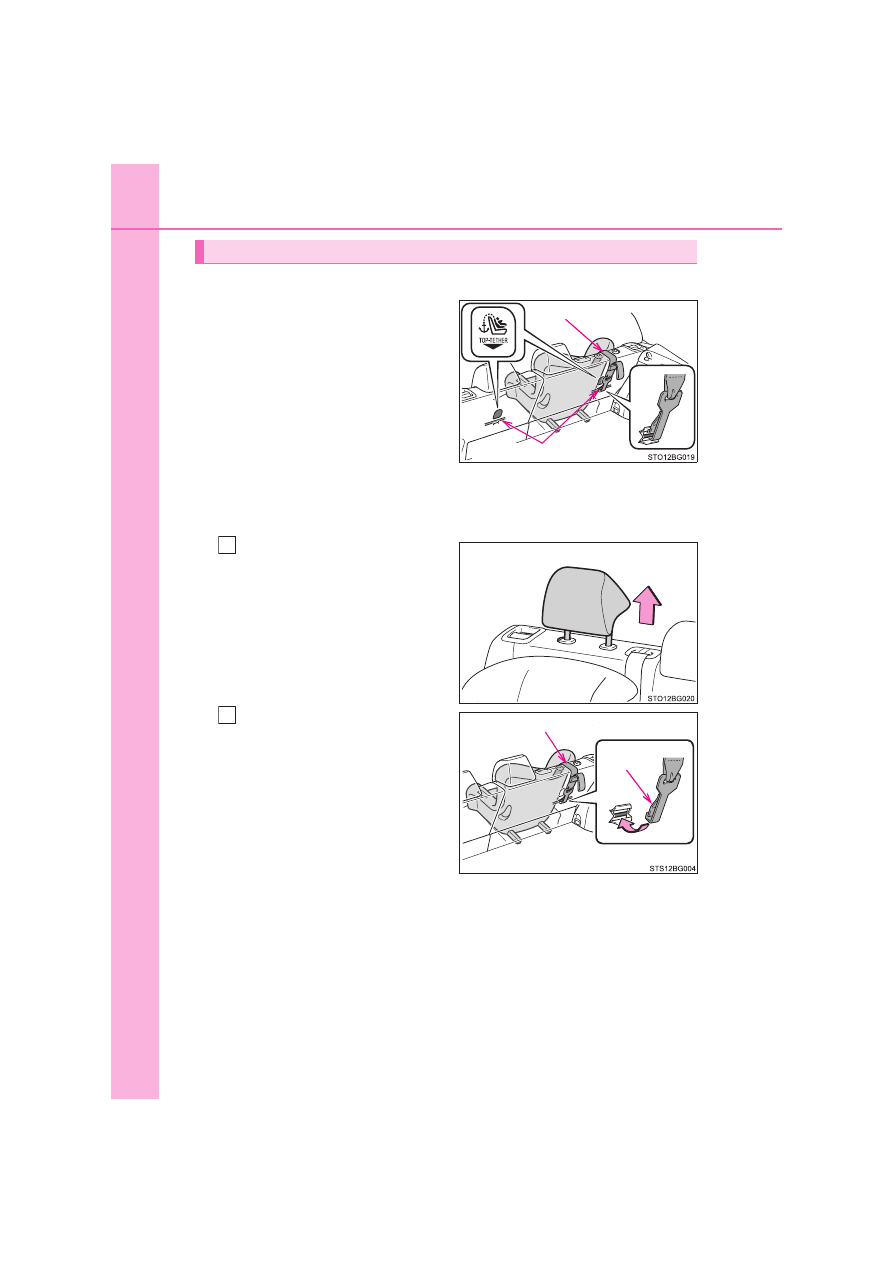
Top tether anchorages

Top tether anchorages are pro-
vided  for  the  outboard  rear
seat.
Use  top  tether  anchorages
when fixing the top strap.

Fixing the top strap to the top tether anchorage

Install  the  child  restraint  system  in  accordance  to  the  operation
manual enclosed with the child restraint system.

Adjust  the  head  restraint  to
the upmost position.

If  the  head  restraint  interferes
with the child restraint system or
top  strap  installation  and  the
head  restraint  can  be  removed,
remove the head restraint. 
(

P. 264)

Latch  the  hook  onto  the  top
tether anchorage and tighten
the top strap.

Make  sure  the  top  strap  is
securely latched. (

P. 91)

When 

installing 

the 

child

restraint  system  with  the  head
restraint being raised, be sure to
have  the  top  strap  pass  under-
neath the head restraint.

Using a top tether anchorage

Top tether anchorages

Top strap

1

Hook

Top strap

2

95

1-2. Child safety

1

Fo
r s

a

fe

ty a
nd

 se
cu

rity

WARNING

When installing a child restraint system

Observe the following precautions.
Failure to do so may result in death or serious injury.

Firmly attach the top strap and make sure that the belt is not twisted.

Do not attach the top strap to anything other than the top tether anchor-
age.

After securing a child restraint system, never adjust the seat.

Follow  all  installation  instructions  provided  by  the  child  restraint  system
manufacturer.

When  installing  the  child  restraint  system  with  the  head  restraint  being
raised,  after  the  head  restraint  has  been  raised  and  then  the  top  tether
anchorage has been fixed, do not lower the head restraint. 

96

1-3. Emergency assistance

eCall

1, 2

Microphone
“SOS” button*
Indicator lights
Speaker

*

: This button is intended for commu-

nication  with  the  eCall  system
operator. Other SOS buttons avail-
able  in  other  systems  of  a  motor
vehicle do not  relate  to the device
and are not intended for communi-
cation with the eCall system opera-
tor.

1: If equipped

2: Operates within the eCall coverage. The system

name differs depending on the country.

eCall is a telematics service that uses Global Navigation Satellite
System  (GNSS)  data  and  embedded  cellular  technology  to
enable  the  following  emergency  calls  to  be  made:  Automatic
emergency  calls  (Automatic  Collision  Notification)  and  manual
emergency calls (by pressing the “SOS” button). This service is
required by European Union Regulations.

System components

97

1-3. Emergency assistance

1

Fo
r s

a

fe

ty a
nd

 se
cu

rity

Automatic Emergency Calls

If any airbag deploys, the system is designed to automatically call
the eCall control center.* The answering operator receives the vehi-
cle’s  location,  the  time  of  the  incident  and  the  vehicle  VIN,  and
attempts to speak with the vehicle occupants to assess the situa-
tion.  If  the  occupants  are  unable  to  communicate,  the  operator
automatically  treats  the  call  as  an  emergency  and  contacts  the
nearest emergency services provider (112 system, etc.) to describe
the situation and request that assistance be sent to the location.

*

: In some cases, the call cannot be made. (

P. 99)

Manual Emergency Calls

In  the  event  of  an  emergency,
press  the  “SOS”  button  to  call
the  eCall  control  center.*  The
answering  operator  will  deter-
mine  your  vehicle’s  location,
assess  the  situation,  and  dis-
patch  the  necessary  assis-
tance required. 
Make  sure  to  open  the  cover
before  pressing the “SOS” but-
ton.

If you accidentally press the “SOS” button, tell the operator that you are
not experiencing an emergency.

*

: In some cases, the call cannot be made. (

P. 99)

Emergency Notification Services

98

1-3. Emergency assistance

When the power switch is turned to ON, the red indicator light will illu-
minate  for  10  seconds  and  then  the  green  indicator  light  will  illumi-
nate,  indicating  that  the  system  is  enabled.  The  indicator  lights
indicate the following:

If the green indicator light illuminates and stays on, the system is


enabled.

If the green indicator light flashes twice per second, an automatic or
manual Emergency Call is being made.

If the red indicator light illuminates at any time other than immedi-
ately  after  the  power  switch  is  turned  to  ON,  the  system  may  be
malfunctioning or the backup battery may be depleted.

If the red indicator light blinks for approximately 30 seconds during
an Emergency Call, the call has been disconnected or the cellular
network signal is weak.

Free/Open Source Software Information

This product contains Free/Open Source Software (FOSS). 
The license information and/or the source code of such FOSS can be found
at the following URL. 
https://www.denso.com/global/en/opensource/dcm/toyota/
http://www.opensourceautomotive.com/dcm/toyota/19MC/

Indicator lights

99

1-3. Emergency assistance

1

Fo
r s

a

fe

ty a
nd

 se
cu

rity

WARNING

When the Emergency Call may not be made

It may not be possible to make Emergency Calls in any of the following sit-
uations.  In  such  cases,  report  to  emergency  services  provider  (112  sys-
tem, etc.) by other means such as nearby public phones.
• Even when the vehicle is in the cellular phone service area, it may be

difficult to connect to the eCall control center if the reception is poor or
the line is busy. In such cases, even though the system attempts to con-
nect to the eCall control center, you may not be able to connect to the
eCall control center to make Emergency Calls and contact emergency
services.

• When the vehicle  is out of the cellular phone service area, the Emer-

gency Calls cannot be made.

• When any related equipment (such as the “SOS” button panel, indicator

lights,  microphone,  speaker,  DCM,  antenna,  or  any  wires  connecting
the equipment) is malfunctioning, damaged or broken, the Emergency
Call cannot be made.

• During  an  Emergency  Call,  the  system  makes  repeated  attempts  to

connect to the eCall control center. However, if it cannot connect to the
eCall control center due to poor radio wave reception, the system may
not  be  able  to  connect  to  the  cellular  network  and  the  call  may  finish
without connecting. The red indicator light will blink for approximately 30
seconds to indicate this disconnection.

If the 12-volt battery’s voltage decreases or there is a disconnection, the
system may not be able to connect to the eCall control center.

The Emergency Call system might not work outside of EU area, depend-
ing on the available infrastructure in the country.

When the Emergency Call system is replaced with a new one

The Emergency Call system should be registered. Contact any authorized
Toyota retailer or Toyota authorized repairer, or any reliable repairer.

100

1-3. Emergency assistance

WARNING

For your safety

Please drive safely. 
The function of this system is to assist you in making the Emergency Call
in case of accidents such as traffic accidents or sudden medical emergen-
cies, and it does not protect the driver or passengers in any way. Please
drive safely and fasten your seatbelts at all times for your safety.

In case of an emergency, make lives the top priority.

If  you  smell  anything  burning  or  other  unusual  smells,  leave  the  vehicle
and evacuate to a safe area immediately.

If  the  airbags deploy when the system is operating normally, the system
makes emergency call. The system also makes emergency call when the
vehicle  is  struck  from  the  rear  or  rolls  over,  even  if  the  airbags  do  not
deploy.

For safety, do not make the Emergency Call while driving. 
Making calls during driving may cause mishandling of the steering wheel,
which may lead to unexpected accidents. 
Stop the vehicle and confirm the safety of your surroundings before mak-
ing the Emergency Call.

When changing fuses, please use the specified fuses. Using other fuses
may cause ignition or smoke in the circuit and lead to a fire.

Using the system while there is smoke or an unusual smell may cause a
fire. Stop using the system immediately and consult any authorized Toyota
retailer or Toyota authorized repairer, or any reliable repairer.

101

1-3. Emergency assistance

1

Fo
r s

a

fe

ty a
nd

 se
cu

rity

NOTICE

To prevent damage

Do not pour any liquids onto the “SOS” button panel, etc., and do not impact
it.

If the “SOS” button panel, speaker or microphone malfunctions during
an Emergency Call or manual maintenance check

It may not be possible to make Emergency Calls, confirm the system status,
or communicate with the eCall control center operator. If any of the above
equipment  is  damaged,  please  consult  any  authorized  Toyota  retailer  or
Toyota authorized repairer, or any reliable repairer.

102

1-3. Emergency assistance

Data processing flow

Customer  activates  service  on Toyota  Customer  Portal  & Accepts
terms of services according to GDPR.
Server activates the service in the DCM and defines which vehicle
data to collect.
Defined vehicle data is collected by the DCM.
Data is shared with the server.
Data is stored in the server.
Data is processed in the server for fulfilling the service.
Processed data is presented to the customer.

For a list of eligible service please visit the Toyota Customer portal.

System overview of added service

Server

DCM

Storage Processing

103

1-3. Emergency assistance

1

Fo
r s

a

fe

ty a
nd

 se
cu

rity

Implementing Regulation

Implementing Regulation Annex1 PART3 User Information

Conformity

1. DESCRIPTION OF THE ECALL IN-VEHICLE SYSTEM

1.1.

Overview  of  the  112-based  eCall  in-vehicle
system, its operation and functionalities

O

1.2.

The  112-based  eCall  service  is  a  public  ser-
vice of general interest and is accessible free
of charge.

O

1.3.

The 112-based eCall in-vehicle system is acti-
vated  by  default.  It  is  activated  automatically
by means of in-vehicle sensors in the event of
a  severe  accident.  It  will  also  be  triggered
automatically  when  the  vehicle  is  equipped
with a TPS system which does not function in
the event of a severe accident.

O

1.4.

The  112-based  eCall  in-vehicle  system  can
also be triggered manually, if needed. Instruc-
tions for manual activation of the system

O

1.5.

In  the  event  of  a  critical  system  failure  that
would  disable  the  112-based  eCall  in-vehicle
system, the following warning will be given to
the occupants of the vehicle

O

104

1-3. Emergency assistance

2. INFORMATION ON DATA PROCESSING

2.1.

Any  processing  of  personal  data  through  the
112-based eCall in-vehicle system shall comply
with the personal data protection rules provided
for  in  Directives  95/46/EC  and  2002/58/EC,
and in particular, shall be based on the neces-
sity to protect the vital interests of the individu-
als in accordance with Article 7(d) of Directive
95/46/EC.

O

2.2.

Processing of such data is strictly limited to the
purpose  of  handling  the  emergency  eCall  to
the single European emergency number 112.

O

2.3. Types of data and its recipients

2.3.1.

The  112-based  eCall  in-vehicle  system  may
collect  and  process  only  the  following  data:
Vehicle  Identification  Number,  Vehicle  type
(passenger  vehicle  or  light  commercial  vehi-
cle), Vehicle propulsion storage type (gasoline/
diesel/CNG/LPG/electric/hydrogen), 

Vehicle

last three locations and direction of travel, Log
file  of  the  automatic  activation  of  the  system
and its timestamp, Any additional data (if appli-
cable)

O

2.3.2.

Recipients  of  data  processed  by  the
112-based eCall in-vehicle system are the rel-
evant  public  safety  answering  points  desig-
nated  by  the  respective  public  authorities  of
the country on which territory they are located,
to first receive and handle eCalls to the single
European  emergency  number  112. Additional
information (if available):

O

Implementing Regulation Annex1 PART3 User Information

Conformity

105

1-3. Emergency assistance

1

Fo
r s

a

fe

ty a
nd

 se
cu

rity

2.4. Arrangements for data processing

2.4.1.

The  112-based  eCall  in-vehicle  system  is
designed in such a way as to ensure that the
data  contained  in  the  system  memory  is  not
available outside the system before an eCall is
triggered. Additional remarks (if any):

O

2.4.2.

The  112-based  eCall  in-vehicle  system  is
designed in such a way as to ensure that it is
not traceable and not subject to any constant
tracking  in  its  normal  operation  status.  Addi-
tional remarks (if any):

O

2.4.3.

The  112-based  eCall  in-vehicle  system  is
designed in such a way as to ensure that data
in the system internal memory is automatically
and continuously removed.

O

2.4.3.1.

The  vehicle  location  data  is  constantly  over-
written in the internal memory of the system so
as  always to  keep maximum  of the  last  three
up-to-date  locations  of  the  vehicle  necessary
for the normal functioning of the system.

O

2.4.3.2.

The log of activity data in the 112-based eCall
in-vehicle  system  is  kept  for  no  longer  than
necessary  for  attaining  the  purpose  of  han-
dling the emergency eCall and in any case not
beyond  13  hours  from  the  moment  an  emer-
gency eCall was initiated.

O

Implementing Regulation Annex1 PART3 User Information

Conformity

106

1-3. Emergency assistance

2.5. Modalities for exercising data subject’s rights

2.5.1.

The  data  subject  (the  vehicle’s  owner)  has  a
right  of  access  to  data  and  as  appropriate  to
request the rectification, erasure or blocking of
data, concerning him or her, the processing of
which  does  not  comply  with  the  provisions  of
Directive 95/46/EC. Any third parties to whom
the data have been disclosed have to be noti-
fied  of  such  rectification,  erasure  or  blocking
carried  out  in  compliance  with  this  Directive,
unless  it  proves  impossible  or  involves  a  dis-
proportionate effort.

O

2.5.2.

The data subject has a right to complain to the
competent  data  protection  authority  if  he  or
she considers that his or her rights have been
infringed as a result of the processing of his or
her personal data.

O

2.5.3.

Contact  service  responsible  for  handling
access requests (if any): 

P. 108

O

Implementing Regulation Annex1 PART3 User Information

Conformity

107

1-3. Emergency assistance

1

Fo
r s

a

fe

ty a
nd

 se
cu

rity

3.  INFORMATION  ON  THIRD  PARTY  SERVICES AND  OTHER ADDED
VALUE SERVICES (IF FITTED)

3.1.

Description of the operation and the functional-
ities of the TPS system/added value service

P. 102

3.2.

Any  processing  of  personal  data  through  the
TPS  system/other  added  value  service  shall
comply with the personal data protection rules
provided for in Directives 95/46/EC and 2002/
58/EC.

O

3.2.1.

Legal basis for the use of TPS system and/or
added value services and for processing data
through them

The Euro-

pean Union 

General 

Data Pro-

tection Reg-

ulation

3.3.

The TPS system and/or other added value ser-
vices shall process personal data only on the
base of the explicit consent of the data subject
(the vehicle’s owner or owners).

O

3.4.

Modalities  for  data  processing  through  TPS
system  and/or  other  added  value  services,
including any necessary additional information
regarding traceability, tracking and processing
of personal data

P. 102

3.5.

The  owner  of  a  vehicle  equipped  with  a TPS
eCall system and/or other added value service
in  addition  to  the  112-based  eCall  in-vehicle
system has the right to choose to use the 112-
based eCall in-vehicle system rather than the
TPS eCall system and  the other added  value
service.

O

3.5.1.

Contact details for handling TPS eCall system
deactivation requests

N/A

Implementing Regulation Annex1 PART3 User Information

Conformity

117

1

1-4. Hybrid system

Fo
r s

a

fe

ty a
nd

 se
cu

rity

Hybrid system features

The illustration is an example for explanation and may differ from the
actual item.

Gasoline engine
Electric motor (traction motor)

Your  vehicle  is  a  Hybrid  Electric  Vehicle.  It  has  characteristics
different  from  conventional  vehicles.  Be  sure  you  are  closely
familiar  with  the  characteristics  of  your  vehicle,  and  operate  it
with care.
The hybrid  system  combines  the  use  of  a gasoline  engine and
an  electric  motor  (traction  motor)  according  to  driving  condi-
tions,  improving  fuel  efficiency  and  reducing  exhaust  emis-
sions. 

118

1-4. Hybrid system

When stopped/during start off 

The  gasoline  engine  stops*  when  the  vehicle  is  stopped.  During
start  off,  the  electric  motor  (traction  motor)  drives  the  vehicle. At
slow speeds or when traveling down a gentle slope, the engine is
stopped* and the electric motor (traction motor) is used.
When shift lever is in N, the hybrid battery (traction battery) is not
being charged.

*

: When the hybrid battery (traction battery) requires charging or the engine

is warming up, etc., the gasoline engine will not automatically stop. 
(

P. 119)

During normal driving

The  gasoline  engine  is  predominantly  used.  The  electric  motor
(traction motor) charges the hybrid battery (traction battery) as nec-
essary.

When accelerating sharply

When the accelerator pedal is depressed heavily, the power of the
hybrid  battery  (traction  battery)  is  added  to  that  of  the  gasoline
engine via the electric motor (traction motor).

When braking (regenerative braking)

The wheels operate the electric motor (traction motor) as a power
generator, and the hybrid battery (traction battery) is charged.

When  driving  with  the  gasoline  engine  stopped,  a  sound,  which
changes in accordance with the driving speed, will be played in order
to warn people nearby of the vehicle’s approach. The sound will stop
when the vehicle speed exceeds approximately 25 km/h (15 mph).

Acoustic vehicle alerting system


Content      ..     4      5      6      7     ..