Toyota Corolla Hatchback (2023 year). Manual in english - page 24
 

  Index      Toyota     Toyota Corolla Hatchback (2023 year). Manual in english


Search            copyright infringement  


Content      ..     22      23      24      25     ..


Toyota Corolla Hatchback (2023 year). Manual in english - page 24


384

8-1. Specifications

*

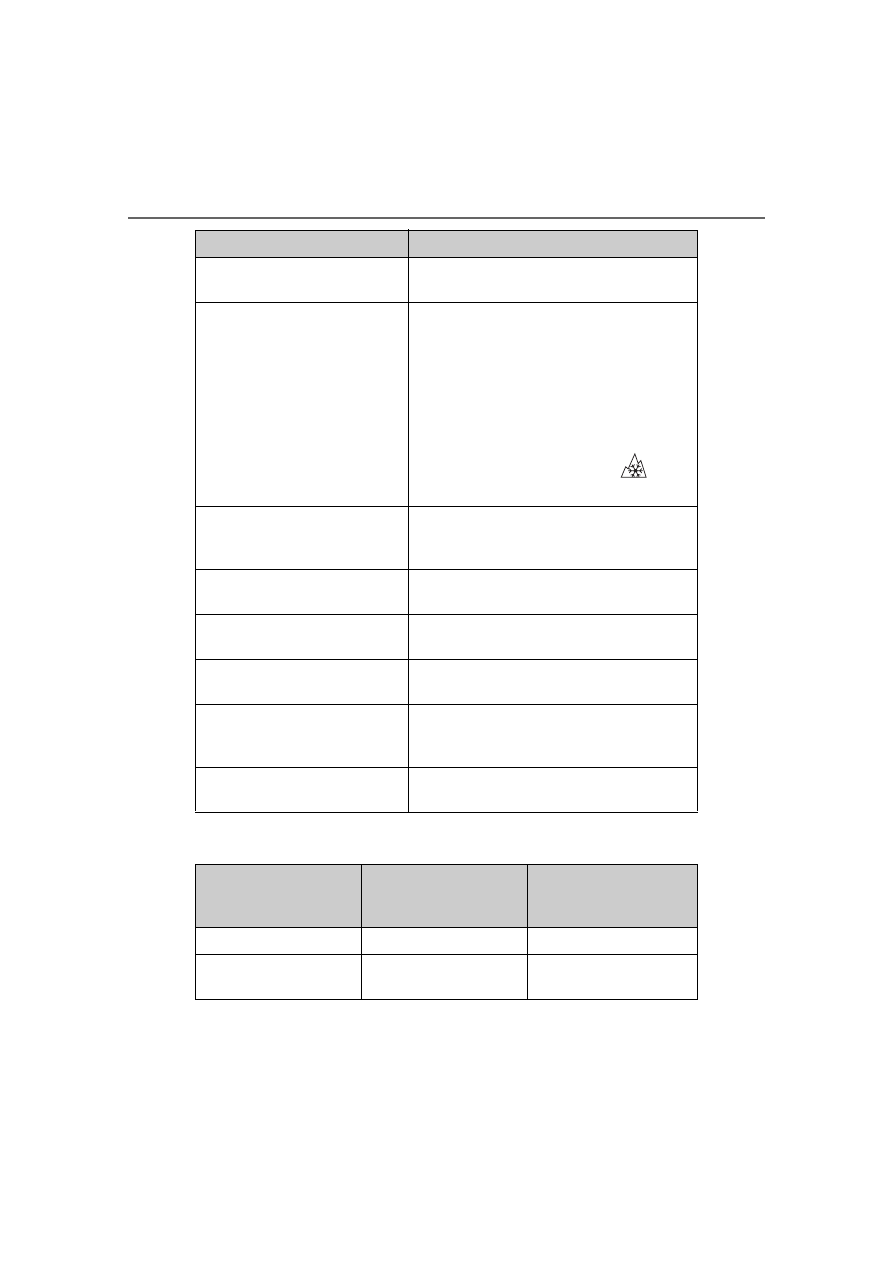
: Table 1 -Occupant loading and distribution for vehicle normal load for var-

ious designated seating capacities

Sidewall separation

The parting of the rubber compound from 
the cord material in the sidewall

Snow tire

A tire that attains a traction index equal to 
or greater than 110, compared to the 
ASTM E-1136 Standard Reference Test 
Tire, when using the snow traction test as 
described in ASTM F-1805-00, Standard 
Test Method for Single Wheel Driving Trac-
tion in a Straight Line on Snow-and 
Ice-Covered Surfaces, and which is 

marked with an Alpine Symbol (

) on at 

least one sidewall

Test rim

The rim on which a tire is fitted for testing, 
and may be any rim listed as appropriate 
for use with that tire

Tread

That portion of a tire that comes into con-
tact with the road

Tread rib

A tread section running circumferentially 
around a tire

Tread separation

Pulling away of the tread from the tire car-
cass

Treadwear indicators (TWI)

The projections within the principal 
grooves designed to give a visual indica-
tion of the degrees of wear of the tread

Wheel-holding fixture

The fixture used to hold the wheel and tire 
assembly securely during testing

Tire related term

Meaning

Designated seating 

capacity, Number of 

occupants

Vehicle normal load, 

Number of occupants

Occupant distribution in 

a normally loaded vehi-

cle

2 through 4

2

2 in front

5 through 10

3

2 in front, 1 in second 

seat

385

8-1. Specifications

8

Vehicle

 specificatio

ns

11 through 15

5

2 in front, 1 in second 

seat, 1 in third seat, 1 in 

fourth seat

16 through 20

7

2 in front, 2 in second 

seat, 2 in third seat, 1 in 

fourth seat

Designated seating 

capacity, Number of 

occupants

Vehicle normal load, 

Number of occupants

Occupant distribution in 

a normally loaded vehi-

cle

386

8-2. Customization

8-2.Customization

Changing by using the 
audio system screen

1

Select 

 on the main menu.

2

Select “Vehicle customise”.

3

Select the item to change the 
settings of from the list.

For functions that can be turned 
on/off, select 

 (ON)/ 


(OFF).

Changing by using the 
meter control switches

1

Select 

 (4.2-inch display) 

or 

 (7-inch display) of the 

multi-information display.

2

4.2-inch display meter: Press 

 or 

 to select the 

desired item to be custom-
ized.

7-inch display meter: Press 


or 

 to select the desired item 

to be customized.

3

Press or press and hold 

.

The available settings will differ 
depending on if 

 is pressed or 

pressed and held. Follow the 

instructions on the display.

Some function settings are changed simultaneously with other func-
tions being customized. Contact your Toyota dealer for further 
details.

Settings that can be changed using the audio system screen
Settings that can be changed using the meter control switches

Customizable features

Your vehicle includes a vari-
ety of electronic features 
that can be personalized to 
suit your preferences. The 
settings of these features 
can be changed using the 
multi-information display, 
on the audio system screen, 
or at your Toyota dealer.

Customizing vehicle fea-
tures

WARNING

During customization

As the engine needs to be run-

ning during customization, ensure 

that the vehicle is parked in a 

place with adequate ventilation. In 

a closed area such as a garage, 

exhaust gases including harmful 

carbon monoxide (CO) may col-

lect and enter the vehicle. This 

may lead to death or a serious 

health hazard.

NOTICE

During customization

To prevent battery discharge, 

ensure that the engine is running 

while customizing features.

Customizable features

387

8-2. Customization

8

Vehicle

 specificatio

ns

Settings that can be changed by your Toyota dealer

Definition of symbols: O = Available, — = Not available

Gauges, meters and multi-information display (

P.68, 72, 75, 

77, 83)

Function

*1

Default setting Customized setting

Language

English

French

O O —

Spanish

Units

*2

miles (MPG)

km (km/L)

— O —

km (L/100 km)

miles (MPG Impe-

rial)

Meter Style

*3

Smart

Casual

— O —

Sporty

Dial Type

*3

Tachometer

Speedometer

— O —

Simple (non-dial)

Eco Driving Indicator 
Light

On

Off

— O —

Fuel economy display

Total average 

(Average fuel 

consumption 

[after reset])

Trip average (Aver-

age fuel consump-

tion [after start])

— O —

Tank average 

(Average fuel con-

sumption [after 

refuel])

Audio system linked dis-
play

On

Off

— O —

Drive information type

After start

After reset

— O —

Drive information items 
(First item)

Distance

Average vehicle 

speed

— O —

Elapsed time

388

8-2. Customization

*1

:For details about each function: 

P.77, 83

*2

:The default setting varies according to country.

*3

:7-inch display

Door lock (

P.95, 99, 356)

Smart key system and wireless remote control (

P.95, 102)

Drive information items 
(Second item)

Elapsed time

Average vehicle 

speed

— O —

Distance

Pop-up display

On

Off

— O —

Function

Default setting Customized setting

Unlocking using a 
mechanical key

Driver’s door 

unlocked in 

one step, all 

doors 

unlocked in 

two step

All doors unlocked 

in one step

— — O

Automatic door locking 
function

Shift position 

linked door 

locking opera-

tion

Off

O — O

Speed linked door 

locking operation

Automatic door unlock-
ing function

Shift position 

linked door 

unlocking 

operation

Off

O — O

Driver’s door linked 

door unlocking 

operation

Function

Default setting Customized setting

Operating signal (Buzz-
ers)

5

Off

O — O

1 to 7

Operation signal (Emer-
gency flashers)

On

Off

O — O

Function

*1

Default setting Customized setting

389

8-2. Customization

8

Vehicle

 specificatio

ns

Smart key system (

P.95, 102)

Wireless remote control (

P.93, 95, 99)

Time elapsed before 
automatic door lock 
function is activated if 
door is not opened after 
being unlocked

60 seconds

Off

O — O

30 seconds

120 seconds

Open door warning 
buzzer

On

Off

— — O

Function

Default setting Customized setting

Smart key system

On

Off

— — O

Smart door unlocking

Driver’s door

All the doors

O — O

Time elapsed before 
unlocking all the door 
when gripping and hold-
ing the driver’s door 
handle

2.0 seconds

Off

— — O

1.5 seconds

2.5 seconds

Number of consecutive 
door lock operations

2 times

As many as 

desired

— — O

Engine switch illumina-
tion

On

Off

— — O

Function

Default setting Customized setting

Wireless remote control

On

Off

— — O

Unlocking operation

Driver’s door 

unlocked in 

one step, all 

doors 

unlocked in 

two step

All doors unlocked 

in one step

O — O

Theft deterrent panic 
mode

On

Off

— — O

Locking operation when 
door opened

On

Off

O — O

Function

Default setting Customized setting

390

8-2. Customization

Engine switch (

P.102)

Power windows (

P.117)

Automatic light control system (

P.148)

Lights (

P.148)

Function

Customized setting

ACC customization
Enabling/Disabling ACC 
mode

On, Off

O — O

Function

Default setting Customized setting

Mechanical key linked 
operation

Off

On

— — O

Wireless remote control 
linked operation

Off

On (open only)

— — O

Wireless remote control 
linked operation signal 
(buzzer)

On

Off

— — O

Function

Default setting Customized setting

Light sensor sensitivity

Standard

-2 to 2

O — O

Time elapsed before 
headlights automatically 
turn off after doors are 
closed

30 seconds

Off

O — O

60 seconds

90 seconds

Windshield wiper linked 
headlight illumination

On

Off

— — O

Function

Default setting Customized setting

Daytime running light 
system

On

Off

O — O

391

8-2. Customization

8

Vehicle

 specificatio

ns

PCS (Pre-Collision System) (

P.167)

*

: The system is automatically enabled each time the engine switch is 

turned to ON.

LDA (Lane Departure Alert) (

P.182)

Dynamic radar cruise control (

P.193)

Proactive Driving Assist (

P.187)

Function

Customized setting

PCS (Pre-Collision Sys-
tem)

*

On, Off

— O —

Warning timing

Later, Default, Earlier

— O —

Function

Customized setting

LDA (Lane Departure 
Alert) system

On, Off

— O —

Alert timing

Default, Earlier

— O —

Alert options

Vibration, Beep

— O —

Function

Customized setting

Acceleration setting

High, Mid, Low

— O —

Guide message

On, Off

— O —

Curve speed reduction

High, Mid, Low, Off

— O —

Function

Customized setting

Proactive Driving Assist

On, Off

— O —

Obstacle Anticipation 
Assist

On, Off

— O —

Deceleration Assist

On, Off

— O —

Support timing

Later, Default, Earlier

— O —

392

8-2. Customization

RSA (Road Sign Assist) (

P.206)

Driver break suggestion (

P.185)

BSM (Blind Spot Monitor)

*

 (

P.209)

*

: If equipped

RCTA (Rear Cross Traffic Alert) function

*1

 (

P.214)

*1

:If equipped

*2

:The sound volume is linked among the Toyota parking assist-sensor and 

RCTA.

Function

Customized setting

RSA (Road Sign Assist)

On, Off

— O —

Excess speed notifica-
tion method

None, Visual, Visual and Audible

— O —

Other notifications 
method

None, Visual, Visual and Audible

— O —

Excess speed notifica-
tion level

5 mph (10 km/h), 3 mph (5 km/h), 1 

mph (2 km/h)

— O —

Function

Customized setting

Driver break suggestion

On, Off

— O —

Function

Default setting Customized setting

BSM (Blind Spot Moni-
tor)

On

Off

— O —

Outside rear view mirror 
indicator brightness

Bright

Dim

— O —

Alert timing for pres-
ence of approaching 
vehicle (sensitivity)

Intermediate

Early

— O —

Late

Function

Default setting Customized setting

RCTA (Rear Cross Traf-
fic Alert)

On

Off

— O —

Buzzer volume of RCTA 
when operating

*2

Level 2

Level 1

— O —

Level 3

393

8-2. Customization

8

Vehicle

 specificatio

ns

Safe Exit Assist

*

 (

P.219)

*

: If equipped

Automatic air conditioning system (

P.234)

Illumination (

P.243)

Vehicle customization

When the smart key system is off, 

Smart door unlocking cannot be 

Function

Default setting Customized setting

Safe Exit Assist

On

Off

— O —

Outside rearview mir-
rors display

On

Off

— O —

Detection sensitivity

Middle

High

— O —

Low

Function

Default setting Customized setting

Switching between out-
side air and recirculated 
air mode linked to auto-
matic mode switch oper-
ation

On

Off

O — O

A/C auto switch opera-
tion

On

Off

O — O

Function

Default setting Customized setting

Time elapsed before the 
interior lights turn off

15 seconds

Off

O — O

7.5 seconds

30 seconds

Operation after the 
engine switch is turned 
off

On

Off

— — O

Operation when the 
doors are unlocked

On

Off

— — O

Operation when you 
approach the vehicle 
with the electronic key 
on your person

On

Off

— — O

394

8-2. Customization

customized.

When the doors remain closed 

after unlocking the doors and the 

automatic door lock function is 

activated, the signals will be gen-

erated in accordance with the 

operation signal (buzzer) and the 

operation signal (emergency 

flashers) settings.

In the following situations, cus-

tomize mode in which the set-

tings can be changed through 

the multi-information display 

will automatically be turned off

A warning message appears after 

the customize mode screen is dis-

played

The engine switch is turned off.

The vehicle begins to move while 

the customize mode screen is dis-

played.

395

8-3. Initialization

8

Vehicle

 specificatio

ns

8-3.Initialization

Items to initialize

The following items must be initialized for normal system 
operation after such cases as the battery being reconnected, 
or maintenance being performed on the vehicle:

List of items to initialize

Item

When to initialize

Reference

Message indicat-
ing maintenance is 
required

• After maintenance is performed

P.266

Tire pressure warn-
ing system

• When rotating the tires.
• When the tire inflation pressure 

is changed, such as when the 
tire size is changed.

• When the tire inflation pressure 

is changed, such as when 
changing traveling speed.

• When changing between two 

registered wheel sets

P.288

397

9

9

For ow

ner
s

For owners

.

9-1. For owners

Reporting safety defects for 

U.S. owners...............

398

Reporting safety defects for 

Canadian owners ......

398

Seat belt instructions for 

Canadian owners (in 
French)......................

399

SRS airbag instructions for 

Canadian owners (in 
French)......................

400

398

9-1. For owners

9-1.For owners

Reporting safety 

defects for U.S. own-

ers

If you believe that your vehicle 
has a defect which could 
cause a crash or could cause 
injury or death, you should 
immediately inform the 
National Highway Traffic 
Safety Administration 
(NHTSA) in addition to notify-
ing Toyota Motor Sales, 
U.S.A., Inc. (Toll-free: 
1-800-331-4331).

If NHTSA receives similar 
complaints, it may open an 
investigation, and if it finds 
that a safety defect exists in a 
group of vehicles, it may order 
a recall and remedy cam-
paign. However, NHTSA can-
not become involved in 
individual problems between 
you, your dealer, or Toyota 
Motor Sales, U.S.A., Inc.

To contact NHTSA, you may 
call the Vehicle Safety Hotline 
toll-free at 1-888-327-4236 
(TTY: 1-800-424-9153); go to 

http://www.safercar.gov

 ; or 

write to: Administrator, 
NHTSA, 1200 New Jersey 
Ave. SE., Washington, DC 
20590. You can also obtain 
other information about motor 
vehicle safety from 

http://www.safercar.gov

.

Reporting safety 

defects for Canadian 

owners

Canadian customers who 
wish to report a safety-related 
defect to Transport Canada, 
Defects Investigations and 
Recalls, may telephone the 
toll-free hotline 
1-800-333-0510, mail Trans-
port Canada - ASFAD, 330 
Sparks Street, Ottawa, ON, 
K1A 0N5, or complete the 
online form at 
https://www.tc.gc.ca/recalls.

399

9-1. For owners

9

For ow

ner
s

Déroulez la sangle diagonale 
de telle sorte qu'elle passe 
bien sur l'épaule, sans pour 
autant être en contact avec le 
cou ou glisser de l'épaule.

Placez la sangle abdominale 
le plus bas possible sur les 
hanches.

Réglez la position du dossier 
de siège. Asseyez-vous le 
dos droit et calez-vous bien 
dans le siège.

Ne vrillez pas la ceinture de 

sécurité.

Traitement des ceintures de 
sécurité

Nettoyez avec un chiffon ou une 
éponge humidifiés avec de l'eau 
savonneuse tiède. Vérifiez 
régulièrement que les ceintures 
ne sont pas usées, effilochées 
ou entaillées excessivement.

Seat belt instructions 

for Canadian owners 

(in French)

The following is a French 
explanation of seat belt 
instructions extracted from 
the seat belt section in this 
manual.

See the seat belt section for 
more detailed seat belt 
instructions in English.

Utilisation correcte des 
ceintures de sécurité

Entretien et soin

WARNING

Détérioration et usure des 

ceintures de sécurité

Inspectez le système de ceintures 

de sécurité régulièrement. Con-

trôlez l'absence de coupures, 

d'effilochages et de pièces 

desserrées. N'utilisez pas une 

ceinture de sécurité endommagée 

avant qu'elle ne soit remplacée. 

Une ceinture de sécurité endom-

magée ne permet pas de protéger 

un occupant de blessures graves 

ou mortelles.

400

9-1. For owners

Emplacement des coussins gonflables SRS

Coussins gonflables frontaux SRS

Coussin gonflable conducteur/coussin gonflable du passager 
avant SRS

Participe à la protection de la tête et du thorax du conducteur et du pas-
sager avant contre les chocs contre les éléments de l'habitacle

Coussin gonflable de genoux SRS

Participe à la protection du conducteur

Coussin gonflable de coussin de siège SRS

Contribue à retenir le passager avant

SRS airbag instructions for Canadian owners (in 

French)

The following is a French explanation of SRS airbag instruc-
tions extracted from the SRS airbag section in this manual.

See the SRS airbag section for more detailed SRS airbag instruc-
tions in English.

Système de coussins gonflables SRS


Content      ..     22      23      24      25     ..