Toyota Corolla Hatchback (2023 year). Manual in english - page 13
 

  Index      Toyota     Toyota Corolla Hatchback (2023 year). Manual in english


Search            copyright infringement  


Content      ..     11      12      13      14     ..


Toyota Corolla Hatchback (2023 year). Manual in english - page 13


208

4-5. Using the driving support systems

Operating conditions of the 

notification functions

Excess speed notification function

This function will operate when the 

following condition is met:

• A speed limit road sign is recog-

nized by the system.

No entry notification function

This function will operate when all of 

the following conditions are met:

• More than one no entry road signs 

are recognized by the system 

simultaneously.

• The vehicle is passing between no 

entry road signs recognized by the 

system.

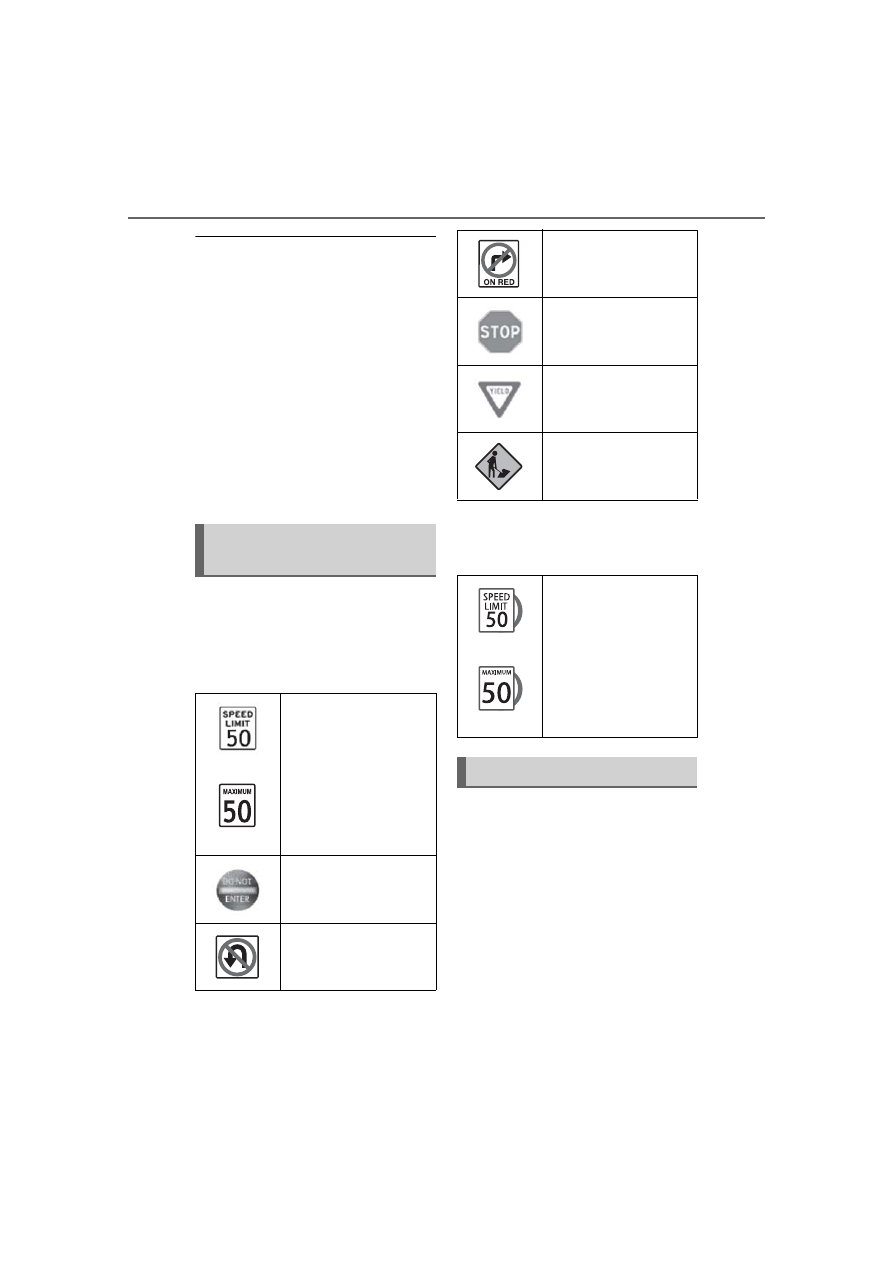
The following types of road 
signs can be displayed.

However, non-standard or recently 
introduced traffic signs may not be 
displayed.

Depending on the specifica-
tions of the vehicle, signs may 
be displayed overlapping.

The following settings of the 
RSA can be changed through 
customize settings. (

P.386)

Types of road signs sup-
ported

(U.S.A.)

(Canada)

Speed limit

Do Not Enter

No U-turn

No Turn On Red

Stop

Yield

Warning

(U.S.A.)

(Canada)

Duplicate display 
example

Changing RSA settings

209

4-5. Using the driving support systems

4

Dr

iv

ing

*

: If equipped

Meter control switches

Turning the Blind Spot Monitor 
on/off.

Outside rear view mirror indi-
cators

When a vehicle is detected in a 
blind spot of the outside rear view 
mirrors or approaching rapidly from 
behind into a blind spot, the outside 
rear view mirror indicator on the 
detected side will illuminate. If the 
turn signal lever is operated toward 
the detected side, the outside rear 
view mirror indicator flashes.

Driving assist information 
indicator

Illuminates when the Blind Spot 
Monitor is turned off. At this time, 
“Blind Spot Monitor OFF” will be 
displayed on the multi-information 
display.

Outside rear view mirror indica-

tor visibility

In strong sunlight, the outside rear 

view mirror indicator may be difficult 

to see.

Customization

Some functions can be customized. 

(

P.386)

BSM (Blind Spot Moni-

tor)

*

The Blind Spot Monitor is a 
system that uses rear side 
radar sensors installed on 
the inner side of the rear 
bumper on the left and right 
side to assist the driver in 
confirming safety when 
changing lanes.

WARNING

Cautions regarding the use of 

the system

The driver is solely responsible 

for safe driving. Always drive 

safely, taking care to observe 

your surroundings.

The Blind Spot Monitor is a sup-

plementary function which alerts 

the driver that a vehicle is in a 

blind spot of the outside rear 

view mirrors or is approaching 

rapidly from behind into a blind 

spot. Do not overly rely on the 

Blind Spot Monitor. As the func-

tion cannot judge if it is safe to 

change lanes, over reliance 

could lead to an accident result-

ing in death or serious injury. As 

the system may not function 

correctly under certain condi-

tions, the driver’s own visual 

confirmation of safety is neces-

sary.

System components

210

4-5. Using the driving support systems

The Blind Spot Monitor can be 
enabled/disabled on 


(4.2-inch display) or 

 (7-inch 

display) of the multi-information 
display. (

P.386)

When the Blind Spot Monitor 
function is off, the driving assist 
information indicator (

P.70) 

will illuminate. At this time, 
"Blind Spot Monitor OFF" will be 
displayed on the multi-informa-

WARNING

To ensure the system can 

operate properly

Blind Spot Monitor sensors are 

installed behind the left and right 

sides of the rear bumper respec-

tively. Observe the following to 

ensure the Blind Spot Monitor can 

operate correctly.

Keep the sensors and the sur-

rounding areas on the rear 

bumper clean at all times.

If a sensor or its surrounding area 
on the rear bumper is dirty or cov-
ered with snow, the Blind Spot 
Monitor may not operate and a 
warning message will be dis-
played. In this situation, clear off 
the dirt or snow and drive the 
vehicle with the operation condi-
tions of the BSM function 
(

P.212) satisfied for approxi-

mately 10 minutes. If the warning 
message does not disappear, 
have the vehicle inspected by 
your Toyota dealer.

Do not attach accessories, 

stickers (including transparent 

stickers), aluminum tape, etc. to 

a sensor or its surrounding area 

on the rear bumper.

Do not subject a sensor or its 

surrounding area on the rear 

bumper to a strong impact.

If a sensor is moved even 

slightly off position, the system 

may malfunction and vehicles 

may not be detected correctly.

In the following situations, have 

your vehicle inspected by your 

Toyota dealer.

• A sensor or its surrounding area 

is subject to a strong impact.

• If the surrounding area of a sen-

sor is scratched or dented, or 

part of them has become dis-

connected.

Do not disassemble the sensor.

Do not modify the sensor or sur-

rounding area on the rear 

bumper.

If a sensor or the rear bumper 

needs to be removed/installed 

or replaced, contact your Toyota 

dealer.

Do not paint the rear bumper 

any color other than an official 

Toyota color.

Turning the Blind Spot 
Monitor on/off

211

4-5. Using the driving support systems

4

Dr

iv

ing

tion display.
Each time the engine switch is 

turned to ON, the Blind Spot 
Monitor is enabled.

Objects that can be detected while driving

The Blind Spot Monitor uses rear side radar sensors to detect the fol-
lowing vehicles traveling in adjacent lanes and advises the driver of 
the presence of such vehicles via the indicators on the outside rear 
view mirrors.

Vehicles that are traveling in areas that are not visible using the 
outside rear view mirrors (the blind spots)
Vehicles that are approaching rapidly from behind in areas that 
are not visible using the outside rear view mirrors (the blind spots)

Detection range while driving

The areas that vehicles can be detected in are outlined below.

The range of each detection area is:

Approximately 1.6 ft. (0.5 m) to 11.5 ft. (3.5 m) from either side of 
the vehicle

*1

Approximately 3.3 ft. (1 m) forward of the rear bumper

Blind Spot Monitor operation

212

4-5. Using the driving support systems

Approximately 9.8 ft. (3 m) from the rear bumper
Approximately 9.8 ft. (3 m) to 197 ft. (60 m) from the rear 
bumper

*2

*1

:The area between the side of the vehicle and 1.6 ft. (0.5 m) from the side 

of the vehicle cannot be detected.

*2

:The greater the difference in speed between your vehicle and the 

detected vehicle is, the farther away the vehicle will be detected, causing 
the outside rear view mirror indicator to illuminate or flash.

The Blind Spot Monitor is oper-

ational when

The Blind Spot Monitor is opera-

tional when all of the following con-

ditions are met:

The engine switch is in ON.

The Blind Spot Monitor is on.

The shift lever is in a position 

other than R.

The vehicle speed is approxi-

mately 7 mph (10 km/h) or more.

The Blind Spot Monitor will 

detect a vehicle when

The Blind Spot Monitor will detect a 

vehicle present in the detection area 

in the following situations:

A vehicle in an adjacent lane over-

takes your vehicle.

You overtake a vehicle in an adja-

cent lane slowly.

Another vehicle enters the detec-

tion area when it changes lanes.

Situations in which the blind 

spot monitor cannot detect 

vehicles.

The blind spot monitor cannot 

detect the following vehicles and 

other objects:

Small motorcycles, bicycles, 
pedestrians, etc.

*

Vehicles traveling in the opposite 

direction

Guardrails, walls, signs, parked 

vehicles and similar stationary 

objects

*

Following vehicles that are in the 
same lane

*

Vehicles traveling 2 lanes away 
from your vehicle

*

Vehicles which are being over-
taken rapidly by your vehicle

*

*

: Depending on the conditions, 

detection of a vehicle and/or 
object may occur.

Conditions under which the 

System may not function cor-

rectly

The Blind Spot Monitor may not 

detect vehicles correctly in the fol-

lowing situations:

• When the sensor is misaligned 

due to a strong impact to the sen-

sor or its surrounding area

• When mud, snow, ice, a sticker, 

etc. is covering the sensor or sur-

rounding area on the rear bumper

• When driving on a road surface 

that is wet with standing water 

during bad weather, such as 

heavy rain, snow, or fog

• When multiple vehicles are 

approaching with only a small gap 

between each vehicle

• When the distance between your 

vehicle and a following vehicle is 

short

• When there is a significant differ-

ence in speed between your vehi-

cle and the vehicle that enters the 

detection area

• When the difference in speed 

between your vehicle and another 

213

4-5. Using the driving support systems

4

Dr

iv

ing

vehicle is changing

• When a vehicle enters a detection 

area traveling at about the same 

speed as your vehicle

• As your vehicle starts from a stop, 

a vehicle remains in the detection 

area

• When driving up and down con-

secutive steep inclines, such as 

hills, dips in the road, etc.

• When driving on roads with sharp 

bends, consecutive curves, or 

uneven surfaces

• When vehicle lanes are wide, or 

when driving on the edge of a 

lane, and the vehicle in an adja-

cent lane is far away from your 

vehicle

• When an accessory (such as a 

bicycle carrier) is installed to the 

rear of the vehicle

• When there is a significant differ-

ence in height between your vehi-

cle and the vehicle that enters the 

detection area

• Immediately after the Blind Spot 

Monitor is turned on

• When towing with the vehicle

Instances of the Blind Spot Moni-

tor unnecessarily detecting a vehi-

cle and/or object may increase in 

the following situations:

• When the sensor is misaligned 

due to a strong impact to the sen-

sor or its surrounding area

• When the distance between your 

vehicle and a guardrail, wall, etc. 

that enters the detection area is 

short

• When driving up and down con-

secutive steep inclines, such as 

hills, dips in the road, etc.

• When vehicle lanes are narrow, or 

when driving on the edge of a 

lane, and a vehicle traveling in a 

lane other than the adjacent lanes 

enters the detection area

• When driving on roads with sharp 

bends, consecutive curves, or 

uneven surfaces

• When the tires are slipping or 

spinning

• When the distance between your 

vehicle and a following vehicle is 

short

• When an accessory (such as a 

bicycle carrier) is installed to the 

rear of the vehicle

• When towing with the vehicle

214

4-5. Using the driving support systems

*

: If equipped

Meter control switches

Turning the RCTA function on/off.
When the RCTA function is dis-
abled, the RCTA OFF indicator illu-
minates.

Outside rear view mirror indi-
cators

If a vehicle is detected as 
approaching from the left or right 
behind the vehicle, both outside 
rear view mirror indicators will blink 
and a buzzer will sound.

Audio system screen

If a vehicle approaching from the 
right or left at the rear of the vehicle 
is detected, the RCTA icon 
(

P.215) for the detected side will 

be displayed on the audio system 
screen. This illustration shows an 
example of a vehicle approaching 
from both sides of the vehicle.

Driving assist information 
indicator

When the RCTA is off,  “Rear Cross 
Traffic Alert OFF” will be displayed 
on the multi-information display.

RCTA (Rear Cross Traf-

fic Alert) function

*

The RCTA function uses the 
BSM rear side radar sensors 
installed behind the rear 
bumper. This function is 
intended to assist the driver 
in checking areas that are 
not easily visible when 
backing up.

WARNING

Cautions regarding the use of 

the system

The driver is solely responsible for 

safe driving. Always drive safely, 

taking care to observe your sur-

roundings. The RCTA function is 

only a supplementary function 

which alerts the driver that a vehi-

cle is approaching from the right 

or left at the rear of the vehicle. As 

the RCTA function may not func-

tion correctly under certain condi-

tions, the driver’s own visual 

confirmation of safety is neces-

sary. Over reliance on this func-

tion may lead to an accident 

resulting death or serious injury.

To ensure the system can 

operate properply

P.210

System components

215

4-5. Using the driving support systems

4

Dr

iv

ing

The RCTA can be enabled/dis-
abled on 

 (4.2-inch display) 

or 

 (7-inch display) of the 

multi-information display. 
(

P.386)

When the RCTA function is off, 
the driving assist information 
indicator (

P.70) will illuminate. 

At this time, "Rear Cross Traffic 

Alert OFF" will be displayed on 
the multi-information display.

Outside rear view mirror indica-

tor visibility

In strong sunlight, the outside rear 

view mirror indicator may be difficult 

to see.

Hearing the RCTA buzzer

The RCTA buzzer may be difficult to 

hear over loud noises, such as if the 

audio system volume is high.

Rear side radar sensors

P.210

Operation of the RCTA function

The RCTA function uses rear side radar sensors to detect vehicles 
approaching from the right or left at the rear of the vehicle and alerts 
the driver of the presence of such vehicles by flashing the outside 
rear view mirror indicators and sounding a buzzer.

Approaching vehicles
Detection areas of approaching vehicles

RCTA icon display

When a vehicle approaching from the right or left at the rear of the 
vehicle is detected, the following will be displayed on the audio sys-
tem screen.
Example: Vehicles are approaching from both sides of the vehicle

Turning the RCTA func-
tion on/off

 RCTA function

216

4-5. Using the driving support systems

RCTA function detection areas

The areas that vehicles can be detected in are outlined below.

The buzzer can alert the driver of faster vehicles approaching from 
farther away.
Example:

The RCTA function is opera-

tional when

The RCTA function operates when 

all of the following conditions are 

met:

The engine switch is in ON.

The RCTA function is on.

The shift lever is in R.

The vehicle speed is less than 

approximately 9 mph (15 km/h).

The approaching vehicle speed is 

between approximately 5 mph (8 

km/h) and 34 mph (56 km/h).

Setting the buzzer volume

The buzzer volume can be adjusted 

on the multi-information display.
The volume of the RCTA buzzer can 
be adjusted on 

 (4.2-inch dis-

play) or 

 (7-inch display) of the 

multi-information display. (

P.78, 

83)

Conditions under which the 

system will not detect a vehicle

The RCTA function is not designed 

to detect the following types of vehi-

cles and/or objects:

Approaching vehicle speed

 Approximate alert distance

34 mph (56 km/h) (fast)

131 ft. (40 m)

5 mph (8 km/h) (slow)

18 ft. (5.5 m)

217

4-5. Using the driving support systems

4

Dr

iv

ing

Vehicles approaching from directly 

behind

Vehicles backing up in a parking 

space next to your vehicle

Vehicles that the sensors cannot 

detect due to obstructions

Guardrails, walls, signs, parked 

vehicles and similar stationary 
objects

*

Small motorcycles, bicycles, 
pedestrians, etc.

*

Vehicles moving away from your 

vehicle

Vehicles approaching from the 

parking spaces next to your vehi-
cle

*

The distance between the sensor 

and approaching vehicle gets too 

close

*

: Depending on the conditions, 

detection of a vehicle and/or 
object may occur.

Situations in which the system 

may not operate properly

The RCTA function may not detect 

vehicles correctly in the following 

situations:

When the sensor is misaligned 

due to a strong impact to the sen-

sor or its surrounding area

When mud, snow, ice, a sticker, 

etc., is covering the sensor or sur-

rounding area on the position 

above the rear bumper

When driving on a road surface 

that is wet with standing water 

during bad weather, such as 

heavy rain, snow, or fog

When multiple vehicles are 

approaching with only a small gap 

between each vehicle

When a vehicle is approaching at 

high speed

When equipment that may 

obstruct a sensor is installed, such 

as a towing eyelet, bumper pro-

tector (an additional trim strip, 

etc.), bicycle carrier, or snow plow

When backing up on a slope with 

a sharp change in grade

When backing out of a sharp 

angle parking spot

Immediately after the RCTA func-

tion is turned on

Immediately after the engine is 

started with the RCTA function on

When the sensors cannot detect a 

vehicle due to obstructions

When towing a trailer

When there is a significant differ-

ence in height between your vehi-

cle and the vehicle that enters the 

218

4-5. Using the driving support systems

detection area

When a sensor or the area around 

a sensor is extremely hot or cold

If the suspension has been modi-

fied or tires of a size other than 

specified are installed

If the front of the vehicle is raised 

or lowered due to the carried load

When turning while backing up

When a vehicle turns into the 

detection area

Situations in which the system 

may operate even if there is no 

possibility of a collision

Instances of the RCTA function 

unnecessary detecting a vehicle 

and/or object may increase in the 

following situations:

When the parking space faces a 

street and vehicles are being 

driven on the street

When the distance between your 

vehicle and metal objects, such as 

a guardrail, wall, sign, or parked 

vehicle, which may reflect electri-

cal waves toward the rear of the 

vehicle, is short

When equipment that may 

obstruct a sensor is installed, such 

as a towing eyelet, bumper pro-

tector (an additional trim strip, 

etc.), bicycle carrier, or snow plow

When a vehicle passes by the 

side of your vehicle

When a detected vehicle turns 

while approaching the vehicle

When there are spinning objects 

near your vehicle such as the fan 

of an air conditioning unit

When water is splashed or 

sprayed toward the rear bumper, 

such as from a sprinkler

Moving objects (flags, exhaust 

fumes, large rain droplets or 

snowflakes, rain water on the road 

surface, etc.)

When the distance between your 

219

4-5. Using the driving support systems

4

Dr

iv

ing

vehicle and a guardrail, wall, etc., 

that enters the detection area is 

short

Gratings and gutters

When a sensor or the area around 

a sensor is extremely hot or cold

If the suspension has been modi-

fied or tires of a size other than 

specified are installed

If the front of the vehicle is raised 

or lowered due to the carried load

*

: If equipped

Safe Exit Assist

*

The safe exit assist is a sys-
tem that uses rear side 
radar sensors installed on 
the inner side of the rear 
bumper to help occupants 
judge if an approaching 
vehicle or bicycle may col-
lide with a door when open-
ing it or cancel opening of 
the door, to reduce the pos-
sibility of a collision.

WARNING

Cautions regarding the use of 

the system

The driver is solely responsible 

for safe driving. Always drive 

safely, taking care to observe 

your surroundings.

The safe exit assist is a supple-

mentary system that, when the 

vehicle is stopped, informs 

occupants of the existence of 

approaching vehicles and bicy-

cles. As this system alone can-

not be used to judge safety, 

over-reliance on this system 

may lead to an accident result-

ing in death or serious injury.

In certain situations, this system 

may not function to its fullest 

extent. Therefore it is necessary 

for the occupants to visually 

check for safety directly and using 

the mirrors.

220

4-5. Using the driving support systems

Multi-information display

Turning the safe exit assist on/off.
When the system determines that 
the possibility of a collision with a 
door is high, the target door is dis-
played on the multi-information dis-
play. Also, if the door is opened 
when the outside rear view mirror 
indicator is illuminated, a buzzer 
will sound as a warning.

Outside rear view mirror indi-
cators

When a vehicle or bicycle which 
may collide with a door (other than 
the back door) when opened is 
detected, the outside rear view mir-
ror indicator on the detected side 
will illuminate. When a door on the 
detected side is opened, the out-
side rear view mirror indicator will 
flash.

Driving assist information 
indicator

Illuminates when the safe exit 
assist is turned off. At this time, 
“Safe Exit Assist OFF” will be dis-
played on the multi-information dis-
play.

Outside rear view mirror indica-

tor visibility

In strong sunlight, the outside rear 

view mirror indicator may be difficult 

to see.

Buzzer

If the volume setting of the audio 

system is high or the surrounding 

area is loud, it may be difficult to 

hear the buzzer.

Customization

Some functions can be customized. 

(

P.386)

System components

WARNING

To ensure the system can 

operate properly

Safe exit assist sensors are 

installed behind the left and right 

sides of the rear bumper respec-

tively. Observe the following to 

ensure the safe exit assist can 

operate correctly.

221

4-5. Using the driving support systems

4

Dr

iv

ing

The safe exit assist can be 
enabled/disabled on 


(4.2-inch display) or 

 (7-inch 

display) of the multi-information 
display. (

P.386)

When the safe exit assist is off, 
the driving assist information 
indicator will illuminate. At this 
time, “Safe Exit Assist OFF” will 
be displayed on the multi-infor-
mation display. Each time the 
engine switch is turned to ON, 
the safe exit assist is enabled.

WARNING

Keep the sensors and the sur-

rounding areas on the rear 

bumper clean at all times.

If a sensor or its surrounding area 
on the rear bumper is dirty or cov-
ered with snow, the Safe Exit 
Assist may not operate and a 
warning message will be dis-
played. In this situation, clear off 
the dirt or snow and drive the 
vehicle with the operation condi-
tions of the SEA function satisfied 
for approximately 10 minutes. If 
the warning message does not 
disappear, have the vehicle 
inspected by your Toyota dealer.

Do not attach accessories, 

stickers (including transparent 

stickers), aluminum tape, etc. to 

a sensor or its surrounding area 

on the rear bumper.

Do not subject a sensor or its 

surrounding area on the rear 

bumper to a strong impact.

If a sensor is moved even 

slightly off position, the system 

may malfunction and vehicles 

may not be detected correctly.

In the following situations, have 

your vehicle inspected by your 

Toyota dealer.

• A sensor or its surrounding area 

is subject to a strong impact.

• If the surrounding area of a sen-

sor is scratched or dented, or 

part of them has become dis-

connected.

Do not disassemble the sensor.

Do not modify the sensor or sur-

rounding area on the rear 

bumper.

If a sensor or the rear bumper 

needs to be removed/installed 

or replaced, contact your Toyota 

dealer.

Do not paint the rear bumper 

any color other than an official 

Toyota color.

Turning the Safe exit 
assist system ON/OFF

222

4-5. Using the driving support systems

Objects that can be detected by the Safe exit assist

When the safe exit assist detects the following vehicles or bicycles 
behind your vehicle using a rear side radar sensor, the occupants of 
the vehicle are informed through an outside rear view mirror indica-
tor, buzzer, and the multi-information display.

Vehicle or bicycle which has a high possibility of colliding with a 
door (other than the back door) when opened

The Safe exit assist detection areas

The areas that vehicles can be detected in are outlined below.

Approximately 145 ft. (45 m) rearward from the front door

*

*

: The faster a vehicle or bicycle is approaching, the distance at which an 

outside rear view mirror indicator will illuminate or blink will become fur-
ther.

The Safe exit assist is opera-

tional when

The Safe exit assist is operational 

when all of the following conditions 

are met:

When the engine switch is ON, 

less than 3 minutes have elapsed 

since the engine was off, or less 

than 3 minutes have elapsed 

since a door was opened and 

someone has entered the vehicle 

(the time which operation is possi-

ble may be extended if a door is 

opened and closed)

Safe exit assist operation

223

4-5. Using the driving support systems

4

Dr

iv

ing

Safe exit assist is on

The vehicle is stopped.

The shift lever is in a position 

other than R.

The Safe exit assist will detect a 

vehicle when

The Safe exit assist will detect a 

vehicle present in the detection area 

in the following situations:

When the vehicle is stopped and a 

vehicle or bicycle, which is travel-

ing parallel to the vehicle, is 

approaching within the area that a 

door opens (other than the back 

door)

Conditions under which the 

system will not detect a vehicle

Safe exit assist does not detect 

the following objects, vehicles, 

and bicycles:

• Vehicles or bicycles which are 

approaching slowly

*

• Vehicles or bicycles which are 

determined to have a low possibil-

ity of colliding with a door (other 
than the back door) when opened

*

• Vehicles or bicycles which are 

approaching from directly behind

*

• Vehicles or bicycles which are 

approaching from the front

*

• Guardrails, walls, signs, parked 

vehicles, and other stationary 
objects

*

• Pedestrians, animals, etc.

*

*

: Depending on the conditions, 

detection of a vehicle and/or 
object may occur.

In situations such as the following, 

safe exit assist will not operate:

• When 3 minutes or more have 

elapsed since the engine off (the 

time which operation is possible 

may be extended if a door is 

opened and closed)

• When your vehicle is not com-

pletely stopped

Conditions under which the 

system may not function cor-

rectly

The Safe exit assist may not 

detect vehicles correctly in the fol-

lowing situations:

• When the sensor is misaligned 

due to a strong impact to the sen-

sor or its surrounding area

• When mud, snow, ice, a sticker, 

etc. is covering the sensor or sur-

rounding area on the rear bumper

• When the vehicle is stopped on a 

wet road surface, such as in a 

puddle, while in inclement 

weather, such as heavy rain, 

snow, fog, etc.

• When a vehicle or bicycle 

approaches from behind a nearby 

parked vehicle

• When an approaching vehicle or 

bicycle suddenly changes direc-

tion

• Immediately after a vehicle or 

bicycle starts moving

• When the back door is open

• When a bicycle carrier, ramp, or 

other accessory is installed to the 

back of the vehicle

• When a parked vehicle, wall, sign, 

person or other stationary object 

is behind the vehicle

• When the vehicle is stopped at an 

angle to the road

• When a vehicle is traveling near 

an approaching vehicle or bicycle

• When an approaching vehicle or 

bicycle is traveling along a station-

ary object, such a wall or sign

• When a vehicle or bicycle is 

approaching at high speed

• When towing with the vehicle

• When stopped on a steep slope

• When stopped on a curve or at the 

exit of a curve

Instances of the Safe exit assist 

unnecessarily detecting a vehicle 

and/or object may increase in the 

following situations:

• When the sensor is misaligned 

due to a strong impact to the sen-

sor or its surrounding area

• When a vehicle or bicycle 


Content      ..     11      12      13      14     ..