Toyota Camry (2023 year). Manual in english - page 29
 

  Index      Toyota     Toyota Camry (2023 year). Manual in english


Search            copyright infringement  


Content      ..     27      28      29      30     ..


Toyota Camry (2023 year). Manual in english - page 29


468

6-3. Do-it-yourself maintenance

Checking fluid level

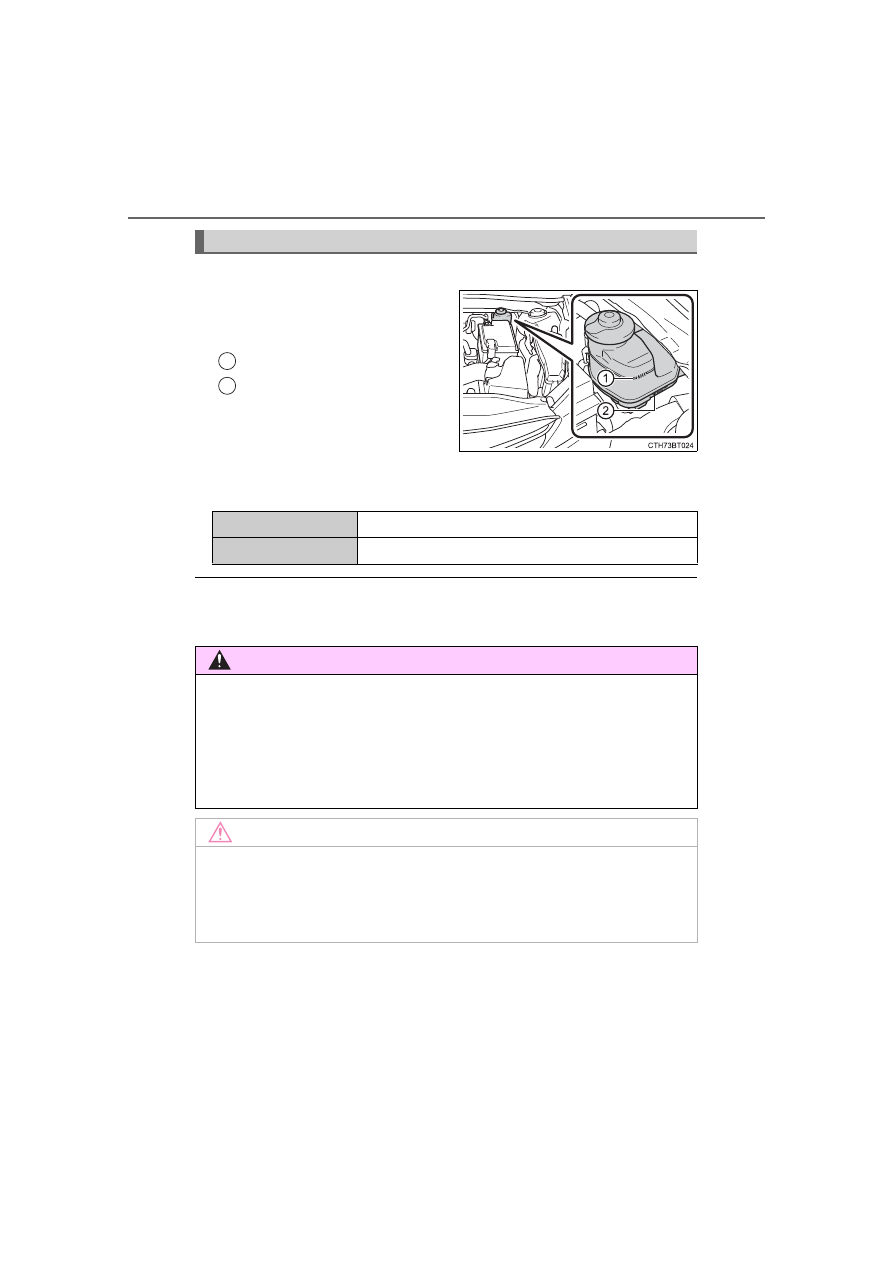
The brake fluid level should be
between  the  “MAX”  and  “MIN”
lines on the tank.

“MAX”
“MIN”

Adding fluid

Make sure to check the fluid type and prepare the necessary item.

Brake fluid can absorb moisture from the air

Excess moisture in the brake fluid can cause a dangerous loss of braking effi-
ciency. Use only newly opened brake fluid.

Brake fluid

1

2

Fluid type

FMVSS No.116 DOT 3 or SAE J1703 brake fluid

Item

Clean funnel

WARNING

When filling the reservoir

Take  care  as  brake  fluid  can  harm  your  hands  and  eyes  and  damage
painted surfaces.
If fluid gets on your hands or in your eyes, flush the affected area with clean
water immediately.
If you still experience discomfort, see a doctor.

NOTICE

If the fluid level is low or high

It is normal for the brake fluid level to go down slightly as the brake pads
wear out or when the fluid level in the accumulator is high.
If the reservoir needs frequent refilling, there may be a serious problem.

469

6-3. Do-it-yourself maintenance

6

Mainten

ance an

d ca

re

Check the battery as follows.

Battery exterior

Make  sure  that  the  battery  terminals  are  not  corroded  and  that
there are no loose connections, cracks, or loose clamps.

Terminals
Hold-down clamp

Before recharging

When recharging, the battery produces hydrogen gas which is flammable and
explosive. Therefore, observe the following before recharging:

If recharging with the battery installed on the vehicle, be sure to disconnect
the ground cable.

Make sure the power switch on the charger is off when connecting and dis-
connecting the charger cables to the battery.

After recharging/reconnecting the battery (vehicles with a smart key sys-
tem)

Unlocking the doors using the smart key system may not be possible imme-
diately  after  reconnecting  the  battery.  If  this  happens,  use  the  wireless
remote control or the mechanical key to lock/unlock the doors.

Start the engine with the engine switch in ACCESSORY mode. The engine
may  not  start  with  the  engine  switch  turned  off.  However,  the  engine  will
operate normally from the second attempt.

The engine switch mode is recorded by the vehicle. If the battery is recon-
nected, the vehicle will return the engine switch mode to the status it was in
before  the  battery  was  disconnected.  Make  sure  to  turn  off  the  engine
before disconnecting the battery. Take extra care when connecting the bat-
tery if the engine switch mode prior to discharge is unknown.

If the system will not start even after multiple attempts, contact your Toyota
dealer.

Battery

1

2

470

6-3. Do-it-yourself maintenance

WARNING

Chemicals in the battery

Batteries  contain  poisonous  and  corrosive  sulfuric  acid  and  may  produce
hydrogen gas which is flammable and explosive. To reduce the risk of death
or serious injury, take the following precautions while working on or near the
battery:

Do not cause sparks by touching the battery terminals with tools.

Do not smoke or light a match near the battery.

Avoid contact with eyes, skin and clothes.

Never inhale or swallow electrolyte.

Wear protective safety glasses when working near the battery.

Keep children away from the battery.

Where to safely charge the battery

Always charge the battery in an open area. Do not charge the battery in a
garage or closed room where there is insufficient ventilation.

How to recharge the battery

Only  perform  a  slow  charge  (5  A  or  less).  The  battery  may  explode  if
charged at a quicker rate.

Emergency measures regarding electrolyte

If electrolyte gets in your eyes
Flush your eyes with clean water for at least 15 minutes and get immedi-
ate medical attention. If possible, continue to apply water with a sponge or
cloth while traveling to the nearest medical facility.

If electrolyte gets on your skin
Wash the affected area thoroughly. If you feel pain or burning, get medical
attention immediately.

If electrolyte gets on your clothes
It can soak through clothing on to your skin. Immediately take off the cloth-
ing and follow the procedure above if necessary.

If you accidentally swallow electrolyte
Drink a large quantity of water or milk. Get emergency medical attention
immediately.

When disconnecting the battery

Do not disconnect the negative (-) terminal on the body side. The discon-
nected negative (-) terminal may touch the positive (+) terminal, which may
cause a short and result in death or serious injury.

471

6-3. Do-it-yourself maintenance

6

Mainten

ance an

d ca

re

NOTICE

When recharging the battery

Never  recharge  the  battery  while  the  engine  is  running. Also,  be  sure  all
accessories are turned off.

472

6-3. Do-it-yourself maintenance

Add  washer  fluid  in  the  following
situations:

A washer does not work.

“Windshield Washer Fluid Low”
is  displayed  on  the  multi-infor-
mation display.

Washer fluid

WARNING

When adding washer fluid

Do not add washer fluid when the engine is hot or running as washer fluid
contains alcohol and may catch fire if spilled on the engine, etc.

NOTICE

Do not use any fluid other than washer fluid 

Do not use soapy water or engine antifreeze instead of washer fluid.
Doing so may cause streaking on the vehicle's painted surfaces, as well as
damaging the pump leading to problems of the washer fluid not spraying.

Diluting washer fluid

Dilute washer fluid with water as necessary. 
Refer to the freezing temperatures listed on the label of the washer fluid bot-
tle.

473

6-3. Do-it-yourself maintenance

6

Mainten

ance an

d ca

re

Check if the treadwear indicators are showing on the tires. Also check
the tires for uneven wear, such as excessive wear on one side of the
tread.
Check the spare tire condition and pressure if not rotated.

New tread
Worn tread
Treadwear indicator

The location of treadwear indicators is shown by a “TWI” or “

” mark,

etc., molded into the sidewall of each tire. 
Replace the tires if the treadwear indicators are showing on a tire.

Rotate  the  tires  in  the  order
shown.

To equalize tire wear and extend

tire life, Toyota recommends that

tire  rotation  is  carried  out  at  the

same interval as tire inspection.
Do  not  fail  to  initialize  the  tire

pressure  warning  system  after

tire rotation.

Tires

Replace or rotate tires in accordance with maintenance sched-
ules and treadwear.

Checking tires

Tire rotation

1

2

3

Front

474

6-3. Do-it-yourself maintenance

Your vehicle is equipped with a tire pressure warning system that uses
tire pressure warning valve and transmitters to detect low tire inflation
pressure before serious problems arise.

Vehicles without a tire inflation pressure display function

If  the  tire  pressure  drops  below  a  predetermined  level,  the  driver  is
warned by a warning light. (

P. 532)

Vehicles with a tire inflation pressure display function

The tire pressure detected by the tire pressure warning system can
be displayed on the multi-information display.

If the tire pressure drops below a predetermined level, the driver is
warned by a screen display and a warning light. (

P. 532)

Tire pressure warning system

4.2-inch display

7-inch display

4.2-inch display

7-inch display

475

6-3. Do-it-yourself maintenance

6

Mainten

ance an

d ca

re

Installing tire pressure warning valve and transmitters

When replacing the tires or wheels, the tire pressure warning valve
and  transmitters  must  be  installed  to  the  wheels  which  will  be
installed to the vehicle.
When  new  tire  pressure  warning  valve  and  transmitters  are
installed,  new  ID  codes  must  be  registered  in  the  tire  pressure
warning  computer  and  the  tire  pressure  warning  system  must  be
initialized. (

P. 477)

Initializing the tire pressure warning system

The tire pressure warning system must be initialized in the fol-
lowing circumstances:

When the tire inflation pressure is changed such as when chang-
ing traveling speed or load weight.

When the tire inflation pressure is changed such as when the tire
size is changed.

When rotating the tires.

Vehicles with a tire inflation pressure display function: After per-
forming the transmitter ID code registration procedure. (

P. 477)

When the tire pressure warning system is initialized, the current tire
inflation pressure is set as the benchmark pressure.

How to initialize the tire pressure warning system

Park the vehicle in a safe place and stop the engine for 20 min-
utes or more.

The  initialization  procedure  cannot  be  started  while  the  vehicle  is

moving.

Adjust the tire inflation pressure to the specified cold tire inflation
pressure level. (

P. 584)

Make sure to adjust the tire pressure to the specified cold tire infla-

tion  pressure  level.  The  tire  pressure  warning  system  will  operate

based on this pressure level.

Start the engine. (

P. 209, 211)

Select 

 (4.2-inch display) or 

 (7-inch display) on the multi-

information display using the meter control switches on the steer-
ing wheel. (

P. 103, 117).

1

2

3

4

476

6-3. Do-it-yourself maintenance

4.2-inch display: Select “Vehicle Settings” and then press 

.

7-inch display: Select 

 and then press and hold 

.

Select “TPWS” and then press 

.

Select  “Set  Pressure”  then
press  and  hold 

  until

the  tire  pressure  warning
light blinks 3 times.

Then  a  message  will  be  dis-

played on the multi-information

display.
Vehicles  with  a  tire  inflation

pressure display function: “- -”

will  be  displayed  on  the  multi-

information  display  for  the

inflation  pressure  of  each  tire

while initialization is being per-

formed.

Vehicles  with  a  tire  inflation  pressure  display  function:  Drive  at
approximately 25 mph (40 km/h) or more for approximately 10 to
30 minutes.

When initialization is complete, the inflation pressure of each tire will

be displayed on the multi-information display.
Even if the vehicle is not driven at approximately 25 mph (40 km/h)

or  more,  initialization  can  be  completed  by  driving  for  a  long time.

However, if initialization does not complete after driving for 1 hour or

more, park the vehicle in a safe place for approximately 20 minutes

and then drive the vehicle again.

5

6

7

8

477

6-3. Do-it-yourself maintenance

6

Mainten

ance an

d ca

re

Registering ID codes

Vehicles without a tire inflation pressure display function

Every tire pressure warning valve and transmitter has a unique ID
code. In addition to the set of tire pressure warning system sensor
ID codes initially registered to the vehicle, a second set of ID codes
can be registered.
A second set of tire pressure warning system sensor ID codes can
be registered at your Toyota dealer. When 2 sets of ID codes have
been registered, either ID code set can be selected.

Vehicles with a tire inflation pressure display function

Every tire pressure warning valve and transmitter has a unique ID
code. When replacing a tire pressure warning valve and transmitter,
it is necessary to register the ID codes. 
The ID codes can be registered on 

 (4.2-inch display) or 

 (7-

inch display) of the multi-information display.

Changing the available set of ID codes (vehicles without a tire
inflation pressure display function)

When 2 sets of ID codes are registered, the corresponding ID code
set for the installed wheels can be selected on 

 (4.2-inch display)

or 

 (7-inch display) of the multi-information display. It is not nec-

essary  to  reregister  the  ID  codes  each  time  the  wheels  are
changed.
For information regarding changing the registered ID codes for an
ID code set, contact your Toyota dealer.

478

6-3. Do-it-yourself maintenance

How to register the ID codes (vehicles with a tire inflation pres-
sure display function)

Park the vehicle in a safe place, wait for approximately 20 min-
utes, and then start the engine. (

P. 209, 211)

Select 

 (4.2-inch display) or 

 (7-inch display) on the multi-

information display using the meter control switches on the steer-
ing wheel. (

P. 103, 117)

4.2-inch display: Select “Vehicle Settings” and then press 

.

7-inch display: Select 

 and then press and hold 

.

Select “TPWS” and then press 

.

Select  “Change  Wheel”  then
press  and  hold 

  until

the  tire  pressure  warning
light blinks slowly 3 times.

Then  a  message  will  be  dis-

played on the multi-information

display.
When registration is being per-

formed, the tire pressure warn-

ing 

light 

will 

blink 

for

approximately  1  minute  then

illuminate and “- -” will be dis-

played  for  the  inflation  pres-

sure  of  each tire  on  the  multi-

information display.

Drive  at  approximately  25  mph  (40  km/h)  or  more  for  approxi-
mately 10 to 30 minutes.

Registration is complete when the tire pressure warning light turns

off and the inflation pressure of each tire is displayed on the multi-

information display.
Even if the vehicle is not driven at approximately 25 mph (40 km/h)

or  more,  registration  can  be  completed  by  driving  for  a  long  time.

However, if registration does not complete after driving for 1 hour or

more, perform the procedure again from the beginning.

Initialize the tire pressure warning system. (

P. 475)

1

2

3

4

5

6

7

479

6-3. Do-it-yourself maintenance

6

Mainten

ance an

d ca

re

When to replace your vehicle’s tires

Tires should be replaced if:

The treadwear indicators are showing on a tire.

You  have  tire  damage  such  as  cuts,  splits,  cracks  deep  enough  to

expose the fabric, and bulges indicating internal damage

A tire goes flat repeatedly or cannot be properly repaired due to the size

or location of a cut or other damage

If you are not sure, consult with your Toyota dealer.

Replacing tires and wheels

If the ID codes of the tire pressure warning valve and transmitters are not

registered, the tire pressure warning system will not work properly. In this

case, after driving for about 20 minutes, the tire pressure warning light will

blink for approximately 1 minute and then illuminate to indicate a system

malfunction.

Tire life

Any tire over 6 years old must be checked by a qualified technician even

if it has seldom or never been used or damage is not obvious.

Routine tire inflation pressure checks

The  tire  pressure  warning  system  does  not  replace  routine  tire inflation

pressure  checks.  Make  sure  to  check  tire  inflation  pressure  as  part  of

your routine of daily vehicle checks.

Low profile tires (vehicles with 18 or 19-inch wheels)

Generally,  low  profile  tires  will  wear  more  rapidly  and  tire  grip  perfor-

mance  will  be  reduced  on  snowy  and/or  icy  roads  when  compared  to

standard tires. Be sure to use snow tires on snowy and/or icy roads and

drive carefully at a speed appropriate for road and weather conditions.

Maximum load of tire

Check that the maximum load of the replacement tire is greater than 1/2

of the Gross Axle Weight Ratings (GAWR) of either the front axle or the

rear axle, whichever is greater.
For  the  GAWR,  see  the  Certification

Label. For the maximum load of the tire,

see the load limit at maximum cold tire

inflation  pressure  mentioned  on  the

sidewall of the tire. (

P. 593)

480

6-3. Do-it-yourself maintenance

Tire types

Summer tires
Summer tires are high-speed performance tires best suited to highway

driving under dry conditions. Since summer tires do not have the same

traction  performance  as  snow  tires,  summer  tires  are  inadequate  for

driving  on  snow-covered  or  icy  roads.  For  driving  on  snow-covered

roads or icy roads, the use of snow tires is recommended. When install-

ing snow tires, be sure to replace all four tires.

All season tires
All season tires are designed to provide better traction in snow and to

be  adequate  for  driving  in  most  winter  conditions  as  well  as  for  use

year-round. All  season  tires,  however,  do  not  have  adequate  traction

performance compared with snow tires in heavy or loose snow. Also, all

season tires fall short in acceleration and handling performance com-

pared with summer tires in highway driving.

Snow tires
For driving on snow-covered roads or icy roads, we recommend using

snow tires. If you need snow tires, select tires of the same size, con-

struction and load capacity as the originally installed tires. Since your

vehicle  has  radial  tires  as  original  equipment,  make  sure  your  snow

tires also have radial construction. Do not install studded tires without

first  checking  local  regulations  for  possible  restrictions.  Snow  tires

should be installed on all wheels. (

P. 377)

If the tread on snow tires wears down below 0.16 in. (4 mm)

The effectiveness of the tires as snow tires is lost.

Situations in which the tire pressure warning system may not oper-

ate properly

In  the  following  situations,  the  tire  pressure  warning  system  may  not

operate properly.
• If non-genuine Toyota wheels are used. 

• If  a  tire  has  been  replaced  with  a  tire  that  is  not  an  OE  (Original

Equipment) tire.

• If a tire has been replaced with a tire that is not of the specified size.

• If tire chains, etc. are installed.

• If a window tint that affects radio wave signals is installed.

• If there is a lot of snow or ice on the vehicle, particularly around the

wheels or wheel housings.

• If the tire inflation pressure is much higher than the specified level.

• If wheels not equipped with tire pressure warning valve and transmit-

ter are used.

• If the ID codes of the tire pressure warning valve and transmitters are

not registered in the tire pressure warning computer.

481

6-3. Do-it-yourself maintenance

6

Mainten

ance an

d ca

re

Performance may be affected in the following situations.
• When driving near a TV tower, electric power plant, gas station, radio

station,  large  display,  airport  or  other  facility  that  generates  strong

radio waves or electrical noise

• When  carrying  a  portable  radio,  cellular  phone,  cordless  phone  or

other wireless communication device

Vehicles  with  a  tire  inflation  pressure  display  function:  If  tire  position

information is not correctly displayed due to the radio wave conditions,

the display may be corrected by changing the location of the vehicle as

the radio wave conditions may change.

When the vehicle is stopped, the time taken for the warning to start or

turn off may be longer.

When the inflation pressure of a tire drops rapidly, for example when a

tire has burst, the warning may not operate.

Initialization procedure

Make sure to perform the initialization procedure after adjusting the tire

inflation pressure.

Also,  make  sure  the  tires  are  cold  before  performing  the  initialization

procedure or adjusting the tire inflation pressure.

If the engine switch is turned to the “LOCK” position (vehicles without a

smart key system) or off (vehicles with a smart key system) during ini-

tialization, it is not necessary to restart the initialization procedure from

the  beginning  as  it  will  begin  automatically  when  the  engine  switch  is

turned back to the “ON” position (vehicles without a smart key system)

or IGNITION ON mode (vehicles with a smart key system).

If  initialization  has  accidentally  been  started  when  it  is  not  necessary,

adjust the tire inflation pressure to the specified level when the tires are

cold and then perform the initialization procedure again.

Vehicles with a tire inflation pressure display function: While the position

of each tire is being determined and the inflation pressures are not being

displayed on the multi-information display, if the inflation pressure of a

tire drops, the tire pressure warning light will come on.

Warning performance of the tire pressure warning system

The  warning  of  the  tire  pressure  warning  system  will  change  in  accor-

dance with the conditions under which it was initialized. For this reason,

the system may give a warning even if the tire pressure does not reach a

low enough level, or if the pressure is higher than the pressure that was

adjusted to when the system was initialized.

482

6-3. Do-it-yourself maintenance

If the tire pressure warning system is not initialized properly

Vehicles without a tire inflation pressure display function

Initialization can be completed in a few minutes. However, in the following

cases, the settings have not been recorded and the system will not oper-

ate properly. If repeated attempts to record tire inflation pressure settings

are unsuccessful, have the vehicle inspected by your Toyota dealer.

If initialization is attempted and the tire pressure warning light does not

blink 3 times.

If, when the vehicle has been driven for about 20 minutes after perform-

ing initialization, the tire pressure warning light blinks for approximately

1 minute and then illuminates.

Vehicles with a tire inflation pressure display function

In the following situations, initialization may take longer than usual to be

completed or may not be possible. (Usually, the vehicle will need to be

driven for approximately 10 to 30 minutes to complete initialization.) 

If  initialization  is  not  complete  after  driving  approximately  30  minutes,

continue driving for a while.
• If the vehicle is driven on an unpaved road, it may take longer to com-

plete initialization.

• If  the  vehicle  is  backed  up  while  performing  initialization,  data  col-

lected during initialization will be cleared and it will take longer than

normal to complete.

• If the vehicle is driven in heavy traffic or another situation where other

vehicles are driven close by, it may take time for the system to recog-

nize the tire pressure warning valve and transmitters of your vehicle

over those of other vehicles.

If  initialization  is  not  complete  after  driving  for  approximately  1  hour,

park the vehicle in a safe place for approximately 20 minutes and then

drive the vehicle again.

In  the  following  situations,  initialization  will  not  be  started  or  was  not

completed  properly  and  the  system  will  not  operate  properly.  Perform

the initialization procedure again.
• If, when attempting to start initialization, the tire pressure warning light

does not blink 3 times.

• If, when the vehicle has been driven for about 20 minutes after per-

forming initialization, the tire pressure warning light blinks for approxi-

mately 1 minute and then illuminates.

If  initialization  cannot  be  completed  after  performing  the  above  proce-

dure, contact your Toyota dealer.

483

6-3. Do-it-yourself maintenance

6

Mainten

ance an

d ca

re

When registering ID codes (vehicles with a tire inflation pressure dis-

play function)

Before performing ID code registration, make sure that no wheels with

tire pressure warning valve and transmitters installed are near the vehi-

cle.

Make sure to initialize the tire pressure warning system after registering

the ID codes. If the system is initialized before registering the ID codes,

the initialized values will be invalid.

As the tires will be warm when registration is completed, make sure to

allow the tires to cool before performing initialization.

Canceling ID code registration (vehicles with a tire inflation pressure

display function)

To cancel ID code registration after it has been started, turn the engine

switch off before driving the vehicle.

If the vehicle is driven after ID code registration is started, to cancel reg-

istration, perform the ID code registration start procedure again and turn

the engine switch off before driving.

If ID code registration has been canceled, the tire pressure warning light

will blink for approximately 1 minute when the engine switch is turned to

the  “ON”  position  (vehicles  without  a  smart  key  system)  or  IGNITION

ON mode (vehicles with a smart key system) and then illuminate. The

tire pressure warning system will be operational when the tire pressure

warning light turns off.

If  the  warning  light  does  not  turn  off  even  after  several  minutes  have

elapsed, ID code registration may not have been cancelled correctly. To

cancel  registration,  perform  the  ID  code  registration  start  procedure

again and then turn the engine switch off before driving.


Content      ..     27      28      29      30     ..