Toyota Yaris Cross (2022 year). Manual in english - page 16
 

  Index      Toyota     Toyota Yaris Cross (2022 year). Manual in english


Search            copyright infringement  


Content      ..     14      15      16      17     ..


Toyota Yaris Cross (2022 year). Manual in english - page 16


257

4

n

4-5. Using the driving support systems

D

riv

ing

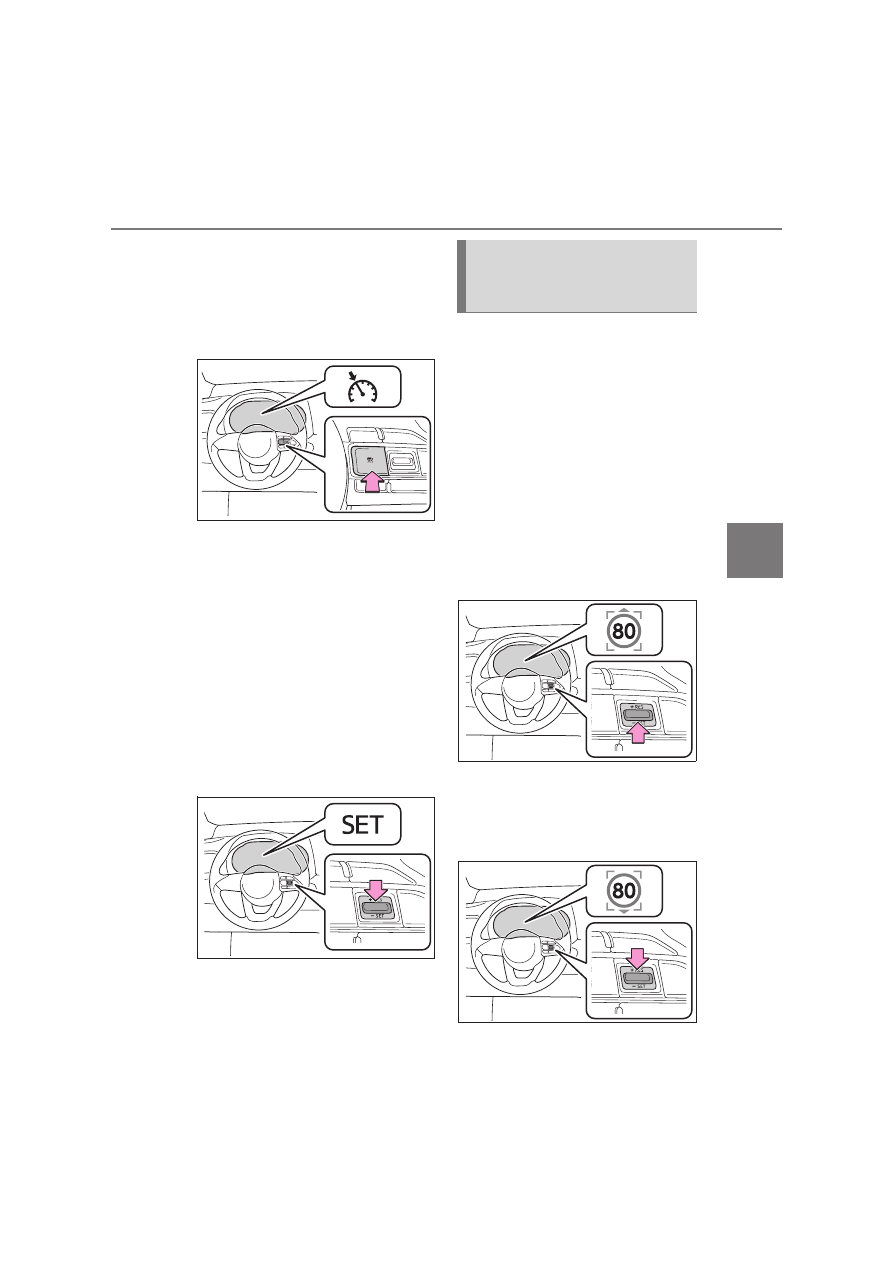
Immediately after the switch is pressed, 
the dynamic radar cruise control indica-

tor will come on. Afterwards, it switches 

to the cruise control indicator.
Switching to constant speed control 

mode is only possible when operating 

the switch with the cruise control off.

2

Accelerate or decelerate, with 
accelerator pedal operation, to 
the desired vehicle speed (at or 
above approximately 30 km/h 
[20 mph]) and press the “-SET” 
switch to set the speed.

Cruise control “SET” indicator will come 

on.
The vehicle speed at the moment the 

switch is released becomes the set 

speed.
Adjusting the speed setting: 

P.254

Canceling and resuming the speed set-

ting: 

P.256

When this function is enabled and 
the system is operating in vehicle-
to-vehicle distance control mode 
(

P.252), when a speed limit sign 

is detected, the recognized speed 
limit will be displayed with an 
up/down arrow. The set speed can 
be increased/reduced to the recog-
nized speed limit by pressing and 
holding the “+RES”/“-SET” switch.

When the current set speed is 
lower than the recognized speed 
limit

Press and hold the “+RES” switch.

When the current set speed is 
higher than the recognized 
speed limit

Dynamic Radar Cruise Con-
trol with Road Sign Assist (if 
equipped)

258

n

4-5. Using the driving support systems

Press and hold the “-SET” switch.

Dynamic Radar Cruise Control with 
Road Sign Assist can be 

enabled/disabled in 

 on the 

multi-information display. (

P.457)

When the Dynamic Radar Cruise 
Control with Road Sign Assist is 
operating, while driving down a hill, 
the vehicle speed may exceed the 
set speed.
In this case, the displayed set vehi-
cle speed will be highlighted and a 
buzzer will sound to alert the driver.

Dynamic radar cruise control can 

be set when

The shift lever is in range 2nd or 

higher.

Depending on the control mode, this 

item can be set at the following 
speeds.

• Vehicle-to-vehicle distance control 

mode: Approximately 30 km/h (20 
mph) or more

• Constant speed control mode: 

Approximately 30 km/h (20 mph) or 
more

Accelerating after setting the vehi-

cle speed

The vehicle can accelerate by operating 
the accelerator pedal. After accelerat-

ing, the set speed resumes. However, 

during vehicle-to-vehicle distance con-
trol mode, the vehicle speed may 

decrease below the set speed in order 

to maintain the distance to the preceding 

vehicle.

Shift position selection

Select a shift position according to the 

vehicle speed. If the engine speed is too 

high or too low, control may be automat-
ically canceled.

Automatic cancelation of vehicle-

to-vehicle distance control mode

Vehicle-to-vehicle distance control mode 
is automatically canceled in the follow-

ing situations.

Actual vehicle speed falls below 

approximately 25 km/h (16 mph).

VSC is activated.

TRC is activated for a period of time.

When the VSC or TRC system is 

turned off.

The sensor cannot detect correctly 

because it is covered in some way.

When the brake control or output 

restriction control of a driving support 
system operates. (For example: Pre-

Collision System, Drive-Start Control)

When the shift lever is in N or the 

clutch pedal is depressed for a certain 

amount of time or more.

The parking brake is operated.

If vehicle-to-vehicle distance control 
mode is automatically canceled for any 

reasons other than the above, there 

may be a malfunction in the system. 
Contact any authorized Toyota retailer 

or Toyota authorized repairer, or any reli-

able repairer.

Automatic cancelation of constant 
speed control mode

Constant speed control mode is auto-

matically canceled in the following situa-
tions:

Actual vehicle speed is more than 
approximately 16 km/h (10 mph) 

below the set vehicle speed.

Actual vehicle speed falls below 

approximately 30 km/h (20 mph).

VSC is activated.

Enabling/Disabling the 
Dynamic Radar Cruise Con-
trol with Road Sign Assist (if 
equipped)

259

4

n

4-5. Using the driving support systems

D

riv

ing

TRC is activated for a period of time.

When the VSC or TRC system is 

turned off.

When the brake control or output 

restriction control of a driving support 
system operates. (For example: Pre-

Collision System, Drive-Start Control)

When the shift lever is in N or the 

clutch pedal is depressed for a certain 

amount of time or more.

The parking brake is operated.

If constant speed control mode is auto-
matically canceled for any reasons other 

than the above, there may be a malfunc-

tion in the system. Contact any autho-
rized Toyota retailer or Toyota 

authorized repairer, or any reliable 

repairer.

The Dynamic Radar Cruise Control 
with Road Sign Assist may not 

operate properly when (if 

equipped)

As the Dynamic Radar Cruise Control 

with Road Sign Assist may not operate 

properly in conditions in which RSA may 
not operate or detect correctly 

(

P.266), when using this function, 

make sure to check the speed limit sign 
displayed.
In the following situations, the set speed 

may not be changed to the recognized 
speed limit by pressing and holding the 

“+RES”/“-SET” switch.

If speed limit information is not avail-

able

When the recognized speed limit is 

the same as the set speed

When the recognized speed limit is 

outside of the speed range that the 

dynamic radar cruise control system 
can operate

Brake operation

A brake operation sound may be heard 

and the brake pedal response may 
change, but these are not malfunctions.

Warning messages and buzzers for 
dynamic radar cruise control

Warning messages and buzzers are 

used to indicate a system malfunction or 
to inform the driver of the need for cau-

tion while driving. If a warning message 

is shown on the multi-information dis-
play, read the message and follow the 

instructions. (

P.215, 413)

When the sensor may not be cor-

rectly detecting the vehicle ahead

In the case of the following and depend-

ing on the conditions, operate the brake 

pedal when deceleration of the system 
is insufficient or operate the accelerator 

pedal when acceleration is required.
As the sensor may not be able to cor-
rectly detect these types of vehicles, the 

approach warning (

P.256) may not be 

activated.

Vehicles that cut in suddenly

Vehicles traveling at low speeds

Vehicles that are not moving in the 
same lane

Vehicles with small rear ends (trailers 
with no load on board, etc.)

Motorcycles traveling in the same lane

When water or snow thrown up by the 

surrounding vehicles hinders the 
detecting of the sensor

When your vehicle is pointing 
upwards (caused by a heavy load in 

the luggage compartment, etc.)

260

n

4-5. Using the driving support systems

Preceding vehicle has an extremely 
high ground clearance

Conditions under which the vehi-
cle-to-vehicle distance control 

mode may not function correctly

In the case of the following conditions, 
operate the brake pedal (or accelerator 

pedal, depending on the situation) as 

necessary.
As the sensor may not be able to cor-

rectly detect vehicles ahead, the system 

may not operate properly.

When the road curves or when the 

lanes are narrow

When steering wheel operation or 

your position in the lane is unstable

When the vehicle ahead of you decel-
erates suddenly

When driving on a road surrounded by 
a structure, such as in a tunnel or on a 

bridge

While the vehicle speed is decreasing 

to the set speed after the vehicle 

accelerates by depressing the accel-
erator pedal

261

4

n

4-5. Using the driving support systems

D

riv

ing

*

: If equipped

Meter display

Indicators

Set speed

Operation switches

“+RES” switch

Cancel switch

“-SET” switch

Speed limiter main switch

1

Press the speed limiter main 
switch to activate the speed lim-
iter.

Speed limiter indicator will come on.
Press the switch again to deactivate the 

speed limiter.

2

Accelerate or decelerate the 
vehicle to the desired speed, 
and press the “-SET” switch to 
set the desired maximum 
speed.

The set speed is displayed on the multi-
information display.
If the switch is pressed while the vehi-

cle speed is below 30 km/h (20 mph), 
the set speed will be 30 km/h (20 mph).

Speed limiter

*

A desired maximum speed can 
be set using the speed limiter 
switch. The speed limiter pre-
vents vehicle speed from 
exceeding the set speed.

System components

Setting the vehicle speed

262

n

4-5. Using the driving support systems

To change the set speed, press the 
“+RES” or “-SET” switch until the 
desired set speed is obtained.

1

Increases the speed

2

Decreases the speed

Fine adjustment: Press the switch in 
the desired direction.

Large adjustment: Press and hold 
switch.

The set speed will be increased or 
decreased as follows:

Fine adjustment: By 1 km/h (0.6 mph)

*1


or 1 mph (1.6 km/h)

*2

 each time the 

switch is pressed

Large adjustment: Increases or 
decreases in 5 km/h (3.1 mph)

*1

 or 5 

mph (8 km/h)

*2

 increments for as long 

as the switch is held

*1

: When the set speed is shown in 

“km/h”

*2

: When the set speed is shown in 

“MPH”

1

Pressing the cancel switch can-
cels the speed limiter.

2

Pressing the “+RES” switch 
resumes the speed limiter.

Exceeding the set speed

In the following situations, the vehicle 
speed exceeds the set speed and dis-

play characters will flash:

When fully depressing the accelerator 

pedal

When driving down a slope

Automatic speed limiter cancel-

ation

The speed limiter is automatically can-
celed in any of the following situations:

Dynamic radar cruise control is acti-
vated.

When the VSC or TRC system is 
turned off by pressing the VSC off 

switch.

If the warning message for the 

speed limiter is shown on the multi-
information display

Stop the engine and then restart the 

engine. After restarting the engine, set 
the speed limiter. If the speed limiter 

cannot be set, there may be a malfunc-

tion in the speed limiter. Have the vehi-
cle inspected by any authorized Toyota 

retailer or Toyota authorized repairer, or 

any reliable repairer.

Adjusting the set speed

Canceling and resuming the 
constant speed control

263

4

n

4-5. Using the driving support systems

D

riv

ing

*

: If equipped

The RSA system recognizes spe-
cific road signs using the front cam-
era and/or 7-inch/8-inch display 
navigation system (when speed 
limit information is available) to pro-
vide information to the driver via the 
display.

If the system judges that the vehicle 
is being driven over the speed limit, 
performing prohibited actions, etc. 
according to the recognized road 
signs, it notifies the driver through a 
visual notification and notification 
buzzer.

WARNING

To avoid operating the speed lim-

iter by mistake

Switch the speed limiter off using the 

speed limiter main switch when not in 

use.

Situations unsuitable for speed 

limiter

Do not use speed limiter in any of the 

following situations.

Doing so may result in loss of control 
and could cause an accident resulting 

in death or serious injury.

On slippery roads, such as those 

covered with rain, ice or snow

On steep hills

When your vehicle is towing a 
trailer or during emergency towing

RSA (Road Sign Assist)

*

Summary of function

WARNING

Before using the RSA

Do not rely solely upon the RSA sys-

tem. RSA is a system which supports 
the driver by providing information, 

but it is not a replacement for a 

driver’s own vision and awareness. 
Drive safely by always paying careful 

attention to the traffic rules.

264

n

4-5. Using the driving support systems

When the front camera recognizes 
a sign and/or information of a sign 
is available from the 7-inch/8-inch 
display navigation system, the sign 
will be displayed on the multi-infor-
mation display.

When the driving support system 
information is selected, a maxi-
mum of 2 signs (4.2-inch display) 
or 3 signs (7-inch display) can be 
displayed. (

P.94, 100)

4.2-inch display

7-inch display

When a tab other than the driving 
support system information is 
selected, the following types of 
road signs will be displayed. 
(

P.94, 100)

• Speed limit begins/ends sign
• Speed limit related information sign 

(Expressway, Highway, Urban area, 
Residential area)

• End of prohibition sign

• No-entry sign

*

 (when notification is 

necessary)

• Speed limit with supplemental sign 

(Ramp way only)

*

: Vehicles with 7-inch/8-inch display 

multimedia system (with navigation 
function) only

If signs other than speed limit signs are 
recognized, they will be displayed in an 
overlapping stack under the current 
speed limit sign.

The following types of road signs, 
including electronic signs and blink-
ing signs, are recognized.

A non-official (not meeting the Vienna 
Convention) or a recently introduced 
traffic sign may not be recognized.

Speed limit road signs

Indication on the multi-infor-
mation display

Supported types of road 
signs

Speed limit begins/Maxi-
mum speed zone begins

Speed limit ends/Maximum 
speed zone ends

265

4

n

4-5. Using the driving support systems

D

riv

ing

Speed limit related information

*

*

: Displayed when a sign is recognized 

but speed limit information for the 
road is not available from the 7-
inch/8-inch display navigation system

No-overtaking road signs

Other road signs

*

: For vehicles with 7-inch/8-inch dis-

play navigation system

Speed limit with supplemental 
mark

*1

*1

: Displayed simultaneously with speed 

limit

*2

: Contents not recognized.

Motorway entrance

Motorway exit

Expressway entrance

Expressway exit

Urban area beginning

Urban area ending

Urban area beginning

Urban area ending

Residential area beginning

Residential area ending

No overtaking begins

No overtaking ends

No-entry

*

End of prohibition

Stop

Wet

Rain

Ice

Supplemental mark 
exists

*2

Exit ramp on right

*3

Exit ramp on left

*3

Time

266

n

4-5. Using the driving support systems

*3

: If the turn signal indicator is not 

operated when changing lanes, the 
mark does not display.

In the following situations, the RSA 
system will notify the driver.

When the vehicle speed exceeds 
the speed notification threshold 
of the speed limit sign displayed, 
the sign display will be empha-
sized and a buzzer will sound.

When the RSA system recog-
nizes a no-entry sign and detects 
that the vehicle has entered a 
no-entry area based on the map 
information of the navigation sys-
tem, the no-entry sign flashes 
and a buzzer will sound. (For 
vehicles with 7-inch/8-inch dis-
play navigation system)

If it is detected that your vehicle 
is overtaking when a no overtak-
ing sign is displayed on the multi-
information display, the dis-
played sign will flash and a 
buzzer will sound.

Depending on the situation, traffic 
environment (traffic direction, 
speed unit) may be detected incor-
rectly and a notification function 
may not operate properly.

Setting procedure

1

Press 

 / 

 (4.2-inch display) or 

 / 

 (7-inch display) of the 

meter control switches and select 

.

2

Press 

 / 

 (4.2-inch display) or 

 / 

 (7-inch display) of the 

meter control switches and select 

, then press 

.

Automatic turn-off of RSA sign dis-

play

One or more signs automatically turn off 
in the following situations.

No sign has been recognized for a 
certain distance.

The road changes due to a left or right 
turn, etc.

Conditions in which the function 

may not operate or detect correctly

In the following situations, RSA does not 
operate normally and may not recognize 

signs, display the incorrect sign, etc. 

However, this does not indicate a mal-
function.

The front camera is misaligned due to 
a strong impact being applied to the 

sensor, etc.

Dirt, snow, stickers, etc., are on the 

windshield near the front camera.

In inclement weather such as heavy 

rain, fog, snow or sand storms.

Light from an oncoming vehicle, the 

sun, etc., enters the front camera.

The sign is dirty, faded, tilted or bent.

The contrast of electronic sign is low.

All or part of the sign is hidden by the 

leaves of a tree, a pole, etc.

The sign is only visible to the front 

camera for a short amount of time.

The driving scene (turning, lane 

change, etc.) is judged incorrectly.

If a sign not appropriate for the cur-

rently traveled lane, but the sign exists 
directly after a freeway branches, or in 

an adjacent lane just before merging.

Notification function

267

4

n

4-5. Using the driving support systems

D

riv

ing

Stickers are attached to the rear of the 
preceding vehicle.

A sign resembling a system compati-
ble sign is recognized.

Side road speed signs may be 
detected and displayed (if positioned 

in sight of the front camera) while the 

vehicle is traveling on the main road.

Roundabout exit road speed signs 

may be detected and displayed (if 
positioned in sight of the front camera) 

while traveling on a roundabout.

The front of the vehicle is raised or 

lowered due to the carried load.

The surrounding brightness is not suf-

ficient or changes suddenly.

When a sign intended for trucks, etc., 

is recognized.

The vehicle is driven in a country with 

a different direction of traffic.

The 7-inch/8-inch display navigation 

system map data is outdated.

The 7-inch/8-inch display navigation 

system is not operating.

The speed information displayed on 

the meter and on the 7-inch/8-inch 

display navigation system may be dif-
ferent due to the 7-inch/8-inch display 

navigation system using map data.

Speed limit sign display

If the engine switch was last turned off 
while a speed limit sign was displayed 

on the multi-information display, the 

same sign displays again when the 
engine switch is turned to ON.

If “RSA Malfunction Visit Your 

Dealer” is shown

The system may be malfunctioning. 
Have the vehicle inspected by any 

authorized Toyota retailer or Toyota 

authorized repairer, or any reliable 
repairer.

Customization

Some functions can be customized. 

(Customizable features: 

P.457)

*

: If equipped

Stopping the engine

1

Fully depress the clutch pedal 
and depress the brake pedal to 
stop the vehicle.

2

Move the shift lever to N and 
release the clutch pedal. The 
engine will stop automatically.

When the engine is stopped by the Stop 

& Start system, the Stop & Start indica-

tor will illuminate.

Restarting the engine

With the shift lever in N, depress 
the clutch pedal. The engine will 
start automatically.

Stop & Start system

*

The Stop & Start system stops 
and starts the engine accord-
ing to clutch pedal or shift 
lever operation when the vehi-
cle is stopped, such as at a 
stoplight, intersection, etc., in 
order to improve fuel economy 
and reduce noise pollution 
caused by the engine idling.

Stop & Start system opera-
tion

268

n

4-5. Using the driving support systems

When the engine starts, the Stop & 
Start indicator will turn off.

Press the Stop & Start cancel 
switch to disable the Stop & Start 
system.
The Stop & Start cancel indicator 
will illuminate.

Pressing the switch again will enable 
the Stop & Start system and the Stop & 
Start cancel indicator will turn off.

Automatic enabling of the Stop & 

Start system

If the Stop & Start system is disabled 

using the Stop & Start cancel switch, it 

will be automatically re-enabled once 
the engine switch is turned off and then 

the engine is started.

Points for use

If the engine switch is pressed when 

the engine is stopped by the Stop & 

Start system, the engine will not be 
able to be restarted by the automatic 

engine start function. In this case, 

restart the engine using the normal 
engine starting procedure. (

 P.173, 

174)

When the engine is being restarted by 

the Stop & Start system, the power 

outlets may be temporarily unusable, 

but this does not indicate a malfunc-
tion.

Installation and removal of electrical 
components and wireless devices 

may affect the Stop & Start system. 

Contact any authorized Toyota retailer 
or Toyota authorized repairer, or any 

reliable repairer for details.

When stopping the vehicle for a lon-

ger period of time, turn the engine 

switch off to stop the engine com-
pletely.

Operating conditions

The Stop & Start system is operational 
when all of the following conditions 

are met:

• The vehicle has been driven a certain 

amount of time.

• The clutch pedal is not depressed.

• The shift lever is in N.
• The driver’s seat belt is fastened.

• The driver’s door is closed.

• The windshield defogger is off. (vehi-

cles without a manual air conditioning 

system)

• The engine is adequately warmed up.
• The outside temperature is -5°C 

(23°F) or higher.

• The hood is closed. (

P.269)

In the following situations the engine 

may not be stopped by the Stop & 
Start system. This is not a malfunction 

of the Stop & Start system.

• When the air conditioning system is 

being used.

• When the battery is undergoing a peri-

odic recharge.

• When the battery is not sufficiently 

charged, such as if the vehicle has 

been parked for a long time and the 
battery charge has decreased, the 

electric load is large, the battery fluid 

temperature is excessively low or the 
battery has deteriorated.

• When the brake booster vacuum is 

low.

• When the elapsed time since the 

engine was restarted is short.

• When the vehicle is stopped fre-

quently, such as when in a traffic jam.

• When the engine coolant temperature 

Disabling the Stop & Start 
system

269

4

n

4-5. Using the driving support systems

D

riv

ing

or transmission fluid temperature is 
extremely low or high.

• When the steering wheel is being 

operated.

• When the vehicle is being driven in a 

high altitude area.

• When the battery fluid temperature is 

extremely low or high.

• For a while after the battery terminals 

have been disconnected and recon-
nected.

When the engine is stopped by the 
Stop & Start system, the engine will be 

restarted automatically if any of the 

following conditions are met:

(To enable the engine to be stopped by 
the Stop & Start system again, drive the 
vehicle.)
• The air conditioning system is turned 

on. (vehicles without a manual air 

conditioning system)

• The windshield defogger is turned on. 

(vehicles without a manual air condi-

tioning system)

• The driver’s seat belt is unfastened.

• The driver’s door is opened.

• The Stop & Start cancel switch is 

pressed.

• The steering wheel is operated.

• The vehicle starts to roll on an incline.

When the engine is stopped by the 

Stop & Start system, the engine may 
restart automatically in the following 

situations: (To enable the engine to be 

stopped by the Stop & Start system 
again, drive the vehicle.)

• When the brake pedal is pumped or 

strongly depressed.

• When the air conditioning system is 

being used.

• When a switch of the air conditioning 

system is operated (windshield defog-

ger switch, etc.).

• If the battery charge becomes low.

When the hood is opened

If the hood is opened while the engine 

is stopped by the Stop & Start system, 
the engine will stall and will not be 

able to be restarted by the automatic 

engine start function. In this case, 

restart the engine using the normal 
engine starting procedure. (

P.173, 

174)

If the hood is closed after the engine 

is started with the hood open, the Stop 

& Start system will not operate. Close 
the hood, turn the engine switch off, 

wait 30 seconds or more, and then 

start the engine.

Air conditioning system operation 
while the engine is stopped by the 

Stop & Start system

Vehicles with an automatic air condition-
ing system: When the air conditioning is 

in automatic mode and the engine is 

stopped by the Stop & Start system, the 
fan may operate at a low speed in order 

to prevent the temperature in the cabin 

from increasing or decreasing or may be 
stopped.
To prioritize air conditioning system per-

formance when the vehicle is stopped, 
disable the Stop & Start system by 

pressing the Stop & Start cancel switch.

If the windshield is fogged up

Turn the windshield defogger on. 
(

P.313, 318)

If the windshield fogs up frequently, 
press the Stop & Start cancel switch to 
disable the Stop & Start system.

If an odor is emitted from the air con-
ditioning system

• Vehicles with a manual air condition-

ing system

If the idling stop time setting is set to 
“Extended”, change it to “Standard”. If 
an odor is emitted when the idling stop 
time setting is set to “Standard”, press 
the Stop & Start cancel switch to deacti-
vate the Stop & Start system.
• Vehicles with an automatic air condi-

tioning system

Press the Stop & Start cancel switch to 
deactivate the Stop & Start system.

270

n

4-5. Using the driving support systems

Changing the idling stop time with 
the air conditioning system on

The length of time the Stop & Start sys-
tem will operate when the air condition-

ing system is on can be changed in 


of the multi-information display (

P.98, 

104). (The length of time the Stop & 
Start system will operate when the air 
conditioning system is off cannot be 
changed.)

Displaying the Stop & Start system 

status

P.99, 105

Multi-information display mes-

sages

If the following situations, 

 and a 

message may be displayed on the multi-
information display.

When the engine cannot be stopped 

by the Stop & Start system

 “Non-Dedicated Battery”

• A battery not designed for use with a 

Stop & Start system may have been 

installed.

Have the vehicle inspected by any 

authorized Toyota retailer or Toyota 
authorized repairer, or any reliable 
repairer.

 “Battery Charging”

• The battery charge may be low.

Stopping of the engine is temporarily 

prohibited to prioritize charging of the 
battery. After the engine runs for a cer-
tain amount of time, the system will be 
enabled.
• A refresh charge may be occurring

After a refresh charge for up to an 

hour completes, the system can be 
operated.
• If displayed continuously for a long 

time (more than an hour)

The battery may be deteriorated. Con-

tact any authorized Toyota retailer or 
Toyota authorized repairer, or any reli-
able repairer for details.

 “Stop & Start System Unavailable”

• The Stop & Start system is temporarily 

disabled.

Allow the engine to run for some time.

• The engine may have been started 

with the hood open.

Close the hood, turn the engine 

switch off, wait for 30 seconds or more, 
and then start the engine.

 “Preparing to Operate”

• The vehicle is being driven in a high 

altitude area.

 “For Climate Control”

• The air conditioning system is being 

used when the ambient temperature is 

high or low.

If the difference between the set tem-

perature and cabin temperature 
becomes small, the system will be 
enabled.
• The windshield defogger is on.

When the engine automatically 
restarts while stopped by the Stop & 

Start system

 “For Climate Control”

• The air conditioning system has been 

turned on or is being used.

• The windshield defogger has been 

turned on.

 “Battery Charging”

• The battery charge may be low.

The engine is restarted to prioritize 

battery charging. After the engine runs 
for a certain amount of time, the system 
will be enabled.

When the engine cannot be restarted 
by the Stop & Start system

271

4

n

4-5. Using the driving support systems

D

riv

ing

“Shift to N and depress clutch”

When the engine is stopped by the 

Stop & Start system, the shift lever was 
moved to a position other than N without 
depressing the clutch pedal.

The Stop & Start system protection 

function

When the volume of the audio system 

is excessively high, sound output from 
the audio system may suddenly be cut 

off in order to reduce battery con-

sumption. To prevent the audio sys-
tem from being cut off, keep the 

volume of audio system at a moderate 

level. If the audio system has been cut 
off, turn the engine switch off, wait for 

3 seconds or more and then turn it to 

ACC or ON to re-enable the audio 
system.

The audio system may not be acti-
vated if the battery terminals are dis-

connected and then reconnected. If 

this occurs, turn the engine switch off 
and then repeat the following opera-

tion twice to activate the audio system 

normally.

• Turn the engine switch to ON and 

then to off.

Replacing the battery

P.441

If the Stop & Start cancel indicator 
flashes continuously

The system may be malfunctioning. 

Have the vehicle inspected by any 
authorized Toyota retailer or Toyota 

authorized repairer, or any reliable 

repairer.

If “Stop & Start System Malfunction 
Visit Your Dealer” is displayed on 

the multi-information display

The system may be malfunctioning. 
Have the vehicle inspected by any 

authorized Toyota retailer or Toyota 

authorized repairer, or any reliable 
repairer.

WARNING

When the Stop & Start system is 

operating

Make sure to disable the Stop & Start 

system while the vehicle is in a poorly 

ventilated area.
If not disabled, the engine may be 

automatically restarted unexpectedly, 

causing exhaust gases to collect and 
enter the vehicle, possibly resulting in 

death or a serious health hazard.

Do not leave the vehicle while the 
engine is stopped by the Stop & 

Start system (while the Stop & Start 

indicator is on). An accident may 
occur due to the automatic engine 

start function.

Depress the brake pedal and apply 

the parking brake when necessary 

while the engine is stopped by the 
Stop & Start system (while the Stop 

& Start indicator is on).

NOTICE

To ensure the system operates 

correctly

If any of the following situations occur, 

the Stop & Start system may not oper-

ate correctly. Have your vehicle 
inspected by any authorized Toyota 

retailer or Toyota authorized repairer, 

or any reliable repairer.

While the driver’s seat belt is fas-

tened, the driver’s and front pas-

senger’s seat belt reminder light 
flashes.

Even though the driver’s seat belt is 
not fastened, the driver’s and front 

passenger’s seat belt reminder light 

does not illuminate.

Even though the driver’s door is 

closed, the open door warning light 
is illuminated or the interior light is 

illuminated when the interior light 

switch is in the door position.

272

n

4-5. Using the driving support systems

*

: If equipped

NOTICE

Even though the driver’s door is 

open, the open door warning light 
does not illuminate or the interior 

light does not illuminate when the 

interior light switch is in the door 
position.

If the engine stalls

If the Stop & Start system is enabled 

and the clutch pedal is depressed 

quickly, the engine may restart.

BSM (Blind Spot Moni-
tor)

*

The Blind Spot Monitor is a 
system that uses rear side 
radar sensors installed on the 
inner side of the rear bumper 
on the left and right side to 
assist the driver in confirming 
safety when changing lanes.

WARNING

Cautions regarding the use of 
the system

The driver is solely responsible for 

safe driving. Always drive safely, tak-
ing care to observe your surround-

ings.
The Blind Spot Monitor is a supple-
mentary function which alerts the 

driver that a vehicle is in a blind spot 

of the outside rear view mirrors or is 
approaching rapidly from behind into 

a blind spot. Do not overly rely on the 
Blind Spot Monitor. As the function 

cannot judge if it is safe to change 

lanes, over reliance could lead to an 
accident resulting in death or serious 

injury.
As the system may not function cor-
rectly under certain conditions, the 

driver’s own visual confirmation of 

safety is necessary.


Content      ..     14      15      16      17     ..