Toyota Prius Prime (2022 year). Manual in english - page 8
 

  Index      Toyota     Toyota Prius Prime (2022 year). Manual in english


Search            copyright infringement  


Content      ..     6      7      8      9     ..


Toyota Prius Prime (2022 year). Manual in english - page 8


129

2-2. Charging

2

Plug-

in hybrid system

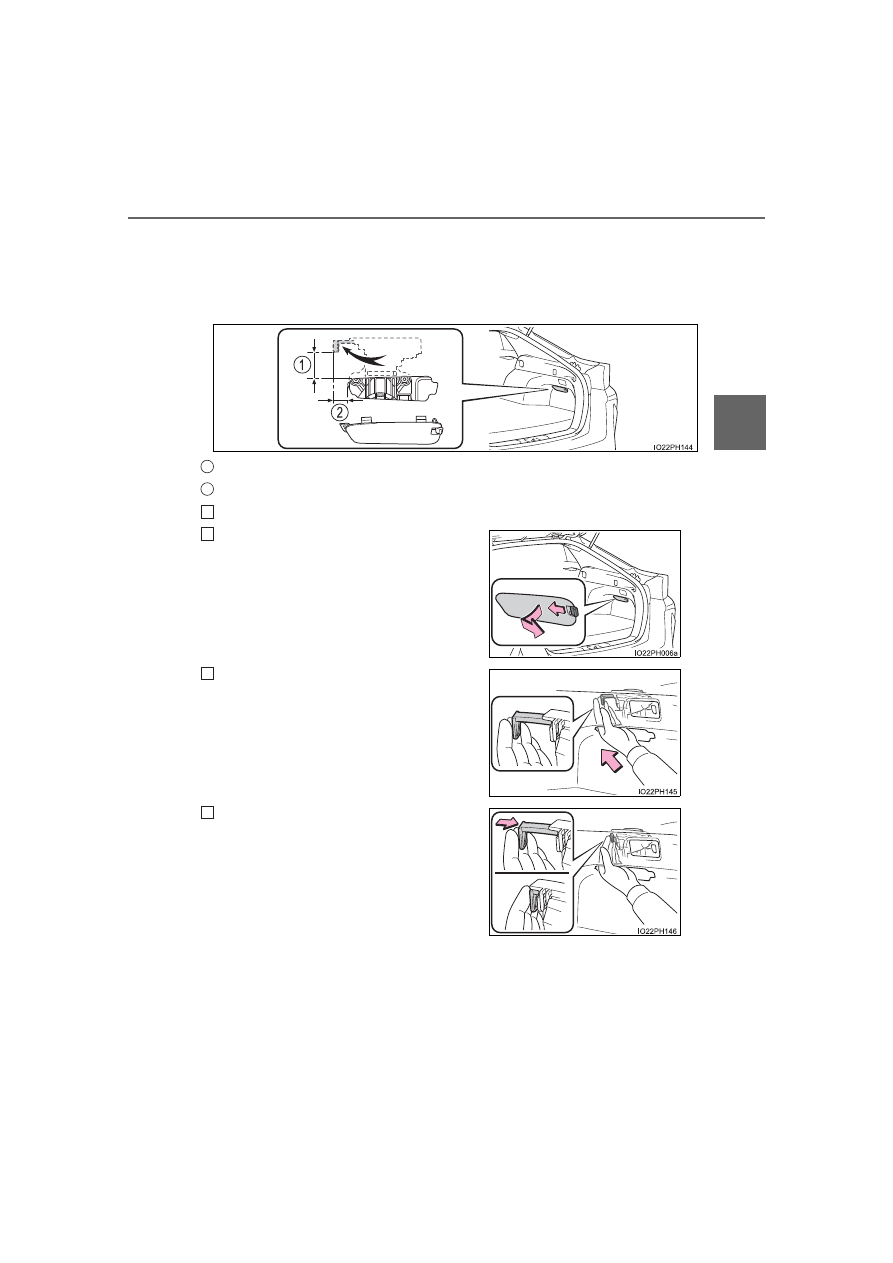
If the charging cable cannot be unlocked

If the charging connector cannot be unlocked by pressing the charging con-
nector  lock  switch  even  after  carrying  an  electronic  key  or  unlocking  the
doors, the charging connector can be unlocked by operating the emergency
release lever.

Approximately 2.0 in. (50 mm)
Approximately 0.9 in. (20 mm)
Open the back door. (

P. 285)

Pull the knob and remove the cover as
shown in the illustration.

Insert a hand from the lower side of the
vehicle  obliquely  upward,  and  hook  a
finger to the emergency release lever.

Move  the  emergency  release  lever  in
the direction shown in the illustration.

*

The charging connector is unlocked and
can be removed.

*

: Make  sure  to  move  in  the  direction

shown in the illustration. Applying force
in  other  directions  may  damage  the
emergency release lever.

1

2

1

2

3

4

130

2-2. Charging

Reinstall the cover to the its original position.

This method is a temporary correction procedure for emergency use only. If
the problem persists, have the vehicle inspected by your Toyota dealer imme-
diately.
Do  not  operate  the  emergency  release  lever  when  the  charging  connector
can be unlocked in the normal procedure.

When recharging or replacing the 12-volt battery

P. 715

WARNING

When connecting the charging connector to the charging inlet

5

Do  not  insert  hand  into  the  connector
lock portion.
A hand may be caught in the connector
lock pin, resulting in an injury.

Be careful not to touch the charging port
lid lock portion.
When the connector lock operates, the
charging port lid lock will also operate.
The charging port lid lock pin may hit a
hand, resulting in an injury.

Connector lock pin

Charging port 
lid lock pin

131

2-2. Charging

2

Plug-

in hybrid system

NOTICE

When locking the charging connector

Observe the following precautions. Failure to do so may cause a malfunc-
tion in the charging connector locking system.

Check that the charging connector is compatible with this vehicle
A  charging  connector  of  the  different  type  or  a  charging  connector  with
damaged or deformed insertion part may not be locked.

Do  not  operate  the  charging  connector  lock  switch  before  the  charging
connector is connected

Operate  the  charging  connector  lock  switch  after  firmly  inserting  the
charging connector into the charging inlet

Do not apply excessive force to the charging connector when the charging
connector is locked
When removing the charging connector, make sure to unlock the charging
connector.

132

2-2. Charging

Power sources that can be used

Connect to an AC 120 V outlet (NEMA 5-15R) with a Ground-Fault
Circuit-Interrupter (GFCI) and a circuit breaker. Use of a 15A indi-
vidual circuit is strongly recommended to ensure charging cable will
operate properly. 

When charging outdoors, make sure to connect to a weatherproof
outlet that is certified for outdoor use.
Checking Ground-Fault Circuit-Interrupter (GFCI) operation before
its use is recommended.

NEMA 5-15R outlet

The  illustration  is  an  example
shown  for  demonstration  pur-
poses,  and  may  differ  from  the
actual configuration.

An  external  power  source  that  fulfills  the  following  criteria  is
necessary  for  charging  this  vehicle.  Confirm  this  before
charging.

WARNING

Warnings for electrical faults

Make  sure  to  observe  the  precautions  in  this  Owner’s  Manual  when
charging the vehicle.
Failure  to  use  a  power  source  that  fulfills  the  requirements,  or  failure  to
observe  regulations  while  charging  could  lead  to  an  accident,  possibly
resulting in death or serious injury.

Power sources

Outlets that can be connected

133

2-2. Charging

2

Plug-

in hybrid system

The charging environment

For safe charging, the following charging equipment and settings are recom-
mended.

Weatherproof outlet
When  charging  outdoors,  connect  the  plug  to  a  weatherproof  outlet,  and
ensure that the plug remains waterproof while the plug is connected.

Dedicated circuit
• To reduce the risk of fire, connect only to an at least 15A branch circuit

with  an  over-current  protection  in  accordance with  the  National  Electric
Code, ANSI/NFPA 70.

• To reduce the risk of electric shock when working with the plug, connect

to a outlet with a Ground-Fault Circuit-Interrupter (GFCI) or that has an
Earth Leakage Circuit Breaker installed.

When your circuit breaker trips during charging

The upper limit of the charging current can be changed in the “Vehicle Set-
tings” settings on the multi-information display.

Press 

 or 

 of the meter control switches to select 

 (“Vehicle

Settings”) in the 

 screen, and then press 

.

Press 

 or 

 of the meter control switches to select “Charge Settings”,

and then press 

.

The “Charge Settings” screen will display.

Press 

 or 

 of the meter control switches to select “Charge Current”,

and then press 

.

The “Charge Current” screen will display.

Press 

  or 

  of  the  meter  control  switches  to  select  “8A”,  and  then

press 

.

The maximum charging current during charging will be restricted to 8A.

*

If the breaker still trips while charging, even after changing the upper limit of
the charging current, check if the connected power source meets the speci-
fied charging conditions. (

P. 132)

*

: Restricting the charging current will lengthen the charging time.

1

2

3

4

134

2-2. Charging

WARNING

Power sources precautions

Observe the following precautions.
If you do not follow them, fire, electrical shock or damage may occur, possi-
bly resulting in death or serious injury.

Connect to an AC 120 V outlet (NEMA 5-15R) with a Ground-Fault Circuit-
Interrupter (GFCI) and supplied by a circuit breaker per your local code.
Use of a 15A individual circuit is strongly recommended.

Use of a block heater for charging is prohibited.

Make sure to connect the charging connector and charging inlet directly.
Do  not  connect  a  converting  adaptor  or  extension  cord  between  the
charging connector and charging inlet.

Do not connect the charging cable to a
multi-outlet adaptor, multi-plugs, or con-
version plug.

Connecting  the  charging  cable  to  an
extension cord is strictly prohibited. The
extension cord may overheat and does
not contain a Ground-Fault Circuit-Inter-
rupter (GFCI). 
The  leakage  detection  function  of  the
CCID  (Charging  Circuit  Interrupting
Device) may not operate correctly.

Do not connect to a power strip.

ITO12P109

ITO12P110

135

2-2. Charging

2

Plug-

in hybrid system

Charging methods

Charging from an external power source (

P. 147)

This is a charging method used when charging from an AC outlet
(120 V) with the charging cable equipped to the vehicle or charging
at a public charging station.

The charging start time (or departure time) and day can be set to carry
out charging using the charging schedule at the desired date and time.
(

P. 158)

Using the hybrid battery (traction battery) charge mode 
(

P. 89)

The plug-in hybrid system can be switched to hybrid battery (trac-
tion battery) charge mode to charge the hybrid battery (traction bat-
tery) using electricity generated by gasoline engine operation.

The  maximum  charge  amount  in  the  hybrid  battery  (traction  battery)
charge mode is approximately 80% of the fully charged capacity for the
charging from an external power source.

The time required to charge the hybrid battery (traction battery) differs
according to the charging voltage and charging current.

*

1

: This  is  the  maximum  value.  Furthermore,  the  upper  limit  of  the  charging

current can be changed in the “Vehicle Settings” settings. (

P. 133)

*

2

: The time required for charging to complete depends on conditions such as

the  remaining  charge  of  the  hybrid  battery  (traction  battery),  the  outside
temperature and specifications of a charger (charging station).

The following methods can be used to charge the hybrid battery
(traction battery).

Estimated charging time

Connected power 

source

Charging station

Home power source

Charging voltage

AC 240 V

AC 120 V

Charging current

*

1

16A

12A

Estimated charging 

time

*

2

Approximately 2 hours

Approximately 5 hours 

10 minutes

136

2-2. Charging

Charging time may increase

In the following situations, charging time may become longer than normal:

In very hot or very cold temperatures.

The  vehicle  is  consuming  a  lot  of  electricity,  for  example,  when  the  head
light switch is on etc.

There is a power outage during charging.

There is an interruption in the electrical supply.

There is a drop in the voltage of external power source.

The charge in the 12-volt battery is low, for example due to the vehicle being
left unused for a long period of time.

The maximum charging current is set to 8A through the “Vehicle Settings”
settings. (

P. 133)

When the “Traction Battery Heater” operates.

When the “Traction Battery Cooler” is operated before charging. (

P. 137)

When the plug generates heat due to a loose outlet connection etc.

Using a DC Charger

DC Chargers cannot be used with this vehicle.

This  vehicle  is  equipped  with  several  functions  that  are  linked  with
charging.

“Traction Battery Heater”

When the outside temperature is low and the charging cable is con-
nected to the vehicle, this function automatically warms the hybrid
battery (traction battery) until it reaches or exceeds a certain tem-
perature.

When the charging cable is removed from the vehicle or remains
connected  to  the  vehicle  for  approximately  3  days,  the  system
automatically stops.

When the charging schedule is used (

P. 158), this function will

operate according to the charging schedule.

Charging-linked functions

137

2-2. Charging

2

Plug-

in hybrid system

Hybrid battery (traction battery) warming control (Alaska and
Canada only)

This control operates after the charging cable remains connected to
the vehicle for 3 days and “Traction Battery Heater” automatically
stops. It automatically insulates the hybrid battery (traction battery)
in extremely low temperatures.

This control stops 31 days after the charging cable is connected,
even if it is still connected to the vehicle.

When  this  control  operates,  charging  schedule  settings  are
ignored and charging starts.

“Traction Battery Cooler”

When the hybrid battery (traction battery) is hot, this function pro-
tects  it  by  using  the  vehicle  air  conditioning  to  cool  it  before
charging is carried out.
When  the  hybrid  battery  (trac-
tion  battery)  is  above  a  certain
temperature  and  the  power
switch  is  turned  off,  a  check
screen  is  displayed  on  the
multi-information  display  that
indicates whether “Traction Bat-
tery Cooler” is implemented.

When “No” is selected, the hybrid battery (traction battery) cooling sys-
tem does not operate.

138

2-2. Charging

“Traction Battery Heater”

“Traction  Battery  Heater”  may  operate  when  charging  is  not  being  per-
formed.

When  “Traction  Battery  Heater”  is  operating,  the  charging  indicator  illumi-
nates.

When “Traction Battery Heater” is operating during charging, the charging
time may be longer than normal.

If the outside temperature becomes high while “Traction Battery Heater” is
operating,  charging  may  complete  earlier  than  the  “Departure”  time  set.
(

P. 158)

“Traction Battery Heater” can be turned on and off in the “Vehicle Settings”
settings on the multi-information display. (

P. 749)

“Traction Battery Heater” may operate even when the hybrid battery (trac-
tion battery) is fully charged depending on the temperature of the hybrid bat-
tery (traction battery).
• The remaining charge of the hybrid battery (traction battery) decreases

when  “Traction  Battery  Heater”  operates.  The  charging  operation  may
start again to charge the hybrid battery (traction battery).

• “Charging  Stopped  Due  to  Pulled  Charging  Connector”  may  be  shown

when the charging connector is removed while recharging. (

P. 186)

139

2-2. Charging

2

Plug-

in hybrid system

“Traction Battery Cooler”

When  the  hybrid  battery  (traction  battery)  is  above  a  certain  temperature
and the power switch is turned off, a check screen is displayed on the multi-
information display that indicates whether “Traction Battery Cooler” is imple-
mented. Approximately 5 minutes after selecting “Yes” on this screen, sys-
tem operation becomes possible.

When charging starts, “Traction Battery Cooler” only operates if the hybrid
battery (traction battery) temperature is hot.

The  charging  indicator  is  illuminated  while  “Traction  Battery  Cooler”  is  on
standby or operating.

“Traction  Battery  Cooler”  is  implemented  for  a  maximum  of  approximately
30 minutes. However, when the “Departure” time is set (

P. 158) and there

is not sufficient time between the current time and the time that charging will
complete, “Traction Battery Cooler” operation time may become shorter.

When  there  is  a  small  amount  of  remaining  charge  in  the  hybrid  battery
(traction battery), even if the hybrid battery (traction battery) is hot, “Traction
Battery Cooler” may not be implemented.

When the following operations are performed while “Traction Battery Cooler”
is operating, the hybrid battery (traction battery) cooling operation stops.
• A door is opened
• The hood is opened
• The power switch is turned to any mode other than off
• The shift position is changed to any position other than P
• The Remote Air Conditioning System is operated (

P. 531)

• “Charge Now” is implemented (

P. 159)

• The amount of remaining charge in the hybrid battery (traction battery) is

below a certain amount

When  the  power  switch  is  turned  off,  a  check  screen  is  displayed  on  the
multi-information display that indicates whether “Traction Battery Cooler” is
implemented. This check screen can be turned on and off in the “Meter Cus-
tomize” settings on the multi-information display (

P. 248). However, when

the check screen is set to “Off”, “Traction Battery Cooler” is no longer oper-
ates.

“Traction Battery Cooler” uses the power of the hybrid battery (traction bat-
tery) and external power source.
• While “Traction Battery Cooler” is operating, the amount of the remaining

charge of the hybrid battery (traction battery) increases and decreases in
a certain range, and does not increase as in normal charging.

• The operation of “Traction Battery Cooler” is recognized as charging by a

charger. The charger that calculates the fee according to charging time
causes a charging fee.

140

2-2. Charging

Charging tips

To  enable  the  use  of  EV  mode,  we  recommend  systematically
charging the vehicle.

Before leaving home

In  order  to  use  EV  mode,  charge
the hybrid battery (traction battery)
at home before leaving.
The charging schedule function 
(

P.  158)  can  be  used  to  set  the

system  to  automatically  fully
charge  the  hybrid  battery  (traction
battery) before your desired depar-
ture time. It is also possible to set
the  air  conditioning  to  make  the
interior  in  a  comfortable  state
before your desired departure time.

At your destination

Use  a  public  charging  station  to
charge  the  hybrid  battery  (traction
battery).
If there are no charging facilities at
your destination, the hybrid battery
(traction  battery)  can  be  charged
using  the  hybrid  battery  (traction
battery) charge mode. (

P. 89)

*

After returning home

In order to drive the next time, charge the hybrid battery (traction battery).
Settings the charge schedule allows you to charge the hybrid battery (trac-
tion battery) at the desired time such as late at night or early in the morn-
ing.  Furthermore,  the  charging  schedule  can  be  set  to  automatically
charge the hybrid battery (traction battery) every day or at the same time
on certain days. (

P. 158)

*

: When using the hybrid battery (traction battery) charge mode while parked,

make sure that no flammable objects are near the vehicle and the vehicle
is parked in a well-ventilated area. (

P. 98)

This  section  explains  methods  for  using  the  charging  function
for this vehicle and checking information related to charging.

Systematically charging

1

2

3

141

2-2. Charging

2

Plug-

in hybrid system

Searching charging stations (vehicles with 11.6-inch display)

After applying to Entune App Suite, it is possible to use the smartphone appli-
cation to search the nearby charging stations.
For details about Entune App Suite, refer to http://www.toyota.com/entune/.

Information related to charging can be displayed and checked on the
multi-information display or 11.6-inch display (if equipped).

Refer to P. 266 for details on the screen display for the 11.6-inch display (if
equipped).

While charging

When  any  door  is  opened
during  charging,  the  current
charging condition and remain-
ing  time  until  charging  is  com-
plete can be checked.

After charging is complete

After  charging  is  complete,  the
first time that the hybrid system
is  started,  a  message  detailing
the  results  of  the  charging  is
displayed.  Also,  a  message  is
displayed  if  an  operation  that
stops  charging  is  performed  or
a situation where charging can-
not be performed occurs.

When a message is displayed, follow the instructions displayed on the
screen. (

P. 186)

Combination meter display during charging

If approximately 100 seconds elapse after the power switch is turned to ON
mode during charging, the power switch will automatically turn off and the dis-
play will disappear.

Checking information related to charging

142

2-2. Charging

Things to know before charging

This  vehicle  has  been  designed  to  allow  charging  from  an  external
power source using a charging cable for exclusive use with standard
household AC outlets.
However, the vehicle differs greatly from standard household electri-
cal goods in the following ways, and incorrect usage could cause fire
or electric shock, possibly leading to death or serious injury.

The charging operation is designed to operate at 12A continuously
for the charge duration (up to 5 hours 10 minutes). (

P. 135)

Charging can be conducted outdoors.

To charge properly, follow the procedure after reading the explanation
below. Charging is intended to be carried out by licensed drivers only
who properly understand the charging procedure.

Do not allow children to use the charging cable without supervision.
Also, keep the charging cable out of reach of infants.

When charging with a charger, follow the procedures for using each
charger.

When charging using a public charging facility, check the setting of
the charging schedule function.

• When the charge schedule is registered, temporarily turn off the

function or turn “Charge Now” on. (

P. 165, 167, 175, 176)

• When  the  charge  schedule  is  set  to  ON,  charging  will  not  start

even if the charging cable is connected. Also, charging fee may
occur due to connection of the charging cable.

Make sure to read the following precautions before connecting
the charging cable to the vehicle and charging the hybrid battery
(traction battery).

Charging precautions

143

2-2. Charging

2

Plug-

in hybrid system

Before charging, always check the following items.

The parking brake is applied. (

P. 346)

The headlights are switched off or set to AUTO, and lights such as
the emergency flashers and interior lights etc. are switched off.

If  these  light  switches  are  turned  ON,  then  these  features  will  consume
electricity, and charging time will increase.

The power switch is off. (

P. 332)

Before charging, make sure that each part of the charging cable is in
good condition. (

P. 121)

Safety functions

The hybrid system will not start while the charging cable is attached to the
vehicle, even if the power switch is operated.

If  the  charging  cable  is  connected  while  the  “READY”  indicator  is  illumi-
nated, the hybrid system will stop automatically and driving will not be possi-
ble.

When the charging cable is connected to the vehicle, the shift position can-
not be changed from P to another position.

During charging

The followings occur, however, it does not indicate a malfunction. 

The charging starting time may differ depending on the state of the vehicle.

During charging, the sound of the fan may be heard from the onboard trac-
tion battery charger cooling air intake vents. (

P. 146)

During and after charging, the rear seat and its surrounding area in which
the onboard traction battery charger is installed may get warm.

Confirm the following before charging

Inspecting the charging cable

144

2-2. Charging

Capacity reduction of the hybrid battery (traction battery)

The  capacity  of  the  hybrid  battery  (traction  battery)  will  decline  gradually
when  the  hybrid  battery  (traction  battery)  is  in  use.  The  rate  at  which  it
declines will differ in accordance with environmental conditions and the way
in which the vehicle is used. Observing the following can help suppress bat-
tery capacity decline.

Avoid parking the vehicle in areas with a high temperature under direct sun-
light when the hybrid battery (traction battery) is fully charged.

Avoid accelerating and decelerating frequently and suddenly when EV driv-
ing.

Avoid frequent driving near the top speed for EV driving. (

P. 96)

Leave  a  low  level  of  charge  in  the  hybrid  battery  (traction  battery)  when
leaving the vehicle undriven for a long period of time.
After  confirming  that  EV  mode  has  switched  to  HV  mode,  turn  the  power
switch off.

Use the charging schedule function as much as possible in order to fully
charge  the  hybrid  battery  (traction  battery)  immediately  before  starting
off. (

P. 158)

Also, if the hybrid battery (traction battery) capacity reduces, the distance that
can  be  driven  in  EV  mode  decreases.  However,  vehicle  performance  does
not significantly become worse.

When the remaining charge of the hybrid battery (traction battery) is low
after charging

In the following situations, the remaining charge of the hybrid battery (traction
battery) after charging completes may be less than normal in order to protect
the  system  (the  EV  driving  range  after  the  battery  is  fully  charged  may  be
shorter).

*

Charging is carried out when the outside temperature is low or high

Charging  is  carried  out  immediately  after  high-load  driving  or  in  extreme
heat

When none of the above situations apply and there is a drastic drop in the
remaining charge of the hybrid battery (traction battery) after charging com-
pletes, have the vehicle inspected by your Toyota dealer.

*

: When this occurs, even if the remaining charge display of the hybrid battery

(traction battery) shows that it is fully charged, the remaining charge rapidly
decreases faster than normal.

When the charging amount sent to the hybrid battery (traction battery)
decreases

When the amount of power supplied by the charger is low or operation of the
“Traction Battery Heater”, etc., reduces the charging power sent to the hybrid
battery (traction battery), the charging amount sent to the hybrid battery (trac-
tion battery) may decrease.


Content      ..     6      7      8      9     ..