Toyota Prius (2022 year). Manual in english - page 24
 

  Index      Toyota     Toyota Prius (2022 year). Manual in english


Search            copyright infringement  


Content      ..     22      23      24      25     ..


Toyota Prius (2022 year). Manual in english - page 24


385

4-5. Using the driving support systems

4

Drivin

g

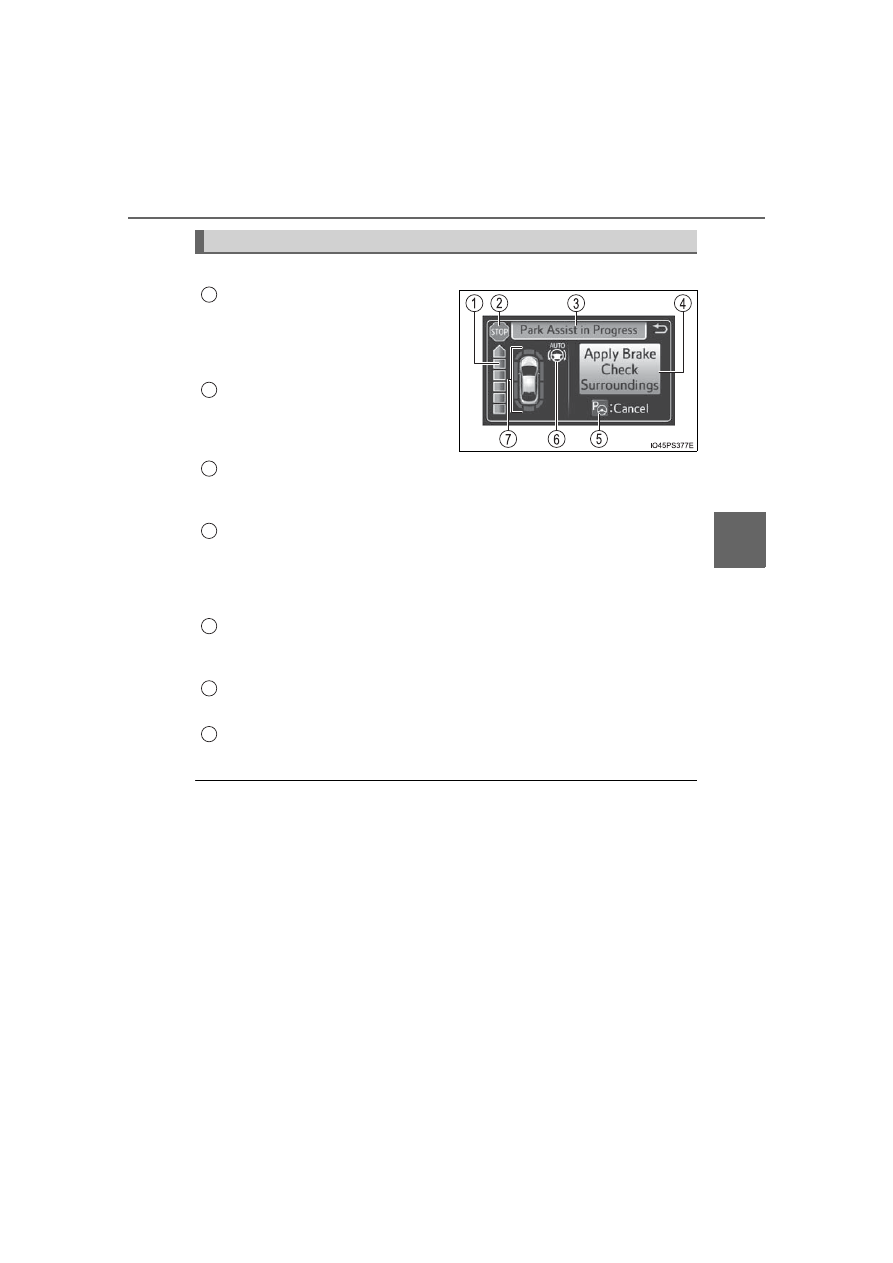
The guidance screen is displayed on the multi-information display.

Assistance level indicator

Displays  a  gauge  indicating  the
level  until  the  vehicle’s  stopping
position/the position at which assist
control ends.

Stop display

When  illuminated,  depress  the
brake pedal and stop the vehicle at
once.

Operation display area

Displays  the  operating  condition  of  the  Simple Advanced  Parking  Guid-
ance System.

Advice display

Follow  the  instructions  on  the  display  and  perform  any  indicated  opera-
tions. As an example, the illustration shows the display indicating it is nec-
essary to depress the brake pedal in order to control the vehicle speed and
to confirm the safety of your surroundings.

S-APGS switch icon

Displayed when the assist mode can be changed and the system can be
turned off or on using the S-APGS switch.

Steering wheel auto operation display

Displays when the steering wheel auto operation is being performed.

Intuitive parking assist display/door position (open/close) display

P. 359

S-APGS indicator inside the meter (

P. 111)

This  indicator  illuminates  when  the  steering  wheel  auto  operation  is  being
performed by the Simple Advanced Parking Guidance System. After control
ends, the indicator blinks for a short period of time and then turns off.

Intuitive parking assist pop-up display

While  the  Simple Advanced  Parking  Guidance  System  is  operating,  if  the
intuitive parking assist detects an obstacle, the intuitive parking assist display
automatically  pops  up  on  the  guidance  screen  (

P.  359),  regardless  of

whether the intuitive parking assist is on or off. (

P. 358)

Guidance screen

1

2

3

4

5

6

7

386

4-5. Using the driving support systems

Assist mode will be canceled or stopped in the following cases.

Assist control is canceled when

The system temperature preservation function operates

There is a system malfunction

System determined that the parking environment is not suitable
for assist to continue

When  assist  control  is  canceled,  firmly  grasp  the  steering  wheel,
depress the brake pedal and stop the vehicle.
Start again from the beginning, as the system will already be can-
celed.  When  continuing  to  park  manually,  operate  the  steering
wheel as you normally would.

Assist control is stopped when

The steering wheel is operated

The vehicle speed exceeds 4 mph (7 km/h) during assist control

The Parking Support Brake function operates

When assist control is stopped, it can be resumed by following the
guidance shown on the screen.

If the vehicle speed is about to exceed the speed limit during assist con-
trol

Canceling or stopping assist mode

A  buzzer  sounds  and  the  message  indi-
cating  there is possibility  that the  vehicle
speed may exceed the speed limit.
When the message is displayed, immedi-
ately depress the brake pedal to deceler-
ate. If the vehicle continues to accelerate,
assist  control  will  be  canceled  when  the
vehicle  speed  exceeds  a  certain  speed.
(

P. 408)

387

4-5. Using the driving support systems

4

Drivin

g

Function summary

If a parking space can be detected, you will be guided forward until
you reach the assist control starting position, and then the parallel
parking assist mode can be used. Furthermore, depending on the
parking space and other conditions, multi-turn maneuvering assist
control is also provided if necessary.

Continue  moving  forward
with  the  vehicle  parallel  to
the curb or road, and stop so
that  the  center  of  the  target
parking  spot  appears  nearly
perpendicular  to  the  vehicle.
Then  press  the  S-APGS
switch  1  time  to  select  the
parallel parking assist mode.
Travel  straight  ahead  paral-
lel  with  the  road  or  curb  so
that  the  parking  space  is
detected.
A sound is issued and a display is shown to notify you when the
vehicle  reaches  a  position  where  assist  control  can  be  used  to
begin  backing  up  from,  and  then  when  the  shift  position  is
changed according to guidance provided by the system, steering
wheel auto operation begins.

If the detected parking space or road width (distance to the side of the
road across from the parking space) is narrow, or if there are obstacles
in front of the vehicle, guidance will not be issued.

Parking is complete

This  completes  the  assist  mode.  Depending  on  the  condition  of  the
parking space, guidance to starting points for moving forward and back-
ing up, as well as the steering wheel auto operation, are repeated any
time  multi-turn  maneuvering  is  necessary  following  step 

  from  the

time the vehicle begins backing up until parking completes.

How to parallel park (parallel parking assist mode)

1

2

3

4

3

388

4-5. Using the driving support systems

Parking

Stop so that the center of the target parking spot appears nearly
perpendicular to vehicle. Then press the S-APGS switch 1 time
and  check  that  the  display  on  the  multi-information  display
switches to “Parallel Parking”.

The mode switches each time the S-APGS switch is pressed. 
(

P. 384)

When the vehicle speed is approximately 19 mph (30 km/h) or
higher, pressing the S-APGS switch will not cause the screen
to switch to the “Parallel Parking” display.

1

389

4-5. Using the driving support systems

4

Drivin

g

Travel  straight  ahead  paral-
lel  with  the  road  (or  curb),
and  maintain  a  gap  of
approximately  3.3  ft.  (1  m)
from any parked vehicles.

Proceed slowly.

The  system  will  begin
searching  for  a  parking
space.

While  searching  for  a
space, the turn signal lever
(

P. 255) can be operated

to  select  a  parking  space
on the left or right.

When  stopping  the  func-
tion,  press  the  S-APGS
switch  once  to  turn  the
function off.

When  a  parking  space  is
detected,  the  screen  will
change.

2

3.3 ft.

(1 m)

390

4-5. Using the driving support systems

When  a  beep  sounds  once
and the stop display (

P. 385)

is  shown  on  the  display,  stop
the vehicle.

When the shift position is changed to R, a high-pitched beep is
emitted and assist control will start.

When  the  steering  wheel  auto  operation  starts,  the  steering
wheel auto operation display (

P.  385) and assistance level

indicator (

P. 385) will be shown in the display area.

To stop assist control, press the S-APGS switch.

Assume  an  ordinary  posture  for  backing  up,  rest  your  hands
lightly on the steering wheel without applying any force, directly
confirm the safety of the area to the rear and around the vehicle,
confirm  that  there  are  no  obstacles  in  the  parking  space,  and
slowly  back  up  while  adjusting  your  speed  by  depressing  the
brake pedal.

When backing up too quickly, a sharp beeping sound is emit-
ted and assist control is stopped. (

P. 386)

When the vehicle cannot be cleanly entered within the target
parking spot on the first try and multi-turn maneuvering is nec-
essary, proceed to step 

.

When  multi-turn  maneuvering  is  not  necessary,  proceed  to
step 

.

3

4

5

6

12

391

4-5. Using the driving support systems

4

Drivin

g

When  a  beep  sounds  once
and the stop display (

P. 385)

is  shown  on  the  display,  stop
the vehicle.

Change the shift position to D.
Assume  an  ordinary  driving  posture,  rest  your  hands  lightly  on
the  steering  wheel  without  applying  any  force,  directly  confirm
the  safety  of  the  area  to  the  front  and  around  the  vehicle  and
slowly proceed forward while adjusting your speed by depressing
the brake pedal.
When  a  beep  sounds  once  and  the  stop  display  (

P.  385)  is

shown on the display, stop the vehicle.
Change the shift position to R.
Assume  an  ordinary  posture  for  backing  up,  rest  your  hands
lightly on the steering wheel without applying any force, directly
confirm the safety of the area to the rear and around the vehicle
and slowly back up while adjusting your speed by depressing the
brake pedal.

Depending  on the condition of  the  parking space,  steps 

 to 

 may

need to be repeated.

6

7

8

9

10

11

6

11

392

4-5. Using the driving support systems

When the vehicle is almost entirely within the target parking spot,
a high-pitched beep is emitted and the stop display is shown on
the display, stop the vehicle.
This completes the parallel parking assist mode.

After stopping, feel free to maneuver the vehicle to reach the
desired parking spot.

Be  sure  to  back  up  while  checking  the  area  to  the  front  and
rear of the vehicle directly and by using the mirrors.

Parallel parking assist mode operating conditions

In order to operate the parallel parking assist mode correctly, drive slowly (at
a speed at which the vehicle can be quickly stopped) parallel to the road (or
shoulder) while maintaining a distance of approximately 3.3 ft. (1 m) to any
parked vehicles.

The  function  cannot  be  used  when  the  vehicle  speed  is  approximately
19 mph (30 km/h) or higher.

The  front  side  sensors  and  rear  side  sensors  are  used  to  detect  parked
vehicles and determine the parking spot. Therefore, when detection is not
possible (

P. 414), guidance is not issued.

If  there  are  no  parked  vehicles,  the  parking  spot  cannot  be  determined.
Therefore, the parallel parking assist mode cannot be operated.

If unable to detect the environment surrounding the parking space, the par-
allel parking assist mode may not be able to operate.

Guidance  will  continue  until  the  vehicle  speed  meets  or  exceeds  approxi-
mately  19 mph  (30 km/h)  or  the  function  is  turned  off  using  the  S-APGS
switch.

Timing for pressing the S-APGS switch

In  the  following  cases,  the  assist  mode  may  also  operate  during  the  steps
taken  to  park  using  the  parallel  parking  assist  mode.  However,  in  these
cases, conduct parking procedures according to the information on the multi-
information display.

In step   the S-APGS switch is pressed after already passing over the tar-
get parking spot.
If the vehicle is not stopped in step  , pressing the S-APGS switch 1 time
while  the  vehicle  is  in  motion  allows  you  to  select  “Parallel  Parking”  and
proceed directly to step  .

The  vehicle  is  moved  up  to  the  position  in  step 

  without  the  S-APGS

switch  being  pressed.  Then  the  S-APGS  switch  is  pressed  after  having
changed the shift position to R.

12

1

1

2

3

393

4-5. Using the driving support systems

4

D

riv

in

g

NOTICE

If the road surface has any dips or inclines, the target parking spot cannot
be correctly set. Therefore, the vehicle may be parked at an angle or may
deviate from the parking spot. In these cases, do not use the parallel park-
ing assist mode.

When  there  is  a  wall  or  other  obstacle  on  the  inner  side  of  the  parking
space, or when another parked vehicle extends into the road from its park-
ing  spot,  the  target  parking  spot  may  be  set  in  a  position  that  juts  out
slightly into the road.

Depending  on  the  surrounding  environment,  such  as  other  parked  vehi-
cles, the vehicle may be parked at an angle or may deviate from the park-
ing spot. Manually adjust vehicle alignment as necessary.

The system provides assistance to guide the vehicle based on position of
adjacent  vehicles,  even  if  there  are  obstacles,  bumps,  drops  or  curb
stones in the parking space.
If it seems the vehicle may make contact, stop the vehicle by depressing
the brake pedal, and then press the S-APGS switch to turn off the system.

It may not be possible to detect objects that are low to the ground. Directly
confirm the safety of your surroundings and, if it seems the vehicle may
make contact with an obstacle, stop the vehicle by depressing the brake
pedal.

When  the  other  parked  vehicle  is  nar-
row  or  parked  extremely  close  to  the
curb,  assist  control  will  also  guide  the
vehicle to a position close to the curb. 
If  it  seems  the  vehicle  may  make  con-
tact  with  the  curb  or  any  other  obsta-
cles,  or if it  seems the  tire position will
deviate from the intended parking spot,
stop  the  vehicle  by  depressing  the
brake  pedal,  and  then  press  the
S-APGS switch to turn off the system.

394

4-5. Using the driving support systems

Function summary

When departing from a parallel parking position, select the direction
you would like to depart in, and steering wheel operation assist con-
trol  will  be  provided  to  guide  the  vehicle  to  a  position  from  which
you can take off.

With  the  shift  position  in  P,
press  the  S-APGS  switch,
select  exit  parallel  parking
assist  mode,  and  then  oper-
ate  the  turn  signal  lever  to
select  the  desired  departure
direction.
Steering  wheel  auto  opera-
tion  starts  when  the  shift
position  is  changed  accord-
ing  to  guidance  provided  by
the system.
A sound is issued and a display is shown to notify you when the
vehicle reaches a position from which you can take off.

Depending on the condition of the parking space, guidance to starting
points for moving forward and backing up, as well as the steering wheel
auto operation, are repeated any time multi-turn maneuvering is neces-
sary from the time the steering wheel auto operation begins in step 
up until the vehicle reaches a position from which it can take off.

How to depart from a parallel parking position (exit parallel park-
ing assist mode)

1

2

3

2

395

4-5. Using the driving support systems

4

Drivin

g

Using the exit parallel parking assist mode to depart

With the shift position in P, press the S-APGS switch and check
that the display on the multi-information display switches to “Exit
Parallel Parking”.

Operate  the  turn  signal  lever  (

P.  255)  to  select  whether  you

would like to depart to the left or right.

If there are any obstacles in the direction the vehicle is departing in, the
system determines that it is not possible to depart, and assist control is
stopped.

When the shift position is changed to R (or D) according to the
advice display on the screen (

P. 385), a high-pitched beep is

emitted and assist control will start.

Step   and onward is for cases in which the advice display shows “Shift
to [R]” after operating the turn signal lever to select a departure direc-
tion.

When  the  steering  wheel  auto  operation  starts,  the  steering
wheel auto operation display (

P. 385)  and assistance level

indicator (

P. 385) will be shown in the display area.

To stop assist control, press the S-APGS switch.

Assume  an  ordinary  posture  for  backing  up,  rest  your  hands
lightly on the steering wheel without applying any force, directly
confirm the safety of the area to the rear and around the vehicle
and slowly back up while adjusting your speed by depressing the
brake pedal.

When backing up too quickly, a sharp beeping sound is emit-
ted and assist control is stopped. (

P. 386)

1

2

3

4

4

396

4-5. Using the driving support systems

When  a  beep  sounds  once
and the stop display (

P. 385)

is  shown  on  the  display,  stop
the vehicle.

Change the shift position to D.
Assume  an  ordinary  driving  posture,  rest  your  hands  lightly  on
the  steering  wheel  without  applying  any  force,  directly  confirm
the  safety  of  the  area  to  the  front  and  around  the  vehicle  and
slowly proceed forward while adjusting your speed by depressing
the brake pedal.

When  departure cannot be accomplished  on  the  first try and
multi-turn maneuvering is necessary, proceed to step 

.

When  multi-turn  maneuvering  is  not  necessary,  proceed  to
step 

 (

P. 398).

When  a  beep  sounds  once
and the stop display (

P. 385)

is  shown  on  the  display,  stop
the vehicle.

Change the shift position to R.

5

6

7

8

14

8

9

397

4-5. Using the driving support systems

4

Drivin

g

Assume  an  ordinary  posture  for  backing  up,  rest  your  hands
lightly on the steering wheel without applying any force, directly
confirm the safety of the area to the rear and around the vehicle
and slowly back up while adjusting your speed by depressing the
brake pedal.

Depending on the condition of the parking space, steps 

 to 

 may

need to be repeated.

When  a  beep  sounds  once
and the stop display (

P. 385)

is  shown  on  the  display,  stop
the vehicle.

Change the shift position to D.
Assume  an  ordinary  driving  posture,  rest  your  hands  lightly  on
the  steering  wheel  without  applying  any  force,  directly  confirm
the  safety  of  the  area  to  the  front  and  around  the  vehicle  and
slowly proceed forward while adjusting your speed by depressing
the brake pedal.

10

5

10

11

12

13

398

4-5. Using the driving support systems

When the vehicle has nearly
reached the take-off point, a
high-pitched beep is emitted
and  assist  control  finishes.
From there, grasp the steer-
ing  wheel  and  proceed  for-
ward. 

Exit parallel parking assist mode

During  assist  control,  if  the  driver  determines  that  they  are  at  a  position
where take-off is possible and operates the steering wheel, assist control is
stopped at that position.

Assist control cannot be used if there are no parked vehicles ahead, or if the
gap between the front of your vehicle and the vehicle parked ahead is too
large.

When using the exit parallel parking assist mode, the assist mode may not
be able to operate depending on the surrounding environment.

14

NOTICE

The detection range of the sensors (

P. 362) is limited. Directly confirm

the  safety  of  your  surroundings,  and  if  there  is  a  possibility  of  a  contact
accident, stop the vehicle by depressing the brake pedal.

It may not be possible to detect objects that are low to the ground. Directly
confirm the safety of your surroundings and, if it seems the vehicle may
make contact with an obstacle, stop the vehicle by depressing the brake
pedal.

When departing for a position from which you can take off, directly confirm
the safety of your surroundings.

399

4-5. Using the driving support systems

4

Drivin

g

Function summary

Stop  so  that  the  center  of  the  target  parking  spot  appears  nearly
perpendicular to the vehicle. If the space is detectable, the forward
guidance  function  can  be  used.  Furthermore,  depending  on  the
parking space and other conditions, multi-turn maneuvering assist
control is also provided if necessary.

Stop so that the center of the
target  parking  spot  appears
nearly  perpendicular  to  the
vehicle.  Then  press  the
S-APGS  switch  2  times  to
select  back-in  parking  assist
mode.
Steering  wheel  auto  opera-
tion  starts  when  the  vehicle
begins to move.
A sound is issued and a dis-
play  is  shown  to  notify  you
when the vehicle reaches the
position  to  start  backing  up
from.

If the detected parking space or
road width (distance to the side
of the road across from the park-
ing  space)  is  narrow,  or  if there
are obstacles in front of the vehi-
cle, guidance will not be issued.

Parking is complete

This completes the assist mode.
Depending on the condition of the parking space, guidance to starting
points for moving forward and backing up, as well as the steering wheel
auto operation, are repeated any time multi-turn maneuvering is neces-
sary following step   from the time the vehicle begins backing up until
parking completes.

How to park next to other vehicles (back-in parking assist mode)

1

2

3

4

3

400

4-5. Using the driving support systems

Parking

Stop so that the center of the
target  parking  spot  appears
nearly perpendicular  to  vehi-
cle. Then press the S-APGS
switch 2 times and check that
the display on the multi-infor-
mation  display  switches  to
“Back-in Parking”.

Visually  check  the  area  in
the  direction  of  the  arrow
indicating  the  direction  of
the  steering  wheel  auto
operation  and  the  target
parking  spot  on  the  dis-
play.

The  mode  switches  each
time the S-APGS switch is
pressed. (

P. 384)

When  the  shift  position  is  not  in  D  or  B,  the  screen  will  not
switch to the “Back-in Parking” display.

When  the  vehicle  speed  has  been  detected,  the  screen
switches to the “Parallel Parking” display. To switch the screen
to  the  “Back-in  Parking”  display,  stop  the  vehicle  completely
and press the S-APGS switch again.

The  turn  signal  lever  (

P.  255)  can  be  operated  to  select

whether you would like to park to the left or right.

The system cannot be used when the parking space is narrow
or  there  is  not  a  sufficient  enough  area  for  assist  control  to
operate.  Please  refer  to  the  information  shown  on  the  multi-
information display to use a different parking space.

3.3 ft.

(1 m)

1


Content      ..     22      23      24      25     ..