Toyota Prius (2022 year). Manual in english - page 21
 

  Index      Toyota     Toyota Prius (2022 year). Manual in english


Search            copyright infringement  


Content      ..     19      20      21      22     ..


Toyota Prius (2022 year). Manual in english - page 21


337

4-5. Using the driving support systems

4

Drivin

g

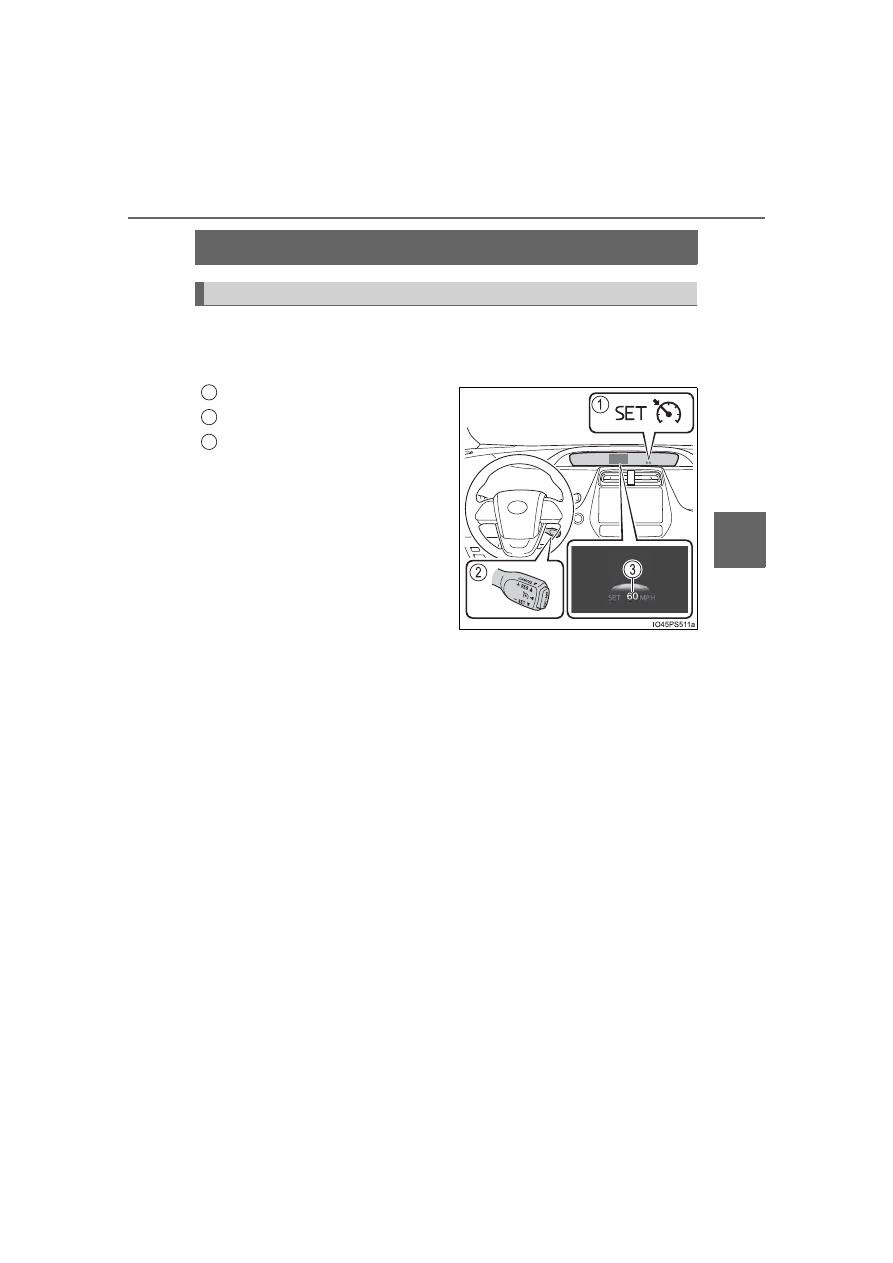
Cruise control

Use the cruise control to maintain a set speed without depressing the
accelerator pedal.
Use the cruise control on freeways and highways.

Indicators
Cruise control switch
Set speed

: If equipped

Summary of functions

1

2

3

338

4-5. Using the driving support systems

Press  the  “ON-OFF”  button  to
activate the cruise control. 

Cruise  control  indicator  will  come
on.
Press  the  button  again  to  deacti-
vate the cruise control. 

Accelerate  or  decelerate,  with
accelerator  pedal  operation,  to
the  desired  vehicle  speed
(above  approximately  20  mph
[30  km/h])  and  push  the  lever
down to set the speed.

Cruise  control  “SET”  indicator  will
come on.
The  vehicle  speed  at  the  moment
the  lever  is  released  becomes  the
set speed.

Setting the vehicle speed

1

2

339

4-5. Using the driving support systems

4

Drivin

g

To change the set speed, operate the lever until the desired set speed
is obtained.

Increases the speed
Decreases the speed

Fine 

adjustment: 

Momentarily

move the lever in the desired direc-
tion.
Large adjustment: Hold the lever in
the desired direction.

The set speed will be increased or decreased as follows:
Fine adjustment: By approximately 1 mph (1.6 km/h) or 1 km/h (0.6 mph)
each time the lever is operated.
Large adjustment: The set speed can be increased or decreased continu-
ally until the lever is released.

Pulling  the  lever  toward  you
cancels  the  constant  speed
control.

The speed setting is also canceled
when 

the 

brake 

pedal 

is

depressed.

Pushing  the  lever  up  resumes
the constant speed control.

However,  resuming  is  available
when  the  vehicle  speed  is  more
than 

approximately 

20 mph

(30 km/h).

Adjusting the set speed

1

2

Canceling and resuming the constant speed control

1

2

340

4-5. Using the driving support systems

Cruise control can be set when

The shift position is in D.

Vehicle speed is above approximately 20 mph (30 km/h). 

Accelerating after setting the vehicle speed

The vehicle can be accelerated by operating accelerator pedal. After accel-
erating, the set speed resumes.

Even without canceling the cruise control, the set speed can be increased
by first accelerating the vehicle to the desired speed and then pushing the
lever down to set the new speed.

Automatic cancelation of cruise control

Cruise control is automatically canceled in any of the following situations.

Actual vehicle speed falls more than approximately 10 mph (16 km/h) below
the set speed.
At this time, the memorized set speed is not retained.

Actual vehicle speed is below approximately 20 mph (30 km/h).

VSC is activated.

TRAC is activated for a period of time.

When the VSC or TRAC system is turned off.

If  “Cruise  Control  Malfunction  Visit  Your  Dealer”  is  displayed  on  the
multi-information display

Press  the  “ON-OFF”  button  once  to  deactivate  the  system,  and  then  press
the button again to reactivate the system. 
If the cruise control speed cannot be set or if the cruise control cancels imme-
diately after being activated, there may be a malfunction in the cruise control
system. Have the vehicle inspected by your Toyota dealer.

341

4-5. Using the driving support systems

4

D

riv

in

g

WARNING

To avoid operating the cruise control by mistake

Switch the cruise control off using the “ON-OFF” button when not in use.

Situations unsuitable for cruise control

Do not use cruise control in any of the following situations.
Doing so may result in loss of control and could cause an accident resulting
in death or serious injury.

Roads where there are pedestrians, cyclists, etc.

In heavy traffic

On roads with sharp bends

On winding roads

On slippery roads, such as those covered with rain, ice or snow

On sharp inclines or declines
Vehicle speed may exceed the set speed when driving down a steep hill.

During emergency towing

342

4-5. Using the driving support systems

Driving mode select switch

Repeatedly press the switch until the system changes to the intended
driving mode.

Each time the switch is pressed, the driving mode changes in the following
order  and  the  “ECO  MODE”  and  “PWR  MODE”  indicators  turn  on  or  off
accordingly.

In response to driving conditions, one of 3 driving modes can be
selected.

Driving modes

343

4-5. Using the driving support systems

4

Drivin

g

Normal mode
Suitable for normal driving.

When  normal mode is selected, the “ECO MODE”  and “PWR MODE”
indicators turn off.

Power mode
Suitable  for  when  crisp  handling  and  enhanced  accelerator
response are desired, such as when driving on mountainous roads.

When power mode is selected, the

 “PWR MODE” indicator will illuminate

on the main display.

Eco drive mode
Suitable  for  driving  that  improves  fuel  economy  by  generating
torque in response to accelerator pedal operations more smoothly
than in normal mode.

When Eco drive mode is selected, the “ECO MODE” indicator will illumi-
nate on the main display.
While  the  air  conditioning  is  being  used,  the  system  automatically
switches to air conditioning eco mode (

P. 433, 443), allowing for driv-

ing that leads to even better fuel economy.

The driving mode after turning the power switch off

The  driving  mode  will  not  be  changed  automatically  until  the  switch  is
pressed, even if the power switch is turned off.

Switching the driving mode when in EV drive mode

P. 247

1

2

3

344

4-5. Using the driving support systems

BSM (Blind Spot Monitor)

The Blind Spot Monitor is a system that has 2 functions;

The Blind Spot Monitor function 
Assists the driver in making the decision when changing lanes

The Rear Cross Traffic Alert function 
Assists the driver when backing up

These functions use same sensors.

Outside rear view mirror indicators

Blind Spot Monitor function: 
When a vehicle is detected in the blind spot, the outside rear view mirror
indicator comes on while the turn signal lever is not operated. If the turn
signal  lever  is  operated  toward  the  detected  side,  the  outside  rear  view
mirror indicator flashes.
Rear Cross Traffic Alert function: 
When  a  vehicle  approaching  from  the  right  or  left  rear  of  the  vehicle  is
detected, the outside rear view mirror indicators flash.

: If equipped

Summary of the Blind Spot Monitor

1

345

4-5. Using the driving support systems

4

Drivin

g

The Blind Spot Monitor on/off screen and indicator

The Blind Spot Monitor function and Rear Cross Traffic Alert function can
be switched on and off using the multi-information display. (

P. 151)

When  switched  on,  the  BSM  indicator  illuminates  on  the  meter  and  the
buzzer sounds.

Rear  Cross  Traffic Alert  buzzer  (Rear  Cross  Traffic Alert  function
only)

When  a  vehicle  approaching  from  the  right  or  left  rear  of  the  vehicle  is
detected, a buzzer sounds from the driver’s side instrument panel.

RCTA detection screen (RCTA function only)

If a vehicle approaching from the right or left at the rear of the vehicle is
detected, the RCTA detection screen will be shown on the multi-informa-
tion display.

The Blind Spot Monitor function and Rear Cross Traffic Alert function

can be enabled/disabled on the 

 screen (

P. 151) of the multi-

information display.

Once the systems are disabled, the systems will not be enabled until they

are  enabled  by  the 

  screen  of  multi-information  display  again.  (The

systems  are  not  automatically  enabled  even  when  the  hybrid  system  is
restarted.)

Changing settings of the Blind Spot Monitor function and Rear
Cross Traffic Alert function

2

3

4

346

4-5. Using the driving support systems

The BSM outside rear view mirror indicators visibility

When under strong sunlight, the outside rear view mirror indicator may be dif-
ficult to see.

The Rear Cross Traffic Alert buzzer hearing

The Rear Cross Traffic Alert buzzer may be difficult to hear over loud noises
such as high audio volume.

When “Blind Spot Monitor Unavailable” is shown on the multi-informa-
tion display

The  sensor  voltage  has  become  abnormal,  water,  snow  mud,  etc.,  may  be
built up in the vicinity of the sensor area of bumper (

P. 348). Removing the

water,  snow,  mud,  etc.,  from  the  vicinity  of  the  sensor  area  bumper  should
return it to normal. Also, the sensor may not function normally when used in
extremely hot or cold weather.

When  “Blind  Spot  Monitor  System  Malfunction  Visit  Your  Dealer”  is
shown on the multi-information display

There  may  be  a  sensor  malfunction  or  misaligned.  Have  the  vehicle
inspected by your Toyota dealer.

Customization

The  brightness  of  the  outside  rear  view  mirror  indicators  can  be  changed.
(Customizable features: 

P. 686)

Certifications for the Blind Spot Monitor

For vehicles sold in the U.S.A., Hawaii, Guam, Saipan and Puerto Rico

347

4-5. Using the driving support systems

4

Drivin

g

For vehicles sold in Canada

348

4-5. Using the driving support systems

WARNING

To ensure the system can operate properly

Keep the sensor and its surrounding area on the bumper clean at all times.

Do not subject a sensor or its surrounding area on the rear bumper to a
strong impact.
If a sensor is moved even slightly off position, the system may malfunction
and vehicles may not be detected correctly.
In  the  following  situations,  have  your  vehicle  inspected  by  your  Toyota
dealer.
• A sensor or its surrounding area is subject to a strong impact.
• If  the  surrounding  area  of  a  sensor  is  scratched  or  dented,  or  part  of

them has become disconnected.

Do not disassemble the sensor.

Do not attach accessories or stickers to the sensor or surrounding area on
the bumper.

Do not modify the sensor or surrounding area on the bumper.

Do not paint the rear bumper any color other than an official Toyota color.

One  Blind  Spot  Monitor  sensor  is
installed  inside  the  left  and  right  side  of
the  vehicle  rear  bumper  respectively.
Observe the following to ensure the Blind
Spot Monitor can function correctly.

349

4-5. Using the driving support systems

4

Drivin

g

The Blind Spot Monitor function uses radar sensors to detect vehicles
that are traveling in an adjacent lane in the area that is not reflected in
the outside rear view mirror (the blind spot), and advises the driver of
the vehicle’s existence via the outside rear view mirror indicator.

The areas that vehicles can be detected in are outlined below.
The range of the detection area extends to:

Approximately  11.5  ft.  (3.5  m)
from the side of the vehicle

The  first  1.6  ft.  (0.5  m)  from  the
side  of  the  vehicle  is  not  in  the
detection area

Approximately 9.8 ft. (3 m) from
the rear bumper
Approximately 3.3 ft. (1 m) for-
ward of the rear bumper

The Blind Spot Monitor function

The Blind Spot Monitor function detection areas

1

2

3

350

4-5. Using the driving support systems

The Blind Spot Monitor function is operational when

The BSM system is set to on (

P. 151)

Vehicle speed is greater than approximately 10 mph (16 km/h)

The Blind Spot Monitor function will detect a vehicle when

A vehicle in an adjacent lane overtakes your vehicle.

You overtake a vehicle in adjacent lane slowly.

Another vehicle enters the detection area when it changes lanes.

Conditions under which the system will not detect a vehicle

The Blind Spot Monitor function is not designed to detect the following types
of vehicles and/or objects:

Small motorcycles, bicycles, pedestrians etc.

*

Vehicles traveling in the opposite direction

Guardrails, walls, signs, parked vehicles and similar stationary objects

*

Following vehicles that are in the same lane

*

Vehicles driving 2 lanes across from your vehicle

*

Vehicles which are being overtaken rapidly by your vehicle

*

*

: Depending on conditions, detection of a vehicle and/or object may occur.

WARNING

Cautions regarding the use of the system

The driver is solely responsible for safe driving. Always drive safely, taking
care to observe your surroundings.
The Blind Spot Monitor function is a supplementary function which alerts the
driver that a vehicle is present in the blind spot. Do not overly rely on the
Blind Spot Monitor function. The function cannot judge if it is safe to change
lanes, therefore over reliance could cause an accident resulting in death or
serious injury.
According  to  conditions,  the  system  may  not  function  correctly. Therefore
the driver’s own visual confirmation of safety is necessary.

351

4-5. Using the driving support systems

4

Drivin

g

Conditions under which the system may not function correctly

The Blind Spot Monitor function may not detect vehicles correctly in the fol-
lowing situations:
• When the sensor is misaligned due to a strong impact to the sensor or its

surrounding area

• When mud, snow, ice, a sticker, etc. is covering the sensor or surround-

ing area on the rear bumper

• When driving on a road surface that is wet with standing water during bad

weather, such as heavy rain, snow, or fog

• When multiple vehicles are approaching with only a small gap between

each vehicle

• When the distance between your vehicle and a following vehicle is short
• When there is a significant difference in speed between your vehicle and

the vehicle that enters the detection area

• When the difference in speed between your vehicle and another vehicle

is changing

• When  a  vehicle  enters  a  detection  area  traveling  at  about  the  same

speed as your vehicle

• As your vehicle starts from a stop, a vehicle remains in the detection area
• When driving up and down consecutive steep inclines, such as hills, dips

in the road, etc.

• When driving on roads with sharp bends, consecutive curves, or uneven

surfaces

• When vehicle lanes are wide, or when driving on the edge of a lane, and

the vehicle in an adjacent lane is far away from your vehicle

• When a bicycle carrier or other accessory is installed to the rear of the

vehicle

• When there is a significant difference in height between your vehicle and

the vehicle that enters the detection area

• Immediately after the Blind Spot Monitor function is turned on

Instances of the Blind Spot Monitor function unnecessarily detecting a vehi-
cle and/or object may increase in the following situations:
• When the sensor is misaligned due to a strong impact to the sensor or its

surrounding area

• When the distance between your vehicle and a guardrail, wall, etc. that

enters the detection area is short

• When driving up and down consecutive steep inclines, such as hills, dips

in the road, etc.

• When vehicle lanes are narrow, or when driving on the edge of a lane,

and a vehicle traveling in a lane other than the adjacent lanes enters the
detection area

• When driving on roads with sharp bends, consecutive curves, or uneven

surfaces

• When the tires are slipping or spinning
• When the distance between your vehicle and a following vehicle is short
• When a bicycle carrier or other accessory is installed to the rear of the

vehicle

352

4-5. Using the driving support systems

The Rear Cross Traffic Alert functions when your vehicle is in reverse.
It can detect other vehicles approaching from the right or left rear of
the vehicle. It uses radar sensors to alert the driver of the other vehi-
cle’s existence through flashing the outside rear view mirror indicators
and sounding a buzzer.

The Rear Cross Traffic Alert function

Approaching vehicles

Detection areas

WARNING

Cautions regarding the use of the system

There  is  a  limit  to  the  degree  of  recognition  accuracy  and  control  perfor-
mance that this system can provide, do not overly rely on this system. The
driver is always responsible for paying attention to the vehicle’s surround-
ings and driving safely. (

P. 350)

To ensure the system can operate properly

P. 348

1

2


Content      ..     19      20      21      22     ..