Toyota Prius (2022 year). Manual in english - page 16
 

  Index      Toyota     Toyota Prius (2022 year). Manual in english


Search            copyright infringement  


Content      ..     14      15      16      17     ..


Toyota Prius (2022 year). Manual in english - page 16


257

4-3. Operating the lights and wipers

4

Drivin

g

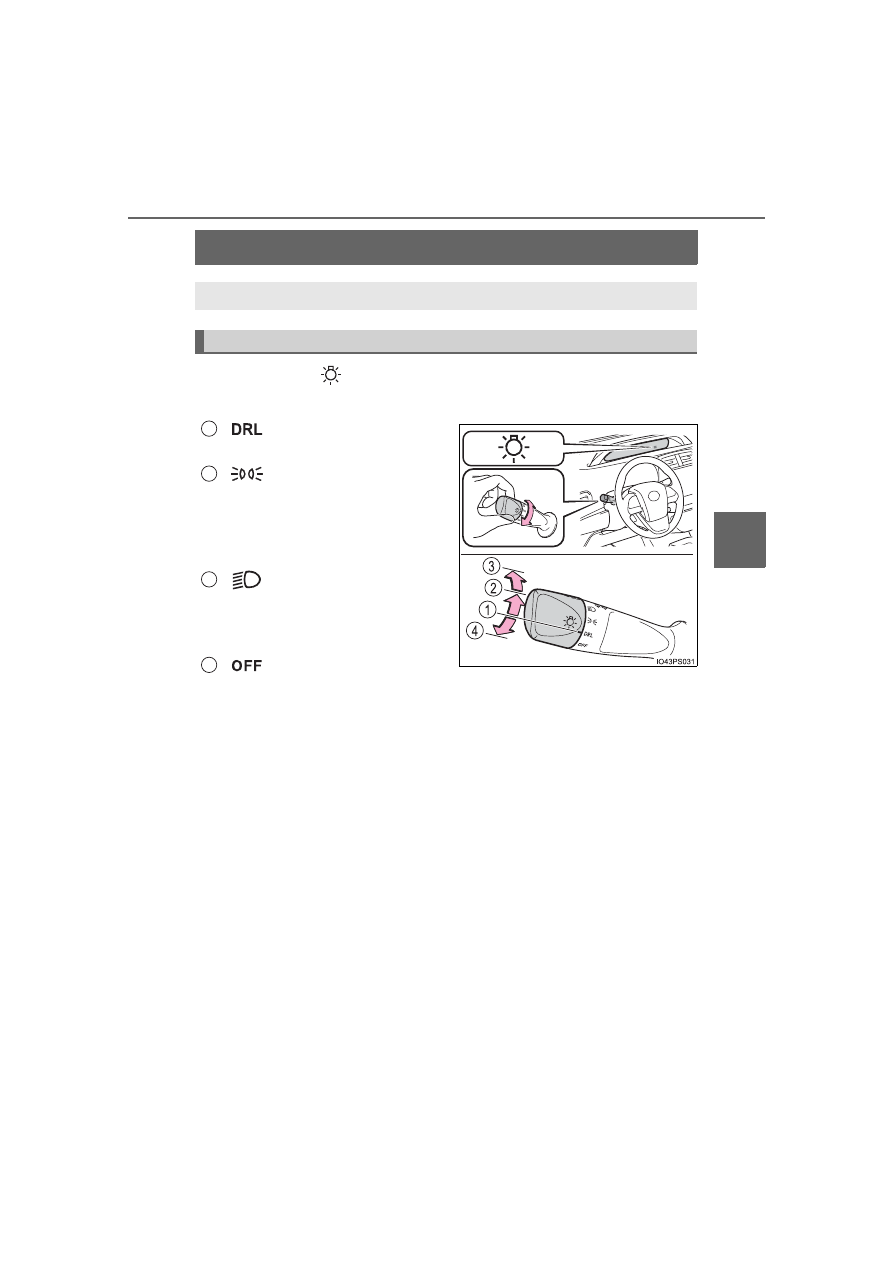
Headlight switch

Operating the 

 switch turns on the lights as follows:

U.S.A. (type A)

The  daytime  running
lights turn on. (

P. 260)

The  side  marker,  park-
ing,  tail,  license  plate,
instrument  panel  lights,
and  daytime  running
lights (

P. 260) turn on.

The  headlights  and  all
the  lights  listed  above
(except daytime running
lights) turn on.
The  daytime  running
lights turn off.

The headlights can be operated manually or automatically. 

Operating instructions

1

2

3

4

258

4-3. Operating the lights and wipers

U.S.A. (type B)

The headlights and all the lights listed above (except day-
time running lights) turn on.
The daytime running lights turn off.

The  headlights,  side
marker,  parking,  LED
accent  (if  equipped),
daytime  running  lights
(

P.  260)  and  so  on

turn on and off automat-
ically  (when  the  power
switch is in ON mode).
The  side  marker,  park-
ing,  LED  accent  (if
equipped),  tail,  license
plate,  instrument  panel
lights, and daytime run-
ning  lights  (

P.  260)

turn on.

1

2

(if equipped)

3

4

259

4-3. Operating the lights and wipers

4

Drivin

g

Canada

The  headlights,  side
marker,  parking,  LED
accent  (if  equipped),
daytime  running  lights
(

P.  260)  and  so  on

turn on and off automat-
ically  (when  the  power
switch is in ON mode).
The  side  marker,  park-
ing,  LED  accent  (if
equipped),  tail,  license
plate,  instrument  panel
lights, and daytime run-
ning  lights  (

P.  260)

turn on.
The headlights and all the lights listed above (except day-
time running lights) turn on.

With  the  headlights  on,  push
the lever away from you to turn
on the high beams. 

Pull  the  lever  toward  you  to  the
center  position  to  turn  the  high
beams off.

Pull  the  lever  toward  you  and
release  it  to  flash  the  high
beams once.

You can flash the high beams with the headlights on or off.

AFS  (Adaptive  Front-lighting  System)  secures  excellent  visibility  at
intersections and on curves by automatically adjusting the direction of
the  light  axis  of  the  headlights  according  to  vehicle  speed  and  the
degree of the tire’s angle as controlled by steering input.
AFS operates at speeds of approximately 6 mph (10 km/h) or higher.

1

2

Turning on the high beam headlights

3

1

2

AFS (Adaptive Front-lighting System) (if equipped)

260

4-3. Operating the lights and wipers

Daytime running light system

The  daytime  running  lights  illuminate  using  the  same  lights  as  the  head-
lights, and illuminate dimmer than the headlights.

To make your vehicle more visible to other drivers during daytime driving,
the  daytime  running  lights  turn  on  automatically  when  all  of  the  following
conditions are met. (The daytime running lights are not designed for use at
night.)
• The hybrid system is operating
• The parking brake is released

• The headlight switch is in the 

 or 

*

 position

*

: When the surroundings are bright

The daytime running lights remain on after they illuminate, even if the park-
ing brake is set again.

For  the  U.S.A.:  Daytime  running  lights  can  be  turned  off  by  operating  the
switch.

Compared  to  turning  on  the  headlights,  the  daytime  running  light  system
offers greater durability and consumes less electricity, so it can help improve
fuel economy.

Headlight control sensor (if equipped)

Automatic light off system

When the headlights come on: The headlights and tail lights turn off 30 sec-
onds  after  the  driver’s  door  is  opened  and  closed  if  the  power  switch  is
turned to ACCESSORY mode or turned off. (The lights turn off immediately
if 

 on the key is pressed after all the doors are locked.)

When only the tail lights come on: The tail lights turn off automatically if the
power switch is turned to ACCESSORY mode or turned off and the driver’s
door is opened.

To turn the lights on again, turn the power switch to ON mode, or turn the light

switch to the 

 or 

 position once and then back to the 

or 

 position. 

The sensor may not function properly if an
object is placed on the sensor, or anything
that  blocks  the  sensor  is  affixed  to  the
windshield. 
Doing  so  interferes  with  the  sensor
detecting  the  level  of  ambient  light  and
may  cause  the  automatic  headlight  sys-
tem to malfunction. 
Air  conditioning  operation  may  also  be
interrupted.

261

4-3. Operating the lights and wipers

4

D

riv

in

g

Automatic headlight leveling system (vehicles with AFS)

The level of the headlights is automatically adjusted according to the number
of  passengers  and  the  loading  condition  of  the  vehicle  to  ensure  that  the
headlights do not interfere with other road users.

12-volt battery-saving function

In order to prevent the 12-volt battery of the vehicle from discharging, if the
headlights and/or tail lights are on when the power switch is turned off, the
12-volt battery saving function will operate and automatically turn off all the
lights after approximately 20 minutes.
When any of the following are performed, the 12-volt battery-saving function
is canceled once and then reactivated. All the lights will turn off automatically
20 minutes after the 12-volt battery-saving function has been reactivated:

When the headlight switch is operated

When a door is opened or closed

If “Headlight System Malfunction Visit Your Dealer” is displayed on the
multi-information display

The system may be malfunctioning. Have the vehicle inspected by your Toy-
ota dealer.

If the AFS OFF indicator flashes (vehicles with AFS)

It may indicate a malfunction in the system. Contact your Toyota dealer.

Customization

Settings (e.g. light sensor sensitivity) can be changed. 
(Customizable features: 

P. 686)

NOTICE

To prevent 12-volt battery discharge

Do not leave the lights on longer than necessary when the hybrid system is
off.

262

4-3. Operating the lights and wipers

AHB (Automatic High Beam)

Push  the  lever  away  from  you
with the headlight switch in the

 or 

 position.

Press  the  Automatic  High
Beam switch.

The Automatic  High  Beam  indica-
tor  will  come  on  when  the  head-
lights  are  turned  on  automatically
to  indicate  that  the  system  is
active.

: If equipped

The  Automatic  High  Beam  uses  an  in-vehicle  front  camera  to
assess  the  brightness  of  streetlights,  the  lights  of  vehicles
ahead etc., and automatically turns the high beam on or off as
necessary.

WARNING

Limitations of the Automatic High Beam

Do not rely on the Automatic High Beam. Always drive safely, taking care to
observe your surroundings and turning the high beam on or off manually if
necessary.

To prevent incorrect operation of the Automatic High Beam system

Do not overload the vehicle.

Activating the Automatic High Beam system

1

2

263

4-3. Operating the lights and wipers

4

Drivin

g

Switching to low beam

Pull  the  lever  to  the  original
position.

The Automatic  High  Beam  indi-
cator will turn off.
Push the lever away from you to
activate  the  Automatic  High
Beam system again.

Switching to high beam

Press  the  Automatic  High
Beam switch.

The Automatic  High  Beam  indi-
cator  will  turn  off  and  the  high
beam indicator will turn on.
Press  the switch to  activate the
Automatic  High  Beam  system
again.

Turning the high beam on/off manually

264

4-3. Operating the lights and wipers

High beam automatic turning on or off conditions

When all of the following conditions are fulfilled, the high beam will be auto-
matically turned on (after approximately 1 second):
• The vehicle speed is approximately 21 mph (34 km/h) or more.
• The area ahead of the vehicle is dark.
• There are no vehicles ahead with headlights or tail lights turned on.
• There are few streetlights on the road ahead.

If any of the following conditions are fulfilled, the high beam will be automat-
ically turned off:
• The vehicle speed is below approximately 17 mph (27 km/h).
• The area ahead of the vehicle is not dark.
• Vehicles ahead have headlights or tail lights turned on.
• There are many streetlights on the road ahead.

Front camera detection information

The  high  beam  may  not be  automatically turned  off in  the  following  situa-
tions:
• When oncoming vehicles suddenly appear from a curve
• When the vehicle is cut in front of by another vehicle
• When vehicles ahead are hidden from sight due to repeated curves, road

dividers or roadside trees

• When vehicles ahead appear from the faraway lane on wide road
• When vehicles ahead vehicles have no lights

The high beam may be turned off if a vehicle ahead that is using fog lights
without using the headlights is detected.

House lights, street lights, traffic signals, and illuminated billboards or signs
may cause the high beam to switch to the low beams, or the low beams to
remain on.

The following factors may affect the amount of time taken to turn the high
beam on or off:
• The brightness of headlights, fog lights, and tail lights of vehicles ahead
• The movement and direction of vehicles ahead
• When a vehicle ahead only has operational lights on one side
• When a vehicle ahead is a two-wheeled vehicle
• The condition of the road (gradient, curve, condition of the road surface

etc.)

• The number of passengers and amount of luggage

The high beam may be turned on or off when the driver does not expect it.

Bicycles or similar objects may not be detected.

265

4-3. Operating the lights and wipers

4

Drivin

g

In  the  situations  shown  below,  the  system  may  not  be  able  to  accurately
detect  surrounding  brightness  levels.  This  may  cause  the  low  beams  to
remain  on or the  high beams to  cause problems  for pedestrians, vehicles
ahead or other parties. In these cases, manually switch between the high
and low beams.
• In bad weather (rain, snow, fog, sandstorms etc.)
• The windshield is obscured by fog, mist, ice, dirt etc.
• The windshield is cracked or damaged.
• The front camera is deformed or dirty.
• The front camera temperature is extremely high.
• Surrounding brightness levels are equal to those of headlights, tail lights

or fog lights.

• Vehicles  ahead  have  headlights  that  are  either  switched  off,  dirty,  are

changing color, or are not aimed properly.

• When driving through an area of intermittently changing brightness and

darkness.

• When frequently and repeatedly driving ascending/descending roads, or

roads  with  rough,  bumpy  or  uneven  surfaces  (such  as  stone-paved
roads, gravel tracks etc.).

• When  frequently  and  repeatedly  taking  curves  or  driving  on  a  winding

road.

• There is a highly reflective object ahead of the vehicle, such as a sign or

a mirror.

• The back of a vehicle ahead is highly reflective, such as a container on a

truck.

• The vehicle’s headlights are damaged or dirty.
• The vehicle is listing or tilting, due to a flat tire, a trailer being towed etc.
• The high beam and low beam are repeatedly being switched between in

an abnormal manner.

• The driver believes that the high beam may be causing problems or dis-

tress to other drivers or pedestrians nearby.

266

4-3. Operating the lights and wipers

Temporarily lowering sensor sensitivity

The sensitivity of the sensor can be temporarily lowered.

Turn the power switch off while the following conditions are met.

• The headlight switch is in the 

 or 

 position.

• The headlight switch lever is in high beam position.
• Automatic High Beam switch is on.
Turn the power switch to ON mode.
Within 60 seconds after step  , repeat pulling the headlight switch lever to
the  original  position  then  pushing  it  to  the  high  beam  position  quickly  10
times, then leave the lever in high beam position.
If the sensitivity is changed, the Automatic High Beam indicator is turn on
and off 3 times.

Automatic High Beam (headlights) may turn on even the vehicle is stopped.

If “Headlight System Malfunction Visit Your Dealer” is displayed on the
multi-information display

The system may be malfunctioning. Have the vehicle inspected by your Toy-
ota dealer.

1

2

3

2

4

267

4-3. Operating the lights and wipers

4

Drivin

g

Fog light switch

Type A

Turns the fog lights off

Turns the fog lights on

: If equipped

The fog lights offer improved visibility in difficult driving condi-
tions, such as in rain and fog.

Operating instructions

1

2

268

4-3. Operating the lights and wipers

Type B

Turns the fog lights off

Turns the fog lights on

Fog lights can be used when

The headlights are on in low beam.

1

2

NOTICE

To prevent 12-volt battery discharge

Do not leave the lights on longer than necessary when the hybrid system is
off.

269

4-3. Operating the lights and wipers

4

Drivin

g

Windshield wipers and washer

Operating the 

 lever operates the wipers or washer as follows.

Intermittent  windshield  wipers  with  interval  adjuster  (if
equipped)

Type A

Off

Intermittent operation

Low speed operation

High speed operation

Temporary operation

Type B

Off

Intermittent operation

Low speed operation

High speed operation

Temporary operation

Operating the wiper lever

1

2

3

4

5

1

2

3

4

5

270

4-3. Operating the lights and wipers

Wiper  intervals  can  be  adjusted  when  intermittent  operation  is
selected.

Increases  the  intermittent
windshield wiper frequency 
Decreases  the  intermittent
windshield wiper frequency

Washer/wiper 

dual

operation

Pulling  the  lever  operates  the
wipers and washer.
The  wipers  will  automatically
operate  a  couple  of  times  after
the washer squirts.

6

7

8

271

4-3. Operating the lights and wipers

4

Drivin

g

Rain-sensing windshield wipers (if equipped)

Type A

Off

Rain-sensing  opera-

tion

Low speed operation

High speed operation

Temporary operation

Type B

Off

Rain-sensing operation

Low speed operation

High speed operation

Temporary operation

When 

 is selected, the wipers will operate automatically when the

sensor detects falling rain. The system automatically adjusts wiper tim-
ing in accordance with rain volume and vehicle speed. 

1

2

3

4

5

1

2

3

4

5

272

4-3. Operating the lights and wipers

The sensor sensitivity can be adjusted when 

 is selected.

Increases the sensitivity
Decreases the sensitivity

Washer/wiper 

dual

operation

Pulling  the  lever  operates  the
wipers and washer.
The  wipers  will  automatically
operate  a  couple  of  times  after
the washer squirts.

6

7

8


Content      ..     14      15      16      17     ..