Toyota GR Supra (2022 year). Manual in english - page 20
 

  Index      Toyota     Toyota GR Supra (2022 year). Manual in english


Search            copyright infringement  


Content      ..     18      19      20      21     ..


Toyota GR Supra (2022 year). Manual in english - page 20


309

5-1. MOBILITY

5

MOBILITY

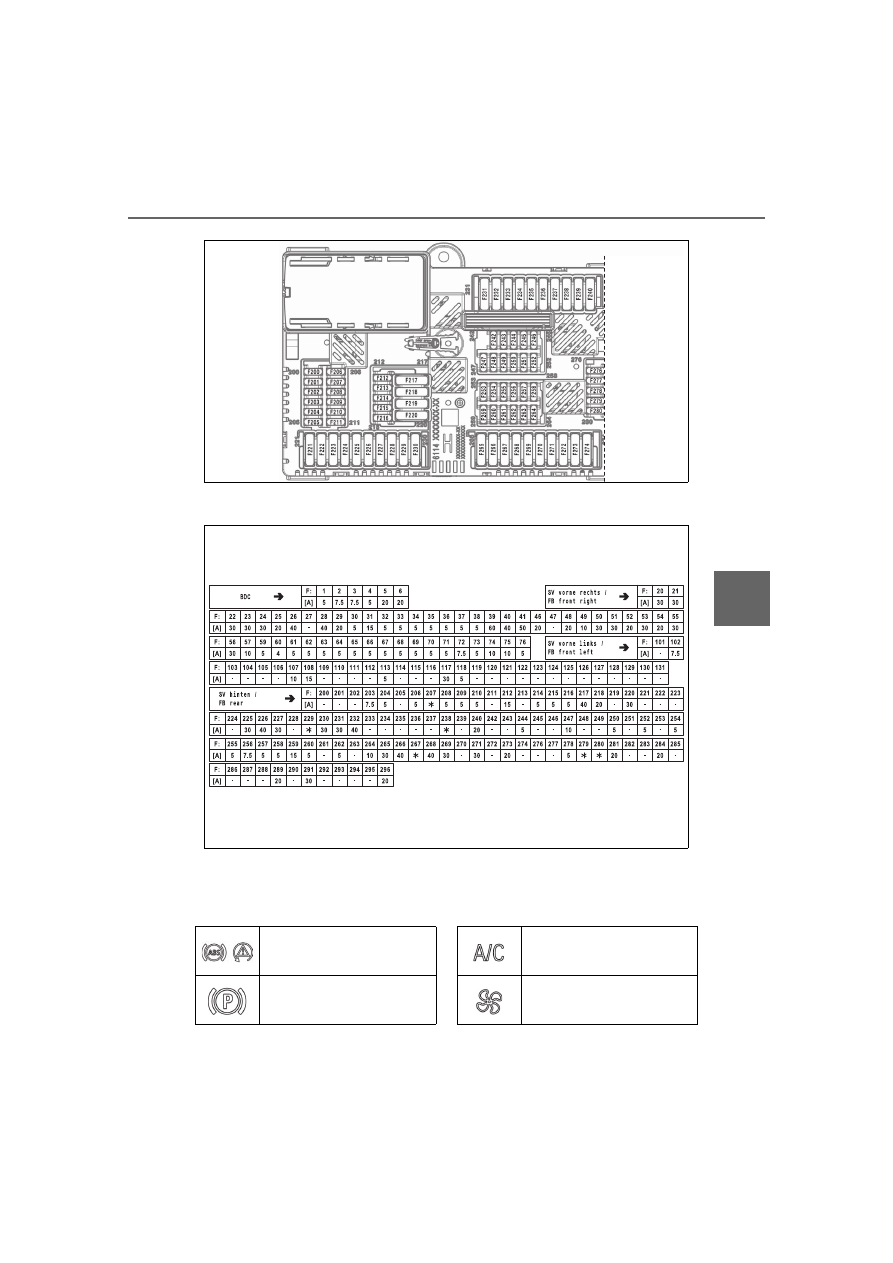
Fuse values

F: Fuse

[A]: Ampere (Fuse - Value)

*: Spare Slot

F28

F28, F32

F3, F40, F204

F40

310

5-1. MOBILITY

F231

F48, F50, F52, F265, 
F269

F55, F56, F64, F65, F67, 
F68

F75

F1, F57, F210

F215, F217

F59

F36, F244

F34, F73

F36, F63

F206, F244, F271

F20, F21

F3

F2

F254

F2

F2, F29

F2

F1, F59, F60, F76, F204, 
F208, F209, F255

F212

F1, F32, F59, F212, 
F214, F215, F216, F217, 
F218, F220

F214

F39

F252

F32, F70, F209

F46, F273

F3, F254

F4, F5, F6, F244

F51

F4

F69, F70

F203, F206, F209, F271

311

5-1. MOBILITY

5

MOBILITY

F1, F3, F39

F36, F61, F62, F67, F68, 
F71

F4

F67, F68

Symbol

Meaning

VSC Vehicle Stability 
Control System

Parking brake

Air conditioning

Blower motor, Interior 
ventilation

Rear window heating

Seat heating

Seat setting

Crash-security module

Switching center column, 
Light switch element, 
steering Operating panel 
Audio

HiFi amplifier, Video mod-
ule TV

Rear-view mirror

Overhead function cen-
ter, Exterior door handle 
electronics

Instrument cluster

Additional battery: Dual 
Accumulator System 
(DSS)

Fuel pump control elec-
tronics, Natural Vacuum 
Leak Detection, Gas gen-
erator for battery safety 
terminal, Remote control 
receiver

Electric window opener

Heating and air-condi-
tioning system

Vehicle's diagnostic port 
(interface)

Interior lights in the boot

Vertical Dynamic platform

Vertical Dynamic platform

Vertical Dynamic platform

Mono Camera (Kafas)

Head Unit

Active Sound Design

Symbol Meaning

312

5-1. MOBILITY

USB Hub

Body Domain Controller

Controller (Toyota Supra 
Command)

Electric fan (air cooler), 
Controlled differential 
lock

12 V socket, Cigarette 
lighter

Interior lights in the boot

Door lock, Exterior door 
handle electronics, 
Telematic Communica-
tion Box

Electronic gear box con-
trol

Telematic Communica-
tion Box, Exterior door 
handle electronics

Electric fan, Rear Power 
distributor

Engine control

Switching center column, 
Light switch element, 
Body Domain Controller

Control panels centre 
console, Interior light in 
the glove box, Interior 
light, Interior light in the 
sunvisor, Exterior mirror, 
Selector lever

Symbol

Meaning

Telematic Communica-
tion Box, Exterior door 
handle electronics pas-
senger side

Switcher block driver's 
door, Exterior mirror

Symbol Meaning

313

5-1. MOBILITY

5

MOBILITY

This chapter describes all stan-

dard, country-specific and 

optional features offered with 

the series. It also describes fea-

tures and functions that are not 

necessarily available in your 

vehicle, e.g., due to the selected 

options or country versions. This 

also applies to safety-related 

functions and systems. When 

using these functions and sys-

tems, the applicable laws and 

regulations must be observed.

Breakdown assistance

Vehicle features and 

options

If a malfunction occurs 

while driving

WARNING

If a malfunction occurs while driv-

ing, immediately stop the vehicle 

in a safe place.

If a warning light illuminates or 

flashes, or a warning message is 

displayed, immediately stop the 

vehicle in a safe place. Do not 

open the hood to inspect the 

engine, as doing so may lead to 

serious injury, such as steam 

burns. If a warning message is 

displayed, perform the necessary 

procedures according to the dis-

played message or explanation in 

the owner’s manual.
These warning messages indicate 

that a malfunction has occurred in 

a system or function of the vehi-

cle. If you continue to drive the 

vehicle, the engine may stop sud-

denly, possibly leading to an acci-

dent. Also, even if no warning 

lights are illuminated or messages 

are displayed, if any abnormal 

sounds, smells or vibrations are 

detected, or of the engine stops 

suddenly, refrain from opening the 

hood to inspect the engine and 

consult an authorized Toyota 

retailer or Toyota authorized 

repairer, or any reliable repairer.

WARNING

If you hear a loud noise or feel 

something impact the underside 

of the vehicle while driving, imme-

diately stop the vehicle in a safe 

place.

314

5-1. MOBILITY

If you have been involved in a 

collision, perform the following:

1

Immediately leave the vehi-

cle and move to a safe place 

in order to avoid secondary 

collisions. Make sure to turn 

the engine switch off to help 

prevent the vehicle from 

catching fire. If the airbags 

have deployed (inflated), the 

WARNING

After stopping the vehicle in a 

safe place, check the underside of 

the vehicle for any leaking brake 

fluid, oil or fuel. If any fluid is leak-

ing, stop driving immediately and 

have the vehicle inspected by an 

authorized Toyota retailer or Toy-

ota authorized repairer, or any 

reliable repairer.
Brake and fuel lines run under the 

floor of the vehicle. If any of these 

lines are damaged, the brakes 

may fail or leaking fuel may ignite 

and cause a fire.

WARNING

During normal driving, do not turn 

off the engine. Turning the engine 

off while driving will not cause loss 

of steering or braking control, but 

the power assist to these systems 

will be lost. This will make it more 

difficult to steer and brake, so you 

should pull over and stop the 

vehicle as soon as it is safe to do 

so.

WARNING

While driving, if a tire has been 

punctured or has ruptured, firmly 

grip the steering wheel, gradually 

reduce the vehicle speed and 

stop the vehicle in a safe place. 

Avoid sudden braking and steer-

ing operations as doing so may 

cause you to lose control of the 

vehicle. Gradually reduce the 

vehicle speed and stop the vehi-

cle in a safe place.

If you have been involved 

in a collision

315

5-1. MOBILITY

5

MOBILITY

airbag related parts will be 
extremely hot. Avoid touching 
the parts with your hands or 
any part of your body.

2

If someone has been injured, 
contact emergency services 
and request assistance. If 
someone has no obvious 
external injuries, but they 
may have a head injury, keep 
their airway open while mov-
ing them as little as possible. 
If there is danger of the vehi-
cle being involved in a sec-
ondary collision, move the 
injured person to a safe place 
while keeping them as hori-
zontal as possible.

The button is located in the cen-
ter console.

The red light in the button 
flashes when the hazard warn-
ing flashers are activated.

*

: if equipped

1

Unlock the cover, arrow 

1

and fold open, arrow 

2

.

2

Remove the warning triangle.

Contact the roadside assis-
tance if assistance is needed in 
the event of a breakdown.

In the event of a breakdown, 
data on the vehicle's condition is 
transmitted to the roadside 
assistance.

Roadside assistance can also 

Hazard warning flashers

Warning triangle*

Roadside assistance

Concept

General information

316

5-1. MOBILITY

be contacted via a vehicle mes-
sage, refer to page 135.

Active Toyota Supra Connect 
contract.

Cellular network reception.

Standby state is switched on.

Via Toyota Supra Command:

1

"Toyota Supra Connect"

2

"Toyota Supra Assistance"

3

"Roadside assistance"

A voice connection is established.

In case of an emergency, an 
emergency call can be triggered 
automatically by the system or 
manually.

Only press the SOS button in an 
emergency.

The automatic emergency call 
establishes a connection with 
the Toyota Emergency Call Cen-
ter.

For technical reasons, the emer-
gency call cannot be guaran-
teed under unfavorable 
conditions.

Active Toyota Supra Connect 
contract.

Standby state is switched on.

The automatic emergency call 
is functional.

The SIM card integrated in 
the vehicle has been acti-
vated.

Under certain conditions, for 
instance if the airbags trigger, an 
emergency call is automatically 
initiated immediately after an 
accident of corresponding 
severity. Automatic emergency 
call is not affected by pressing 

Functional requirements

Starting roadside assis-
tance

Emergency call

Automatic emergency call

Concept

General information

Overview

SOS button.

Functional requirements

Automatic triggering

317

5-1. MOBILITY

5

MOBILITY

the SOS button.

1

Tap the cover.

2

Press and hold the SOS but-

ton until the LED in the area 

of the button illuminates 

green.

The LED is illuminated green 

when an emergency call has 

been initiated.

If a cancel prompt appears on the 

Control Display, the emergency call 

can be aborted.
If the situation allows, wait in your 

vehicle until the voice connection 

has been established.

The LED flashes green when 

a connection to the Toyota 

Emergency Call Center has 

been established.

The Toyota Emergency Call Center 

then makes contact with the occu-

pants of the vehicle and initiates 

further steps to help.
Even if you are unable to respond, 

the Toyota Emergency Call Center 

can take further steps to help you 

under certain circumstances.
For this, data is transmitted to the 

Toyota Emergency Call Center 

which serves to determine the nec-

essary rescue measures. E.g., the 

current position of the vehicle, if it 

can be established.
Even if the Toyota Emergency Call 

Center is no longer heard through 

the loudspeakers, the Toyota Emer-

gency Call Center may still be able 

to hear the occupants of the vehi-

cle.

The Toyota Emergency Call 

Center ends the Emergency 

call.

If the battery is discharged, the 

engine can be started using the 

battery of another vehicle and 

two jumper cables. Only use 

jumper cables with fully insu-

lated clamp handles.

Manual triggering

Jump-starting

General information

Safety information

WARNING

Contact with live components can 

lead to an electric shock. There is 

a risk of injuries or danger to life. 

Do not touch any components 

that are under voltage.

WARNING

If the jumper cables are con-

nected in the incorrect order, 

sparking may occur. There is a 

risk of injury. Pay attention to the 

correct order during connection.

NOTICE

In the case of body contact 

between the two vehicles, a short 

circuit can occur during 

jump-starting. There is a risk of 

damage to property. Make sure 

that no body contact occurs.

318

5-1. MOBILITY

1

Check whether the battery of 
the other vehicle has a volt-
age of 12 volts. The voltage 
information can be found on 
the battery.

2

Switch off the engine of the 
assisting vehicle.

3

Switch off any electronic sys-
tems/power consumers in 
both vehicles.

The starting aid terminal in the 
engine compartment acts as the 
positive battery terminal.

A special connection on the 
body in the engine compartment 
acts as the negative battery ter-
minal.

Additional information:

Overview of engine compart-
ment, refer topage 291.

Open the cover of the positive 
battery terminal.

Before you begin, switch off all 
unnecessary electronic sys-
tems/power consumers, such as 
the radio, on the assisting and 
receiving vehicle.

1

Open the cover of the starting 
aid terminal.

2

Attach one terminal clamp of 
the positive jumper cable to 
the positive terminal of the 
battery, or to the correspond-
ing starting aid terminal of the 
vehicle providing assistance.

3

Attach the terminal clamp on 
the other end of the cable to 
the positive terminal of the 
battery, or to the correspond-
ing starting aid terminal of the 
vehicle to be started.

4

Attach one terminal clamp of 
the negative jumper cable to 
the negative terminal of the 
battery, or to the correspond-
ing engine or body ground of 
assisting vehicle.

5

Attach the second terminal 
clamp to the negative termi-
nal of the battery, or to the 
corresponding engine or 
body ground of the vehicle to 
be started.

Never use spray fluids to start 
the engine.

1

Start the engine of the assist-
ing vehicle and let it run for 
several minutes at an 
increased idle speed.

2

Start the engine of the vehicle 
that is to be started in the 
usual way.

If the first starting attempt is not 
successful, wait a few minutes 
before making another attempt in 

Preparation

Starting aid terminals

Connecting the cables

Starting the engine

319

5-1. MOBILITY

5

MOBILITY

order to allow the discharged bat-

tery to recharge.

3

Let both engines run for sev-

eral minutes.

4

Disconnect the jumper 

cables in the reverse order.

Check the battery and recharge, 

if needed.

The vehicle is not permitted to 

be towed.

To remove a broken-down vehi-

cle from the danger area, it can 

be pushed for a short distance.
For rolling or pushing the vehi-

cle, refer to page 128.

The vehicle should only be 

transported on a loading plat-

form.

Switch on the hazard warning 

system, depending on local reg-

ulations.

Tow-starting and towing

Safety information

WARNING

Due to system limits, individual 

functions can malfunction during 

tow-starting/towing with the Toy-

ota Supra Safety systems acti-

vated. There is a risk of an 

accident. Switch all Toyota Supra 

Safety systems off prior to 

tow-starting/towing.

Transporting the vehicle

General information

Safety information

NOTICE

The vehicle can be damaged 

when towing the vehicle with a 

single lifted axle. There is a risk of 

damage to property. The vehicle 

should only be transported on a 

loading platform.

NOTICE

The vehicle can become dam-

aged when lifting and securing it.
There is a risk of damage to prop-

erty.

Lift the vehicle using suitable 

means.

Do not lift or secure the vehicle 

by its tow fitting, body parts, or 

suspension parts.

Pushing the vehicle

Tow truck

Towing other vehicles

General information

320

5-1. MOBILITY

If the electrical system has 

failed, clearly identify the vehicle 

being towed by placing a sign or 

a warning triangle in the rear 

window.

The tow fittings used should be 

on the same side on both vehi-

cles.
Should it prove impossible to 

avoid mounting the tow bar at 

an offset angle, please follow 

the following:

Maneuvering capability is lim-

ited going around corners.

The tow bar will generate lat-

eral forces if it is secured with 

an offset.

Observe the following notes 

when using the tow rope:

Use nylon ropes or straps, 

which will enable the vehicle 

to be towed without jerking.

Make sure the tow rope is not 

twisted when fastening.

Check the fastening of the 

tow fitting and tow rope in reg-

ular intervals.

Do not exceed a towing 

speed of 30 mph/50 km/h.

Do not exceed a towing dis-

tance of 3 miles/5 km.

When starting to tow the vehi-

cle, make sure that the tow 

rope is taut.

The screw-in tow fitting should 

always be carried in the vehicle.
The tow fitting can be screwed 

in at the front or rear of the vehi-

cle.

Safety information

WARNING

If the approved gross vehicle 

weight of the towing vehicle is 

lighter than the vehicle to be 

towed, the tow fitting can tear off 

or it will not be possible to control 

the vehicle's response. There is a 

risk of an accident. Make sure 

that the gross vehicle weight of 

the towing vehicle is heavier than 

the vehicle to be towed.

NOTICE

If the tow bar or tow rope is 

attached incorrectly, damage to 

other vehicle parts can occur. 

There is a risk of damage to prop-

erty. Correctly attach the tow bar 

or tow rope to the tow fitting.

Tow bar

Tow rope

Tow fitting

General information

321

5-1. MOBILITY

5

MOBILITY

The tow fitting is found in the 

onboard vehicle tool kit, refer to 

page 303.
Observe the following notes 

when using the tow fitting:

Use only the tow fitting pro-

vided with the vehicle.

Turn the tow fitting at least 5 

turns clockwise and screw it 

in as far as it will go. If neces-

sary, tighten with a suitable 

object.

After use, unscrew the tow fit-

ting counter clockwise.

Use the tow fitting for towing 

on paved roads only.

Avoid lateral loading of the 

tow fitting, for instance do not 

lift the vehicle by the tow fit-

ting.

Check the attachment of the 

tow fitting in regular intervals.

Press on the mark on the edge 

of the cover to push it out.
For covers which have an open-

ing instead of a marking, pull the 

cover out by the opening.

Do not tow-start the vehicle.
Start the engine by jump-start-

ing, refer to page 317, if possi-

ble.
Have the reasons for the start-

ing difficulties corrected by your 

Toyota dealer.

Safety information

NOTICE

If the tow fitting is not used as 

intended, there may be damage 

to the vehicle or to the tow fitting. 

There is a risk of damage to prop-

erty. Follow the notes on using the 

tow fitting.

Screw thread for tow fit-

ting

Tow-starting

322

5-1. MOBILITY

This chapter describes all stan-

dard, country-specific and 

optional features offered with 

the series. It also describes fea-

tures and functions that are not 

necessarily available in your 

vehicle, e.g., due to the selected 

options or country versions. This 

also applies to safety-related 

functions and systems. When 

using these functions and sys-

tems, the applicable laws and 

regulations must be observed.

Regularly remove foreign 

objects such as leaves in the 

area below the windshield when 

the hood is raised.
Wash your vehicle frequently, 

particularly in winter. Intense 

soiling and road salt can dam-

age the vehicle.

Maximum temperature: 140 

°F/60 °C.

Minimum distance from sen-

sors, cameras, seals: 12 in/30 

cm.

Care

Vehicle features and 

options

Washing the vehicle

General information

Steam blaster and 

high-pressure washer

Safety information

NOTICE

When cleaning with high-pressure 

washers, components can be 

damaged due to the pressure or 

temperatures being too high. 

There is a risk of damage to prop-

erty. Maintain sufficient distance 

and do not spray too long continu-

ously. Follow the operating 

instructions for the high-pressure 

washer.

Distances and temperature

Automatic vehicle washes

Safety information

NOTICE

Water can penetrate in the wind-

shield area due to high-pressure 

washers. There is a risk of dam-

age to property. Avoid high-pres-

sure washers.

323

5-1. MOBILITY

5

MOBILITY

Safety information

General information

In a vehicle wash, the vehicle 

must be able to roll freely.

To roll or push the vehicle, refer 

to page 128.
Some vehicle washes do not 

permit persons in the vehicle. 

The vehicle cannot be locked 

from the outside when in selec-

tor lever position N. A signal 

sounds when an attempt is 

made to lock the vehicle.

Make sure that the remote con-

trol is in the vehicle.
Switch on drive-ready state, 

refer to page 44.

Do not rub wet headlights dry 

and do not use abrasive or 

acidic cleaning agents.
Soak areas that have been dirt-

ied, for instance from insects, 

with shampoo and wash off with 

water.
Thaw ice with de-icing spray; do 

not use an ice scraper.

After washing the vehicle, apply 

the brakes briefly to dry them; 

otherwise, braking action can be 

reduced. The heat generated 

during braking dries brake discs 

and brake pads and protects 

them against corrosion.
Completely remove all residues 

NOTICE

Improper use of automatic vehicle 

washes can cause damage to the 

vehicle. There is a risk of damage 

to property. Follow the following 

instructions:

Give preference to cloth vehicle 

washes or those that use soft 

brushes in order to avoid paint 

damage.

Avoid vehicle washes with 

guide rails higher than 4 in/10 

cm to avoid damage to the 

chassis.

Observe the tire width of the 

guide rail to avoid damage to 

tires and rims.

Fold in exterior mirrors to avoid 

damage to the exterior mirrors.

Deactivate the wiper and, if nec-

essary, rain sensor to avoid 

damage to the wiper system.

Do not treat the convertible top 

with wax. Ensure that a cycle 

without wax or a special cycle 

for convertibles is available to 

avoid damage to the convertible 

top.

Driving into a vehicle wash

NOTICE

Selector lever position P is auto-

matically engaged when standby 

state is switched off. There is a 

risk of damage to property. Do not 

switch standby state off in vehicle 

washes.

Driving out of a vehicle wash

Headlights

After washing the vehicle

324

5-1. MOBILITY

on the windows, to minimize 

loss of visibility due to smearing 

and to reduce wiper noises and 

wiper blade wear.

Regular care contributes to driv-

ing safety and value retention. 

Environmental influences in 

areas with elevated air pollution 

or natural contaminants, such as 

tree resin or pollen can affect 

the vehicle's paintwork. Tailor 

the frequency and extent of your 

vehicle care to these influences.
Aggressive substances such as 

spilled fuel, oil, grease or bird 

droppings, must be removed 

immediately to prevent the finish 

from being altered or discolored.

Perform the following to protect 

the vehicle.

Working from top to bottom, 

liberally apply water to the 

vehicle body, wheel wells and 

underside of the vehicle to 

remove any dirt and dust.

Wash the vehicle body using 

a sponge or soft cloth, such 

as a chamois.

For hard-to-remove marks, 

use a neutral detergent and 

rinse thoroughly with water.

Wipe away any water.

Never use wax or abrasive 

compounds.

Vehicle care

Vehicle care products

Safety information

WARNING

Cleansers can contain sub-

stances that are dangerous and 

harmful to your health. There is a 

risk of injury. When cleaning the 

interior, open the doors or win-

dows. Only use products intended 

for cleaning vehicles. Follow the 

instructions on the container.

Vehicle paint

General information

Matte finish

Safety information

WARNING

Improperly performed work on the 

vehicle paint can lead to a failure 

or malfunction of the radar sen-

sors and thereby result in a safety 

risk. There is a risk of accidents or 

risk of damage to property. Have 

paintwork or paintwork repairs on 

bumpers of vehicles with radar 

sensors performed by your Toyota 

dealer only.

NOTICE

To prevent paint deteriora-

tion and corrosion on the 

body and components (alumi-

num wheels etc.)

Observe the following precau-

tions:


Content      ..     18      19      20      21     ..