Toyota Corolla Hatchback (2022 year). Manual in english - page 13
 

  Index      Toyota     Toyota Corolla Hatchback (2022 year). Manual in english


Search            copyright infringement  


Content      ..     11      12      13      14     ..


Toyota Corolla Hatchback (2022 year). Manual in english - page 13


208

4-5. Using the driving support systems

1

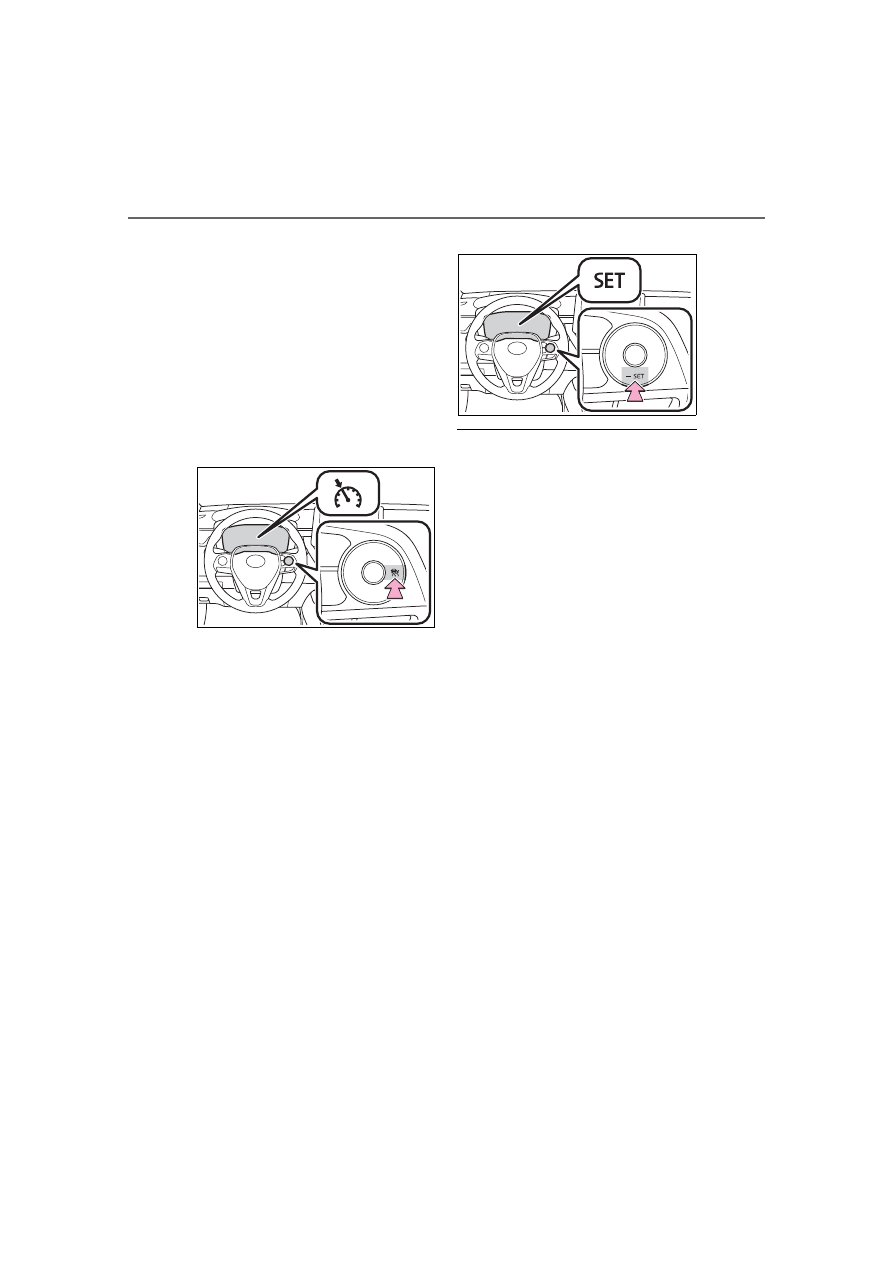
With the cruise control off, 
press and hold the cruise 
control main switch for 1.5 
seconds or more.

Immediately after the switch is 

pressed, the dynamic radar cruise 

control indicator will come on. After-

wards, it switches to the cruise con-

trol indicator.
Switching to constant speed control 

mode is only possible when operat-

ing the switch with the cruise con-

trol off.

2

Accelerate or decelerate, 
with accelerator pedal opera-
tion, to the desired vehicle 
speed (at or above approxi-
mately 20 mph [30 km/h]) 
and press the “-SET” switch 
to set the speed.

Cruise control “SET” indicator will 

come on.
The vehicle speed at the moment 

the switch is released becomes the 

set speed.
Adjusting the speed setting: 

P.205

Canceling and resuming the speed 

setting: 

P.207

Dynamic radar cruise control 

with full-speed range can be set 

when

The shift lever is in D.

The desired set speed can be set 

when the vehicle speed is approx-

imately 20 mph (30 km/h) or more. 

(However, when the vehicle speed 

is set while driving at below 

approximately 20 mph [30 km/h], 

the set speed will be set to 

approximately 20 mph [30 km/h].)

Accelerating after setting the 

vehicle speed

The vehicle can accelerate by oper-

ating the accelerator pedal. After 

accelerating, the set speed 

resumes. However, during vehi-

cle-to-vehicle distance control 

mode, the vehicle speed may 

decrease below the set speed in 

order to maintain the distance to the 

preceding vehicle.

When the vehicle stops while 

follow-up cruising

Pressing the “+RES” switch while 

the vehicle ahead stops will 

resume follow-up cruising if the 

vehicle ahead starts off within 

approximately 3 seconds after the 

switch is pressed.

If the vehicle ahead starts off 

within 3 seconds after your vehicle 

stops, follow-up cruising will be 

resumed.

209

4-5. Using the driving support systems

4

Dr

iv

ing

Automatic cancelation of vehi-

cle-to-vehicle distance control 

mode

Vehicle-to-vehicle distance control 

mode is automatically canceled in 

the following situations.

VSC is activated.

TRAC is activated for a period of 

time.

When the VSC or TRAC system is 

turned off.

The sensor cannot detect cor-

rectly because it is covered in 

some way.

When the brake control or output 

restriction control of a driving sup-

port system operates.(For exam-

ple: Pre-Collision System, 

Drive-Start Control)

The parking brake is operated.

The vehicle is stopped by system 

control on a steep incline.

The following are detected when 

the vehicle has been stopped by 

system control:

• The driver is not wearing a seat 

belt.

• The driver’s door is opened.

• The vehicle has been stopped for 

about 3 minutes

If vehicle-to-vehicle distance control 

mode is automatically canceled for 

any reasons other than the above, 

there may be a malfunction in the 

system. Contact your Toyota dealer.

Automatic cancelation of con-

stant speed control mode

Constant speed control mode is 

automatically canceled in the follow-

ing situations:

Actual vehicle speed is more than 

approximately 10 mph (16 km/h) 

below the set vehicle speed.

Actual vehicle speed falls below 

approximately 20 mph (30 km/h).

VSC is activated.

TRAC is activated for a period of 

time.

When the VSC or TRAC system is 

turned off.

When the brake control or output 

restriction control of a driving sup-

port system operates.(For exam-

ple: Pre-Collision System, 

Drive-Start Control)

If constant speed control mode is 

automatically canceled for any rea-

sons other than the above, there 

may be a malfunction in the system. 

Contact your Toyota dealer.

Brake operation

A brake operation sound may be 

heard and the brake pedal response 

may change, but these are not mal-

functions.

Warning messages and buzzers 

for dynamic radar cruise con-

trol with full-speed range

Warning messages and buzzers are 

used to indicate a system malfunc-

tion or to inform the driver of the 

need for caution while driving. If a 

warning message is shown on the 

multi-information display, read the 

message and follow the instructions. 

(

P.169, 480)

When the sensor may not be 

correctly detecting the vehicle 

ahead

In the case of the following and 

depending on the conditions, oper-

ate the brake pedal when decelera-

tion of the system is insufficient or 

operate the accelerator pedal when 

acceleration is required.
As the sensor may not be able to 

correctly detect these types of vehi-

cles, the approach warning 

(

P.207) may not be activated.

Vehicles that cut in suddenly

Vehicles traveling at low speeds

Vehicles that are not moving in the 

same lane

Vehicles with small rear ends 

(trailers with no load on board, 

210

4-5. Using the driving support systems

etc.)

Motorcycles traveling in the same 

lane

When water or snow thrown up by 

the surrounding vehicles hinders 

the detecting of the sensor

When your vehicle is pointing 

upwards (caused by a heavy load 

in the luggage compartment, etc.)

Preceding vehicle has an 

extremely high ground clearance

Conditions under which the 

vehicle-to-vehicle distance con-

trol mode may not function cor-

rectly

In the case of the following condi-

tions, operate the brake pedal (or 

accelerator pedal, depending on the 

situation) as necessary.
As the sensor may not be able to 

correctly detect vehicles ahead, the 

system may not operate properly.

When the road curves or when the 

lanes are narrow

When steering wheel operation or 

your position in the lane is unsta-

ble

When the vehicle ahead of you 

decelerates suddenly

When driving on a road sur-

rounded by a structure, such as in 

a tunnel or on a bridge

While the vehicle speed is 

decreasing to the set speed after 

the vehicle accelerates by 

depressing the accelerator pedal

211

4-5. Using the driving support systems

4

Dr

iv

ing

*

: If equipped

Meter display

Multi-information display
Set speed
Indicators

Operation switches

Vehicle-to-vehicle distance 
switch
“+RES” switch
Cruise control main switch
Cancel switch
“-SET” switch

Dynamic radar cruise 

control

*

In vehicle-to-vehicle dis-
tance control mode, the 
vehicle automatically accel-
erates and decelerates to 
match the speed changes of 
the preceding vehicle even 
if the accelerator pedal is 
not depressed. In constant 
speed control mode, the 
vehicle runs at a fixed 
speed.

Use the dynamic radar 
cruise control on freeways 
and highways.

Vehicle-to-vehicle distance 
control mode (

P.214)

Constant speed control 
mode (

P.218)

System Components

WARNING

Before using dynamic radar 

cruise control

Driving safely is the sole 

responsibility of the driver. Do 

not rely solely on the system, 

and drive safely by always pay-

ing careful attention to your sur-

roundings.

The dynamic radar cruise con-

trol provides driving assistance 

to reduce the driver’s burden. 

However, there are limitations to 

the assistance provided.

Read the following conditions 

carefully. Do not overly rely on 

this system and always drive 

carefully.

• When the sensor may not be 

correctly detecting the vehicle 

ahead: 

P.220

• Conditions under which the 

vehicle-to-vehicle distance con-

trol mode may not function cor-

rectly: 

P.220

212

4-5. Using the driving support systems

WARNING

Set the speed appropriately 

depending on the speed limit, 

traffic flow, road conditions, 

weather conditions, etc. The 

driver is responsible for check-

ing the set speed.

Even when the system is func-

tioning normally, the condition of 

the preceding vehicle as 

detected by the system may dif-

fer from the condition observed 

by the driver. Therefore, the 

driver must always remain alert, 

assess the danger of each situ-

ation and drive safely. Relying 

solely on this system or assum-

ing the system ensures safety 

while driving can lead to an 

accident, resulting in death or 

serious injury.

Switch the dynamic radar cruise 

control setting to off, using the 

cruise control main switch when 

not in use.

Cautions regarding the driv-

ing assist systems

Observe the following precau-

tions, as there are limitations to 

the assistance provided by the 

system.

Failure to do so may cause an 

accident resulting in death or seri-

ous injury.

Assisting the driver to measure 

following distance

The dynamic radar cruise control 

is only intended to help the driver 

in determining the following dis-

tance between the driver’s own 

vehicle and a designated vehicle 

traveling ahead. It is not a mecha-

nism that allows careless or inat-

tentive driving, and it is not a 

system that can assist the driver 

in low-visibility conditions. 

It is still necessary for driver to 

pay close attention to the vehi-

cle’s surroundings.

Assisting the driver to judge 

proper following distance

The dynamic radar cruise control 

determines whether the following 

distance between the driver’s own 

vehicle and a designated vehicle 

traveling ahead is within a set 

range. It is not capable of making 

any other type of judgement. 

Therefore, it is absolutely neces-

sary for the driver to remain vigi-

lant and to determine whether or 

not there is a possibility of danger 

in any given situation.

Assisting the driver to operate 

the vehicle

The dynamic radar cruise control 

does not include functions which 

will prevent or avoid collisions 

with vehicles ahead of your vehi-

cle. Therefore, if there is ever any 

possibility of danger, the driver 

must take immediate and direct 

control of the vehicle and act 

appropriately in order to ensure 

the safety of all involved.

213

4-5. Using the driving support systems

4

Dr

iv

ing

WARNING

Situations unsuitable for 

dynamic radar cruise control

Do not use dynamic radar cruise 

control in any of the following situ-

ations. 

Doing so may result in inappropri-

ate speed control and could 

cause an accident resulting in 

death or serious injury.

Roads where there are pedes-

trians, cyclists, etc.

In heavy traffic

On roads with sharp bends

On winding roads

On slippery roads, such as 

those covered with rain, ice or 

snow

On steep downhills, or where 

there are sudden changes 

between sharp up and down 

gradients 

Vehicle speed may exceed the 

set speed when driving down a 

steep hill.

At entrances to freeways and 

highways

When weather conditions are 

bad enough that they may pre-

vent the sensors from detecting 

correctly (fog, snow, sand-

storm, heavy rain, etc.)

When there is rain, snow, etc. 

on the front surface of the radar 

or front camera

In traffic conditions that require 

frequent repeated acceleration 

and deceleration

During emergency towing

When an approach warning 

buzzer is heard often

214

4-5. Using the driving support systems

This mode employs a radar to detect the presence of vehicles up to 
approximately 328 ft. (100 m) ahead, determines the current vehi-
cle-to-vehicle following distance, and operates to maintain a suitable 
following distance from the vehicle ahead. The desired vehi-
cle-to-vehicle distance can also be set by operating the vehi-
cle-to-vehicle distance switch.

When driving on downhill slopes, the vehicle-to-vehicle distance may 
become shorter.

Example of constant speed cruising
When there are no vehicles ahead

The vehicle travels at the speed set by the driver.

Example of deceleration cruising and follow-up cruising
When a preceding vehicle driving slower than the set speed 
appears

When a vehicle is detected running ahead of you, the system automatically 
decelerates your vehicle. When a greater reduction in vehicle speed is nec-
essary, the system applies the brakes (the stop lights will come on at this 
time). The system will respond to changes in the speed of the vehicle 
ahead in order to maintain the vehicle-to-vehicle distance set by the driver. 
Approach warning warns you when the system cannot decelerate suffi-
ciently to prevent your vehicle from closing in on the vehicle ahead.
When the turn signal lever is operated and your vehicle moves to an over-
taking lane while driving at 50 mph (80 km/h) or more, the vehicle will accel-
erate to help to overtake a passing vehicle.
The system’s identification of what is an overtaking lane may be determined 
solely based on the location of the steering wheel in the vehicle (left side 

Driving in vehicle-to-vehicle distance control mode

215

4-5. Using the driving support systems

4

Dr

iv

ing

driver position versus right side driver position.) If the vehicle is driven to a 
region where the overtaking lane is on a different side from where the vehi-
cle is normally driven, the vehicle may accelerate when the turn signal lever 
is operated in the opposite direction to the overtaking lane (e.g., if the driver 
normally operates the vehicle in a region where the overtaking lane is to the 
right but then drives to a region where the overtaking lane is to the left, the 
vehicle may accelerate when the right turn signal is activated).

Example of acceleration
When there are no longer any preceding vehicles driving slower 
than the set speed

The system accelerates until the set speed is reached. The system then 
returns to constant speed cruising.

1

Press the cruise control main 
switch to activate the cruise 
control.

Dynamic radar cruise control indi-

cator will come on and a message 

will be displayed on the multi-infor-

mation display. Press the switch 

again to deactivate the cruise con-

trol.
If the cruise control main switch is 

pressed and held for 1.5 seconds 

or more, the system turns on in 

constant speed control mode. 

(

P.218)

2

Accelerate or decelerate, 
with accelerator pedal opera-
tion, to the desired vehicle 

speed (at or above approxi-
mately 20 mph [30 km/h]) 
and press the “-SET” switch 
to set the speed.

Cruise control “SET” indicator will 

come on.
The vehicle speed at the moment 

the switch is released becomes the 

set speed.

To change the set speed, press 
the “+RES” or “-SET” switch 
until the desired set speed is 
displayed.

Setting the vehicle speed 
(vehicle-to-vehicle dis-
tance control mode)

Adjusting the set speed

216

4-5. Using the driving support systems

1

Increases the speed

2

Decreases the speed

Fine adjustment: Press the switch.
Large adjustment: Press and hold 
the switch to change the speed, 
and release when the desired 
speed is reached.

In the vehicle-to-vehicle dis-
tance control mode, the set 
speed will be increased or 
decreased as follows:

For the U.S. mainland, Hawaii

Fine adjustment: By 1 mph (1.6 
km/h)

*1

 or 1 km/h (0.6 mph)

*2

 each 

time the switch is pressed 
Large adjustment: Increases or 
decreases in 1 mph (1.6 km/h)

*1

 or 

1 km/h (0.6 mph)

*2

 increments for 

as long as the switch is held

For Canada, Guam and 
Puerto Rico

Fine adjustment: By 1 mph (1.6 
km/h)

*1

 or 1 km/h (0.6 mph)

*2

 each 

time the switch is pressed 
Large adjustment: Increases or 
decreases in 5 mph (8 km/h)

*1

 or 5 

km/h (3.1 mph)

*2

 increments for as 

long as the switch is held

In the constant speed control 
mode (

P.218), the set speed 

will be increased or decreased 
as follows:

Fine adjustment: By 1 mph (1.6 
km/h)

*1

 or 1 km/h (0.6 mph)

*2

 each 

time the switch is pressed
Large adjustment: The speed will 
continue to change while the switch 
is held.

*1

:When the set speed is shown in 

“MPH”

*2

:When the set speed is shown in 

“km/h”

Pressing the switch changes the 
vehicle-to-vehicle distance as 
follows:

1

Long

2

Medium

3

Short

If a vehicle is running ahead of you, 
the preceding vehicle mark 

 will 

also be displayed.

Changing the vehi-
cle-to-vehicle distance 
(vehicle-to-vehicle dis-
tance control mode)

217

4-5. Using the driving support systems

4

Dr

iv

ing

Select a distance from the table 
below. Note that the distances 
shown correspond to a vehicle 
speed of 50 mph (80 km/h). 
Vehicle-to-vehicle distance 
increases/decreases in accor-
dance with vehicle speed.

1

Pressing the cancel switch 
cancels the speed control.

The speed control is also canceled 
when the brake pedal is depressed.

2

Pressing the “+RES” switch 
resumes the cruise control 

and returns vehicle speed to 
the set speed.

However, cruise control does not 
resume when the vehicle speed is 
approximately 16 mph (25 km/h) or 
less.

When your vehicle is too close 
to a vehicle ahead, and suffi-
cient automatic deceleration via 
the cruise control is not possi-
ble, the display will flash and the 
buzzer will sound to alert the 
driver. An example of this would 
be if another driver cuts in front 
of you while you are following a 
vehicle. Depress the brake 
pedal to ensure an appropriate 
vehicle-to-vehicle distance.

Warnings may not occur 
when

In the following instances, warn-
ings may not occur even when 
the vehicle-to-vehicle distance is 
small.

When the speed of the pre-
ceding vehicle matches or 

Vehicle-to-vehicle dis-
tance settings (vehi-
cle-to-vehicle distance 
control mode)

Distance 

options

Vehicle-to-vehicle dis-

tance

Long

Approximately 160 ft. 

(50 m)

Medium

Approximately 130 ft. 

(40 m)

Short

Approximately 100 ft. 

(30 m)

Canceling and resuming 
the speed control

Approach warning (vehi-
cle-to-vehicle distance 
control mode)

218

4-5. Using the driving support systems

exceeds your vehicle speed

When the preceding vehicle is 
traveling at an extremely slow 
speed

Immediately after the cruise 
control speed was set

When depressing the acceler-
ator pedal

When constant speed control 
mode is selected, your vehicle 
will maintain a set speed without 
controlling the vehicle-to-vehi-
cle distance. Select this mode 
only when vehicle-to-vehicle dis-
tance control mode does not 
function correctly due to a dirty 
radar, etc.

1

With the cruise control off, 
press and hold the cruise 
control main switch for 1.5 
seconds or more.

Immediately after the switch is 

pressed, the dynamic radar cruise 

control indicator will come on. After-

wards, it switches to the cruise con-

trol indicator.
Switching to constant speed control 

mode is only possible when operat-

ing the switch with the cruise con-

trol off.

2

Accelerate or decelerate, 
with accelerator pedal opera-
tion, to the desired vehicle 
speed (at or above approxi-
mately 20 mph [30 km/h]) 
and press the “-SET” switch 
to set the speed.

Cruise control “SET” indicator will 

come on.
The vehicle speed at the moment 

the switch is released becomes the 

set speed.
Adjusting the speed setting: 

P.215

Canceling and resuming the speed 

setting: 

P.217

Dynamic radar cruise control 

can be set when

The shift lever is in range 2nd or 

higher.

Depending on the control mode, 

this item can be set at the follow-

ing speeds.

Selecting constant speed 
control mode

219

4-5. Using the driving support systems

4

Dr

iv

ing

• Vehicle-to-vehicle distance con-

trol mode: Approximately 20 mph 

(30 km/h) or more

• Constant speed control mode: 

Approximately 20 mph (30 km/h) 

or more

Accelerating after setting the 

vehicle speed

The vehicle can accelerate by oper-

ating the accelerator pedal. After 

accelerating, the set speed 

resumes. However, during vehi-

cle-to-vehicle distance control 

mode, the vehicle speed may 

decrease below the set speed in 

order to maintain the distance to the 

preceding vehicle.

Shift position selection

Select a shift position according to 

the vehicle speed. If the engine 

speed is too high or too low, control 

may be automatically canceled.

Automatic cancelation of vehi-

cle-to-vehicle distance control 

mode

Vehicle-to-vehicle distance control 

mode is automatically canceled in 

the following situations.

Actual vehicle speed falls below 

approximately 16 mph (25 km/h).

VSC is activated.

TRAC is activated for a period of 

time.

When the VSC or TRAC system is 

turned off.

The sensor cannot detect cor-

rectly because it is covered in 

some way.

When the brake control or output 

restriction control of a driving sup-

port system operates.(For exam-

ple: Pre-Collision System, 

Drive-Start Control)

When the shift lever is in N or the 

clutch pedal is depressed for a 

certain amount of time or more.

If vehicle-to-vehicle distance control 

mode is automatically canceled for 

any reasons other than the above, 

there may be a malfunction in the 

system. Contact your Toyota dealer.

Automatic cancelation of con-

stant speed control mode

Constant speed control mode is 

automatically canceled in the follow-

ing situations:

Actual vehicle speed is more than 

approximately 10 mph (16 km/h) 

below the set vehicle speed.

Actual vehicle speed falls below 

approximately 20 mph (30 km/h).

VSC is activated.

TRAC is activated for a period of 

time.

When the VSC or TRAC system is 

turned off.

When the brake control or output 

restriction control of a driving sup-

port system operates.(For exam-

ple: Pre-Collision System, 

Drive-Start Control)

When the shift lever is in N or the 

clutch pedal is depressed for a 

certain amount of time or more.

If constant speed control mode is 

automatically canceled for any rea-

sons other than the above, there 

may be a malfunction in the system. 

Contact your Toyota dealer.

Brake operation

A brake operation sound may be 

heard and the brake pedal response 

may change, but these are not mal-

functions.

Warning messages and buzzers 

for dynamic radar cruise con-

trol

Warning messages and buzzers are 

used to indicate a system malfunc-

tion or to inform the driver of the 

need for caution while driving. If a 

warning message is shown on the 

multi-information display, read the 

message and follow the instructions. 

(

P.169, 480)

220

4-5. Using the driving support systems

When the sensor may not be 

correctly detecting the vehicle 

ahead

In the case of the following and 

depending on the conditions, oper-

ate the brake pedal when decelera-

tion of the system is insufficient or 

operate the accelerator pedal when 

acceleration is required.
As the sensor may not be able to 

correctly detect these types of vehi-

cles, the approach warning 

(

P.217) may not be activated.

Vehicles that cut in suddenly

Vehicles traveling at low speeds

Vehicles that are not moving in the 

same lane

Vehicles with small rear ends 

(trailers with no load on board, 

etc.)

Motorcycles traveling in the same 

lane

When water or snow thrown up by 

the surrounding vehicles hinders 

the detecting of the sensor

When your vehicle is pointing 

upwards (caused by a heavy load 

in the luggage compartment, etc.)

Preceding vehicle has an 

extremely high ground clearance

Conditions under which the 

vehicle-to-vehicle distance con-

trol mode may not function cor-

rectly

In the case of the following condi-

tions, operate the brake pedal (or 

accelerator pedal, depending on the 

situation) as necessary.
As the sensor may not be able to 

correctly detect vehicles ahead, the 

system may not operate properly.

When the road curves or when the 

lanes are narrow

When steering wheel operation or 

your position in the lane is unsta-

ble

When the vehicle ahead of you 

decelerates suddenly

When driving on a road sur-

rounded by a structure, such as in 

a tunnel or on a bridge

While the vehicle speed is 

decreasing to the set speed after 

the vehicle accelerates by 

221

4-5. Using the driving support systems

4

Dr

iv

ing

depressing the accelerator pedal

*

: If equipped

RSA (Road Sign 

Assist)

*

The RSA system recognizes 
specific road signs using 
the front camera to provide 
information to the driver via 
the display.

If the system judges that the 
vehicle is being driven over 
the speed limit, performing 
prohibited actions, etc. 
according to the recog-
nized road signs, it notifies 
the driver through a visual 
notification and notification 
buzzer .

WARNING

Before using the RSA

Do not rely solely upon the RSA 

system. RSA is a system which 

supports the driver by providing 

information, but it is not a replace-

ment for a driver’s own vision and 

awareness. Drive safely by 

always paying careful attention to 

the traffic rules.

222

4-5. Using the driving support systems

When the front camera recog-
nizes a sign, the sign will be dis-
played on the multi-information 
display.

• Speed limit sign

When the driving support sys-
tem information is selected, a 
maximum of 3 signs can be 
displayed. (

P.82)

When a tab other than the 
driving support system infor-
mation is selected, the follow-
ing types of road signs will be 
displayed.  (

P.82)

• Speed limit sign
• Do Not Enter sign (when notifica-

tion is necessary)

If signs other than speed limit signs 
are recognized, they will be dis-

played in an overlapping stack 
under the current speed limit sign.

The following types of road 
signs, including electronic signs 
and blinking signs, are dis-
played.

A non-official or a recently intro-
duced traffic sign may not be dis-
played.

Speed limit

Do Not Enter

Stop

Yield

In the following situations, the 
RSA system will notify the 
driver.

When the vehicle speed 
exceeds the speed notifica-
tion threshold of the speed 
limit sign displayed, the sign 
display will be emphasized 
and a buzzer will sound.

Indication on the 
multi-information display

Supported types of road 
signs

Notification function

223

4-5. Using the driving support systems

4

Dr

iv

ing

When the RSA system recog-
nizes a do not enter sign and 
determines that your vehicle 
has entered a no-entry area, 
the displayed sign will flash 
and a buzzer will sound.

Depending on the situation, a 
notification function may not 
operate properly.

Setting procedure

1

Press 

 or 

 of the meter 

control switches and select 

2

Press 

 or 

 of the meter 

control switches and select 

, then press 

Automatic turn-off of RSA sign 

display

In the following situations, a dis-

played speed limit sign and/or do 

not enter sign will stop being dis-

played automatically:

No sign has been recognized for a 

certain distance.

The road changes due to a left or 

right turn, etc.

In the following situations, stop and 

yield signs will stop being displayed 

automatically:

The system determines that your 

vehicle has passed the sign.

The road changes due to a left or 

right turn, etc.

Conditions in which the func-

tion may not operate or detect 

correctly

In the following situations, RSA 

does not operate normally and may 

not recognize signs, display the 

incorrect sign, etc. However, this 

does not indicate a malfunction.

The front camera is misaligned 

due to a strong impact being 

applied to the sensor, etc.

Dirt, snow, stickers, etc. are on the 

windshield near the front camera.

In inclement weather such as 

heavy rain, fog, snow or sand 

storms

Light from an oncoming vehicle, 

the sun, etc. enters the front cam-

era.

The sign is dirty, faded, tilted or 

bent.

The contrast of electronic sign is 

low.

All or part of the sign is hidden by 

the leaves of a tree, a pole, etc.

The sign is only visible to the front 

camera for a short amount of time.

The driving scene (turning, lane 

change, etc.) is judged incorrectly.

If a sign not appropriate for the 

currently traveled lane, but the 

sign exists directly after a freeway 

branches, or in an adjacent lane 

just before merging.

Stickers are attached to the rear of 

the preceding vehicle.

A sign resembling a system com-

patible sign is recognized.

Side road speed signs may be 

detected and displayed (if posi-

tioned in sight of the front camera) 

while the vehicle is traveling on 

the main road.

Roundabout exit road speed signs 

may be detected and displayed (if 

positioned in sight of the front 

camera) while traveling on a 

roundabout.

The front of the vehicle is raised or 

lowered due to the carried load.

The surrounding brightness is not 

sufficient or changes suddenly.

When a sign intended for trucks, 

etc. is recognized.

The speed information displayed 

on the meter and on the naviga-

tion system may be different due 


Content      ..     11      12      13      14     ..