Toyota Corolla Hatchback (2022 year). Manual in english - page 12
 

  Index      Toyota     Toyota Corolla Hatchback (2022 year). Manual in english


Search            copyright infringement  


Content      ..     10      11      12      13     ..


Toyota Corolla Hatchback (2022 year). Manual in english - page 12


192

4-5. Using the driving support systems

“LTA Unavailable at Current 

Speed”

The function cannot be used as the 

vehicle speed exceeds the LTA 

operation range. Drive slower.

Customization

Function settings can be changed.

(Customizable features: 

P.535)

*

: If equipped

LDA (Lane Departure 

Alert with steering 

control)

*

While driving on a road with 
clear white (yellow) lane 
lines, the LDA system warns 
the driver if the vehicle may 
deviate from the current 
lane or course*, and also 
can slightly operate the 
steering wheel to help avoid 
deviation from the lane or 
course*.

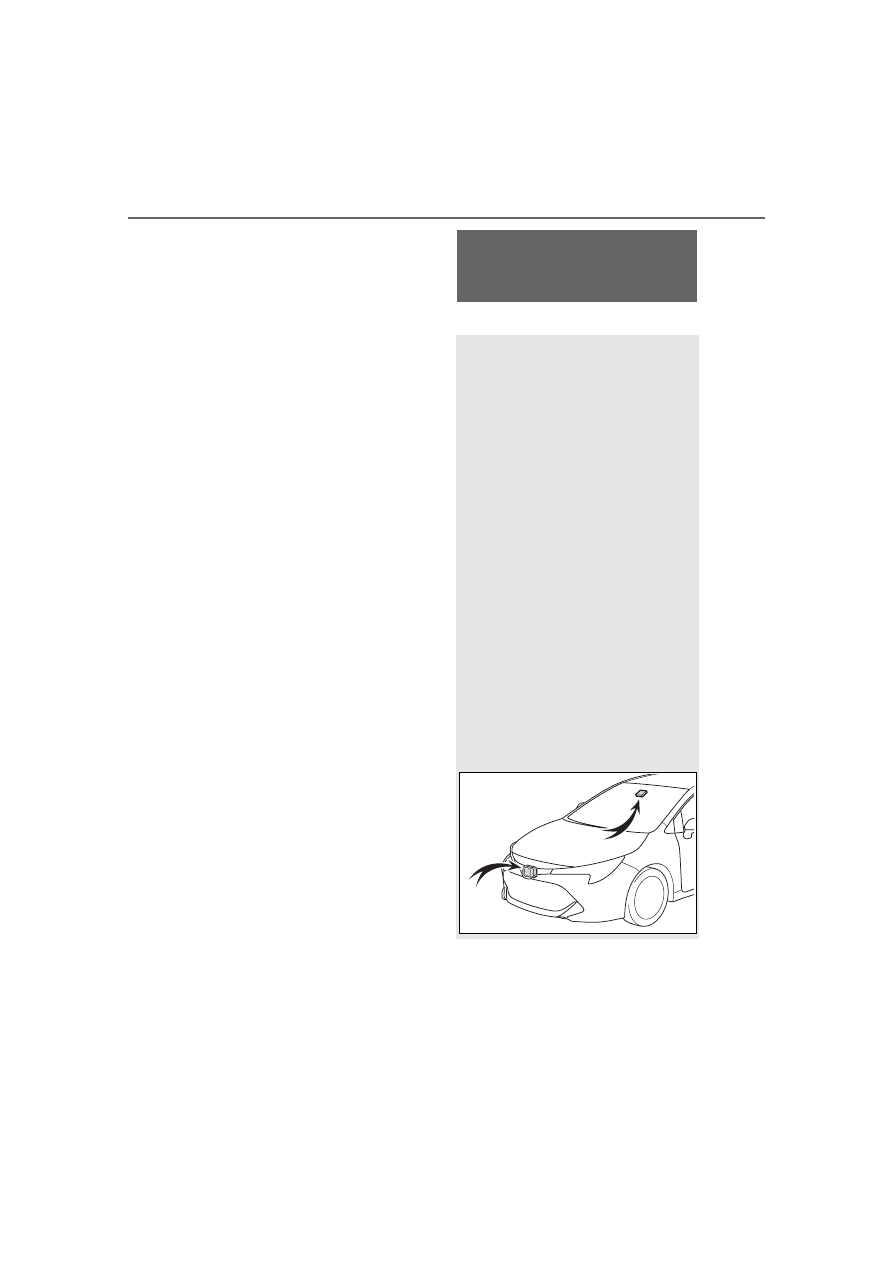
The LDA system recog-
nizes white (yellow) lane 
lines or a course

*

 using the 

front camera. Additionally, it 
detects preceding vehicles 
using the front camera and 
radar.

*

: Boundary between asphalt and 

the side of the road, such as 
grass, soil, or a curb

193

4-5. Using the driving support systems

4

Dr

iv

ing

WARNING

Before using LDA system

Do not rely solely upon the LDA 

system. The LDA system does 

not automatically drive the vehi-

cle or reduce the amount of 

attention that must be paid to 

the area in front of the vehicle. 

The driver must always assume 

full responsibility for driving 

safely by paying careful atten-

tion to the surrounding condi-

tions and operating the steering 

wheel to correct the path of the 

vehicle. Also, the driver must 

take adequate breaks when 

fatigued, such as from driving 

for a long period of time.

Failure to perform appropriate 

driving operations and pay care-

ful attention may lead to an 

accident, resulting in death or 

serious injury.

When not using the LDA sys-

tem, use the LDA switch to turn 

the system off.

Situations unsuitable for LDA 

system

In the following situations, use the 

LDA switch to turn the system off. 

Failure to do so may lead to an 

accident, resulting in death or 

serious injury.

Vehicle is driven on a road sur-

face which is slippery due to 

rainy weather, fallen snow, 

freezing, etc.

Vehicle is driven on a snow-cov-

ered road.

White (yellow) lines are difficult 

to see due to rain, snow, fog, 

dust, etc.

A spare tire, tire chains, etc. are 

equipped.

When the tires have been 

excessively worn, or when the 

tire inflation pressure is low.

During emergency towing.

Preventing LDA system mal-

functions and operations per-

formed by mistake

Do not modify the headlights or 

place stickers, etc. on the sur-

face of the lights.

Do not modify the suspension 

etc. If the suspension etc. needs 

to be replaced, contact your 

Toyota dealer.

Do not install or place anything 

on the hood or grille. Also, do 

not install a grille guard (bull 

bars, kangaroo bar, etc.).

If your windshield needs 

repairs, contact your Toyota 

dealer.

Conditions in which functions 

may not operate properly

In the following situations, the 

functions may not operate prop-

erly and the vehicle may depart 

from its lane. Drive safely by 

always paying careful attention to 

your surroundings and operate 

the steering wheel to correct the 

path of the vehicle without relying 

solely on the functions.

Vehicle is being driven around a 

sharp curve.

194

4-5. Using the driving support systems

WARNING

Objects or patterns that could 

be mistaken for white (yellow) 

lines are present on the side of 

the road (guardrails, reflective 

poles, etc.).

Vehicle is driven where the road 

diverges, merges, etc.

Repair marks of asphalt, white 

(yellow) lines, etc. are present 

due to road repair.

There are shadows on the road 

that run parallel with, or cover, 

the white (yellow) lines.

The vehicle is driven in an area 

without white (yellow) lines, 

such as in front of a tollgate or 

checkpoint, or at an intersec-

tion, etc.

The white (yellow) lines are 

cracked, “Botts’ dots”, “Raised 

pavement marker” or stones are 

present.

The white (yellow) lines cannot 

be seen or are difficult to see 

due to sand, etc.

The vehicle is driven on a road 

surface that is wet due to rain, 

puddles, etc.

The traffic lines are yellow 

(which may be more difficult to 

recognize than lines that are 

white).

The white (yellow) lines cross 

over a curb, etc.

The vehicle is driven on a bright 

surface, such as concrete.

If the edge of the road is not 

clear or straight.

The vehicle is driven on a sur-

face that is bright due to 

reflected light, etc.

The vehicle is driven in an area 

where the brightness changes 

suddenly, such as at the 

entrances and exits of tunnels, 

etc.

Light from the headlights of an 

oncoming vehicle, the sun, etc. 

enters the camera.

The vehicle is driven on a slope.

The vehicle is driven on a road 

which tilts left or right, or a wind-

ing road.

The vehicle is driven on an 

unpaved or rough road.

195

4-5. Using the driving support systems

4

Dr

iv

ing

Lane departure alert func-
tion

When the system determines 
that the vehicle might depart 
from its lane or course

*

, a warn-

ing is displayed on the 
multi-information display, and a 
warning buzzer will sound to 

alert the driver.

When the warning buzzer sounds, 
check the area around your vehicle 
and carefully operate the steering 
wheel to move the vehicle back to 
the center of the lane.
Vehicles with a BSM: When the 
system determines that the vehicle 
might depart from its lane and that 
the possibility of a collision with an 
overtaking vehicle in the adjacent 
lane is high, the lane departure 
alert will operate even if the turn 
signals are operating.

*

: Boundary between asphalt and 

the side of the road, such as 
grass, soil, or a curb

Steering assist function

When the system determines 
that the vehicle might depart 
from its lane or course

*

, the sys-

tem provides assistance as nec-
essary by operating the steering 

WARNING

The traffic lane is excessively 

narrow or wide.

The vehicle is extremely tilted 

due to carrying heavy luggage 

or having improper tire pres-

sure.

The distance to the preceding 

vehicle is extremely short.

The vehicle is moving up and 

down a large amount due to 

road conditions during driving 

(poor roads or road seams).

When driving in a tunnel or at 

night with the headlights off or 

when a headlight is dim due to 

its lens being dirty or it being 

misaligned.

The vehicle is struck by a cross-

wind.

The vehicle has just changed 

lanes or crossed an intersec-

tion.

Tires which differ by structure, 

manufacturer, brand or tread 

pattern are used.

When tires of a size other than 

specified are installed.

Snow tires, etc. are equipped.

Functions included in 
LDA system

196

4-5. Using the driving support systems

wheel in small amounts for a 
short period of time to keep the 
vehicle in its lane.

If the system detects that the steer-
ing wheel has not been operated 
for a fixed amount of time or the 
steering wheel is not being firmly 
gripped, a warning is displayed on 
the multi-information display and 
the function is temporarily can-
celed.
Vehicles with a BSM: When the 
system determines that the vehicle 
might depart from its lane and that 
the possibility of a collision with an 
overtaking vehicle in the adjacent 
lane is high, the steering assist 
function will operate even if the turn 
signals are operating.

*

: Boundary between asphalt and 

the side of the road, such as 
grass, soil, or a curb

Vehicle sway warning func-
tion

When the vehicle is swaying 
within a lane, the warning 
buzzer will sound and a mes-
sage will be displayed on the 
multi-information display to alert 
the driver.

Press the LDA switch to turn the 
LDA system on.

The LDA indicator illuminates and a 
message is displayed on the 
multi-information display.
Press the LDA switch again to turn 
the LDA system off.
When the LDA system is turned on 
or off, operation of the LDA system 
continues in the same condition the 
next time the engine is started.

Turning LDA system on

197

4-5. Using the driving support systems

4

Dr

iv

ing

LDA indicator

The illumination condition of the 
indicator informs the driver of the 
system operation status.
Illuminated in white: LDA system is 
operating.
Illuminated in green: Steering wheel 
assistance of the steering assist 
function is operating.
Flashing in orange: Lane departure 
alert function is operating.

Operation display of steering 
wheel operation support

Displayed when the multi-informa-
tion display is switched to the driv-
ing assist system information 
screen.
Indicates that steering wheel assis-
tance of the steering assist function 
is operating.

Lane departure alert function 
display

Displayed when the multi-informa-
tion display is switched to the driv-
ing assist system information 
screen.

Inside of displayed lines is 
white

Indicates that the system is rec-
ognizing white (yellow) lines or a 
course

*

. When the vehicle 

departs from its lane, the white 
line displayed on the side the 
vehicle departs from flashes 
orange.

Inside of displayed lines is 
black

Indicates that the system is not 
able to recognize white (yellow) 
lines or a course

*

 or is temporar-

ily canceled.

Indications on multi-infor-
mation display

198

4-5. Using the driving support systems

*

: Boundary between asphalt and 

the side of the road, such as 
grass, soil, or a curb

Operation conditions of each 

function

Lane departure alert function

This function operates when all of 
the following conditions are met.
• LDA is turned on.

• Vehicle speed is approximately 32 

mph (50 km/h) or more.

• System recognizes white (yellow) 

lane lines or a course*. (When a 
white [yellow] line or course

*

 is 

recognized on only one side, the 

system will operate only for the 

recognized side.)

• Width of traffic lane is approxi-

mately 9.8 ft. (3 m) or more.

• Turn signal lever is not operated. 

(Vehicle with BSM: Except when 

another vehicle is in the lane on 

the side where the turn signal was 

operated)

• Vehicle is not being driven around 

a sharp curve.

• No system malfunctions are 

detected. (

P.199)

*

: Boundary between asphalt and 

the side of the road, such as 
grass, soil, or a curb

Steering assist function

This function operates when all of 
the following conditions are met in 
addition to the operation conditions 
for the lane departure alert function.
• Setting for “Steering Assist” in 


of the multi-information display is 

set to “ON”. (

P.535)

• Vehicle is not accelerated or 

decelerated by a fixed amount or 

more.

• Steering wheel is not operated 

with a steering force level suitable 

for changing lanes.

• ABS, VSC, TRAC and PCS are 

not operating.

• TRAC or VSC is not turned off.

• Hands off steering wheel warning 

is not displayed. (

P.199)

Vehicle sway warning function

This function operates when all of 
the following conditions are met.
• Setting for “Sway Warning” in 


of the multi-information display is 

set to “ON”. (

P.535)

• Vehicle speed is approximately 32 

mph (50 km/h) or more.

• Width of traffic lane is approxi-

mately 9.8 ft. (3 m) or more.

• No system malfunctions are 

detected. (

P.199)

Temporary cancellation of func-

tions

When operation conditions are no 

longer met, a function may be 

temporarily canceled. However, 

when the operation conditions are 

met again, operation of the func-

tion is automatically restored. 

(

P.198)

Steering assist function

Depending on the vehicle speed, 

lane departure situation, road con-

ditions, etc., the driver may not 

feel the function is operating or 

the function may not operate at 

all.

The steering control of the func-

tion is overridden by the driver’s 

steering wheel operation.

Do not attempt to test the opera-

tion of the steering assist function.

Lane departure alert function

The warning buzzer may be diffi-

cult to hear due to external noise, 

audio playback, etc.

If the edge of the course

*

 is not 

clear or straight, the lane depar-

ture alert function may not oper-

ate.

Vehicle with BSM: It may not be 

possible for the system to deter-

mine if there is a danger of a colli-

sion with a vehicle in an adjacent 

199

4-5. Using the driving support systems

4

Dr

iv

ing

lane.

Do not attempt to test the opera-

tion of the lane departure alert 

function.

*

: Boundary between asphalt and 

the side of the road, such as 
grass, soil, or a curb

Hands off steering wheel warn-

ing

In the following situations, a warning 

message urging the driver to hold 

the steering wheel and the symbol 

shown in the illustration are dis-

played on the multi-information dis-

play to warn the driver.The warning 

stops when the system determines 

that the driver holds the steering 

wheel. Always keep your hands on 

the steering wheel when using this 

system, regardless of warnings.

When the system determines that 

the driver is driving without hold-

ing the steering wheel while the 

system is operating

If the driver continues to keep their 

hands off of the steering wheel, the 

buzzer sounds, the driver is warned 

and the function is temporarily can-

celed. This warning also operates in 

the same way when the driver con-

tinuously operates the steering 

wheel only a small amount.
Depending on the vehicle condition 

and road conditions, the warning 

may not operate. Also, if the system 

determines that the vehicle is driv-

ing around a curve, warnings will 

occur earlier than during 

straight-lane driving.

When the system determines that 

the driver is driving without hold-

ing the steering wheel while the 

steering wheel assist of the steer-

ing assist function is operating.

If the driver continues to keep their 

hands off of the steering wheel and 

the steering wheel assist is operat-

ing, the buzzer sounds and the 

driver is warned. Each time the 

buzzer sounds, the continuing time 

of the buzzer becomes longer.

Vehicle sway warning function

When the system determines that 

the vehicle is swaying while the 

vehicle sway warning function is 

operating, a buzzer sounds and a 

warning message urging the driver 

to rest and the symbol shown in the 

illustration are simultaneously dis-

played on the multi-information dis-

play.

Depending on the vehicle and road 

conditions, the warning may not 

operate.

Warning message

If the following warning message is 

displayed on the multi-information 

display and the LDA indicator illumi-

nates in orange, follow the appropri-

ate troubleshooting procedure. Also, 

if a different warning message is 

displayed, follow the instructions 

displayed on the screen.

“LDA Malfunction Visit Your 

Dealer”

The system may not be operating 

properly. Have the vehicle inspected 

by your Toyota dealer.

“LDA Unavailable”

The system is temporarily canceled 

due to a malfunction in a sensor 

other than the front camera. Turn 

200

4-5. Using the driving support systems

the LDA system off, wait for a little 

while, and then turn the LDA system 

back on.

“LDA Unavailable at Current 

Speed”

The function cannot be used as the 

vehicle speed exceeds the LDA 

operation range. Drive slower.

“LDA Unavailable Below Approx. 

32MPH”

The LDA system cannot be used as 

the vehicle speed is less than 

approximately 32 mph (50 km/h). 

Drive the vehicle at approximately 

32 mph (50 km/h) or more.

Customization

Function settings can be changed. 

(Customizable features: 

P.535)

*

: If equipped

Meter display

Multi-information display

Dynamic radar cruise 

control with full-speed 

range

*

In vehicle-to-vehicle dis-
tance control mode, the 
vehicle automatically accel-
erates, decelerates and 
stops to match the speed 
changes of the preceding 
vehicle even if the accelera-
tor pedal is not depressed. 
In constant speed control 
mode, the vehicle runs at a 
fixed speed.

Use the dynamic radar 
cruise control with 
full-speed range on free-
ways and highways.

Vehicle-to-vehicle distance 
control mode (

P.203)

Constant speed control 
mode (

P.207)

System Components

201

4-5. Using the driving support systems

4

Dr

iv

ing

Set speed
Indicators

Operation switches

Vehicle-to-vehicle distance 
switch
“+RES” switch
Cruise control main switch
Cancel switch
“-SET” switch

WARNING

Before using dynamic radar 

cruise control with full-speed 

range

Driving safely is the sole 

responsibility of the driver. Do 

not rely solely on the system, 

and drive safely by always pay-

ing careful attention to your sur-

roundings.

The dynamic radar cruise con-

trol with full-speed range pro-

vides driving assistance to 

reduce the driver’s burden. 

However, there are limitations to 

the assistance provided.

Read the following conditions 

carefully. Do not overly rely on 

this system and always drive 

carefully.

• When the sensor may not be 

correctly detecting the vehicle 

ahead: 

P.209

• Conditions under which the 

vehicle-to-vehicle distance con-

trol mode may not function cor-

rectly: 

P.210

Set the speed appropriately 

depending on the speed limit, 

traffic flow, road conditions, 

weather conditions, etc. The 

driver is responsible for check-

ing the set speed.

Even when the system is func-

tioning normally, the condition of 

the preceding vehicle as 

detected by the system may dif-

fer from the condition observed 

by the driver. Therefore, the 

driver must always remain alert, 

assess the danger of each situ-

ation and drive safely. Relying 

solely on this system or assum-

ing the system ensures safety 

while driving can lead to an 

accident, resulting in death or 

serious injury.

Switch the dynamic radar cruise 

control with full-speed range 

setting to off, using the cruise 

control main switch when not in 

use.

Cautions regarding the driv-

ing assist systems

Observe the following precau-

tions, as there are limitations to 

the assistance provided by the 

system.

Failure to do so may cause an 

accident resulting in death or seri-

ous injury.

202

4-5. Using the driving support systems

WARNING

Assisting the driver to measure 

following distance

The dynamic radar cruise control 

with full-speed range is only 

intended to help the driver in 

determining the following distance 

between the driver’s own vehicle 

and a designated vehicle traveling 

ahead. It is not a mechanism that 

allows careless or inattentive driv-

ing, and it is not a system that can 

assist the driver in low-visibility 

conditions. 

It is still necessary for driver to 

pay close attention to the vehi-

cle’s surroundings.

Assisting the driver to judge 

proper following distance

The dynamic radar cruise control 

with full-speed range determines 

whether the following distance 

between the driver’s own vehicle 

and a designated vehicle traveling 

ahead is within a set range. It is 

not capable of making any other 

type of judgement. Therefore, it is 

absolutely necessary for the 

driver to remain vigilant and to 

determine whether or not there is 

a possibility of danger in any 

given situation.

Assisting the driver to operate 

the vehicle

The dynamic radar cruise control 

with full-speed range does not 

include functions which will pre-

vent or avoid collisions with vehi-

cles ahead of your vehicle. 

Therefore, if there is ever any 

possibility of danger, the driver 

must take immediate and direct 

control of the vehicle and act 

appropriately in order to ensure 

the safety of all involved.

Situations unsuitable for 

dynamic radar cruise control 

with full-speed range

Do not use dynamic radar cruise 

control with full-speed range in 

any of the following situations. 

Doing so may result in inappropri-

ate speed control and could 

cause an accident resulting in 

death or serious injury.

Roads where there are pedes-

trians, cyclists, etc.

In heavy traffic

On roads with sharp bends

On winding roads

On slippery roads, such as 

those covered with rain, ice or 

snow

On steep downhills, or where 

there are sudden changes 

between sharp up and down 

gradients 

Vehicle speed may exceed the 

set speed when driving down a 

steep hill.

At entrances to freeways and 

highways

When weather conditions are 

bad enough that they may pre-

vent the sensors from detecting 

correctly (fog, snow, sand-

storm, heavy rain, etc.)

When there is rain, snow, etc. 

on the front surface of the radar 

or front camera

In traffic conditions that require 

frequent repeated acceleration 

and deceleration

During emergency towing

When an approach warning 

buzzer is heard often

203

4-5. Using the driving support systems

4

Dr

iv

ing

This mode employs a radar to detect the presence of vehicles up to 
approximately 328 ft. (100 m) ahead, determines the current vehi-
cle-to-vehicle following distance, and operates to maintain a suitable 
following distance from the vehicle ahead. The desired vehi-
cle-to-vehicle distance can also be set by operating the vehi-
cle-to-vehicle distance switch.

When driving on downhill slopes, the vehicle-to-vehicle distance may 
become shorter.

Example of constant speed cruising
When there are no vehicles ahead

The vehicle travels at the speed set by the driver.

Example of deceleration cruising and follow-up cruising
When a preceding vehicle driving slower than the set speed 
appears

When a vehicle is detected running ahead of you, the system automatically 
decelerates your vehicle. When a greater reduction in vehicle speed is nec-
essary, the system applies the brakes (the stop lights will come on at this 
time). The system will respond to changes in the speed of the vehicle 
ahead in order to maintain the vehicle-to-vehicle distance set by the driver. 
Approach warning warns you when the system cannot decelerate suffi-
ciently to prevent your vehicle from closing in on the vehicle ahead.
When the vehicle ahead of you stops, your vehicle will also stop (vehicle is 
stopped by system control). After the vehicle ahead starts off, pressing the 
“+RES” switch or depressing the accelerator pedal (start-off operation) will 
resume follow-up cruising. If the start-off operation is not performed, system 
control continues to keep your vehicle stopped.

Driving in vehicle-to-vehicle distance control mode

204

4-5. Using the driving support systems

When the turn signal lever is operated and your vehicle moves to an over-
taking lane while driving at 50 mph (80 km/h) or more, the vehicle will accel-
erate to help to overtake a passing vehicle.
The system’s identification of what is an overtaking lane may be determined 
solely based on the location of the steering wheel in the vehicle (left side 
driver position versus right side driver position.) If the vehicle is driven to a 
region where the overtaking lane is on a different side from where the vehi-
cle is normally driven, the vehicle may accelerate when the turn signal lever 
is operated in the opposite direction to the overtaking lane (e.g., if the driver 
normally operates the vehicle in a region where the overtaking lane is to the 
right but then drives to a region where the overtaking lane is to the left, the 
vehicle may accelerate when the right turn signal is activated).

Example of acceleration
When there are no longer any preceding vehicles driving slower 
than the set speed

The system accelerates until the set speed is reached. The system then 
returns to constant speed cruising.

1

Press the cruise control main 
switch to activate the cruise 
control.

Dynamic radar cruise control indi-

cator will come on and a message 

will be displayed on the multi-infor-

mation display. Press the switch 

again to deactivate the cruise con-

trol.
If the cruise control main switch is 

pressed and held for 1.5 seconds 

or more, the system turns on in 

constant speed control mode. 

(

P.207)

2

Accelerate or decelerate, 
with accelerator pedal opera-
tion, to the desired vehicle 
speed (at or above approxi-
mately 20 mph [30 km/h]) 
and press the “-SET” switch 
to set the speed.

Cruise control “SET” indicator will 

come on.
The vehicle speed at the moment 

the switch is released becomes the 

Setting the vehicle speed 
(vehicle-to-vehicle dis-
tance control mode)

205

4-5. Using the driving support systems

4

Dr

iv

ing

set speed.

To change the set speed, press 
the “+RES” or “-SET” switch 
until the desired set speed is 
displayed.

1

Increases the speed (Except 
when the vehicle has been 
stopped by system control in 
vehicle-to-vehicle distance 
control mode)

2

Decreases the speed

Fine adjustment: Press the switch.
Large adjustment: Press and hold 
the switch to change the speed, 
and release when the desired 
speed is reached.

In the vehicle-to-vehicle dis-
tance control mode, the set 
speed will be increased or 
decreased as follows:

For the U.S. mainland, Hawaii

Fine adjustment: By 1 mph (1.6 
km/h)

*1

 or 1 km/h (0.6 mph)

*2

 each 

time the switch is pressed 
Large adjustment: Increases or 
decreases in 1 mph (1.6 km/h)

*1

 or 

1 km/h (0.6 mph)

*2

 increments for 

as long as the switch is held

For Canada, Guam and 
Puerto Rico

Fine adjustment: By 1 mph (1.6 
km/h)

*1

 or 1 km/h (0.6 mph)

*2

 each 

time the switch is pressed 
Large adjustment: Increases or 
decreases in 5 mph (8 km/h)

*1

 or 5 

km/h (3.1 mph)

*2

 increments for as 

long as the switch is held

In the constant speed control 
mode (

P.207), the set speed 

will be increased or decreased 
as follows:

Fine adjustment: By 1 mph (1.6 
km/h)

*1

 or 1 km/h (0.6 mph)

*2

 each 

time the switch is pressed
Large adjustment: The speed will 
continue to change while the switch 
is held.

*1

:When the set speed is shown in 

“MPH”

*2

:When the set speed is shown in 

“km/h”

Pressing the switch changes the 
vehicle-to-vehicle distance as 

Adjusting the set speed

Changing the vehi-
cle-to-vehicle distance 
(vehicle-to-vehicle dis-
tance control mode)

206

4-5. Using the driving support systems

follows:

1

Long

2

Medium

3

Short

If a vehicle is running ahead of you, 
the preceding vehicle mark 

 will 

also be displayed.

Select a distance from the table 
below. Note that the distances 
shown correspond to a vehicle 
speed of 50 mph (80 km/h). 
Vehicle-to-vehicle distance 
increases/decreases in accor-
dance with vehicle speed. When 
the vehicle is stopped by system 
control, the vehicle stops at a 
certain vehicle-to-vehicle dis-
tance depending on the situa-
tion.

After the vehicle ahead of you 
starts off, press the “+RES” 
switch.
Your vehicle will also resume 
follow-up cruising if the acceler-
ator pedal is depressed after the 
vehicle ahead of you starts off.

Vehicle-to-vehicle dis-
tance settings (vehi-
cle-to-vehicle distance 
control mode)

Distance 

options

Vehicle-to-vehicle dis-

tance

Long

Approximately 160 ft. 

(50 m)

Medium

Approximately 130 ft. 

(40 m)

Short

Approximately 100 ft. 

(30 m)

Resuming follow-up 
cruising when the vehicle 
has been stopped by sys-
tem control (vehi-
cle-to-vehicle distance 
control mode)

207

4-5. Using the driving support systems

4

Dr

iv

ing

1

Pressing the cancel switch 
cancels the speed control.

The speed control is also canceled 
when the brake pedal is depressed. 
(When the vehicle has been 
stopped by system control, 
depressing the brake pedal does 
not cancel the setting.)

2

Pressing the “+RES” switch 
resumes the cruise control 
and returns vehicle speed to 
the set speed.

When your vehicle is too close 
to a vehicle ahead, and suffi-
cient automatic deceleration via 
the cruise control is not possi-
ble, the display will flash and the 
buzzer will sound to alert the 
driver. An example of this would 
be if another driver cuts in front 
of you while you are following a 
vehicle. Depress the brake 
pedal to ensure an appropriate 
vehicle-to-vehicle distance.

Warnings may not occur 
when

In the following instances, warn-
ings may not occur even when 
the vehicle-to-vehicle distance is 
small.

When the speed of the pre-
ceding vehicle matches or 
exceeds your vehicle speed

When the preceding vehicle is 
traveling at an extremely slow 
speed

Immediately after the cruise 
control speed was set

When depressing the acceler-
ator pedal

When constant speed control 
mode is selected, your vehicle 
will maintain a set speed without 
controlling the vehicle-to-vehi-
cle distance. Select this mode 
only when vehicle-to-vehicle dis-
tance control mode does not 
function correctly due to a dirty 
radar, etc.

Canceling and resuming 
the speed control

Approach warning (vehi-
cle-to-vehicle distance 
control mode)

Selecting constant speed 
control mode


Content      ..     10      11      12      13     ..