Toyota Hilux (2022 year). Manual in english - page 11
4-5. Using the driving support systems
303
WARNING
Q Cautions regarding the driving assist systems
Observe the following precautions, as there are limitations to the assistance
provided by the system. Failure to do so may cause an accident resulting in
death or serious injury.
OAssisting the driver to measure following distance
The dynamic radar cruise control is only intended to help the driver in
determining the following distance between the driver’s own vehicle and a
designated vehicle traveling ahead. It is not a mechanism that allows care-
less or inattentive driving, and it is not a system that can assist the driver in
low-visibility conditions.
It is still necessary for driver to pay close attention to the vehicle’s sur-
roundings.
OAssisting the driver to judge proper following distance
The dynamic radar cruise control determines whether the following dis-
tance between the driver’s own vehicle and a designated vehicle traveling
4
ahead is within a set range. It is not capable of making any other type of
judgement. Therefore, it is absolutely necessary for the driver to remain
vigilant and to determine whether or not there is a possibility of danger in
any given situation.
OAssisting the driver to operate the vehicle
The dynamic radar cruise control does not include functions which will pre-
vent or avoid collisions with vehicles ahead of your vehicle. Therefore, if
there is ever any possibility of danger, the driver must take immediate and
direct control of the vehicle and act appropriately in order to ensure the
safety of all involved.
304
4-5. Using the driving support systems
WARNING
Q Situations unsuitable for dynamic radar cruise control
Do not use dynamic radar cruise control in any of the following situations.
Doing so may result in inappropriate speed control and could cause an acci-
dent resulting in death or serious injury.
ORoads where there are pedestrians, cyclists, etc.
OIn heavy traffic
OOn roads with sharp bends
OOn winding roads
OOn slippery roads, such as those covered with rain, ice or snow
OOn steep downhills, or where there are sudden changes between sharp up
and down gradients
Vehicle speed may exceed the set speed when driving down a steep hill.
O At entrances to freeways and highways
O When weather conditions are bad enough that they may prevent the sen-
sors from detecting correctly (fog, snow, sandstorm, heavy rain, etc.)
O When there is rain, snow, etc. on the front surface of the radar or front
camera
O In traffic conditions that require frequent repeated acceleration and decel-
eration
O When your vehicle is towing a trailer (with towing hitch) or during emer-
gency towing
O When an approach warning buzzer is heard often
4-5. Using the driving support systems
305
Driving in vehicle-to-vehicle distance control mode
This mode employs a radar to detect the presence of vehicles up to
approximately 100 m (328 ft.) ahead, determines the current vehicle-
to-vehicle following distance, and operates to maintain a suitable fol-
lowing distance from the vehicle ahead. The desired vehicle-to-vehi-
cle distance can also be set by operating the vehicle-to-vehicle
distance switch.
When driving on downhill slopes, the vehicle-to-vehicle distance may
become shorter.
4
306
4-5. Using the driving support systems
1
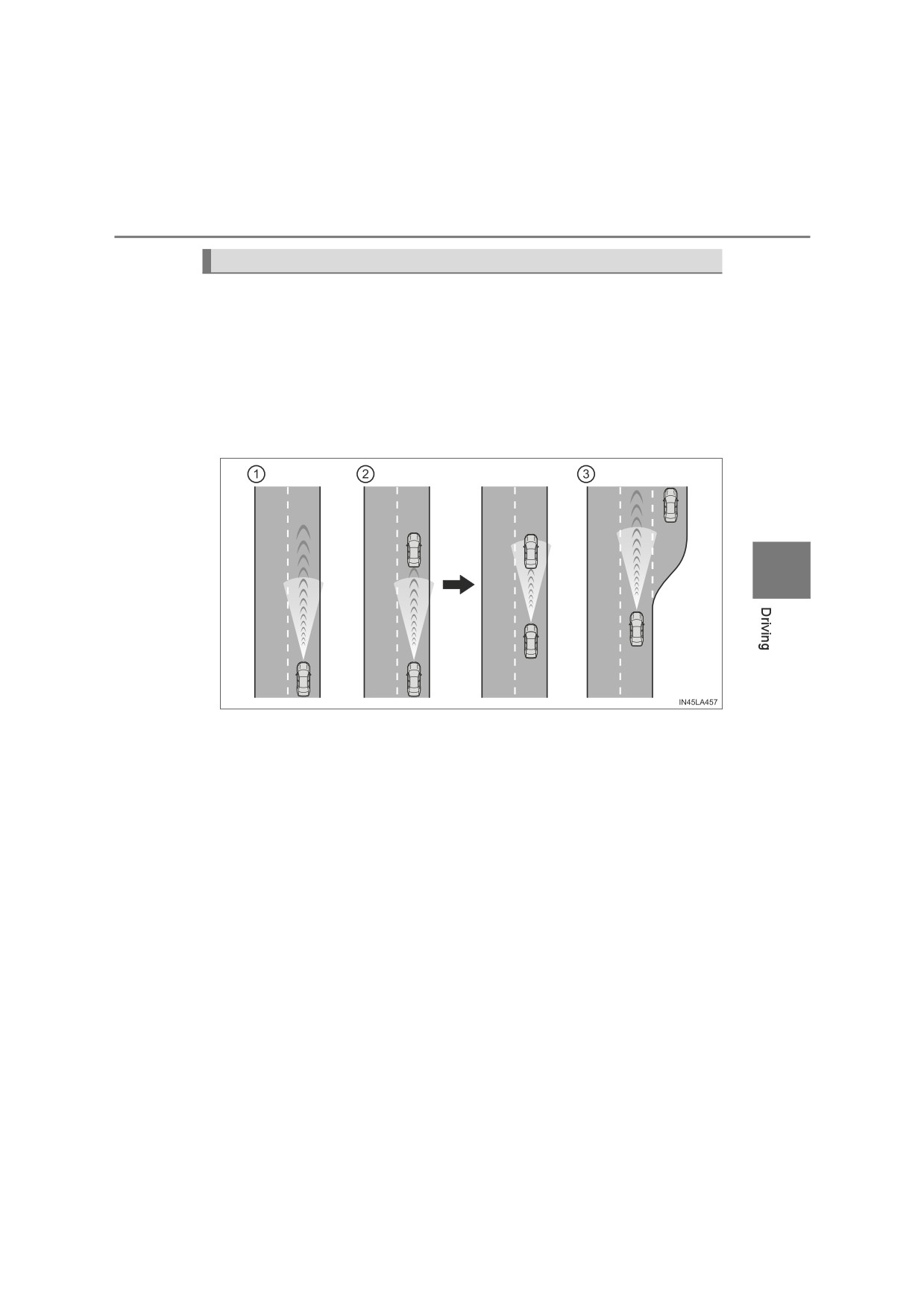
Example of constant speed cruising
When there are no vehicles ahead
The vehicle travels at the speed set by the driver.
Example of deceleration cruising and follow-up cruising
2
When a preceding vehicle driving slower than the set speed
appears
When a vehicle is detected running ahead of you, the system automatically
decelerates your vehicle. When a greater reduction in vehicle speed is
necessary, the system applies the brakes (the stop lights will come on at
this time). The system will respond to changes in the speed of the vehicle
ahead in order to maintain the vehicle-to-vehicle distance set by the driver.
Approach warning warns you when the system cannot decelerate suffi-
ciently to prevent your vehicle from closing in on the vehicle ahead.
When the turn signal lever is operated and your vehicle moves to an over-
taking lane while driving at 80 km/h (50 mph) or more, the vehicle will
accelerate to help to overtake a passing vehicle.
The system’s identification of what is an overtaking lane may be deter-
mined solely based on the location of the steering wheel in the vehicle (left
side driver position versus right side driver position.) If the vehicle is driven
to a region where the overtaking lane is on a different side from where the
vehicle is normally driven, the vehicle may accelerate when the turn signal
lever is operated in the opposite direction to the overtaking lane (e.g., if the
driver normally operates the vehicle in a region where the overtaking lane
is to the right but then drives to a region where the overtaking lane is to the
left, the vehicle may accelerate when the right turn signal is activated).
Example of acceleration
3
When there are no longer any preceding vehicles driving slower
than the set speed
The system accelerates until the set speed is reached. The system then
returns to constant speed cruising.
4-5. Using the driving support systems
307
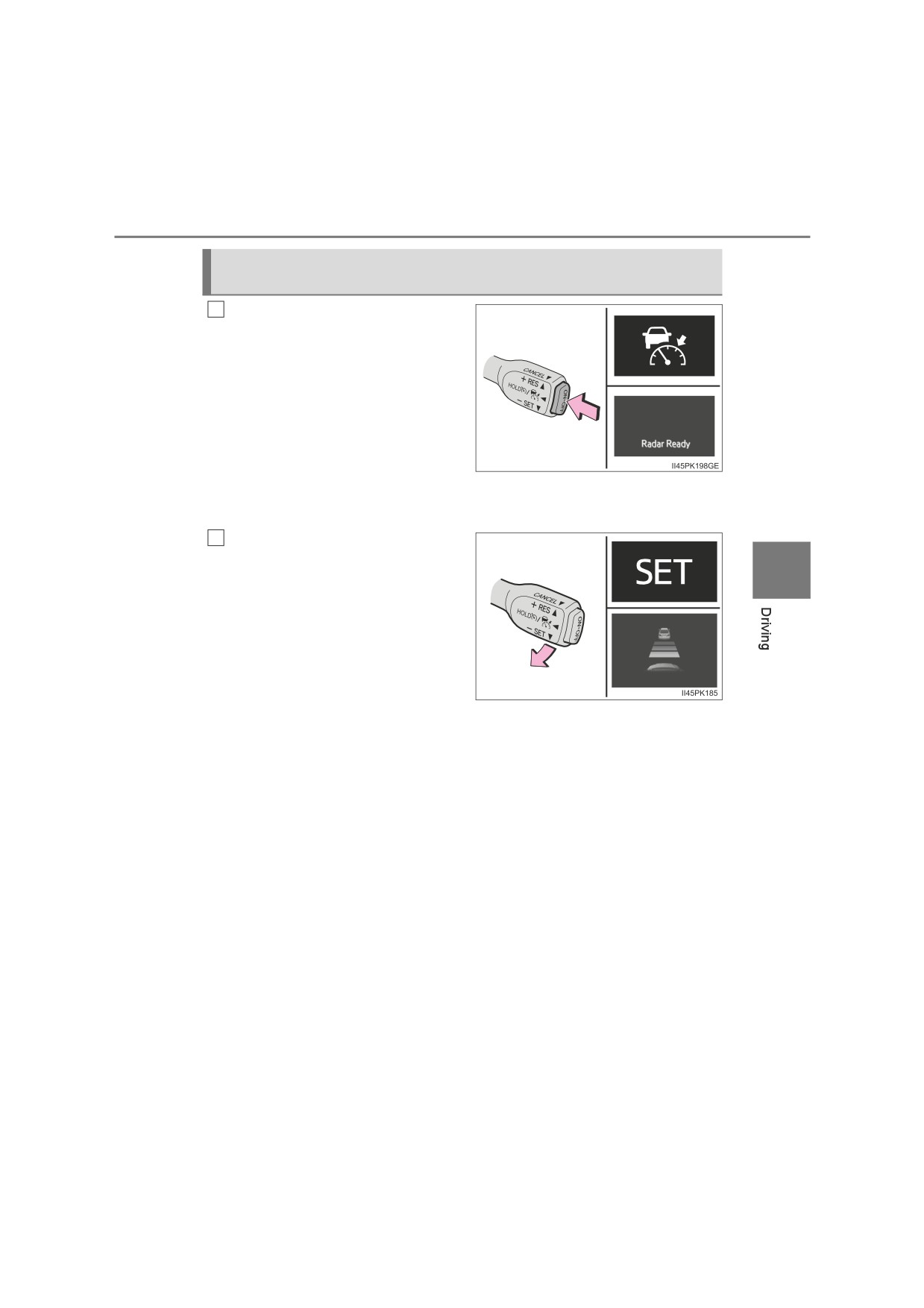
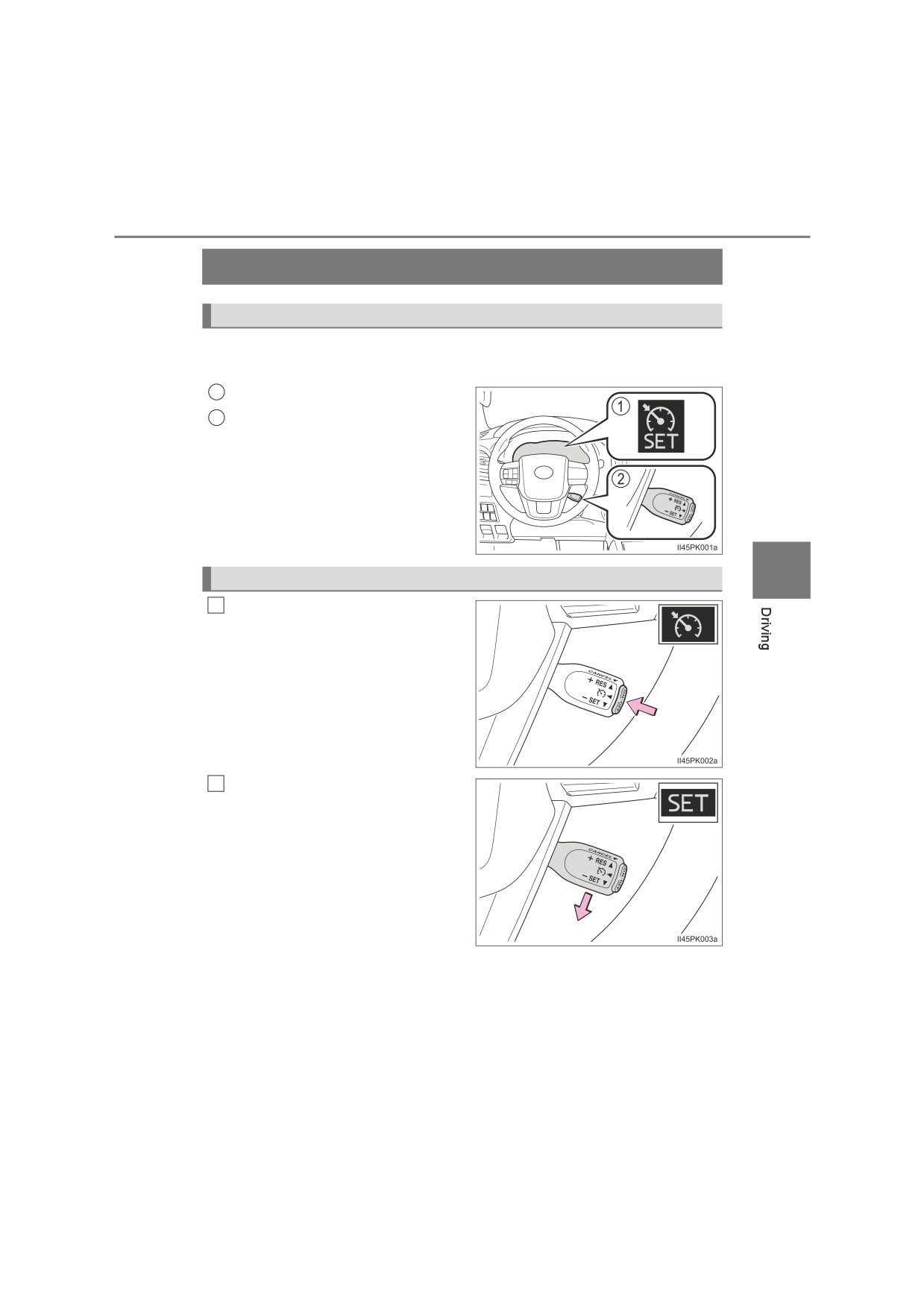
Setting the vehicle speed (vehicle-to-vehicle distance
control
mode)
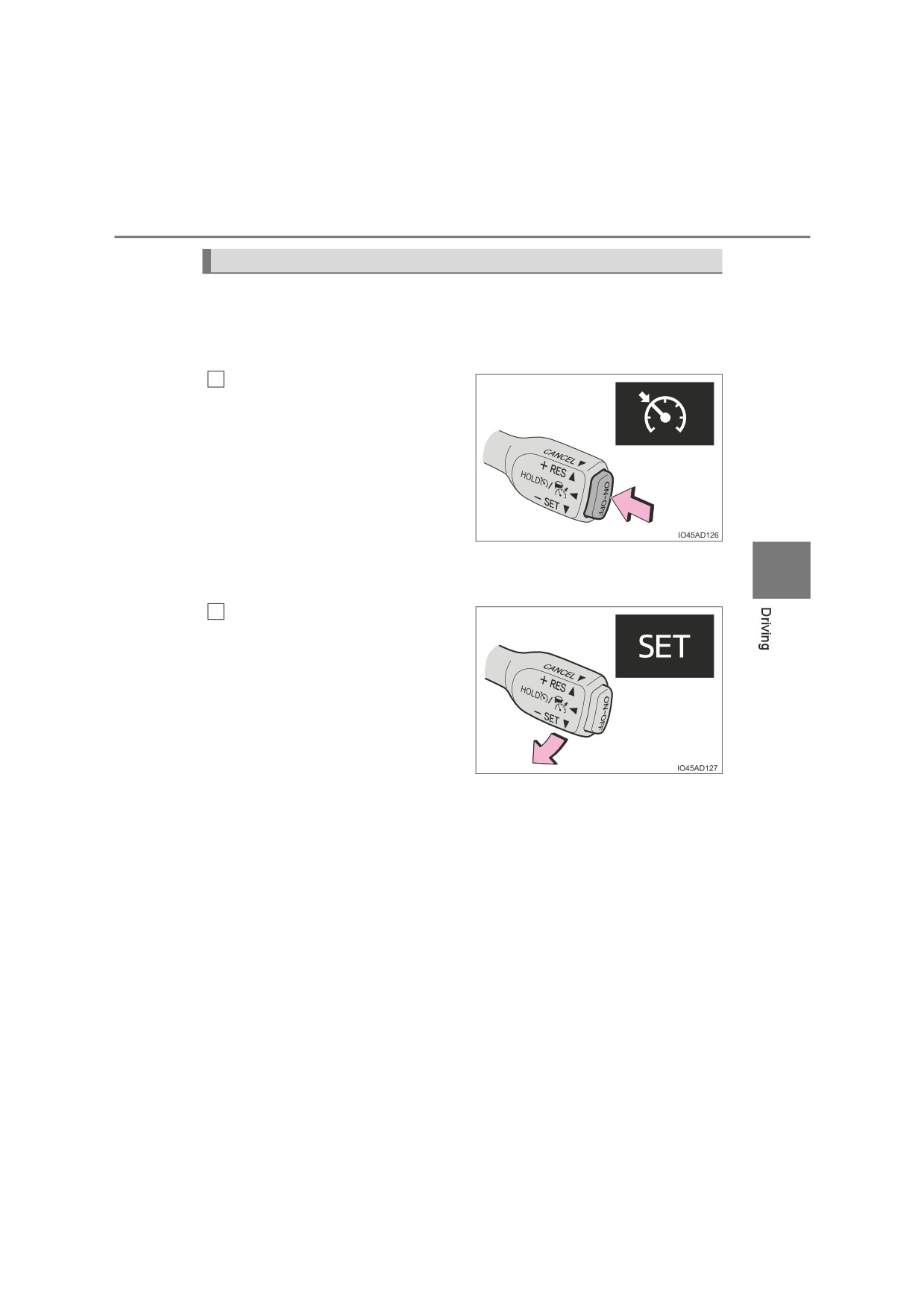
Press the “ON-OFF” button to
1
activate the cruise control.
Dynamic radar cruise control indi-
cator will come on and a message
will be displayed on the multi-infor-
mation display. Press the button
again to deactivate the cruise con-
trol.
If the “ON-OFF” button is pressed
and held for 1.5 seconds or more,
the system turns on in constant
speed control mode. (P. 311)
Accelerate or decelerate, with
2
accelerator pedal operation, to
4
the desired vehicle speed (at or
above approximately 30 km/h
[20 mph]) and push the lever
down to set the speed.
Cruise control “SET” indicator will
come on.
The vehicle speed at the moment
the lever is released becomes the
set speed.
308
4-5. Using the driving support systems
Adjusting the set speed
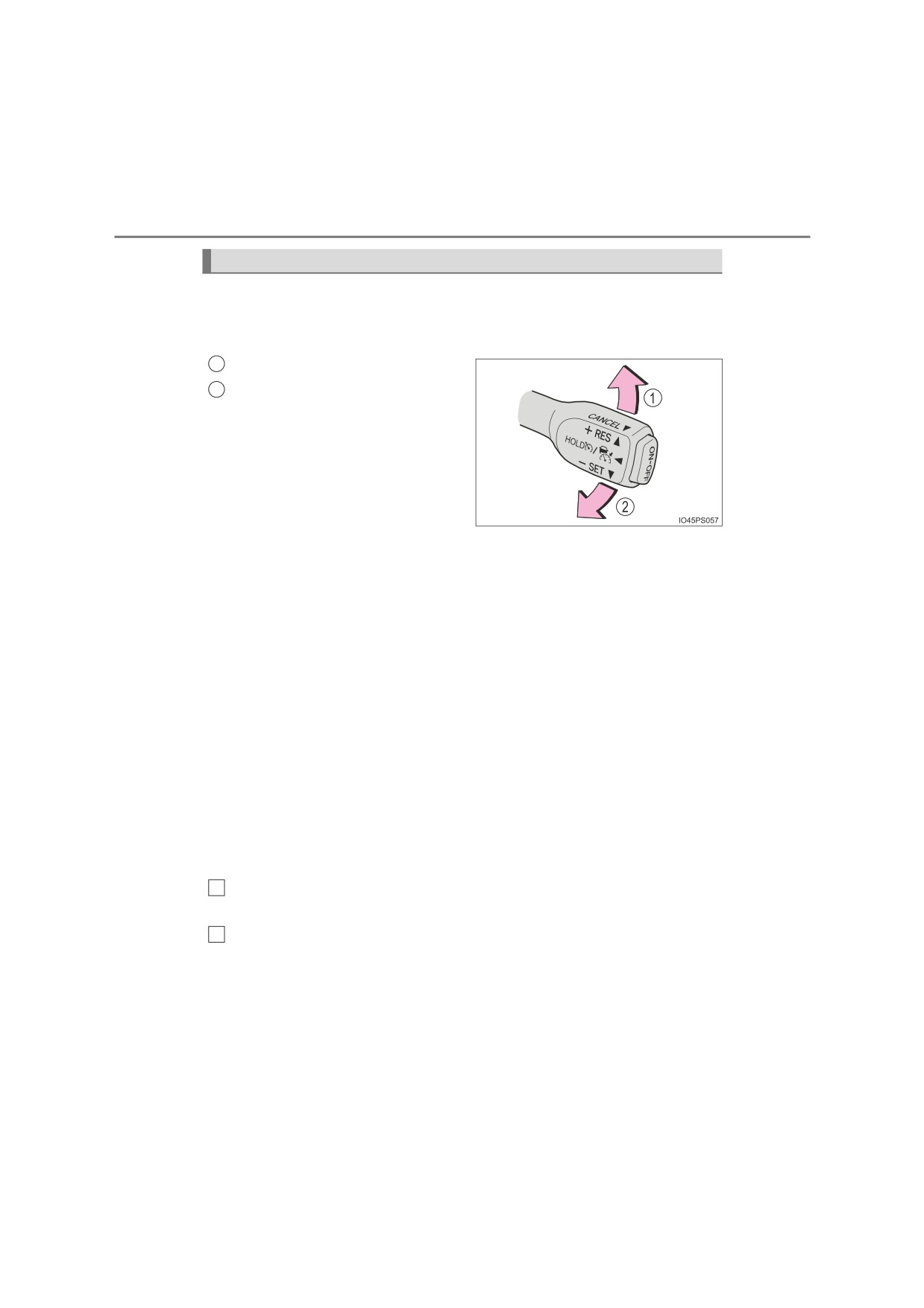
O Adjusting the set speed by the lever
To change the set speed, operate the lever until the desired set speed
is displayed.
1
Increases the speed
2
Decreases the speed
Fine adjustment: Momentarily
move the lever in the desired direc-
tion.
Large adjustment: Hold the lever
up or down to change the speed,
and release when the desired
speed is reached.
In the vehicle-to-vehicle distance control mode, the set speed will be
increased or decreased as follows:
Fine adjustment: By 1 km/h (0.6 mph)*1 or 1 mph (1.6 km/h)*2 each time
the lever is operated
Large adjustment: Increases or decreases in 5 km/h (3.1 mph)*1 or 5 mph
(8 km/h)*2 increments for as long as the lever is held
In the constant speed control mode (P. 311), the set speed will be
increased or decreased as follows:
Fine adjustment: By 1 km/h (0.6 mph)*1 or 1 mph (1.6 km/h)*2 each time
the lever is operated
Large adjustment: The speed will continue to change while the lever is
held.
*1: When the set speed is shown in “km/h”
*2: When the set speed is shown in “MPH”
O Increasing the set speed by the accelerator pedal
1
Accelerate with accelerator pedal operation to the desired vehicle
speed
2
Push the lever down
4-5. Using the driving support systems
309
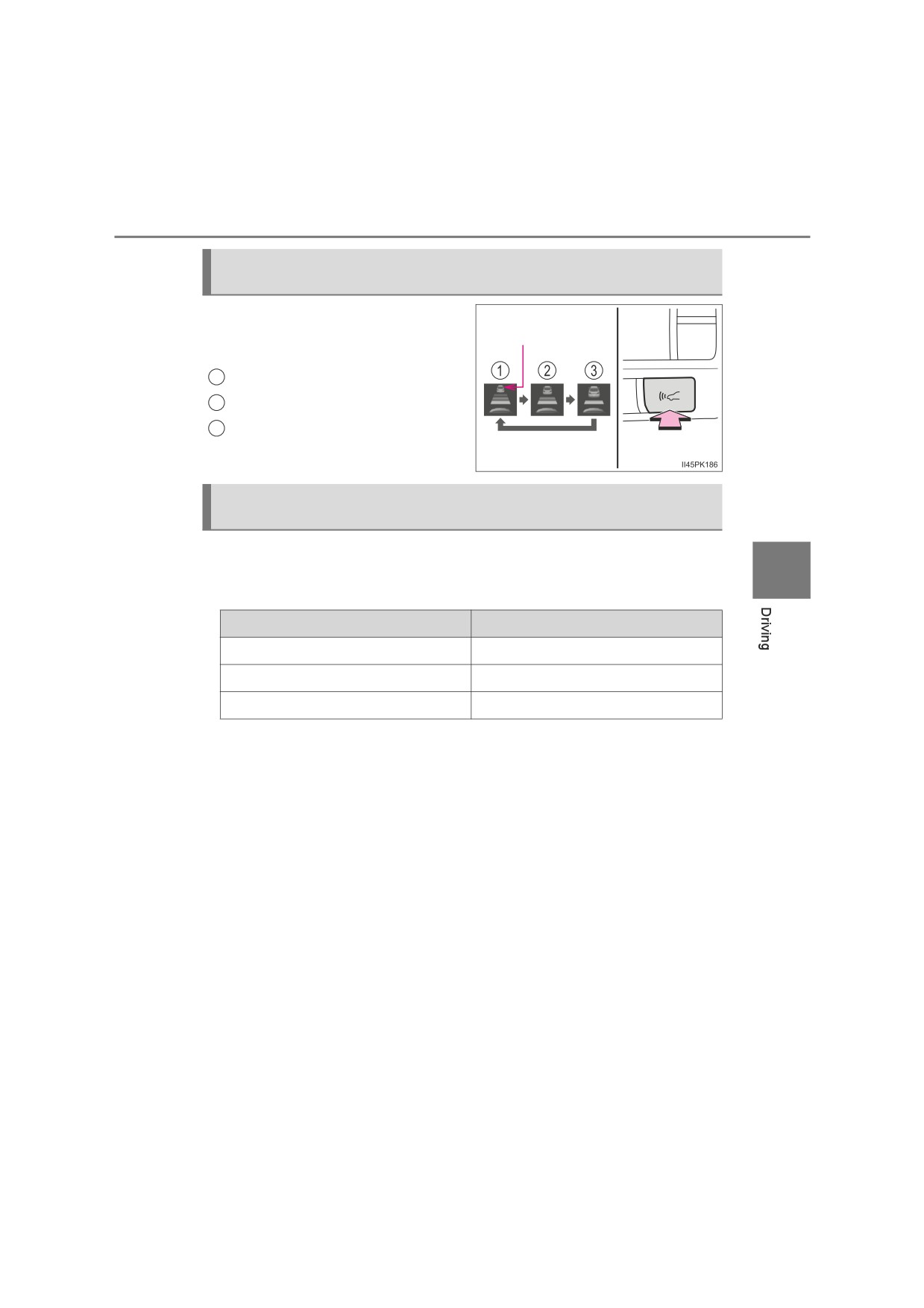
Changing the vehicle-to-vehicle distance (vehicle-to-vehicle dis-
tance control mode)
Pressing the switch changes the
Preceding vehicle
vehicle-to-vehicle distance as fol-
mark
lows:
1
Long
2
Medium
3
Short
Vehicle-to-vehicle distance settings (vehicle-to-vehicle distance
control mode)
Select a distance from the table below. Note that the distances shown
correspond to a vehicle speed of 80 km/h (50 mph). Vehicle-to-vehicle
4
distance increases/decreases in accordance with vehicle speed.
Distance options
Vehicle-to-vehicle distance
Long
Approximately 50 m (160 ft.)
Medium
Approximately 40 m (130 ft.)
Short
Approximately 30 m (100 ft.)
310
4-5. Using the driving support systems
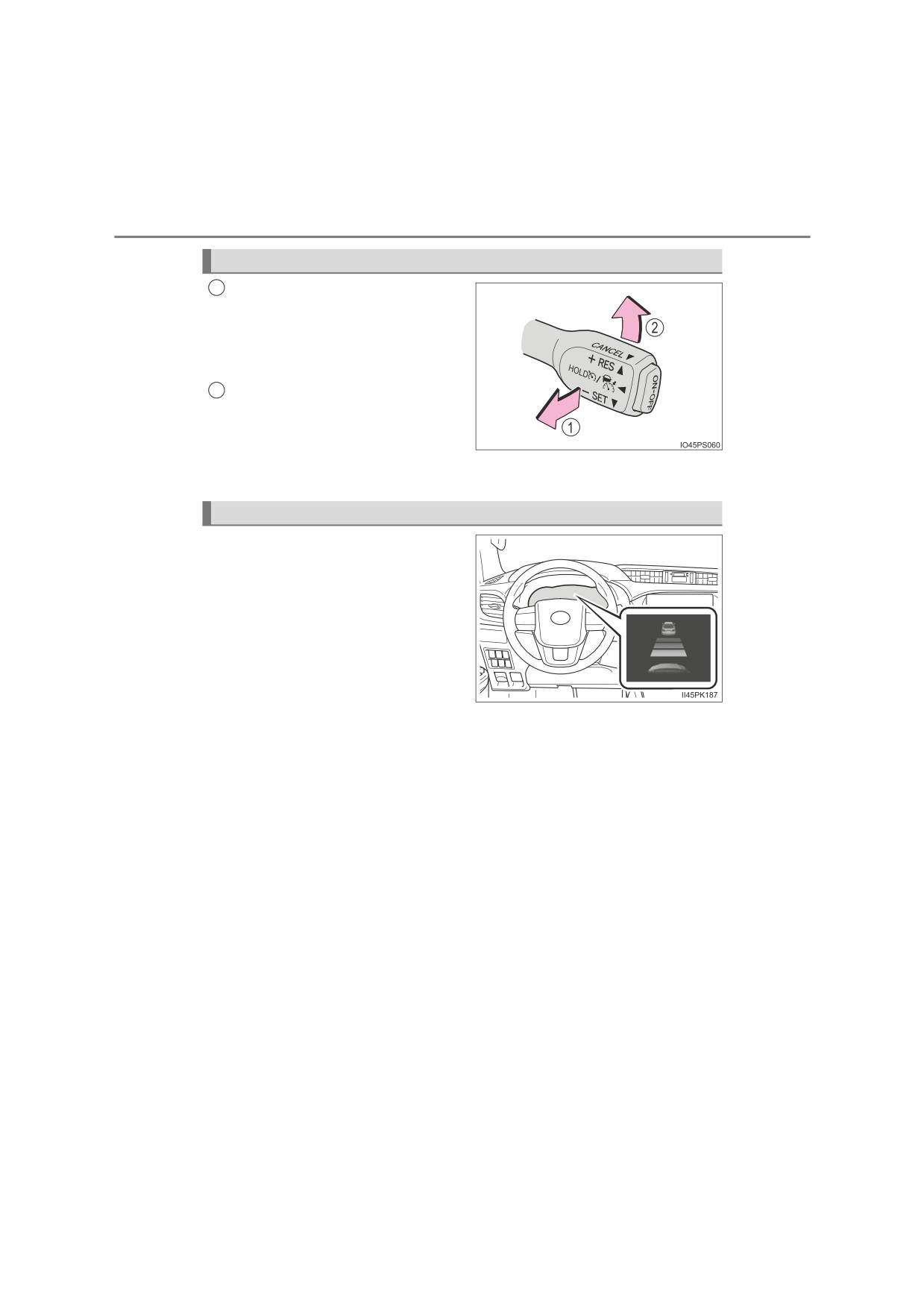
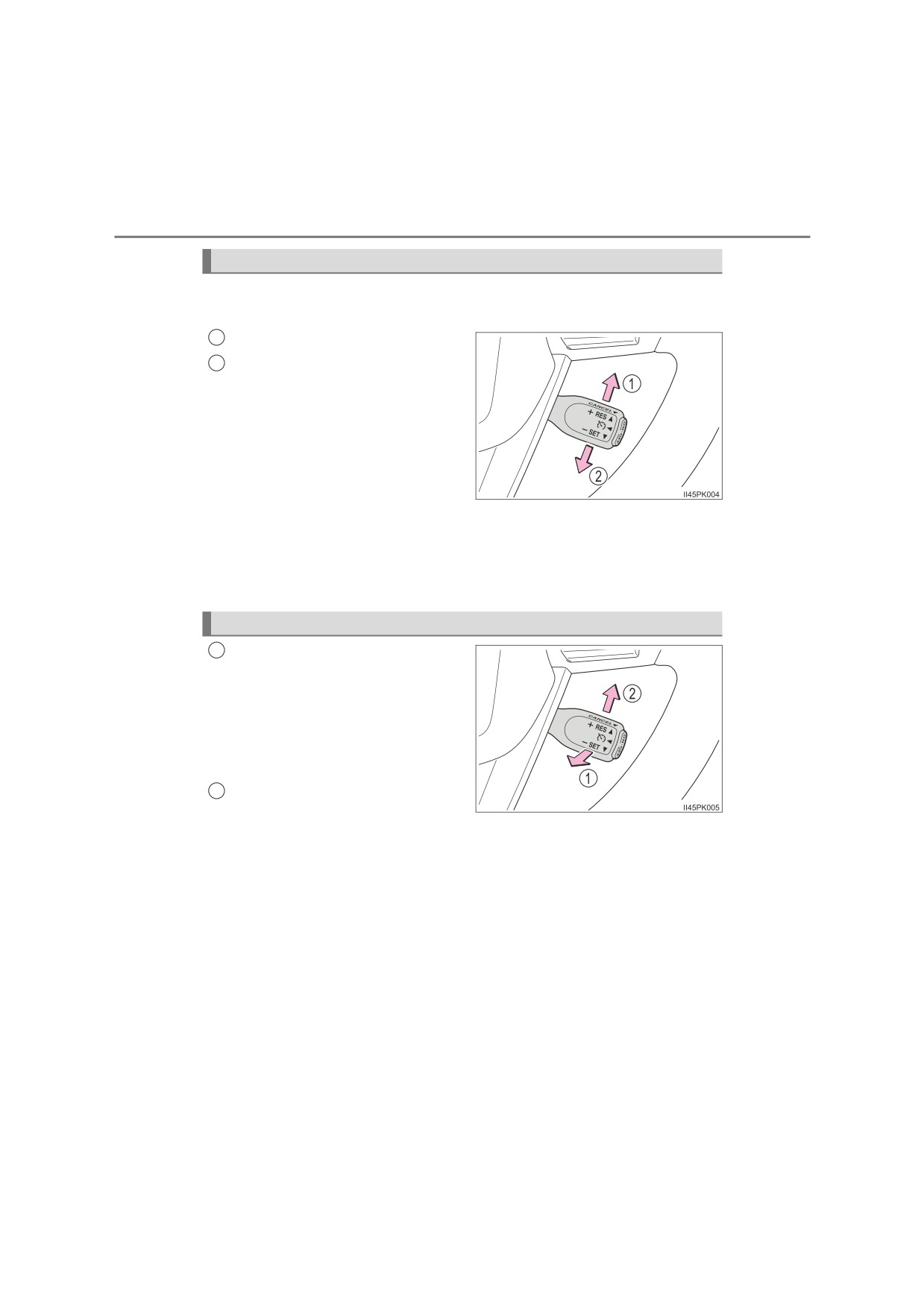
Canceling and resuming the speed control
Pulling the lever toward you
1
cancels the speed control.
The speed control is also canceled
when the brake pedal is
depressed.
Pushing the lever up resumes
2
the cruise control and returns
vehicle speed to the set speed.
However, cruise control does not resume when the vehicle speed
is
approximately 25 km/h (16 mph) or less.
Approach warning (vehicle-to-vehicle distance control mode)
When your vehicle is too close to
a vehicle ahead, and sufficient
automatic deceleration via the
cruise control is not possible, the
display will flash and the buzzer
will sound to alert the driver. An
example of this would be if
another driver cuts in front of you
while you are following a vehicle.
Depress the brake pedal to
ensure an appropriate vehicle-to-
vehicle distance.
Q Warnings may not occur when
In the following instances, warnings may not occur even when the
vehicle-to-vehicle distance is small.
O When the speed of the preceding vehicle matches or exceeds
your vehicle speed
O When the preceding vehicle is traveling at an extremely slow
speed
O Immediately after the cruise control speed was set
O When depressing the accelerator pedal
4-5. Using the driving support systems
311
Selecting constant speed control mode
When constant speed control mode is selected, your vehicle will main-
tain a set speed without controlling the vehicle-to-vehicle distance.
Select this mode only when vehicle-to-vehicle distance control mode
does not function correctly due to a dirty radar, etc.
With the cruise control off,
1
press and hold the “ON-OFF”
button for 1.5 seconds or more.
Immediately after the
“ON-OFF”
button is pressed, the dynamic
radar cruise control indicator will
come on. Afterwards, it switches to
the cruise control indicator.
Switching to constant speed con-
trol mode is only possible when
4
operating the lever with the cruise
control off.
Accelerate or decelerate, with
2
accelerator pedal operation, to
the desired vehicle speed (at or
above approximately 30 km/h
[20 mph]) and push the lever
down to set the speed.
Cruise control “SET” indicator will
come on.
The vehicle speed at the moment
the lever is released becomes the
set speed.
Adjusting the speed setting: P. 308
Canceling and resuming the speed setting: P. 310
312
4-5. Using the driving support systems
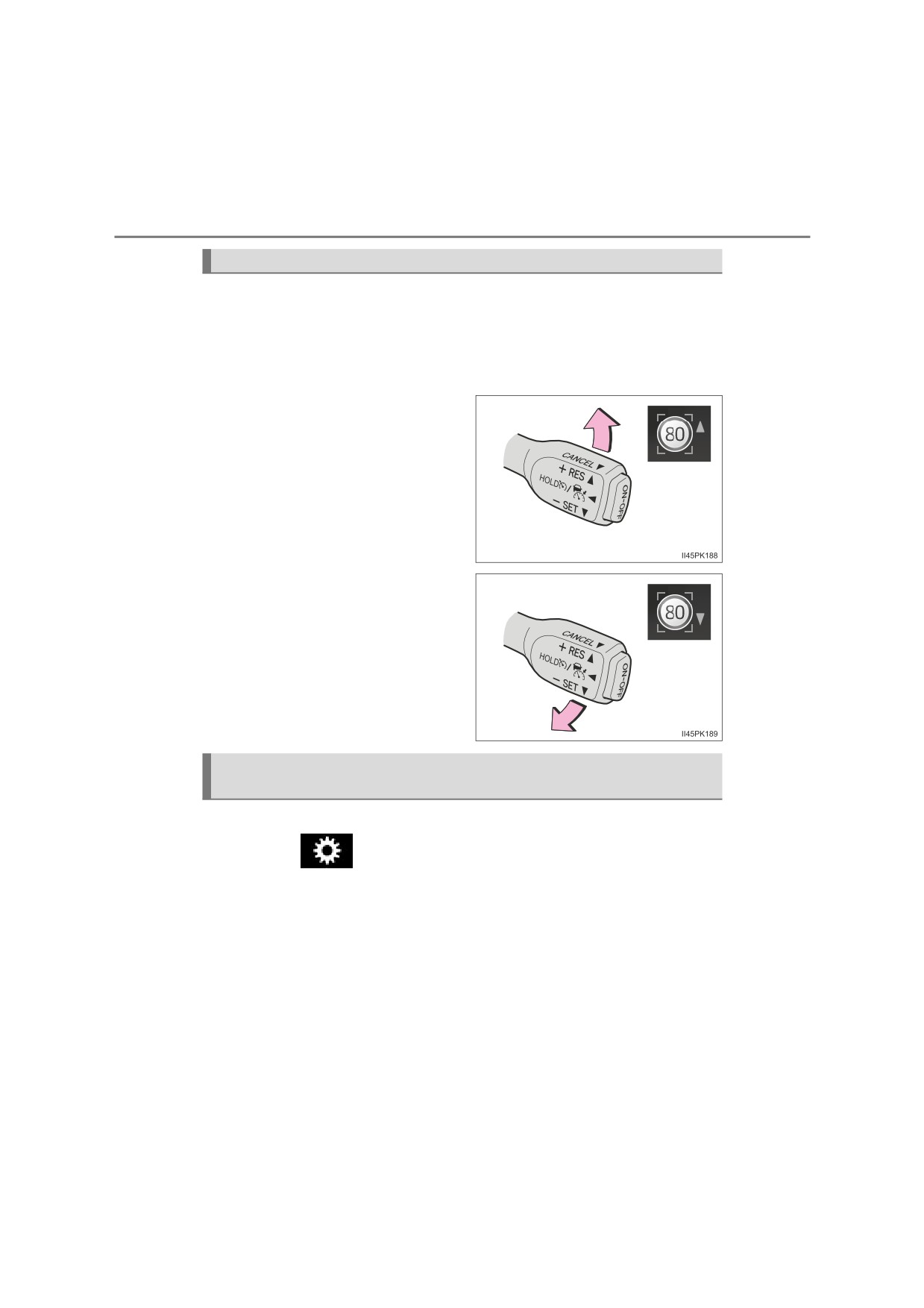
Dynamic Radar Cruise Control with Road Sign Assist
When this function is enabled and the system is operating in vehicle-
to-vehicle distance control mode (P. 305), when a speed limit sign is
detected, the recognized speed limit will be displayed with an up/
down arrow. The set speed can be increased/reduced to the recog-
nized speed limit by pushing the lever up or down.
O When the current set speed is
lower than the recognized
speed limit
Push the lever up
O When the current set speed is
higher than the recognized
speed limit
Push the lever down
Enabling/Disabling the Dynamic Radar Cruise Control with Road
Sign Assist
Dynamic Radar Cruise Control with Road Sign Assist can be enabled/
disabled in
on the multi-information display. (P. 135)
When the Dynamic Radar Cruise Control with Road Sign Assist is
operating, while driving down a hill, the vehicle speed may exceed the
set speed.
In this case, the displayed set vehicle speed will be highlighted and a
buzzer will sound to alert the driver.
4-5. Using the driving support systems
313
Q Dynamic radar cruise control can be set when
OThe shift lever is in D. (Vehicles with automatic transmission)
O The shift lever is in range 2nd or higher. (Vehicles with manual transmission)
O Depending on the control mode, this item can be set at the following
speeds.
• Vehicle-to-vehicle distance control mode: Approximately
30 km/h (20
mph) or more
• Constant speed control mode: Approximately 30 km/h (20 mph) or more
Q Accelerating after setting the vehicle speed
The vehicle can accelerate by operating the accelerator pedal. After acceler-
ating, the set speed resumes. However, during vehicle-to-vehicle distance
control mode, the vehicle speed may decrease below the set speed in order
to maintain the distance to the preceding vehicle.
Q Shift position selection (vehicles with manual transmission)
Select a shift position according to the vehicle speed. If the engine speed is
too high or too low, control may be automatically canceled.
4
Q Automatic cancelation of vehicle-to-vehicle distance control mode
Vehicle-to-vehicle distance control mode is automatically canceled in the fol-
lowing situations.
OActual vehicle speed falls below approximately 25 km/h (16 mph).
OVSC is activated.
O TRC/A-TRC is activated for a period of time.
O When the VSC or TRC/A-TRC system is turned off.
O The sensor cannot detect correctly because it is covered in some way.
O When the brake control or output restriction control of a driving support sys-
tem operates. (For example: Pre-Collision System, Drive-Start Control)
O When the shift lever is in N or the clutch pedal is depressed for a certain
amount of time or more. (Vehicles with manual transmission)
O4WD models: Switching the transfer mode is not completed within 5 sec-
onds while the cruise control system is on.
If vehicle-to-vehicle distance control mode is automatically canceled for any
reasons other than the above, there may be a malfunction in the system.
Contact any authorized Toyota retailer or Toyota authorized repairer, or any
reliable repairer.
314
4-5. Using the driving support systems
Q Automatic cancelation of constant speed control mode
Constant speed control mode is automatically canceled in the following situa-
tions:
OActual vehicle speed is more than approximately 16 km/h (10 mph) below
the set vehicle speed.
OActual vehicle speed falls below approximately 30 km/h (20 mph).
OVSC is activated.
O TRC/A-TRC is activated for a period of time.
O When the VSC or TRC/A-TRC system is turned off.
O When the brake control or output restriction control of a driving support sys-
tem operates. (For example: Pre-Collision System, Drive-Start Control)
O When the shift lever is in N or the clutch pedal is depressed for a certain
amount of time or more. (Vehicles with manual transmission)
O4WD models: Switching the transfer mode is not completed within 5 sec-
onds while the cruise control system is on.
If constant speed control mode is automatically canceled for any reasons
other than the above, there may be a malfunction in the system. Contact any
authorized Toyota retailer or Toyota authorized repairer, or any reliable
repairer.
Q The Dynamic Radar Cruise Control with Road Sign Assist may not oper-
ate properly when
As the Dynamic Radar Cruise Control with Road Sign Assist may not oper-
ate properly in conditions in which RSA may not operate or detect correctly
(P. 299), when using this function, make sure to check the speed limit
sign displayed.
In the following situations, the set speed may not be changed to the recog-
nized speed limit by pushing the lever up or down.
OIf speed limit information is not available
O When the recognized speed limit is the same as the set speed
O When the recognized speed limit is outside of the speed range that the
dynamic radar cruise control system can operate
Q Brake operation
A brake operation sound may be heard and the brake pedal response may
change, but these are not malfunctions.
Q Warning messages and buzzers for dynamic radar cruise control
Warning messages and buzzers are used to indicate a system malfunction or
to inform the driver of the need for caution while driving. If a warning message
is shown on the multi-information display, read the message and follow the
instructions. (P. 271, 575)
4-5. Using the driving support systems
315
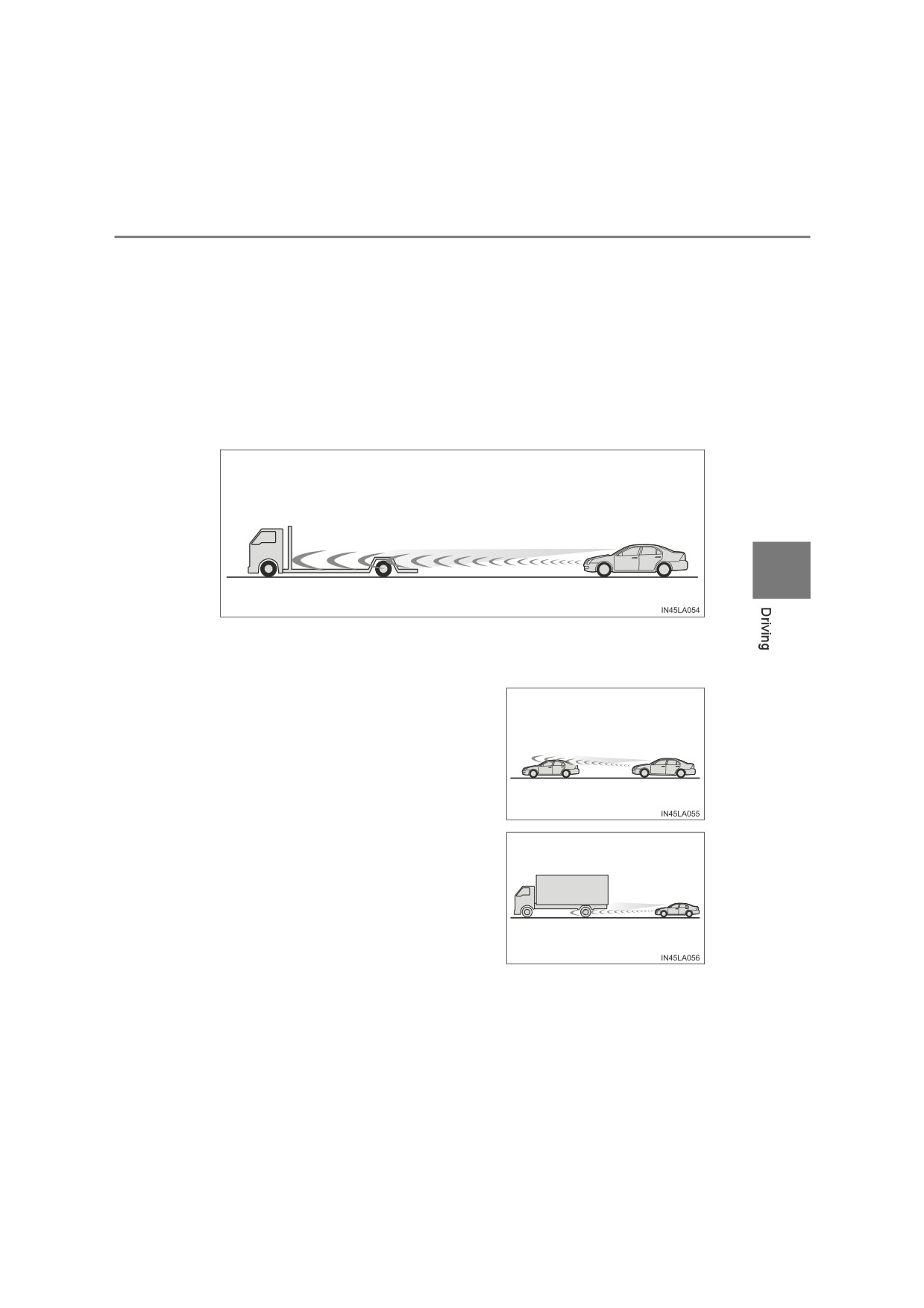
Q When the sensor may not be correctly detecting the vehicle ahead
In the case of the following and depending on the conditions, operate the
brake pedal when deceleration of the system is insufficient or operate the
accelerator pedal when acceleration is required.
As the sensor may not be able to correctly detect these types of vehicles, the
approach warning (P. 310) may not be activated.
O Vehicles that cut in suddenly
O Vehicles traveling at low speeds
O Vehicles that are not moving in the same lane
O Vehicles with small rear ends (trailers with no load on board, etc.)
4
O Motorcycles traveling in the same lane
O When water or snow thrown up by the surrounding vehicles hinders the
detecting of the sensor
O When your vehicle is pointing upwards
(caused by a heavy load in the luggage
compartment, etc.)
O Preceding vehicle has an extremely high
ground clearance
316
4-5. Using the driving support systems
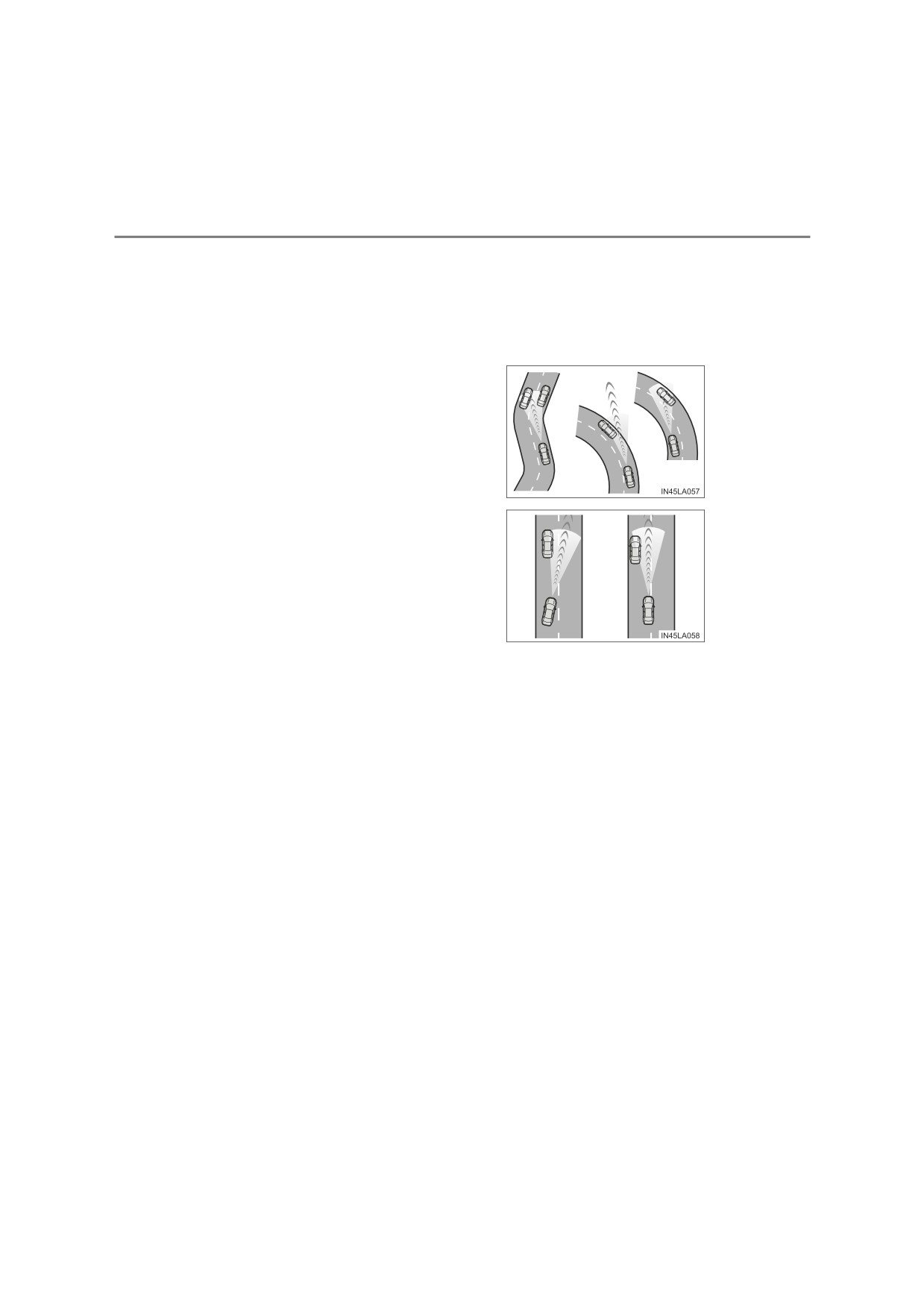
Q Conditions under which the vehicle-to-vehicle distance control mode
may not function correctly
In the case of the following conditions, operate the brake pedal (or accelera-
tor pedal, depending on the situation) as necessary.
As the sensor may not be able to correctly detect vehicles ahead, the system
may not operate properly.
O When the road curves or when the lanes
are narrow
O When steering wheel operation or your
position in the lane is unstable
O When the vehicle ahead of you decelerates suddenly
O When driving on a road surrounded by a structure, such as in a tunnel or on
a bridge
O While the vehicle speed is decreasing to the set speed after the vehicle
accelerates by depressing the accelerator pedal
4-5. Using the driving support systems
317
Cruise control
Summary of functions
Use the cruise control to maintain a set speed without depressing the
accelerator pedal.
1
Indicators
2
Cruise control switch
4
Setting the vehicle speed
Press the “ON-OFF” button to
1
activate the cruise control.
Cruise control indicator will come
on.
Press the button again to deacti-
vate the cruise control.
Accelerate or decelerate the
2
vehicle to the desired speed,
and push the lever down to set
the speed.
“SET” indicator will come on.
The vehicle speed at the moment
the lever is released becomes the
set speed.
: If equipped
318
4-5. Using the driving support systems
Adjusting the set speed
To change the set speed, operate the lever until the desired set speed
is obtained.
1
Increases the speed
2
Decreases the speed
Fine adjustment: Momentarily
move the lever in the desired direc-
tion.
Large adjustment: Hold the lever in
the desired direction.
The set speed will be increased or decreased as follows:
Fine adjustment: By approximately 1.0 km/h (0.6 mph) each time the lever
is operated.
Large adjustment: The set speed can be increased or decreased continu-
ally until the lever is released.
Canceling and resuming the constant speed control
Pulling the lever toward you
1
cancels the constant speed
control.
The speed setting is also canceled
when the brakes are applied or the
clutch pedal (manual transmission
only) is depressed.
Pushing the lever up resumes
2
the constant speed control.
Resuming is available when the vehicle speed is more than approximately
30 km/h (20 mph).
4-5. Using the driving support systems
319
Q Cruise control can be set when
O The shift lever is in D or shifted to range 4 or higher of S. (vehicles with auto-
matic transmission)
O Range 4 or higher has been selected by using the paddle shift. (vehicles
with paddle shift switches)
O Vehicle speed is above approximately 30 km/h (20 mph).
Q Accelerating after setting the vehicle speed
O The vehicle can be accelerated normally. After acceleration, the set speed
resumes.
O Even without canceling the cruise control, the set speed can be increased
by first accelerating the vehicle to the desired speed and then pushing the
lever down to set the new speed.
Q Automatic cruise control cancelation
Cruise control will stop maintaining the vehicle speed in any of the following
situations:
OActual vehicle speed falls more than approximately 16 km/h (10 mph) below
4
the preset vehicle speed.
At this time, the memorized set speed is not retained.
OActual vehicle speed is below approximately 30 km/h (20 mph).
OVSC is activated. (if equipped)
O4WD models: Switching the transfer mode is not completed within 5 sec-
onds while the cruise control system is on.
O TRC/A-TRC is activated for a period of time. (if equipped)
O When the VSC or TRC/A-TRC system is turned off. (if equipped)
Q If the cruise control indicator turns to yellow (vehicles without multi-
information display) or “Cruise Control Malfunction Visit Your Dealer” is
shown on the multi-information display (vehicles with multi-information
display)
Press the “ON-OFF” button once to deactivate the system, and then press
the button again to reactivate the system.
If the cruise control speed cannot be set or if the cruise control cancels imme-
diately after being activated, there may be a malfunction in the cruise control
system. Have the vehicle inspected by any authorized Toyota retailer or
Toyota authorized repairer, or any reliable repairer.
320
4-5. Using the driving support systems
WARNING
Q To avoid operating the cruise control by mistake
Switch the cruise control off using the “ON-OFF” button when not in use.
Q Situations unsuitable for cruise control
Do not use cruise control in any of the following situations.
Doing so may result in loss of control and could cause an accident resulting
in death or serious injury.
OIn heavy traffic
OOn roads with sharp bends
OOn winding roads
OOn slippery roads, such as those covered with rain, ice or snow
OOn steep hills
Vehicle speed may exceed the set speed when driving down a steep hill.
O When your vehicle is towing a trailer (with towing hitch) or during emer-
gency towing
4-5. Using the driving support systems
321
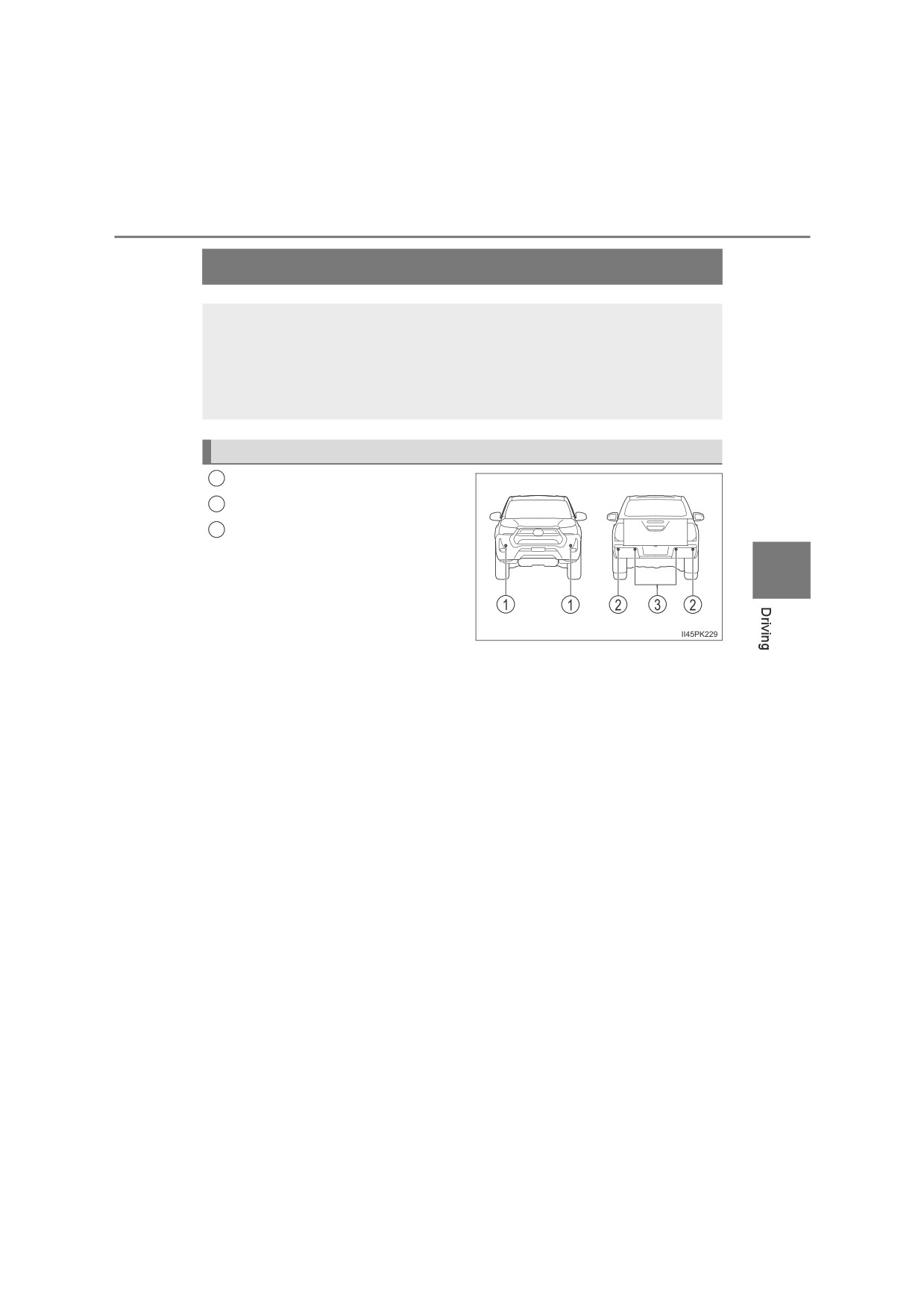
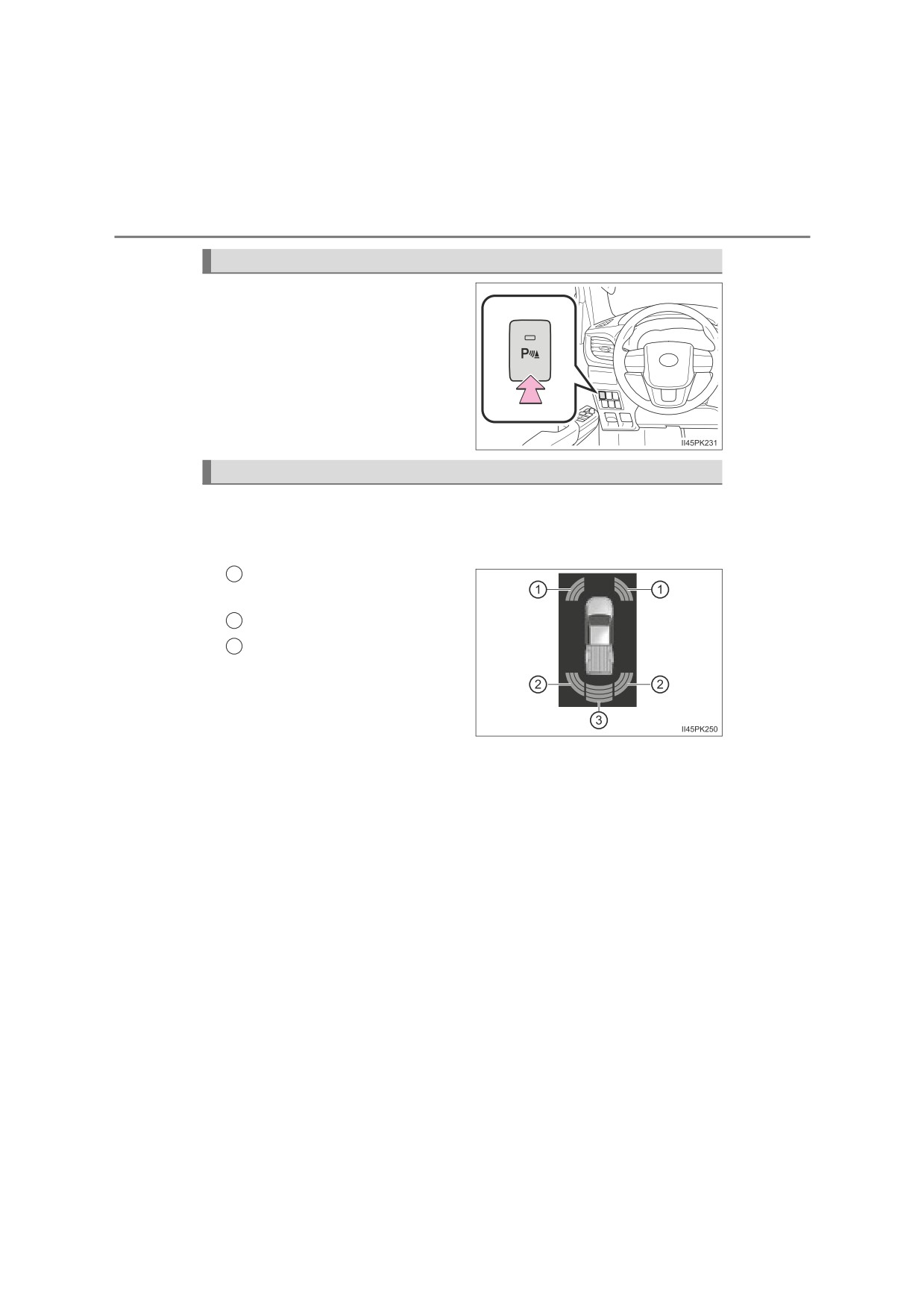
Toyota parking assist-sensor
The distance from your vehicle to objects, such as a wall, when
parallel parking or maneuvering into a garage is measured by
the sensors and communicated via the multi-information display
and a buzzer. Always check the surrounding area when using
this system.
Types of sensors
1
Front corner sensors
2
Rear corner sensors
3
Rear center sensors
4
: If equipped
322
4-5. Using the driving support systems
Turning Toyota parking assist-sensor on/off
Turns Toyota parking assist-sen-
sor on/off
When on, the indicator light comes
on to inform the driver that the sys-
tem is operational.
Display
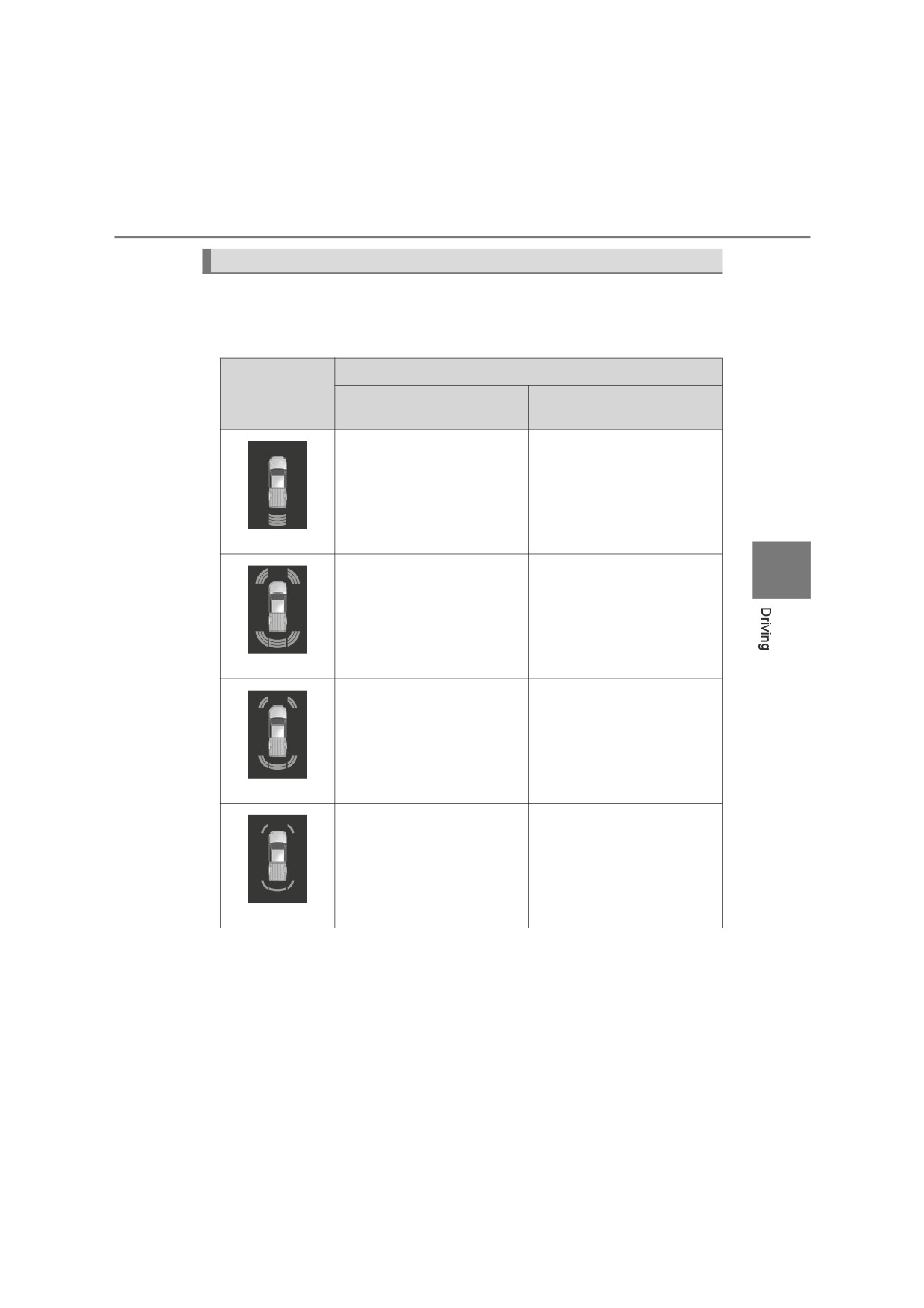
When the sensors detect an object, the following displays inform the
driver of the position and distance to the object.
Q Multi-information display*
1
Front corner sensor opera-
tion
2
Rear corner sensor operation
3
Rear center sensor operation
*: The vehicle shown in the illus-
trations may differ depending on
the grade.
4-5. Using the driving support systems
323
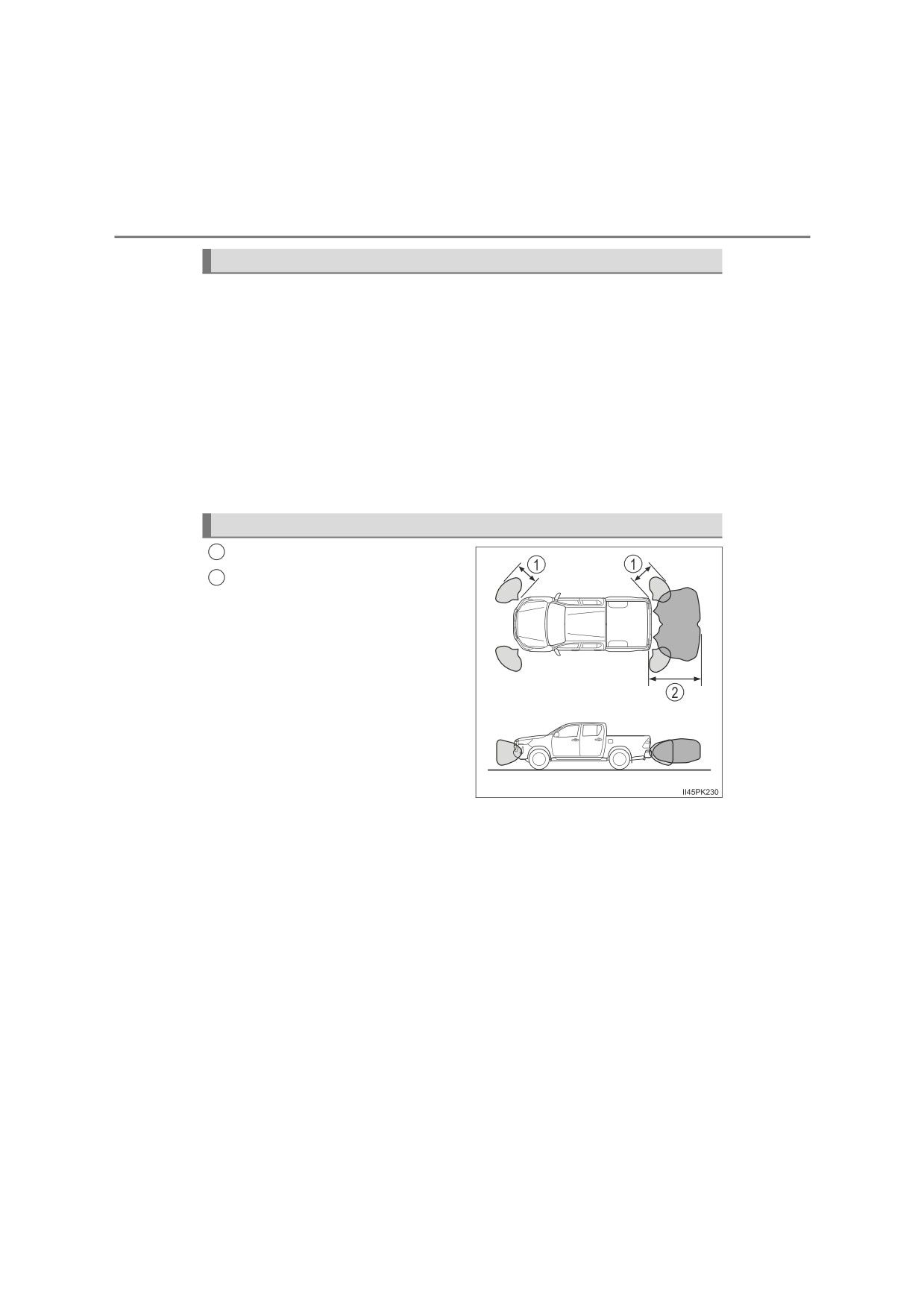
Sensor detection display, object distance
Q Distance display
When an object is detected by a sensor, the approximate distance
to the object will be displayed on the multi-information display.
Approximate distance to object
Multi-
information
Rear center and
display*
Front corner sensor
Rear corner sensor
Rear center sensor only:
150 cm (4.9 ft.) to
80 cm (2.6 ft.)
(continuous)
4
Rear center sensor:
80 cm (2.6 ft.) to
60 cm (2.0 ft.) to
70 cm (2.3 ft.)
45 cm (1.5 ft.)
Rear corner sensor:
60 cm (2.0 ft.) to
50 cm (1.6 ft.)
(continuous)
Rear center sensor:
70 cm (2.3 ft.) to
45 cm (1.5 ft.) to
60 cm (2.0 ft.)
35 cm (1.1 ft.)
Rear corner sensor:
50 cm (1.6 ft.) to
40 cm (1.3 ft.)
(continuous)
Rear center sensor:
Less than 60 cm (2.0 ft.)
Less than 35 cm (1.1 ft.)
Rear corner sensor:
Less than 40 cm (1.3 ft.)
(blinking)
*: The images may differ from those shown in the illustrations. (P. 322)
324
4-5. Using the driving support systems
Buzzer operation and distance to an object
A buzzer sounds when the sensors are operating.
Q When an object is detected to the front or rear of the vehicle
O The buzzer sounds faster as the vehicle approaches an object.
When the vehicle comes within the following distance of the object,
the buzzer beeps continuously.
• Front corner sensor: Approximately 35 cm (1.1 ft.)
• Rear corner sensor: Approximately 40 cm (1.3 ft.)
• Rear center sensor: Approximately 60 cm (2.0 ft.)
O When 2 or more objects are detected simultaneously, the buzzer
system responds to the nearest object.
Detection range of the sensors
1
Approximately 60 cm (24 in.)
2
Approximately 150 cm (59 in.)
The diagram shows the detection
range of the sensors. Note that the
sensors may not be able to detect
objects that are extremely close to
the vehicle.
The range of the sensors may
change depending on the shape of
the object etc.
4-5. Using the driving support systems
325
Q Toyota parking assist-sensor can be operated when
OThe engine switch is in the “ON” position (vehicles without smart entry &
start system) or IGNITION ON mode (vehicles with smart entry & start sys-
tem).
O Front corner sensor:
• The shift lever is in other than P.
• The vehicle speed is approximately 10 km/h (6 mph) or less.
O Rear corner and rear center sensors:
The shift lever is in R.
QSensor detection information
O The sensor’s detection areas are limited to the areas around the vehicle’s
bumper.
O Depending on the shape of the object and other factors, the detection dis-
tance may shorten, or detection may be impossible.
O Detection may be impossible if the objects draw too close to the sensor.
OThere will be a short delay between object detection and display. Even at
4
low speeds, there is a possibility that the object will come within the sensor’s
detection areas before the display is shown and the warning beep sounds.
O Thin posts or objects lower than the sensor may not be detected when
approached, even if they have been detected once.
O It might be difficult to hear the buzzer due to the volume of the audio system
or air flow noise of the air conditioning system.
Q Objects which the system may not properly detect
The shape of the object may prevent the sensor from detecting it. Pay partic-
ular attention to the following objects:
O Wires, fences, ropes, etc.
O Cotton, snow and other materials that absorb sound waves
O Sharply-angled objects
O Low objects
O Tall objects with upper sections projecting outwards in the direction of your
vehicle
OMoving objects such as people or animals
People may not be detected if they are wearing certain types of clothing.
Q Situations in which the system may not operate properly
Certain vehicle conditions and the surrounding environment may affect the
ability of the sensor to correctly detect objects. Particular instances where this
may occur are listed below.
OThere is dirt, snow or ice on the sensor. (Wiping the sensors will resolve this
problem.)
326
4-5. Using the driving support systems
O The sensor is frozen. (Thawing the area will resolve this problem.)
In especially cold weather, if a sensor is frozen, the screen may show an
abnormal display, or objects may not be detected.
O The sensor is covered in any way.
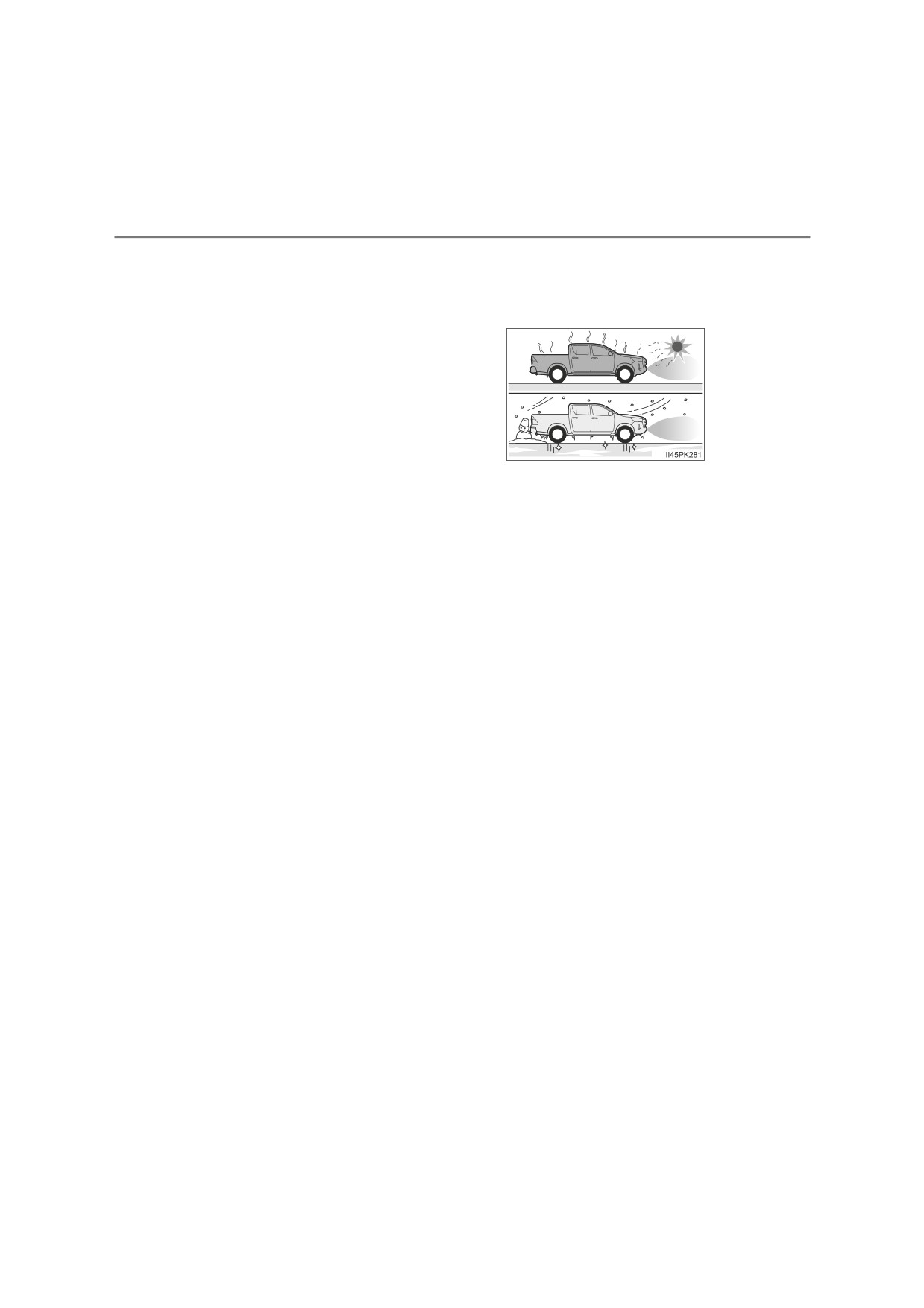
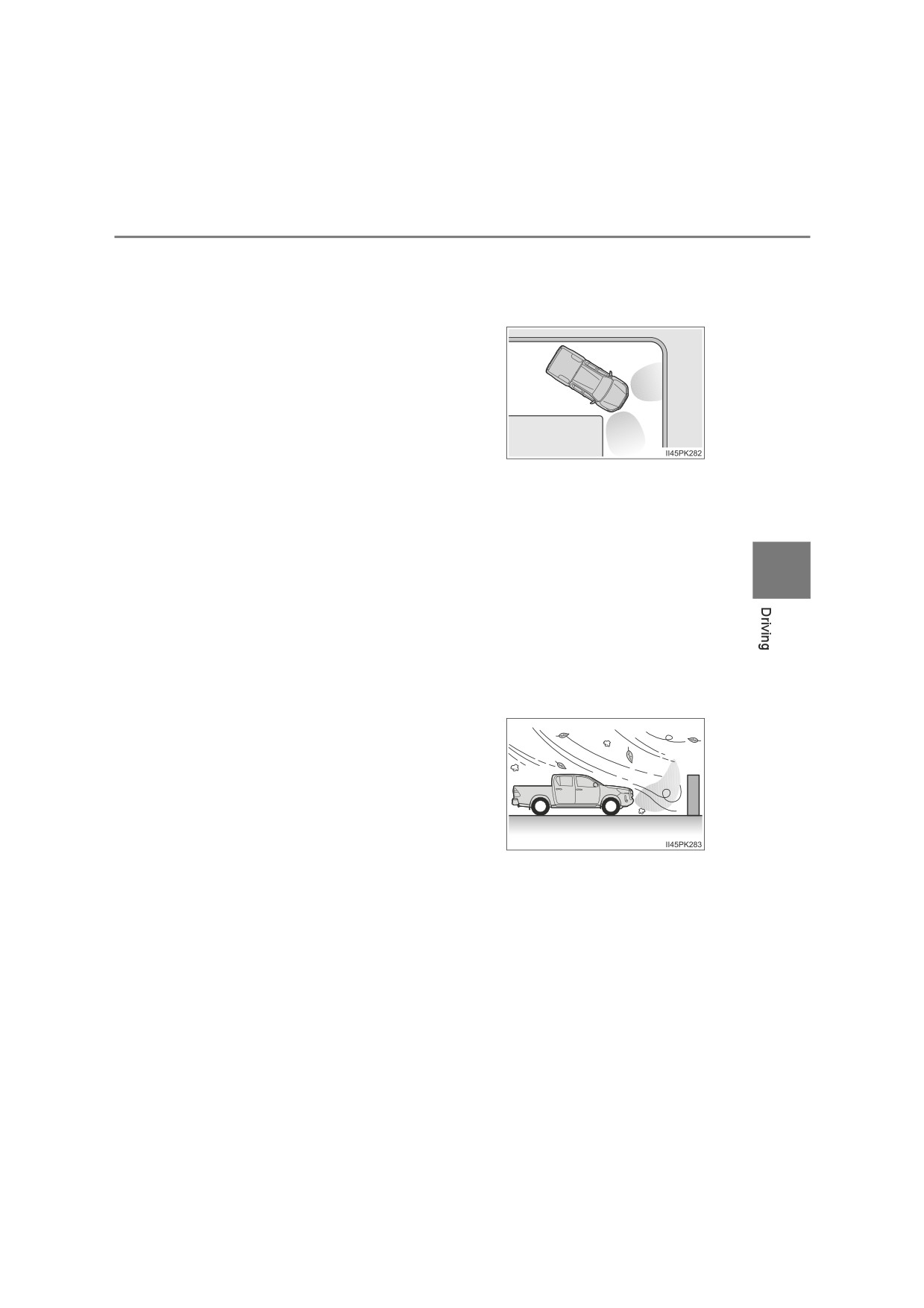
O When a sensor or the area around a
sensor is extremely hot or cold
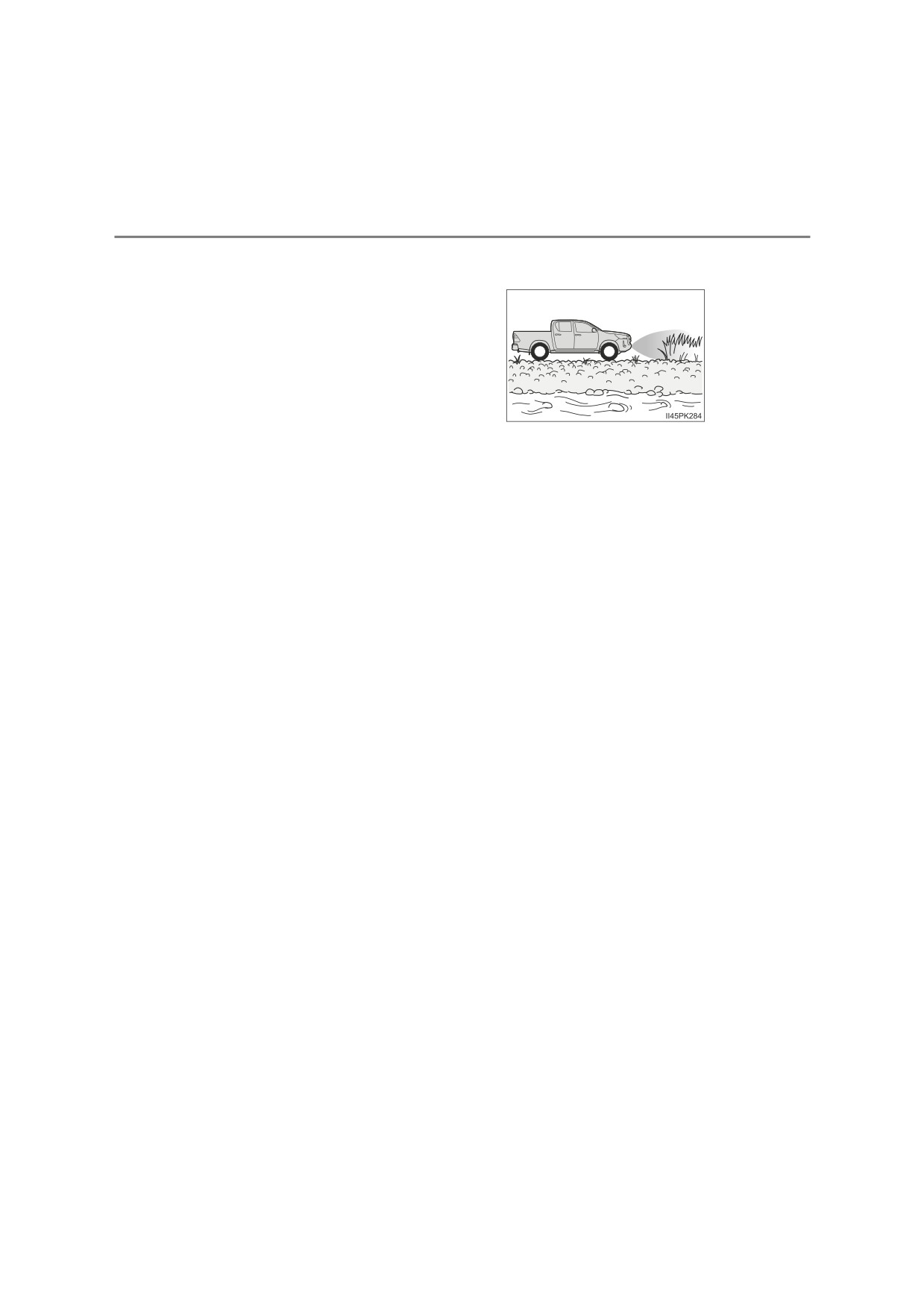
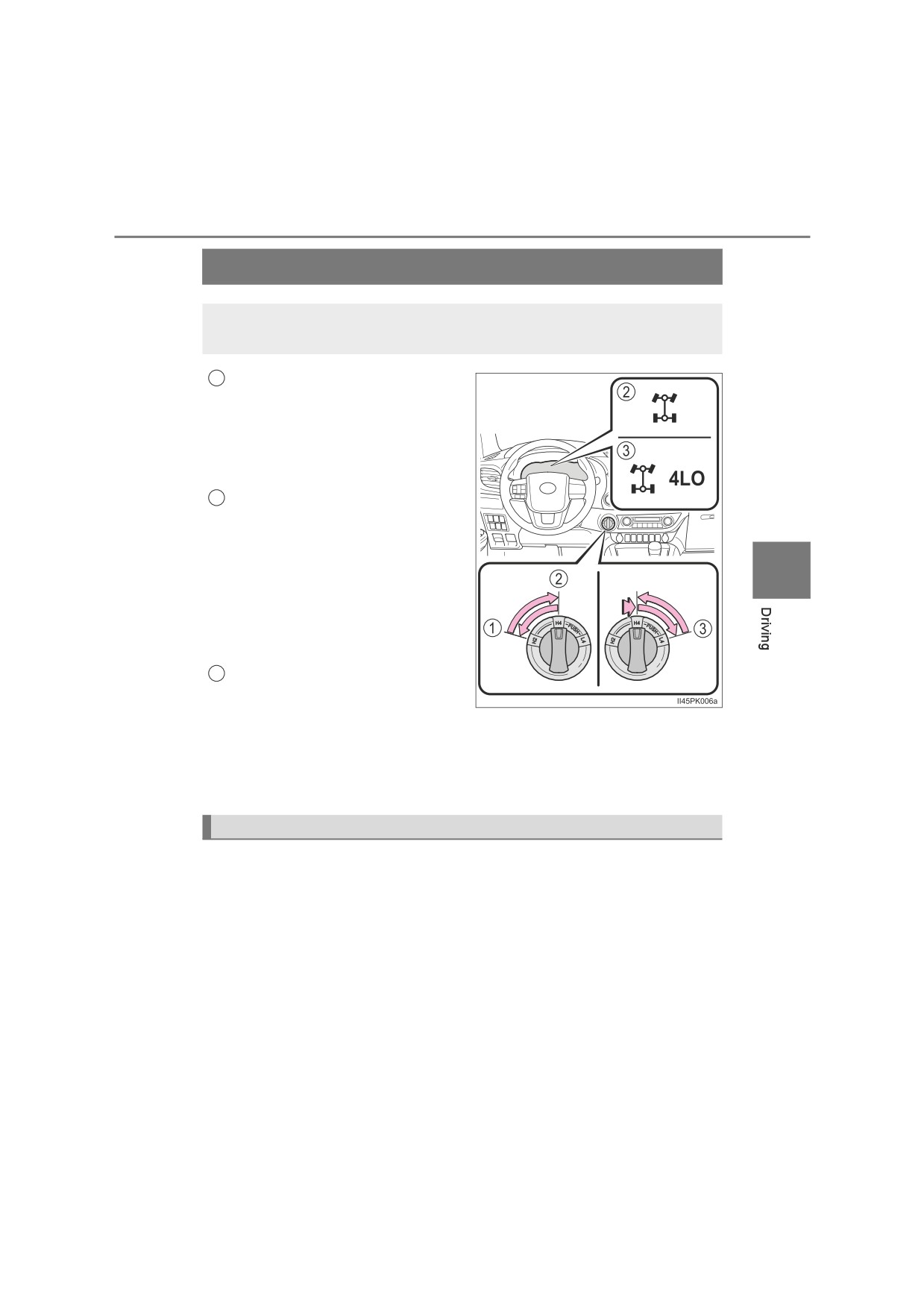
O On an extremely bumpy road, on an incline, on gravel, or on grass
O When vehicle horns, vehicle detectors, motorcycle engines, air brakes of
large vehicles, the clearance sonar of other vehicles or other devices which
produce ultrasonic waves are near the vehicle.
O A sensor is coated with a sheet of spray or heavy rain.
O If objects draw too close to the sensor.
O When a pedestrian is wearing clothing that does not reflect ultrasonic waves
(ex. skirts with gathers or frills).
O When objects that are not perpendicular to the ground, not perpendicular to
the vehicle traveling direction, uneven, or waving are in the detection range.
OStrong wind is blowing.
O When driving in inclement weather such as fog, snow or a sandstorm.
O When an object that cannot be detected is between the vehicle and a
detected object.
O If an object such as a vehicle, motorcycle, bicycle or pedestrian cuts in front
of the vehicle or runs out from the side of the vehicle.
O If the orientation of a sensor has been changed due to a collision or other
impact.
O When equipment that may obstruct a sensor is installed, such as a towing
eyelet, bumper protector (an additional trim strip, etc.), bicycle carrier, or
snow plow.
O If the front of the vehicle is raised or lowered due to the carried load.
OIf the vehicle cannot be driven in a stable manner, such as when the vehicle
has been in an accident or is malfunctioning.
O When tire chains, a compact spare tire or an emergency tire puncture repair
kit are used.
4-5. Using the driving support systems
327
Q Situations in which the system may operate even if there is no possibil-
ity of a collision
In some situations, such as the following, the system may operate even
though there is no possibility of a collision.
O When driving on a narrow road.
O When driving toward a banner, flag, low-hanging branch or boom barrier
(such as those used at railroad crossings, toll gates and parking lots).
O When there is a rut or hole in the surface of the road.
O When driving on a metal cover (grating), such as those used for drainage
ditches.
4
O When driving up or down a steep slope.
O If a sensor is hit by a large amount of water, such as when driving on a
flooded road.
O There is dirt, snow, water drops or ice on a sensor. (Cleaning the sensors
will resolve this problem.)
O A sensor is coated with a sheet of spray or heavy rain.
O When driving in inclement weather such as fog, snow or a sandstorm.
O When strong winds are blowing.
O When vehicle horns, vehicle detectors, motorcycle engines, air brakes of
large vehicles, the clearance sonar of other vehicles or other devices which
produce ultrasonic waves are near the vehicle.
O If the front of the vehicle is raised or lowered due to the carried load.
O If the orientation of a sensor has been changed due to a collision or other
impact.
O The vehicle is approaching a tall or curved curb.
O Driving close to columns (H-shaped steel beams, etc.) in multi-story parking
garages, construction sites, etc.
328
4-5. Using the driving support systems
OIf the vehicle cannot be driven in a stable manner, such as when the vehicle
has been in an accident or is malfunctioning.
O On an extremely bumpy road, on an
incline, on gravel, or on grass.
O When tire chains, a compact spare tire or an emergency tire puncture repair
kit are used.
Q If “Clean Parking Assist Sensor” is displayed on the multi-information
display
A sensor may be dirty or covered with snow or ice. In such cases, if it is
removed from the sensor, the system should return to normal.
Also, due to the sensor being frozen at low temperatures, a malfunction dis-
play may appear or an object may not be detected. If the sensor thaws out,
the system should return to normal.
Q If “Parking Assist Malfunction Visit Your Dealer” is displayed on the
multi-information display
Depending on the malfunction of the sensor, the device may not be working
normally. Have the vehicle inspected by any authorized Toyota retailer or
Toyota authorized repairer, or any reliable repairer.
Q If “Parking Assist Malfunction” is displayed on the multi-information dis-
play
Water may be continuously flowing over the sensor surface, such as in a
heavy rain. When the system determines that it is normal, the system will
return to normal.
Q Customization
Setting of buzzer volume can be changed.
(Customizable features: P. 647)
4-5. Using the driving support systems
329
WARNING
Q Cautions regarding the use of the system
There is a limit to the degree of recognition accuracy and control perfor-
mance that this system can provide, do not overly rely on this system. The
driver is always responsible for paying attention to the vehicle’s surround-
ings and driving safely.
Q To ensure the system can operate properly
Observe the following precautions.
Failure to do so may result in the vehicle being unable to be driven safely
and possibly cause an accident.
ODo not damage the sensors, and always keep them clean.
ODo not attach a sticker or install an electronic component, such as a backlit
license plate (especially fluorescent type), fog lights, fender pole or wire-
less antenna near a radar sensor.
ODo not subject the surrounding area of the sensor to a strong impact. If
subjected to an impact, have the vehicle inspected by any authorized
4
Toyota retailer or Toyota authorized repairer, or any reliable repairer. If the
front or rear bumper needs to be removed/installed or replaced, contact
any authorized Toyota retailer or Toyota authorized repairer, or any reliable
repairer.
ODo not modify, disassemble or paint the sensors.
ODo not attach a license plate cover.
O Keep your tires properly inflated.
Q When to disable the function
In the following situations, disable the function as it may operate even
though there is no possibility of a collision.
OFailing to observe the warnings above.
O A non-genuine Toyota suspension (lowered suspension, etc.) is installed.
Q Notes when washing the vehicle
Do not apply intensive bursts of water or steam to the sensor area.
Doing so may result in the sensor malfunctioning.
O When using a high pressure washer to wash the vehicle, do not spray the
sensors directly, as doing so may cause a sensor to malfunction.
O When using steam to clean the vehicle, do not direct steam too close to
the sensors as doing so may cause a sensor to malfunction.
330
4-5. Using the driving support systems
NOTICE
Q When using the Toyota parking assist-sensor
In the following situations, the system may not function correctly due to a
sensor malfunction etc. Have the vehicle checked by any authorized Toyota
retailer or Toyota authorized repairer, or any reliable repairer.
O Toyota parking assist-sensor operation display flashes, and a beep
sounds when no objects are detected.
O If the area around a sensor collides with something, or is subjected to
strong impact.
OIf the bumper collides with something.
O If the display shows up and remains on without a beep.
4-5. Using the driving support systems
331
Four-wheel drive system
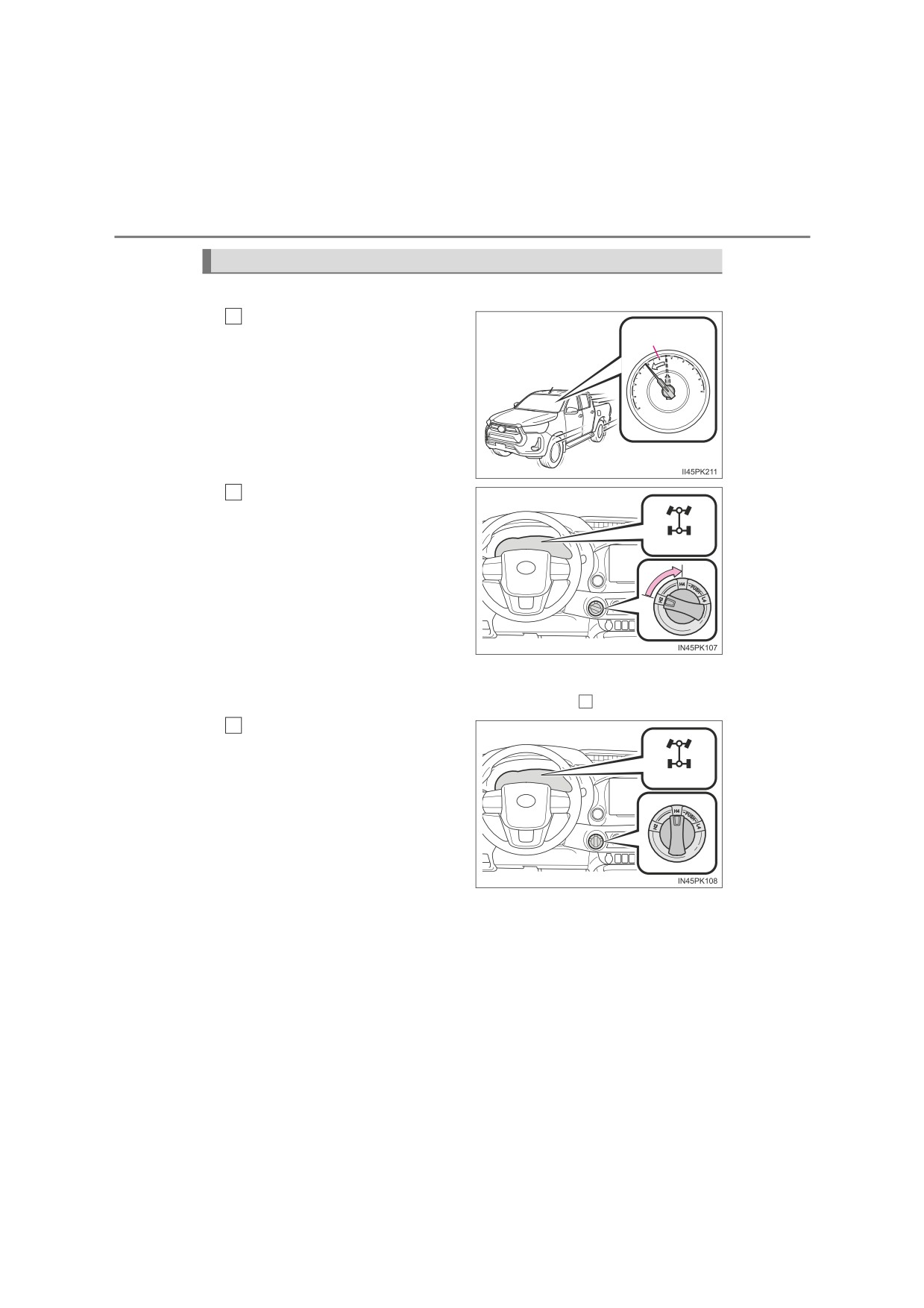
Use the front-wheel drive control switch to select the following
transfer modes.
1
H2 (high speed position, two-
wheel drive)
Use this for normal driving on dry
hard-surfaced roads. This position
gives greater economy, quietest
ride and least wear.
2
H4 (high speed position, four-
wheel drive)
Use this for driving only on tracks
that permit the tires slide, like off-
4
road, icy or snow-covered roads.
This position provides greater trac-
tion than two-wheel drive.
The four-wheel drive indicator
light comes on
3
L4 (low speed position, four-
wheel drive)
Use this for maximum power and traction. Use L4 for climbing or descend-
ing steep hills, off-road driving, and hard pulling in sand, mud or deep
snow.
The four-wheel drive and low speed four-wheel drive indicator lights
come on
A.D.D. (automatic disconnecting differential) (if equipped)
The A.D.D. can be engaged or disengaged by the shifting operations
described in the following shifting procedures.
: If equipped
332
4-5. Using the driving support systems
Shifting between H2 and H4
Q Shifting from H2 to H4
1
Reduce the vehicle speed to
100 km/h
less than 100 km/h (62 mph).
(62 mph)
The transfer mode cannot be
switched if the vehicle speed is
more than 100 km/h (62 mph).
Turn the front-wheel drive
2
control switch to H4.
The four-wheel drive indicator
(Flashes)
light flashes while switching.
If turning the front-wheel drive
control switch when the vehicle
speed is more than
100 km/h
(62 mph), the four-wheel drive
indicator light flashes and a
buzzer sounds.
Reduce the vehicle speed to less than 100 km/h (62 mph), or return the
front-wheel drive control switch to H2 and try step
1
again.
3
Check that the four-wheel
drive indicator light comes on.
The four-wheel drive indicator
(Comes on)
light comes on when switching
the transfer mode is completed.
If the four-wheel drive indicator
light does not stop flashing after
turning the front-wheel drive
control switch from H2 to H4,
perform any of the followings
while driving straight.
• Accelerating
• Decelerating
• Driving in reverse
The four-wheel drive indicator light may not stop flashing if the front-
wheel drive control switch is turned from H2 to H4 while the vehicle is
stopped. In this case, perform any of the followings.
• Driving forward
• Driving in reverse