Subaru Legacy (2023 year). Manual in english - page 26
 

  Index      Manuals     Subaru Legacy (2023 year). Manual in english


Search            copyright infringement  


Content      ..     24      25      26      27     ..


Subaru Legacy (2023 year). Manual in english - page 26


(408,1)

!

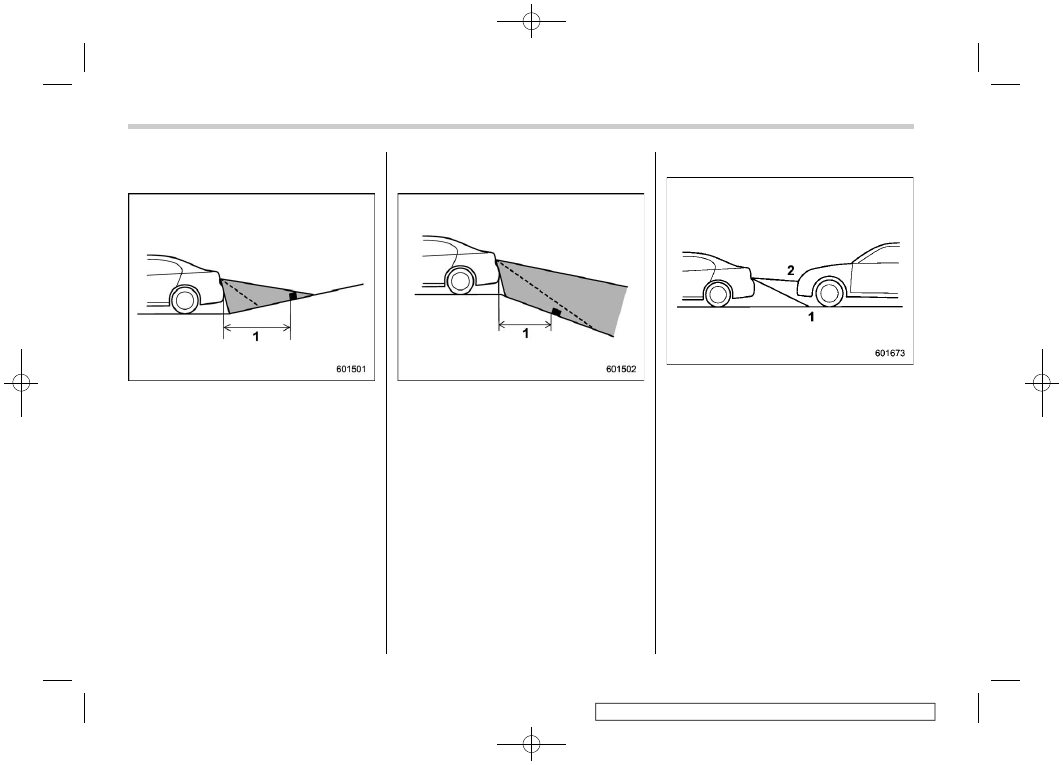
When there is an upward slope at
the back

1)

3 ft (1 m)

The distance on the screen looks farther
than the actual distance.

!

When there is a downward slope
at the back

1)

3 ft (1 m)

The distance on the screen looks nearer
than the actual distance.

NOTE

When cargo is loaded, the rear view
distance on the screen looks farther
than the actual distance as in an
upward slope.

!

Feature of distance marker

1)

3 ft (1 m) line

2)

10 ft (3 m) line

The distance marker shows the distance
on the road. If there is a car or another
object close behind, distance cannot be
correctly displayed.

Rear View Camera

406

(409,1)

7-20. BSD/RCTA (If
Equipped)

The BSD/RCTA consists of rear corner
radars with Blind Spot Detection and Rear
Cross Traffic Alert.
These functions of BSD/RCTA are the
systems that detect objects and vehicles to
the rear and draw attention to the driver
when changing a lane or when driving in
reverse.

WARNING

The driver is responsible for driving
safely. Always be sure to check the
surroundings with your eyes when
changing lanes or reversing the
vehicle.

The system is designed to assist the
driver in changing lanes or rever-
sing safely by monitoring the rear
and side areas of the vehicle. How-
ever, you cannot rely on this system
alone in assuring the safety during a
lane change or reversing. Overcon-
fidence in this system could result in
an accident and lead to serious
injury or death. Since the system
operation has various limitations,
the flashing or illumination of the
BSD/RCTA approach indicator light

may be delayed or it may not operate
at all even when a vehicle is present
in a neighboring lane or approach-
ing from either side.

The driver is responsible for paying
attention to the rear and side areas
of the vehicle.

&

System Features

BSD/RCTA consists of the following func-
tions.

.

To detect a vehicle in a blind spot on an

adjacent lane or a vehicle approaching at
high speed while driving the vehicle (Blind
Spot Detection)

.

To detect a vehicle approaching from

the right or left while reversing the vehicle
(Rear Cross Traffic Alert)

The system uses rear corner radars for the
following features.

NOTE

The BSD/RCTA radar sensor has been
certified by radio wave-related laws
applicable in the U.S. and other FCC-
compliant countries, including Canada.
When driving your vehicle in countries
other than the U.S. and Canada, you
must obtain certification for the coun-
try where you are driving the vehicle.

For more information on certification in
the U.S. and other FCC compliant
countries, including Canada, refer to
“Certification for the BSD/RCTA”

P413.

!

Blind Spot Detection (BSD)

1)

Operating range

The system notifies the driver of the
presence of vehicles in its blind spot.

.

If the system detects a vehicle in its

blind spot, it warns the driver by illuminat-
ing the BSD/RCTA approach indicator light
(s) on the outside mirror(s).

.

If the driver operates the turn signal

lever in the direction where the BSD/RCTA
approach indicator light is illuminating, the
system warns the driver of dangers by
flashing the BSD/RCTA approach indica-

– CONTINUED –

BSD/RCTA

407

7

Starting

and

Operating

(410,1)

tor light.

!

Lane Change Assist (LCA)

1)

Operating range

The system notifies the driver of vehicles
approaching at a high speed in the
neighboring lanes.

.

If the system detects a vehicle ap-

proaching at a high speed in the neighbor-
ing lanes, it warns the driver of dangers by
illuminating the BSD/RCTA approach in-
dicator light(s) on the outside mirror(s).

.

If the driver operates the turn signal

lever in the direction where the BSD/RCTA
approach indicator light is illuminating, the
system warns the driver of dangers by
flashing the BSD/RCTA approach indica-
tor light.

!

Rear Cross Traffic Alert (RCTA)

1)

Operating range

The system notifies the driver of another
vehicle approaching from either side when
driving in reverse. This feature helps the
driver check the rear and side areas of the
vehicle when moving backward.

If the system detects a vehicle approach-
ing from either side while moving back-
ward, it warns the driver of dangers in the
following way.

.

The BSD/RCTA approach indicator

light(s) on the outside mirror(s) flashes.

.

A warning buzzer sounds.

.

An icon appears on the center informa-

tion display.

!

Limitations of the detectability of
RCTA

Since the detectability of RCTA is limited,
the RCTA may not operate properly in
angled parking.

Example 1

1)

The detection range of the rear corner
radars

2)

Area out of detection range of the rear
corner radars

A)

Vehicle that may not be detected

B)

Parked vehicle

WARNING

An approaching vehicle (A) may not
be detected because the detection
range is limited by the parked vehi-
cle (B). Always be sure to check the
surroundings with your eyes when

BSD/RCTA

408

(411,1)

reversing the vehicle.

Example 2

1)

The detection range of the rear corner
radars

C)

Vehicle that may be detected

NOTE

The system may detect that a vehicle
(C) is passing in front of your vehicle.
Always be sure to check the surround-
ings with your eyes when reversing the
vehicle.

&

System Operation

!

Operating conditions

The BSD/RCTA will operate when all of the
following conditions are met.

.

The ignition switch is in the “ON”

position.

.

The BSD/RCTA warning indicator and

BSD/RCTA OFF indicator are turned off.

.

The vehicle is driven at speeds above 7

mph (12 km/h) (except when reversing).

.

The select lever is in the “R” position

(RCTA only).

The BSD/RCTA will not operate in the
following situations.

.

The BSD/RCTA OFF indicator appears.

.

The vehicle speed is below 6 mph (10

km/h) even when the BSD/RCTA OFF
indicator does not appear (except when
reversing).

NOTE

.

In the following cases, the BSD/

RCTA will stop operating and the BSD/
RCTA warning indicator will appear.

– When a malfunction occurs in the
system, including the BSD/RCTA
approach indicator light

.

If the BSD/RCTA warning indicator

appears, exercise proper caution. For
details, refer to “BSD/RCTA Warning

Indicator”

P413.

.

In the following cases, the BSD/

RCTA will temporarily stop operating
(or may stop operating) and the BSD/
RCTA OFF indicator will appear.

– When the rear corner radars
become significantly misaligned (If
the orientation of the rear corner
radars is shifted for any reason,
readjustment is required. Have the
sensor adjusted at a SUBARU deal-
er.)
– When a large amount of snow or
ice sticks to the rear bumper sur-
face around the rear corner radars
– When the vehicle is driven on a
snow-covered road or in an envir-
onment in which there are no ob-
jects around (such as in a desert) for
a prolonged period of time
– When the temperature around the
rear corner radars increases exces-
sively due to long driving on uphill
grades in the summer, etc.
– When the temperature around the
rear corner radars becomes extre-
mely low
– When the vehicle battery voltage
lowers
– When the vehicle voltage ex-
ceeds the battery voltage rating

– CONTINUED –

BSD/RCTA

409

7

Starting

and

Operating

(412,1)

The BSD/RCTA will resume operation
once these conditions are corrected,
and the BSD/RCTA OFF indicator will
disappear. However, if the BSD/RCTA
OFF indicator appears for a prolonged
period of time, have the system in-
spected at a SUBARU dealer as soon as
possible.

.

The detectability of the rear corner

radars is restricted. The BSD/RCTA
detection may be impaired and the
system may not operate properly under
the following conditions.

– When the rear bumper around the
rear corner radars is distorted
– When ice, snow or mud adheres
to the rear bumper surface around
the rear corner radars
– When stickers, etc. are affixed on
the areas of the rear corner radars
on the rear bumper
– During adverse weather condi-
tions such as rain, snow or fog
– When driving on wet roads such
as snow-covered roads and through
puddles

.

The rear corner radars may not

detect or may have difficulty detecting
the following vehicles and objects.

– Small motorcycles, bicycles, pe-
destrians, stationary objects on the
road or road side, etc.

– Vehicles with body shapes that
the radar may not reflect (vehicles
with lower body height such as a
trailer with no cargo and sports
cars)
– Vehicles that are not approaching
your vehicle even though they are in
the detection area (either on a
neighboring lane to the rear or be-
side your vehicle when reversing)
(The system determines the pre-
sence of approaching vehicles
based on data detected by the rear
corner radars.)
– Vehicles traveling at significantly
different speeds
– Vehicles driving in parallel at al-
most the same speed as your vehi-
cle for a prolonged time
– Oncoming vehicles
– Vehicles in a lane beyond the
neighboring lane
– Vehicles travelling at a signifi-
cantly lower speed that you are
trying to overtake

.

On a road with extremely narrow

lanes, the system may detect vehicles
driving in a lane next to the neighboring
lane.

&

BSD/RCTA Approach Indica-
tor Light/Warning Buzzer

While the BSD/RCTA is active, the follow-
ing item(s) will operate to alert the driver:

.

The BSD/RCTA approach indicator

light (when there are vehicles in the
neighboring lanes).

.

The BSD/RCTA approach indicator

light and warning buzzer (when a vehicle
is approaching from the left or right side
while your vehicle is reversing)

!

BSD/RCTA approach indicator light

BSD/RCTA approach indicator light

It is mounted on each side of the outside
mirrors.
The indicator light will illuminate when a
vehicle approaching from behind is de-

BSD/RCTA

410

(413,1)

tected.
The indicator light will flash to warn the
driver of dangers under the following
conditions.

.

While the indicator light is illuminating, if

the turn signal lever is operated toward the
side in which this light turned on

.

When reversing the vehicle while the

system detects a vehicle approaching
from either side

!

BSD/RCTA approach indicator
light dimming function

When the headlights are turned on, the
brightness of the BSD/RCTA approach
indicator light will be reduced.

NOTE

.

You may have difficulty seeing the

BSD/RCTA approach indicator light
under the following conditions.

– When sunlight shines directly on
it
– When the headlight beams from a
vehicle traveling behind shines di-
rectly on it

.

While the illumination brightness

control dial is in the fully upward
position, even if the headlights are
turned on, the brightness of the BSD/
RCTA approach indicator light will not
be reduced. For details about the

illumination brightness control dial,
refer to “Illumination Brightness Con-
trol”

P177.

!

BSD/RCTA approach warning buz-
zer (only when reversing)

A warning buzzer sounds along with
flashing of the BSD/RCTA approach in-
dicator light to warn the driver of dangers.

The setting of the warning buzzer volume
can be changed by operating the center
information display. For details, refer to
“Car settings”

P226 (11.6-inch display

models).

!

Safety tips regarding the BSD/RCTA
approach indicator light/warning
buzzer

.

In the following cases, operation of the

BSD/RCTA approach indicator light and
the warning buzzer may be delayed or the
system may fail to issue these warnings.

– When a vehicle moves to the neigh-
boring lane from a lane next to the
neighboring lane
– When driving on a steep incline or
on repeated sharp uphill and downhill
grades
– When going beyond a pass
– When both your vehicle and a
vehicle driving on a neighboring lane
are driving on the far side of each lane.

– When several narrowly-spaced ve-
hicles are approaching in a row
– In low radius bends (tight bends or
when making turns at an intersection)
– When there is a difference in height
between your lane and the neighboring
lane
– Immediately after the BSD/RCTA is
activated by touching “BSD/RCTA”
– Immediately after the select lever is
shifted to the “R” position
– When extremely heavy cargo is
loaded in the trunk or cargo area

.

During reversing, operation of the BSD/

RCTA approach indicator light and the
warning buzzer may be delayed or the
system may fail to issue these warnings
under the following conditions.

– When backing out of an angled
parking space
– When a large-sized vehicle is
parked next to your vehicle (That
vehicle prevents the propagation of
radar waves.)
– When reversing on sloped roads
– When reversing at a high speed

– CONTINUED –

BSD/RCTA

411

7

Starting

and

Operating

(414,1)

.

The BSD/RCTA approach indicator

light may illuminate when driving close to
solid objects on the road or road side (such
as guardrails, tunnels and sidewalls).

.

When turning at an intersection in

urban areas, or a multilane intersection,
the BSD/RCTA approach indicator light
may flash.

.

If a building or a wall exists in the

reversing direction, the BSD/RCTA ap-
proach indicator light may flash and the
warning buzzer may sound.

.

In the following cases, the system may

detect a vehicle driving two lanes away
from your vehicle.

– When your vehicle drives on the
near side of its lane from the corre-
sponding vehicle
– When the vehicle driving two lanes

away drives on the near side of its lane
from your vehicle

&

BSD/RCTA OFF Indicator

!

System temporary stops

1)

BSD/RCTA temporary stop message

2)

BSD/RCTA OFF indicator

This display appears when the system is
used at extremely high or low tempera-
tures or when abnormal voltage exists.
Once these conditions are corrected, the
system will recover from the temporary
stop condition and the indicator will dis-
appear.

If the indicator remains displayed for a
prolonged time, have the system in-
spected at a SUBARU dealer.

!

System temporary stops due to
reduced radar sensitivity

1)

BSD/RCTA temporary stop message due
to reduced radar sensitivity

2)

BSD/RCTA OFF indicator

This display appears when the detectabil-
ity of the rear corner radars is reduced.
Once the condition is corrected, the
system will recover from the temporary
stop condition and the indicator will dis-
appear.

If the indicator remains displayed for a
prolonged time, have the system in-
spected at a SUBARU dealer.

BSD/RCTA

412

(415,1)

&

BSD/RCTA Warning Indicator

!

System malfunction

1)

BSD/RCTA malfunction message

2)

At first, this message will appear

3)

Then this message will appear

4)

BSD/RCTA warning indicator

This display appears when a malfunction
occurs in the system. Contact a SUBARU
dealer and have the system inspected.

&

To Turn On/Off the BSD/RCTA

BSD/RCTA OFF indicator

To turn the BSD/RCTA system on and off,
operate the center information display.
Refer to “Car settings”

P226 (11.6-inch

display models).
When the BSD/RCTA system is turned
OFF, the BSD/RCTA OFF indicator on the
combination meter display (color LCD) will
illuminate.

NOTE

.

In the following cases, turn off the

BSD/RCTA system. The system may
not operate properly due to blocked
radar waves.

– When towing a trailer (Outback/
Subaru Outback Wilderness)
– When a bicycle carrier or other

item is fitted to the rear of the
vehicle
– When using a chassis dynam-
ometer or free roller device, etc.
– When running the engine and
making the wheels rotate while
lifting up the vehicle

.

If the ignition switch is turned to the

“LOCK”/“OFF” position, the last known
status of the system is maintained. For
example, if the ignition switch is turned
to the “LOCK”/“OFF” position with the
BSD/RCTA deactivated, the BSD/RCTA
remains deactivated the next time the
ignition switch is turned to the “ON”
position.

&

Certification for the BSD/
RCTA

.

The U.S. and other FCC compliant

countries

FCC ID: OAYSRR3A

CAUTION

FCC WARNING

Changes or modifications not ex-
pressly approved by the party re-
sponsible for compliance could void
the user’s authority to operate the
equipment.

– CONTINUED –

BSD/RCTA

413

7

Starting

and

Operating

(416,1)

This device complies with part 15 of the
FCC Rules. Operation is subject to the
following two conditions: (1) This device
may not cause harmful interference, and
(2) this device must accept any interfer-
ence received, including interference that
may cause undesired operation.

.

Canada-spec. models

BSD/RCTA

414

(417,1)

&

Handling of Rear Corner Ra-
dars

Rear corner radars (Legacy)

Rear corner radars (Outback/Subaru
Outback Wilderness)

The rear corner radars, one on each side
of the vehicle, are mounted inside the rear
bumper.

CAUTION

To ensure correct operation of the
BSD/RCTA, observe the following
precautions.

.

Always keep the bumper surface

near the rear corner radars clean.

.

Do not affix any stickers or other

items on the bumper surface near
the rear corner radars. For de-
tails, consult your SUBARU deal-
er.

.

Do not modify the bumper near

the rear corner radars.

.

Do not paint the bumper near the

rear corner radars.

.

Do not expose the bumper near

the rear corner radars to strong
impacts. If a sensor becomes
misaligned, a system malfunc-
tion may occur, including the
inability to detect vehicles enter-
ing the detection areas. If any
strong shock is applied to the
bumper, be sure to contact your
SUBARU dealer for inspection.

.

Do not disassemble the rear cor-

ner radars.

– CONTINUED –

BSD/RCTA

415

7

Starting

and

Operating

(418,1)

NOTE

If the rear corner radars require repair
or replacement, or the bumper area
around the rear corner radars requires
repair, paintwork or replacement, con-
tact your SUBARU dealer for assis-
tance.

7-21. Reverse Automatic
Braking (RAB) System (If
Equipped)

Reverse Automatic Braking (RAB) is a
system designed to help avoid collisions or
reduce collision damage when reversing
the vehicle. If a wall or an obstacle is
detected in the reversing direction, the
system will notify the driver with a warning
sound and may activate the vehicle’s
brakes automatically.

WARNING

.

Reverse Automatic Braking
(RAB) is not a system intended
to replace the driver’s responsi-
bility to check their surroundings
for vehicles or obstacles to avoid
a collision.

.

The driver is responsible for driv-

ing safely. Before reversing, be
sure to first depress the brake
pedal and visually check the
surroundings.

.

There are some cases in which

the vehicle cannot avoid colli-
sion, because the system opera-
tion has limitations. The warning
sound or automatic braking may

be delayed or may not operate at
all even when an obstacle is
present.

.

Make sure to set the Automatic

Braking function to OFF when the
vehicle is on the free roller or on
the chassis dynamometer. Other-
wise, the vehicle may move and it
may cause an accident.

.

Make sure to set the Automatic

Braking function to OFF when
towing a trailer. Otherwise, the
vehicle may move and it may
cause an accident.

.

The system is not designed to

detect people (including chil-
dren), animals or other moving
objects.

.

Depending on the vehicle condi-

tion or the surrounding environ-
ment, the sonar sensor’s ability
to detect objects may become
unstable.

NOTE

The Reverse Automatic Braking (RAB)
system records and stores the follow-
ing data when automatic braking oper-
ates. It does not record conversations,
personal information or other audio

Reverse Automatic Braking (RAB) System

416

(419,1)

data.

.

Distance from the object

.

Vehicle speed

.

Accelerator pedal operation status

.

Brake pedal operation status

.

Select lever position

.

Outside temperature

.

The sensitivity setting of the sonar

sensors

SUBARU and third parties contracted
by SUBARU may acquire and use the
recorded data for the purpose of vehi-
c l e r e s e a r c h a n d d e v e l o p m e n t .
SUBARU and third parties contracted
by SUBARU will not disclose or provide
the acquired data to any other third
party except under the following con-
ditions.

.

The vehicle owner has given his/her

consent.

.

The disclosure/provision is based

on a court order or other legally en-
forceable request.

.

Data that has been modified so that

the user and vehicle cannot be identi-
fied is provided to a research institution
for statistical processing or similar
purposes.

&

Reverse Automatic Braking
(RAB) System Overview

The Reverse Automatic Braking (RAB)
system will operate the following 2 func-
tions using 4 sonar sensors.

.

Sonar Audible Alarm function

The Reverse Automatic Braking (RAB)
system detects objects rearward and
warns the driver by warning message on
the center information display and warning
beeps.

.

Automatic Braking function

The Automatic Braking function detects
objects rearward and if there is a high risk
of a collision, the system decelerates the
vehicle and controls the braking to reduce
damage.

– CONTINUED –

Reverse Automatic Braking (RAB) System

417

7

Starting

and

Operating

(420,1)

1)

When reversing

2)

When either strong automatic braking or
torque control is applied to prevent
collision (in this case, short warning
beeps or continuous warning beeps will
sound)

3)

When the vehicle is stopped by the
system (in this case, the continuous
beep will remain sounding)

4)

Object (e.g., a wall)

!

Detecting range

1)

Detecting range (width): Approximately 6
in (15 cm) outside of the vehicle width

2)

Range that the system cannot detect:
Approximately 20 in (50 cm) behind the
rear of the vehicle

3)

Detecting range (length): Approximately
5 ft (1.5 m) from the rear of the vehicle

WARNING

If your vehicle is trapped on a rail-
road crossing and you are trying to
escape by reversing through the
crossing gate, the system may re-
cognize the crossing gate as an
obstacle and brake may activate. In
this case, remain calm and either
continue to depress the accelerator
pedal or cancel the system. To

Reverse Automatic Braking (RAB) System

418

(421,1)

cancel the system, refer to “Cancel-
ing the Reverse Automatic Braking
(RAB) System Operation”

P425.

&

Operating Conditions

The Reverse Automatic Braking (RAB)
system will operate when all of the follow-
ing conditions are met.

1)

EyeSight warning indicator

2)

RAB warning indicator

3)

RAB OFF indicator

.

The ignition switch is in the “ON”

position.

.

The EyeSight warning indicator is off.

.

The RAB warning indicator is off.

.

The RAB OFF indicator is off.

.

The select lever is in the “R” position.

Sonar Audible Alarm function

.

The Sonar Audible Alarm is set to “ON”

.

The vehicle speed is from 0 to 9 mph (0

to 15 km/h).

Automatic Braking function

.

The Automatic Braking is set to “ON”.

.

The vehicle speed is from 1 to 9 mph

(1.5 to 15 km/h).

NOTE

.

In the following cases, the Reverse

Automatic Braking (RAB) system will
not operate. Promptly contact a
SUBARU dealer to have the system
inspected.

– The EyeSight warning indicator
is illuminated.
– The RAB warning indicator is
illuminated.

.

In the following cases, the Reverse

Automatic Braking (RAB) system can-
not be operated.

– The

(EyeSight Temporary Stop

indicator: White) is illuminated, and
the messages corresponding to the
EyeSight temporary stop are dis-
played on the combination meter
display (color LCD). For details,
refer to the Owner’s Manual supple-
ment for the EyeSight system.
– The RAB OFF indicator is illumi-

nated.

.

In the following cases, the functions

may not be able to properly work.
Promptly contact a SUBARU dealer to
have the system inspected.

– A sticker, paint, or a chemical is
applied to the sonar sensors or the
rear bumper near the sonar sensor.
– The rear bumper is modified.
– The rear bumper has been re-
moved and attached.
– The ground clearance is changed
due to the vehicle’s loading condi-
tion or modification.
– There is damage to the sonar
sensors or the rear bumper near
the sonar sensor.
– The rear bumper is exposed to
strong impact, or the rear bumper is
deformed.

.

On a steep hill, the system’s auto-

matic braking ability will be reduced.

.

The system is designed to avoid

collisions by automatic hard braking
when the vehicle’s reversing speed is
less than approximately 3 mph (5 km/h).
However, the system does not guaran-
tee that the vehicle will be able to avoid
collisions in any situation.

.

If the vehicle is reversed at an

extremely slow speed, the driver’s
operation may be prioritized. In this

– CONTINUED –

Reverse Automatic Braking (RAB) System

419

7

Starting

and

Operating

(422,1)

case, automatic braking will not oper-
ate.

.

The system may not be able to detect

and apply the brake with the following
objects.

– Sharp or thin objects such as
poles, fences and ropes which may
not reflect the sound wave emitted
from the sonar sensor.
– Objects that are too close to the
rear bumper when the select lever is
set to the “R” position.
– Objects with a surface which may
not reflect the sound wave emitted
from the sonar sensor such as a
chain link fence.

.

Objects the system is not designed

to detect and apply brake.

– Pedestrians.
– Moving objects including moving
vehicles.
– Objects which absorbs sound
waves such as cloth or snow.
– Objects whose surface has a
diagonal angle.
– Objects that are low to the ground
such as parking blocks.
– Objects that are high above the
ground such as objects hanging
from above.
– Objects that are out of range of
the center of the vehicle in the

horizontal direction.
– Objects that are not perpendicu-
lar to the ground.
– The surface of the object is
uneven or wavy.

.

When reversing the vehicle, the

functions may not be able to work
properly or may cause a system mal-
function if the following conditions
exist.

High frequency sound from other
sources are nearby:

– Horn sound from another vehicle.
– Engine sound from other vehi-
cles.
– Sound of an air brake.
– Vehicle detection equipment or a
sonar from another vehicle.
– A sound wave with a frequency
similar to the vehicle’s system is
transmitted near by.
– A vehicle equipped with the same
system is reversing toward your
reversing direction.

Weather conditions:

– Extremely high or extremely low
temperatures in which the area near
the sonar sensor becomes too hot
or too cold to operate.
– The sonar sensors or the rear

bumper near the sonar sensors are
exposed to heavy rain or a signifi-
cant amount of water.
– Fog, snow or sandstorm, etc.
– Air is moving rapidly such as
when a strong wind is blowing.

Parts attached to the rear bumper
near the sonar sensor:

– Commercial electronic parts (fog
light, fender pole, radio antenna) or
commercial attachment parts (trai-
ler hitch, bicycle carrier, bumper
guard) are attached.
– Parts that emit high frequency
sound, such as a horn or speaker,
are attached.

Vehicle conditions:

– Ice, snow or mud is adhered to
the sonar sensors or the rear bum-
per near the sonar sensor.
– The vehicle is significantly in-
clined.
– The ground clearance is signifi-
cantly reduced due to the vehicle’s
loading condition, etc.
– When the sonar sensor is mis-
aligned due to a collision or an
accident.

Surrounding environment:

– A cloth banner, flag, hanging

Reverse Automatic Braking (RAB) System

420

(423,1)

branch or railroad crossing bars are
present in the reversing direction.
– When reversing on a gravel or
grassy area.
– When reversing in an area where
objects or walls are adjacent to the
vehicle such as narrow tunnels,
narrow bridges, narrow roads or
narrow garages.
– Wheel track or hole is present in
the ground of the reversing direc-
tion.
– When reversing over a drainage
cover (grating cover).

– The path of the reversing direc-
tion is inclined such as on a steep
uphill.
– When reversing downhill.

– A curb or step is present in the
reversing direction.
– Reversing in a garage with a low
ceiling or a tunnel.
– There is a patch of snow rear-
ward.
– There is a puddle of water.
– There is an obstacle that is next
to an object.
– Going back along a wall.
– The area where the road starts
touching dirt and snow
– When reversing on an uneven
road.

.

In circumstances such as the follow-

ing, it may not be possible to avoid a
collision even when the system oper-
ates normally.

– CONTINUED –

Reverse Automatic Braking (RAB) System

421

7

Starting

and

Operating


Content      ..     24      25      26      27     ..