Subaru Solterra (2023 year). Manual in english - page 13
 

  Index      Manuals     Subaru Solterra (2023 year). Manual in english


Search            copyright infringement  


Content      ..     11      12      13      14     ..


Subaru Solterra (2023 year). Manual in english - page 13


208

4-5. Opening, closing the windows

This function can be used to 
prevent children from acciden-
tally opening or closing a pas-
senger window.
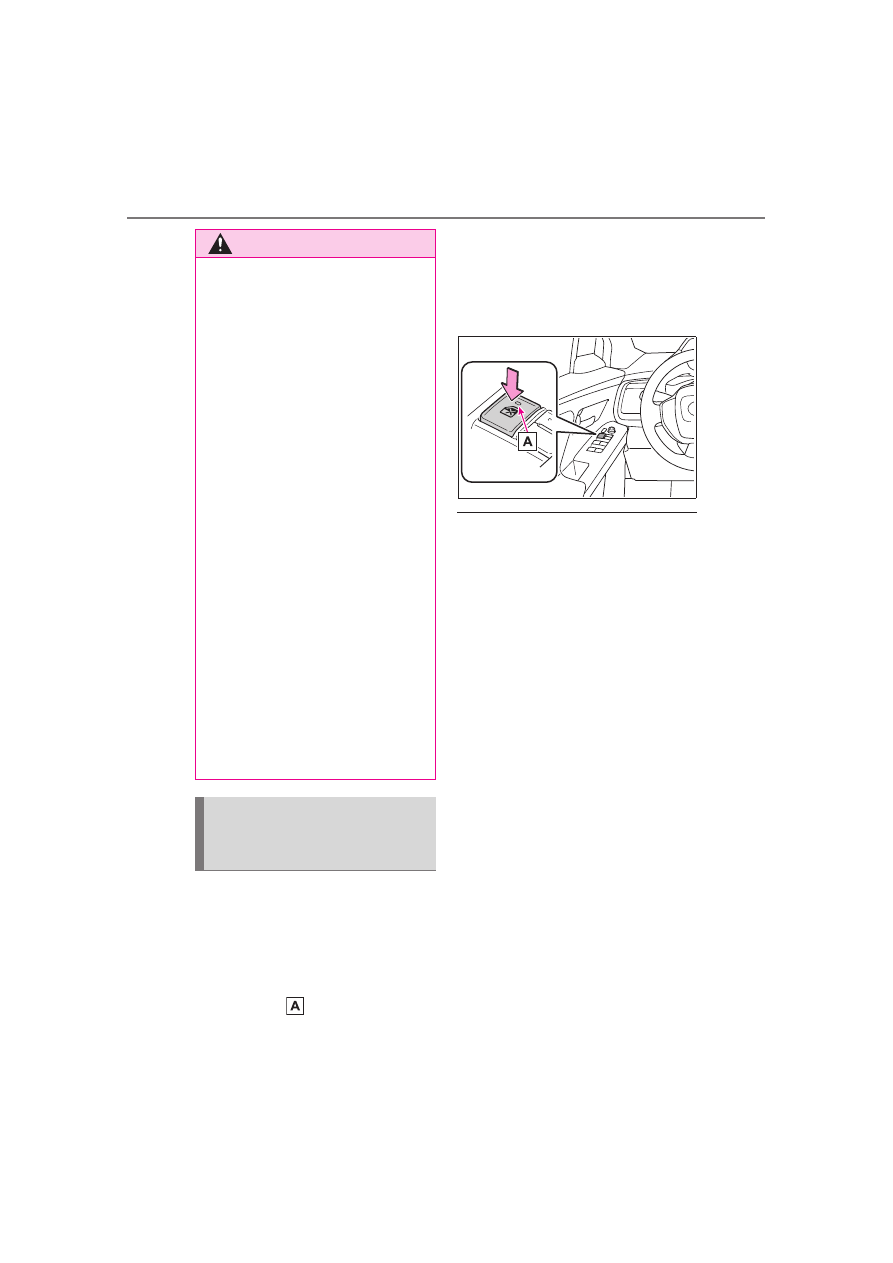
Press the switch.

The indicator 

 will come on and 

the passenger windows will be 

locked.
The passenger windows can still be 
opened and closed using the 
driver’s switch even if the lock 
switch is on.

The window lock switch can be 

operated when

The power switch is in ON.

When the 12-volt battery is dis-

connected

The window lock switch is disabled. 

If necessary, press the window lock 

switch after reconnecting the 12-volt 

battery.

WARNING

When exiting the vehicle, turn 

the power switch to OFF, carry 

the key and exit the vehicle 

along with the child. There may 

be accidental operation, due to 

mischief, etc., that may possibly 

lead to an accident.

Jam protection function

Never use any part of your body 

to intentionally activate the jam 

protection function.

The jam protection function may 

not work if something gets 

jammed just before the side 

window is fully closed. Be care-

ful not to get any part of your 

body jammed in the side win-

dow.

Catch protection function

Never use any part of your body 

or clothing to intentionally acti-

vate the catch protection func-

tion.

The catch protection function 

may not work if something gets 

caught just before the side win-

dow is fully opened. Be careful 

not to get any part of your body 

or clothing caught in the side 

window.

Preventing accidental 
operation (window lock 
switch)

209

4-6. Favorite settings

4

Be
fo

re 
dr

iv

in

g

4-6.Favorite settings

*

: If equipped

When all of the following have 
been performed, the driver’s 
seat is automatically adjusted to 
a position that allows driver to 
enter and exit the vehicle easily.

The shift position has been 
shifted to P.

The power switch has been 
turned to OFF.

The driver’s seat belt has 
been unfastened.

When any of the following has 
been performed, the driver’s 
seat automatically return to it 
original position.

The power switch has been 
turned to ACC or ON.

The driver’s seat belt has 
been fastened.

Operation of the power easy 

access system

When exiting the vehicle, the power 

easy access system may not oper-

ate if the seat is already close to the 

rearmost position, etc.

Driving position mem-
ory

*

This feature automatically 
adjusts the positions of the 
driver’s seat and outside 
rear view mirrors to make 
entering and exiting the 
vehicle easier or to suit 
your preferences.

Your preferred driving posi-
tion (the position of the 
driver’s seat) can be 
recorded and recalled by 
pressing a button.

Two different driving posi-
tions can be recorded into 
memory.

Each electronic key can be 
registered to recall your 
preferred driving position.

My Settings: Up to 3 differ-
ent driving positions can be 
recorded for each the driver 
and guest that have been 
registered for My Settings. 
When electronic key assign-
ment is registered for My 
Settings, the driving posi-
tion for each driver can be 
recalled (memory recall 
function).

For details about My Set-
tings, please refer to P.213.

Enabling easier driver 
entry and exit (power easy 
access system)

210

4-6. Favorite settings

Customization

The seat movement amount set-

tings of the power easy access sys-

tem can be customized. 

(Customizable features: 

P.575)

Recording procedure

1

Check that the shift position 
is in P.

2

Turn the power switch to ON.

3

Adjust the driver’s seat and 
outside rear view mirrors to 
the desired positions.

4

While pressing the “SET” but-
ton, or within 3 seconds after 
the “SET” button is pressed, 
press button “1” or “2” until 
the buzzer sounds.

If the selected button has already 

been preset, the previously 

recorded position will be overwrit-

ten.

Recall procedure

1

Check that the shift position 
is in P.

2

Turn the power switch to ON.

3

Press one of the buttons for 
the driving position you want 
to recall until the buzzer 
sounds.

To stop the position recall oper-

ation part-way through

Perform any of the following:

Press the “SET” button.

Press button “1” or “2”.

Operate any of the seat adjust-

ment switches.

Using the voice control system 

(if equipped)

The following operations can be 

performed using the voice control 

system:

Driving position registration

WARNING

While the power easy access 

system is operating the seat 

is moving

Be careful not to get body parts or 

luggage caught. Failure to do so 

may cause an injury or damage to 

the luggage.

Recording/recalling a 
driving position

211

4-6. Favorite settings

4

Be
fo

re 
dr

iv

in

g

Driving position recall (only when 

the shift position is in P)

For details, refer to the “MULTIME-

DIA OWNER’S MANUAL”.

Seat positions that can be 

memorized (

P.186)

The adjusted positions other than 

the position adjusted by lumbar sup-

port switch can be recorded.

Operating the driving position 

memory after turning the power 

switch to OFF

Recorded seat positions can be 

activated up to 180 seconds after 

the driver’s door is opened and 

another 60 seconds after it is closed 

again.

In order to correctly use the 

driving position memory func-

tion

If a seat position is already in the 

furthest possible position and the 

seat is operated in the same direc-

tion, the recorded position may be 

slightly different when it is recalled.

When recalling the driving posi-

tion

Take care so that a head restraint 

does not contact the ceiling or a sun 

visor.

If the 12-volt battery is discon-

nected

The memorized positions are 

erased.

When the recorded seat posi-

tion cannot be recalled

The seat position may not be 

recalled in some situations when the 

seat position is recorded in a certain 

range. For details, contact your 

SUBARU dealer.

Jam protection function

While the driving position is recalled 

or the power easy access system is 

operating, if an object is stuck 

behind the front seat, the front seat 

will stop and then slightly move for-

ward. When the jam protection func-

tion operates, the seat stops at a 

position other than the set seat posi-

tion. Check the seat position.

Registering procedure

Record your driving position to 
button “1” or “2” before perform-
ing the following:
Carry only the key you want to 
register, and then close the 
driver’s door. 
If 2 or more keys are in the vehi-
cle, the driving position cannot 
be recorded properly.

1

Check that the shift position 
is in P.

2

Turn the power switch to ON.

3

Recall the driving position 
that you want to record.

4

While pressing the recalled 
button, press and hold the 
door lock switch (either lock 
or unlock) until the buzzer 
sounds.

If the driving position could not be 

registered, the buzzer sounds con-

WARNING

Seat adjustment caution

Take care during seat adjustment 

so that the seat does not strike 

the rear passenger or squeeze 

your body against the steering 

wheel.

Registering/recall/cancel-
ing a driving position to 
an electronic key (mem-
ory recall function)

212

4-6. Favorite settings

tinuously for approximately 3 sec-

onds.

Recall procedure

Make sure that the doors are 
locked before recalling the driv-
ing position. Carry the electronic 
key that has been registered to 
the driving position, and then 
unlock and open the driver’s 
door using the smart key system 
or wireless remote control.

The driving position will move to the 
recorded position.
If the driving position is in a position 
that has already been recorded, the 
seat will not move.

Cancelation procedure

Carry only the key you want to 
cancel and then close the 
driver’s door.
If 2 or more keys are in the vehi-
cle, the driving position cannot 
be canceled properly.

1

Check that the shift position 
is in P.

2

Turn the power switch to ON.

3

While pressing the “SET” but-
ton, press and hold the door 
lock switch (either lock or 

unlock) until the buzzer 
sounds twice.

If the driving position could not be 

canceled, the buzzer sounds con-

tinuously for approximately 3 sec-

onds.

Recalling the driving position 

using the memory recall func-

tion

Different driving positions can be 

registered for each electronic key. 

Therefore, the driving position that 

is recalled may be different 

depending on the key being car-

ried.

If a door other than the driver’s 

door is unlocked with smart key 

system, the driving position can-

not be recalled. In this case, press 

the driving position button which 

has been set.

Customization

Settings (e.g. the unlock door set-

tings of the memory recall function) 

can be customized. (Customizable 

features: 

P.575)

213

4-6. Favorite settings

4

Be
fo

re 
dr

iv

in

g

*

: If equipped

An individual can be identified 
using the following authentica-
tion devices.

Electronic key

An individual is identified when the 
Smart key system detects their 
electronic key.

Bluetooth devices

An individual can be detected if the 
same Bluetooth device that was 

used as a handsfree phone the last 
time the vehicle was entered is con-
nected to the audio system.

When an individual is identified 
from an authentication device, 
settings for the following func-
tions are recalled.

Driving position (memory 
recall function)

After an individual is identified, the 
driving position that was set when 
driving was last completed is 
recalled when the following opera-
tion is performed.
The door is unlocked and opened 
using the smart key system or wire-
less remote control.

Meter displays and multime-
dia information

*

When an individual is identified, the 
vehicle settings used when the 
power switch was last turned off are 
recalled.

Vehicle settings that can be 
set using the multimedia dis-
play

*

When an individual is identified, the 
vehicle settings used when the 
power switch was last turned off are 
recalled.

Safe driving support function

*

When an individual is identified, the 
vehicle settings used when the 
power switch was last turned off are 
recalled.

*

: Some settings are excluded

My Settings

*

By recognizing an individ-
ual through a device, such 
as an electronic key, the 
driving position and vehicle 
settings recorded for that 
driver can be recalled when 
the vehicle is entered. By 
assigning an authentication 
device to a driver in 
advance, the driver can 
enter the vehicle with their 
preferred settings. Settings 
for up to 3 drivers can be 
recorded by My Settings. 
For details on how to 
assign/delete electronic 
keys, set driver names, per-
form initialization, change 
drivers manually, or delete a 
driver, refer to the “MULTI-
MEDIA OWNER’S MAN-
UAL”.

Types of assigned 
authentication devices

Recalled functions

215

5

5

Dri
vin

g

Driving

5-1. Before driving

Driving the vehicle.......

217

Cargo and luggage .....

223

Vehicle load limits .......

228

Trailer towing...............

229

Dinghy towing .............

230

5-2. Driving procedures

Power (ignition) switch

231

Transmission...............

236

Turn signal lever..........

242

Parking brake..............

243

Brake Hold ..................

247

5-3. Operating the lights and 

wipers

Headlight switch..........

249

AHB (Automatic High 

Beam)........................

251

Fog light switch ...........

254

Windshield wipers and 

washer.......................

255

5-4. Using the driving support 

systems

Software update ..........

259

SUBARU Safety Sense

260

PCS (Pre-Collision System)

..................................

267

LTA (Lane Tracing Assist)

..................................

278

LDA (Lane Departure Alert)

..................................

283

RSA (Road Sign Assist)

..................................

288

Dynamic radar cruise con-

trol .............................

290

Cruise control ..............

298

Emergency Driving Stop 

System ......................

301

BSM (Blind Spot Monitor)

..................................

304

SEA (Safe Exit Assist) .

309

SUBARU Parking Assist

..................................

313

RCTA (Rear Cross Traffic 

Alert)..........................

324

RCD (Rear Camera Detec-

tion) ...........................

330

PKSB (Parking Support 

Brake)........................

333

Static Objects Front and 

Rear of the Vehicle....

338

Moving Vehicle Rear of the 

Vehicle.......................

340

216

Pedestrians Rear of the 

Vehicle.......................

342

Static Objects Around the 

Vehicle (vehicles with 
Advanced Park).........

344

Advanced Park............

346

Drive mode select switch

..................................

384

X-MODE......................

385

Driving assist systems

390

5-5. Driving tips

Winter driving tips .......

396

Utility vehicle precautions

..................................

399

217

5-1. Before driving

5

Dri
vin

g

5-1.Before driving

Before starting the EV sys-
tem

Check that the charging cable is 
disconnected. (

P.103, 111)

Starting the EV system

P.231

Driving

1

With the brake pedal 
depressed, shift the shift 
position to D. (

P.237)

Check that the shift position indica-

tor shows D.

2

If the parking brake is set, 
release the parking brake. 
(

P.243)

If the parking brake is in automatic 

mode, the parking brake will be 

released automatically. (

P.244)

3

Gradually release the brake 
pedal and gently depress the 
accelerator pedal to acceler-
ate the vehicle.

Stopping

1

Depress the brake pedal.

2

If necessary, set the parking 
brake. (

P.243)

If the vehicle is to be stopped for an 

extended period of time, shift the 

shift position to P. (

P.237)

Parking the vehicle

1

Depress the brake pedal to 
stop the vehicle completely.

2

If the parking brake is 
released, set the parking 
brake. (

P.243)

Make sure the parking brake indi-

cator light is on.

3

Shift the shift position to P. 
(

P.237)

Check that the shift position indica-

tor shows P and the parking brake 

indicator is illuminated.

4

Press the power switch to 
stop the EV system.

5

Slowly release the brake 
pedal.

6

Lock the door, making sure 
that you have the electronic 
key on your person.

If parking on a hill, block the wheels 
as needed.

Starting off on a steep 
uphill

1

Firmly depress the brake 
pedal and shift the shift posi-
tion to D.

The hill-start assist control will be 

activated.

2

Set the parking brake. 
(

P.243)

3

Release the brake pedal and 
gently depress the accelera-
tor pedal to accelerate the 
vehicle.

4

Release the parking brake. 
(

P.243)

Driving the vehicle

The following procedures 
should be observed to 
ensure safe driving:

Driving procedure

218

5-1. Before driving

When starting off on a uphill

The hill-start assist control will acti-

vate. (

P.390)

Driving in the rain

Drive carefully when it is raining, 

because visibility will be reduced, 

the windows may become fogged-

up, and the road will be slippery.

Drive carefully when it starts to 

rain, because the road surface will 

be especially slippery.

Refrain from high speeds when 

driving on an expressway in the 

rain, because there may be a 

layer of water between the tires 

and the road surface, preventing 

the steering and brakes from 

operating properly.

Restraining the EV system out-

put (Brake Override System)

When the accelerator and brake 

pedals are depressed at the same 

time, the EV system output may 

be restrained.

A warning message is displayed 

on the multi-information display 

while the system is operating.

Breaking in your new SUBARU

To extend the life of the vehicle, 

observing the following precautions 

is recommended:

For the first 200 miles (300 km):

Avoid sudden stops.

For the first 600 miles (1000 km):

• Do not drive at extremely high 

speeds.

• Avoid sudden acceleration.

• Do not drive at a constant speed 

for extended periods.

WARNING

Observe the following precau-

tions.

Failure to do so may result in 

death or serious injury.

When starting the vehicle

Always keep your foot on the 

brake pedal while stopped with 

the “READY” indicator is illumi-

nated. This prevents the vehicle 

from creeping.

When driving the vehicle

Do not drive if you are unfamil-

iar with the location of the brake 

and accelerator pedals to avoid 

depressing the wrong pedal.

• Accidentally depressing the 

accelerator pedal instead of the 

brake pedal will result in sudden 

acceleration that may lead to an 

accident.

• When backing up, you may twist 

your body around, leading to dif-

ficulty in operating the pedals. 

Make sure to operate the pedals 

properly.

• Make sure to keep a correct 

driving posture even when mov-

ing the vehicle only slightly. This 

allows you to depress the brake 

and accelerator pedals properly.

• Depress the brake pedal using 

your right foot. Depressing the 

brake pedal using your left foot 

may delay response in an emer-

gency, resulting in an accident.

The driver should pay extra 

attention to pedestrians. As 

there is no engine noise, the 

pedestrians may misjudge the 

vehicle’s movement. Even 

though the vehicle is equipped 

with the Acoustic Vehicle Alert-

ing System, drive with care as 

pedestrians in the vicinity may 

still not notice the vehicle if the 

surrounding area is noisy.

219

5-1. Before driving

5

Dri
vin

g

WARNING

During normal driving, do not 

turn off the EV system. Turning 

the EV system off while driving 

will not cause loss of steering or 

braking control, however, power 

assist to the steering will be lost. 

This will make it more difficult to 

steer smoothly, so you should 

pull over and stop the vehicle as 

soon as it is safe to do so. 

In the event of an emergency, 

such as if it becomes impossible 

to stop the vehicle in the normal 

way: 

P.509

Use regenerative braking to 

maintain a safe speed when 

driving down a steep hill.

Using the brakes continuously 

may cause the brakes to over-

heat and lose effectiveness. 

(

P.241)

If “Regenerative braking lim-

ited. Press brake to decelerate.” 

appears on the multi-informa-

tion display, firmly depress the 

brake pedal to decelerate the 

vehicle. (

P.525)

Do not adjust the position of the 

steering wheel, the seat, or the 

inside or outside rear view mir-

rors while driving.

Doing so may result in a loss of 

vehicle control.

Always check that all passen-

gers’ arms, heads or other parts 

of their body are not outside the 

vehicle.

Do not drive the vehicle off-

road.

This is not a Symmetrical AWD 

vehicle designed for off-road 

driving. Proceed with all due 

caution if it becomes unavoid-

able to drive off-road.

Do not drive across a river or 

through other bodies of water. 

This may cause electric/elec-

tronic components to short cir-

cuit, damage the EV system or 

cause other serious damage to 

the vehicle.

Do not drive in excess of the 

speed limit. Even if the legal 

speed limit permits it, do not 

drive over 85 mph (140 km/h) 

unless your vehicle has high-

speed capability tires. Driving 

over 85 mph (140 km/h) may 

result in tire failure, loss of con-

trol and possible injury. Be sure 

to consult a tire dealer to deter-

mine whether the tires on your 

vehicle are high-speed capabil-

ity tires or not before driving at 

such speeds.

When driving on slippery 

road surfaces

Sudden braking, acceleration 

and steering may cause tire 

slippage and reduce your ability 

to control the vehicle.

Sudden acceleration or regen-

erative braking due to shift 

changing could cause the vehi-

cle to skid, resulting in an acci-

dent.

After driving through a puddle, 

lightly depress the brake pedal 

to make sure that the brakes 

are functioning properly. Wet 

brake pads may prevent the 

brakes from functioning prop-

erly. If the brakes on only one 

side are wet and not functioning 

properly, steering control may 

be affected.

220

5-1. Before driving

WARNING

When shifting the shift posi-

tion

Do not let the vehicle roll back-

ward while a forward driving 

position is selected, or roll for-

ward while the shift position is in 

R. 

Doing so may result in an acci-

dent or damage to the vehicle.

Do not shift the shift position to 

P while the vehicle is moving.

Doing so can damage the trans-

mission and may result in a loss 

of vehicle control.

Do not shift the shift position to 

R while the vehicle is moving 

forward.

Doing so can damage the trans-

mission and may result in a loss 

of vehicle control.

Do not shift the shift position to 

a driving position while the vehi-

cle is moving backward.

Doing so can damage the trans-

mission and may result in a loss 

of vehicle control.

Changing the shift position to N 

while the vehicle is moving will 

disengage the hybrid system. 

Regenerative braking is not 

available with the EV system 

disengaged.

Be careful not to change the 

shift position with the accelera-

tor pedal depressed.

Changing the shift position to 

any positions other than P or N 

may lead to unexpected rapid 

acceleration of the vehicle that 

may cause an accident and 

result in death or serious injury. 

After changing the shift position, 

make sure to confirm the cur-

rent shift position displayed on 

the shift position indicator inside 

the meter.

If you hear a squealing or 

scraping noise (brake pad 

wear limit indicators)

Have the brake pads checked and 

replaced by your SUBARU dealer 

as soon as possible.

Rotor damage may result if the 

pads are not replaced when 

needed.

It is dangerous to drive the vehicle 

when the wear limits of the brake 

pads and/or those of the brake 

discs are exceeded.

When the vehicle is stopped

Do not depress the accelerator 

pedal unnecessarily. 

If the shift position is in any 

position other than P or N, the 

vehicle may accelerate sud-

denly and unexpectedly, caus-

ing an accident.

In order to prevent accidents 

due to the vehicle rolling away, 

always keep depressing the 

brake pedal while stopped with 

the “READY” indicator is illumi-

nated, and apply the parking 

brake as necessary.

If the vehicle is stopped on an 

incline, in order to prevent acci-

dents caused by the vehicle roll-

ing forward or backward, always 

depress the brake pedal and 

securely apply the parking 

brake as needed.

When the vehicle is parked

Do not leave glasses, cigarette 

lighters, spray cans, or soft 

drink cans in the vehicle when it 

is in the sun.

Doing so may result in the fol-

lowing:

• Gas may leak from a cigarette 

lighter or spray can, and may 

lead to a fire.

221

5-1. Before driving

5

Dri
vin

g

WARNING

• The temperature inside the 

vehicle may cause the plastic 

lenses and plastic material of 

glasses to deform or crack.

• Soft drink cans may fracture, 

causing the contents to spray 

over the interior of the vehicle, 

and may also cause a short cir-

cuit in the vehicle’s electrical 

components.

Do not leave cigarette lighters in 

the vehicle. If a cigarette lighter 

is in a place such as the glove 

box or on the floor, it may be lit 

accidentally when luggage is 

loaded or the seat is adjusted, 

causing a fire.

Do not attach adhesive discs to 

the windshield or windows. Do 

not place containers such as air 

fresheners on the instrument 

panel or dashboard. Adhesive 

discs or containers may act as 

lenses, causing a fire in the 

vehicle.

Do not leave a door or window 

open if the curved glass is 

coated with a metallized film 

such as a silver-colored one. 

Reflected sunlight may cause 

the glass to act as a lens, caus-

ing a fire.

Always apply the parking brake, 

shift the shift position to P, stop 

the EV system and lock the 

vehicle. 

Do not leave the vehicle unat-

tended while the “READY” indi-

cator is illuminated. 

If the vehicle is parked with the 

shift position in P but the park-

ing brake is not set, the vehicle 

may start to move, possibly 

leading to an accident.

When taking a nap in the vehi-

cle

Always turn the EV system off. 

Otherwise, you may accidentally 

move the shift lever or depress 

the accelerator pedal, causing the 

vehicle to unintentionally move, 

which can lead to an accident, 

resulting in death or serious injury.

When braking

When the brakes are wet, drive 

more cautiously.

Braking distance increases 

when the brakes are wet, and 

this may cause one side of the 

vehicle to brake differently than 

the other side. Also, the parking 

brake may not securely hold the 

vehicle.

If the electronically controlled 

brake system does not operate, 

do not follow other vehicles 

closely and avoid hills or sharp 

turns that require braking. 

In this case, braking is still pos-

sible, but the brake pedal 

should be depressed more 

firmly than usual. Also, the brak-

ing distance will increase. Have 

your brakes fixed immediately.

The brake system consists of 2 

or more individual hydraulic sys-

tems; if one of the systems fails, 

the other(s) will still operate. In 

this case, the brake pedal 

should be depressed more 

firmly than usual and the brak-

ing distance will increase. Have 

your brakes fixed immediately.

If the vehicle becomes stuck

Do not spin the wheels exces-

sively when any of the tires is up 

in the air, or the vehicle is stuck in 

sand, mud, etc. This may damage 

the driveline components or pro-

pel the vehicle forward or back-

ward, causing an accident.

222

5-1. Before driving

NOTICE

When driving the vehicle

Do not depress the accelerator 

and brake pedals at the same 

time during driving, as this may 

restrain the EV system output.

Do not use the accelerator 

pedal or depress the accelera-

tor and brake pedals at the 

same time to hold the vehicle on 

a hill.

Avoiding damage to vehicle 

parts

Do not turn the steering wheel 

fully in either direction and hold 

it there for an extended period 

of time.

Doing so may damage the 

power steering motor.

When driving over bumps in the 

road, drive as slowly as possible 

to avoid damaging the wheels, 

underside of the vehicle, etc.

If you get a flat tire while driv-

ing

A flat or damaged tire may cause 

the following situations. Hold the 

steering wheel firmly and gradu-

ally depress the brake pedal to 

slow down the vehicle.

It may be difficult to control your 

vehicle.

The vehicle will make abnormal 

sounds or vibrations.

The vehicle will lean abnor-

mally.

Information on what to do in case 

of a flat tire (

P.529)

When encountering flooded 

roads

Do not drive on a road that has 

flooded after heavy rain, etc. 

Doing so may cause the following 

serious damage to the vehicle:

Short in electrical components

Traction battery caused by 

water immersion

In the event that you drive on a 

flooded road and the vehicle is 

flooded, be sure to have your 

SUBARU dealer check the follow-

ing:

Brake function

Changes in quantity and quality 

of transmission fluid, etc.

Lubricant condition for the bear-

ings and suspension joints 

(where possible), and the func-

tion of all joints, bearings, etc.

Components connected to the 

traction battery.

If the shift control system is dam-

aged by flooding, it may not be 

possible to shift the shift position 

to P, or from P to other positions. 

In this case, contact your SUB-

ARU dealer.

When parking the vehicle

Always set the parking brake, and 

shift the shift position to P. Failure 

to do so may cause the vehicle to 

move or the vehicle may acceler-

ate suddenly if the accelerator 

pedal is accidentally depressed.

When involved in a minor 

accident

Damage to the traction battery or 

battery peripheral components 

could cause malfunctions. Even if 

it is a minor accident, have the 

vehicle inspected by your SUB-

ARU dealer.

223

5-1. Before driving

5

Dri
vin

g

When the following unusual 
operation is performed with the 
accelerator pedal depressed, 
the EV system output may be 
restrained.
• When the shift position is 

shifted to R

*

.

• When the shift position is 

shifted from P or R to forward 
drive shift position such as D

*

.

When the system operates, a mes-
sage appears on the multi-informa-
tion display. Read the message and 
follow the instruction.

*

: Depending on the situation, the 

shift position may not be 
changed.

Drive-Start Control (DSC)

When the TRAC is turned off 

(

P.391), sudden start restraint 

control also does not operate. If 

your vehicle have trouble escap-

ing from the mud or fresh snow 

due to sudden start restraint con-

trol operation, deactivate TRAC 

(

P.391) so that the vehicle may 

become able to escape from the 

mud or fresh snow.

Also, sudden start restraint control 

will not operate in the following con-

ditions:

• When “X-MODE” is selected

Sudden start restraint 
control (Drive-Start Con-
trol [DSC])

Cargo and luggage

Take notice of the following 
information about storage 
precautions, cargo capac-
ity and load.

WARNING

Things that must not be car-

ried in the luggage compart-

ment

The following things may cause a 

fire if loaded in the luggage com-

partment:

Receptacles containing gaso-

line

Aerosol cans

Storage precautions

Observe the following precau-

tions.

Failure to do so may prevent the 

pedals from being depressed 

properly, may block the driver’s 

vision, or may result in items hit-

ting the driver or passengers, pos-

sibly causing an accident.

Stow cargo and luggage in the 

luggage compartment when-

ever possible.

Do not stack cargo and luggage 

in the luggage compartment 

higher than the seatbacks.

Do not place cargo or luggage 

in or on the following locations.

• At the feet of the driver

• On the front passenger or rear 

seats (when stacking items)

• On the luggage cover (if 

equipped)

• On the instrument panel

• On the dashboard

224

5-1. Before driving

Cargo capacity depends on the 
total weight of the occupants.
(Cargo capacity) = (Total load 
capacity) - (Total weight of occu-
pants)

Steps for Determining Cor-
rect Load Limit 

(1) Locate the statement “The 
combined weight of occupants 
and cargo should never exceed 
XXX kg or XXX lbs.” on your 
vehicle’s placard.
(2) Determine the combined 
weight of the driver and passen-
gers that will be riding in your 
vehicle.
(3) Subtract the combined 
weight of the driver and passen-
gers from XXX kg or XXX lbs.
(4) The resulting figure equals 
the available amount of cargo 
and luggage load capacity.

For example, if the “XXX” 
amount equals 1400 lbs. and 
there will be five 150 lb passen-
gers in your vehicle, the amount 
of available cargo and luggage 
load capacity is 650 lbs. (1400 - 
750 (5 

 150) = 650 lbs.)

(5) Determine the combined 
weight of luggage and cargo 
being loaded on the vehicle. 
That weight may not safely 
exceed the available cargo and 
luggage load capacity calcu-
lated in Step 4.
(6) If your vehicle will be towing 
a trailer, load from your trailer 
will be transferred to your vehi-
cle. Consult this manual to 
determine how this reduces the 
available cargo and luggage 
load capacity of your vehicle. 
(

P.228)

WARNING

• In front of the instrument cluster

Secure all items in the occupant 

compartment.

When you fold down the rear 

seats, long items should not be 

placed directly behind the front 

seats.

Never allow anyone to ride in 

the luggage compartment. It is 

not designed for passengers. 

They should ride in their seats 

with their seat belts properly 

fastened.

Capacity and distribution

WARNING

Capacity and distribution

Do not exceed the maximum 

axle weight rating or the total 

vehicle weight rating.

Even if the total load of occu-

pant’ weight and the cargo load 

is less than the total load capac-

ity, do not apply the load 

unevenly. Improper loading may 

cause deterioration of steering 

or braking control which may 

cause death or serious injury.


Content      ..     11      12      13      14     ..