Subaru Outback (2023 year). Manual in english - page 13
 

  Index      Manuals     Subaru Outback (2023 year). Manual in english


Search            copyright infringement  


Content      ..     11      12      13      14     ..


Subaru Outback (2023 year). Manual in english - page 13


(203,1)

CAUTION

If the Auto Start Stop OFF indicator
light does not illuminate when “Auto
Start Stop” is touched, contact a
SUBARU dealer for an inspection as
soon as possible.

&

Auto Start Stop Indica-
tor Light (Green)

This indicator light illuminates when the
engine has been temporarily stopped by
the Auto Start Stop system. It will turn off
when the engine is restarted.

&

Auto Start Stop No
Activity Detected Indi-
cator Light

When a vehicle is stopped, the indicator
light illuminates when the operating con-
ditions of the Auto Start Stop system are
not met. The light will turn off when the
vehicle starts driving. Refer to “Non-
operational conditions”

P396.

&

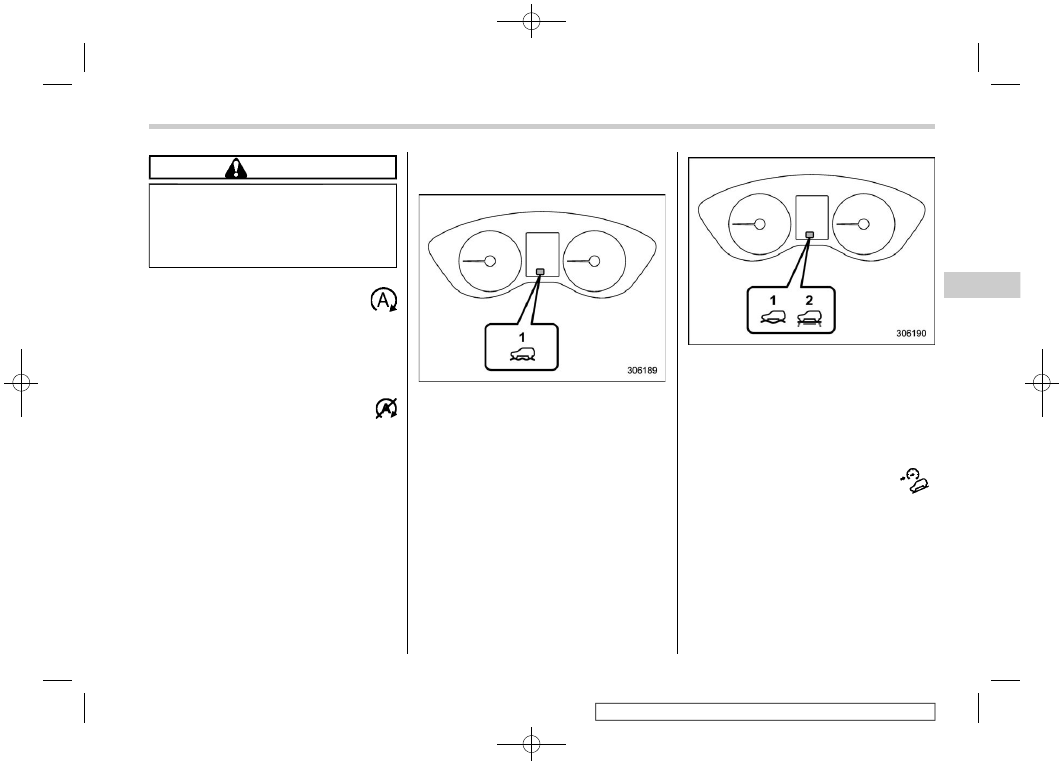
X-MODE Indicator (Outback/
Subaru Outback Wilderness)

X-MODE indicator (models with 1 mode)

1)

X-MODE indicator

X-MODE indicator (models with 2 modes)

1)

DEEP SNOW/MUD mode indicator

2)

SNOW/DIRT mode indicator

This indicator appears while X-MODE is
activated. It will disappear when X-MODE
is deactivated. Refer to “To Activate/
Deactivate X-MODE”

P383.

&

Hill Descent Control
Indicator (Outback/
Subaru Outback
Wilderness)

This indicator appears while the hill des-
cent control function is in standby. It will
flash while the hill descent control function
is operating. It will disappear when the hill
descent control function is not available.

– CONTINUED –

Warning and Indicator Lights

201

3

Instruments

and

Controls

(204,1)

&

BSD/RCTA Warning In-
dicator (If Equipped)

This warning indicator appears on the
combination meter display (color LCD)
when the BSD (Blind Spot Detection) or
RCTA (Rear Cross Traffic Alert) is mal-
functioning for any reason. For further
details, refer to “BSD/RCTA Warning In-
dicator”

P413. If this indicator remains

displayed, have your vehicle inspected by
your SUBARU dealer as soon as possible.

&

BSD/RCTA OFF Indica-
tor (If Equipped)

This indicator appears on the combination
meter display (color LCD) when “BSD/
RCTA” is touched to deactivate the BSD
(Blind Spot Detection) and RCTA (Rear
Cross Traffic Alert), or when the BSD/
RCTA is suspended temporarily. For de-
tails, refer to “BSD/RCTA OFF Indicator”

P412.

&

Icy Road Surface
Warning Indicator

When the outside temperature is 37

8

F

(3

8

C) or less, the icy road surface warning

indicator will illuminate to inform the driver
that the road surface may be frozen.

NOTE

.

The outside temperature indicator

shows the temperature in the area
around the sensor. However, the tem-
perature may not be indicated correctly
or the update may be delayed in the
following conditions.

– While parking or driving at low
speeds
– When the outside temperature
changes suddenly (example: when
going in and out of an underground
parking area or when passing
through a tunnel)
– When starting the engine after
being parked for a certain period of
time

.

The icy road surface warning indi-

cator should be treated only as a guide.
Be sure to check the condition of the
road surface before driving.

.

Once the icy road surface warning

indicator appears, it will not disappear
unless the outside temperature has
increased to 41

8

F (5

8

C) or higher.

&

RAB Warning Indi-
cator (If Equipped)

This indicator illuminates if the Reverse
Automatic Braking (RAB) system malfunc-
tions. Refer to “Reverse Automatic Brak-

ing (RAB) System”

P416.

&

RAB OFF Indicator (If
Equipped)

This indicator illuminates when the Re-
verse Automatic Braking (RAB) system is
turned OFF, or when the Reverse Auto-
matic Braking (RAB) system is suspended
temporarily. Refer to “Reverse Automatic
Braking (RAB) System”

P416.

&

Driver Monitoring Sys-
tem Operation Indicator
Light (Green) (If
Equipped)

This indicator illuminates when the Driver
Monitoring System is activated. Refer to
“Driver Monitoring System operation in-
dicator light (green)”

P435.

&

Driver Monitoring Sys-
tem Warning Light (Yel-
low) (If Equipped)

This warning light illuminates if the Driver
Monitoring System malfunctions. Have
your vehicle inspected at a SUBARU
dealer as soon as possible. Refer to
“Driver Monitoring System operation in-
dicator light (green)”

P435.

Warning and Indicator Lights

202

(205,1)

&

Driver Monitoring Sys-
tem OFF Indicator Light
(If Equipped)

This indicator illuminates when “Driver
Monitoring System” is touched to deacti-
vate Driver Monitoring System. Refer to
“Driver Monitoring System OFF indicator
light”

P435.

&

Driver Monitoring Sys-
tem Temporary Stop In-
dicator Light (If
Equipped)

This indicator illuminates when the Driver
Monitoring System is temporarily stopped.
Refer to “Driver Monitoring System tem-
porary stop indicator light”

P435.

NOTE

The Driver Monitoring System stops
temporarily in the following circum-
stances.

.

The temperature of the Driver Mon-

itoring System unit is high.

&

Sonar Audible Alarm
OFF Indicator (If
Equipped)

This indicator illuminates when the sonar
audible alarm is turned OFF. For the
setting procedure, refer to “Car settings”

P226.

3-7. Combination Meter Dis-
play (Color LCD)

WARNING

Always pay adequate attention to
safe driving when operating the
combination meter display (color
LCD) while the vehicle is in motion.
When operation of the combination
meter display (color LCD) interferes
with your ability to concentrate on
driving, stop the vehicle before
performing operations on the
screen. Also, do not concentrate on
the display while driving. Doing so
may cause you to look away from the
road and could result in an accident.

Various information will be shown on the
combination meter display (color LCD).
Also, a warning message will appear on
the display if a malfunction is detected. In
addition, several settings for the displayed
content can be performed.

– CONTINUED –

Combination Meter Display (Color LCD)

203

3

Instruments

and

Controls

(206,1)

Combination meter display (color LCD)

1)

Meter information screen (Refer to “Me-
ter Information Screen”

P205.)

2)

Warning screen (Refer to “Warning
Screen”

P205.)/Basic screen (Refer to

“Basic Screens”

P208.)

3)

EyeSight screen*

4)

Digital speed screen (Refer to “Digital
Speed Screen”

P211.)

5)

Telltale screen (Refer to “Telltale Screen”

P207.)

6)

Select lever/gear position indicator (Re-
fer to “Select Lever/Gear Position Indi-
cator”

P199.)

7)

X-MODE indicator (Outback/Subaru
Outback Wilderness) (Refer to
“X-MODE Indicator (Outback/Subaru
Outback Wilderness)”

P201.)

SI-DRIVE indicator (if equipped) (Refer
to “SI-DRIVE Indicator Light”

P199.)

8)

O d o m e t e r ( R e f e r t o “ O d o m e t e r ”

P175.)/Double trip meter (Refer to

“Double Trip Meter”

P176.)

*: For details, refer to the separate EyeSight

Owner’s Manual.

A:

Activating the EyeSight system

B:

Deactivating the EyeSight system

&

Basic Operation

Control switches

1)
2)
3)

By operating

or

of the control

switches, the screens can be changed.

If there are some useful messages, such
as vehicle information, warning informa-
tion, etc., they will interrupt the current
screen, and appear on the display accom-
panied by a beep. If such a screen is
displayed, take proper action according to
the message shown on the screen.

The warning screen will return to the
original screen after a few seconds. While
the

information reminder is shown on

the display, it may be possible to display

Combination Meter Display (Color LCD)

204

(207,1)

the warning screen again. To recall the
message marked with

on the display,

press the

switch on the steering wheel.

&

Welcome Screen (Opening
Animation) and Good-Bye
(Ending Animation) Screen

Welcome screen and Good-bye screen
are motion graphic displayed on the
combination meter display and center
information display upon entering and
exiting the vehicle.
When the driver’s door is opened and
closed after unlocking the door, the wel-
come screen (opening animation) will
appear on the combination meter display
(color LCD) for approximately 20 seconds.
When the ignition switch is turned to the
“LOCK”/“OFF” position, the combination
meter display (color LCD) gradually turns
off by showing good-bye screen (ending
animation).

NOTE

.

The welcome screen and the good-

bye screen may differ in the actual
words and appearance.

.

The basic screen will be shown

when the ignition switch is turned to
the “ON” position while the welcome
screen is displayed.

.

Once the welcome screen appears, it

takes a certain period of time to display
it again.

.

If the ignition switch is operated

after unlocking the driver’s door, the
welcome screen will not appear even
when the driver’s door is opened and
closed.

.

The welcome screen will disappear

when you lock the driver’s door by
using the remote keyless entry system
(all models) or the keyless access
function (if equipped) while the wel-
come screen is displayed.

.

The welcome screen including the

audio/navigation unit can be set to on
or off.

.

The welcome screen can be set to on

or off. For details, refer to “General
settings”

P221 (11.6-inch display

models) or “General settings”

P239

(dual 7.0-inch display models).

.

The good-bye screen can be set to

on or off. For details, refer to “General
settings”

P221 (11.6-inch display

models) or “General settings”

P239

(dual 7.0-inch display models).

&

Warning Screen

Example of warning

If there is a warning message or a
maintenance notification, it will appear on
combination meter display (color LCD).
Take the appropriate actions based on the
messages indicated.

&

Meter Information Screen

The meter information screen can be
changed. For details, refer to “General
settings”

P221 (11.6-inch display mod-

els) or “General settings”

P239 (dual

7.0-inch display models).

– CONTINUED –

Combination Meter Display (Color LCD)

205

3

Instruments

and

Controls

(208,1)

!

ECO gauge

The ECO gauge shows the difference
between the average rate of fuel con-
sumption since the trip meter was last
reset and the current rate of fuel consump-
tion.

The ECO gauge indicates the current fuel
efficiency as shown in the following chart.

Displayed unit

Needle position

“+” side

“−” side

MPG

Better

Poorer

l/100km

Poorer

Better

NOTE

.

The ECO gauge shows only an

approximate indication.

.

After resetting the trip meter, the

average rate of fuel consumption is not
shown until driving 0.6 miles (1 km).
Until that time, the ECO gauge does not
operate.

!

Clock and outside temperature

This screen displays the clock and outside
temperature.

NOTE

.

The clock can be displayed in either

12-hour display or 24-hour display. For
details, refer to “Clock”

P252.

.

You can set the temperature units to

be displayed in Celsius (

8

C) or Fahren-

heit (

8

F). For details, refer to “Car

settings”

P226 (11.6-inch display

models) or “Vehicle setting icons”

P246 (dual 7.0-inch display models).

!

Compass (if equipped)

The direction of the vehicle is displayed.

Combination Meter Display (Color LCD)

206

(209,1)

!

Driving range on remaining fuel

NOTE

The driving range on the remaining fuel
is only a guide. The indicated value may
differ from the actual driving range on
the remaining fuel, so you must im-
mediately fill the tank when the low fuel
warning light illuminates.

&

Telltale Screen

1)

Telltale screen

When the corresponding situation occurs,
the following telltales will be displayed on
the telltale screen.

NOTE

.

When there is warning information

to display, it will be displayed in five
warning indicators, starting on the left
in ascending order of severity.

.

If there are 6 or more warning

messages to display, the indicators will
be displayed in sequential order.

Mark

Name

Page

Door open indicator
light

190

Engine hood open
warning light

191

AT OIL TEMP warning
light

185

All-Wheel Drive warn-
ing light

191

LED headlight warning
light

200

High beam assist indi-
cator light

199

Steering Responsive
Headlight OFF indicator
light

200

Steering Responsive
Headlight warning light

200

Engine low oil level
warning indicator

185

RAB warning light (if
equipped)

202

RAB OFF indicator (if
equipped)

202

– CONTINUED –

Combination Meter Display (Color LCD)

207

3

Instruments

and

Controls

(210,1)

Mark

Name

Page

BSD/RCTA warning in-
dicator (if equipped)

202

BSD/RCTA OFF indi-
cator (if equipped)

202

Auto Start Stop warning
light (yellow)

200

Auto Start Stop OFF
indicator light

200

Auto Start Stop indica-
tor light (green)

201

Auto Start Stop No Ac-
tivity Detected indicator
light

201

Automatic headlight
beam leveler warning
light

200

Windshield washer fluid
warning light

191

Hill descent control in-
dicator light (Outback/
Subaru Outback
Wilderness)

201

Mark

Name

Page

Driver Monitoring Sys-
tem operation indicator
light (green) (if
equipped)

202

Driver Monitoring Sys-
tem warning light (yel-
low) (if equipped)

202

Driver Monitoring Sys-
tem OFF indicator light
(if equipped)

203

Driver Monitoring Sys-
tem temporary stop in-
dicator light (if
equipped)

203

Icy road surface warn-
ing light

202

&

Basic Screens

By operating the

or

switch on the

steering wheel, you can change the screen
that is always displayed.

Average fuel consumption screen:

AVG: Average fuel consumption

: Driving range on remaining fuel

This screen displays the average rate of
fuel consumption since the trip meter was
last reset.

NOTE

The driving range on the remaining fuel
is only a guide. The indicated value may
differ from the actual driving range on
the remaining fuel, so you must im-
mediately fill the tank when the low fuel
warning light illuminates.

Combination Meter Display (Color LCD)

208

(211,1)

Current fuel consumption screen:

: Current fuel consumption
: Driving range on remaining fuel

NOTE

The driving range on the remaining fuel
is only a guide. The indicated value may
differ from the actual driving range on
the remaining fuel, so you must im-
mediately fill the tank when the low fuel
warning light illuminates.

Driving information screen:

: Journey time
: Journey distance

This screen displays the journey time (the
time that has elapsed since the ignition
switch was turned to the “ON” position)
and journey distance (the distance that
has been driven since the ignition switch
was turned to the “ON” position).

Auto Start Stop screen:

: The total amount of time that the engine

was stopped by means of the Auto Start
Stop system

: The total amount of fuel saved due to the

engine being stopped by the Auto Start
Stop system

The indicated values are calculated from
the most recent reset of the currently
displayed trip meter to the current time.
The indication ranges are as follows.

.

Total amount of time: from 00

00

@

to

9999h59

59

@

.

Total amount of fuel saved: from 0 gal to

9999.999 gal

NOTE

.

When the trip meter is reset, the

corresponding accumulated time and
the amount of fuel saving are also reset.

– CONTINUED –

Combination Meter Display (Color LCD)

209

3

Instruments

and

Controls

(212,1)

.

The time spent with the engine

stopped by means of the Auto Start
Stop system is also added to the
journey time.

TPMS screen (U.S.-spec. models):

This screen displays each tire pressure.
When a tire is deflated, the deflated tire
and the tire pressure will be displayed on
the screen in yellow.

NOTE

.

The tire pressure values are dis-

played several minutes after driving.

.

You can set the tire pressure units.

For details about setting the units, refer
to “General settings”

P221 (11.6-inch

display models) or “General settings”

P239 (dual 7.0-inch display models).

.

Once the tire pressure monitoring

system detects the low tire pressure,
the tire pressure values will display in
yellow until the system detects the
normal tire pressure.

.

Immediately adjust the tire pressure

when the warning light illuminates.
When the tire pressure monitoring
system detects the adjusted tire pres-
sure, the warning light will turn off and
the tire pressure values will turn to
white.

.

For information about the specified

value of the air pressure, refer to
“Tires”

P566.

Compass screen (if equipped):

The direction of the vehicle is displayed.

Navigation screen (if equipped):

When the route guidance is set in the
navigation system, this item shows the
navigation route information. For details
about the navigation system, refer to the
separate navigation/audio Owner’s Man-
ual.

Combination Meter Display (Color LCD)

210

(213,1)

Audio screen:

The audio screen shows the status of
audio information. For details about the
audio system, refer to the separate navi-
gation/audio Owner’s Manual.

Clock and outside temperature screen:

This screen displays the clock and outside
temperature.

NOTE

.

The clock can be displayed in either

12-hour display or 24-hour display. For
details, refer to “Clock”

P252.

.

You can set the temperature units to

be displayed in Celsius (

8

C) or Fahren-

heit (

8

F). For details, refer to “Car

settings”

P226 (11.6-inch display

models) or “Vehicle setting icons”

P246 (dual 7.0-inch display models).

&

Digital Speed Screen

1)

Speed limit indicator (if equipped)

2)

Vehicle speed

This screen displays the current vehicle
speed.

Combination Meter Display (Color LCD)

211

3

Instruments

and

Controls

(214,1)

3-8. Center Information Dis-
play (CID)

WARNING

Always pay attention to safe driving
when operating the center informa-
tion display while the vehicle is in
motion. When operation of the cen-
ter information display is disturbing
your awareness and ability to con-
centrate on driving, stop the vehicle
in a safe place before performing
operations on the display. Also, do
not concentrate on the display while
driving. Doing so could result in an
accident.

&

Features

All information is displayed on the center
information display, including vehicle set-
tings, vehicle status, navigation system (if
equipped) operation, audio operation, and
climate control operation.

Items

Page for

11.6-inch

display

models

Page for

dual 7.0-

inch display

models

Interruption
screen

213

Vehicle status and
maintenance in-
formation

214

246

Vehicle settings

221

239/243

Climate control
operations

221

239

Front View Moni-
tor (if equipped)/
Rear view camera

399/402

Navigation system

Refer to the navigation/

audio Owner’s Manual.

Audio/telephone

Refer to the navigation/

audio Owner’s Manual.

EyeSight

Refer to the Owner’s

Manual supplement for

the EyeSight system.

The center information display can also be
used to set and initialize the center
information display itself.

NOTE

.

When the vehicle is in motion,

certain functions and selections may
not be available.

.

The language and units for both the

center information display and the

combination meter display (color LCD)
can be changed. For details about
language settings, refer to “General
settings”

P221 (11.6- inch display

models) or “General settings”

P239

(dual 7.0-inch display models). For de-
tails about unit settings, refer to “Car
settings”

P226 (11.6-inch display

models) or “Vehicle setting icons”

P246 (dual 7.0-inch display models).

.

The images displayed in this Own-

er’s Manual are sample images. The
actual image may vary depending on
the region and vehicle specifications.

&

Welcome Screen

Welcome screen and Good-bye screen
are motion graphic displayed on the
combination meter display and center
information display upon entering and
exiting the vehicle.
When the driver’s door is opened and
closed, the welcome screen will appear for
a short time.

NOTE

.

The welcome screen will disappear

when the ignition switch is turned to the
“ON” position while the welcome
screen is shown.

.

The welcome screen can be turned

on or off. For details, refer to “General

Center Information Display (CID)

212

(215,1)

settings”

P221 (11.6-inch display

models) or “General settings”

P239

(dual 7.0-inch display models).

.

For a certain period of time after the

welcome screen has once appeared, it
may not appear again even when the
driver’s door is opened and closed.
This does not indicate a malfunction.

&

Good-Bye Screen

The good-bye screen will be displayed
under the following conditions.

.

The driver’s door is opened after the

ignition switch is put in the “OFF” position.

.

3 minutes have passed after the ignition

switch is put in the “OFF” position with the
driver’s door closed.

.

10 minutes have passed when the

hands-free phone is used after the ignition
switch is put in the “OFF” position.

.

The battery voltage is low when the

ignition switch is put in the “OFF” position.

&

Interruption Screen

Useful messages, such as reminders,
weather information (if equipped) and
traffic information (if equipped) may inter-
rupt the current screen and appear on the
display accompanied by a beep. Take the
proper action according to the message.

&

Touch Screen Operations

The center information display has a touch
screen. Operations are performed by
touching the touch screen directly.

!

Touch

Quickly touch and release once.

!

Drag

Touch the screen and move the screen to
the desired position.

!

Swipe

Quickly move the screen by swiping with

– CONTINUED –

Center Information Display (CID)

213

3

Instruments

and

Controls

(216,1)

your finger.

NOTE

Swipe operations may not be per-
formed smoothly in high altitudes.

&

11.6-Inch Display Models (If
Equipped)

NOTE

For dual 7.0-inch display models, refer
to “Dual 7.0-Inch Display Models”

P238.

!

Touch screen

1)

HOME icon (Refer to “HOME icon”

P221.)

2)

Status bar (Refer to “Status bar”

P214.)

3)

Information bar (Refer to “Information
bar”

P215.)

4)

Main screen (Refer to “Main screen”

P221.)

5)

Manage device icon (Refer to the sepa-
rate navigation/audio Owner’s Manual)

6)

Driver profiles icon (Refer to “Driver
profiles icon”

P221.)

7)

Climate control screen (Refer to “Climate
control screen”

P221.)

8)

Auto Start Stop ON/OFF icon (Refer to
“Auto Start Stop ON/OFF icon”

P217.)

9)

Car settings icon (Refer to “Car settings
icon”

P219.)

While the ignition switch is in the “ACC” or
“ON” position, the touch panel will activate.

!

Status bar

The outside temperature and clock are
displayed on the status bar.

NOTE

.

The outside temperature indicator

shows the temperature around the
sensor. However, the temperature may
not be indicated correctly or the update
may be delayed in the following condi-
tions.

– While parking or driving at low
speeds
– When the outside temperature
changes suddenly (example: when
going in and out of an underground
parking area or when passing
through a tunnel)
– When starting the engine after

Center Information Display (CID)

214

(217,1)

being parked for a certain period of
time

.

You can set the temperature units to

be displayed in Celsius (

8

C) or Fahren-

heit (

8

F). For details, refer to “Car

settings”

P226.

.

The clock can be displayed in either

12-hour display or 24-hour display. For
details, refer to “Clock”

P252.

.

Touch the clock on the status bar to

display the clock setting screen. Refer
to “Clock”

P252.

.

For details about Bluetooth device

information, refer to the navigation/
audio Owner’s Manual.

!

Information bar

Swipe the information bar or touch

or

on the information bar to switch the item
displayed.

Audio screen:

The screen of the currently selected audio
source is displayed.
For details about how to use the audio set,
refer to the separate navigation/audio
Owner’s Manual.

Navigation screen (models with naviga-
tion system):

The directions to the destination are
displayed on the screen.

NOTE

When a destination is not set in the
navigation system, the compass orien-
tation, street name and speed limit
remain displayed on the screen.

– CONTINUED –

Center Information Display (CID)

215

3

Instruments

and

Controls

(218,1)

Favorite screen:

Favorite screen

This screen displays up to three optional
pieces of information that can be selected
from the following items.

Item

Details

Engine coolant temperature

Engine oil temperature

Average vehicle speed

Accelerator opening ratio

Vehicle posture

Direction of the vehicle*

1

Weather information for the
next three hours*

2

Weather information for the
next six hours*

2

Posted speed limit of the
road you are currently driv-
ing on*

1

Calendar

Driver Monitoring System*

1

information and the average
fuel consumption of driver

Item

Details

Nothing is displayed.

*1: If equipped
*2: Models with SiriusXM Satellite Radio

NOTE

Some items may not be shown depend-
ing on the model and specifications.

The items shown on the favorite screen
can be changed. For details, refer to
“Favorite Widgets”

P232.

Center Information Display (CID)

216


Content      ..     11      12      13      14     ..