Skoda Karoq (2019 year). Manual - part 10
DVD
video player
Main menu
Only valid for Infotainment Columbus.
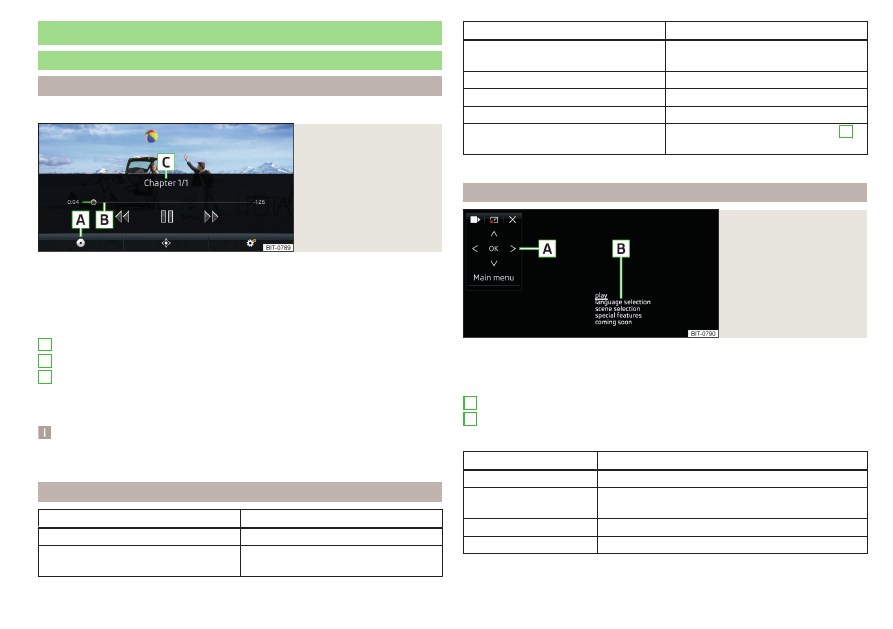
Fig. 192
Video DVD: Main menu
›
To display the main menu, insert a CD / DVD in the corresponding slot in the
external module.
›
or: In the main menu Media, select the video source, display the folder/track
list and start the video file.
Main menu
Select a video source
Playback timeline
Information for the selected video file (e.g., video title, chapter)
Display the video DVD menu
Video DVD menu settings
Note
For safety reasons, the image display is switched off at speeds over 5 km/h.
Only the sound continues. The respective message appears on the screen.
Control playback
Operation
Action
Play / pause
Tap /
Play the previous video
Tap within 3 s from the start of the
track playback
A
B
C
Operation
Action
Play the current video from the start
Tap after 3 s from the start of the
playback
Fast rewind
Press and hold
Play the next video
Tap
Fast forward
Press and hold
Forward / rewind the video at the de-
sired time
Tapping the playback time axis
B
a)
The longer the function surface is held, the faster the fast forward/reverse.
DVD menu
Fig. 193
DVD menu
›
to display the DVD menu in the Video DVD main menu, tap on the function
surface
Description of the DVD menu
Operating surface
Example of the displayed menu
Function surfaces on the operating surface
Symbol
Operation
/
Move the operating surface left / right
/
Show / hide full screen display of the control sur-
face
Close the control surface
Movement in the EPG/teletext
A
B
157
DVD