Seat Arona (2022 year). Manual in english - page 14
Driving
ACC operation
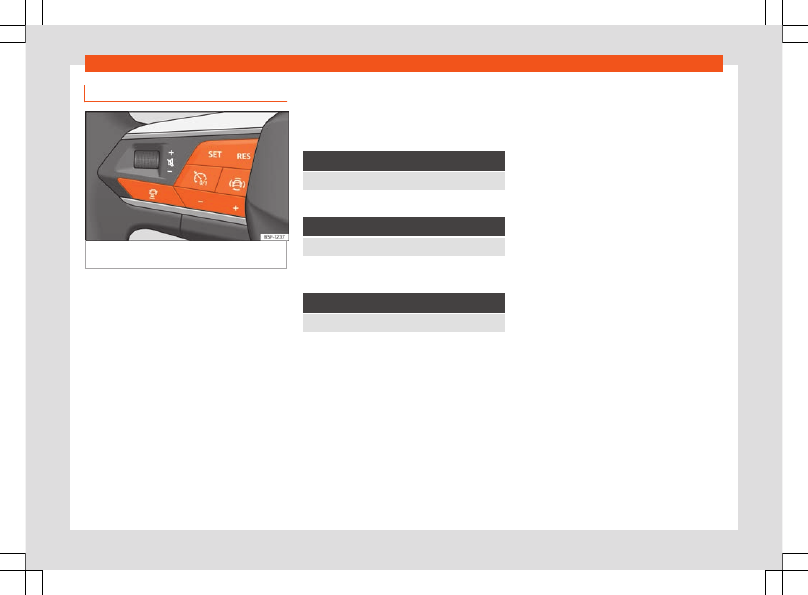
Fig. 149
On the multifunction steering wheel:
buttons to operate the ACC
Connecting
●
Press the
button on the multifunction
steering wheel.
The ACC does not regulate anything yet
(standby).
Start regulation
●
To start regulation, press the button
›››
The ACC sets the current speed, or the clos-
est speed within the valid range (30-210
km/h), as the cruise speed.
With manual transmission, the gear lever
must be in any gear except first and reverse,
and the speed must be higher than approxi-
mately 30 km/h (18 mph). On vehicles with
automatic transmission, the gear lever must
be in the
D
,
S
or
M
position.
Depending on the driving situation, the fol-
lowing indicator lamps come on:
It lights up green
The ACC is active
a)
Only on analogue instrument clusters.
It lights up green
ACC connected, no vehicle detected in front.
a)
It lights up white on the analogue instrument clus-
ter.
It lights up green
ACC connected, vehicle detected in front.
a)
It lights up white on the analogue instrument clus-
ter.
When the ACC is in standby, the indicator
lamps light up grey.
Setting speed
To program the speed, press the
or
›››
buttons to the desired speed. The
speed is adjusted at intervals of 10 km/h (5
mph).
When the ACC is active, the button
can be
pressed to increase the desired speed by 1
km/h (1 mph). You can then press
to de-
crease it by 1 km/h (1 mph).
Setting your distance level
The distance can be set to one of five levels,
from very short to very long:
●
Press the button
and then the button
or
.
●
Alternatively, press the button
as many
times as necessary to set the desired dis-
tance.
Keep in mind each country’s regulations on
minimum braking distances.
Suspend regulation (standby)
●
Briefly press the button
on the multifunc-
tion steering wheel or press the brake pedal.
The ACC indicator lamp is grey; the speed
and distance are saved.
If the ESC or ASR is disconnected
›››
, the ACC is automatically sus-
pended.
Reinstating the cruise control
●
Press the
button. The ACC regulates to
the last speed and distance setting.
●
OR:
Press the
button to use the current
speed.
220