Seat Alhambra (2022 year). Manual in english - page 6
Instruments and warning/control lamps
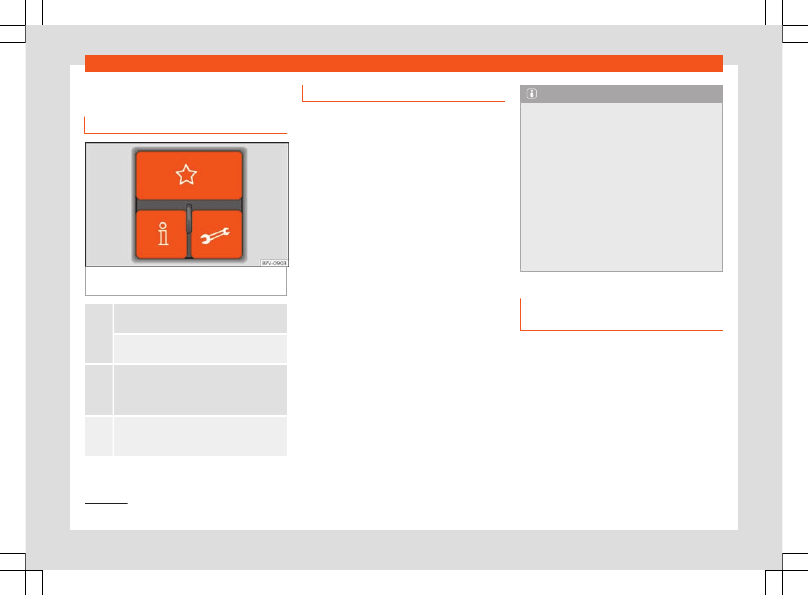
Three button unit in the roof
Three button module
Fig. 85
Three button module in the roof: tele-
phone management system controls.
Press it briefly
: to accept or end a call.
Keep it pressed down
: to reject a call.
Short press
: to start or stop the voice control
function, for example, to make a call.
Hold down for over 2 seconds
: to obtain infor-
mation about the SEAT brand and selected
additional services related to traffic and trav-
el.
Hold down for over 2 seconds
: to obtain help
from the network of SEAT dealers in the event
of a breakdown.
a)
Not operational if a navigation system with voice
control is fitted.
Information and assistance calls
Communication with the SEAT Customer
Care Service is established using the
and
buttons of the three-button unit
will automatically connect you with the Assis-
tance Centre of the relevant country. You will
only be able to make calls if your mobile is
turned on and connected to the pre-installed
Bluetooth.
Information call
The
Information call
button offers infor-
mation on the SEAT brand and selected addi-
tional services related to traffic and your
travel.
To establish communication, press the
but-
ton for more than 2 seconds.
In countries where there is no information tel-
ephone number, an information call is made
by pressing the
button.
Assistance call
The
assistance call
button gives im-
mediate help in case of a breakdown. To this
end, the SEAT dealer network, with its mobile
assistance vehicles, is at your disposal.
To establish communication, press the
but-
ton for more than 2 seconds.
Note
●
Calls made with the
and
buttons take
priority over normal calls. If the
or
but-
ton is pressed during a normal telephone
call, this call will be cut off and an informa-
tion call or assistance call will be made.
●
If the assistance call button
is pressed
during an information call, the information
call will be interrupted to make the assis-
tance call (and vice versa).
●
Mobile phone coverage must be availa-
ble to place a call to the information and
assistance services. This service might not
be available in some countries.
Activate and deactivate voice con-
trol
Switching on the speech control system
●
Press the
button on the multi-function
steering wheel.
●
Wait for the acoustic signal.
●
Give the command.
●
Follow the dialogue instructions (extended
dialogue).
»
1)
Depending upon country.
91