Renault Alaskan (2017 year). Instruction - part 16
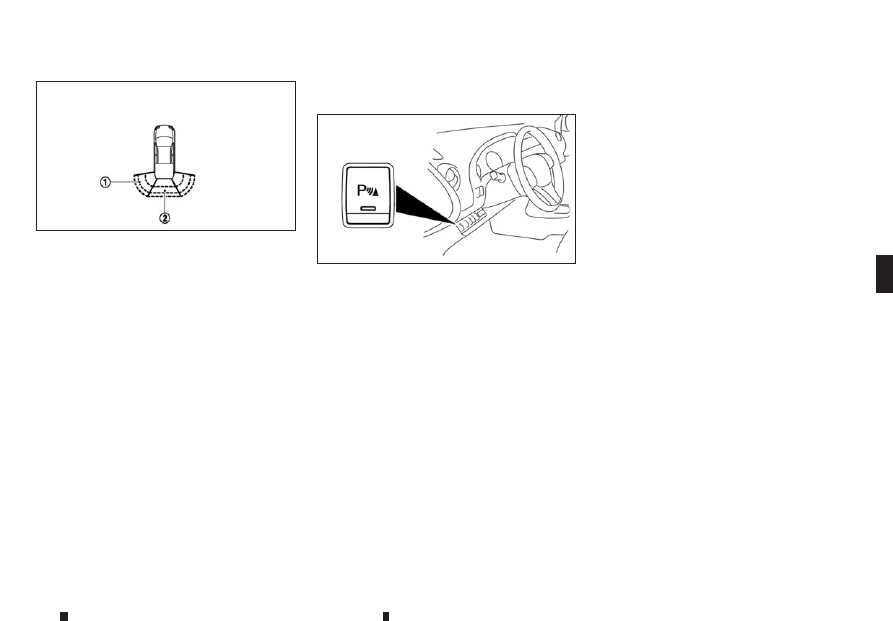
When the corner of the vehicle moves closer to an
object, the corner sensor indicators
➀
appears.
When the centre of the vehicle moves close to an
object, the centre sensor indicator
➁
appears.
When the object is detected, the indicator (green)
appears and the tone sounds intermittently. When
the vehicle moves closer to the object, the colour of
the indicator turns yellow. When the vehicle is very
close to the object, the indicator turns red, and the
tone sounds continuously.
PARKING SENSOR (SONAR)
SYSTEM OFF SWITCH
The parking sensor (sonar) system OFF switch on
the instrument panel allows the driver to turn the
parking sensor (sonar) system ON or OFF. To turn
the parking sensor (sonar) system ON or OFF, the
ignition switch must be in the ON position.
The indicator light on the switch will illuminate when
the system is turned ON.
If the indicator light flashes when the parking sensor
(sonar) system is not turned off, it may indicate a
malfunction in the parking sensor (sonar) system.
The parking sensor (sonar) system will be turned
ON automatically under the following conditions:
•
When the ignition switch is switched from the
OFF position to the ON position.
•
When the shift lever is shifted into the R (Re-
verse) position.
•
When the vehicle speed reaches at least 10 km/h
(6 MPH) and decreases.
The automatic system enabling function can be
turned ON or OFF with the [Sensor] key in the
[Parking Aids] menu. See “Vehicle information
display” in the “2. Instruments and controls” sec-
tion.
PARKING SENSOR (SONAR)
SYSTEM SETTINGS
The following settings for the parking sensor (sonar)
system can be changed by using the switches on
the steering-wheel-mounted controls. For details,
see “Vehicle information display” in the “2. Instru-
ments and controls” section.
[Sensor]
Activate or deactivate the Parking sensor system.
ON (default) - OFF
[Volume]
Adjust the volume of the tone.
[High] - [Med.] (default) - [Low]
[Range]
Adjust the detection range of the sensor.
[Far] - [Mid.] (default) - [Near]
JVS0539XZ
NIC2804
Starting and driving
5-47