Peugeot 1007 Dag (2008.5). Instruction - part 5


  Index      Peugeot     Peugeot 1007 Dag 2008.5 - instruction in english


Search            


Content   ..  3  4  5  6   ..


Peugeot 1007 Dag (2008.5). Instruction - part 5


3

68
3

69

                                 FRONT INTERIOR LAYOUT  

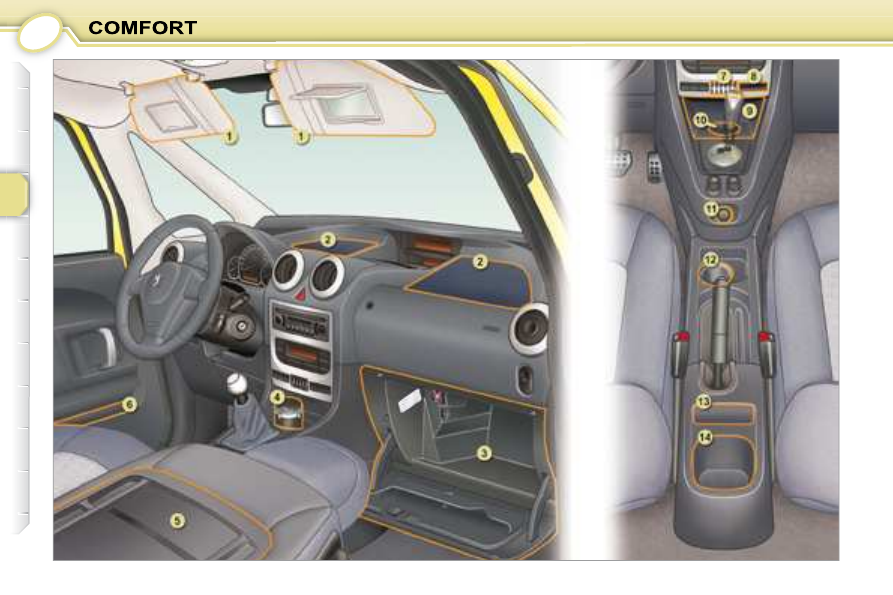
  5. Writing table 
 When  the  front  passenger  seat  is 
placed in the table position, you have 
a  table  with  two  pieces  of  elastic  to 
retain A4  format  documents,  as  well 
as pen holders.  

     CHILD MONITORING MIRROR 

 This mirror enables the driver or front 
passenger  to  observe  all  the  rear 
seats. 
 Fitted on its own ball joint, it provides 
a panoramic view of the rear interior 
of the vehicle. 

       AREAS FOR TOLL CARDS/
CAR PARK TICKETS 

  *   With colour screen only.  

  1. Sun visor 
 Each sun visor has a courtesy mirror 
with concealer and a ticket holder.  

  2. Storage trays on the fascia  

  3. Glove box 
 To open the glove box, lift the handle. 
 The  glove  box  lights  when  the  lid  is 
opened. 
 The lid has two opening positions, in-
termediate and full. 
 It contains the passenger air bag dis-
arming  switch,  a  ventilation  nozzle 
that  can  be  closed  (distributing  the 
same  conditioned  air  as  the  vents 
of  the  passenger  compartment)  and 
three  sockets *   for  connecting  audio/
video equipment (refer to the "Audio 
and  Telematics"  section  to  activate 
the auxiliary input sockets). 
 The  layout  allows  storage  of  a  pen, 
the vehicle handbook, a pair of spec-
tacles, maps, etc.  

  4.  Enclosed storage 

compartment/Movable ashtray 

 This  can  be  placed  in  the  positions 
marked 1012 and 14.  

  6. Door storage trays 
 Before opening the door, ensure that 

there are no objects protruding from 
the tray.  

  7. Coin storage  

  8. Card holder  

  9.  Storage compartment/USB 

socket/Buttons and navigator 
(Screen C without WIP Sound)  

  10. Can holder  

  11.  Lighter/12 volt accessories 

socket (100 W max.) 

 This is supplied with current from the 
running position.  

  12. Can holder  

  13. Mobile storage  

  14. Bottle storage   

  The athermic windscreen has a non-

refl ective  zone  located  above  the 

base of the interior mirror. 
 It  is  intended  for  affi xing  toll  cards 

and/or car park tickets.  

3

70

3

71

                     REAR INTERIOR LAYOUT  

  5. Retaining straps 
 These  secure  the  warning  triangle, 
the tool kit, oil cans...  

  1. Rear parcel shelf 
 To remove the shelf: 
   -  

tilt and slightly raise the shelf, 

  -  

pull upwards on each side to de-
tach it from its fasteners.  

 There are several options for storing 
the shelf: 
   -  

either behind the rear seats, 

  -  

or fl at in the boot.   

  2. Retaining hooks  

  3. Stowing rings  

  4. Luggage retaining net 
 Hooked  onto  the  stowing  rings,  this 
enables your luggage to be secured.  

  6. Storage trays in the fl oor 
 The  right  storage  tray  houses  the 

subwoofer of the JBL audio system.  

  7. Armrests/Side storage trays 
 These  have  recesses  for  storing  a 
can and a bottle.  

  8. Grab handles with coat hook   

4

72

                       THE REMOTE CONTROL KEY 

 The  remote  control  permits  locking, 
deadlocking, unlocking and locating of 
the vehicle, as well as folding and un-
folding  of  the  exterior  mirrors.  It  does 
not work when the ignition is on. 
 The  key  permits  mechanical  and  in-

dependent operation of the fuel fi ller 

cap and passenger air bag disarming 
switch as well as switching on of the 
ignition. 
 From  the  driver's  door,  the  key  per-
mits  electrical  control  of  the  locking, 
deadlocking and unlocking of the ve-
hicle, as well as folding and unfolding 
of the exterior mirrors. 
 If  one  of  the  doors  or  the  tailgate  is 
open,  the  central  locking  does  not 
work. 

  Using the key 
 Turn the key in the lock on the driver's 
door to lock the vehicle. 
 Normal locking is confi rmed by fi xed 

lighting of the direction indicators for 
approximately two seconds. 
 The exterior mirrors fold at the same 
time. 

  Using the key 
 Turn the key in the lock on the driver's 
door to unlock the vehicle. 
 Unlocking  is  confi rmed  by  rapid 

fl ashing of the direction indicators for 

approximately two seconds. 
 The  exterior  mirrors  unfold  at  the 
same time.   

  Folding/Unfolding the key 

 To  fold  the  key,  press  button   A   then 
fold the key into the casing of the re-
mote control. 
 To unfold the key, press button  A .  

  Unlocking 

  Normal locking 

  When the vehicle is locked, if 
unlocking is activated inadver-
tently, without the doors being 
opened within 30 seconds, the 
vehicle will lock automatically. 

 The  folding  and  unfolding  of  the  ex-
terior  mirrors  can  be  deactivated  by 
a  PEUGEOT  dealer. 
 The  remote  control  does  not  work 
when the ignition is on.   

  Using the remote control 
  Press button   B  to lock the vehicle. 
  Pressing  button  B  for  more  than 
2 seconds
  permits automatic   closing 
of the windows and sunroof in addition 
to locking. 
 Each  action  is  confi rmed  by  fi xed 

lighting of the direction indicators for 
approximately two seconds. 
 The exterior mirrors fold at the same 
time.  

  Using the remote control 
 Press button  C  to unlock the vehicle. 
 This is confi rmed by rapid fl ashing of 

the direction indicators. 
 The  exterior  mirrors  unfold  at  the 
same time.  

4

73

  Deadlocking 

 Deadlocking  renders  the   internal   and 
external door controls inoperative. 
 It also deactivates the internal central 
locking button. 

  Using the remote control 
  Pressing button B  locks the   vehicle 
or  pressing button B for more than 
2 seconds 
 permits   automatic closing 
of  the  windows  and  sunroof  in  addi-
tion to locking. 
  A second press

  within fi ve seconds 

deadlocks the vehicle. 
 Each  action  is  confi rmed  by  fi xed 

lighting of the direction indicators for 
approximately two seconds.  

  Opening/Closing the 
"Sesame" doors 

  Pressing  button    D   or   E   opens  or 
closes the left or right door. 
 This press unlocks the vehicle before 
opening the corresponding door. 
  A  second  press   stops  the  move-
ment of the corresponding door. 
  A  third  press   reverses  the  move-
ment of the corresponding door.  

  Using the key 
 Turn the key in the lock on the driver's 
door to lock the vehicle. 
 Within the next fi ve seconds, turn the 

key again to deadlock the vehicle. 
 Each  action  is  confi rmed  by  fi xed 

lighting of the direction indicators for 
approximately two seconds. 

  Key in ignition 

 A buzzer sounds on opening the driver's
door,  if  the  key  has  been  left  in  the 
ignition.  

   Locating your vehicle 
 To  locate  your  vehicle,  if  you  have 
locked it, in a car park: 
      press  button   B ,  the  courtesy 

lights come on and the direction 

indicators  fl ash  for  a  few 

seconds.    

 If  the  deadlocking  is  opera-
ted from inside the vehicle, it 
will change to normal locking 
when the vehicle is started. 

  When  closing  the  windows 
and  sunroof  using  the  remote 
control,  the  user  must  ensure 
that  no  one  is  preventing  cor-
rect  closing  of  the  windows 
and sunroof. 

 Never leave anyone inside the vehicle 
when it is deadlocked.   

4

74

     ELECTRONIC ENGINE 
IMMOBILISER 

 This  locks  the  engine  control  system 
a  few  moments  after  the  ignition  has 
been  switched  off  and  therefore  pre-
vents starting of the vehicle by anyone 
who does not have the key. 
 The ignition key has an electronic chip 
which  has  a  special  code.  When  the 
ignition  is  switched  on,  the  code  is 
recognised and starting is possible. 
  If  the  system  does  not  function 
correctly,
   the  service  warning  light 
comes  on,  accompanied  by  an  au-
dible  signal  and  a  message  on  the 
multifunction display. 
 In  this  case,  your  vehicle  will  not 
start. Contact a  PEUGEOT  dealer as 
soon as possible. 
  Lost keys  
 Visit a  PEUGEOT  dealer with the ve-

hicle's V5 registration certifi cate and 

your  personal  identifi cation  docu-

ments. 
 A   PEUGEOT   dealer  will  be  able  to 
retrieve  the  key  code  and  the  tran-
sponder  code  required  to  order  a 
replacement key. 

  Programming the remote 
control 

 Following  changing  of  the  remote 
control  battery  or  disconnection  of 
the  vehicle  battery,  the  remote  con-
trol must be reprogrammed. 
      Wait  at  least  one  minute  before 

using the remote control. 

     Switch on the ignition. 
     Press  button   B   or   C   for  at  least 

fi ve seconds within the next ten 

seconds. 

     Switch off the ignition. 
     Wait  at  least  one  minute  before 

using the remote control.  

 The  remote  control  is  now  working 
again.  

  Changing the remote control 
battery 

 Battery ref.: CR1620/3 volts. 
 The information "battery fl at" is given 

by  displaying  of  the  service  warning 
light,  accompanied  by  an  audible 
signal  and  a  message  on  the  multi-
function display. 
 To replace the battery, unclip the casing 
using a coin at the notch. 
 If  the  remote  control  does  not  work 
after  the  battery  has  been  changed, 
re-programme the remote control.  

4

75

  Make  a  careful  note  of  the 
number  on  each  key.  The 
key number is coded on the 
label attached to the key.
  

    If  the  keys  are  lost,  a   PEUGEOT  
dealer can rapidly supply you with 
new keys.
  
  The  high  frequency  remote  con-
trol  is  a  sensitive  system;  do  not 
operate it while it is in your pocket 
as there is a possibility that it may 
unlock  your  vehicle,  without  you 
being aware of it.
  
  The remote control does not oper-
ate when the key is in the ignition, 
even when the ignition is switched 
off, except for reprogramming.
  
  Do  not  operate  the  deadlocking 
function  if  there  is  anyone  inside 
the vehicle.
  
  Driving with the doors locked may 
make  access  to  the  passenger 
compartment  by  the  emergency 

services more diffi cult in an emer-

gency.  
  As  a  safety  precaution  (with  chil-
dren on board), remove the ignition 
key  when  you  leave  the  vehicle, 
even for a short time.
  
  Do not repeatedly press the button 
of your remote control out of range 
and  out  of  sight  of  your  vehicle. 
You run the risk of stopping it from 
working  and  the  remote  control 
would have to be reprogrammed.
  

    When 

purchasing 

second-

hand vehicle, have the key codes 
memorised by a  PEUGEOT  dealer 
to  ensure  that  the  keys  in  your 
possession  are  the  only  ones 
which can start the vehicle.
  

       Do  not  throw  the  remote 
control  batteries  away,  they 
contain  metals  which  are 
harmful to the environment. 

 Take them to an approved collection 
point. 


Do not make any modifi cations to 

the  electronic  engine  immobiliser 
system.
  

4

74

     ELECTRONIC ENGINE 
IMMOBILISER 

 This  locks  the  engine  control  system 
a  few  moments  after  the  ignition  has 
been  switched  off  and  therefore  pre-
vents starting of the vehicle by anyone 
who does not have the key. 
 The ignition key has an electronic chip 
which  has  a  special  code.  When  the 
ignition  is  switched  on,  the  code  is 
recognised and starting is possible. 
  If  the  system  does  not  function 
correctly,
   the  service  warning  light 
comes  on,  accompanied  by  an  au-
dible  signal  and  a  message  on  the 
multifunction display. 
 In  this  case,  your  vehicle  will  not 
start. Contact a  PEUGEOT  dealer as 
soon as possible. 
  Lost keys  
 Visit a  PEUGEOT  dealer with the ve-

hicle's V5 registration certifi cate and 

your  personal  identifi cation  docu-

ments. 
 A   PEUGEOT   dealer  will  be  able  to 
retrieve  the  key  code  and  the  tran-
sponder  code  required  to  order  a 
replacement key. 

  Programming the remote 
control 

 Following  changing  of  the  remote 
control  battery  or  disconnection  of 
the  vehicle  battery,  the  remote  con-
trol must be reprogrammed. 
      Wait  at  least  one  minute  before 

using the remote control. 

     Switch on the ignition. 
     Press  button   B   or   C   for  at  least 

fi ve seconds within the next ten 

seconds. 

     Switch off the ignition. 
     Wait  at  least  one  minute  before 

using the remote control.  

 The  remote  control  is  now  working 
again.  

  Changing the remote control 
battery 

 Battery ref.: CR1620/3 volts. 
 The information "battery fl at" is given 

by  displaying  of  the  service  warning 
light,  accompanied  by  an  audible 
signal  and  a  message  on  the  multi-
function display. 
 To replace the battery, unclip the casing 
using a coin at the notch. 
 If  the  remote  control  does  not  work 
after  the  battery  has  been  changed, 
re-programme the remote control.  

4

75

  Make  a  careful  note  of  the 
number  on  each  key.  The 
key number is coded on the 
label attached to the key.
  

    If  the  keys  are  lost,  a   PEUGEOT  
dealer can rapidly supply you with 
new keys.
  
  The  high  frequency  remote  con-
trol  is  a  sensitive  system;  do  not 
operate it while it is in your pocket 
as there is a possibility that it may 
unlock  your  vehicle,  without  you 
being aware of it.
  
  The remote control does not oper-
ate when the key is in the ignition, 
even when the ignition is switched 
off, except for reprogramming.
  
  Do  not  operate  the  deadlocking 
function  if  there  is  anyone  inside 
the vehicle.
  
  Driving with the doors locked may 
make  access  to  the  passenger 
compartment  by  the  emergency 

services more diffi cult in an emer-

gency.  
  As  a  safety  precaution  (with  chil-
dren on board), remove the ignition 
key  when  you  leave  the  vehicle, 
even for a short time.
  
  Do not repeatedly press the button 
of your remote control out of range 
and  out  of  sight  of  your  vehicle. 
You run the risk of stopping it from 
working  and  the  remote  control 
would have to be reprogrammed.
  

    When 

purchasing 

second-

hand vehicle, have the key codes 
memorised by a  PEUGEOT  dealer 
to  ensure  that  the  keys  in  your 
possession  are  the  only  ones 
which can start the vehicle.
  

       Do  not  throw  the  remote 
control  batteries  away,  they 
contain  metals  which  are 
harmful to the environment. 

 Take them to an approved collection 
point. 


Do not make any modifi cations to 

the  electronic  engine  immobiliser 
system.
  

4

76

       ALARM 

 The alarm offers two types of protection. 
   -  

 external;   the  alarm  sounds   if 
one  of  the  doors,  the  bonnet 
or the tailgate is opened
 , 

  -  

 internal;   the  alarm  sounds   if 
there  is  air  movement  in  the 
passenger 

compartment  

(a 

broken  window  or  movement 
within the car).  

 The  alarm  also  has  an  anti-tamper 
function. 
 If  there  is  an  attempt  to  tamper  with 
the following equipment: 
   -  

the  wires  to  the  siren  or  the 
control  unit,  the  siren  sounds 

accompanied  by  fl ashing  of  the 

direction indicators. 

  -  

the battery, the siren sounds.  

  Complete setting and 
disarming of the alarm 

  Complete disarming of the alarm 
 Press  the  unlocking  button  on  the 
remote control. 
 The  direction  indicators  fl ash  for 

two seconds. 
 The red indicator light on the switch  1 
goes out. 
  Note:   if  the  indicator  light  continues 

to  fl ash  after  de-activation  of  the 

alarm, it is a sign that the alarm has 
been triggered during your absence. 

The fl ashing will stop when the igni-

tion is switched on.   

 When  the  alarm  is  set,  if  a 
door, the tailgate or the bon-
net is not closed correctly, the 
siren sounds for a moment. If 

the  vehicle  is  closed  correctly  in  the 
following  45  seconds,  the  alarm  is 
set. In all cases, the alarm is set after 
45 seconds.  

  Automatic setting 

 The alarm is set automatically 2 minutes 
after the last door or the boot is closed. 
 To prevent the alarm being triggered 
when  a  door  or  the  boot  is  opened, 
the  remote  control  unlocking  button 
must be pressed again.  

  Locking the vehicle without 
alarm 

 To  lock  the  vehicle  without  activating 
the alarm (for example when washing), 
insert the key in the lock, then lock it.  

  Complete setting of the alarm 
  Switch off the ignition and get out 
of the vehicle.
  
 Lock or deadlock the vehicle. 
 The  direction  indicators  light  for 
two seconds. 
 The red indicator light on the switch  1  

fl ashes once a second. 
 5  seconds  later,  external  protection 
is set. 
 45  seconds  later,  internal  protection 
is set. 

  Note:   when  the  alarm  is  triggered, 
the  siren  sounds  for  thirty  seconds. 
However,  after  the  siren  stops,  the 
alarm remains set. 

4

77

  Selection of the type 
of protection 

  Remote control failure 

 Unlock the doors using the key. 
 Open the door. 
 The alarm is triggered. 
 Switch on the ignition. 
 The  electronic  engine  immobiliser 
system recognises the key. 
 The  siren  stops  and  the  alarm  is 
disarmed.  

 Do  not  make  any  modifi ca-

tions to the alarm system, this 
could result in malfunctions.  

  To de-activate external protection 
only 
 Press  the  unlocking  button  on  the 
remote control. 
 The  direction  indicators  fl ash  for 

two seconds. 
 The red indicator light on the switch  1 
goes out.   

  Work on the battery 

 The alarm must not be set when the 
battery  is  disconnected.  Otherwise, 
the siren will sound. 
 After reconnecting the battery: 
   -  

lock or deadlock, then unlock the 
vehicle using the remote control, 

  -  

the  alarm  will  be  operational 
again the next time the vehicle is 
locked or deadlocked.  

  To set the alarm to external 
protection only 
 If  you  want  to  leave  a  window  par-
tially open, or a pet inside the vehicle, 
you need to select external protection 
only: 
   -  

switch off the ignition, 

  -  

within  the  next  ten  seconds, 
press  the  control  button   1   until 
the  warning  light  comes  on 
continuously, 

  -  

get out of the vehicle, 

  -  

lock or deadlock the vehicle, 

  -  

the  direction  indicators  light  for 
two seconds, 

  -  

the  red  indicator  light  on  the 
switch  1

  fl ashes once a second.   

4

78

           ELECTRIC WINDOWS 

   1.    Driver's electric window 

switch.  

  2.    Passenger electric window 

switch.   

  You  can  close  all  of  the 
windows  using  the  remote 
control  when  locking  (refer 
to  the  chapter  "Access  -  § 
Remote control key"). 

 The electric window switches are not 
active  when  the  door  concerned  is 
open. 
 The  movement  of  a  window  stops  if 
the door is opened. A second action 
on  the  electric  window  switch  will 
only be taken into account when the 
door is closed. 

  Safety auto-reverse 
 In automatic mode, when the window 
rises and meets an obstacle, it stops 
and partially lowers again. 

 In  the  case  of  unwanted 
opening  of  the  window  on 
closing  or  if  the  window  will 
not  rise,  lower  it  completely 

and  raise  it  again  immediately,  by 
pulling  the  switch  until  the  window 
closes completely. Continue to press 
the  switch  for  approximately  one 
second after closing. 
  The  safety  auto-reverse  function 
is  not  operational  during  these 
operations.
  

  Electric window 

 Press  or  pull  switch   1 .  The 
window stops as soon as the 
switch is released. 

  One-touch electric window 
with safety auto-reverse 

 You have two options: 

   -  

 Manual mode:   

 Press or pull switch  1  gently. 
The  window  stops  as  soon 
as the switch is released. 

   -  

 Automatic mode:   

 Press or pull switch  1  fully. The win-
dow  opens  or  closes  completely 
when the switch is released. 
 Pressing  the  switch  again  stops  the 
movement of the window. 
  Note:   the  electrical  functions  of  the 
one-touch  electric  windows  are  de-
activated  approximately  one  minute 
after the ignition is switched off. 

  Note:   the  electrical  functions  of  the 
electric  windows  are  deactivated 
approximately  45  seconds  after  the 
ignition  is  switched  off,  or  when  a 
door is opened.  

 Always remove the key from 
the  ignition  when  leaving 
the  vehicle,  even  for  a  short 
time. 

 In the event of contact when operating 
the  windows,  you  must  reverse  the 
movement of the window. To do this, 
press the switch concerned. 
 When  the  driver  operates  the  pas-
senger  window  switches,  he  must 
ensure that no one is preventing cor-
rect closing of the window. 
 The driver must ensure that passengers 
use the electric windows correctly. 
 Be aware of children when operating 
the windows.   

4

79

                 "SESAME" DOORS 

 The  exterior  and  interior  handles 
only  permit  triggering  of  the  electric 
movement of the door when it is fully 
closed or fully open. 
 Opening  and  closing  of  the  doors  is 
accompanied by an audible signal.  

  Closing from outside 
 Give a fi rm, fast push forwards on the 

handle,  without  guiding  the  door,  to 
trigger  the  electric  movement  of  the 
door.  

  Opening from outside 
 Using  your  hand,  tilt  the  handle  to-
wards  the  rear  of  the  vehicle  and 
remove  your  hand  from  the  handle 
when  the  electric  movement  of  the 
door begins.  

  Locking/Unlocking from inside 
 Press button  A , the red warning light 
comes on when the vehicle is locked 
and switches off when it is unlocked. 
 This locks/unlocks the doors and the 
tailgate. 
 If the vehicle is locked or deadlocked 
from  outside,  the  red  warning  light 

fl ashes and button  A  does not func-

tion. In this case, use the key or the 
remote control for unlocking.  

  Opening/Closing from inside 
 The opening and closing operates in 
the same way as from outside. 
 None  of  the  door  opening  switches 
function  when  the  vehicle  is  dead-
locked. 

 To  open  using  the  interior 
handle:  tilt  the  handle,  with 
the  palm  of  your  hand  to-
wards the door.  

4

80

  Automatic central locking 
 The  doors  can  lock  automatically 
when  you  are  driving  (at  a  speed  of 
more than 6 mph (10 km/h). 
 You  can  activate  or  deactivate  this 
function. 

 Driving with the doors locked 
may make access to the pas-
senger  compartment  by  the 
emergency  services  more 

diffi cult in an emergency.  

  Activation 
 With  the  ignition  on,  press  and  hold 
button  A . 
 Activation of the function is accompa-
nied by an audible signal and a mes-
sage on the multifunction display.  

  Deactivation 
 With  the  ignition  on,  press  and  hold 
button  A . 
 Deactivation 

of 

the 

function 

is 

accompanied  by  an  audible  signal 
and  a  message  on  the  multifunction 
display.  

  "Door open" alert 

  -  

 when  the  vehicle  is  moving,  
by  lighting  of  the  "door  open" 
warning  light,  accompanied  by 
an audible signal and a message 
on the multifunction display for a 
few seconds.   

  Opening/Closing using the 
remote control 
 Press button  C  or  D  to open or close 
the left or right door. 
 The opening and closing of the door is 
accompanied by an audible signal. 
 2nd  press  on  button   C   or   D   during 
opening/closing    interruption of the 
movement. 
 3rd press on button  C  or       move-
ment  of  the  door  in  the  opposite 
direction. 

 You  are  advised  to  use  the 
remote control or the controls 
as much as possible.   

  Opening/Closing from the front 
 Press  switch   B   to  open  or  close  the 
corresponding door. 
 Choosing the movement of the door 
using the controls: 
   -  

pull    opens the door, 

  -  

push    closes, 

  -  

second  press      stops  the 
movement, 

  -  

the  controls  do  not  function 
above 3 mph (5 km/h).   

 If  a  door  or  the  boot  is  not 
closed  properly,  you  are 
warned: 

   -  

 when  the  engine  is  running,  

by  lighting  of  the  "door  open" 
warning  light,  accompanied  by 
a message on the multifunction 
display for a few seconds. 

4

81

  General 
recommendations 

 Always check that it is safe to operate 
the door and be sure, in particular, not 
to leave children or animals near the 
door controls without supervision. 
 When opening the door, with the win-
dow  open,  ensure  that  no  person, 
animal  or  object  is  hanging  through 
the window. 
 Before  any  opening  or  closing  and 
during  any  movement  of  the  doors, 
ensure that no person, animal or ob-
ject  is  preventing  the  required  ma-
noeuvre, either inside or outside the 
vehicle. 
 It  is  imperative  that  the  doors  are 
operated  only  when  the  vehicle  is 
stationary. 
 For your safety and for that of your pas-
sengers, as well as for correct operation 
of  the  doors,  you  are  strongly  advised 
not to drive with a door open. The au-
dible  warning,  the  lighting  of  the  "door 
open"  warning  light  and  the  message 
on the multifunction display are there to 
remind you. 
 Lock your vehicle when using an au-
tomatic carwash.  

  The doors and the overall 
dimensions of the vehicle 

  Safety/Obstacle detection 

 The  obstacle  detection  system  is 
triggered when an obstacle of a cer-
tain  physical  resistance  hinders  the 
movement of the door. 
       If  an  obstacle  is  detected  while 

the  door  is  closing,  the  door 
stops then opens fully. 

      If  an  obstacle  is  detected  while 

the  door  is  opening,  the  door 
stops. When you have removed 
the obstacle, complete or restart 
the  action  using  buttons   C   or 
 D   on  the  remote  control  or  the 
controls  B .  

 When  open,  a  door  never  protrudes 
beyond the rear bumper.  

 When  open,  a  door  exceeds  the 
width of the exterior mirror by 8 mm, 
be sure to take this into account when 
you  park  alongside  a  wall,  a  post  or 
a high kerb... 


Content   ..  3  4  5  6   ..