Nissan Altima (2024 year). Manual in english - page 14
 

  Index      Manuals     Nissan Altima (2024 year). Manual in english


Search            copyright infringement  


Content      ..     12      13      14      15     ..


Nissan Altima (2024 year). Manual in english - page 14


SYSTEM TEMPORARILY
UNAVAILABLE

Condition A:

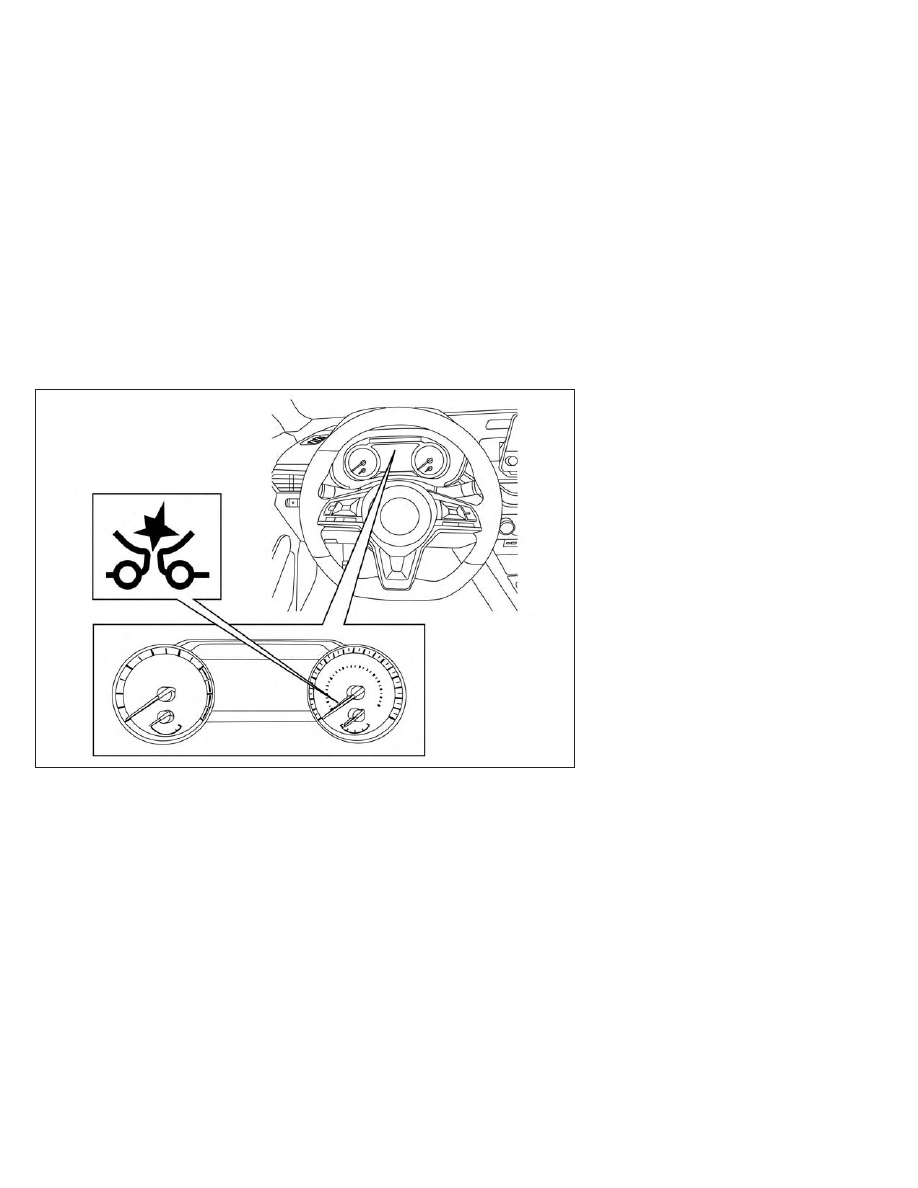
In the following conditions, the AEB with
Pedestrian Detection system warning light
blinks and the system will be turned off
automatically:
• The camera area of the windshield is

misted or frozen.

• Strong light is shining from the front.
• The cabin temperature is over approxi-

mately 104°F (40°C) in direct sunlight.

• The camera area of the windshield glass

is continuously covered with dirt, etc.

Action to take

When the above conditions no longer exist,
the AEB with Pedestrian Detection system
will resume automatically.

NOTE:

When the inside of the windshield on the
camera area is misted or frozen, it will
take a period of time to remove it after
the A/C turns on. If dirt appears on this
area, it is recommended that you visit a
NISSAN dealer.

LSD3238

For vehicles with the 7 inch (18 cm) display

5-118

Starting and driving

In the following conditions, the AEB with
Pedestrian Detection system warning light
illuminates and the system will be turned
off automatically:
• The radar sensor picks up interference

from another radar source.

Action to take

When the above conditions no longer exist,
the AEB with Pedestrian Detection system
will resume automatically.

Condition B:

When there is inclement weather (rain, fog,
snow, etc.) blocking the front radar sensor,
the AEB with Pedestrian Detection system
will be canceled, and the “Forward Driving
Aids temporarily disabled Front Sensor
blocked See Owner’s Manual” warning
message will appear in the vehicle infor-
mation display. The AEB with Pedestrian
Detection system warning light (yellow) will
illuminate.

LSD3912

For vehicles with the 5 inch (13 cm) display

Starting and driving

5-119

Action to take:

When the conditions listed above are no
longer present, the warning message will
no longer be available in the vehicle infor-
mation display. If the “Forward Driving Aids
temporarily disabled Front Sensor blocked
See Owner’s Manual” warning message
continues to be displayed, have the system
checked. It is recommended that you visit a
NISSAN dealer for this service.

Condition C:

When the radar sensor of the front bumper
is covered with dirt or is obstructed, the
AEB with Pedestrian Detection system will
automatically be canceled. The “Forward
Driving Aids temporarily disabled Front
Sensor

blocked

See

Owner’s

Manual”

warning message will appear in the vehicle
information display. The AEB with Pedes-
trian Detection system warning light (yel-
low) will illuminate.

Action to take:

If the warning message appears, stop the
vehicle in a safe place, place the shift lever
in the P (Park) position, and turn the engine
off. When the radar signal is temporarily
interrupted, clean the sensor area of the
front bumper and restart the engine. If the
“Forward Driving Aids temporarily disabled

Front Sensor blocked See Owner’s Manual”
warning message continues to be dis-
played, have the system checked. It is rec-
ommended that you visit a NISSAN dealer
for this service.

Condition D

When driving on roads with limited road
structures or buildings (for example, long
bridges, deserts, snowfields, driving next to
long walls), the system may illuminate the
system warning light and display the “For-
ward Driving Aids Temporarily Disabled
Front Sensor Blocked See Owner’s Manual”
message.

Action to take:

When the above driving conditions no lon-
ger exist, turn the system back on.

Condition E

When the Vehicle Dynamic Control (VDC)
system is turned off, the AEB with Pedes-
trian Detection system braking will not op-
erate. In this case only the visible and au-
dible warning operates. The AEB with
Pedestrian Detection system warning light
(yellow) will illuminate.

Action to take:

When the VDC system is on, the AEB with
Pedestrian Detection system will resume
automatically.

NOTE:
If the AEB with Pedestrian Detection
system stops working, the I-FCW sys-
tem will also stop working.

5-120

Starting and driving

SYSTEM MALFUNCTION

If the AEB with Pedestrian Detection sys-
tem malfunctions, it will be turned off auto-
matically, a chime will sound, the AEB with
Pedestrian Detection system warning light
(yellow) will illuminate and the warning
message [Malfunction] will appear in the
vehicle information display.

Action to take

If the warning light (yellow) comes on, stop
the vehicle in a safe location, turn the en-
gine off and restart the engine. If the
warning light continues to illuminate, have
the AEB with Pedestrian Detection system
checked. It is recommended that you visit a
NISSAN dealer for this service.

SYSTEM MAINTENANCE

The radar sensor is located on the front of
the vehicle

O

B

. The camera is located on

the upper side of the windshield

O

A

.

To keep the AEB with Pedestrian Detection
system operating properly, be sure to ob-
serve the following:
• Always keep the sensor areas of the front

bumper and windshield clean.

• Do not strike or damage the areas around

the sensors (e.g., bumper, windshield).

LSD4448

LSD4810

Starting and driving

5-121

• Do not cover or attach stickers, or install

any accessory near the sensors. This
could block sensor signals and/or cause
failure or malfunction.

• Do not attach metallic objects near the

radar sensor (brush guard, etc.). This
could cause failure or malfunction.

• Do not place reflective materials, such as

white paper or a mirror, on the instru-
ment panel. The reflection of sunlight
may adversely affect the camera unit's
detection capability.

• Do not alter, remove or paint the front

bumper. Before customizing or restoring
the front bumper, it is recommended that
you visit a NISSAN dealer.

Radio frequency statement

For USA

This device complies with Part 15 of the FCC
Rules. Operation is subject to the following
two conditions:

1. This device may not cause harmful inter-

ference, and

2. This device must accept any interfer-

ence received, including interference
that may cause undesired operation.

FCC Warning

Changes or modifications not expressly
approved by the party responsible for
compliance could void the user’s authority
to operate the equipment.

For Canada

This device complies with Part 15 of the FCC
Rules and with Industry Canada licence-
exempt RSS standard(s). Operation is sub-
ject to the following two conditions:

1. This device may not cause interference,

and

2. This device must accept any interfer-

ence received, including interference
that may cause undesired operation of
the device.

Le présent appareil est conforme aux CNR
d'Industrie Canada applicables aux appar-
eils radio exempts de licence. L'exploita-
tion est autorisée aux deux conditions
suivantes:

1. L'appareil ne doit pas produire de brouil-

lage, et

2. L'utilisateur de l'appareil doit accepter

tout

brouillage

radioélectrique

subi,

même si le brouillage est susceptible
d'en compromettre le fonctionnement.

Radio

frequency

radiation

exposure

information:

This equipment complies with FCC and IC
radiation exposure limits set forth for an
uncontrolled environment.

This equipment should be installed and
operated with minimum distance of 30 cm
between the radiator and your body.

This transmitter must not be co-located or
operating in conjunction with any other an-
tenna or transmitter.

Cet équipement est conforme aux limites
d'exposition aux rayonnements IC établies
pour un environnement non contrôlé.

Cet équipement doit être installé et utilisé
avec un minimum de 30 cm de distance
entre la source de rayonnement et votre
corps.

FCC Notice

Changes or modifications not expressly
approved by the party responsible for
compliance could void the user’s authority
to operate the equipment.

5-122

Starting and driving

WARNING

Failure to follow the warnings and in-
structions for proper use of the I-FCW
system could result in serious injury or
death.

The I-FCW system can help warn the
driver before a collision occurs but
will not avoid a collision. It is the driv-
er’s responsibility to stay alert, drive
safely and be in control of the vehicle
at all times.

The I-FCW system can help alert the driver
when there is a sudden braking of a second
vehicle traveling in front of the vehicle
ahead in the same lane.

The I-FCW system uses a radar sensor

O

A

located on the front of the vehicle to mea-
sure the distance to the vehicle ahead in
the same lane.

LSD4811

INTELLIGENT FORWARD COLLISION
WARNING (I-FCW)

Starting and driving

5-123

I-FCW SYSTEM OPERATION

1. Vehicle ahead detection indicator

2. AEB with Pedestrian Detection system

warning light

LSD3282

For vehicles with the 7 inch (18 cm) display

5-124

Starting and driving

LSD4081

For vehicles with the 5 inch (13 cm) display

Starting and driving

5-125

The I-FCW system operates at speeds
above approximately 3 mph (5 km/h).

If there is a potential risk of a forward colli-
sion, the I-FCW system will warn the driver
by blinking the vehicle ahead detection in-
dicator, and sounding an audible alert.

LSD5934

5-126

Starting and driving

TURNING THE I-FCW SYSTEM
ON/OFF

Perform the following steps to turn the
I-FCW system ON or OFF.

For vehicles with the 7 inch (18 cm) display.

1. Press the

button until “Settings” dis-

plays in the vehicle information display.
Use the

button to select “Driver As-

sistance.” Then press the OK button.

2. Select “Emergency Brake” and press the

OK button.

3. Select “Front” and press the OK button to

turn the system on or off.

LSD3237

For vehicles with the 7 inch (18 cm) display

Starting and driving

5-127

For vehicles with the 5 inch (13 cm) display.

1. Press the

button until “Settings” dis-

plays in the vehicle information display.
Use the

button to select “Driver As-

sistance.” Then press the OK button.

2. Select “Driving Aids” and press the OK

button.

3. Select “Emergency Brake” and press the

OK button.

4. Select “Front” and press the OK button to

turn the system on or off.

When the I-FCW system is turned off, the
AEB with Pedestrian Detection system
warning light illuminates.

LSD3929

For vehicles with the 5 inch (13 cm) display

5-128

Starting and driving

NOTE:
• The I-FCW system will be automati-

cally turned on when the engine is
restarted.

• The I-FCW system is integrated into the

AEB with Pedestrian Detection system.
There is not a separate selection in the
vehicle information display for the
I-FCW system. When the AEB with Pe-
destrian Detection is turned off, the
I-FCW system is also turned off.

I-FCW SYSTEM LIMITATIONS

LSD2312

Illustration A

Starting and driving

5-129

WARNING

Listed below are the system limitations
for the I-FCW system. Failure to operate
the vehicle in accordance with these
system limitations could result in seri-
ous injury or death.

The I-FCW system cannot detect all
vehicles under all conditions.

The radar sensor does not detect the
following objects:

Pedestrians, animals or obstacles
in the roadway

Oncoming vehicles

Crossing vehicles

(Illustration A) The I-FCW system
does not function when a vehicle
ahead is a narrow vehicle, such as a
motorcycle.

The radar sensor may not detect a
vehicle

ahead

in

the

following

conditions:

Snow or heavy rain

Dirt, ice, snow or other material
covering the radar sensor.

Interference

by

other

radar

sources.

Snow or road spray from traveling
vehicles.

Driving in a tunnel

(Illustration B) When the vehicle
ahead is being towed.

(Illustration C) When the distance
to the vehicle ahead is too close,
the beam of the radar sensor is
obstructed.

LSD2265

Illustration B

5-130

Starting and driving

(Illustration D) When driving on a
steep downhill slope or roads with
sharp curves.

The system is designed to automati-
cally check the sensor’s functionality,
within certain limitations. The sys-
tem may not detect some forms of
obstruction of the sensor area such
as ice, snow, stickers, etc. In these
cases, the system may not be able to
warn the driver properly. Be sure that
you check, clean and clear the sensor
area regularly.

Excessive noise will interfere with the
warning chime sound, and the chime
may not be heard.

Starting and driving

5-131

LSD2266

Illustration C

5-132

Starting and driving

LSD2313

Illustration D

Starting and driving

5-133

SYSTEM TEMPORARILY
UNAVAILABLE

Condition A

When the radar sensor picks up interfer-
ence from another radar source, making it
impossible to detect a vehicle ahead, the
I-FCW system is automatically turned off.

The AEB with Pedestrian Detection system
warning light (yellow) will illuminate.

Action to take

When the above conditions no longer exist,
the I-FCW system will resume automatically.

Condition B

When there is inclement weather (rain, fog,
snow, etc.) blocking the front radar sensor,
the I-FCW system will automatically be
canceled, and the “Forward Driving Aids
temporarily disabled Front Sensor blocked
See Owner’s Manual” warning message will
appear in the vehicle information display.
The AEB with Pedestrian Detection system
warning light (yellow) will illuminate.

LSD3238

For vehicles with the 7 inch (18 cm) display

5-134

Starting and driving

Action to take:

When the conditions listed above are no
longer present, the warning message will
no longer be available in the vehicle infor-
mation display. If the “Forward Driving Aids
temporarily disabled Front Sensor blocked
See Owner’s Manual” warning message
continues to be displayed, have the system
checked. It is recommended that you visit a
NISSAN dealer for this service.

Condition C

When the radar sensor of the front bumper
is covered with dirt or is obstructed, the
I-FCW system will automatically be can-
celed. The “Forward Driving Aids temporar-
ily disabled Front Sensor blocked See Own-
er’s Manual” warning message will appear
in the vehicle information display. The AEB
with Pedestrian Detection system warning
light (yellow) will illuminate.

Action to take:

If the warning message appears, stop the
vehicle in a safe place, place the shift lever
in the P (Park) position, and turn the engine
off. When the radar signal is temporarily
interrupted, clean the sensor area of the
front bumper and restart the engine. If the
“Forward Driving Aids temporarily disabled
Front Sensor blocked See Owner’s Manual”

LSD3912

For vehicles with the 5 inch (13 cm) display

Starting and driving

5-135

warning message continues to be dis-
played, have the system checked. It is rec-
ommended that you visit a NISSAN dealer
for this service.

Condition D

When driving on roads with limited road
structures or buildings (for example, long
bridges, deserts, snowfields, driving next to
long walls), the system may illuminate the
system warning light and display the “For-
ward Driving Aids temporarily disabled
Front Sensor blocked See Owner’s Manual”
warning message.

Action to take:

When the above driving conditions no lon-
ger exist, turn the system back on.

NOTE:

If the AEB with Pedestrian Detection sys-
tem stops working, the I-FCW system will
also stop working.

SYSTEM MALFUNCTION

If the I-FCW system malfunctions, it will be
turned off automatically, a chime will
sound, the AEB with Pedestrian Detection
system warning light (yellow) will illuminate
and the warning message [Malfunction]
will appear in the vehicle information
display.

Action to take

If the warning light (yellow) comes on, stop
the vehicle in a safe location, turn the en-
gine off and restart the engine. If the
warning light continues to illuminate, have
the I-FCW system checked. It is recom-
mended that you visit a NISSAN dealer for
this service.

LSD4448

5-136

Starting and driving

SYSTEM MAINTENANCE

The sensor

O

A

is located on the front of the

vehicle.

To keep the system operating properly, be
sure to observe the following:
• Always keep the sensor area of the front

bumper clean.

• Do not strike or damage the areas

around the sensor.

• Do not cover or attach stickers or similar

objects on the front bumper near the
sensor area. This could cause failure or
malfunction.

• Do not attach metallic objects near the

sensor area (brush guard, etc.). This could
cause failure or malfunction.

• Do not alter, remove or paint the front

bumper. Before customizing or restoring
the front bumper, it is recommended that
you visit a NISSAN dealer.

FCC Notice

For USA

This device complies with Part 15 of the
FCC Rules. Operation is subject to the fol-
lowing two conditions:

1.

This device may not cause harmful in-
terference, and

2.

This device must accept any interfer-
ence received, including interference
that may cause undesired operation.

FCC Warning

Changes or modifications not expressly
approved by the party responsible for
compliance could void the user’s author-
ity to operate the equipment.

For Canada

This

device

complies

with

Industry

Canada licence-exempt RSS standard(s).
Operation is subject to the following two
conditions:

1.

This device may not cause interfer-
ence,

2.

This device must accept any interfer-
ence, including interference that may
cause undesired operation of the
device.

LSD4811

Starting and driving

5-137

WARNING

Failure to follow the warnings and in-
structions for proper use of the I-DA
system could result in serious injury or
death.

The I–DA system is only a warning to
inform the driver of a potential lack
of driver attention or drowsiness. It
will not steer the vehicle or prevent
loss of control.

The I–DA system does not detect and
provide an alert of the driver’s lack
of attention or fatigue in every
situation.

It is the driver’s responsibility to:

stay alert,

drive safely,

keep the vehicle in the traveling
lane,

be in control of the vehicle at all
times,

avoid driving when tired,

avoid distractions (texting, etc.).

The I–DA system helps alert the driver if the
system detects a lack of attention or driv-
ing fatigue.

The system monitors driving style and
steering behavior over a period of time,
and it detects changes from the normal
pattern. If the system detects that driver
attention is decreasing over a period of
time, the system uses audible and visual
warnings to suggest that the driver take a
break.

INTELLIGENT DRIVER ALERTNESS
SYSTEM OPERATION

LSD3239

For vehicles with the 7 inch (18 cm)

display

INTELLIGENT DRIVER ALERTNESS
(I-DA)

5-138

Starting and driving

If the system detects driver fatigue or that
driver attention is decreasing, the mes-
sage “Take a break?” appears in the vehicle
information display and a chime sounds
when the vehicle is driven at speeds above
37 mph (60 km/h).

The system continuously monitors driver
attention and can provide multiple warn-
ings per trip.

The system resets and starts reassessing
driving style and steering behavior when
the ignition switch is cycled from the ON to
the OFF position and back to the ON
position.

The I–DA system does not activate when
the Steering Assist is active.

LSD3913

For vehicles with the 5 inch (13 cm)

display

Starting and driving

5-139

HOW TO ENABLE/DISABLE THE
INTELLIGENT DRIVER ALERTNESS
(I-DA) SYSTEM

Perform the following steps to enable or
disable the I–DA system.

1. Press the

button until “Settings” dis-

plays in the vehicle information display.
Use the

button to select “Driver As-

sistance.” Then press the OK button.

2. Select “Driver Attention Alert” or “ Driver

Attention” and press the OK button to
turn the system on or off.

NOTE:
The setting will be retained even if the
engine is restarted.

LSD3218

For vehicles with the 7 inch (18 cm) display

5-140

Starting and driving

INTELLIGENT DRIVER ALERTNESS
(I-DA) SYSTEM LIMITATIONS

WARNING

Listed below are the system limitations
for the I–DA system. Failure to operate
the vehicle in accordance with these
system limitations could result in seri-
ous injury or death.

The I-DA system may not operate
properly and may not provide an
alert in the following conditions:

Poor road conditions such as an

uneven road surface or pot holes.

Strong side wind.

If you have adopted a sporty driving

style with higher cornering speeds
or higher rates of acceleration.

Frequent lane changes or changes

to vehicle speed.

The I–DA system will not provide an
alert in the following conditions:

Vehicle speeds lower than 37 mph

(60 km/h).

Short lapses of attention.

Instantaneous distractions such

as dropping an object.

LSD3930

For vehicles with the 5 inch (13 cm) display

Starting and driving

5-141

System malfunction

If the Intelligent Driver Alertness system
malfunctions, the system warning mes-
sage will appear in the vehicle information
display and the function will be stopped
automatically.

Action to take

Stop the vehicle in a safe location, place the
vehicle in P (Park) position, turn the engine
off and restart the engine. If the system
warning message continues to appear,
have the system checked. It is recom-
mended that you visit a NISSAN dealer for
this service.

CAUTION

During the first 1,200 miles (2,000 km),
follow these recommendations to ob-
tain maximum engine performance
and ensure the future reliability and
economy of your new vehicle. Failure to
follow these recommendations may
result in shortened engine life and re-
duced engine performance.

• Avoid driving for long periods at constant

speed, either fast or slow, and do not run
the engine over 4,000 rpm.

• Do not accelerate at full throttle in any

gear.

• Avoid quick starts.
• Avoid hard braking as much as possible.

LIC3125

BREAK-IN SCHEDULE

5-142

Starting and driving

Follow these easy-to-use Fuel Efficient
Driving Tips to help you achieve the most
fuel economy from your vehicle.

1.

Use Smooth Accelerator and Brake
Pedal Application

• Avoid rapid starts and stops.
• Use smooth, gentle accelerator and

brake application whenever possible.

• Maintain constant speed while com-

muting and coast whenever possible.

2.

Maintain Constant Speed

• Look ahead to try and anticipate and

minimize stops.

• Synchronizing your speed with traffic

lights allows you to reduce your num-
ber of stops.

• Maintaining a steady speed can mini-

mize red light stops and improve fuel
efficiency.

3.

Use Air Conditioning (A/C) at Higher
Vehicle Speeds

• Below 40 mph (64 km/h), it is more

efficient to open windows to cool the
vehicle due to reduced engine load.

• Above 40 mph (64 km/h), it is more

efficient to use A/C to cool the vehicle
due to increased aerodynamic drag.

• Recirculating the cool air in the cabin

when the A/C is on reduces cooling
load.

4.

Drive

at

Economical

Speeds

and

Distances

• Observing the speed limit and not ex-

ceeding 60 mph (97 km/h) (where le-
gally allowed) can improve fuel effi-
ciency due to reduced aerodynamic
drag.

• Maintaining a safe following distance

behind other vehicles reduces unnec-
essary braking.

• Safely monitoring traffic to anticipate

changes in speed permits reduced
braking

and

smooth

acceleration

changes.

• Select a gear range suitable to road

conditions.

5.

Use Cruise Control

• Using cruise control during highway

driving helps maintain a steady speed.

• Cruise control is particularly effective

in providing fuel savings when driving
on flat terrains.

6.

Plan for the Shortest Route

• Utilize a map or navigation system to

determine the best route to save time.

7.

Avoid Idling

• Shutting off your engine when safe for

stops exceeding 30–60 seconds saves
fuel and reduces emissions.

8.

Buy an Automated Pass for Toll Roads

• Automated passes permit drivers to

use special lanes to maintain cruising
speed through the toll and avoid stop-
ping and starting.

9.

Winter Warm Up

• Limit idling time to minimize impact to

fuel economy.

• Vehicles typically need no more than

30 seconds of idling at start-up to ef-
fectively circulate the engine oil before
driving.

• Your vehicle will reach its ideal operat-

ing temperature more quickly while
driving versus idling.

10.

Keeping your Vehicle Cool

• Park your vehicle in a covered parking

area

or

in

the

shade

whenever

possible.

• When entering a hot vehicle, opening

the windows will help to reduce the
inside temperature faster, resulting in
reduced demand on your A/C system.

FUEL EFFICIENT DRIVING TIPS

Starting and driving

5-143

• Keep your engine tuned up.
• Follow the recommended scheduled

maintenance.

• Keep the tires inflated to the correct pres-

sure. Low tire pressure increases tire
wear and lowers fuel economy.

• Keep the wheels in correct alignment. Im-

proper alignment increases tire wear and
lowers fuel economy.

• Use the recommended viscosity engine

oil. For additional information, see “Engine
oil

and

oil

filter

recommendations”

(P. 10-7).

If any malfunction occurs in the AWD sys-
tem while the engine is running, messages
are displayed in the meter.

If the AWD error warning message is dis-
played, there may be a malfunction in the
AWD system. Reduce vehicle speed and
have your vehicle checked. It is recom-
mended that you visit a NISSAN dealer as
soon as possible.

LSD3252

INCREASING FUEL ECONOMY

ALL-WHEEL DRIVE (AWD) (if so
equipped)

5-144

Starting and driving

The AWD high temperature message may
be displayed while trying to free a stuck
vehicle due to increased oil temperature.
The driving mode may change to 2-wheel
drive. If this message is displayed, stop the
vehicle with the engine idling, as soon as it
is safe to do so. Then if the message turns
off, you can continue driving.

The tire size message may be displayed if
there is a large difference between the di-
ameters of front and rear wheels. Pull off
the road in a safe area, with the engine
idling. Check that all tire sizes are the same,
that the tire pressure is correct and that
the tires are not excessively worn.

If any warning messages continue to be
displayed, have your vehicle checked. It is
recommended that you visit a NISSAN
dealer as soon as possible.

WARNING

Do not drive beyond the perfor-
mance capability of the tires. Acceler-
ating quickly, sharp steering maneu-
vers or sudden braking may cause
loss

of

control,

even

with

AWD

engaged.

For AWD equipped vehicles, do not
attempt to raise two wheels off the
ground and shift the transmission to
any drive or reverse position with the
engine running. Doing so may result
in drivetrain damage or unexpected
vehicle movement which could result
in serious personal injury or vehicle
damage.

LSD3253

LSD3254

Starting and driving

5-145

Do not attempt to test an AWD
equipped vehicle on a 2-wheel dyna-
mometer (such as the dynamometers
used by some states for emissions
testing) or similar equipment even if
the other two wheels are raised off the
ground. Make sure that you inform the
test facility personnel that your ve-
hicle is equipped with AWD before it is
placed on a dynamometer. Using the
wrong test equipment may result in
drivetrain damage or unexpected ve-
hicle movement which could result
in serious personal injury or vehicle
damage.

CAUTION

Do not operate the engine on a free
roller when any of the wheels are
raised.

If you use the free roller, rotate four
wheels with the same speed without
raising any wheels.

If an AWD warning message is dis-
played while driving there may be a
malfunction in the AWD system. Re-
duce the vehicle speed immediately
and have your vehicle checked. It is
recommended

that

you

visit

a

NISSAN dealer as soon as possible.

The powertrain may be damaged if
you continue driving when the AWD
temperature or tire size incorrect
messages are displayed

If the AWD high temperature mes-
sage is displayed while you are driv-
ing, pull off the road in a safe area,
and idle the engine. The driving
mode will change to 2WD to prevent
the AWD system from malfunction-
ing. If the warning message turns off,
you can drive again.

If the tire size incorrect message is
displayed while you are driving, pull
off the road in a safe area with the
engine idling. Check that all tire sizes
are the same, that the tire pressure is
correct and that the tires are not ex-
cessively worn.

If a warning message continues to be
displayed after the above opera-
tions, have your vehicle checked as
soon as possible. It is recommended
that you visit a NISSAN dealer for this
service.

5-146

Starting and driving

WARNING

Do not stop or park the vehicle over
flammable materials such as dry
grass, waste paper or rags. They may
ignite and cause a fire.

Safe parking procedures require that
both the parking brake be set and the
transmission placed into P (Park).
Failure to do so could cause the ve-
hicle to move unexpectedly or roll
away and result in an accident. Make
sure the shift lever has been pushed
as far forward as it can go and cannot
be moved without depressing the
foot brake pedal.

Never leave the engine running while
the vehicle is unattended.

Do not leave children unattended in-
side the vehicle. They could unknow-
ingly activate switches or controls or
make the vehicle move. Unattended
children could become involved in
serious accidents.

To help avoid risk of injury or death
through unintended operation of the
vehicle and/or its systems, do not
leave children, people who require
the assistance of others or pets unat-
tended in your vehicle. Additionally,

the temperature inside a closed ve-
hicle on a warm day can quickly be-
come high enough to cause a signifi-
cant risk of injury or death to people
and pets.

1. Firmly apply the parking brake.

2. Move the shift lever to the P (Park)

position.

3. To help prevent the vehicle from rolling

into traffic when parked on an incline, it
is a good practice to turn the wheels as
illustrated.

HEADED DOWNHILL WITH CURB

O

A

:

Turn the wheels into the curb and move
the vehicle forward until the curb side
wheel gently touches the curb.

HEADED UPHILL WITH CURB

O

B

:

Turn the wheels away from the curb and
move the vehicle back until the curb
side wheel gently touches the curb.

HEADED UPHILL OR DOWNHILL, NO
CURB

O

C

:

Turn the wheels toward the side of the
road so the vehicle will move away
from the center of the road if it moves.

4. Place the ignition switch in the LOCK

position.

WSD0050

PARKING/PARKING ON HILLS

Starting and driving

5-147

WARNING

If the engine is not running or is
turned off while driving, the power
assist for the steering will not work.
Steering will be harder to operate.

When the power steering warning
light illuminates with the engine run-
ning, there will be no power assist for
the steering. You will still have control
of the vehicle, but the steering will be
much harder to operate. Have the
power steering system checked. It is
recommended

that

you

visit

a

NISSAN dealer for this service.

The power steering system is designed to
provide power assistance while driving to
operate the steering wheel with light force.

When the steering wheel is operated re-
peatedly or continuously while parking or
driving at a very low speed, the power as-
sist for the steering wheel will be reduced.
This is to prevent overheating of the power
steering system and protect it from getting
damaged. While the power assist is re-
duced, steering wheel operation will be-
come heavy. If the steering wheel opera-
tion is still performed, the power steering
may stop and the power steering warning

light will illuminate. In a safe location, stop
the engine and place the ignition switch in
the OFF position. The temperature of the
power steering system will go down after a
period of time and the power assist level
will return to normal after starting the en-
gine. The power steering warning light will
go off. Avoid repeating such steering wheel
operations that could cause the power
steering system to overheat.

You may hear a noise from the front of the
vehicle when the steering wheel is oper-
ated. This is a normal operational noise
and is not a malfunction.

If the power steering warning light illumi-
nates while the engine is running, it may
indicate the power steering system is not
functioning properly and may need servic-
ing. Have the power steering system
checked. It is recommended that you visit a
NISSAN dealer for this service.

When the power steering warning light illu-
minates with the engine running, the
power assist for the steering will cease op-
eration but you will still have control of the
vehicle. At this time, greater steering efforts
are required to operate the steering wheel,
especially in sharp turns and at low speeds.

The brake system has two separate hy-
draulic circuits. If one circuit malfunctions,
you will still have braking at two wheels.

BRAKE PRECAUTIONS

Vacuum assisted brakes

The brake booster aids braking by using
engine vacuum. If the engine stops, you
can stop the vehicle by depressing the
brake pedal. However, greater foot pres-
sure on the brake pedal will be required to
stop the vehicle and stopping distance will
be longer.

Using the brakes

Avoid resting your foot on the brake pedal
while driving. This will overheat the brakes,
wear out the brake pads faster, and reduce
gas mileage.

To help reduce brake wear and to prevent
the brakes from overheating, reduce speed
and downshift to a lower gear before going
down a slope or long grade. Overheated
brakes may reduce braking performance
and could result in loss of vehicle control.

POWER STEERING

BRAKE SYSTEM

5-148

Starting and driving

WARNING

While driving on a slippery surface,
be careful when braking, accelerat-
ing or downshifting. Abrupt braking
or

accelerating

could

cause

the

wheels to skid and result in an
accident.

If the engine is not running or is
turned off while driving, the power
assist for the brakes will not work.
Braking will be harder.

Wet brakes

When the vehicle is washed or driven
through water, the brakes may get wet. As
a result, your braking distance will be lon-
ger and the vehicle may pull to one side
during braking.

To dry the brakes, drive the vehicle at a safe
speed while lightly pressing the brake
pedal to heat up the brakes. Do this until
the brakes return to normal. Avoid driving
the vehicle at high speeds until the brakes
function correctly.

Parking brake break-in

Break in the parking brake shoes whenever
the stopping effect of the parking brake is
weakened or whenever the parking brake
shoes and/or drums/rotors are replaced,
in order to assure the best braking
performance.

This procedure is described in the vehicle
service manual. It is recommended that
you visit a NISSAN dealer for this service.

ANTI-LOCK BRAKING SYSTEM (ABS)

WARNING

The ABS is a sophisticated device, but
it cannot prevent accidents resulting
from careless or dangerous driving
techniques. It can help maintain ve-
hicle control during braking on slip-
pery surfaces. Remember that stop-
ping distances on slippery surfaces
will be longer than on normal sur-
faces even with ABS. Stopping dis-
tances may also be longer on rough,
gravel or snow covered roads, or if
you are using tire chains. Always
maintain a safe distance from the ve-
hicle in front of you. Ultimately, the
driver is responsible for safety.

Tire type and condition may also af-
fect braking effectiveness.

When replacing tires, install the

specified size of tires on all four
wheels.

When installing a spare tire, make

sure that it is the proper size and
type as specified on the Tire and
Loading Information label. For ad-
ditional information, see “Tire and
Loading

Information

label”

(P. 10-14).

For additional information, see

“Wheels and tires” (P. 8-28).

The ABS controls the brakes so the wheels
do not lock during hard braking or when
braking on slippery surfaces. The system
detects the rotation speed at each wheel
and varies the brake fluid pressure to pre-
vent each wheel from locking and sliding.
By preventing each wheel from locking, the
system helps the driver maintain steering
control and helps to minimize swerving
and spinning on slippery surfaces.

Starting and driving

5-149


Content      ..     12      13      14      15     ..