Mitsubishi Lancer Evolution IX. Manual - part 136
SYMPTOM PROCEDURES
SMART WIRING SYSTEM (SWS) NOT USING SWS MONITOR
54B-107
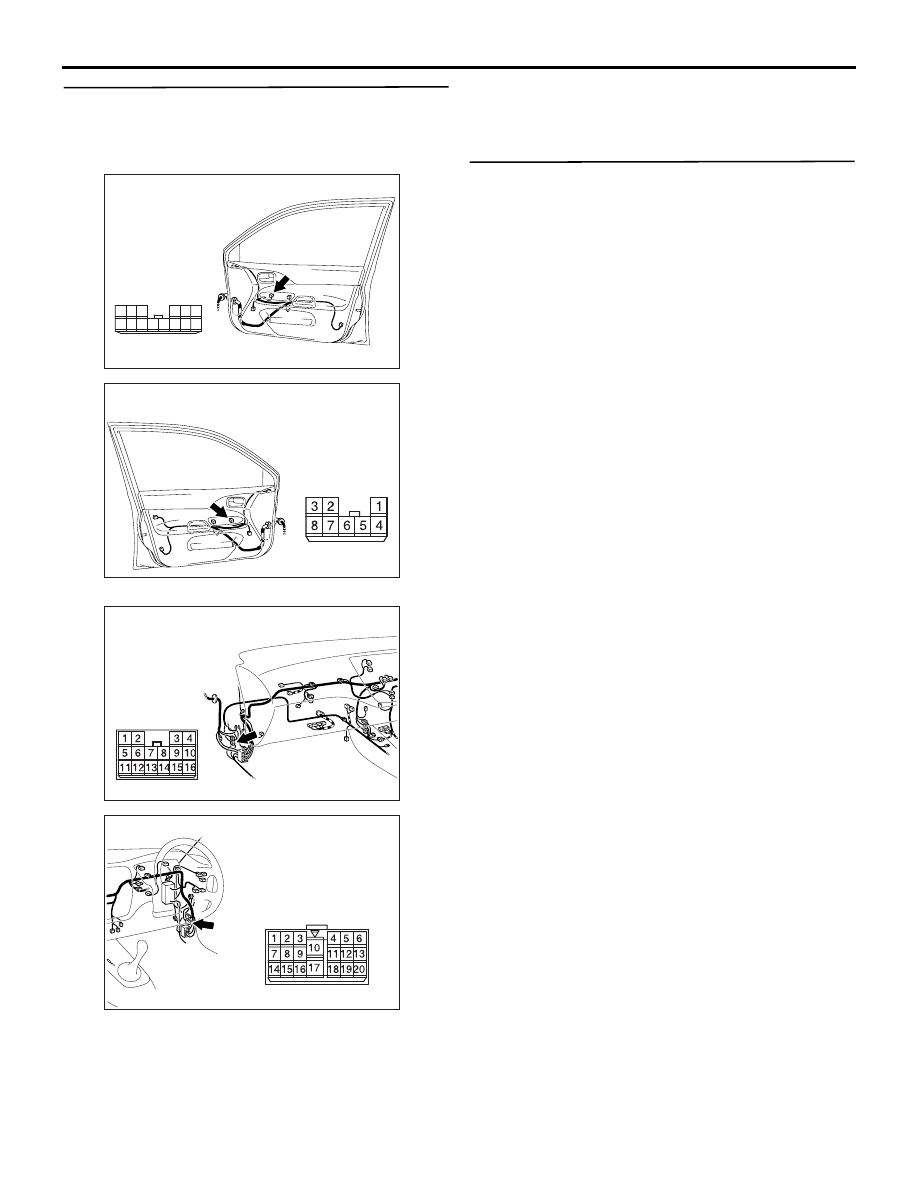
Step 8. Check the wiring harness between E-05
power window main switch connector terminal
No.11 and E-14 front power window sub switch
connector terminal No.6.
NOTE:
Prior to the wiring harness inspection, check interme-
diate connectors C-17, C-110, and repair if neces-
sary.
• Check the communication lines for open circuit.
Q: Is the check result normal?
YES :
Go to Step 9.
NO :
Repair the wiring harness.
Step 9. Retest the system.
After the front power window sub switch is replaced,
check that the front passenger's door power window
can be operated by the power window sub switch.
(1) Replace the front power window sub switch.
(2) Check that the front passenger's power window
works by means of the power window main
switch.
Q: Is the check result normal?
YES :
The trouble can be an intermittent
malfunction (Refer to GROUP 00
− How to
Cope with Intermittent Malfunction
NO :
Replace the power window main switch.
AC310493
Connector: E-05 <RHD>
AG
Harness side
10
1
6
14
5
12
13
4
11
7
2
3
8
9
Front door (RH)
AC310498
Connector: E-14 <RHD>
Harness side
AC
Front door (LH)
AC310454
Connector: C-17 <RHD>
AH
AC310456
Connector: C-110 <RHD>
AH