Mazda MX-30 (2022 year). Manual in english - page 9
When Driving
i-ACTIVSENSE
¾ Under bad weather conditions (rain,
A condition under which the
fog, and snow).
Forward Sensing Camera (FSC)
¾ Tires other than the specified size are
cannot detect a target object is
used, such as when tire chains or
met.
temporary spare tires are used.
Refer to Forward Sensing Camera
(FSC) on page 4-71.
Switch the TJA off when it is not being
The Forward Sensing Camera (FSC)
used.
cannot recognize the area in front
Leaving the TJA on when it is not in use
of the vehicle.
is dangerous as it could operate
The visibility of white (yellow) lane
unexpectedly, resulting in an accident.
lines is poor.
There are multiple white (yellow)
Do not get out of the vehicle while
lane lines.
the stop hold control is operating.
There is a misleading line which
Getting out of the vehicle while the
looks like a white (yellow) lane
stop hold control is operating is
line.
dangerous as the vehicle may move
The distance to the vehicle ahead
unexpectedly and result in an accident.
is close.
Before leaving the vehicle, switch the
The width of the vehicle lane is
TJA off, shift the selector lever to the P
narrow or wide.
position, and apply the parking brake.
A vehicle ahead is driving
erratically.
NOTE
A vehicle ahead veers off course
from your vehicle's line of travel.
The TJA does not operate with the
The vehicle is driven through an
following objects.
intersection, a junction, or a fork in
On-coming vehicles
the road.
Pedestrians
▼ Traffic Jam Assist (TJA) Display
Stationary objects (such as
Indication
stopped vehicles, obstructions)
If a vehicle ahead is traveling at an
The TJA setting status and operation
extremely low speed, the system may
conditions are indicated on the
not detect it correctly.
multi-information display and the
A brake operation sound may be
active driving display.
heard by the TJA control, however, it
does not indicate a problem.
The brake lights turn on while the
brakes and stop hold control are
operating by the TJA control.
When any of the following
conditions is met, the TJA may not be
able to detect white (yellow) lane
lines or vehicles ahead correctly and
the TJA may not operate normally.
4-119
When Driving
i-ACTIVSENSE
Multi-information display (Basic
display on the display changes from
display)
white to green.
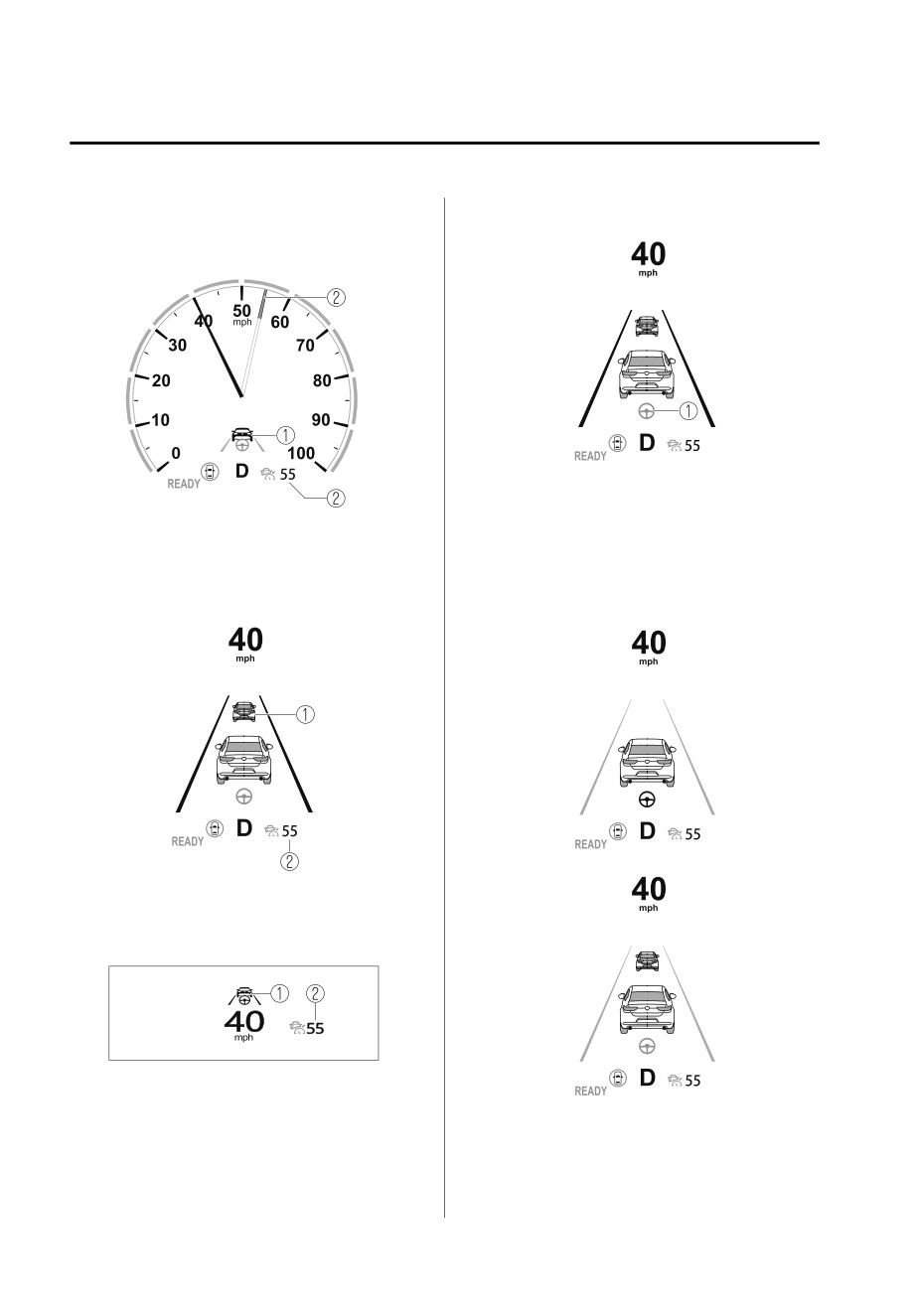
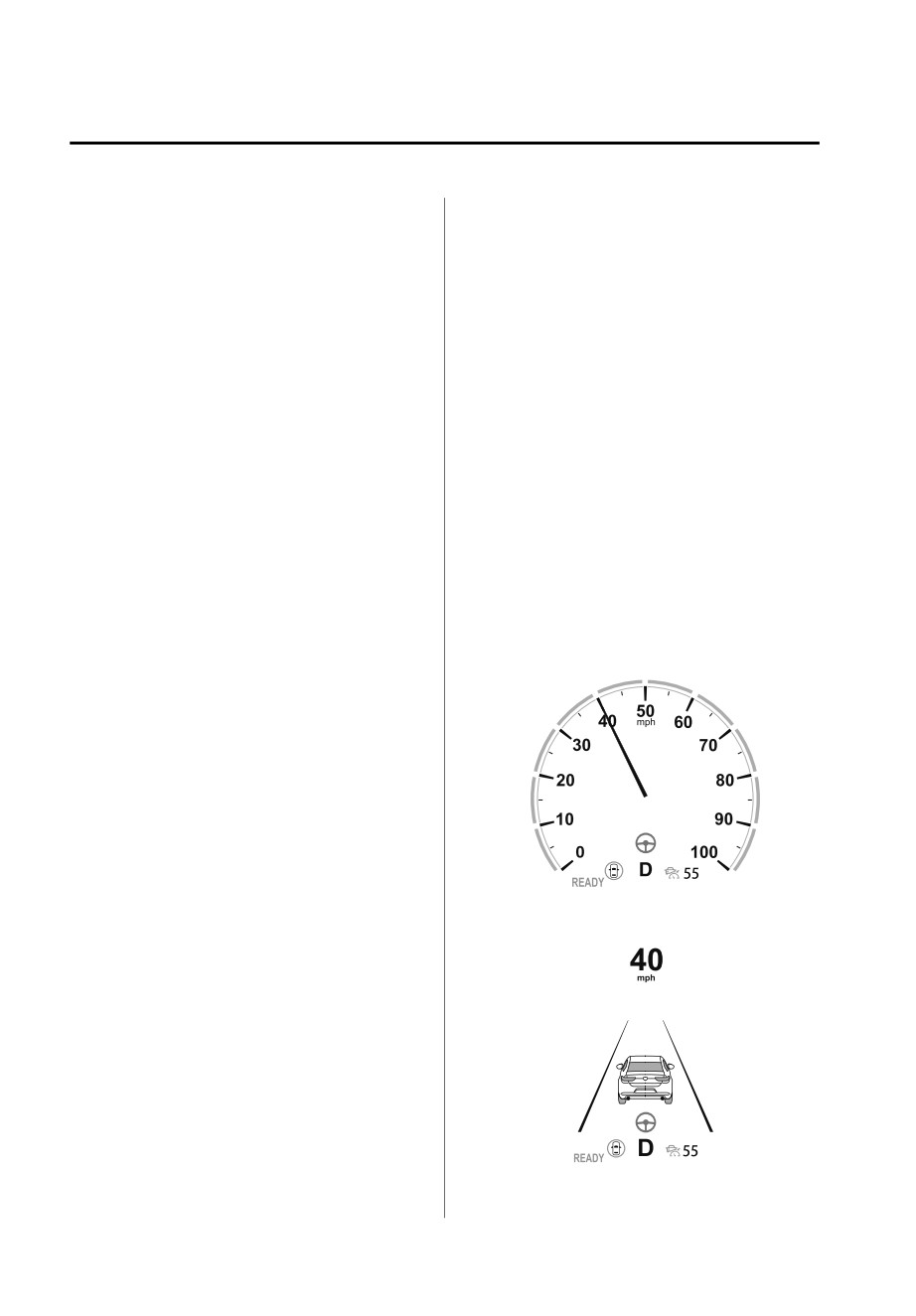
1. Steering assist operation display
NOTE
1. Vehicle ahead display
You can check if the steering assist
2. TJA set vehicle speed
function is following the lane lines or it
is following vehicles ahead, on the
Multi-information display
multi-information display.
(i-ACTIVSENSE display)
Inactive
Active (vehicle ahead)
1. Vehicle ahead display
2. TJA set vehicle speed
Active driving display
1. Vehicle ahead display
2. TJA set vehicle speed
Steering assist function display
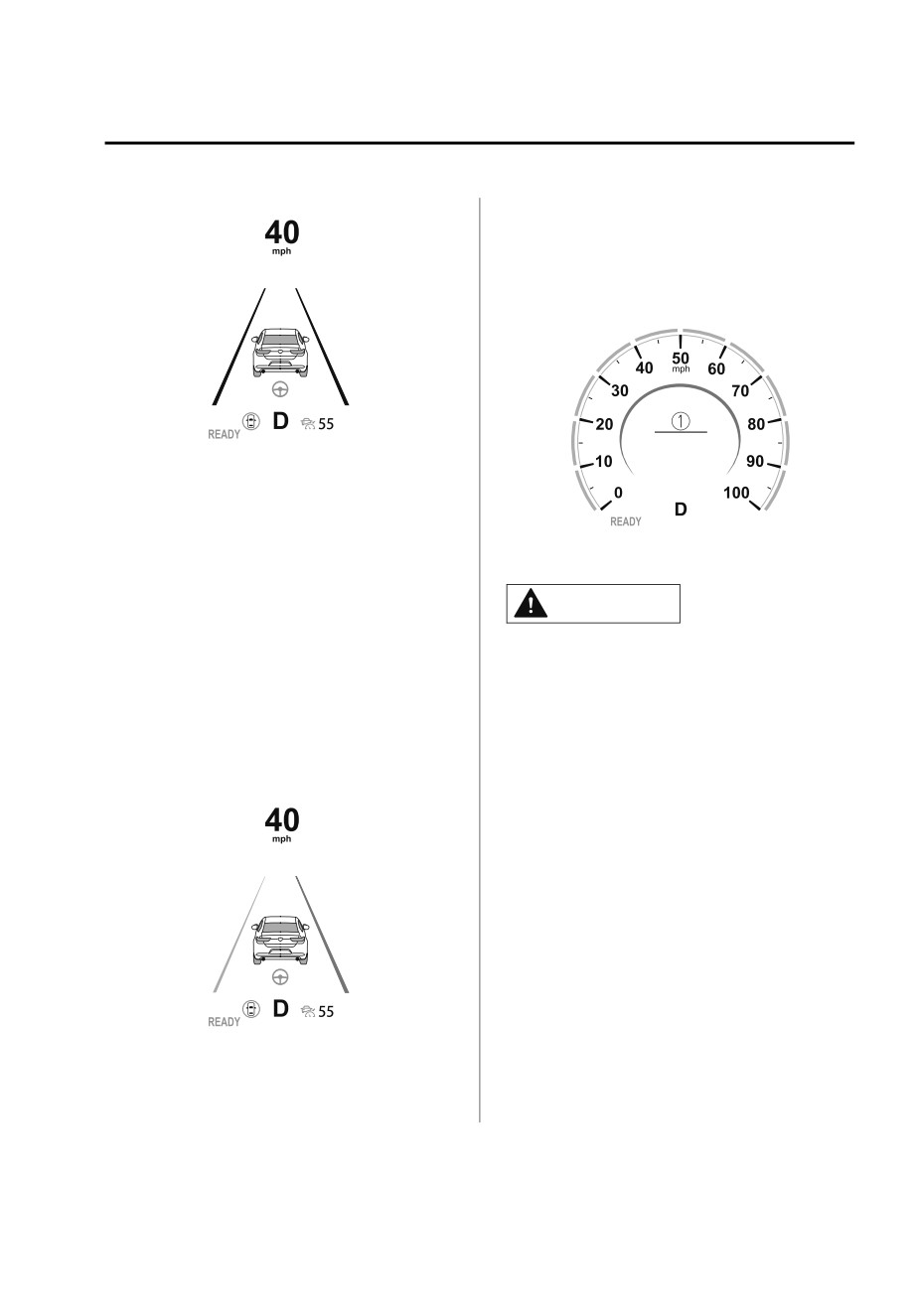
When the steering assist function
operates, the steering assist operation
4-120
When Driving
i-ACTIVSENSE
Active (lane line)
control using the Traffic Jam Assist
(TJA), a warning sound is activated and
a brake warning is indicated on the
multi-information display. Check the
surrounding conditions and keep a
safe distance from the vehicle ahead.
If there is a problem with the TJA, a
message is displayed on the display.
Check the details of the problem and
then have your vehicle inspected by an
1.
“Depress Brake Pedal” message is
Authorized Mazda Dealer.
displayed
Refer to If a Warning Light Turns On or
Flashes on page 7-21.
CAUTION
▼ Steering Assist Limit Warning
¾ While the accelerator pedal is being
If the steering assist function cannot
depressed, the warnings and brake
keep the vehicle within the lane lines,
control do not operate even if your
a warning sound is activated and the
vehicle approaches the vehicle
lane line of the direction reaching the
ahead.
limit is displayed on the
¾ In the following cases, the warnings
multi-information display to urge you
and brakes may not operate even if
to operate the steering wheel.
your vehicle approaches the vehicle
ahead.
¾ Your vehicle is being driven at the
same speed as the vehicle ahead.
¾ Immediately after the Traffic Jam
Assist (TJA) is set.
¾ Immediately after the accelerator
pedal is released.
¾ Another vehicle cuts into the
driving lane.
▼ Close Proximity Warning
If your vehicle approaches the vehicle
ahead while traveling under headway
4-121
When Driving
i-ACTIVSENSE
▼ Setting the System
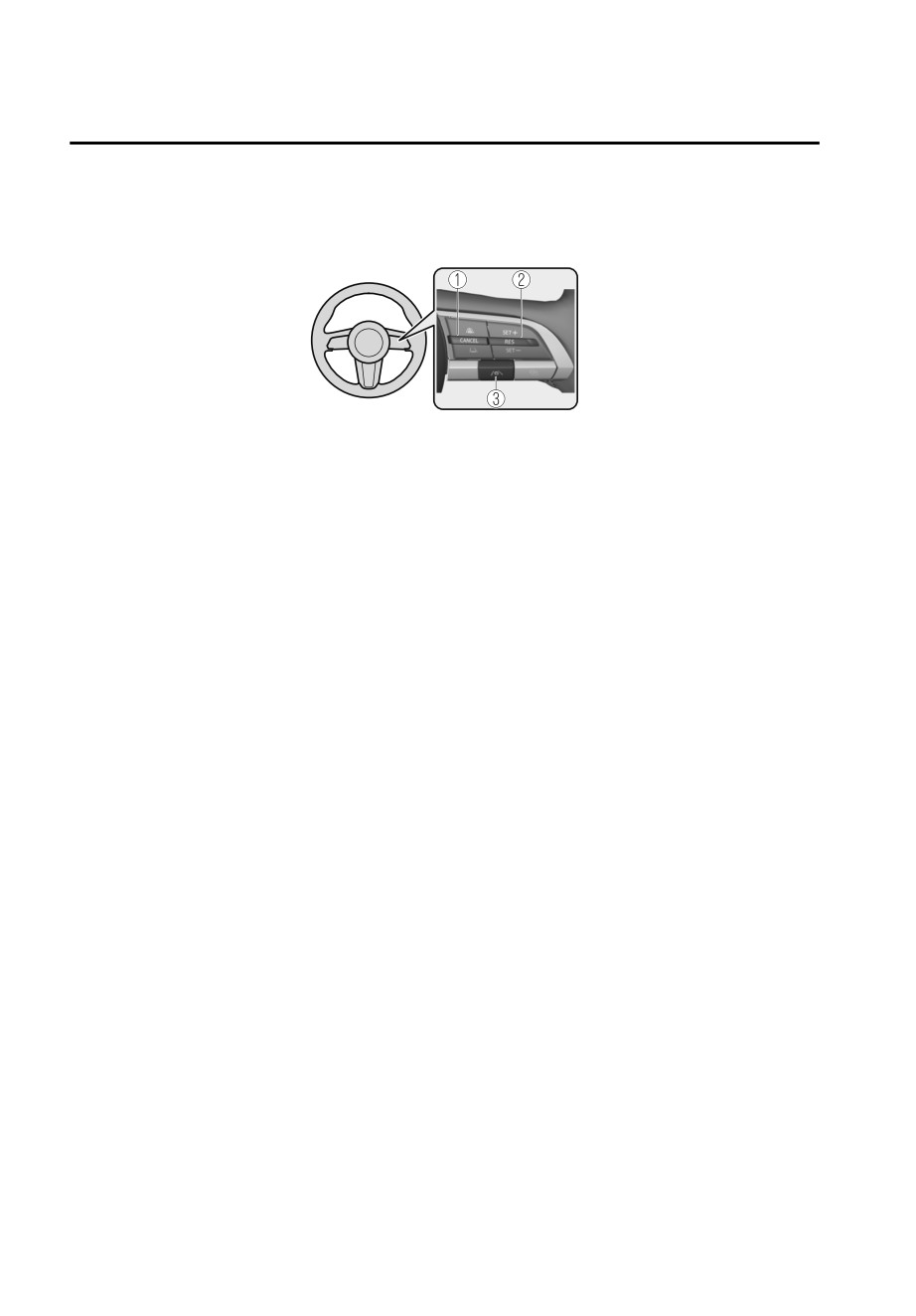
Operation switch
1. CANCEL switch
2. RES switch
3. TJA switch
Operation conditions
Headway control function
The headway control operates when all of the following conditions are met.
The TJA is on.
The selector lever is in the D position.
The parking brake is released.
All the doors are closed.
The driver's seat belt is fastened.
Vehicle speed is 0 to 140 km/h (0 to 87 mph)
Steering assist function
The steering assist function operates when all of the following conditions are met.
The headway control function is operating.
The vehicle is being driven at a speed of less than about 56 km/h (35 mph).
When driving near the center of the lane and the white (yellow) lane lines on both
sides are detected clearly, or a vehicle ahead is detected clearly in front of your
vehicle.
The steering wheel is not turned sharply.
The turn signal lever is not operated.
NOTE
The steering operation assist is performed so that the vehicle remains near the
center of the driving lane, however, depending on conditions such as the road
curvature, road slope and undulations, and vehicle speed, the function might not
be able to keep the vehicle near the center of the driving lane.
Under the following conditions, the TJA cannot be used when the vehicle speed is
30 km/h (20 mph) or slower.
The Forward Sensing Camera (FSC) cannot detect target objects.
There is a problem with the Electric Parking Brake (EPB).
4-122
When Driving
i-ACTIVSENSE
There is a problem with the stop hold control function.
Setting the vehicle speed
1. Press the TJA switch to turn the system on.
2. Accelerate the vehicle until it reaches the desired speed using the accelerator
pedal and press the RES switch up (SET+) or down (SET-) to set the speed.
NOTE
When the system is turned on, the TJA standby indication (white) turns on and the
TJA display indication is displayed on the multi-information display and the active
driving display.
When the vehicle speed is set, the set vehicle speed is displayed on the displays
and the TJA standby indication (white) changes to the TJA set indication (green)
The minimum speed setting is 30 km/h (19 mph).
When the TJA switch is pressed while the Mazda Radar Cruise Control with Stop &
Go function (MRCC with Stop & Go function) system is operating, the MRCC with
Stop & Go function switches to the TJA. In addition, when the MRCC switch is
pressed while the TJA is operating, the TJA switches to the MRCC with Stop & Go
function.
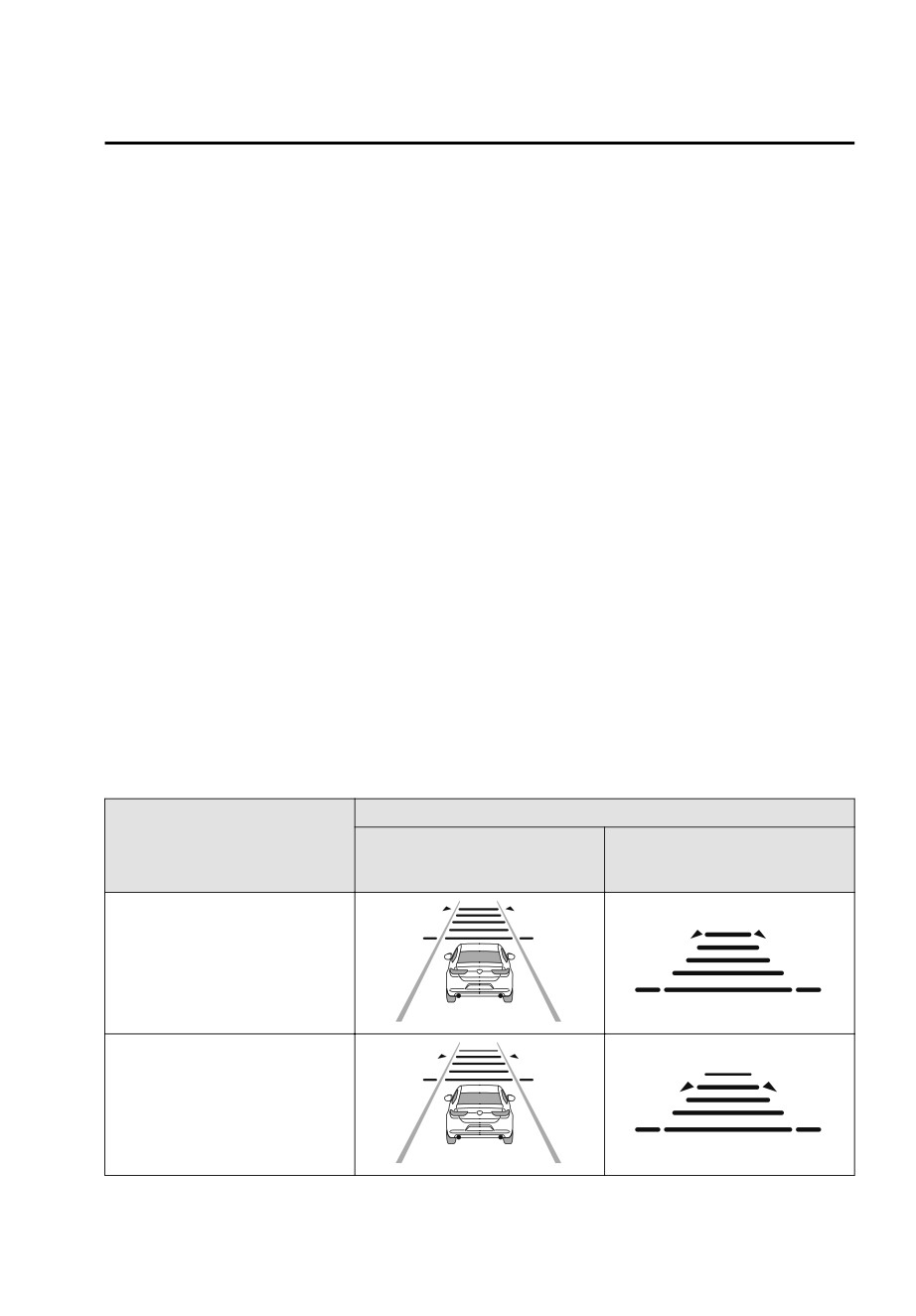
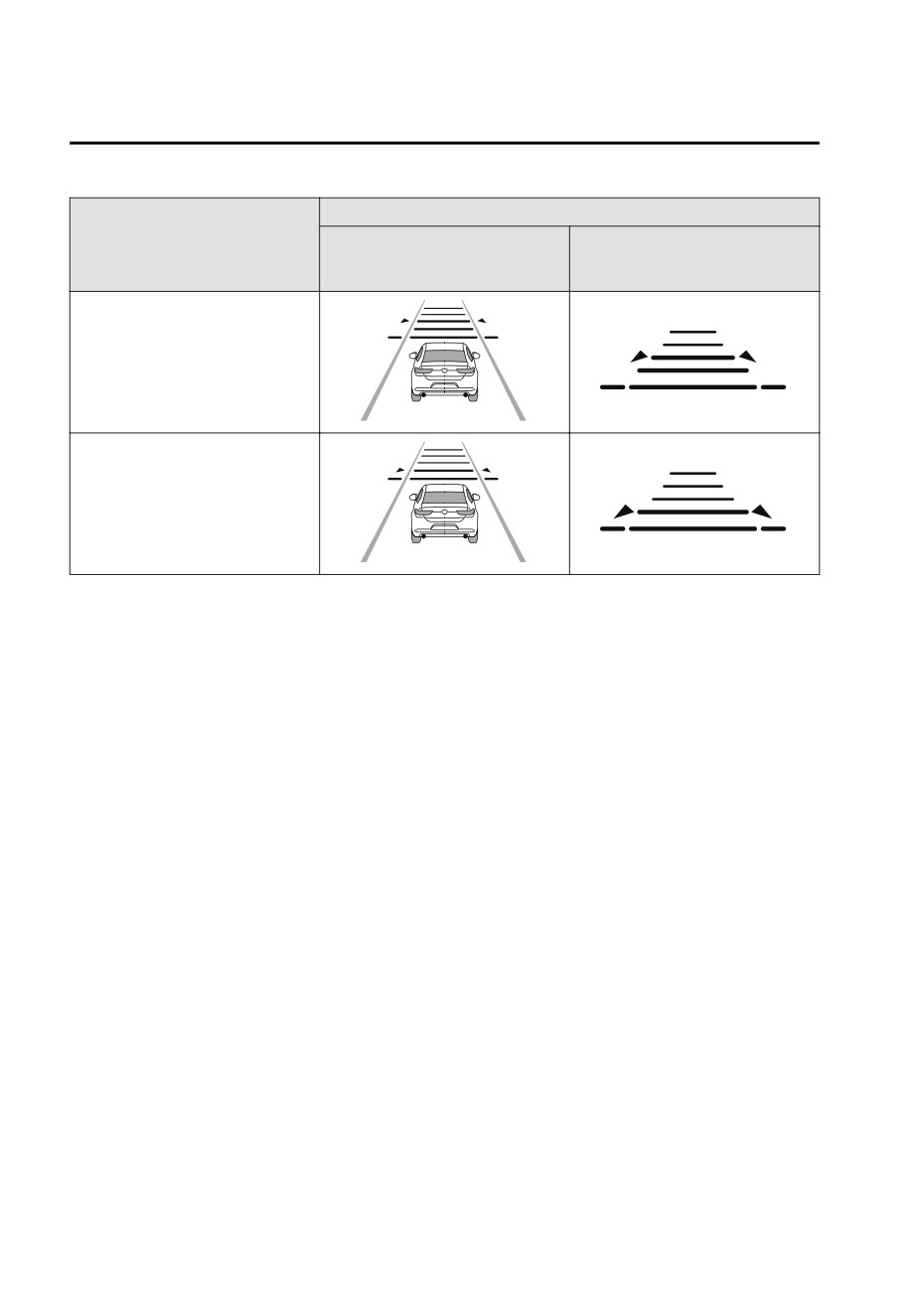
Setting the distance between vehicles
The distance between vehicles is set to a shorter distance by pressing the CANCEL
switch down, and to a longer distance by pressing the CANCEL switch up. The
distance between vehicles can be set to 4 levels: Long, medium, short, and
extremely short distance.
The distance between vehicles increases or decreases depending on the vehicle
speed.
Distance-between-vehicles
Indication on display
guideline
Indication on multi-information
Indication on active driving dis-
(at 80 km/h (50 mph) vehicle
display
play*1
speed)
Long (about 50 m (164 ft))
Medium (about 40 m (131 ft))
4-123
When Driving
i-ACTIVSENSE
Distance-between-vehicles
Indication on display
guideline
Indication on multi-information
Indication on active driving dis-
(at 80 km/h (50 mph) vehicle
display
play*1
speed)
Short (about 30 m (98 ft))
Extremely short (about 25 m (82
ft))
*1
Displays a pop-up image when the CANCEL switch is operated.
Changing the set vehicle speed
How to change the set vehicle speed using the RES switch
When the RES switch is pressed up (SET+), the vehicle accelerates, and when the
RES switch is pressed down (SET-), the vehicle decelerates.
Press and release immediately: 1 km/h (1 mph)
Press and hold: 10 km/h (5 mph)
How to change the set vehicle speed using the accelerator pedal
Depress the accelerator pedal until the vehicle speed reaches the desired speed,
then press the RES switch up (SET+) or down (SET-) and release the switch.
Temporary cancellation
Headway control function
If any of the following conditions is met, the headway control function is temporarily
canceled.
The headway control function operation conditions are not met.
The CANCEL switch is pressed.
The brake pedal is depressed.
The front radar sensors cannot detect target objects.
The DSC has operated.
The Smart Brake Support (SBS) has operated.
The frequency of the braking operation by the TJA is high.
There is a problem in the system.
4-124
When Driving
i-ACTIVSENSE
Steering assist function
If any of the following conditions is met, the steering assist function is temporarily
canceled.
The headway control function is canceled.
White (yellow) lane lines cannot be detected or a vehicle ahead cannot be
recognized.
The vehicle speed is about 64 km/h (40 mph) or faster.
The Lane-keep Assist System (LAS) has operated.
The Blind Spot Assist has operated.
The Road Keep Assist has operated.
The Forward Sensing Camera (FSC) cannot be used.
The accelerator pedal is depressed.
The turn signal lever is operated.
The steering wheel is operated abruptly
The driver takes his/her hands off the steering wheel.
The vehicle is making a sharp curve.
The vehicle crosses a lane line.
The width of the vehicle lane is narrow or wide.
There is a problem in the system.
NOTE
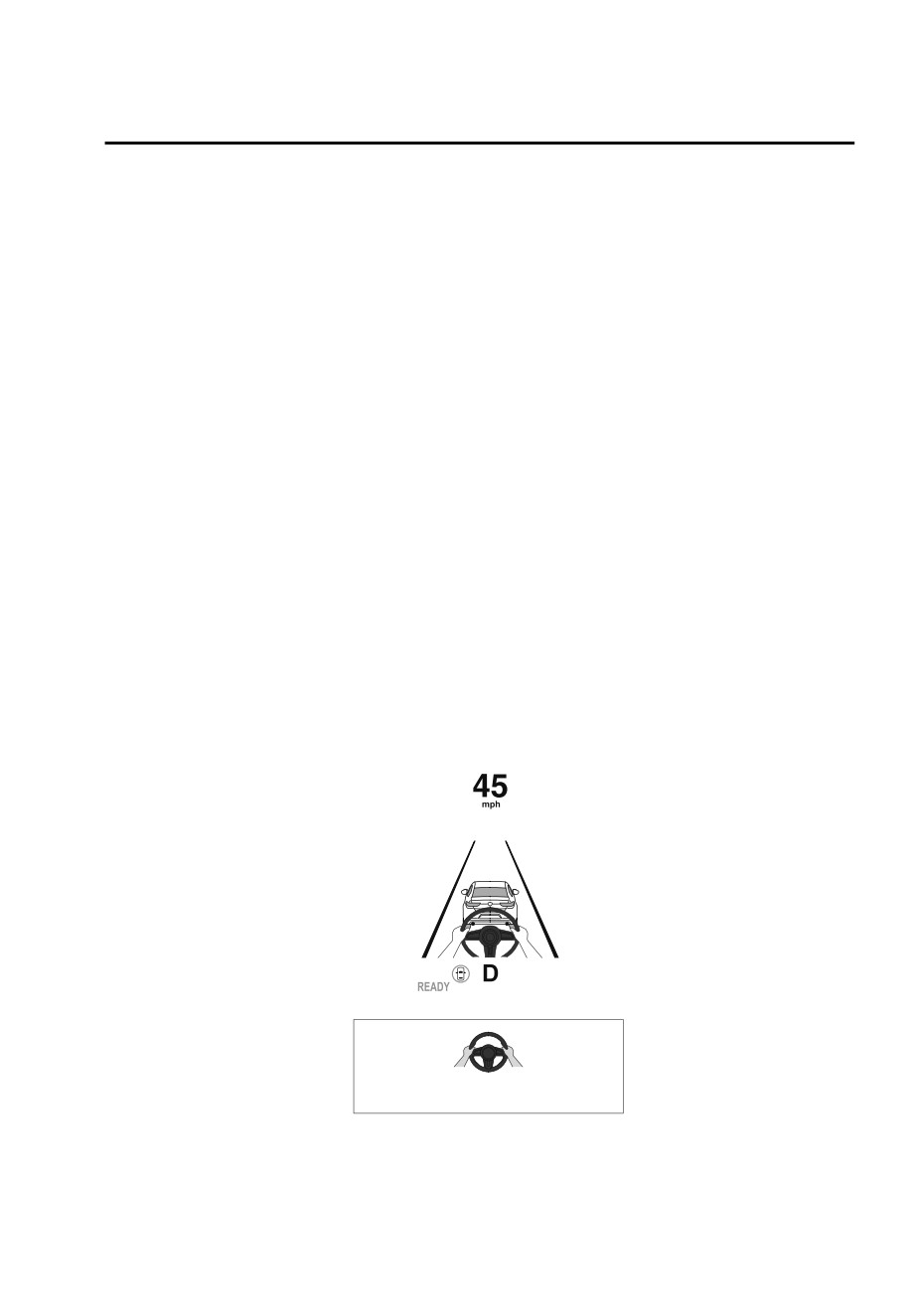
If you are not holding the steering wheel properly, the warning sound is activated
and warnings are displayed on the multi-information display and the active driving
display.
Multi-information display
Active driving display
4-125
When Driving
i-ACTIVSENSE
Resuming the control
If the TJA is temporarily canceled, it will resume operation at the previously set speed
by pressing the RES switch after all of the operation conditions have been met again.
Turning off the system
When the TJA switch is pressed while the TJA is operating, the TJA turns off.
▼ Stop Hold Control
Resume driving information
While in headway control using the
If you do not resume driving within a
Traffic Jam Assist (TJA), your vehicle will
few seconds after the vehicle ahead
stop when a vehicle ahead stops.
starts moving during stop hold control,
When the vehicle is stopped and the
the vehicle-ahead indication on the
stop hold control operates, the TJA
multi-information display flashes to
indicator light turns on.
urge you to resume driving. If you still
do not resume driving after the
indicator light flashes, a sound is
activated to urge you to resume
driving.
NOTE
The parking brake is automatically
applied and the vehicle is held in its
stopped position when 10 minutes or
longer have passed since the stop hold
control operated. When this occurs,
the TJA is temporarily canceled.
Resuming driving
While in stop hold control, if the
vehicle ahead starts moving and the
distance from the vehicle increases, the
stop hold control will be canceled and
your vehicle will resume driving by
performing any of the following
operations.
Press the RES switch.
Depress the accelerator pedal.
NOTE
If the vehicle ahead starts moving
within three seconds after your vehicle
is stopped, the headway control will
continue even if you do not resume
driving your vehicle.
4-126
When Driving
i-ACTIVSENSE
¾ The functions of the LAS have
Lane-keep Assist System
limitations. Always stay on course
(LAS)*
using the steering wheel and drive
with care.
▼ Lane-keep Assist System (LAS)
¾ Do not use the LAS under the
following circumstances, otherwise it
The LAS provides steering assistance to
may result in an accident.
help the driver stay within the vehicle
lane if the vehicle might be deviating.
¾ The vehicle is driven on slippery
The forward sensing camera (FSC)
roads such as icy or snow-covered
detects the white lines (yellow lines) of
roads, and unpaved roads.
the vehicle lane in which the vehicle is
¾ Tires of a different specified size
traveling and if the system determines
are used, such as a temporary
that the vehicle may deviate from its
spare tire.
lane, it operates the electric power
¾ The vehicle is being used to tow a
steering to assist the driver’s steering
camper or boat trailer.
operation. The system also alerts the
¾ Tire chains are used.
driver by displaying an alert on the
¾ The vehicle is driven on roads with
multi-information display and the
lane lines other than white (yellow)
active driving display.
lines, such as an expressway.
Use the system when you drive the
NOTE
vehicle on roads with white (yellow)
The system may not operate normally
lines such as expressways and
under the following conditions.
highways.
A condition under which the forward
sensing camera (FSC) cannot detect
a target object is met.
Refer to Forward Sensing Camera
(FSC) on page 4-71.
The visibility of white (yellow) lines is
poor (due to paint flaking or dirt, or
being hidden by vehicles ahead).
There are multiple white (yellow)
lines or they are interrupted.
A misleading line on the road is
picked up (such as temporary line for
construction, shadow, lingering
WARNING
snow, or grooves filled with water).
The width of a lane is excessively
Do not rely completely on the LAS:
narrow.
The vehicle is shaken after hitting a
¾ The LAS is not an automated driving
road bump.
system. In addition, the system is not
The vehicle is driven on a section
designed to compensate for a
with a closed lane or temporary lane
driver’s lack of caution, and
due to construction.
over-reliance on the system could
lead to an accident.
*Some models.
4-127
When Driving
i-ACTIVSENSE
The vehicle is driven on a forked
The windshield around the forward
road or junction.
sensing camera (FSC) is foggy.
The windshield around the forward
▼ System Operation
sensing camera (FSC) is blocked by
Operation conditions
an obstruction, causing poor forward
visibility.
The Lane-keep Assist System (LAS)
Strong light (such as sunlight, or
becomes operational when all of the
headlights (high-beam) of
following conditions are met.
on-coming vehicles) is directed at
The vehicle speed is about 64 km/h
the forward sensing camera (FSC).
(40 mph) or faster.
▼ Steering Wheel Operation Assist
The system detects white (yellow)
lane lines.
When the system determines that the
vehicle might be deviating from its
NOTE
lane, the steering wheel operation
When the system does not detect a
assist operates.
white (yellow) lane line on one side
The system notifies the driver that it
only, the system does not operate on
provided steering wheel operation
the side that is not being detected.
assistance on the multi-information
display and the active driving display.
When temporarily canceling the
Multi-information display (Basic
system
display)
The LAS goes on stand-by when any of
the following conditions is met. The
LAS is automatically restored when its
operation conditions are met.
The system cannot detect white
(yellow) lane lines.
The vehicle speed is less than about
56 km/h (35 mph).
The turn signal lever is operated.
The accelerator pedal is depressed
Multi-information display
abruptly.
(i-ACTIVSENSE display)
The TCS/DSC is operating.
The TCS is turned off.
The steering wheel is operated.
The brake pedal is operated.
The function is temporarily stopped.
The LAS stops functioning in the
following cases:
The temperature in the forward
sensing camera (FSC) is too high or
too low.
4-128

When Driving
i-ACTIVSENSE
Active driving display
Emergency Lane Keeping
(ELK)*
▼ Emergency Lane Keeping (ELK)
The ELK is a system designed to assist
NOTE
the driver’s steering wheel operation to
When the driver operates the
avoid danger.
steering wheel while the steering
The ELK consists of the Blind Spot
wheel operation assist is operating,
Assist function to prevent your vehicle
the steering wheel operation
from colliding with vehicles on
assistance is canceled.
adjacent lanes, and the Road Keep
When the steering wheel operation
Assist function to prevent your vehicle
assist is performed several times
from deviating from the road.
within a certain period of time, the
Refer to Blind Spot Assist on page
warning sound is activated.
4-129.
Refer to Road Keep Assist on page
▼ System Canceling
4-133.
The Lane-keep Assist System (LAS) can
be set to inoperable.
▼ Blind Spot Assist*
(If only the LAS is turned off)
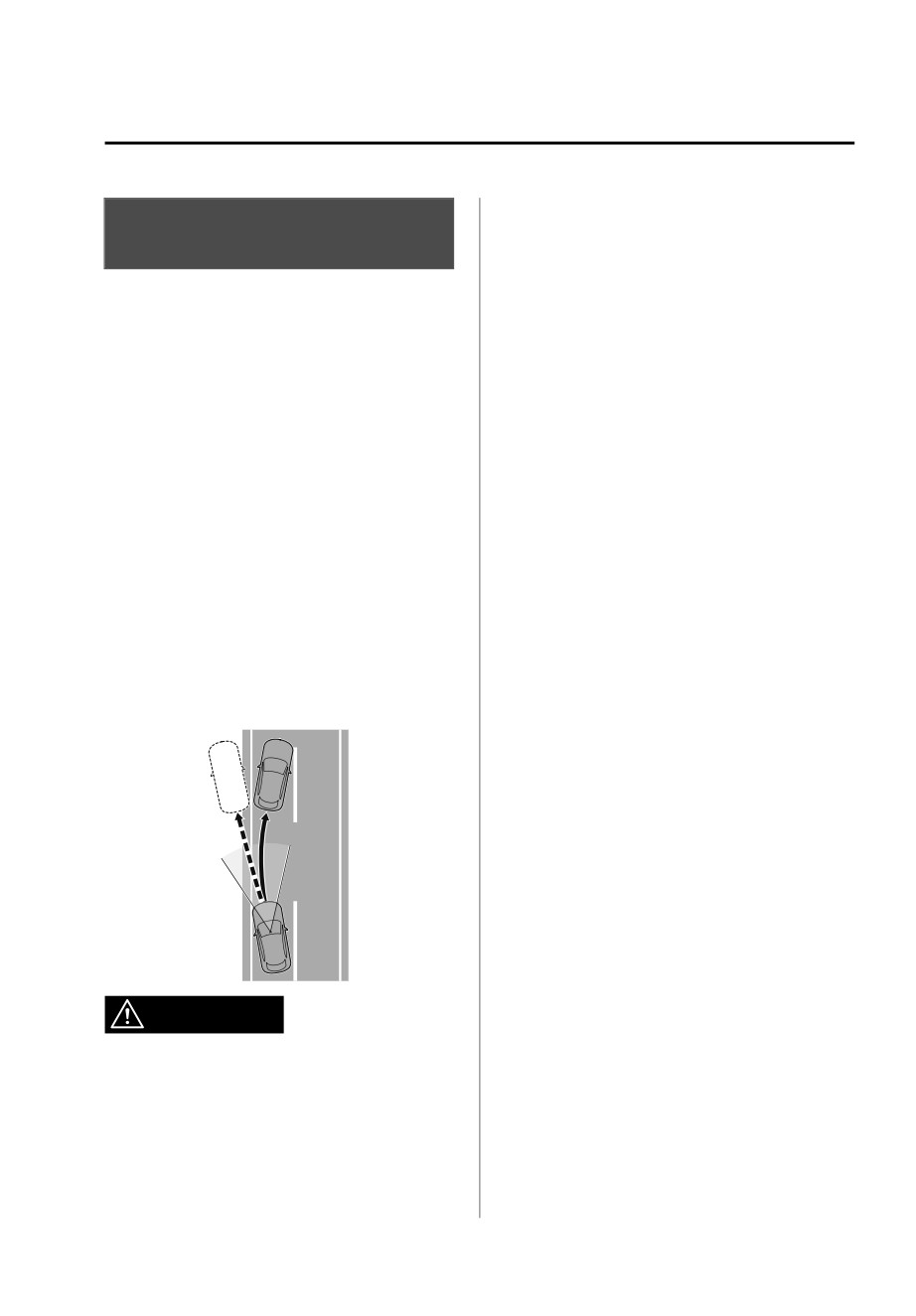
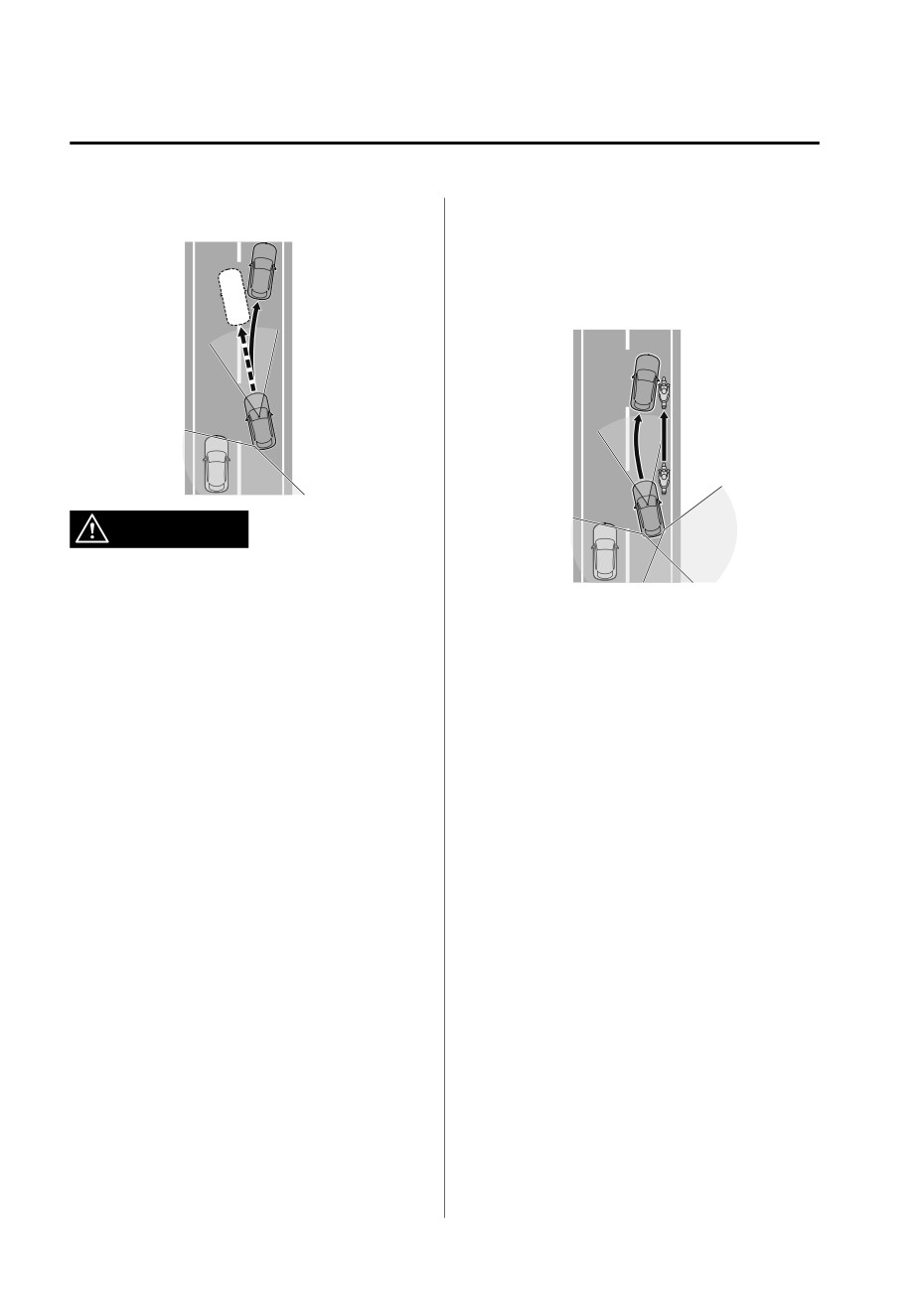
The Blind Spot Assist function assists
Refer to the Settings section in the
the driver in avoiding collisions with
Mazda Connect Owner's Manual.
vehicles in adjacent lanes (excluding
(If the LAS is turned off by operating
vehicles approaching in the opposite
the i-ACTIVSENSE OFF switch)
direction).
Refer to i-ACTIVSENSE OFF Switch
The Blind Spot Assist function detects
on page 4-70.
white lines (yellow lines) on the vehicle
lane using the Forward Sensing Camera
NOTE
(FSC) and detects vehicles on adjacent
If the power switch is switched OFF
lanes using the rear side radar sensors.
while you have canceled the system
If there is a possibility of a collision
using the i-ACTIVSENSE OFF switch,
with a vehicle in an adjacent lane
the LAS is automatically enabled the
when you try to change lanes or if you
next time the power switch is switched
may deviate from your lane, it assists
ON. However, if the system is canceled
your steering wheel operation to keep
using [Settings] in Mazda Connect, the
you in the driving lane.
LAS is not automatically enabled.
When the steering wheel operation
assist operates, a warning sound and
warning indications on displays alert
the driver of the possibility of a
collision. Furthermore, if the possibility
of a collision increases, a warning
*Some models.
4-129
When Driving
i-ACTIVSENSE
sound and display indications alert the
¾ The detection area of the camera
driver of the danger.
and sensors is limited. If the steering
wheel operation assist is operated
without detecting a two-wheeled
vehicle near the detecting vehicle, it
could result in an accident.
WARNING
Do not rely completely on the Blind
Spot Assist function and always drive
carefully:
Do not use the system under the
following conditions. Otherwise, it
¾ The Blind Spot Assist function has
may result in an accident:
limitations. Do not rely completely
on the system and always stay on
¾ The vehicle is driven on slippery
course using the steering wheel.
roads such as icy roads,
¾ The Blind Spot Assist function is not
snow-covered roads, and unpaved
an autonomous driving system. In
roads.
addition, the system is not designed
¾ Tires other than the specified size are
to compensate for a driver’s lack of
used, such as when tire chains or
caution, and over-reliance on the
temporary spare tires are used.
system could lead to an accident.
¾ The vehicle is towing a camping
trailer or boat trailer.
¾ The vehicle is driven on roads other
than expressways and highways.
¾ The rear bumper around a rear side
radar sensor is deformed.
Operation conditions
The Blind Spot Assist function becomes
operational when all of the following
conditions are met.
The vehicle speed is about 64 km/h
(40 mph) or faster.
The vehicle is driven on a straight
road or gentle curve.
4-130
When Driving
i-ACTIVSENSE
The system detects white (yellow)
The vehicle is driven on a forked
lane lines on both sides.
road or junction.
There is a vehicle on the rear sides.
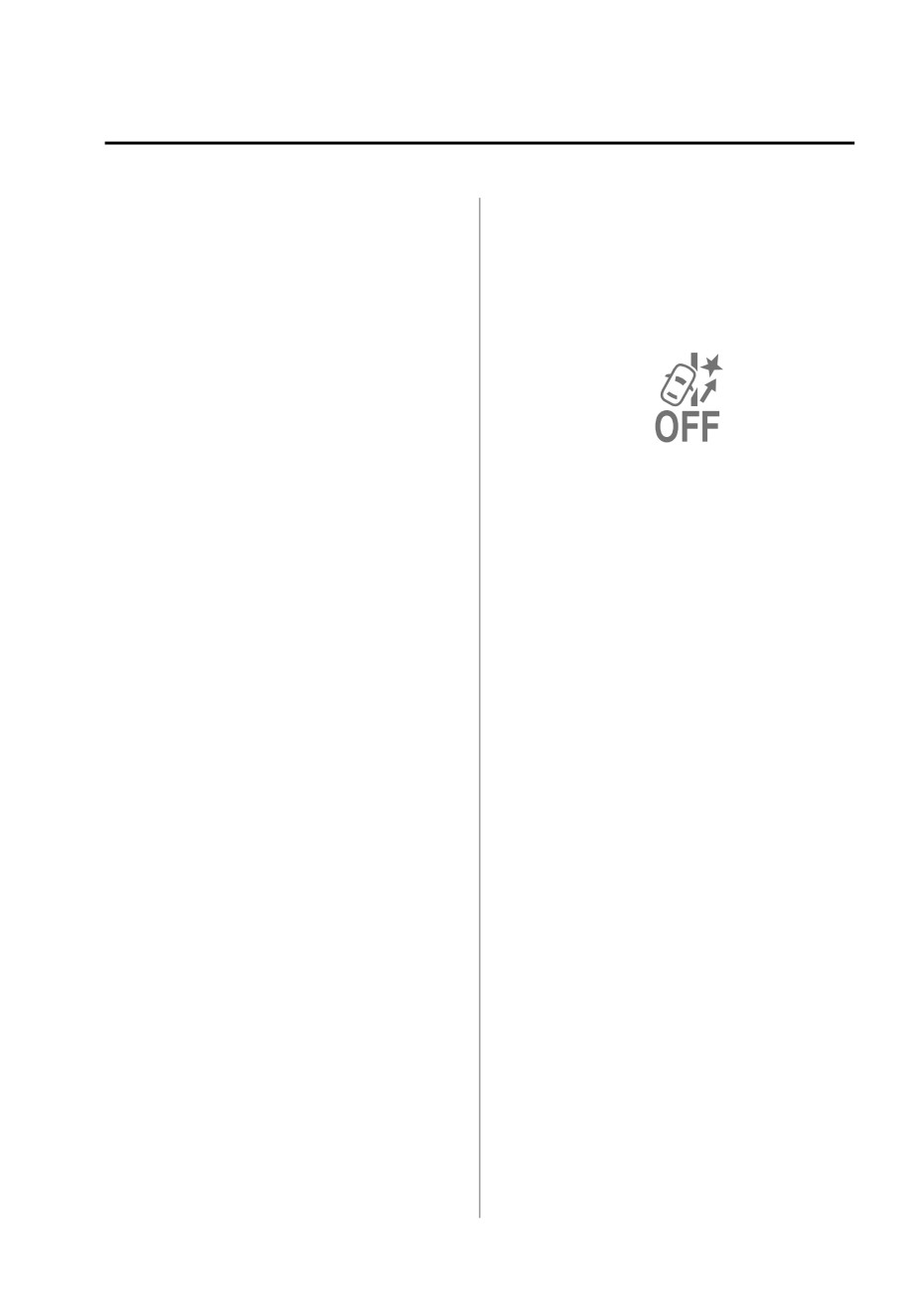
When the ELK OFF indicator light is
on, the system is canceled according
NOTE
to a Mazda Connect setting.
Refer to the Settings section in the
The Blind Spot Assist function may
Mazda Connect Owner's Manual.
not operate normally when any of
the following conditions is met.
A condition under which the
Forward Sensing Camera (FSC)
cannot detect a target object is
met.
Temporary cancellation of the
Refer to Forward Sensing Camera
function
(FSC) on page 4-71.
The Blind Spot Assist function goes on
The visibility of vehicles in adjacent
stand-by when any of the following
lanes is poor.
conditions is met. The Blind Spot Assist
A vehicle in an adjacent lane
function is automatically restored
rapidly approaches at a high
when its operation conditions are met.
speed.
Vehicles in adjacent lanes have any
The vehicle speed is less than about
of the following shapes.
56 km/h (35 mph).
The system cannot detect white
The vehicle size is very small.
(yellow) lane lines.
The vehicle height is extremely
The accelerator pedal is depressed
low or high.
abruptly.
A special type of vehicle with a
The brake pedal is depressed.
complex shape.
The steering wheel is operated
The visibility of white lines (yellow
abruptly.
lines) is poor (due to paint flaking
The TCS/DSC is operating.
or dirt, or being hidden by vehicles
The TCS/DSC is turned off.
ahead).
Multiple vehicles are traveling in the
There are multiple white lines
detecting area near your vehicle.
(yellow lines) or they are
interrupted.
Cancellation of the function
A misleading line on the road is
The Blind Spot Assist function is
picked up (such as temporary line
for construction, shadow, lingering
canceled when any of the following
conditions is met.
snow, or grooves filled with water).
The width of the vehicle lane is
The temperature in the Forward
narrow or wide.
Sensing Camera (FSC) is high or low.
The vehicle is shaken after hitting a
The windshield around the Forward
road bump.
Sensing Camera (FSC) is foggy.
The vehicle is driven on a section
The windshield around the Forward
with a closed lane or temporary
Sensing Camera (FSC) is blocked by
lane due to construction.
an obstruction, causing poor forward
visibility.
4-131
When Driving
i-ACTIVSENSE
Snow, ice, or mud is adhering
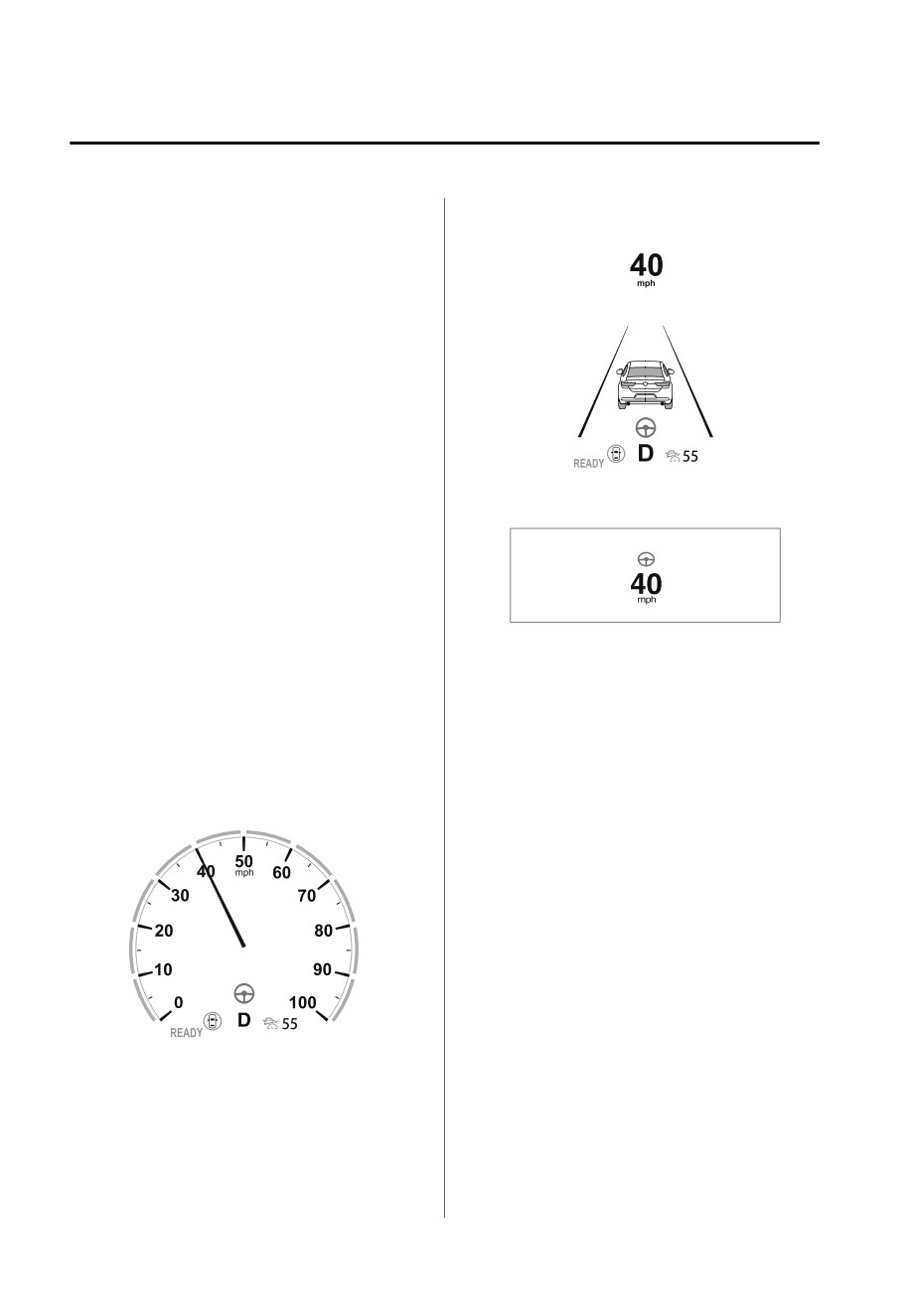
Multi-information display
around a rear side radar sensor.
(i-ACTIVSENSE display)
The temperature around a rear side
radar sensor is high.
There is a problem with the system.
System problem
If there is a problem with the system,
the i-ACTIVSENSE warning indication/
warning light turns on and a message is
indicated.
Refer to i-ACTIVSENSE Warning
Indication/Warning Light on page
7-29.
Active driving display
Steering wheel operation assist
If there is a possibility of collision with
a vehicle in an adjacent lane when you
try to change lanes or if you may
deviate from the lane, the steering
wheel operation assist operates.
NOTE
While the steering wheel operation
If the driver operates the steering
assist is operating, the system notifies
the driver using a warning sound,
wheel while the steering wheel
operation assist is operating, the
multi-information display, and the
active driving display that it is assisting
steering wheel operation assist is
canceled.
the steering wheel operation.
Multi-information display (Basic
When the steering wheel operation
assist is performed several times
display)
within a certain period of time, the
warning sound is activated.
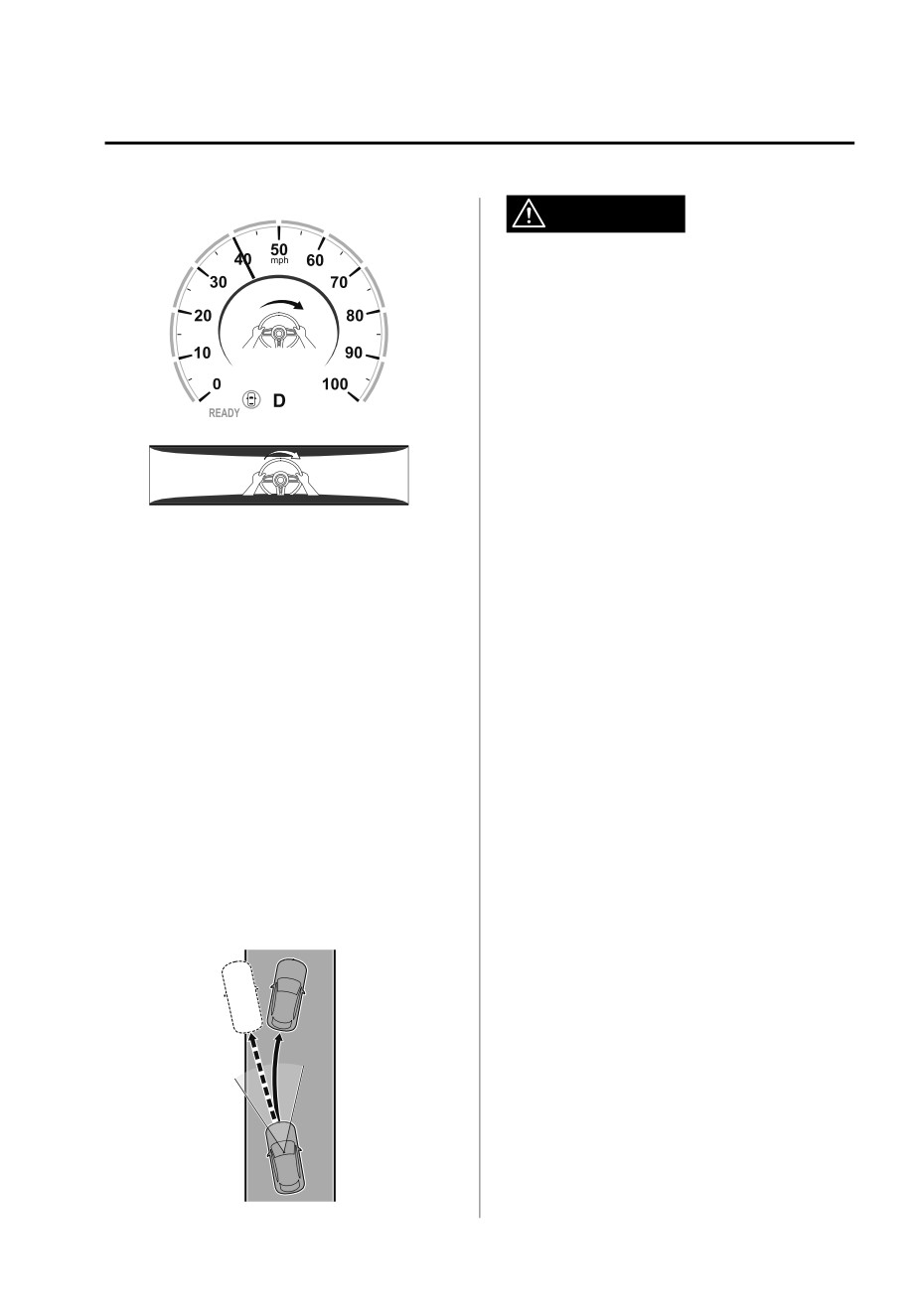
Collision warning
If the possibility of a collision with a
vehicle in an adjacent lane increases,
the direction to which the steering
wheel needs to be turned to avoid a
collision is displayed on the
multi-information display and the
active driving display, together with a
warning sound activated.
4-132
When Driving
i-ACTIVSENSE
Multi-information display
WARNING
Do not rely completely on the Road
Keep Assist function and always drive
carefully:
¾ The Road Keep Assist function has
limitations. Do not rely completely
on the system and always stay on
course using the steering wheel.
¾ The Road Keep Assist function is not
Active driving display
an autonomous driving system. In
addition, the system is not designed
to compensate for a driver’s lack of
caution, and over-reliance on the
▼ Road Keep Assist
system could lead to an accident.
The Road Keep Assist function assists
Do not use the system under the
the driver in avoiding a departure from
following conditions. Otherwise, it
the road while driving.
may result in an accident:
The Road Keep Assist function
recognizes the outside of the road
¾ The vehicle is driven on slippery
using the Forward Sensing Camera
roads such as icy roads,
(FSC). If your vehicle may be deviating
snow-covered roads, and unpaved
from the road, it provides steering
roads.
assistance to avoid departure from the
¾ Tires other than the specified size are
road.
used, such as when tire chains or
When the steering wheel operation
temporary spare tires are used.
assist operates, display indications
¾ The vehicle is towing a camping
alert the driver of the possibility of a
trailer or boat trailer.
road departure. Furthermore, if the
Operation conditions
possibility of a road departure
increases, a warning sound and display
The Road Keep Assist function
indications alert the driver of the
becomes operational when any of the
danger.
following conditions is met.
The vehicle speed is about 64 km/h
(40 mph) or faster.
The vehicle is driven on a straight
road or gentle curve.
The function recognizes the outside
of the road by detecting target
objects (such as gravel, grass, street
gutters, road curbs, guardrails, or
walls).
4-133
When Driving
i-ACTIVSENSE
NOTE
The vehicle speed is less than about
56 km/h (35 mph).
The Road Keep Assist function may
Target objects cannot be detected.
not operate normally when any of
The turn signal lever is operated.
the following conditions is met.
The accelerator pedal is depressed
A condition under which the
abruptly.
Forward Sensing Camera (FSC)
The brake pedal is depressed.
cannot detect a target is met.
The steering wheel is operated
Refer to Forward Sensing Camera
abruptly.
(FSC) on page 4-71.
The TCS/DSC is operating.
The target objects are difficult to
The TCS/DSC is turned off.
detect (due to low road curb, no
Cancellation of the function
contrast between the inside and
outside of the road, or being
The Road Keep Assist function is
hidden by vehicles ahead).
canceled when any of the following
A misleading line (such as
conditions is met.
temporary line for construction,
The temperature in the Forward
shadow, lingering snow, or grooves
Sensing Camera (FSC) is high or low.
filled with water) is recognized as a
The windshield around the Forward
target object.
Sensing Camera (FSC) is foggy.
The road width is narrow.
The windshield around the Forward
The vehicle is shaken after hitting a
Sensing Camera (FSC) is blocked by
road bump.
an obstruction, causing poor forward
When the ELK OFF indicator light is
visibility.
on, the system is canceled according
There is a problem with the system.
to a Mazda Connect setting.
Refer to the Settings section in the
System problem
Mazda Connect Owner's Manual.
If there is a problem with the system,
the i-ACTIVSENSE warning indication/
warning light turns on and a message is
indicated.
Refer to i-ACTIVSENSE Warning
When the system detects target
Indication/Warning Light on page
objects on one side only, the system
7-29.
does not operate to avoid a road
Steering wheel operation assist
departure in the direction of the side
that is not being detected.
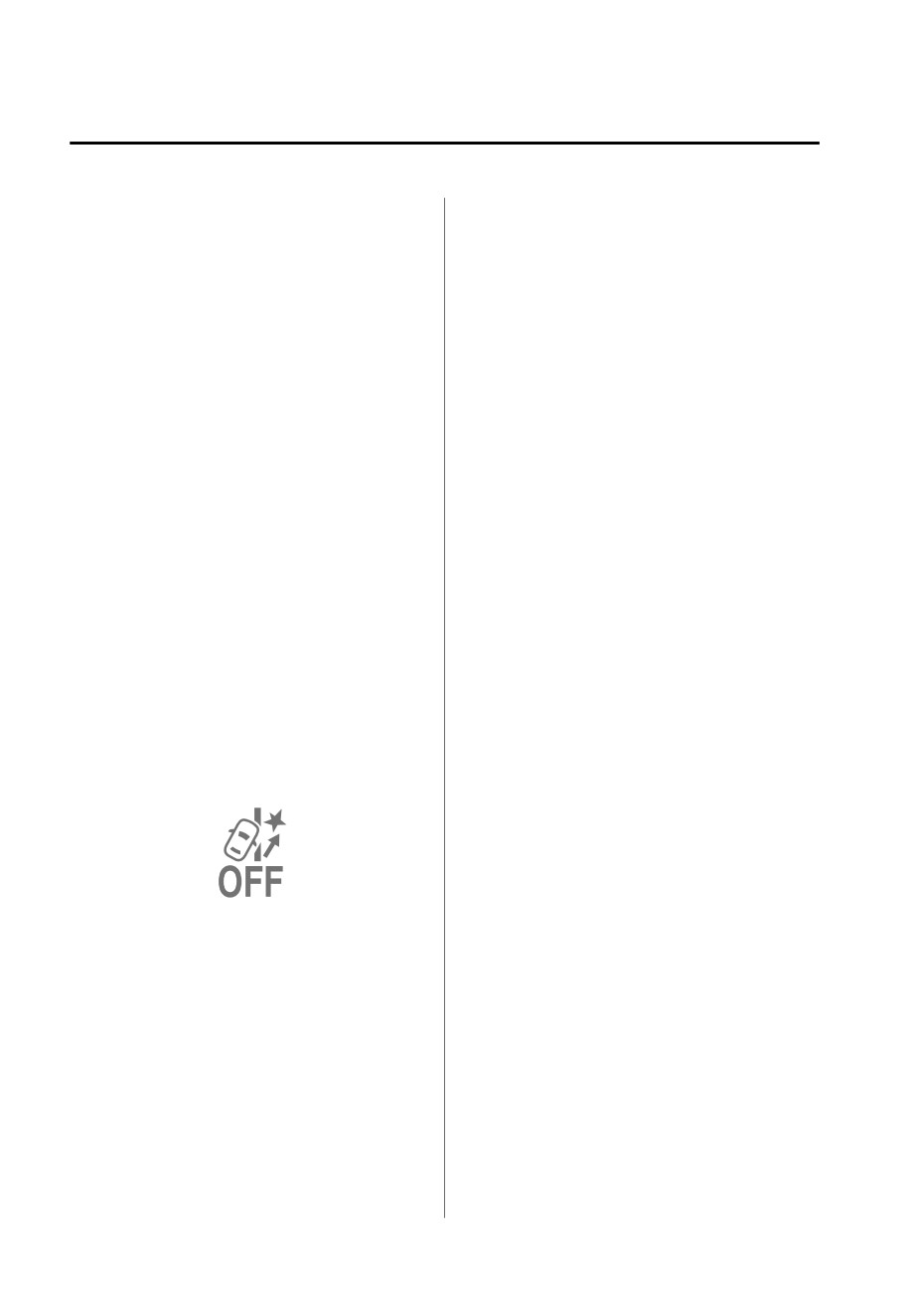
If your vehicle may be deviating from
the road, the steering wheel operation
Temporary cancellation of the
assist operates.
function
While the steering wheel operation
The Road Keep Assist function goes on
assist is operating, the system notifies
stand-by when any of the following
the driver on the multi-information
conditions is met. The Road Keep
display and the active driving display
Assist function is automatically
that it is assisting the steering wheel
restored when its operation conditions
operation.
are met.
4-134
When Driving
i-ACTIVSENSE
Multi-information display (Basic
steering wheel needs to be turned to
display)
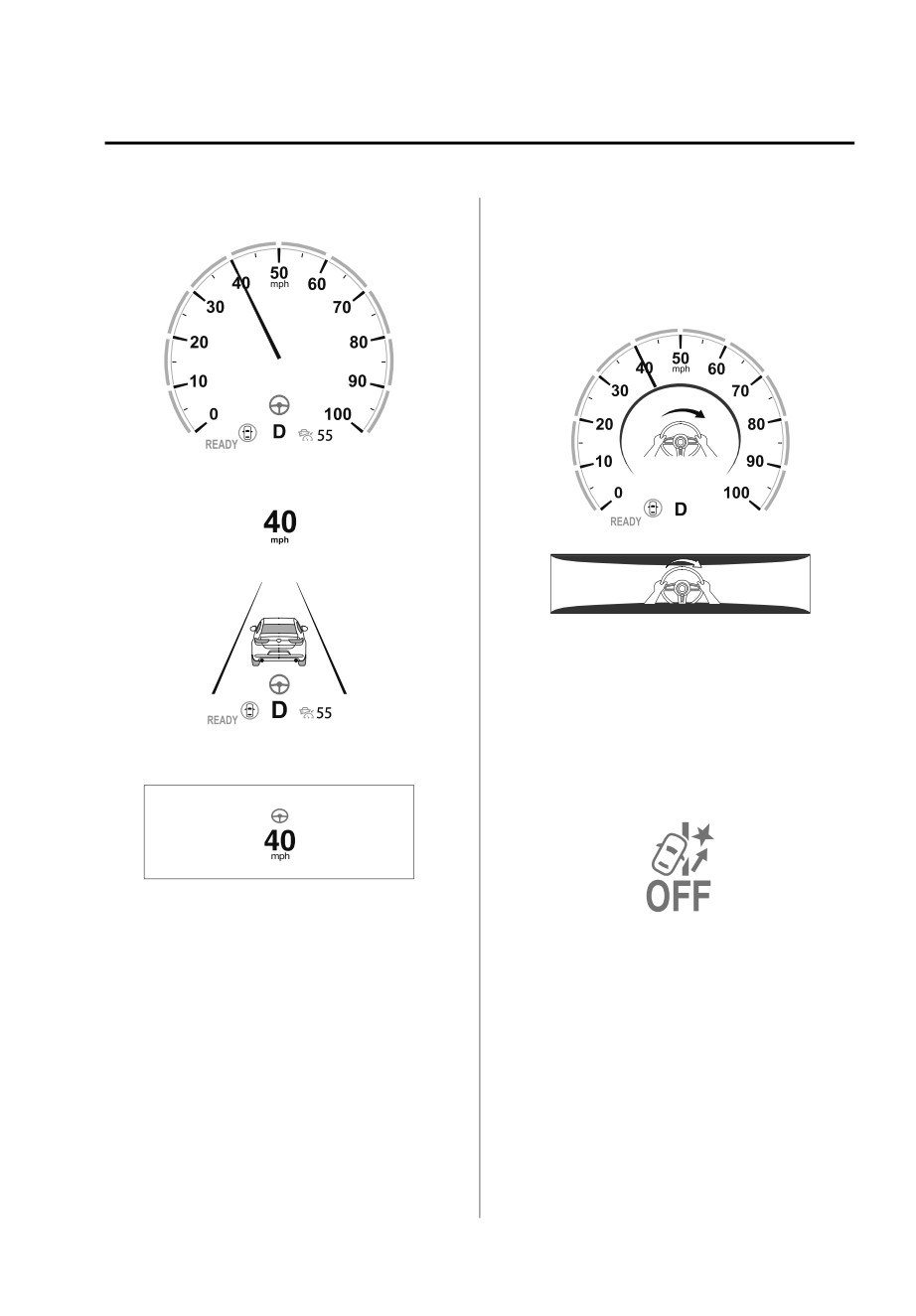
avoid a road departure is displayed on
the multi-information display and the
active driving display, together with a
warning sound.
Multi-information display
Multi-information display
(i-ACTIVSENSE display)
Active driving display
▼ Stopping the Emergency Lane
Keeping (ELK) System Operation
The ELK can be set to inoperable.
Refer to the Settings section in the
Mazda Connect Owner's Manual.
Active driving display
When the ELK is canceled, the ELK OFF
indicator light turns on.
NOTE
If the driver operates the steering
wheel while the steering wheel
operation assist is operating, the
steering wheel operation assist is
canceled.
When the steering wheel operation
assist is performed several times
within a certain period of time, the
warning sound is activated.
Road departure warning
If the possibility of a road departure
increases, the direction to which the
4-135
When Driving
i-ACTIVSENSE
¾ The vehicle is being towed.
Smart Brake Support
¾ The vehicle is driven on rough roads
(SBS)*
such as in areas where there is grass
and foliage or off-road.
▼ Smart Brake Support (SBS)
Refer to Stopping the Smart Brake
Support (SBS) System Operation on
The SBS is a system designed to detect
page 4-143.
target objects using sensors and
cameras equipped on the vehicle, and
Forward detection function
to reduce damage in the event of a
The forward detection function is
collision by operating the brake control
designed to reduce damage in the
if there is the possibility of your vehicle
event of a collision with target objects
colliding with a target object.
at the front.
One part of the SBS functions when
The forward detection function detects
you are driving forward and the other
target objects (vehicles ahead,
part functions when you are driving in
pedestrians, and bicycles) using the
reverse.
front radar sensor and the Forward
Refer to Forward drive detection on
Sensing Camera (FSC). If there is a
page 4-136.
possibility of your vehicle colliding with
Refer to Reverse drive detection on
a target object at the front, you are
page 4-138.
notified of possible danger by a
▼ Forward drive detection
warning sound and a warning
indication on the display.
When you are driving forward, the
Furthermore, if the possibility of a
following functions of the Smart Brake
collision increases, the brake control is
Support (SBS) operate.
performed to reduce damage in the
Forward detection function
event of a collision. In addition, when
the driver depresses the brake pedal,
the brakes are applied firmly and
WARNING
quickly to assist.
Do not rely completely on the SBS:
(Vehicles with Driver Monitoring
The SBS is only designed to reduce
(DM))
damage in the event of a collision.
If the system determines that the driver
The system may not operate normally
is not paying attention to the road, it
depending on the target object,
activates the collision warning earlier
weather conditions, or traffic
than normal.
conditions. Over reliance on the
system leading to the accelerator pedal
Operation conditions
or brake pedal being mistakenly
The forward detection function
operated could result in an accident.
operates when all of the following
conditions are met.
CAUTION
The power switch is switched ON.
In the following cases, turn the SBS off
The SBS is on.
(Object is vehicle ahead)
to prevent a mis-operation.
4-136 *Some models.
When Driving
i-ACTIVSENSE
The vehicle speed is about 4 km/h
When crossing a narrow bridge,
(3 mph) or higher.
going under a low overhang, or
(Object is a pedestrian or bicycle)
passing through a narrow gate, a
The vehicle speed is between about
car washing machine, or tunnel.
10 and 80 km/h (6.3 to 49 mph).
When passing through a toll gate.
The DSC does not operate.
When entering an underground
parking area.
NOTE
There is a metal object, bump, or a
protruding object on the road.
When any of the following
If you suddenly come close to a
conditions is met, the forward
vehicle ahead.
detection function may not operate.
An animal, wall, or standing tree is
If there is the possibility of hitting
detected.
only a part of a vehicle or
While the system is operating, the
obstruction ahead.
driver is notified by the
You are driving your vehicle at the
multi-information display and the
same speed as the vehicle ahead.
active driving display.
When the driver deliberately
If a malfunction is detected or the
performs driving operations
system temporarily stops the
(accelerator operation, steering
function due to dirt on the sensors or
wheel operation).
cameras, the i-ACTIVSENSE warning
The accelerator pedal is depressed
light turns on and a message is
abruptly.
displayed on the multi-information
The brake pedal is depressed.
display.
The steering wheel is being
If the system performs brake control
operated.
and the vehicle is stopped, the
The selector lever is being shifted.
system will continue to hold the
The turn signal lever is being
brakes for a brief time unless there is
operated.
an operation performed by the
Warnings and messages, such as a
driver.
dirty windshield, related to the
Collision warning
Forward Sensing Camera (FSC) or
front radar sensor are being
If there is the possibility of your vehicle
displayed on the multi-information
colliding with a target object at the
display.
front, the warning sound is activated
When any of the following
continuously and a warning is
conditions is met, the forward
displayed on the multi-information
detection function may operate.
display and the active driving display.
There is an object in the road at
the entrance to a curve (including
guardrails and snow banks).
Passing an approaching vehicle
while rounding a curve.
4-137
When Driving
i-ACTIVSENSE
Multi-information display
Heed the following cautions so that
the SBS can operate normally:
¾ Do not apply stickers (including
transparent stickers) to the areas
around the rear side radar sensors
and the rear ultrasonic sensors.
Otherwise, a rear side radar sensor
and a rear ultrasonic sensor may not
be able to detect vehicles and
obstructions correctly which could
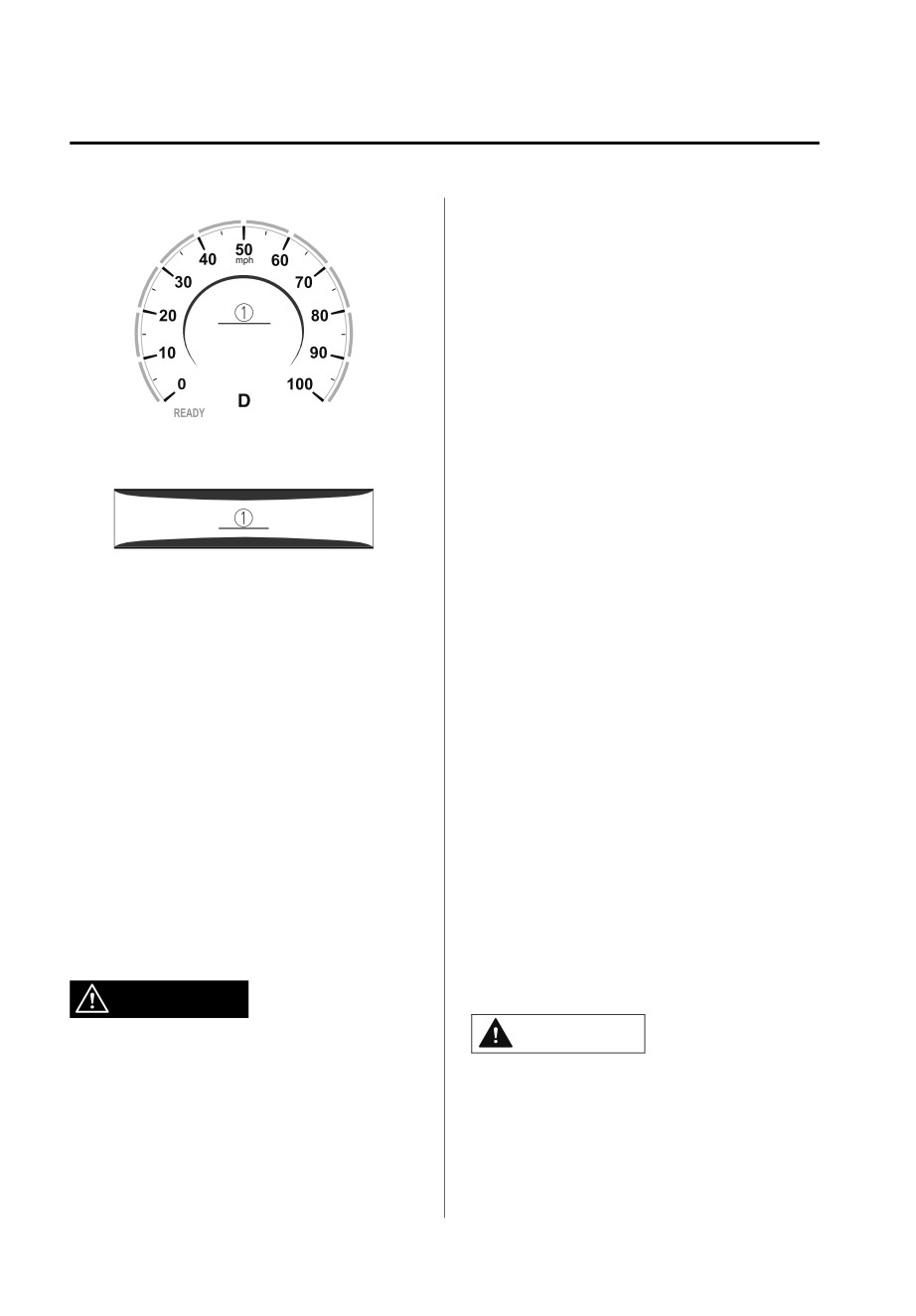
1.
“BRAKE!” message is displayed
result in an accident.
¾ If you recognize scratches around the
Active driving display
rear side radar sensors and rear
ultrasonic sensors, stop using the SBS
immediately and always have the
vehicle inspected by an Authorized
1.
“BRAKE!” message is displayed
Mazda Dealer.
Refer to Stopping the Smart Brake
NOTE
Support (SBS) System Operation on
During brake control and brake assist
page 4-143.
operation, the collision warning
¾ Consult an Authorized Mazda Dealer
sound is activated intermittently.
for rear bumper removal/
The operation distance and volume
installation.
of the collision warning can be
changed.
Do not hit the rear side radar sensors
Refer to the Settings section in the
and rear ultrasonic sensors forcefully:
Mazda Connect Owner's Manual.
When washing the vehicle, do not
spray highly pressurized water against
▼ Reverse drive detection*
the rear side radar sensors and the rear
When you are driving in reverse, the
ultrasonic sensors, or rub them
following functions of the Smart Brake
strongly. In addition, do not hit the rear
Support (SBS) operate.
bumper forcefully when loading and
unloading cargo. Otherwise, the
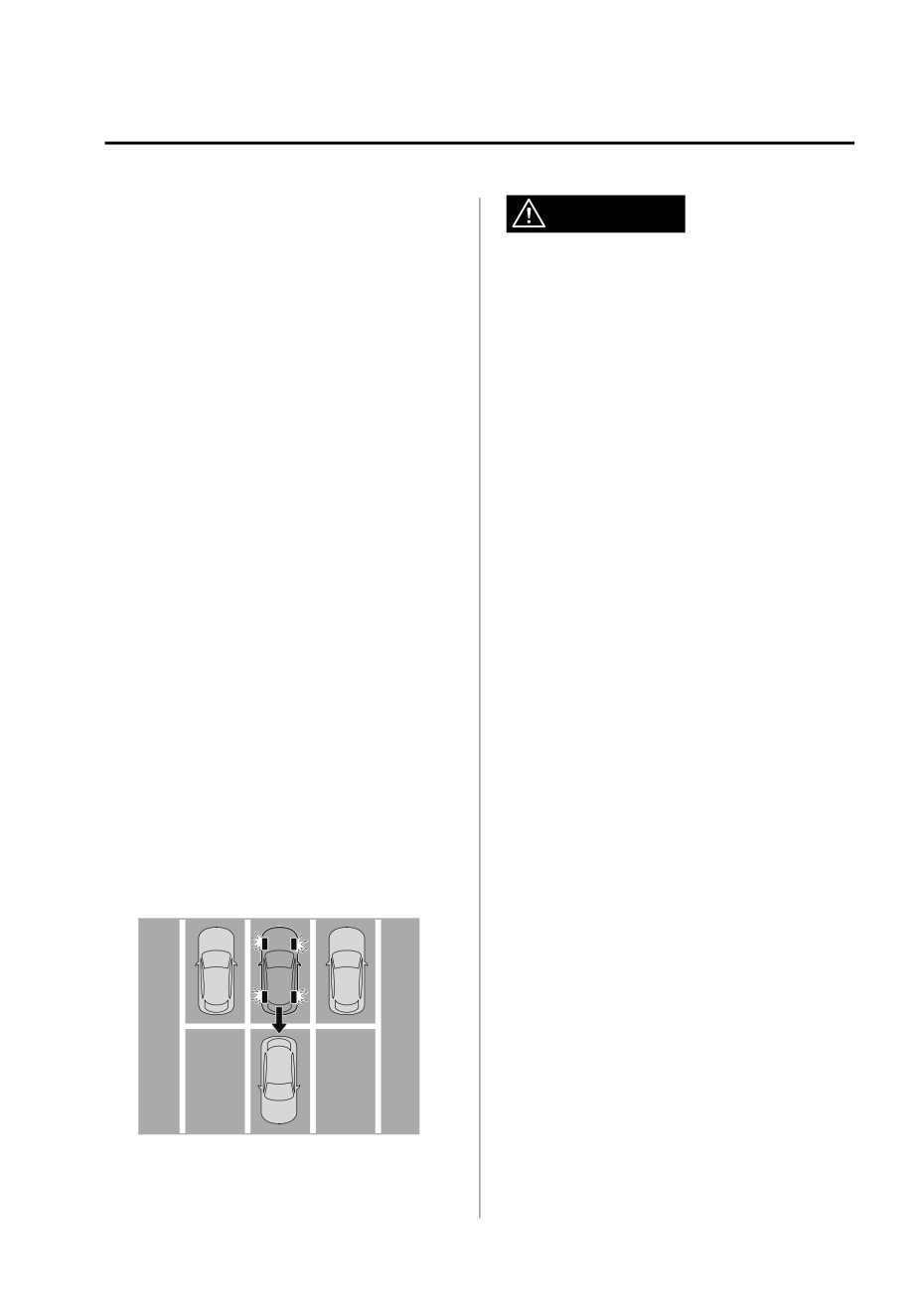
Rearward detection function
system will be unable to detect
Rear crossing
obstructions correctly and the SBS may
not operate normally.
WARNING
CAUTION
Do not rely completely on the SBS:
The SBS is only designed to reduce
¾ In the following cases, turn the SBS
damage in the event of a collision.
off to prevent a mis-operation.
Over reliance on the system leading to
¾ A trailer is pulled or an accessory
the accelerator pedal or brake pedal
such as a bicycle carrier is installed
being mistakenly operated could result
to the rear of the vehicle.
in an accident.
4-138 *Some models.
When Driving
i-ACTIVSENSE
¾ The vehicle is driven on rough
WARNING
roads such as in areas where there
is grass and foliage or off-road.
Always check the surrounding area
Refer to Stopping the Smart Brake
visually when reversing the vehicle:
Support (SBS) System Operation
The operation of the rearward
on page 4-143.
detection function has certain
¾ Always use tires for all wheels that
limitations. Therefore, the function
are of the specified size, and the
might not operate or it might be
same manufacture, brand, and tread
delayed even if there is a target object
pattern. In addition, do not use tires
at the rear of your vehicle. Always
with significantly different wear
make it your responsibility as a driver
patterns on the same vehicle. If such
to check the rear.
improper tires are used, the SBS may
not operate normally.
Operation conditions
Rearward detection function
The rearward detection function
operates when all of the following
The rearward detection function is
conditions are met.
designed to reduce damage in the
event of a collision with a target object
The EV system is operating.
when reversing.
The SBS is on.
The rearward detection function
The selector lever is in the R position.
detects obstructions using the rear
The vehicle speed is about 2 km/h
ultrasonic sensors. In addition, if there
(2 mph) to 8 km/h (4 mph).
is the possibility of your vehicle
There is no problem with the DSC.
colliding with a target object at the rear
The Electric Parking Brake (EPB) is
while you are driving in reverse, you
not operating.
are notified of possible danger by a
warning sound and a warning
NOTE
indication on the display.
When any of the following
Furthermore, if the possibility of a
conditions is met, the rearward
collision increases, brake control is
detection function may not operate.
performed to reduce damage in the
event of a collision.
Directly after the EV system starts.
The height of the obstruction is
low such as low walls or trucks
with low loading platforms.
The height of the obstruction is
high such as trucks with high
loading platforms.
The obstruction is not as large as a
vehicle or wall.
The obstruction is thin such as a
signpost.
The surface of the obstruction is
not pointed vertically relative to
your vehicle.
4-139
When Driving
i-ACTIVSENSE
The obstruction is soft such as a
There is a hanging curtain or
hanging curtain or snow stuck to a
railroad crossing gate.
vehicle.
Reversing near objects such as
The obstruction is shaped
foliage, barriers, vehicles, walls, or
irregularly.
fences.
The obstruction is extremely close.
The vehicle is driven on rough
When any of the following
roads such as in areas where there
conditions is met, the rearward
is grass and foliage or off-road.
detection function may not operate
When reversing through low gates,
normally.
narrow gates, car washing
machines, tunnels, or into a
Snow, ice, or mud adheres to the
mechanical parking garage.
area around a rear ultrasonic
A towing bar is installed or a trailer
sensor.
is connected.
The vehicle posture is unstable due
If the system performs brake control
to sudden operation of the steering
and the vehicle is stopped, the
wheel, accelerator pedal, or brake
system will continue to hold the
pedal.
brakes for a brief time unless there is
There is another obstruction near
an operation performed by the
one obstruction.
driver.
During inclement weather such as
rain, fog, and snow.
Collision warning
High or low humidity.
If there is the possibility of your vehicle
High or low temperatures.
colliding with a vehicle approaching
Strong winds.
from the rear on the left or right, or
The path of travel is not flat.
from the rear while you are driving in
Heavy luggage is loaded in the
reverse, a warning sound is activated
luggage compartment or on the
continuously and a warning is
rear seat and the vehicle is tilted.
displayed on the multi-information
Objects such as a wireless antenna,
display and the active driving display.
fog light, or illuminated license
Multi-information display
plate is installed near a rear
ultrasonic sensor.
The orientation of a rear ultrasonic
sensor has deviated for reasons
such as a collision.
The vehicle is affected by other
sound waves such as the horn,
engine noise, or rear ultrasonic
sensor of another vehicle.
When any of the following
conditions is met, the rearward
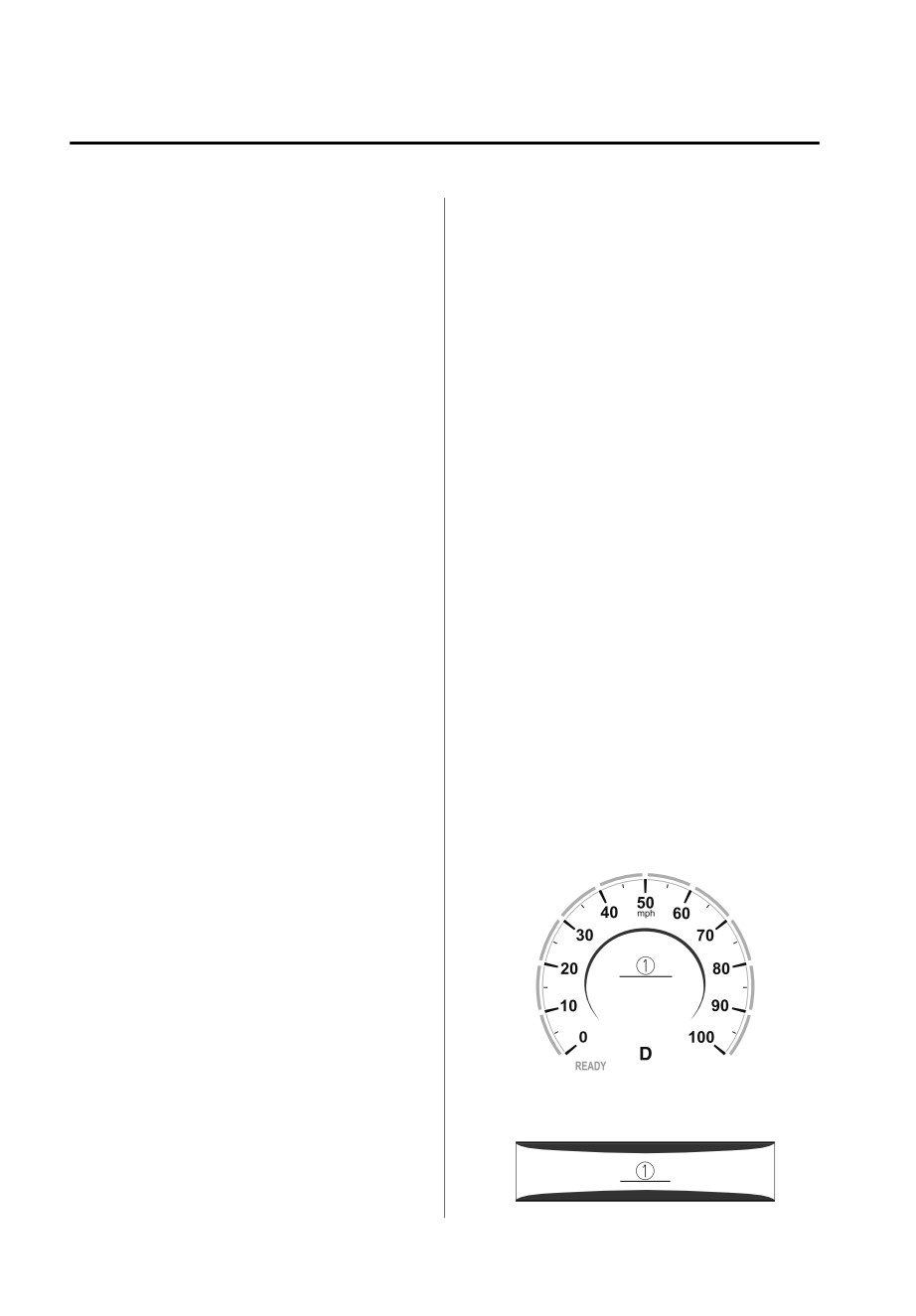
1.
“BRAKE!” message is displayed
detection function may operate.
Active driving display
Reversing towards a steep
ascending slope.
There are grating, wheel blocks, a
road curb, or a bump.
4-140
When Driving
i-ACTIVSENSE
1.
“BRAKE!” message is displayed
Do not rely completely on the Rear
Crossing detection function:
NOTE
The Rear Crossing detection function
During brake control, the collision
operates on vehicles while you are
warning sound is activated
driving in reverse. It will not operate on
intermittently.
walls, pedestrians, or animals.
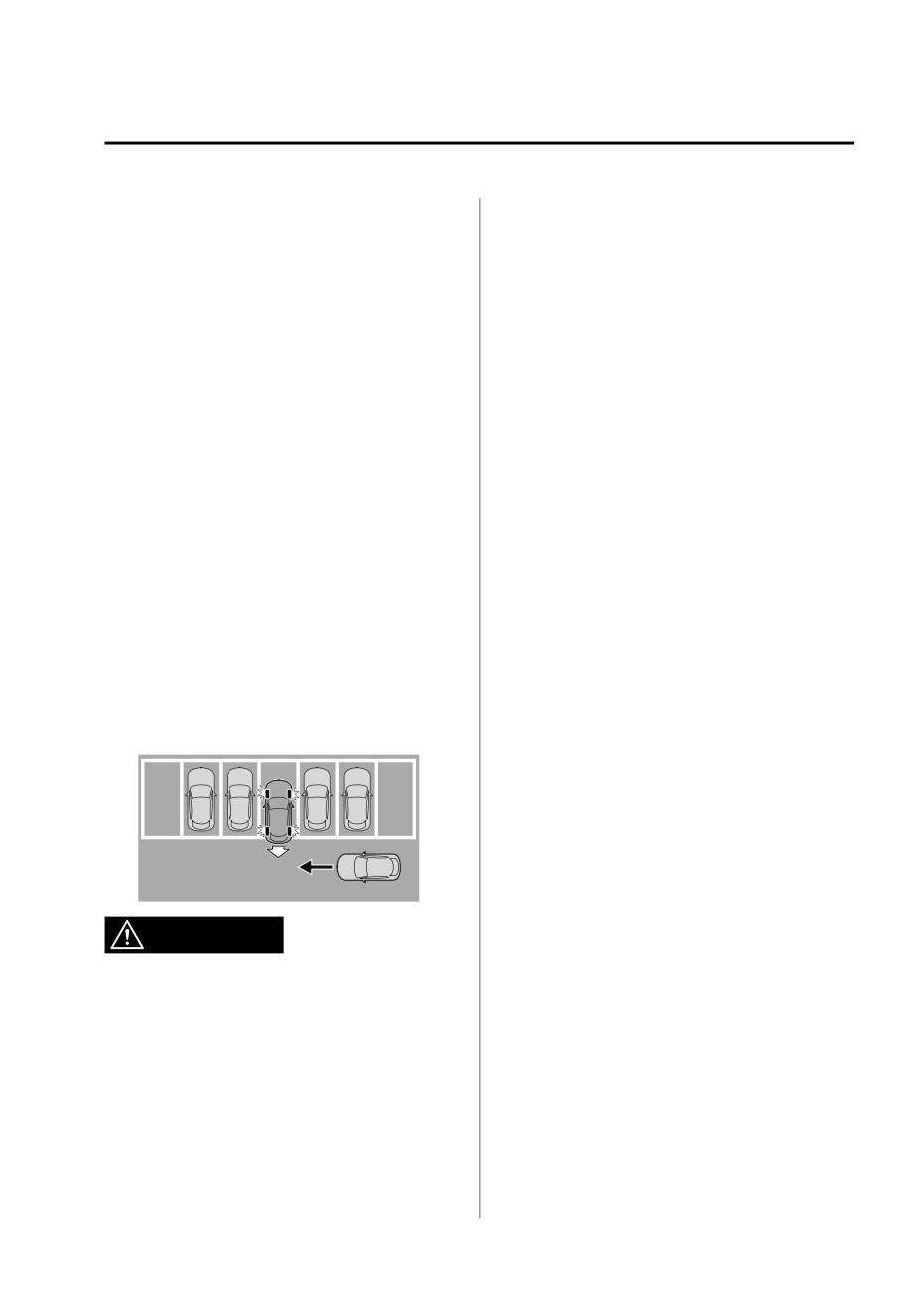
Rear crossing
Operation conditions
The Rear Crossing detection function is
The Rear Crossing detection function
designed to reduce the damage in the
operates when all of the following
event of a collision with a vehicle
conditions are met.
approaching from the rear sides while
driving in reverse.
The EV system is operating.
The Rear Crossing detection function
The SBS is on.
detects approaching vehicles using the
The selector lever is in the R position.
rear side radar sensors. If there is the
The vehicle speed is about 10 km/h
possibility of your vehicle colliding with
(6.2 mph) or slower.
a vehicle approaching from the rear
The vehicle speed of an approaching
sides while you are driving in reverse,
vehicle is about 3 km/h (2 mph) or
you are notified of possible danger by
faster.
a warning sound and a warning
There is no problem with the DSC.
indication on the display.
Furthermore, if the possibility of a
NOTE
collision increases, brake control is
When any of the following
performed to reduce damage in the
conditions is met, the i-ACTIVSENSE
event of a collision.
warning indication/warning light is
turned on and the system operation
is stopped. If the i-ACTIVSENSE
warning indication/warning light
remains on, have the vehicle
inspected by an Authorized Mazda
Dealer as soon as possible.
There is a problem with the
WARNING
system.
A large deviation in the installation
Always check the surrounding area
position of a rear side radar sensor
on the vehicle has occurred.
visually when reversing the vehicle:
The operation of the Rear Crossing
Snow, ice, or mud is adhering
around a rear side radar sensor.
detection function has certain
limitations. Therefore, the function
The temperature around a rear side
radar sensor is high.
might not operate or it might be
delayed even if there is a vehicle
Driving on snow-covered roads for
long periods.
passing through the rear of your
vehicle. Always make it your
The lead-acid battery voltage has
decreased.
responsibility as a driver to check the
rear.
4-141
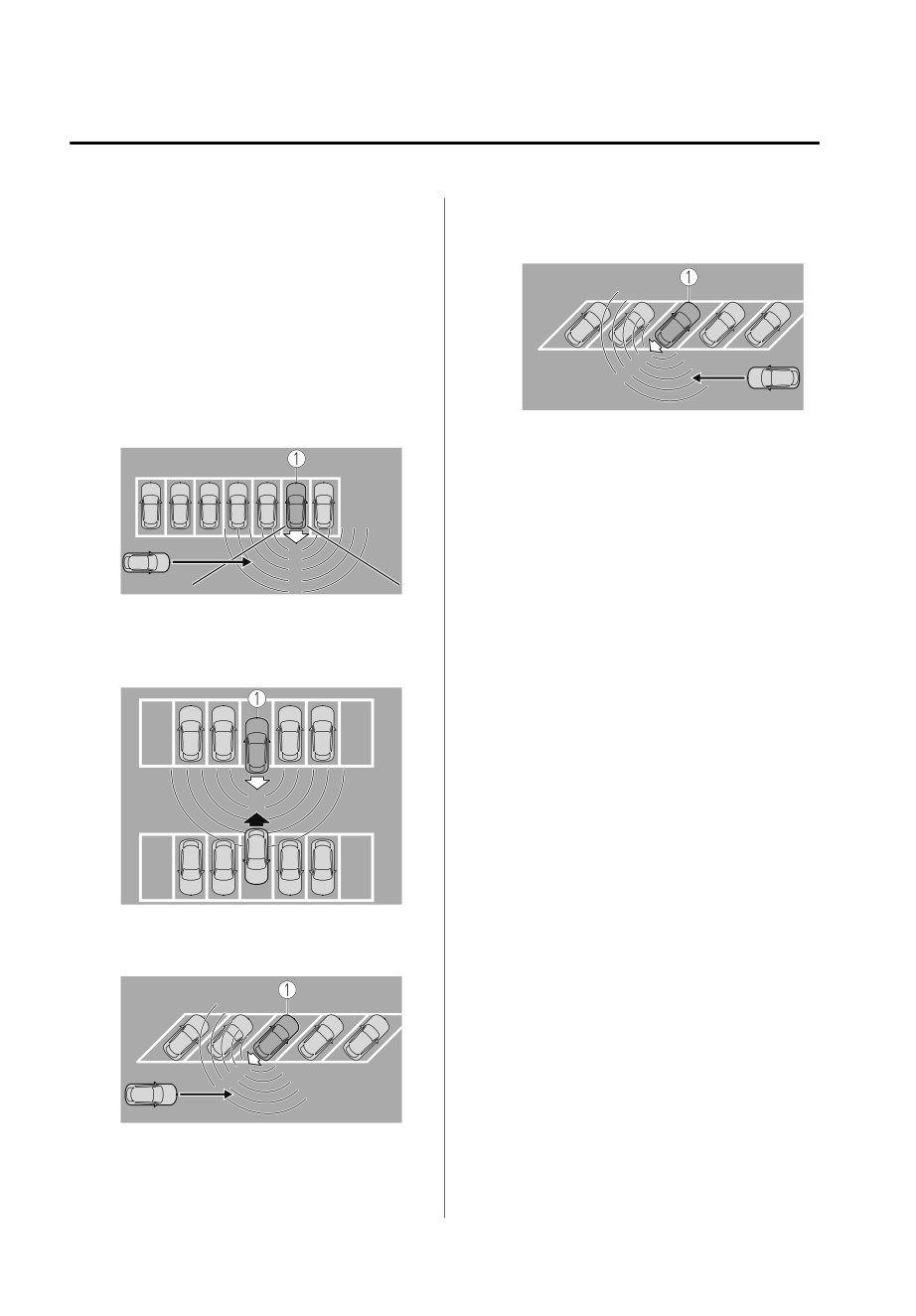
When Driving
i-ACTIVSENSE
When any of the following
A vehicle is approaching from the
conditions is met, the Rear Crossing
opposite direction on a steep
detection function will not detect
gradient.
approaching vehicles or they may be
difficult to detect.
The rear side radar sensor
detection area is obstructed by a
nearby wall or parked vehicle.
(Reverse the vehicle to a position
where the radar sensor detection
1. Your vehicle
area is no longer obstructed.)
Directly after the EV system starts.
Just after the SBS operation has
been enabled using [Settings] in
Mazda Connect.
Radio wave interference from a
radar sensor equipped on a vehicle
parked nearby.
1. Your vehicle
When any of the following
conditions is met, the Rear Crossing
A vehicle is approaching directly
may operate.
from the rear of your vehicle.
There is a hanging curtain or
railroad crossing gate.
Reversing near objects such as
foliage, barriers, vehicles, walls, or
fences.
The vehicle is driven on rough
roads such as in areas where there
is grass and foliage or off-road.
When reversing through low gates,
narrow gates, car washing
machines, or tunnels.
1. Your vehicle
A towing bar is installed or a trailer
is connected.
The vehicle is parked on a slant.
If the system performs brake control
and the vehicle is stopped, the
system will continue to hold the
brakes for a brief time unless there is
an operation performed by the
driver.
Collision warning
1. Your vehicle
If there is the possibility of your vehicle
colliding with a vehicle approaching
from the rear on the left or right, or
4-142
When Driving
i-ACTIVSENSE
from the rear while you are driving in
NOTE
reverse, a warning sound is activated
When the power switch is switched
continuously and a warning is
OFF while the SBS forward drive
displayed on the multi-information
detection is canceled, the SBS forward
display and the active driving display.
drive detection is automatically
Multi-information display
enabled the next time the power
switch is switched ON.
1.
“BRAKE!” message is displayed
Active driving display
1.
“BRAKE!” message is displayed
NOTE
During brake control, the collision
warning sound is activated
intermittently.
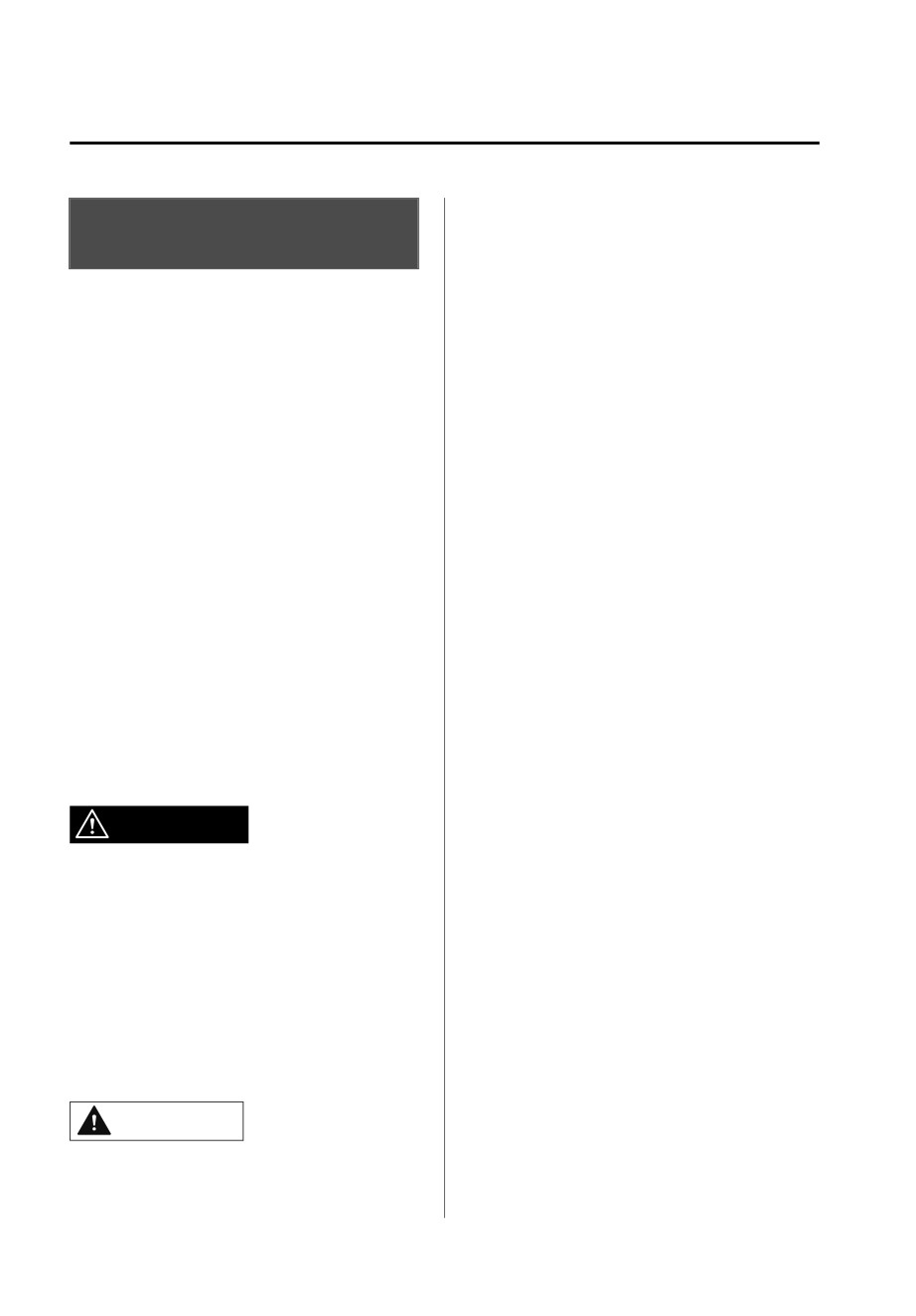
▼ Stopping the Smart Brake Support
(SBS) System Operation
The SBS can be changed to inoperable.
Refer to the Settings section in the
Mazda Connect Owner's Manual.
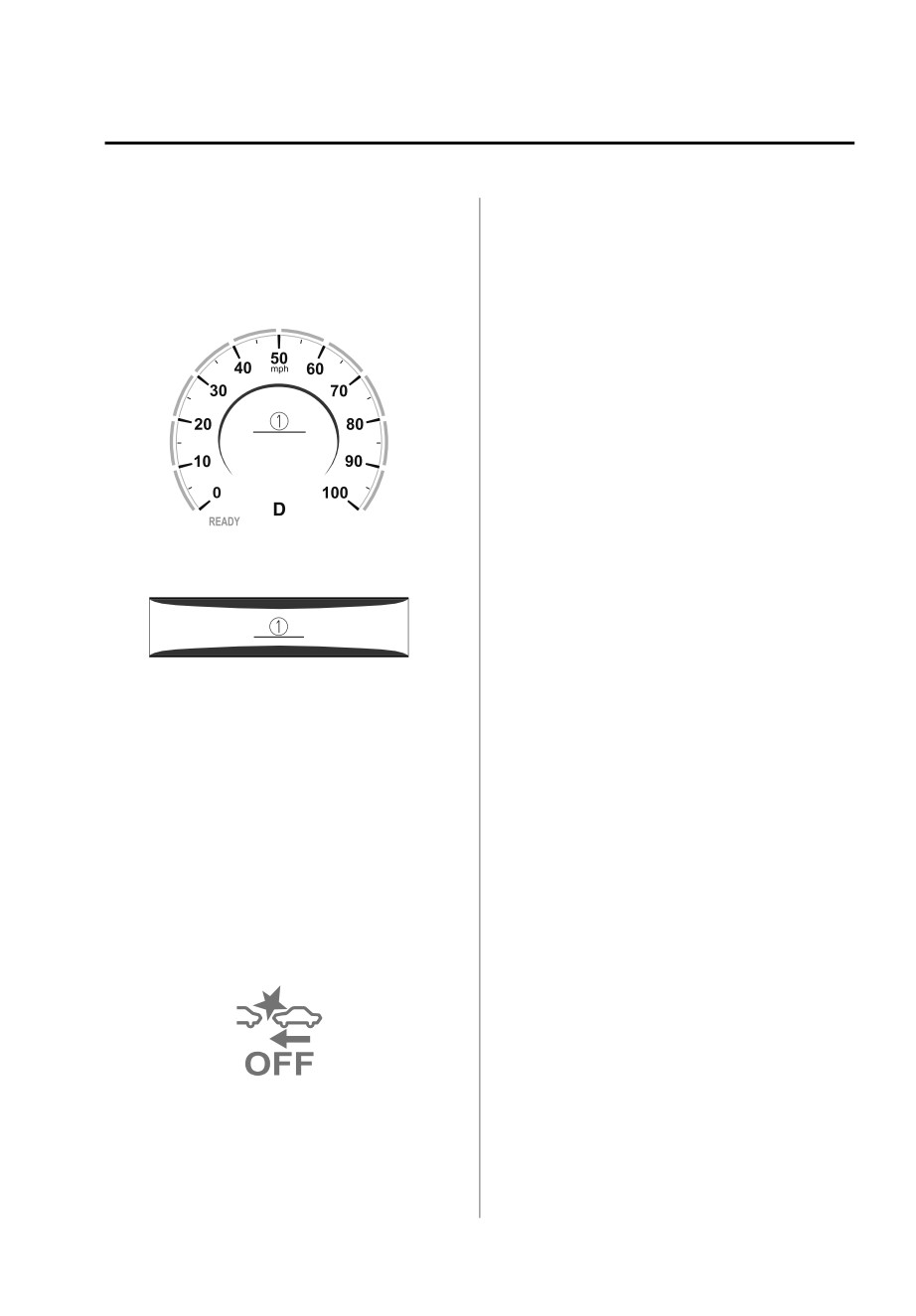
When the SBS is canceled, the SBS OFF
indicator light turns on.
4-143
When Driving
i-ACTIVSENSE
The image from the rear of the
360° View Monitor*
vehicle is displayed on the center
display.
▼ 360° View Monitor
The image from the rear assists the
The 360°View Monitor consists of the
driver in checking the rear of the
following functions which assist the
vehicle by displaying guide lines on
driver in checking the area surrounding
the displayed image taken from the
the vehicle using various indications in
rear of the vehicle.
the center display and a warning sound
Parking sensor
while the vehicle is being driven at low
If there are any obstructions near the
speeds or while parking.
vehicle while the top view/side view
is displayed, an obstruction
Top view
detection indication turns on around
The top view displays an image of
the bumper in the center display.
the vehicle from directly above on
The parking sensors use ultrasonic
the center display by combining the
sensors to detect obstructions
images taken from the 4 cameras set
around the vehicle when the vehicle
on all sides of the vehicle. The top
is driven at low speeds, such as
view displays on the right side of the
during garage or parallel parking,
screen when the front view or rear
and notifies the driver of the
view screen is being displayed. The
approximate distance from the
top view assists the driver in
vehicle to the surrounding
checking the area surrounding the
obstruction using sound and an
vehicle when the vehicle is moving
obstruction detection indication.
forward or in reverse.
Refer to Parking Sensor System on
Front view/front wide view
page 4-198.
The image from the front of the
Front Cross Traffic Alert (FCTA)
vehicle is displayed on the center
If there is the possibility of a collision
display.
with an approaching vehicle while
The view from the front assists the
the front view/front wide view/side
driver in checking the front of the
view is displayed, a warning is
vehicle by displaying guide lines on
displayed on the center display.
the displayed image taken from the
The Front Cross Traffic Alert (FCTA) is
front of the vehicle.
designed to assist the driver in
Side view
checking both sides of the vehicle
The images taken from the front left
when the vehicle starts to drive at an
and right sides of the vehicle are
intersection.
displayed on the center display.
Refer to Front Cross Traffic Alert
The side view assists the driver in
(FCTA) on page 4-104.
checking the front sides of the
Rear Cross Traffic Alert (RCTA)
vehicle by displaying guide lines on
If there is the possibility of a collision
the displayed image taken from the
with an approaching vehicle while
front left and right sides of the
the rear view/rear wide view is
vehicle.
displayed, a warning is displayed on
Rear view/rear wide view
the center display.
4-144 *Some models.
When Driving
i-ACTIVSENSE
The Rear Cross Traffic Alert (RCTA)
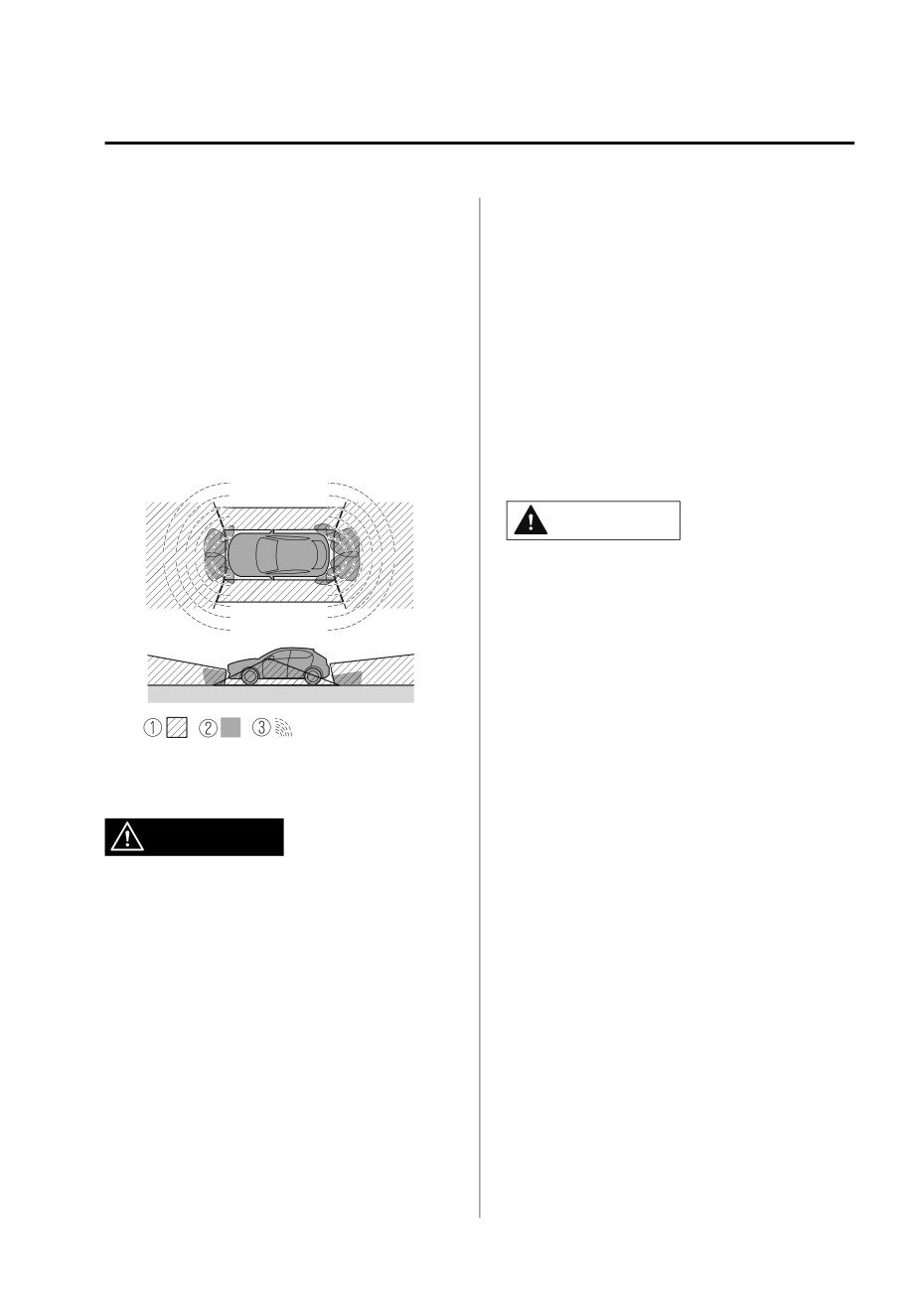
The shooting range of the cameras and
uses rear side radar sensor to detect
detection range of the sensors are
vehicles approaching from the rear
limited. For example, the areas in black
left and right sides of the vehicle,
at the front and rear of the vehicle
and it assists the driver in checking
image and the seams where each of
the rear of the vehicle while reversing
the camera images merge are blind
by flashing the Blind Spot Monitoring
spots where an obstruction may not be
(BSM) warning lights and activating
visible. In addition, the extended
the warning sound.
vehicle width lines and projected
Refer to Rear Cross Traffic Alert
vehicle path lines are only to be used
(RCTA) on page 4-107.
as references, and the images on the
screen may differ from the actual
360°View Monitor Range
conditions.
CAUTION
¾ Do not use the 360°View Monitor
under any of the following
conditions.
¾ Icy or snow-covered roads.
¾ Tire chains or a temporary spare
tire is installed.
¾ The front or rear doors are not fully
closed.
¾ The vehicle is on a road incline.
1. Cameras
¾ The door mirrors are retracted.
2. Ultrasonic sensors
¾ Do not hit the front/rear camera,
3. Front/Rear side radar sensors
front bumper, liftgate, and door
WARNING
mirrors forcefully. The camera
position or installation angle may
shift.
Always confirm the safety of the area
¾ The cameras are waterproof. Do not
around the vehicle with the mirrors
disassemble, modify, or remove a
and directly with your eyes when
camera.
driving:
¾ The camera cover is made of hard
The 360°View Monitor is an auxiliary
plastic, therefore do not apply oil
device which assists the driver in
film remover, organic solvents, wax,
checking the safety of the area around
or coating agents. If any such agent
the vehicle.
gets on the camera cover, wipe it off
using a soft cloth immediately.
¾ Do not rub the camera lens
forcefully, or clean it with an abrasive
or hard brush. Otherwise, it could
scratch the camera lens and
negatively affect the images.
4-145
When Driving
i-ACTIVSENSE
¾ Consult an Authorized Mazda Dealer
If the camera lens is touched or there
for repair, painting, or replacement
is any dirt on it, it could affect the
of the front/rear camera, front
screen image. Wipe the lens using a
bumper, liftgate and door mirrors.
soft cloth.
¾ Heed the following cautions to
If the area where the camera is
assure that the 360°View Monitor
installed, such as the front bumper,
operates normally.
liftgate or door mirrors, has been
damaged in a vehicle accident, the
¾ Do not modify the vehicle
camera (position, installation angle)
suspensions or lower/raise the
may have shifted. Always consult an
vehicle body, or both.
Authorized Mazda Dealer to have
¾ Always use tires of the specified
the vehicle inspected.
type and size for the front and rear
If the camera is subjected to
wheels. Consult an Authorized
excessive changes in temperature
Mazda Dealer for tire replacement.
such as by pouring hot water on the
¾ When the display is cold, images
camera during cold weather, the
may leave trails or the screen might
360°View Monitor may not operate
be darker than usual, making it
normally.
difficult to check the vehicle
If the vehicle is driven during cold
surroundings. Always confirm the
temperatures and the camera
safety at the front and around the
temperature decreases, the top view
vehicle visually when driving.
and the side view may become
¾ The method for parking/stopping
unclear. However, this does not
the vehicle using the 360°View
indicate a problem. If the vehicle is
Monitor differs depending on the
stopped for a while and the camera
road circumstances/conditions and
temperature increases, the top view
the vehicle conditions. When and
and the side view will return to the
how much you turn the steering
normal condition.
wheel will differ depending on the
If the lead-acid battery voltage is
situation, therefore always check the
low, the screen might be temporarily
vehicle surroundings directly with
difficult to view, however, this does
your eyes while using the system.
not indicate a problem.
Also, before using the system, always
The 360°View Monitor has
make sure that the vehicle can be
limitations. Objects under the
parked/stopped in the parking/
bumper or near both ends of the
stopping space.
bumper cannot be displayed.
Obstructions above the upper image
NOTE
range of the camera are not
If there are water droplets, snow, or
displayed.
Under the following conditions, the
mud on the camera lens, wipe it off
using a soft cloth. If the camera lens
screen might be difficult to view,
however this does not indicate a
is especially dirty, wash it off with
mild detergent.
problem.
The temperature near the lens is
high/low.
4-146
When Driving
i-ACTIVSENSE
Rainy conditions, water droplets
on the camera, or high humidity.
Mud or foreign matter near the
camera.
Extremely bright light such as
sunlight or headlights hitting the
camera lens directly.
The surroundings are illuminated
by vehicle lights, fluorescent lights,
or LED lights (display may flicker).
Extremely small dark or white dots
appear on the screen (dots may
flicker).
Because the 360°View Monitor
camera uses a special lens, the
distance displayed on the screen
differs from the actual distance.
Obstructions displayed on the screen
may appear differently than in
actuality. (Obstructions may appear
fallen, larger, or longer than they
actually are.)
Do not apply stickers to a camera or
the area around it. In addition, do
not install accessories or an
illuminated number/character
license plate to the area around a
camera. Otherwise, the camera may
not correctly display the surrounding
conditions.
Only rear and rear wide images
displayed on the monitor from the
360° view monitor camera are
reversed images (mirror images).
Free/open source software
information
This product includes free/open
sources. Information about the
licensing and source code is available
at the following URL.
global/en/opensource/svss/
mazda/
4-147
When Driving
i-ACTIVSENSE
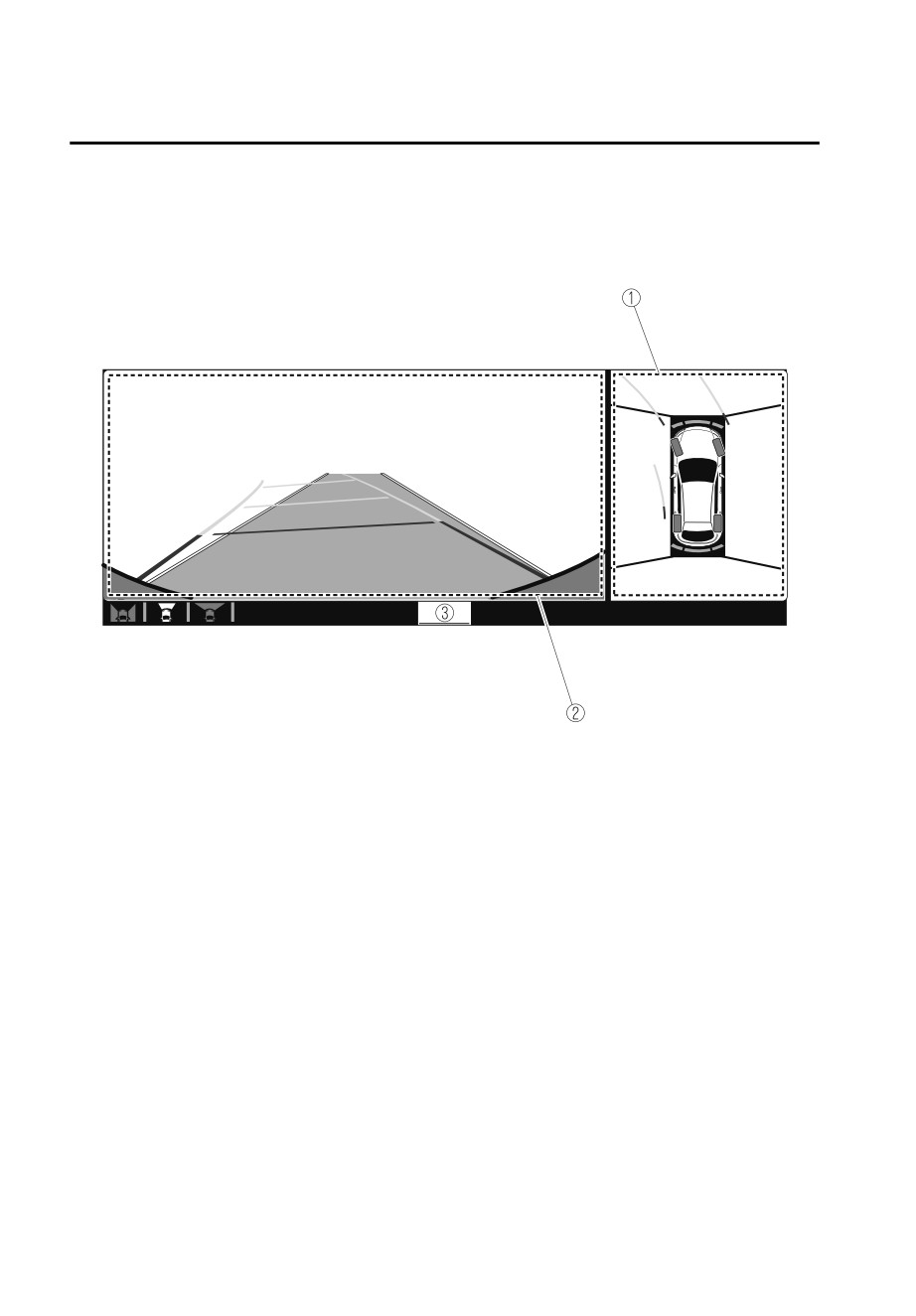
▼ Types of Images Displayed on the Screen
Top view/Front view
Displays the image of the area around the vehicle and the vehicle front.
1. Top view screen
2. Front view screen
4-148
When Driving
i-ACTIVSENSE
3.
“Check surroundings for safety.” message is displayed
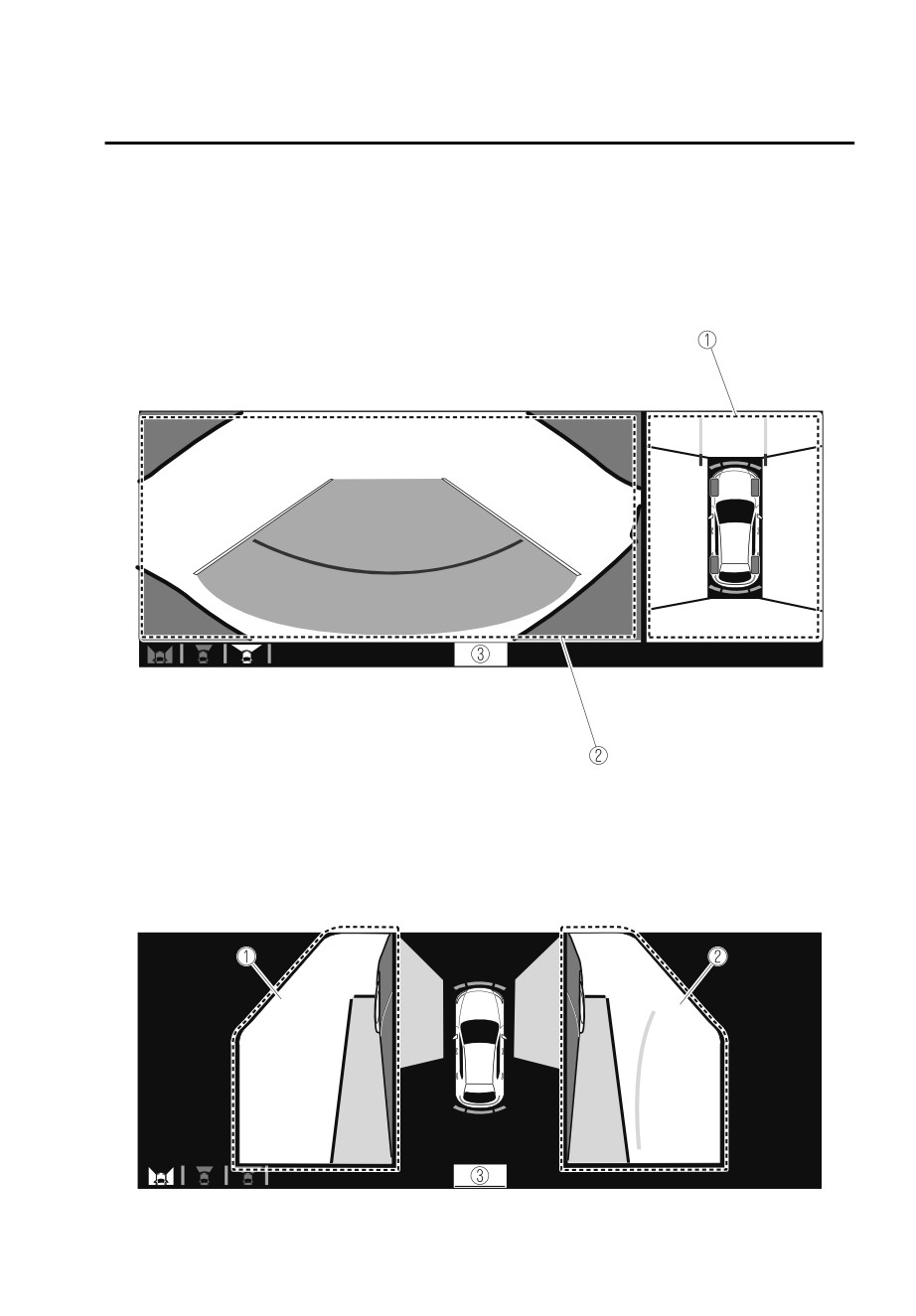
Top view/Front wide view
Displays the image of the area around the vehicle and the front of the vehicle
(wide-area).
1. Top view screen
2. Front wide view screen
3.
“Check surroundings for safety.” message is displayed
Side view
Displays the image of the left and right sides of the vehicle.
1. Left side view screen
4-149
When Driving
i-ACTIVSENSE
2. Right side view screen
3.
“Check surroundings for safety.” message is displayed
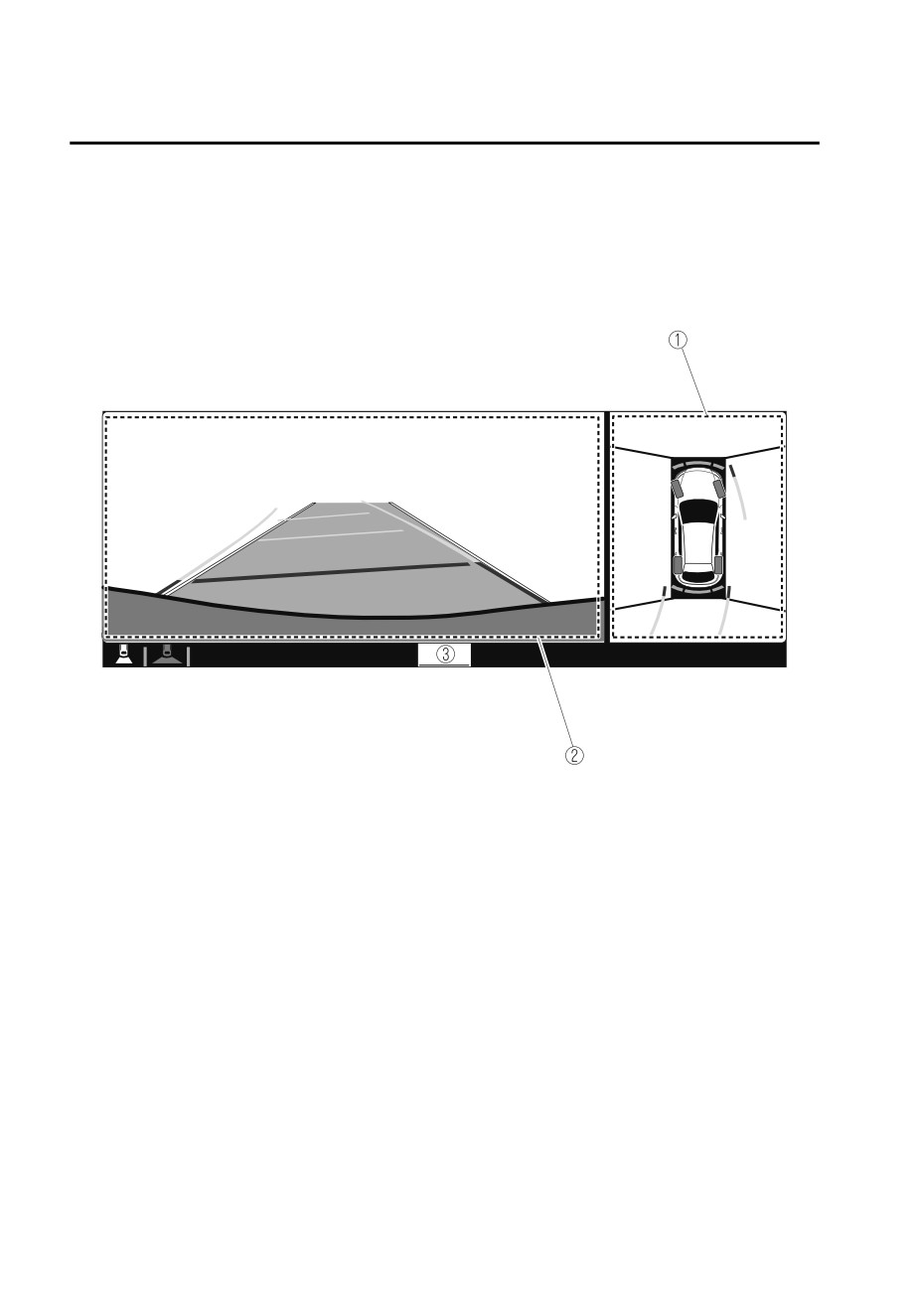
Top view/Rear view
Displays the image of the area around the vehicle and the rear of the vehicle.
1. Top view screen
2. Rear view screen
4-150