Lexus NX450H+ (2022 year). Manual in english - page 29
 

  Index      Manuals     Lexus NX450H+ (2022 year). Manual in english


Search            copyright infringement  


Content      ..     27      28      29      30     ..


Lexus NX450H+ (2022 year). Manual in english - page 29


The steering wheel is not being operated

The accelerator pedal is not depressed

All of the doors and the back door are closed

The outside rear view mirrors are not folded

The parking brake is not engaged

The dynamic radar cruise control with full-speed range are not operating

ABS, VSC, TRAC, PCS and PKSB are not operating

The vehicle is not on a steep slope

The VSC and TRAC are not turned off

If assistance cannot be started, check the message displayed on the center dis-
play

 P.508

Press the Advanced Park main switch.

If the switch is pressed while assistance is being
performed, the assistance will be canceled.

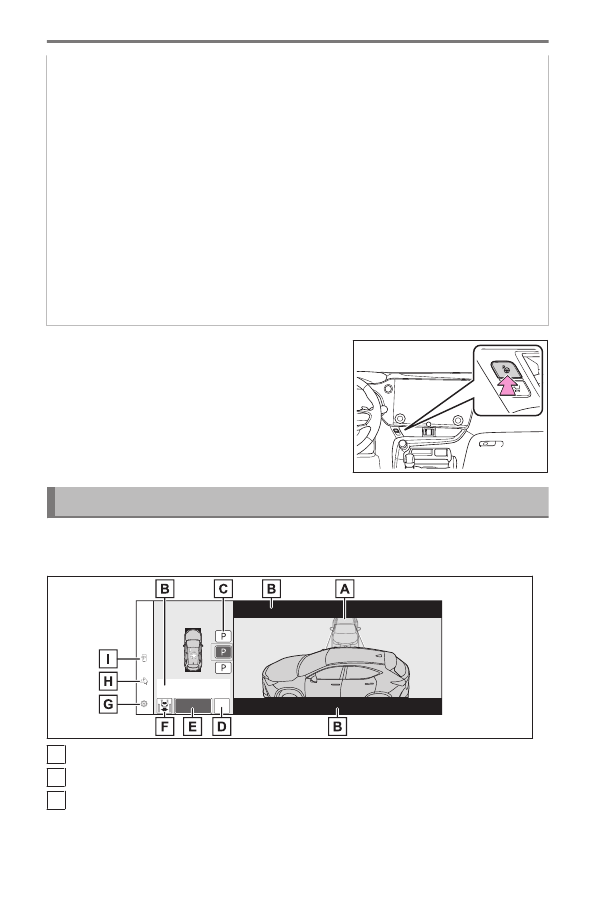
Advanced Park guidance screens

Guidance screens are displayed on the center display.

▶ 

Guidance screen (When assistance starts)

A

Target parking space box (blue)

B

Advice display

C

Parking type change button
If multiple buttons are displayed, depending on the condition of the button its
function differs as follows.

6-2. Using the safe driving support functions

478

 or 

: Change the target to another parking space.

 or 

: Change the target to another parking space.

: Select to change to the parallel parking function

: Change the perpendicular parking (forward/reverse) function

D

[MODE] button
Select to change between the memory function and the perpendicular parking
(forward/reverse) function and parallel parking function 

 P.492

E

[Start] button
Select to start parking assistance.

F

Perpendicular parking direction change button
Select to change between the parking (forward) function and parking (reverse)
function

: Change the perpendicular parking (forward) function
: Change the perpendicular parking (reverse) function

G

Customize setting button
Select to display the Advanced Park setting screen.

 P.506

H

Registration button
Select to begin registering a parking space.

I

Remote control function start button 

*

Select to start parking assistance operation on the smartphone display.

▶ 

Guidance screen (When reversing)

A

Operation icon
Displayed when the Advanced Park is operating.

B

Guide lines (yellow and red)

* : 

If equipped

6-2. Using the safe driving support functions

479

6

Driving suppor

t s

ystem

Display points from the center of the edge of the front or rear bumper to the
target stopping position (yellow) 

*1

 and approximately 1 ft. (0.3 m) (red) from

the vehicle.

C

Moving object warning icon

D

Emergency support brake control operation display
"Brake!" is displayed.

E

Lexus parking assist-sensor display

 P.433

INFORMATION

Intuitive parking assist pop-up display

Regardless of whether the intuitive parking assist is off or on

 P.434

, if an object is

detected by the intuitive parking assist when the Advanced Park is operating, the intuitive
parking assist pop up display will automatically be displayed over the guidance display.

Brake control operation when Advanced Park is operating

While the Advanced Park is operating, if the system determines that the possibility of
collision with detected moving or stationary object is high, the hybrid system output
restriction control and brake control will operate.
If brake control operates, Advanced Park operation will be suspended and a message will
be displayed on the multi-information display.

Buzzer

Depending on surrounding sounds or sounds from other systems, it may be difficult to
hear the buzzer of this system.

If a black screen is displayed on the multimedia system when the Advanced Park is
operating

The system is being affected by radio waves or may be malfunctioning. If a radio antenna
is installed near a camera, move it to a location as far from the cameras as possible. If a
radio antenna is not installed near a camera, and the screen does not return to normal
after turning the power switch off and then starting the hybrid system again, have the
vehicle inspected by your Lexus dealer.

Perpendicular parking (forward/reverse) function

Function description

The perpendicular parking (forward/reverse) function can be used if the tar-
get parking space can be detected when the vehicle is stopped close and

*1 : 

When the distance to the target stopping position is more than 8.2 ft. (2.5 m), the line

will be displayed 8.2 ft. (2.5 m) in front of the vehicle.

6-2. Using the safe driving support functions

480

perpendicular to the center of the parking space. Also, depending on the condition
of the parking space, etc., if it is necessary to change the direction of travel of the
vehicle, the shift position can be changed by assistance control.

Parking using the perpendicular parking (forward/reverse) function

1

Stop the vehicle at a position close and perpendicular to the center of the
target parking space.


▶ 

If there are parking space lines

A

Approximately 3.3 ft. (1 m) 

*2

B

Approximately 8.2 ft. (2.5 m) 

*2

C

Approximately 19.7 ft. (6 m) or more 

*2

D

Approximately 18.0 ft. (5.5 m) or more 

*2

The system can operate even if there is a parking space line on only one side of the
target parking space.


▶ 

If there are parking space lines

A

Approximately 3.3 ft. (1 m) 

*3

B

Approximately 9.8 ft. (3 m) or mor

*3

C

Approximately 19.7 ft. (6 m) or more 

*3

D

Approximately 18.0 ft. (5.5 m) or more 

*3

The system can operate even if there is a vehicle on only one side of the target parking
space.

2

Press the Advanced Park main switch and check that a possible parking space
is displayed on the center display.

*2 : 

This is a reference measurement for detection of a parking space. Depending on the

surrounding environment, detection may not be possible.

*3 : 

This is a reference measurement for detection of a parking space. Depending on the

surrounding environment, detection may not be possible.

6-2. Using the safe driving support functions

481

6

Driving suppor

t s

ystem

If a space which your vehicle can be parked is detected, a target parking space box
will be displayed.

If it is possible to parallel park in the space, select the parking space, and then select

 to change to the parallel parking function.

If it is possible to change the direction which a parking space is entered, select the
parking space, and then select 

 or 

 change the direction.

Depending on the surrounding environment, it may not be possible to use this
function. According to the information displayed on the center display, use the
function on another parking space.

3

Select [Start] button.

A buzzer will sound, an operation message will be displayed on the multi-information
display, and assistance will begin operating.

When the brake pedal is released, "Moving Forward...", "Backing Up..."will be dis-
played and the vehicle will begin moving forward/reverse.

To cancel assistance, press the Advanced Park main switch.

If assistance is canceled, "Advanced Park Canceled"will be displayed.
If you feel that the vehicle is approaching close to a surrounding vehicle, object, person,
or gutter

 P.483

6-2. Using the safe driving support functions

482

4

Perform operations as indicated by the ad-
vice displays until the vehicle stops in the
target parking space.

When the vehicle stops, "Advanced Park Finish-
ed"will be displayed and parking assistance will
end.
If you select 

 on the center display, the vehicle

displayed on the parking assist completion screen
will rotate.

INFORMATION

If you feel that the vehicle is approaching close to a surrounding vehicle, object,
person, or gutter

Depress the brake pedal to stop the vehicle and then change the shift position to
change the direction of travel of the vehicle. At this time, assist will be suspended.
However, if the [Start] button is selected, assist will resume and the vehicle will move
in the direction corresponding to the selected shift position.

NOTICE

When using the perpendicular parking (forward/reverse) function

Make sure that there are no obstructions within the yellow guide lines and be-
tween the vehicle and target parking spot. If there are any obstructions between
the vehicle and the target parking space, or between the yellow guide lines, cancel
the function.

As the target parking space will not be able to be set correctly if the surface of the
parking space is on a slope or has differences in height, the vehicle may stray from
the target parking space or be slanted. Therefore, do not use the function for this
kind of parking spot.

When parking in a narrow parking space, the vehicle may closely approach an
adjacent parked vehicle. If a collision seems likely, depress the brake pedal to stop
the vehicle.

If a detected parked vehicle is narrow or parked extremely close to the curb, the
position at which assistance will park the vehicle will also be close to the curb. If it
seems likely the vehicle will collide with something or drive off of the road, depress
the brake pedal to stop the vehicle, and then press the Advance Park main switch
to disable the system.

Advanced Park perpendicular exiting (forward/reverse) function

6-2. Using the safe driving support functions

483

6

Driving suppor

t s

ystem

Function description

When exiting from a perpendicular parking space, if the system determines that
exit is possible the perpendicular exiting (forward/reverse) function can be used.
Also, depending on the surrounding environment, if it is necessary to change the
direction of travel of the vehicle, the shift position can be changed by assistance
control.

Leaving a parking space using the perpendicular exiting (forward/reverse)
function

1

With the brake pedal depressed and P shift
position selected, press the Advanced Park
main switch and check that the exit direction
selection screen is displayed on the center
display.

2

Select an arrow on the center display to select the direction you wish to exit.

If the turn signal lever is operated, only exit to the left or right can be selected.

3

Depress the brake pedal and select [Start] button.

If you feel that the vehicle is approaching close to a surrounding vehicle, object, person,
or gutter

 P.483

A buzzer will sound, an operation message will be displayed on the multi-information
display, and assistance will begin operating. To cancel assistance, press the Advanced
Park main switch. If assistance is canceled, "Advanced Park Canceled" will be dis-
played.

6-2. Using the safe driving support functions

484

4

Perform operations as indicated by the advice displays until the vehicle is in a
position where exit is possible.

If the steering wheel is not operated, the vehicle will stop at the exit position. Assistance
can be ended by depressing the accelerator pedal or brake pedal. When the vehicle
reaches a position where exit is possible, "You can exit by moving the steering wheel"
will be displayed. If the steering wheel is operated, "Advanced Park Finished" will be
displayed and assistance will end. Grip the steering wheel and drive forward.

INFORMATION

If you feel that the vehicle is approaching close to a surrounding vehicle, object,
person, or gutter

 P.483

Perpendicular exiting (forward/reverse) function

Do not use exiting (forward/reverse) function in any situation other than when exiting
a parallel parking spot. If assistance is started unintentionally, depress the brake pedal
and stop the vehicle, then press the Advanced Park main switch to cancel assistance.

Situations in which the perpendicular exiting (forward/reverse) function will not
operate

Situations in which the perpendicular exiting (forward/reverse) function will not
operate.

When a vehicle which is waiting to park is in the exit direction

When a wall, column, or person is detected as near a front or rear center or
corner sensor

6-2. Using the safe driving support functions

485

6

Driving suppor

t s

ystem

Advanced Park parallel parking function

Function description

The parallel parking function can be used if the target parking space can be
detected when the vehicle is stopped close and aligned with the center of the
parking space. Also, depending on the condition of the parking space, etc., if it is
necessary to change the direction of travel of the vehicle, the shift position can be
changed by assistance control.

Parking using the parallel parking function

1

Stop the vehicle with it aligned near the center of the target parking space.


▶ 

If there are parking space lines

A

Approximately 3.3 ft. (1 m) 

*4

B

Approximately 16.4 to 19.7 ft. (5 to 6 m) 

*4

C

Approximately 14.8 ft. (4.5 m) or mor

*4

D

Approximately 26.2 ft. (8 m) or mor

*4

*4 : 

This is a reference measurement for detection of a parking space. Depending on the

surrounding environment, detection may not be possible.

6-2. Using the safe driving support functions

486


▶ 

If there is an adjacent parked vehicle

A

Approximately 3.3 ft. (1 m) 

*5

B

Approximately 23.0 ft. (7 m) or more 

*5

C

Approximately 14.8 ft. (4.5 m) or mor

*5

D

Approximately 26.2 ft. (8 m) or mor

*5

2

Press the Advanced Park main switch and check that a possible parking space
is displayed on the center display.

If a space which your vehicle can be parked is detected, a target parking space box
will be displayed.

If it is possible to perpendicular parking (forward/reverse) in the space, select
the parking space, and then select 

 to change to the perpendicular parking

(forward/reverse) function.

Depending on the surrounding environment, it may not be possible to use this
function. According to the information displayed on the center display, use the
function on another parking space.

*5 : 

This is a reference measurement for detection of a parking space. Depending on the

surrounding environment, detection may not be possible.

6-2. Using the safe driving support functions

487

6

Driving suppor

t s

ystem

3

Select [Start] button.

A buzzer will sound, an operation message will be displayed on the multi-information
display, and assistance will begin operating.

When the brake pedal is released, "Moving Forward..." will be displayed and the
vehicle will begin moving forward.

To cancel assistance, press the Advanced Park main switch.

If assistance is canceled, "Advanced Park Canceled" will be displayed.
If you feel that the vehicle is approaching close to a surrounding vehicle, object, person,
or gutter

 P.483

4

Perform operations as indicated by the ad-
vice displays until the vehicle stops in the
target parking space.

When the vehicle stops, "Advanced Park Finished"
will be displayed and parking assistance will end.
If you select 

 on the center display, the vehicle

displayed on the parking assist completion screen
will rotate.

INFORMATION

If you feel that the vehicle is approaching close to a surrounding vehicle, object,
person, or gutter

 P.483

"No available parking space" is displayed

Even if the vehicle is stopped parallel to a parking space, an adjacent parked vehicle
may not be detected. In this case, if the vehicle is moved to a position that a parked
vehicle can be detected, assistance can be started.

6-2. Using the safe driving support functions

488

NOTICE

When using the parallel parking function

 P.483

If there is a wall or other barrier on the inner side of the parking space, the vehicle
may stop at a position slightly outside of the set target parking space.

Advanced Park parallel exiting function

Function description

When exiting from a parallel parking space, if the system determines that exit
is possible the parallel exiting function can be used. Also, depending on the
surrounding environment, if it is necessary to change the direction of travel of the
vehicle, the shift position can be changed by assistance control.

6-2. Using the safe driving support functions

489

6

Driving suppor

t s

ystem

Leaving a parking space using the parallel exiting function

1

With the brake pedal depressed and P shift
position selected, press the Advanced Park
main switch and check that the exit direction
selection screen is displayed on the center
display.

2

Select an arrow on the center display to select the direction you wish to exit.

If the turn signal lever is operated, only exit to the left or right can be selected.

3

Depress the brake pedal and select [Start] button.

A buzzer will sound, an operation message will be displayed on the multi-information
display, and assistance will begin operating. To cancel assistance, press the Advanced
Park main switch. If you feel that the vehicle is approaching close to a surrounding
vehicle, object, person, or gutter

 P.483

If assistance is canceled, "Advanced Park

Canceled" will be displayed.

4

Perform operations as indicated by the ad-
vice displays until the vehicle is in a position
where exit is possible.

If the steering wheel is not operated, the vehicle
will stop at the exit position. When the vehicle
reaches a position where exit is possible, "You
can exit by moving the steering wheel" will be
displayed. If the steering wheel is operated, "Ad-
vanced Park Finished" will be displayed and assis-
tance will end. Grip the steering wheel and drive
forward.

6-2. Using the safe driving support functions

490

INFORMATION

If you feel that the vehicle is approaching close to a surrounding vehicle, object,
person, or gutter

 P.483

Parallel exiting function

Do not use parallel exiting function in any situation other than when exiting a parallel
parking spot. If assistance is started unintentionally, depress the brake pedal and stop
the vehicle, then press the Advanced Park main switch to cancel assistance.

Situations in which the parallel exiting function will not operate

In situations such as the following, the parallel exiting function will not operate:

When vehicles waiting at a traffic signal in the exit direction

When a vehicle is stopped in the area behind where the vehicle will exit

When a wall, column, or person is detected as near a front or rear side sensor

When the vehicle has been parked on a curb and a side sensor detects the road
surface

6-2. Using the safe driving support functions

491

6

Driving suppor

t s

ystem

When a vehicle is not parked in front of the vehicle

When there is excessive space between the front of the vehicle and a parked
vehicle

Advanced Park memory function

Function description

The memory function can be used to park in a previously registered parking space,
even if there are no parking space lines or adjacent parked vehicles.
Up to 3 parking spaces can be registered.

Registering a parking space

1

Stop the vehicle with it aligned near the center of the target parking space.


A

Approximately 3.3 ft. (1 m)

2

Press the main switch and then select 

 .

If the Advanced Park main switch is pressed at
a parking space without parking lines or any
adjacent parked vehicles, "No available parking
space" may be displayed. Continuously select and
hold 

 .

6-2. Using the safe driving support functions

492

3

Select perpendicular parking (forward/re-
verse) function or parallel parking function.

Only parking spaces for which assist can be per-
formed are displayed.

4

Select the parking direction.

When perpendicular parking (forward/reverse) was selected in step 3

When parallel parking was selected in step 3

5

Using the arrow buttons, adjust the position
of the parking space to be registered, and
then select [OK] button.

6-2. Using the safe driving support functions

493

6

Driving suppor

t s

ystem


Content      ..     27      28      29      30     ..