Lexus UX 300e (2022 year). Manual in english - page 18
 

  Index      Manuals     Lexus UX 300e (2022 year). Manual in english


Search            copyright infringement  


Content      ..     16      17      18      19     ..


Lexus UX 300e (2022 year). Manual in english - page 18


311

5

5-4. Using the driving support systems

Dr

ivin
g

Approximately 150 cm (4.9 ft.)

Approximately 60 cm (2.0 ft.)

The diagram shows the detection range of 
the sensors. Note that the sensors cannot 

detect objects that are extremely close to 
the vehicle.
The range of the sensors may change 
depending on the shape of the object, etc.

Q

Multi-information display, head-up display (if equipped) and Center Display 
(vehicles with 10.3-inch display model)

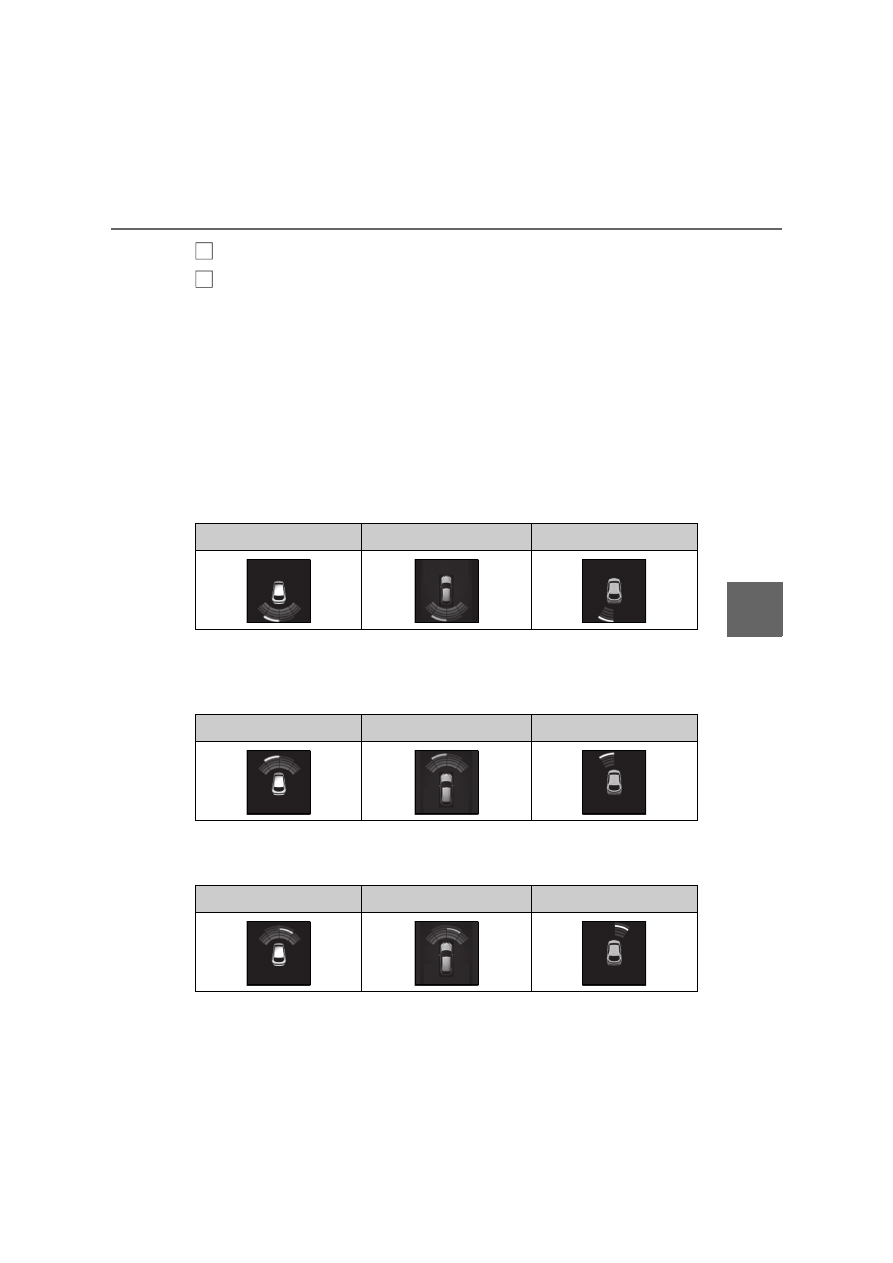
When an object is detected by a sensor, the approximate distance to the object will 
be displayed on the multi-information display, Center Display, and head-up dis-
play. (As the distance to the object becomes short, the distance segments may 
blink.)

Approximate distance to object: 150 cm (4.9 ft.) to 60 cm (2.0 ft.)

*

 (Rear cen-

ter sensor)

*

: Automatic buzzer mute function is enabled. (

P.312)

Approximate distance to object: 100 cm (3.3 ft.) to 60 cm (2.0 ft.)

*

 (Front cen-

ter sensor)

*

: Automatic buzzer mute function is enabled. (

P.312)

Approximate distance to object: 60 cm (2.0 ft.) to 45 cm (1.5 ft.)

*

*

: Automatic buzzer mute function is enabled. (

P.312)

B
C

Multi-information display

Center Display

Head-up display

Multi-information display

Center Display

Head-up display

Multi-information display

Center Display

Head-up display

312

5-4. Using the driving support systems

Approximate distance to object: 45 cm (1.5 ft.) to 30 cm (1.0 ft.)

*

*

: Automatic buzzer mute function is enabled. (

P.312)

Approximate distance to object: 30 cm (1.0 ft.) to 15 cm (0.5 ft.)

*1

*1

: Automatic buzzer mute function is disabled. (

P.312)

*2

: The distance segments will blink slowly.

Approximate distance to object: Less than 15 cm (0.5 ft.)

*1

*1

: Automatic buzzer mute function is disabled. (

P.312)

*2

: The distance segments will blink rapidly.

Q

Buzzer operation and distance to 
an object

A buzzer sounds when the sensors are 
operating.

The buzzer beeps faster as the vehi-
cle approaches an object. When the 
vehicle comes within the following 
distance of the object, the buzzer 
sounds continuously:

Approximately 30 cm (1.0 ft.)

When 2 or more objects are 
detected simultaneously, the buzzer 
sounds for the nearest object. If one 
or more objects come within 
approximately 30 cm (1.0 ft.) of the 
vehicle, the buzzer will repeat a long 
tone, followed by fast beeps.

Automatic buzzer mute function: 
After a buzzer begins sounding, if 
the distance between the vehicle 
and the detected object does not 

Multi-information display

Center Display

Head-up display

Multi-information display

*2

Center Display

*2

Head-up display

Multi-information display

*2

Center Display

*2

Head-up display

313

5

5-4. Using the driving support systems

Dr

ivin
g

become shorter, the buzzer will be 
muted automatically. (However, if 
the distance between the vehicle 
and object is 30 cm [1.0 ft.] or less, 
this function will not operate.)

The buzzer sounds volume can be 
adjusted. (

P.305)

*

: If  equipped

RCTA (Rear Crossing Traffic 
Alert) function

*

The RCTA function uses the BSM 
rear side radar sensors installed on 
the inner side of the rear bumper. 
This function is intended to assist 
the driver in checking areas that 
are not easily visible when backing 
up.

WARNING

Q

Cautions regarding the use of the 

system

There is a limit to the degree of recogni-

tion accuracy and control performance 

that this system can provide, do not 

overly rely on this system. The driver is 

always responsible for paying attention 

to the vehicle’s surroundings and driving 

safely. (

P.293)

Q

To ensure the system can operate 

properly

P.301

314

5-4. Using the driving support systems

Multi-information display

The RCTA function can be turned on/off.
When the RCTA function is disabled, the 
RCTA OFF indicator illuminates.

Outside rear view mirror indicators

When a vehicle approaching from the right 
or left at the rear of the vehicle is detected, 
both outside rear view mirror indicators 
will flash.

Center Display

If a vehicle approaching from the right or 
left at the rear of the vehicle is detected, 
the RCTA icon (

P.315) for the detected 

side will be displayed on the Center Dis-
play. This illustration shows an example of a 
vehicle approaching from both sides of the 
vehicle.

RCTA buzzer

If a vehicle approaching from the right or 
left at the rear of the vehicle is detected, a 

buzzer will sound. The buzzer also sounds 
for approximately 1 second immediately 
after the RCTA function is turned on.

Use the meter control switches to 
enable/disable the RCTA function. 
(

P.164)

1

Press 

 or 

 to select 

.

2

Press 

 or 

 to select “PKSA” 

and then press “OK”.

3

Press 

 or 

 to select “RCTA” 

and then press “OK”.

Each time the power switch is turned off 

then changed to ON, the RCTA function 

will be enabled automatically.

Q

Outside rear view mirror indicator visi-

bility

In strong sunlight, the outside rear view mir-

ror indicator may be difficult to see.

Q

Hearing the RCTA buzzer

The RCTA buzzer may be difficult to hear 

over loud noises, such as if the audio system 

volume is high.

Q

When “RCTA Unavailable” is shown on 

the multi-information display

Ice, water, snow, mud, etc., may be attached 

to the rear bumper around the sensors. 

(

P.301) Remove the ice, snow, mud, etc., 

attached to the rear bumper around the 

sensors to return the function to normal.
Additionally, the function may not operate 

normally when used in extremely hot or 

cold environments.

Q

Rear side radar sensors

P.301

System components

A

B

C

D

Turning the RCTA function 
on/off

315

5

5-4. Using the driving support systems

Dr

ivin
g

Q

Operation of the RCTA function

The RCTA function uses rear side 
radar sensors to detect vehicles 
approaching from the right or left at 
the rear of the vehicle and alerts the 
driver of the presence of such vehicles 
by flashing the outside rear view mirror 
indicators and sounding a buzzer.

Approaching vehicles

Detection areas of approaching 
vehicles

Q

RCTA icon display

When a vehicle approaching from the 
right or left at the rear of the vehicle is 
detected, the following will be dis-
played on the Center Display.

Example (Lexus parking assist mon-
itor) (if equipped): Vehicles are 
approaching from both sides of the 
vehicle

Q

RCTA function detection areas

The areas that vehicles can be 
detected in are outlined below.

The buzzer can alert the driver of 
faster vehicles approaching from far-
ther away.
Example:

Q

The RCTA function is operational when

The RCTA function operates when all of the 

following conditions are met:

O

The power switch is in ON.

O

The RCTA function is on.

O

The shift position is in R.

RCTA function

A
B

Approaching vehi-

cle speed

 Approximate 

alert distance

28 km/h (18 mph) 

(fast)

20 m (65 ft.)

8 km/h (5 mph) 

(slow)

5.5 m (18 ft.)

A

316

5-4. Using the driving support systems

O

The vehicle speed is less than approxi-

mately 8 km/h (5 mph).

O

The approaching vehicle speed is 

between approximately 8 km/h (5 mph) 

and 28 km/h (18 mph).

Q

Setting the buzzer volume

The buzzer volume can be adjusted on the 

multi-information display. (

P.305)

Q

Conditions under which the system will 

not detect a vehicle

The RCTA function is not designed to 

detect the following types of vehicles 

and/or objects:

O

Vehicles approaching from directly 

behind

O

Vehicles backing up in a parking space 

next to your vehicle

O

Vehicles that the sensors cannot detect 

due to obstructions

O

Guardrails, walls, signs, parked vehicles 
and similar stationary objects

*

O

Small motorcycles, bicycles, pedestrians, 
etc.

*

O

Vehicles moving away from your vehicle

O

Vehicles approaching from the parking 
spaces next to your vehicle

*

O

The distance between the sensor and 

approaching vehicle gets too close

*

: Depending on the conditions, detection 

of a vehicle and/or object may occur.

Q

Situations in which the system may not 

operate properly

The RCTA function may not detect vehicles 

correctly in the following situations:

O

When the sensor is misaligned due to a 

strong impact to the sensor or its sur-

rounding area.

O

When mud, snow, ice, a sticker, etc., is 

covering the sensor or surrounding area 

on the rear bumper.

O

When driving on a road surface that is 

wet with standing water during bad 

weather, such as heavy rain, snow, or fog.

O

When multiple vehicles are approaching 

with only a small gap between each vehi-

cle.

O

When a vehicle is approaching at high 

speed.

O

When equipment that may obstruct a 

sensor is installed, such as a towing eye-

let, bumper protector (an additional trim 

strip, etc.), bicycle carrier, or snow plow.

O

When backing up on a slope with a sharp 

change in grade.

O

When backing out of a sharp angle park-

ing spot.

O

When towing a trailer.

O

When there is a significant difference in 

317

5

5-4. Using the driving support systems

Dr

ivin
g

height between your vehicle and the 

vehicle that enters the detection area.

O

When a sensor or the area around a sen-

sor is extremely hot or cold.

O

If the suspension has been modified or 

tires of a size other than specified are 

installed.

O

If the front of the vehicle is raised or low-

ered due to the carried load.

O

When turning while backing up.

O

When a vehicle turns into the detection 

area.

Q

Situations in which the system may 

operate even if there is no possibility of a 

collision

Instances of the RCTA function unneces-

sarily detecting a vehicle and/or object may 

increase in the following situations:

O

When the parking space faces a street 

and vehicles are being driven on the 

street.

O

When the distance between your vehicle 

and metal objects, such as a guardrail, 

wall, sign, or parked vehicle, which may 

reflect electrical waves toward the rear of 

the vehicle, is short.

O

When equipment that may obstruct a 

sensor is installed, such as a towing eye-

let, bumper protector (an additional trim 

strip, etc.), bicycle carrier, or snow plow.

O

When a vehicle passes by the side of your 

vehicle.

O

When a detected vehicle turns while 

approaching the vehicle.

O

When there are spinning objects near 

your vehicle such as the fan of an air con-

ditioning unit.

O

When water is splashed or sprayed 

toward the rear bumper, such as from a 

sprinkler.

O

Moving objects (flags, exhaust fumes, 

large rain droplets or snowflakes, rain 

water on the road surface, etc.).

318

5-4. Using the driving support systems

O

When the distance between your vehicle 

and a guardrail, wall, etc., that enters the 

detection area is short.

O

Gratings and gutters.

O

When a sensor or the area around a sen-

sor is extremely hot or cold.

O

If the suspension has been modified or 

tires of a size other than specified are 

installed.

O

If the front of the vehicle is raised or low-

ered due to the carried load.

*

: If  equipped

Q

Parking Support Brake function 
(static objects)

P.323

Q

Parking Support Brake function 
(rear-crossing vehicles) (if 
equipped)

P.325

PKSB (Parking Support 
Brake)

*

The Parking Support Brake system 
consists of the following functions 
that operate when driving at a low 
speed or backing up, such as when 
parking. When the system deter-
mines that the possibility of a colli-
sion with a detected object is high, a 
warning operates to urge the driver 
to take evasive action. If the system 
determines that the possibility of a 
collision with a detected object is 
extremely high, the brakes are 
automatically applied to help avoid 
the collision or help reduce the 
impact of the collision.

PKSB (Parking Support Brake) 
system

319

5

5-4. Using the driving support systems

Dr

ivin
g

WARNING

Q

Cautions regarding the use of the 

system

Do not overly rely on the system, as 

doing so may lead to an accident. Always 

drive while checking the safety of the sur-

roundings of the vehicle. Depending on 

the vehicle and road conditions, weather, 

etc., the system may not operate. The 

detection capabilities of sensors and 

radars are limited. Always drive while 

checking the safety of the surroundings 

of the vehicle.

O

The driver is solely responsible for safe 

driving. Always drive carefully, taking 

care to observe your surroundings. 

The Parking Support Brake system is 

designed to provide support to lessen 

the severity of collisions. However, it 

may not operate in some situations.

O

The Parking Support Brake system is 

not designed to stop the vehicle com-

pletely. Additionally, even if the system 

has stopped the vehicle, it is necessary 

to depress the brake pedal immedi-

ately as brake control will be canceled 

after approximately 2 seconds.

O

It is extremely dangerous to check the 

system operations by intentionally 

driving the vehicle into the direction of 

a wall, etc. Never attempt such actions.

Q

When to disable the Parking Support 

Brake

In the following situations, disable the 

Parking Support Brake as the system 

may operate even though there is no 

possibility of a collision.

O

When inspecting the vehicle using a 

chassis roller, chassis dynamo or free 

roller.

O

When loading the vehicle onto a boat, 

truck or other transport vessel.

O

If the suspension has been modified or 

tires of a size other than specified are 

installed.

O

If the front of the vehicle is raised or 

lowered due to the carried load.

O

When equipment that may obstruct a 

sensor is installed, such as a towing 

eyelet, bumper protector (an addi-

tional trim strip, etc.), bicycle carrier, 

or snow plow.

O

When using automatic car washing 

devices.

O

If the vehicle cannot be driven in a sta-

ble manner, such as when the vehicle 

has been in an accident or is malfunc-

tioning.

O

When the vehicle is driven in a sporty 

manner or off-road.

O

When the tires are not properly 

inflated.

O

When the tires are very worn.

O

When tire chains, a compact spare tire 

or an emergency tire puncture repair 

kit are used.

NOTICE

Q

If “Parking Support Brake Unavail-

able” is displayed on the multi-infor-

mation display and the PKSB OFF 

indicator is flashing

If this message is displayed immediately 

after the power switch is changed to ON, 

operate the vehicle carefully, paying 

attention to your surroundings. It may be 

necessary to drive the vehicle for a cer-

tain amount of time before the system 

returns to normal. (If the system does not 

return to normal after driving for a while, 

clean the sensors and their surrounding 

area on the bumpers.)

320

5-4. Using the driving support systems

The Parking Support Brake can be 
enabled/disabled on the multi-infor-
mation display. All of the Parking Sup-
port Brake functions (static objects and 
rear crossing vehicles) are 
enabled/disabled simultaneously.
Use the meter control switches to 
enable/disable the parking support 
brake. (

P.164)

1

Press 

 or 

 to select 

.

2

Press 

 or 

 to select 

 and 

then press “OK”.

When the Parking Support Brake is dis-

abled, the PKSB OFF indicator (

P.159) 

illuminates on the multi-information dis-

play.
When the Parking Support Brake is turned 

on or off, operation of the Parking Support 

Brake continues in the same condition the 

next time the EV system is started.

If the EV system output restriction control 
or brake control operates, a buzzer will 
sound and a message will be displayed on 
the Center Display (Panoramic view moni-
tor) and multi-information display, to alert 
the driver. On vehicles with head-up dis-
play, the head-up display will display the 
same message as the multi-information 
display.
Depending on the situation, EV system 
output restriction control will operate to 
either limit acceleration or restrict output 

as much as possible.

EV system output restriction control 
is operating (acceleration restric-
tion)

Acceleration greater than a certain 
amount is restricted by the system.
Center Display (Panoramic view monitor): 
No warning displayed
Multi-information display: “Object 
Detected Acceleration Reduced”
PKSB OFF indicator: Not illuminated
Buzzer: Does not sound

EV system output restriction control 
is operating (output restricted as 
much as possible)

The system has determined that stronger-
than-normal brake operation is necessary.
Center Display (Panoramic view monitor): 
“BRAKE!”
Multi-information display: “BRAKE!”
PKSB OFF indicator: Not illuminated
Buzzer: Short beep

Brake control is operating

The system determined that emergency 
braking is necessary.
Center Display (Panoramic view monitor): 
“BRAKE!”
Multi-information display: “BRAKE!”
PKSB OFF indicator: Not illuminated
Buzzer: Short beep

Vehicle stopped by system opera-
tion

The vehicle has been stopped by brake 
control operation.
Center Display (Panoramic view monitor): 
“Press Brake Pedal”

Enabling/Disabling the Parking 
Support Brake

Displays and buzzers for EV sys-
tem output restriction control 
and brake control

321

5

5-4. Using the driving support systems

Dr

ivin
g

Multi-information display: “Switch to 
Brake” (If the accelerator pedal is not 
depressed, “Press Brake Pedal” will be dis-
played.)
PKSB OFF indicator: Illuminated
Buzzer: Short beep

If the Parking Support Brake deter-
mines that a collision with a detected 
object is possible, the EV system out-
put will be restricted to restrain any 
increase in the vehicle speed. (EV sys-
tem output restriction control: See fig-
ure 2 below.)
Additionally, if the accelerator pedal 
continues to be depressed, the brakes 
will be applied automatically to reduce 
the vehicle speed. (Brake control: See 
figure 3 below.)

Figure 1 When the PKSB (Parking 
Support Brake) is disabled

EV system output

Braking force

Time

Figure 2 When EV system output 
restriction control operates

EV system output

Braking force

Time

EV system output restriction con-
trol begins operating (The system 
determines that possibility of colli-
sion with detected object is high)

“BRAKE!” is displayed on the multi-infor-
mation display.

EV system output reduced

Figure 3 When brake control oper-
ates

EV system output

Braking force

Time

EV system output restriction con-
trol begins operating (The system 
determines that possibility of colli-

System overview

A
B
C

A
B
C
D

E

A
B
C
D

322

5-4. Using the driving support systems

sion with detected object is high)

“BRAKE!” is displayed on the multi-infor-
mation display.

EV system output reduced

Brake control begins operating 
(the system determines that possi-
bility of collision with detected 
object is extremely high)

Brake control strength increased

“Switch to Brake” is displayed on 
the multi-information display

Q

If the Parking Support Brake has oper-

ated

If the vehicle is stopped due to operation of 

the Parking Support Brake, the Parking 

Support Brake will be disabled and the 

PKSB OFF indicator will illuminate. If the 

Parking Support Brake operates unneces-

sarily, brake control can be canceled by 

depressing the brake pedal or waiting for 

approximately 2 seconds for it to automati-

cally be canceled. Then, the vehicle can be 

operated by depressing the accelerator 

pedal.

Q

Re-enabling the Parking Support Brake

To re-enable the Parking Support Brake 

when it is disabled due to operation of the 

Parking Support Brake, either enable the 

system again (

P.320), or turn the power 

switch off and then back to ON. Addition-

ally, if the object becomes no longer in the 

traveling direction of the vehicle or if the 

traveling direction of the vehicle changes 

(such as changing from moving forward to 

backing up, or from backing up to moving 

forward), the system will be re-enabled 

automatically.

Q

If “Parking Support Brake Unavailable” 

is displayed on the multi-information 

display and the PKSB OFF indicator is 

flashing

If this message is displayed, a sensor on the 

front or rear bumper may be dirty. Clean 

the sensors and their surrounding area on 

the bumpers.

Q

If “Parking Support Brake Unavailable” 

and “Parking Assist Unavailable Clean 

Parking Assist Sensor” are displayed on 

the multi-information display and the 

PKSB OFF indicator is flashing

O

A sensor may be covered with ice, snow, 

dirt, etc. In this case, remove the ice, 

snow, dirt, etc., from the sensor to return 

the system to normal. If this message is 

shown even after removing dirt from the 

sensor, or shown when the sensor was 

not dirty to begin with, have the vehicle 

inspected by any authorized Lexus 

retailer or Lexus authorized repairer, or 

any reliable repairer.

O

A sensor may be frozen. Once the ice 

melts, the system will return to normal.

O

Water may be continuously flowing over 

the sensor surface, such as in a heavy 

rain. When the system determines that it 

is normal, the system will return to nor-

mal.

Q

If a 12-volt battery terminal has been 

disconnected and reconnected

The system needs to be initialized. To initial-

ize the system, drive the vehicle straight 

ahead for 5 seconds or more at a speed of 

approximately 35 km/h (22 mph) or more.

E
F

G

H

323

5

5-4. Using the driving support systems

Dr

ivin
g

*

: If equipped

This function will operate in situations 
such as the following if an object is 
detected in the traveling direction of 
the vehicle.

Q

When traveling at a low speed and 
the brake pedal is not depressed, 
or is depressed late

Q

When the accelerator pedal is 
depressed excessively

Parking Support Brake 
function (static objects)

*

If the sensors detect a static object, 
such as a wall, in the traveling direc-
tion of the vehicle and the system 
determines that a collision may 
occur due to the vehicle suddenly 
moving forward due to an acciden-
tal accelerator pedal operation, the 
vehicle moving the unintended 
direction due to the wrong shift 
position being selected, or while 
parking or traveling at low speeds, 
the system will operate to lessen 
the impact with the detected static 
object and reduce the resulting 
damage.

Examples of function operation

324

5-4. Using the driving support systems

Q

When the vehicle moves in the 
unintended direction due to the 
wrong shift position being selected

P.306

Q

The Parking Support Brake function 

(static objects) will operate when

The function will operate when the PKSB 

OFF indicator is not illuminated or flashing 

(

P.158, 159) and all of the following con-

ditions are met:

O

EV system output restriction control

• The Parking Support Brake is enabled.

• The vehicle speed is approximately 15 

km/h (10 mph) or less.

• There is a static object in the traveling 

direction of the vehicle and approxi-

mately 2 to 4 m (6 to 13 ft.) away.

• The Parking Support Brake determines 

that a stronger-than-normal brake oper-

ation is necessary to avoid a collision.

O

Brake control

• EV system output restriction control is 

operating.

• The Parking Support Brake determines 

that an immediate brake operation is 

necessary to avoid a collision.

Q

The Parking Support Brake function 

(static objects) will stop operating when

The function will stop operating if any of the 

following conditions are met:

O

EV system output restriction control

• The Parking Support Brake is disabled.

• The system determines that the collision 

has become avoidable with normal brake 

operation.

• The static object is no longer approxi-

mately 2 to 4 m (6 to 13 ft.) away from the 

vehicle or in the traveling direction of the 

vehicle.

O

Brake control

• The Parking Support Brake is disabled.

• Approximately 2 seconds have elapsed 

since the vehicle was stopped by brake 

control.

• The brake pedal is depressed after the 

vehicle is stopped by brake control.

• The static object is no longer approxi-

mately 2 to 4 m (6 to 13 ft.) away from the 

vehicle or in the traveling direction of the 

vehicle.

Q

Detection range of the Parking Support 

Brake function (static objects)

The detection range of the Parking Support 

Brake function (static objects) differs from 

the detection range of the Lexus parking 

assist-sensor. (

P.310) Therefore, even if 

the Lexus parking assist-sensor detects an 

object and provides a warning, the Parking 

Support Brake function (static objects) may 

not start operating.

Types of sensors

WARNING

Q

To ensure the system can operate 

properly

P.307

Q

If the Parking Support Brake function 

(static objects) operates unnecessar-

ily, such as at a railroad crossing

P.322

Q

Notes when washing the vehicle

P.308

325

5

5-4. Using the driving support systems

Dr

ivin
g

Q

Situations in which the system may not 

operate properly

P.309

Q

Situations in which the system may 

operate even if there is no possibility of a 

collision

P.309

*

: If  equipped

This function will operate in situations 
such as the following if a vehicle is 
detected in the traveling direction of 
the vehicle.

Q

When reversing, a vehicle is 
approaching and the brake pedal is 
not depressed, or is depressed late

P.301

Parking Support Brake 
function (rear-crossing vehi-
cles)

*

If a rear radar sensor detects a 
vehicle approaching from the right 
or left at the rear of the vehicle and 
the system determines that the pos-
sibility of a collision is high, this 
function will perform brake control 
to reduce the likelihood of an 
impact with the approaching vehi-
cle.

Examples of function operation

Types of sensors

326

5-4. Using the driving support systems

Q

The Parking Support Brake function 

(rear-crossing vehicles) will operate 

when

The function will operate when the PKSB 

OFF indicator is not illuminated or flashing 

(

P.158, 159) and all of the following con-

ditions are met:

O

EV system output restriction control

• The Parking Support Brake is enabled.

• The vehicle speed is approximately 15 

km/h (10 mph) or less.

• Vehicles are approaching from the right 

or left at the rear of the vehicle at a travel-

ing speed of approximately 8 km/h (5 

mph) or more.

• The shift position is in R.

• The Parking Support Brake determines 

that a stronger than normal brake opera-

tion is necessary to avoid a collision with 

an approaching vehicle.

O

Brake control

• EV system output restriction control is 

operating.

• The Parking Support Brake determines 

that an emergency brake operation is 

necessary to avoid a collision with an 

approaching vehicle.

Q

The Parking Support Brake function 

(rear-crossing vehicles) will stop oper-

ating when

The function will stop operating if any of the 

following conditions are met:

O

EV system output restriction control

• The Parking Support Brake is disabled.

• The collision becomes avoidable with 

normal brake operation.

• A vehicle is no longer approaching from 

the right or left at the rear of the vehicle.

O

Brake control

• The Parking Support Brake is disabled.

• Approximately 2 seconds have elapsed 

since the vehicle was stopped by brake 

control.

• The brake pedal is depressed after the 

vehicle is stopped by brake control.

• A vehicle is no longer approaching from 

the right or left at the rear of the vehicle.

Q

Detection area of the Parking Support 

Brake function (rear-crossing vehicles)

The detection area of the Parking Support 

Brake function (rear-crossing vehicles) dif-

fers from the detection area of the RCTA 

function (

P.315). Therefore, even if the 

RCTA function detects a vehicle and pro-

vides an alert, the Parking Support Brake 

function (rear-crossing vehicles) may not 

start operating.

Q

Situations in which the system may not 

operate properly

P.316

Q

Situations in which the system may 

operate even if there is no possibility of a 

collision

P.317

WARNING

Q

To ensure the system can operate 

properly

P.301


Content      ..     16      17      18      19     ..