Hyundai Kona (2024 year). Manual in english - page 11
7
7-5
CAUTION
Take the following precautions to
maintain optimal performance of the
detecting sensor:
• Never disassemble the detecting
sensor or sensor assembly, or cause
any damage to it.
• If the detecting sensors have been
replaced or repaired, have the vehicle
inspected by an authorized HYUNDAI
dealer.
• Never install any accessories or stickers
on the front windshield near the front
view camera, or tint the front
windshield.
• Avoid exposing the front view camera
to moisture.
• Never place any reflective objects (for
example, white paper, mirror) over the
dashboard.
• Do not place any objects near the front
windshield or install any accessories on
the front windshield. It can affect the
performance of the defogging and
defrosting function of the climate
control system, which may prevent the
Driver Assistance systems from
operating.
• If a trailer or hitch mounted carrier is
attached, it may adversely affect the
performance of the Forward
Collision-Avoidance Assist.
Forward Collision-Avoidance
Assist settings
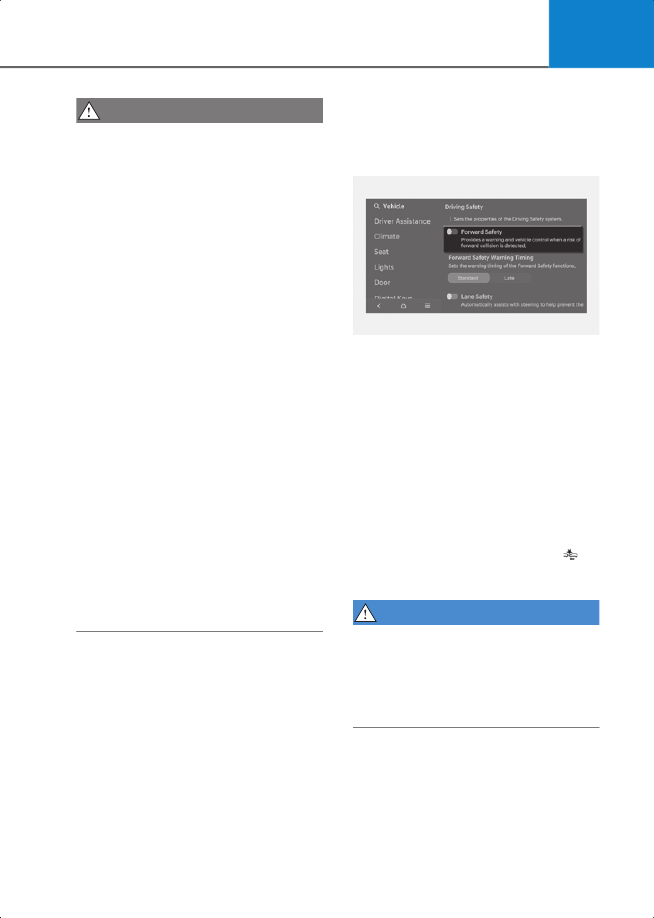
Forward Safety
2C_ForwardSafetySetInfo
With the engine on, select
Setup
>
Vehicle
>
Driver Assistance
>
Driving
Safety
from the settings menu in the
infotainment system to set whether to
use each function.
• If “
Forward Safety
” is selected,
Forward Collision-Avoidance Assist will
warn the driver with a warning
message, an audible warning
depending on the collision risk levels.
Braking assist will be applied
depending on the collision risk levels. If
“
Forward Safety
” is deselected,
Forward Safety will turn off. The ( )
warning light illuminates on the
instrument cluster.
WARNING
When the engine is restarted, Forward
Collision-Avoidance Assist will always
turn on. However, if “
Forward Safety
” is
deselected, the driver should always be
aware of the surroundings and drive
safely.