Hyundai Kona (2024 year). Manual in english - page 6
5
5-37
Information
The HomeLink indicator (7) should light
green, solid or flashing, and your
programmed device should operate.
If your device does not operate, the
HomeLink programming was not
successful, and you’ll need to reprogram
the button.
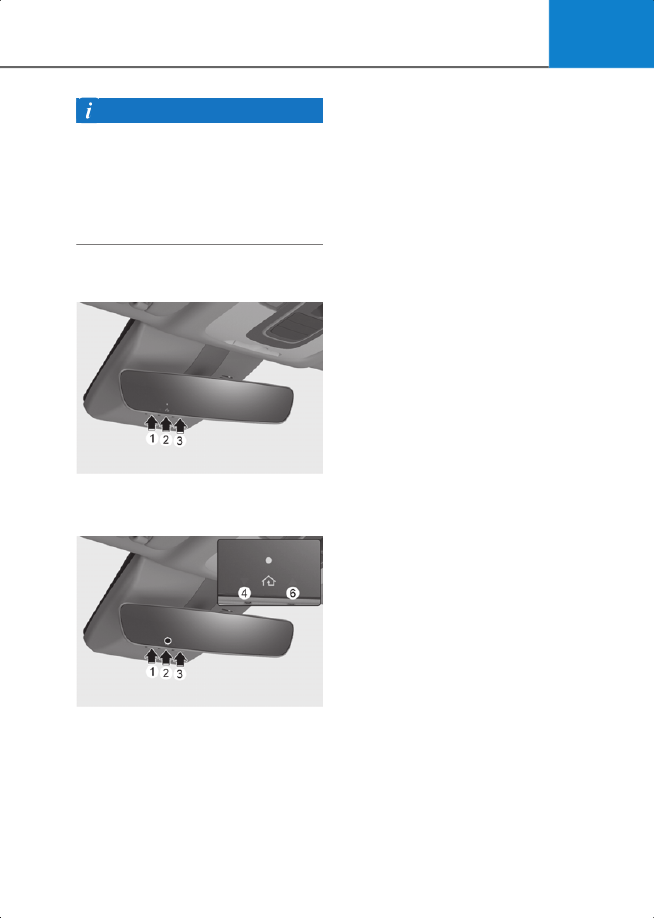
2) Two-Way Communication Display
Behavior
2C_ECMHomelink_6
1. Press and release one of the
programmed HomeLink buttons (1, 2 or
3).
2C_ECMHomelink_7
2. The indicator (4) and (6) operates as
below, if your garage door opener has
Two-Way Communication
functionality.
• If the indicator (4) flashes in Orange,
it indicates that the garage door is
“Closing”.
• The indicator (4) turns solid green
once the garage door has closed.
• If the indicator (6) flashes in Orange,
it indicates that the garage door is
“Opening”.
• The indicator (6) turns solid green
once the garage door has fully
opened.
• If the indicator (4) or (6) does not turn
to green, it indicates that the last
status of garage door was not
received properly. The HomeLink
mirror tries to receive the last known
status of the garage door for a few
seconds.
3) Recalling Garage Door Status
HomeLink mirror with Two-Way
Communication provides a way to view
the last stored message from the garage
door opener. In order to recall the last
known status of the last activated device,
press the buttons “1 and 2” or “2 and 3”
simultaneously.
• If the indicator (4) appears solid Green,
it indicates that the last activated
device was “closed” properly.
• If the indicator (6) appears solid Green,
it indicates that the last activated
device was “open” properly.
3. Erasing HomeLink® Buttons
1) Erasing and Reprogramming a Single
HomeLink® Button:
1. Press and hold the desired HomeLink
button you want to re-program. DO
NOT release the button.
2. The HomeLink indicator light (7) will
illuminate solid green. Release the
button as soon as the HomeLink
indicator light (7) begins to flash
orange, usually about 20 seconds.
3. Proceed with the steps in the
“Programming a New HomeLink
Button” section.