Hyundai Tucson (2022 year). Manual in english - page 17
07
Surround View Monitor Settings
Top View Parking Guidance
Camera settings
Front top view
ONX4E070130
OTM070213L
Rear top view
•
You can change Surround View
Monitor ‘Display Contents’ or ‘Display
Settings’ by touching the setup icon
(
) on the screen while Surround
View Monitor is operating, or selecting
‘Driver Assistance → Parking Safety →
Camera Settings’ from the Settings
menu while the engine is on.
•
In the Display Contents, you can
change settings for ‘Top View Parking
ONX4E070131
Guidance’, ‘Rear View Parking
Guidance’ and ‘Parking Distance
• When the ‘Top View Parking Guidance’
Warning’.
is selected, parking guidance is
displayed on the right side of the
•
In the Display Settings, you can
Surround View Monitor screen.
change the screen’s ‘Brightness’ and
‘Contrast’.
• You may see the front top view or the
rear top view when using Top View
Parking Guidance.
• The ‘Top View Parking Guidance’ can
be connected with the front top view
parking guidance or the rear top view
parking guidance.
7-117
Driver assistance system
Rear View Parking Guidance
Parking Distance Warning
OTM070216L
OTM070217L
• When the ‘Rear View Parking
• When the ‘Parking Distance Warning’
Guidance’ is selected, parking
is selected, parking distance warning
guidance is displayed in the rear view.
is displayed on the right side of the
Surround View Monitor screen.
• The horizontal guideline of the Rear
View Parking Guidance shows the
• The image will be displayed only when
distance of 1.6 ft (0.5m), 3.3 ft (1 m)
Parking Distance Warning is warning
and 7.6 ft (2.3m) from the vehicle.
the driver.
Surround View Monitor Auto On
With the engine on, select ‘Driver
Assistance → Parking Safety → Surround
View Monitor Auto On’ from the Settings
menu to use the function.
7-118
07
Surround View Monitor
Front view
Operation
The front image is displayed on the
Operating button
screen when the gear is in N (Neutral) or
D (Drive) to assist in parking. The front
Type A
Type B
view has a top view/front view/side view.
Operating conditions
• When the gear is shifted from R
(Reverse) to N (Neutral) or D (Drive),
the last set mode of front view
function will be selected.
• Front view function will operate when
the following conditions are satisfied:
--
While the infotainment system
ONX4070040
ONX4E070102
screen is being displayed, press the
Parking/View button (1) briefly when
the gear is in D (Drive) or N (Neutral)
and vehicle speed is below 9 mph
(15 km/h).
• Surround View Monitor Auto On
function will operate when the
following conditions are satisfied:
--
With ‘Driver Assistance → Parking
Safety → Surround View Monitor
Auto On’ selected from the Settings
menu, the front parking assist view
ONX4E070132
screen is displayed when Parking
•
Press the Parking/View button (1) to
Distance Warning warns the driver
turn on Surround View Monitor.
while driving in D (Drive).
Press the button again to turn off the
function.
Off conditions
•
Other view modes can be selected
• Press the Parking/View button (1)
by touching the view icons (2) on the
again, the image will turn off.
Surround View Monitor screen.
• When vehicle speed is above 6 mph
•
When one of the infotainment system
(10 km/h) with the gear in D (Drive),
button (3) is pressed without the gear
Surround View Monitor will turn off
in R (Reverse), Surround View Monitor
and the screen will change back to the
will turn off.
previous infotainment system screen.
Although you drive below 6 mph (10
km/h) again, Surround View Monitor
will not turn on.
• Press one of the infotainment system
button (3), the screen will change to
the infotainment system screen.
• Shift the gear to P (Park), the image
will turn off.
7-119
Driver assistance system
Rear view
Surround View Monitor
The rear image is displayed on the screen
Malfunction and Limitations
when the gear is in R (Revers) or P (Park)
Surround View Monitor malfunction
to assist in parking. The rear view has a
When Surround View Monitor is not
top view/rear view/side view/3D view.
working properly, or the screen flickers,
or the camera image does not display
Operating conditions
normally, we recommend that the
• Shift the gear to R (Reverse), the
vehicle be inspected by an authorized
image will appear on the screen.
HYUNDAI dealer.
• Press the Parking/View button (1)
Limitations of Surround View
while the gear is in P (Park), the image
will appear on the screen.
Monitor
• When the vehicle is stopped for a long
Off conditions
time in winter or when the vehicle is
parked in an indoor parking lot, the
• The image cannot be turned off when
exhaust fumes may temporarily blur
the gear is in R (Reverse).
the image.
• Shift the gear from R (Reverse) to P
• The screen may be displayed
(Park), the image will turn off.
abnormally, and an icon will appear at
• Press the Parking/View button (1)
the top left side of the screen under
again while the gear is in P (Park) with
the following circumstances:
the image on the screen.
--
The liftgate is opened
--
The driver or front passenger door
is opened
--
The side view mirror is folded
7-120
07
WARNING
•
ALWAYS look around your vehicle
to make sure there are no objects
or obstacles before moving the
vehicle. What you see on the screen
may differ from the actual vehicle’s
location.
•
The image shown on the screen may
differ from the actual distance of the
object. Make sure to directly check
the vehicle's surroundings for safety.
•
Surround View Monitor is designed
to be used on a flat surface.
Therefore, if used on roads with
different heights such as curbs
and speed bumps, the image in the
screen my not look correct.
•
Always keep the camera lens clean.
If the lens is covered with foreign
material, it may adversely affect
camera performance and Surround
View Monitor may not operate
normally. However, do not use
chemical solvents such as strong
detergents containing high alkaline
or volatile organic solvents (gasoline,
acetone etc.). This may damage the
camera lens.
7-121
Driver assistance system
REAR CROSS-TRAFFIC COLLISION-AVOIDANCE ASSIST
(RCCA) (IF EQUIPPED)
Rear Cross-Traffic Collision-Avoidance
Detecting sensor
Assist is designed to help detect vehicles
approaching from the left and right side
while your vehicle is reversing, and warn
the driver that a collision is imminent
with a warning message and an audible
warning. Also, braking is assisted to help
prevent a collision.
ONX4070054
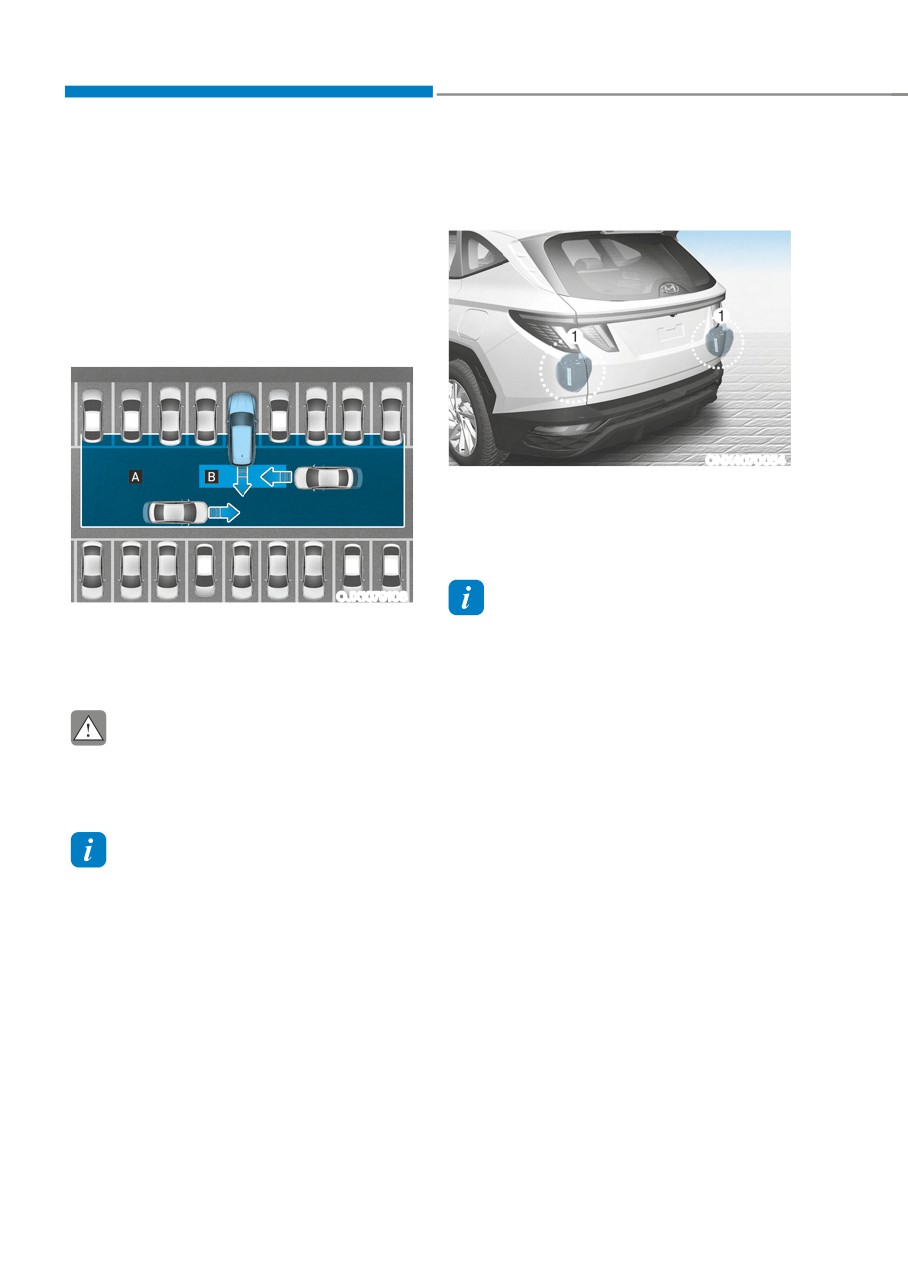
[1] : Rear corner radar
Refer to the picture above for the
detailed location of the detecting
sensors.
OJX1079108
Information
[A] : Rear Cross-Traffic Collision Warning operating
For more details on the precautions of the
range,
rear corner radar, refer to “Blind-Spot
[B] : Rear Cross-Traffic Collision-Avoidance Assist
Collision-Avoidance Assist (BCA)” section
operating range
in chapter 7.
CAUTION
The time of warning may vary
depending on vehicle speed of the
approaching vehicle.
Information
In the following text, Rear Cross-Traffic
Collision Warning and Rear Cross-Traffic
Collision-Avoidance Assist will be referred
as Rear Cross-Traffic Safety system.
7-122
07
Rear Cross-Traffic Safety System
Settings
Setting features
OTM070140N
Warning Timing
With the engine on, select ‘Driver
Assistance → Warning Timing’ from the
OTM070194N
Settings menu to change the initial
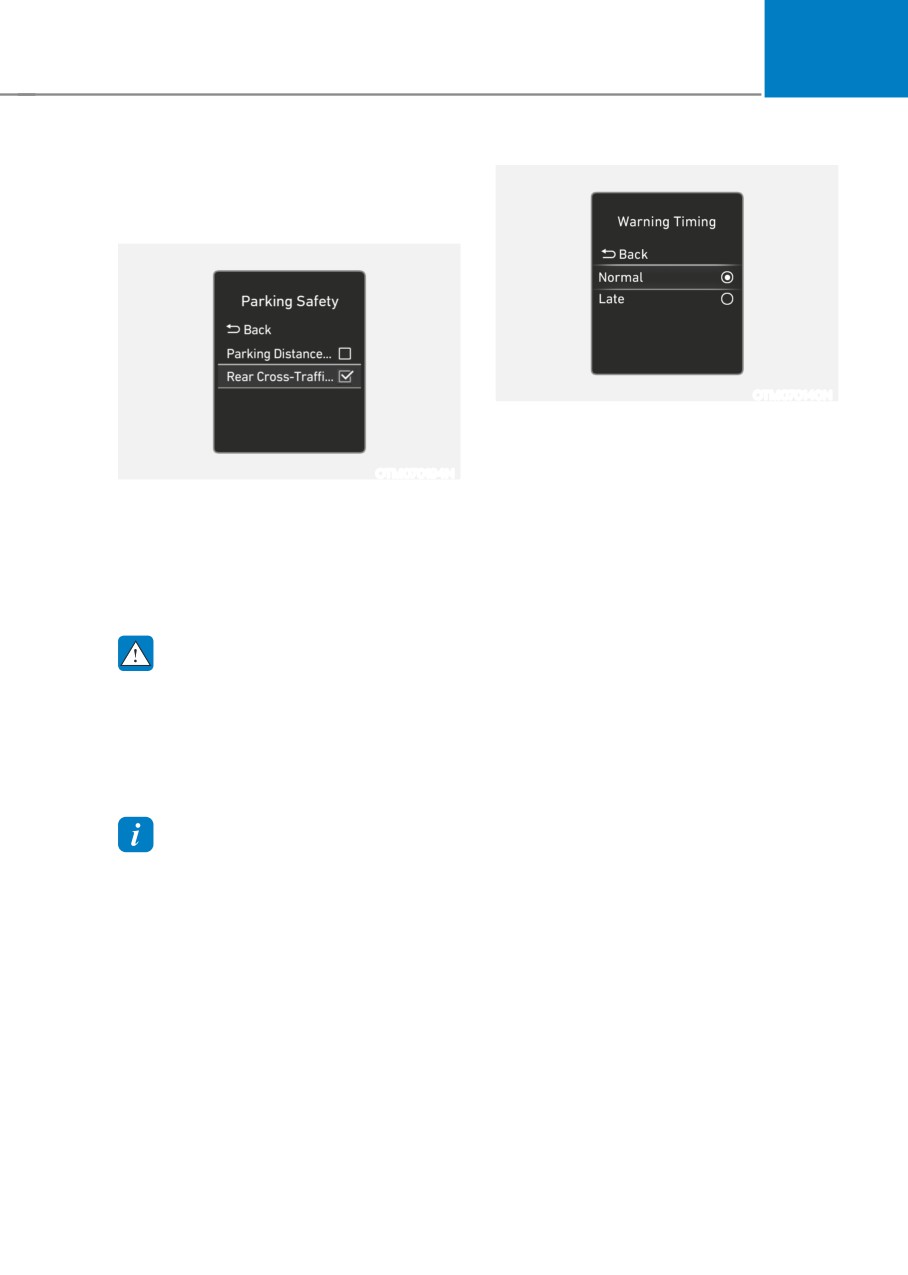
Rear Cross-Traffic Safety
warning activation time for Rear Cross-
With the engine on, select ‘Driver
Traffic Safety system.
Assistance → Parking Safety → Rear Cross-
When the vehicle is first delivered,
Traffic Safety’ from the Settings menu to
Warning Timing is set to ‘Normal’. If you
turn on Rear Cross-Traffic Safety system
change the Warning Timing, the warning
and deselect to turn off the system.
time of other Driver Assistance systems
may change.
WARNING
When the engine is restarted, Rear
Cross-Traffic Safety system will always
turn on. However, if ‘Off’ is selected
after the engine is restarted, the
driver should always be aware of the
surroundings and drive safely.
Information
Settings for Rear Cross-Traffic Safety
system include Rear Cross-Traffic
Collision Warning and Rear Cross-Traffic
Collision-Avoidance Assist.
7-123
Driver assistance system
Rear Cross-Traffic Safety System
Operation
Warning and control
Rear Cross-Traffic Safety system will
warn and control the vehicle depending
on the collision risk level : ‘Collision
Warning’, ‘Emergency Braking’ and
‘Stopping vehicle and ending brake
control’.
OTM070141N
Warning Volume
With the engine on, select ‘Driver
Assistance → Warning Volume’ from the
Settings menu to change the Warning
Volume to ‘High’, ‘Medium’ or ‘Low’ for
Rear Cross-Traffic Safety system.
If you change the Warning Volume,
the Warning Volume of other Driver
Assistance systems may change.
OHY059034
ONX4070055
CAUTION
• The setting of the Warning Timing
and Warning Volume applies to
all functions of the Rear Collision-
Avoidance Assist.
• Even though ‘Normal’ is selected for
Warning Timing, if the vehicles from
the left and right side approaches
at high speed, the initial warning
activation time may seem late.
ONX4E070133
• Select ‘Late’ for Warning Timing
Collision Warning
when traffic is light and when driving
• To warn the driver of an approaching
speed is slow.
vehicle from the rear left/right side
of your vehicle, the warning light on
Information
the side view mirror will blink and a
warning will appear on the cluster. At
If the engine is restarted, Warning Timing
the same time, an audible warning
and Warning Volume will maintain the
will sound. If Rear View Monitor is
last setting.
operating, a warning will also appear
on the infotainment system screen.
7-124
07
• Rear Cross-Traffic Safety system
will operate when all the following
conditions are satisfied:
--
The gear is shifted to R (Reverse)
--
Vehicle speed is below 5 mph (8
km/h)
--
The approaching vehicle is within
approximately 82 ft. (25 m) from the
left or right side of your vehicle
--
The speed of the vehicle
approaching from the left and right
OHY059034
ONX4E070057
is above 3 mph (5 km/h)
Information
If the operating conditions are satisfied,
there will be a warning whenever the
vehicle approaches from the left or right
side even though your vehicle speed is 0
mph (0 km/h).
ONX4E070133
Emergency Braking
• To warn the driver of an approaching
vehicle from the rear left/right side
of your vehicle, the warning light on
the side view mirror will blink and,
the 'Emergency Braking' warning
message will appear on the cluster.
At the same time, an audible warning
will sound. If Rear View Monitor is
operating, a warning will also appear
on the infotainment system screen.
7-125
Driver assistance system
• Rear Cross-Traffic Safety system
will operate when all the following
conditions are satisfied:
--
The gear is shifted to R (Reverse)
--
Vehicle speed is below 5 mph (8
km/h)
--
The approaching vehicle is within
approximately 5 ft. (1.5 m) from the
left or right side of your vehicle
--
The speed of the vehicle
approaching from the left and right
ONX4E070058
is above 3 mph (5 km/h)
Stopping vehicle and ending brake control
• Emergency braking will be assisted
• When the vehicle is stopped due
to help prevent collision with
to emergency braking, the ‘Drive
approaching vehicles from the left
carefully’ warning message will
and right.
appear on the cluster.
• For your safety, the driver should
depress the brake pedal immediately
WARNING
and check the surroundings.
Brake control will end when:
• Brake control will end after the vehicle
--
The approaching vehicle is out of the
is stopped by emergency braking for
detecting range
approximately 2 seconds.
--
The approaching vehicle passes
• During emergency braking, braking
behind your vehicle
control by Rear Cross-Traffic Safety
--
The approaching vehicle does not
system will automatically cancel when
drive toward your vehicle
the driver excessively depresses the
brake pedal.
--
The approaching vehicle speed slows
down
--
The driver depresses the brake pedal
with sufficient power
7-126
07
• The driver is solely responsible to
WARNING
operate the vehicle in a safe manner.
Take the following precautions when
Do not solely depend on Rear
using Rear Cross-Traffic Safety system:
Cross-Traffic Safety system. Rather,
•
For your safety, change the Settings
maintain a safe braking distance, and
after parking the vehicle at a safe
if necessary, depress the brake pedal
location.
to reduce driving speed or to stop
the vehicle.
•
If any other system’s warning
message is displayed or audible
• Never deliberately operate Rear
warning is generated, Rear Cross-
Cross-Traffic Safety system on
Traffic Safety system’s warning
people, animal, objects, etc. It may
message may not be displayed
cause serious injury or death.
and audible warning may not be
generated.
CAUTION
•
You may not hear the warning sound
The brake control may not operate
of Rear Cross-Traffic Safety system if
properly depending on the status of
the surrounding is noisy.
ESC (Electronic Stability Control).
•
Rear Cross-Traffic Safety system may
There will only be a warning when:
not operate if the driver applies the
brake pedal to avoid collision.
--
The ESC (Electronic Stability Control)
warning light is on
•
During Rear Cross-Traffic Safety
system operation, the vehicle may
--
ESC (Electronic Stability Control) is
stop suddenly injuring passengers
engaged in a different function
and shifting loose objects. Always
have the seat belt on and keep loose
objects secured.
Information
•
Even if there is a problem with Rear
If the system assists you with braking,
Cross-Traffic Safety system, the
the driver must immediately depress
vehicle’s basic braking performance
the brake pedal and check vehicle
will operate normally.
surroundings.
•
When Rear Cross-Traffic Safety
--
Brake control will end when the driver
system is operating, braking control
depresses the brake pedal with sufficient
by the system will automatically
power.
cancel when the driver excessively
--
After shifting the gear to R (Reverse),
depresses the accelerator pedal.
braking control will operate once for left
•
Rear Cross-Traffic Safety system does
and right vehicle approach.
not operate in all situations or cannot
avoid all collisions.
•
Rear Cross-Traffic Safety system may
warn the driver late or may not warn
the driver depending on the road and
driving conditions.
7-127
Driver assistance system
Rear Cross-Traffic Safety System
Rear Cross-Traffic Safety system
Malfunction and Limitations
disabled
Rear Cross-Traffic Safety system
Type A
Type B
malfunction
OTM070124N
OTM070124L
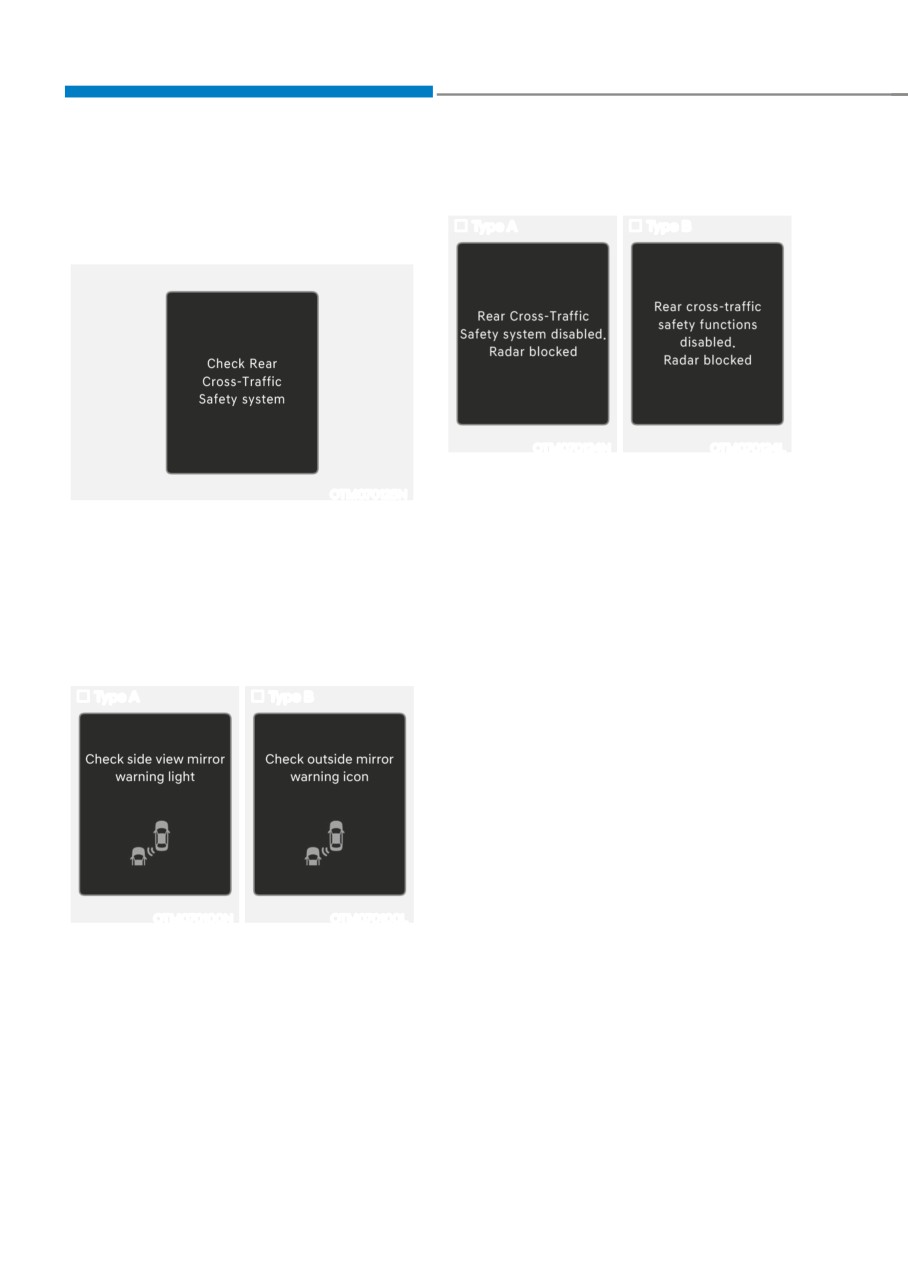
When the rear bumper around the rear-
OTM070125N
side radar or sensor is covered with
foreign material, such as snow or rain,
When Rear Cross-Traffic Safety system
or installing a trailer or carrier, it can
is not working properly, the ‘Check Rear
reduce the detecting performance and
Cross-Traffic Safety system(s)’ warning
temporarily limit or disable Rear Cross-
message will appear on the cluster, and
Traffic Safety system.
the system will turn off automatically
or the system will be limited. Have the
If this occurs, the ‘Rear Cross-Traffic
vehicle inspected by an authorized
Safety system disabled. Radar blocked’
HYUNDAI dealer.
(or ‘Rear cross-traffic safety functions
disabled. Radar blocked’) warning
Type A
Type B
message will appear on the cluster.
Rear Cross-Traffic Safety system will
operate normally when such foreign
material or trailer, etc. is removed.
If Rear Cross-Traffic Safety system does
not operate normally after it is removed,
have the vehicle inspected by an
authorized HYUNDAI dealer.
OTM070100N
OTM070100L
When the side view mirror warning light
is not working properly, the ‘Check side
view mirror warning light’ (or ‘Check
outside mirror warning icon’) warning
message will appear on the cluster. Have
the vehicle inspected by an authorized
HYUNDAI dealer.
7-128
07
WARNING
Information
• Even though the warning message
For more details on the limitations of the
does not appear on the cluster, Rear
rear corner radar, refer to “Blind-Spot
Cross-Traffic Safety system may not
Collision-Avoidance Assist (BCA)” section
operate properly.
in chapter 7.
• Rear Cross-Traffic Safety system may
not operate properly in an area (for
WARNING
example: open terrain), where any
substance are not detected after
• Driving near a vehicle or structure
turning ON the engine.
CAUTION
Turn off Rear Cross-Traffic Safety
system to install a trailer, carrier, etc.,
or remove the trailer, carrier, etc. to use
Rear Cross-Traffic Safety system.
Limitations of Rear Cross-Traffic
Safety system
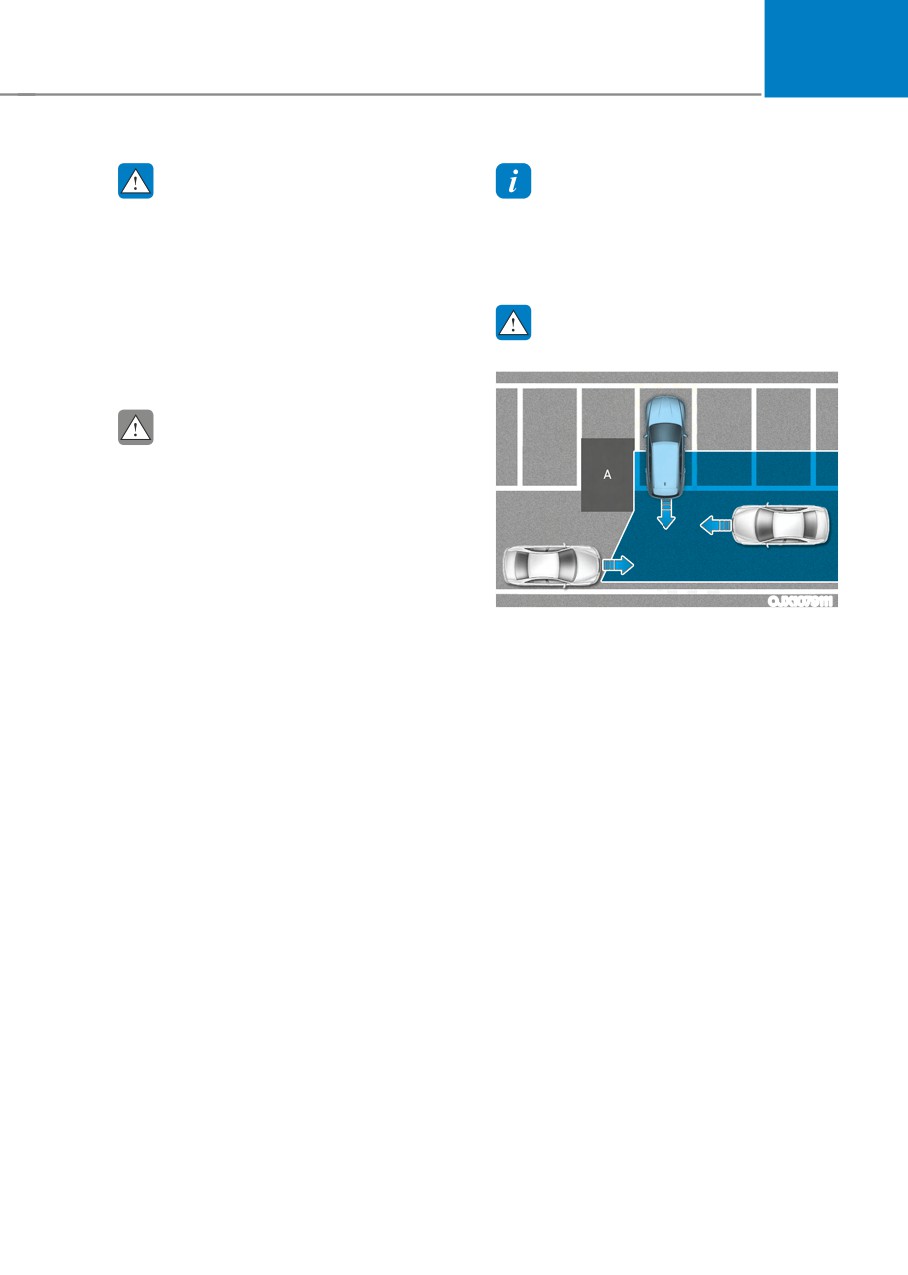
OJX1079111
Rear Cross-Traffic Safety system may
[A] : Structure
not operate normally, or the system
may operate unexpectedly under the
Rear Cross-Traffic Safety system
following circumstances:
may be limited when driving near
• Departing from where trees or grass
a vehicle or structure, and may not
are overgrown
detect the vehicle approaching from
the left or right. If this occurs, the
• Departing from where roads are wet
system may not warn the driver or
• Speed of the approaching vehicle is
control the brakes when necessary.
fast or slow
Always check your surroundings
while backing up.
Braking control may not work, driver’s
attention is required in the following
circumstances:
• The vehicle severely vibrates while
driving over a bumpy road, uneven
road or concrete patch
• Driving on a slippery surface due to
snow, water puddle, ice, etc.
• The tire pressure is low or a tire is
damaged
• The brake is reworked
• Remote Smart Parking Assist is
operating (if equipped)
7-129
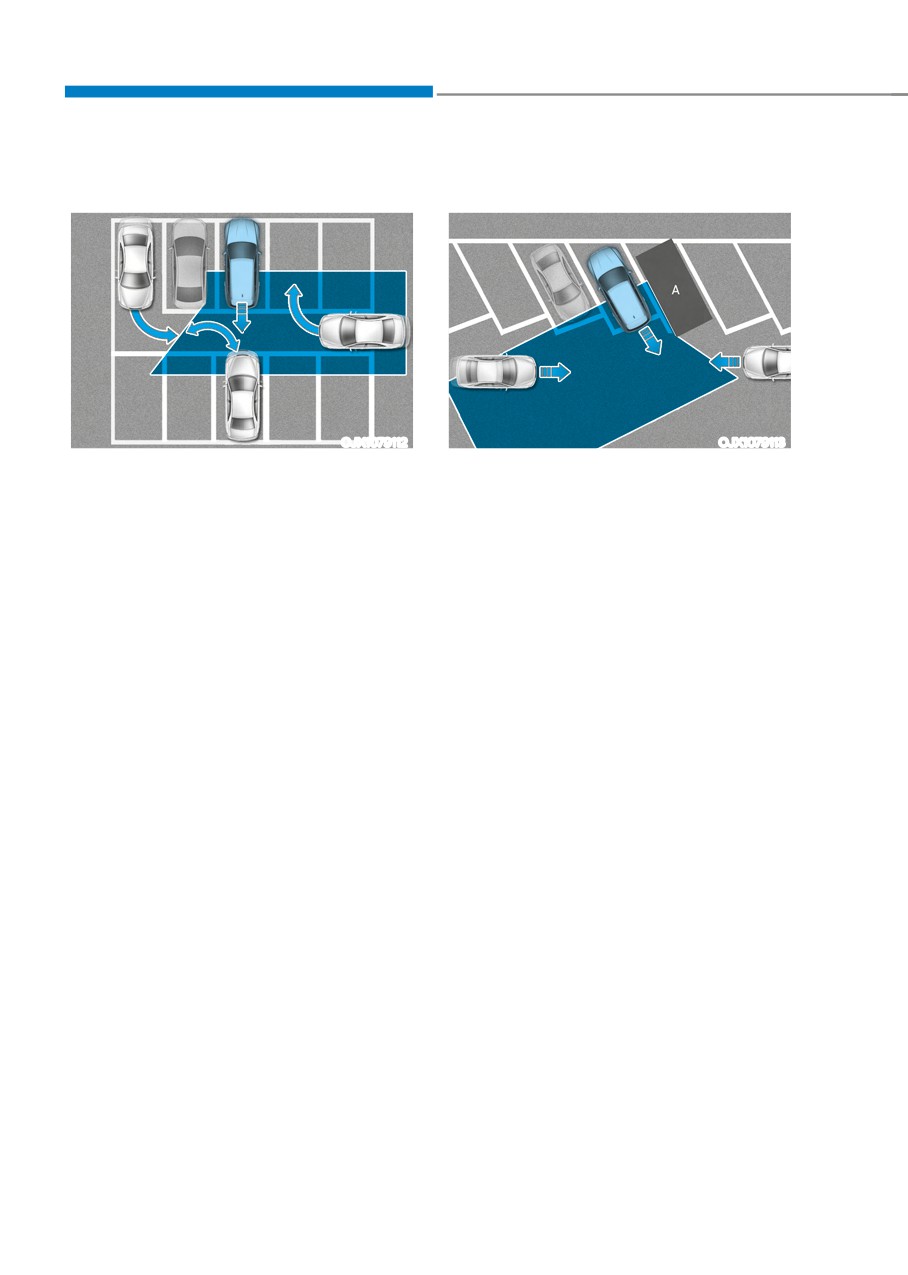
Driver assistance system
• When the vehicle is in a complex
• When the vehicle is parked
parking environment
diagonally
OJX1079112
OJX1079113
[A] : Vehicle
Rear Cross-Traffic Safety system may
detect vehicles which are parking
Rear Cross-Traffic Safety system
or pulling out near your vehicle (for
may be limited when backing up
example: a vehicle leaving beside
diagonally, and may not detect the
your vehicle, a vehicle parking or
vehicle approaching from the left or
pulling out in the rear area, a vehicle
right. If this occurs, the system may
approaching your vehicle making a
not warn the driver or control the
turn, etc.). If this occurs, the system
brakes when necessary.
may unnecessarily warn the driver
Always check your surroundings
and control the brake.
while backing up.
Always check your surroundings
while backing up.
7-130
07
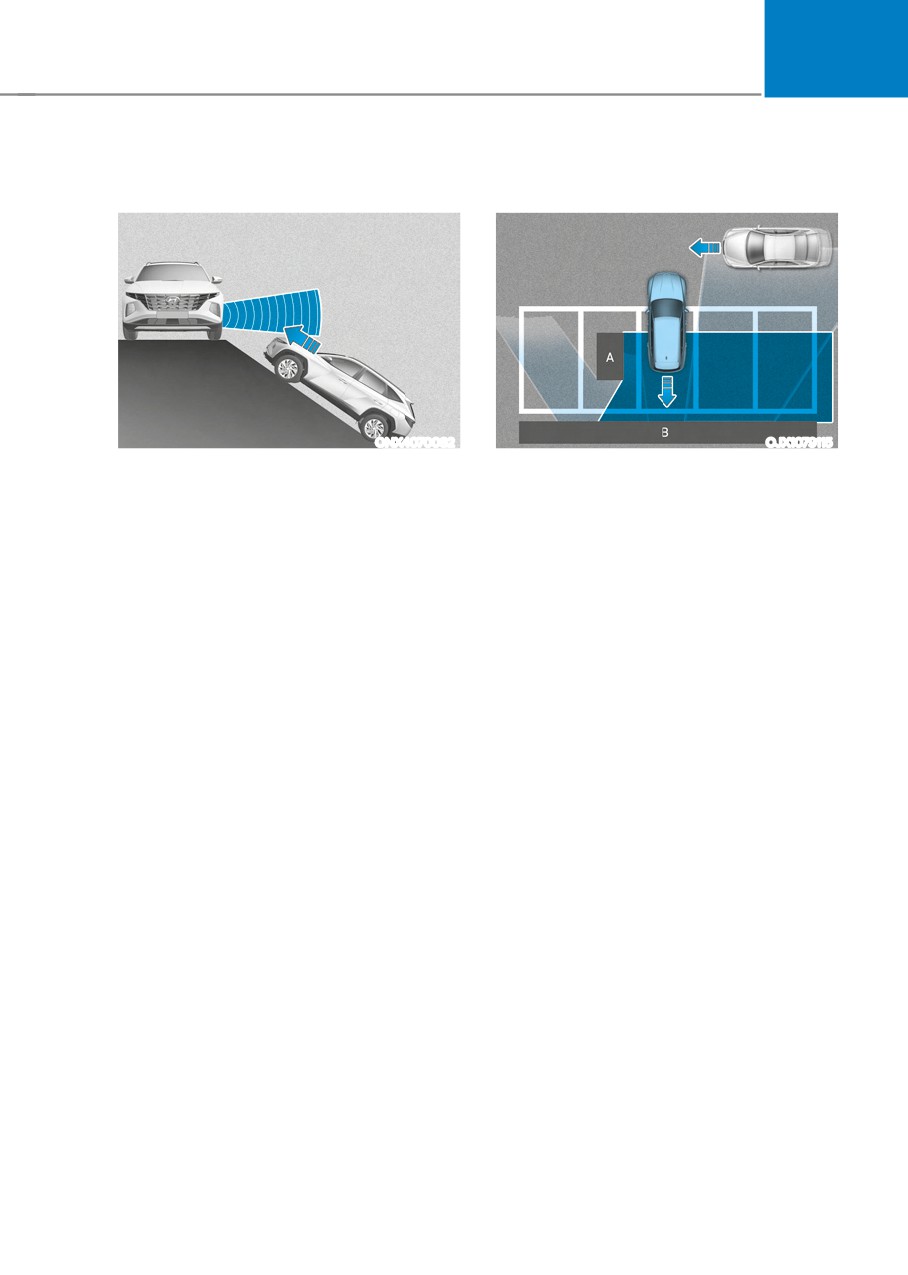
• When the vehicle is on or near a
• Pulling into the parking space where
slope
there is a structure
ONX4070082
OJX1079115
[A] : Structure, [B] :Wall
Rear Cross-Traffic Safety system
may be limited when the vehicle is
Rear Cross-Traffic Safety system
on a uphill or downhill slope, or near
may detect vehicles passing by
it, and may not detect the vehicle
in front of you when parking in
approaching from the left or right. If
reverse into a parking space with a
this occurs, the system may not warn
wall or structure in the rear or side
the driver or control the brakes when
area. If this occurs, the system may
necessary.
unnecessarily warn the driver and
Always check your surroundings
control the brake.
while backing up.
Always check your surroundings
while backing up.
7-131
Driver assistance system
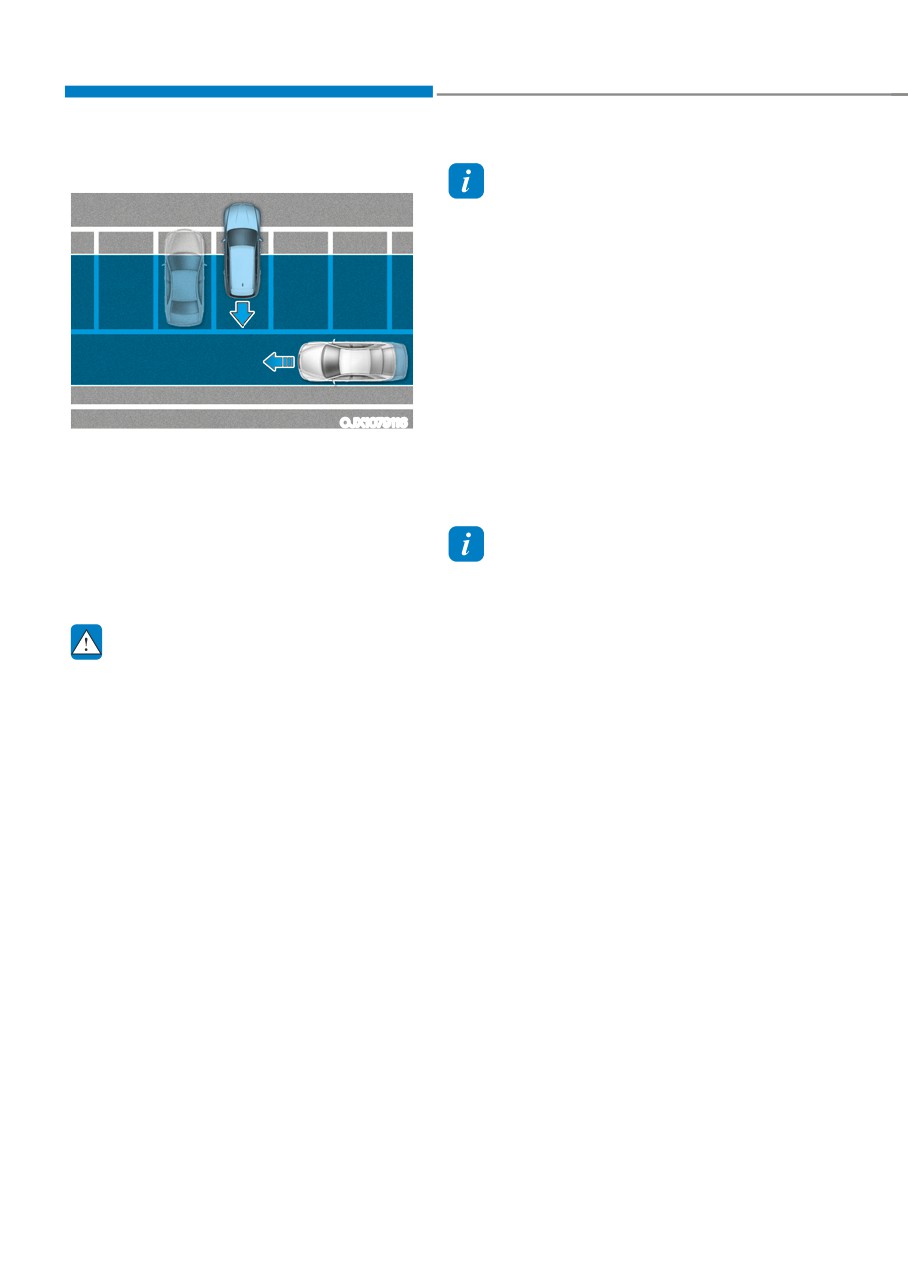
•
When the vehicle is parked rearward
Information
This device complies with Part 15 of the
FCC rules.
Operation is subject to the following three
conditions:
1. This device may not cause harmful
interference, and
2. This device must accept any
interference received, including
interference that may cause undesired
operation.
OJX1079116
3. Changes or modifications not expressly
Rear Cross-Traffic Safety system may
approved by the party responsible
detect vehicles passing by behind
for compliance could void the user's
you when parking in reverse into
authority to operate the device.
a parking space. If this occurs, the
system may unnecessarily warn the
driver and control the brake.
Information
Always check your surroundings
Radio frequency radiation exposure
while backing up.
information:
This equipment complies with FCC
WARNING
radiation exposure limits set forth for an
uncontrolled environment.
•
When you are towing a trailer or
This equipment should be installed and
another vehicle, we recommend that
operated with minimum distance of 8 in.
Rear Cross-Traffic Safety system is
(20 cm) between the radiator (antenna)
turned off due to safety reasons.
and your body.
•
Rear Cross-Traffic Safety system may
This transmitter must not be co-located or
not operate normally if interfered by
operating in conjunction with any other
strong electromagnetic waves.
antenna or transmitter.
•
Rear Cross-Traffic Safety system may
not operate for 3 seconds after the
vehicle is started, or the rear corner
radars are initialized.
7-132
07
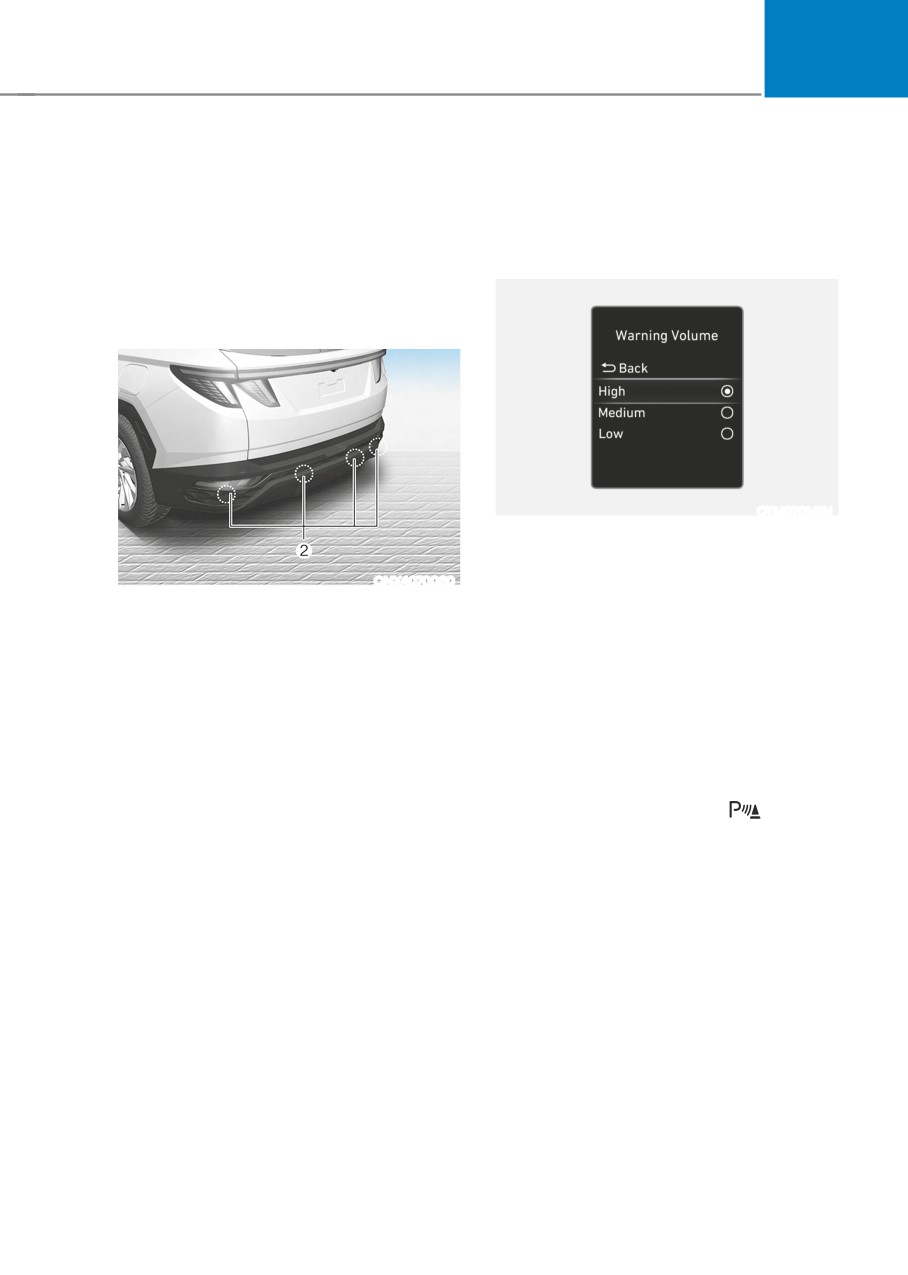
REVERSE PARKING DISTANCE WARNING (PDW)
(IF EQUIPPED)
Reverse Parking Distance Warning will
Reverse Parking Distance
help warn the driver if an obstacle is
Warning Settings
detected within a certain distance when
Warning Volume
the vehicle is moving in reverse at low
speeds.
Detecting sensor
OTM070141N
Select ‘Driver Assistance → Warning
Volume’ from the cluster or infotainment
system Settings menu to change the
ONX4070060
Warning Volume to ‘High’, ‘Medium’,
[2] : Rear ultrasonic sensors
or ‘Low’ for Reverse Parking Distance
Refer to the picture above for the
Warning. If you change the Warning
detailed location of the detecting
Volume, the Warning Volume of other
sensors.
Driver Assistance systems may change.
Reverse Parking Distance
Warning
Operating button
Parking Safety button (if equipped)
• Press the Parking Safety (
) button
to turn on Reverse Parking Distance
Warning. Press the button again to
turn off the function.
• When Reverse Parking Distance
Warning is off (button indicator
light on), if you shift the gear to R
(Reverse), Reverse Parking Distance
Warning will automatically turn on.
7-133
Driver assistance system
Reverse Parking Distance Warning
Reverse Parking Distance
• Reverse Parking Distance Warning
Warning Malfunction and
will operate when the gear is in R
Precautions
(Reverse).
Reverse Parking Distance Warning
• Reverse Parking Distance Warning
malfunction
helps detect a person, animal or
After starting the engine, a beep will
object in the rear when the vehicle’s
sound when the gear is shifted to R
rearward speed is below 6 mph (10
(Reverse) to indicate Reverse Parking
km/h).
Distance Warning is operating normally.
However, if one or more of the following
Warning
occurs, first check whether the ultrasonic
Distance
indicator
Warning
sensor is damaged or blocked with
from object
Driving
sound
foreign material. If it still does not work
rearward
properly, have the vehicle inspected by
an authorized HYUNDAI dealer.
24~48 in.
Buzzer beeps
(60~120 cm)
intermittently
• The audible warning does not sound.
• The buzzer sounds intermittently.
12~24 in.
Beeps more
• The ‘Parking sensor error or blockage’
(30~60 cm)
frequently
warning message appears on the
cluster.
within 12 in.
Beeps
(30 cm)
continuously
• The corresponding indicator will
illuminate whenever each ultrasonic
sensor detects a person, animal or
object in its sensing range. Also an
audible warning will sound.
• When more than two objects are
detected at the same time, the closest
one will be warned with an audible
ONX4E070101
warning.
• The shape of the indicator in the
illustration may differ from the actual
vehicle.
7-134
07
•
Reverse Parking Distance Warning
WARNING
may malfunction when:
• Reverse Parking Distance Warning
--
Heavy rain or water spray is present
is a supplemental function. The
--
Water flows on the surface of the
operation of Reverse Parking
Distance Warning can be affected
sensor
by several factors (including
--
Affected by another vehicle’s
environmental conditions). It is the
sensors
responsibility of the driver to always
--
The sensor is covered with snow
check the rear view before and while
--
Driving on uneven road, gravel
parking.
roads or bushes
• Your new vehicle warranty does not
--
Objects that generates ultrasonic
cover any accidents or damage to
waves are near the sensor
the vehicle due to the malfunction of
Reverse Parking Distance Warning.
--
Installing the license plate
differently from the original location
• Pay close attention when driving
near objects, pedestrians, and
--
The vehicle bumper height or
especially children. Some objects
ultrasonic sensor installation has
may not be detected by the
been modified
ultrasonic sensors, due to the objects
--
Attaching equipments or
distance, size or material, all of
accessories around the ultrasonic
which can limit the effectiveness of
sensors
the sensor.
•
The following objects may not be
detected:
Limitations of Reverse Parking
--
Sharp or slim objects, such as ropes,
Distance Warning
chains or small poles.
•
Reverse Parking Distance Warning
--
Objects, which tend to absorb
may not operate normally when:
sensor frequency, such as clothes,
--
Moisture is frozen to the sensor
spongy material or snow.
--
Sensor is covered with foreign
--
Objects smaller than 40 in. (100 cm)
material, such as snow or water
in length and narrower than 6 in. (14
(Reverse Parking Distance Warning
cm) in diameter.
will operate normally when such
--
Pedestrians, animals or objects
foreign material are removed.)
that are very close to the ultrasonic
--
The weather is extremely hot or cold
sensors
--
The sensor or sensor assembly is
•
Parking Distance Warning Indicators
disassembled
may be displayed differently from
--
The surface of the sensor has been
the actual detected location when
subjected to a hard impact
the obstacle is located between the
--
The surface of the sensor has been
sensors.
scratched with a sharp object
•
Parking Distance Warning indicator
--
The sensors or its surrounding
may not occur sequentially depending
area is directly sprayed with high
on vehicle speed or obstacle shape.
pressure washer
•
If Reverse Parking Distance Warning
needs repair, have the vehicle
inspected by an authorized HYUNDAI
dealer.
7-135
Driver assistance system
FORWARD/REVERSE PARKING DISTANCE WARNING (PDW)
(IF EQUIPPED)
Forward/Reverse Parking Distance
Forward/Reverse Parking
Warning will help warn the driver if an
Distance Warning Settings
obstacle is detected within a certain
distance when the vehicle is moving
forward or in reverse at low speeds.
Detecting sensor
OTM070141N
Warning Volume
Select ‘Driver Assistance → Warning
Volume’ from the cluster or infotainment
ONX4070059
system Settings menu to change the
Warning Volume to ‘High’, ‘Medium’,
or ‘Low’ for Forward/Reverse Parking
Distance Warning. If you change the
Warning Volume, the Warning Volume
of other Driver Assistance systems may
change.
Parking Distance Warning Auto On
To use Parking Distance Warning Auto
On function, select ‘Driver Assistance
→ Parking Safety → Parking Distance
ONX4070060
Warning Auto On’ from the cluster or
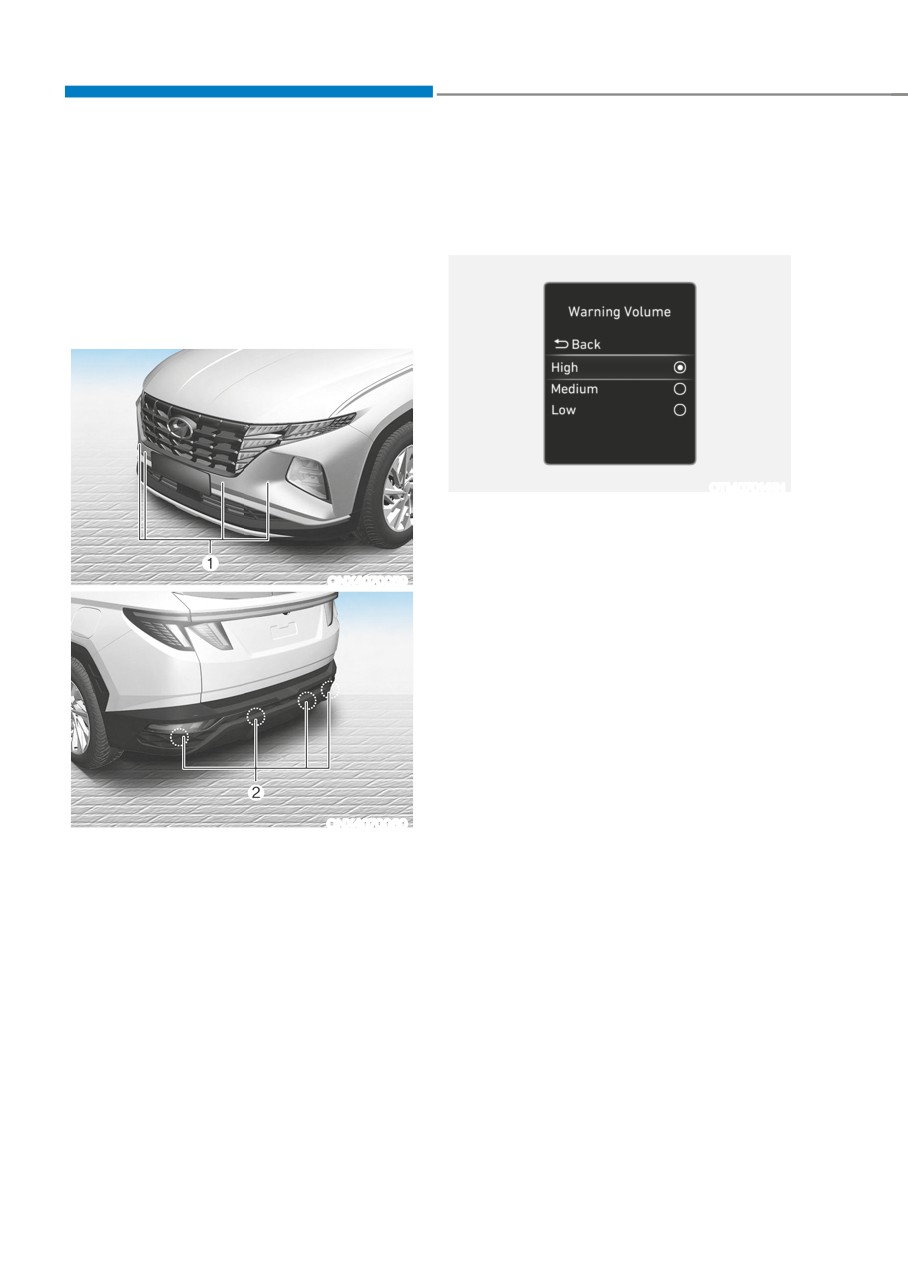
[1] : Front ultrasonic sensors,
infotainment system Settings menu.
[2] : Rear ultrasonic sensors
Refer to the picture above for the
detailed location of the detecting
sensors.
7-136
07
Forward/Reverse Parking
• When Forward/Reverse Parking
Distance Warning turns on, the button
Distance Warning Operation
indicator light will turn on. If vehicle
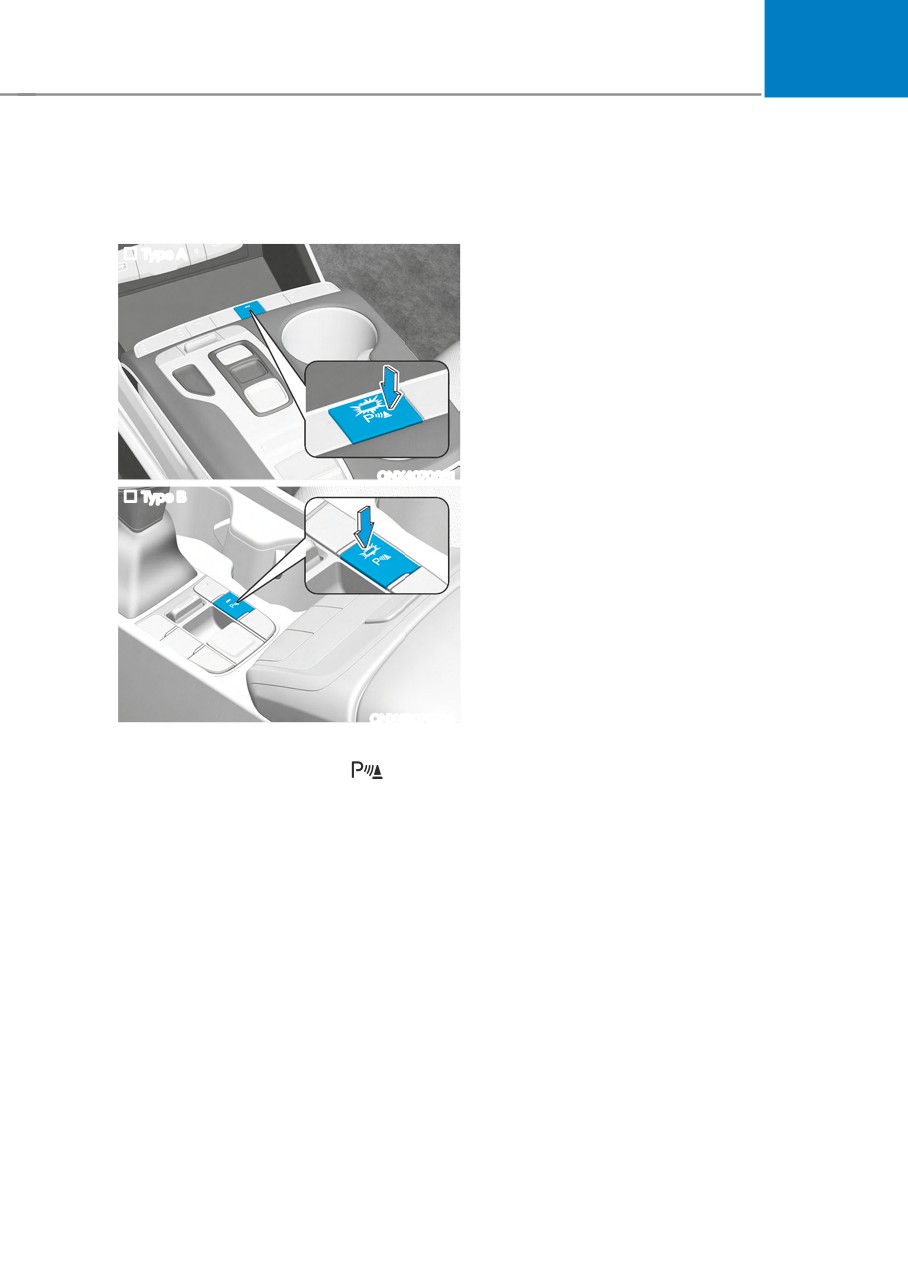
Operating button
speed is above 12 mph (20 km/h),
Type A
Forward/Reverse Parking Distance
Warning will turn off (button indicator
light off).
Forward Parking Distance Warning
•
Forward Parking Distance Warning will
operate when one of the condition is
satisfied.
--
The gear is shifted from R (Reverse)
to D (Drive) with Reverse Parking
Distance Warning on
ONX4070061
Type B
--
The gear is in D (Drive) and the
Parking Safety button indicator light
is on
--
‘Parking Distance Warning Auto On’
is selected from the Settings menu
and the gear is in D (Drive)
•
Forward Parking Distance Warning
helps detect a person, animal or
object in front when the vehicle’s
forward speed is below 6 mph (10
km/h).
ONX4E070106
•
Forward Parking Distance Warning
Parking Safety button
does not operate when the vehicle's
• Press the Parking Safety (
) button
forward speed is above 6 mph (10
to turn on Forward/Reverse Parking
km/h) even when the Parking Safety
Distance Warning. Press the button
button indicator is on. Forward
again to turn off the function.
Parking Distance Warning will operate
again when the vehicle's forward
• When Forward/Reverse Parking
speed decreases below 6 mph (10
Distance Warning is off (button
km/h) while the Parking Safety button
indicator light off), if you shift the
indicator is on.
gear to R (Reverse), Forward/Reverse
Parking Distance Warning will
•
When ‘Parking Distance Warning Auto
automatically turn on.
On’ is selected, the Parking Safety
button indicator light stays on.
7-137
Driver assistance system
• When ‘Parking Distance Warning Auto
Reverse Parking Distance Warning
On’ is deselected, and the vehicle’s
• Reverse Parking Distance Warning
forward speed is above 12 mph (20
will operate when the gear is in R
km/h), the Parking Safety button
(Reverse).
indicator will turn off. Although you
• Reverse Parking Distance Warning
drive below 6 mph (10 km/h), Forward
helps detect a person, animal or
Parking Distance Warning will not turn
object in the rear when the vehicle’s
on.
rearward speed is below 6 mph (10
km/h).
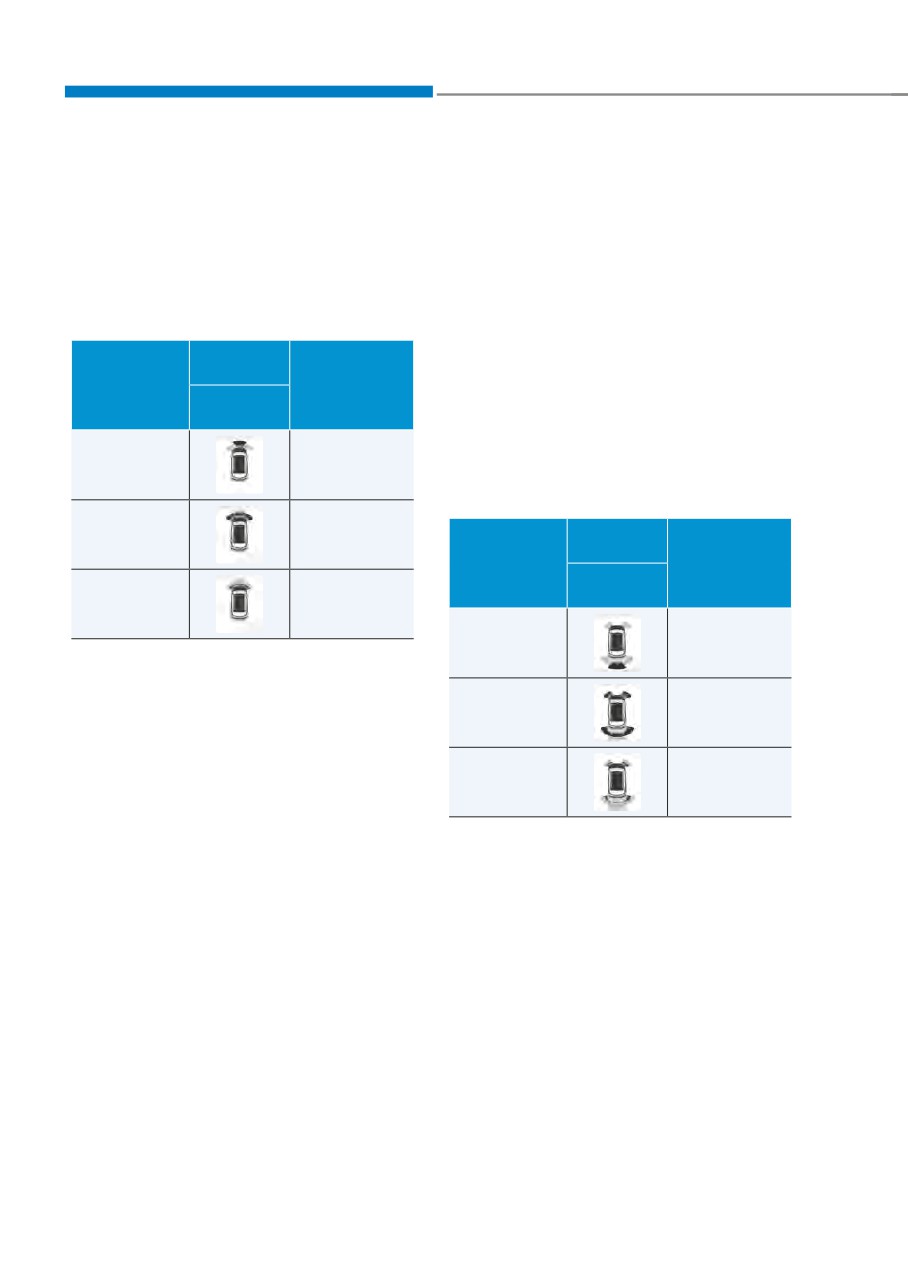
Warning
Distance
indicator
Warning
• When the vehicle’s rearward speed is
from object
Driving
sound
below 6 mph (10 km/h), both the front
and rear ultrasonic sensors will helps
forward
detect objects. However, the front
24~40 in.
Buzzer beeps
ultrasonic sensors can helps detect
(60~100 cm)
intermittently
a person, animal or object when it is
within 24 in. (60 cm) from the sensors.
12~24 in.
Beeps more
Warning
(30~60 cm)
frequently
Distance
indicator
Warning
from object
Driving
sound
within 12 in.
Beeps
rearward
(30 cm)
continuously
24~48 in.
Buzzer beeps
• The corresponding indicator will
(60~120 cm)
intermittently
illuminate whenever each ultrasonic
sensor detects a person, animal or
12~24 in.
Beeps more
object in its sensing range. Also an
(30~60 cm)
frequently
audible warning will sound.
• When more than two objects are
detected at the same time, the closest
within 12 in.
Beeps
one will be warned with an audible
(30 cm)
continuously
warning.
• The corresponding indicator will
• The shape of the indicator in the
illuminate whenever each ultrasonic
illustration may differ from the actual
sensor detects a person, animal or
vehicle.
object in its sensing range. Also an
audible warning will sound.
• When more than two objects are
detected at the same time, the closest
one will be warned with an audible
warning.
• The shape of the indicator in the
illustration may differ from the actual
vehicle.
7-138
07
Forward/Reverse Parking
WARNING
Distance Warning Malfunction
•
Forward/Reverse Parking Distance
and Precautions
Warning is a supplemental function.
Forward/Reverse Parking Distance
The operation of Forward/Reverse
Warning malfunction
Parking Distance Warning can be
After starting the engine, a beep will
affected by several factors (including
sound when the gear is shifted to R
environmental conditions). It is the
(Reverse) to indicate Forward/Reverse
responsibility of the driver to always
Parking Distance Warning is operating
check the front and rear views before
normally.
and while parking.
However, if one or more of the following
•
Your new vehicle warranty does not
occurs, first check whether the ultrasonic
cover any accidents or damage to
sensor is damaged or blocked with
the vehicle due to the malfunction of
foreign material. If it still does not work
Forward/Reverse Parking Distance
properly, have the vehicle inspected by
Warning.
an authorized HYUNDAI dealer.
•
Pay close attention when driving
• The audible warning does not sound.
near objects, pedestrians, and
especially children. Some objects
• The buzzer sounds intermittently.
may not be detected by the
• The ‘Parking sensor error or blockage’
ultrasonic sensors, due to the objects
warning message appears on the
distance, size or material, all of
cluster.
which can limit the effectiveness of
the sensor.
ONX4E070062
7-139
Driver assistance system
Limitations of Forward/Reverse
•
The following objects may not be
Parking Distance Warning
detected:
•
Forward/Reverse Parking Distance
--
Sharp or slim objects, such as ropes,
Warning may not operate normally
chains or small poles.
when:
--
Objects, which tend to absorb
--
Moisture is frozen to the sensor
sensor frequency, such as clothes,
spongy material or snow.
--
Sensor is covered with foreign
material, such as snow or water
--
Objects smaller than 40 in. (100 cm)
(Forward/Reverse Parking Distance
in length and narrower than 6 in. (14
Warning will operate normally when
cm) in diameter.
such foreign material are removed.)
--
Pedestrians, animals or objects
--
The weather is extremely hot or cold
that are very close to the ultrasonic
sensors
--
The sensor or sensor assembly is
disassembled
•
Parking Distance Warning Indicators
may be displayed differently from
--
The surface of the sensor has been
the actual detected location when
subjected to a hard impact
the obstacle is located between the
--
The surface of the sensor has been
sensors.
scratched with a sharp object
•
Parking Distance Warning indicator
--
The sensors or its surrounding
may not occur sequentially depending
area is directly sprayed with high
on vehicle speed or obstacle shape.
pressure washer
•
If Forward/Reverse Parking Distance
•
Forward/Reverse Parking Distance
Warning needs repair, have the
Warning may malfunction when:
vehicle inspected by an authorized
--
Heavy rain or water spray is present
HYUNDAI dealer.
--
Water flows on the surface of the
sensor
--
Affected by another vehicle’s
sensors
--
The sensor is covered with snow
--
Driving on uneven road, gravel
roads or bushes
--
Objects that generates ultrasonic
waves are near the sensor
--
Installing the license plate
differently from the original location
--
The vehicle bumper height or
ultrasonic sensor installation has
been modified
--
Attaching equipments or
accessories around the ultrasonic
sensors
7-140
07
REVERSE PARKING COLLISION-AVOIDANCE ASSIST (PCA) (IF
EQUIPPED)
Reverse Parking Collision-Avoidance
Reverse Parking Collision-
Assist will warn the driver or will
Avoidance Assist Settings
assist with braking to help reduce the
Setting features
possibility of collision with a pedestrian
or an object when backing up.
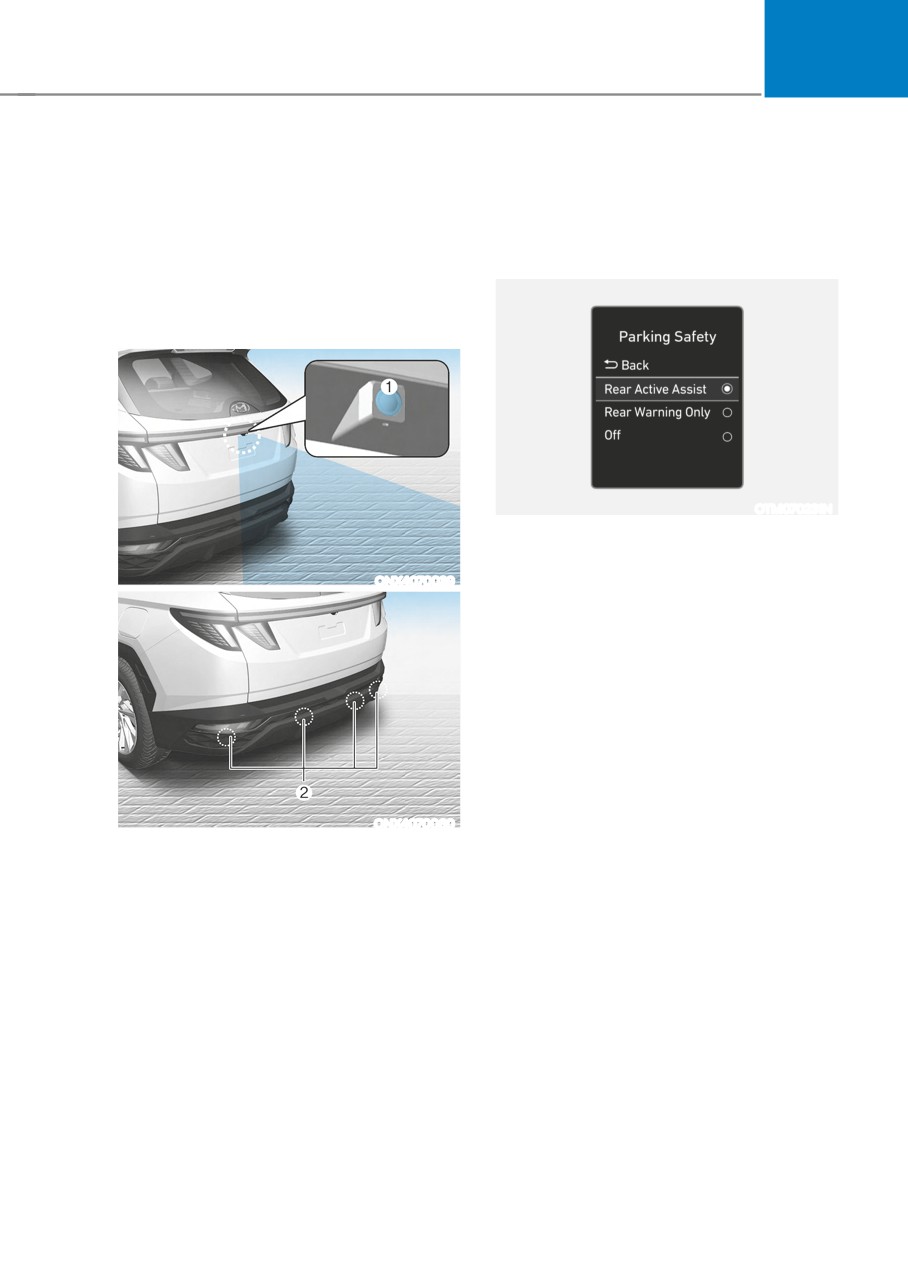
Detecting sensor
OTM070231N
Parking Safety
With the engine on, select or deselect
ONX4070039
‘Driver Assistance → Parking Safety’ from
the Settings menu to set whether or not
to use each function.
--
If ‘Rear Active Assist’ is selected,
Reverse Parking Collision-Avoidance
Assist will warn the driver and assist
with braking when a collision with a
pedestrian or an object is imminent.
--
If ‘Rear Warning Only’ is selected,
Reverse Parking Collision-Avoidance
Assist will warn the driver when a
collision with a pedestrian or an
ONX4070060
object is imminent. Braking will not be
[1] : Rear view camera,
assisted.
[2] : Rear ultrasonic sensors
--
If ‘Off’ is selected, Reverse Parking
Refer to the picture above for the
Collision-Avoidance Assist will turn
detailed location of the detecting
off.
sensors.
7-141
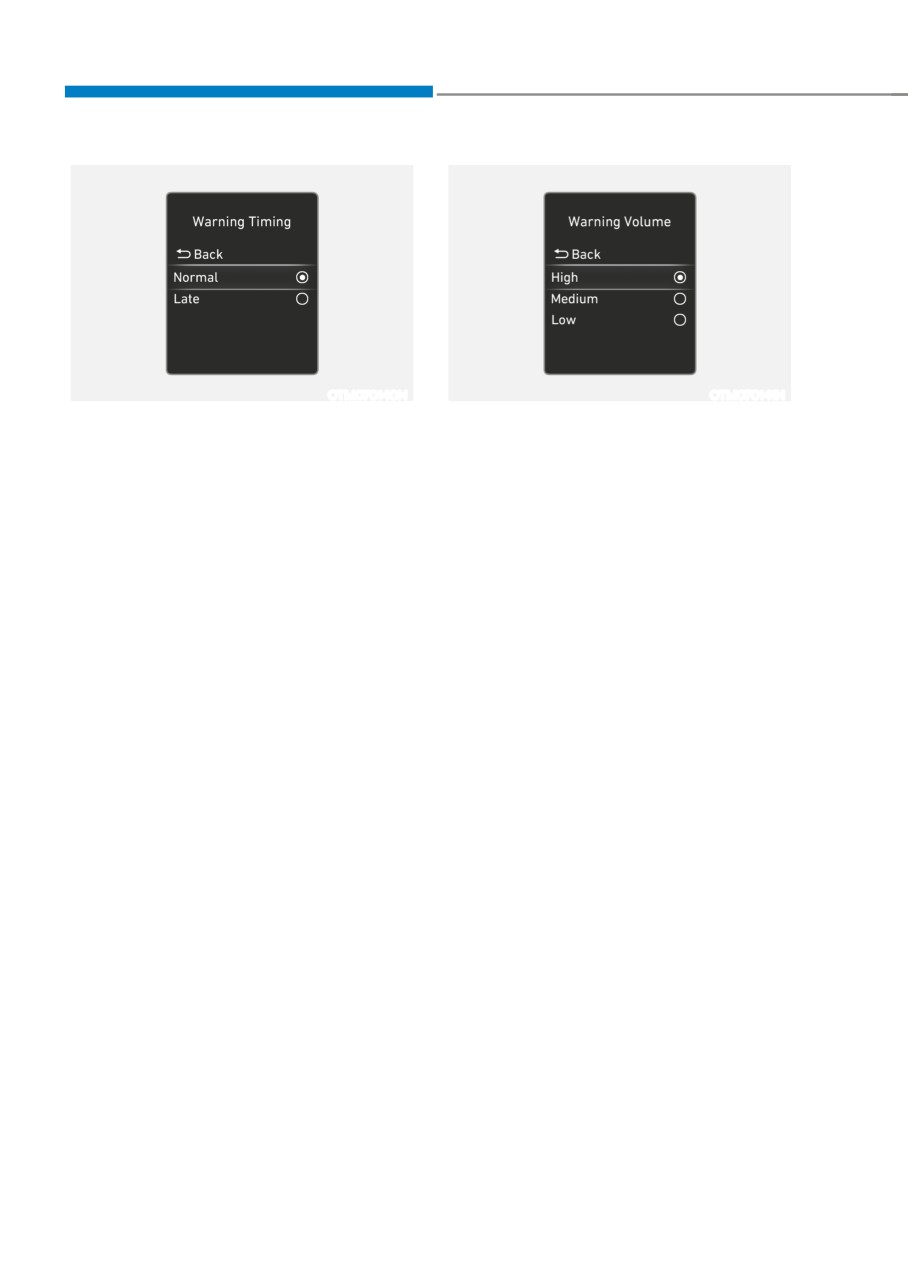
Driver assistance system
OTM070140N
OTM070141N
Warning Timing
Warning Volume
With the engine on, select ‘Driver
With the engine on, select ‘Driver
Assistance → Warning Timing’ from the
Assistance → Warning Volume’ from the
Settings menu to change the initial
Settings menu to change the Warning
warning activation time for Reverse
Volume to ‘High’, ‘Medium’ or ‘Low’ for
Parking Collision-Avoidance Assist.
Forward Collision-Avoidance Assist.
When the vehicle is first delivered,
If you change the Warning Volume,
Warning Timing is set to ‘Normal’. If
the Warning Volume of other Driver
'Normal' feels sensitive, change the
Assistance systems may change.
settings to Late.
If you change the Warning Timing, the
warning time of other Driver Assistance
systems may change.
7-142
07
Reverse Parking Collision-
Rear Active Assist
Avoidance Assist Operation
•
If Reverse Parking Collision-Avoidance
Operating conditions
Assist detects a risk of collision with
a pedestrian or an object, Reverse
If ‘Rear Active Assist’ or ‘Rear Warning
Parking Collision-Avoidance Assist
Only’ is set from the Settings menu,
will warn the driver with an audible
Reverse Parking Collision-Avoidance
warning and warning message on the
Assist will be in the ready status when
cluster. When Rear View Monitor is
the following conditions are satisfied:
operating, a warning will appear on
--
The liftgate is closed
the infotainment system screen.
--
The gear is shifted to R (Reverse)
•
If Reverse Parking Collision-Avoidance
--
Vehicle speed is below 6 mph (10
Assist detects an imminent collision
km/h)
with a pedestrian or an object behind
the vehicle, Reverse Parking Collision-
--
Reverse Parking Collision-Avoidance
Avoidance Assist will assist you with
Assist components such as the rear
braking. The driver needs to pay
view camera and the rear ultrasonic
attention as the brake assist will end
sensors are in normal conditions
within 2 seconds. The driver must
immediately depress the brake pedal
When Reverse Parking Collision-
and check vehicle surroundings.
Avoidance Assist activates, a line
•
Brake control will end when:
appears behind the vehicle image in the
instrument cluster.
--
The gear is shifted to P (Park) or D
(Drive).
Reverse Parking Collision-Avoidance
Assist operates only once after the gear
--
The driver depresses the brake
is shifted to R (Reverse). To reactivate
pedal with sufficient power
Reverse Parking Collision-Avoidance
--
Braking assist has last for
Assist, shift the gear from another gear
approximately 2 seconds
to R (Reverse).
•
The warning will turn off when:
--
The driver shifts the gear to P (Park),
N (Neutral), or D (Drive)
•
The brake control may not operate
properly depending on the status of
ESC (Electronic Stability Control).
There will only be a warning when:
--
The ESC (Electronic Stability
Control) warning light is on
--
ESC (Electronic Stability Control) is
engaged in a different function
OTM070174
7-143
Driver assistance system
Rear Warning Only
Reverse Parking Collision-
•
If Reverse Parking Collision-Avoidance
Avoidance Assist Malfunction
Assist detects a risk of collision with
and Limitations
a pedestrian or an object, Reverse
Reverse Parking Collision-
Parking Collision-Avoidance Assist
Avoidance Assist malfunction
will warn the driver with an audible
warning and warning message on the
cluster. When Rear View Monitor is
operating, a warning will appear on
the infotainment system screen.
•
If ‘Rear Warning Only’ is selected,
braking will not be assisted.
•
The warning will turn off when the
gear is shifted to P (Park), N (Neutral)
or D (Drive).
OTM070173L
When Reverse Parking Collision-
Avoidance Assist or other related
functions are not working properly, the
‘Check Parking Safety system’ warning
message will appear on the cluster, and
Reverse Parking Collision-Avoidance
Assist will turn off automatically.
We recommend that the vehicle be
inspected by an authorized HYUNDAI
dealer.
7-144
07
Reverse Parking Collision-Avoidance
Rear view camera
Rear ultrasonic
sensor
Assist disabled
OTM070219L
OTM070176L
The ‘Rear camera error or blockage’
ONX4070037
or ‘Parking sensor error or blockage’
warning message will appear on the
The rear view camera is used as a
cluster if the following situations occur:
detecting sensor to detect pedestrians. If
the camera lens is covered with foreign
--
The rear view camera or rear
material, such as snow or rain, it may
ultrasonic sensor(s) is covered with
adversely affect camera performance
foreign material, such as snow or rain,
and Reverse Parking Collision-Avoidance
etc.
Assist may not operate normally. Always
--
There is inclement weather, such as
keep the camera lens clean.
heavy snow, heavy rain, etc.
If this occurs, Reverse Parking Collision-
Avoidance Assist may turn off or may not
operate properly. Check whether the rear
view camera and rear ultrasonic sensors
are clean.
ONX4070060N
The rear ultrasonic sensors are located
inside the rear bumper to detect objects
in the rear area. If the sensors are
covered with foreign material, such as
snow or rain, it may adversely affect
sensor performance and Reverse Parking
Collision-Avoidance Assist may not
operate normally. Always keep the rear
bumper clean.
7-145
Driver assistance system
Limitations of Reverse Parking
•
The pedestrian is near the rear edge of
Collision-Avoidance Assist
the vehicle
Reverse Parking Collision-Avoidance
•
The pedestrian is not standing upright
Assist may not assist braking or warn
•
The pedestrian is either very short or
the driver even if there are pedestrians
very tall for Reverse Parking Collision-
or objects under the following
Avoidance Assist to detect
circumstances:
•
The pedestrian or cyclist is wearing
•
Any non-factory equipment or
clothing that easily blends into the
accessory is installed
background, making it difficult to
•
Your vehicle is unstable due to an
detect
accident or other causes
•
The pedestrian is wearing clothing
•
Bumper height or rear ultrasonic
that does not reflect ultrasonic waves
sensor installation has been modified
well
•
Rear view camera or rear ultrasonic
•
Size, thickness, height, or shape of
sensor(s) is damaged
the object does not reflect ultrasonic
waves well (e.g., pole, bush, curbs,
•
Rear view camera or the rear
carts, edge of a wall, etc.)
ultrasonic sensor(s) is stained with
foreign material, such as snow, dirt,
•
The pedestrian or the object is moving
etc.
•
The pedestrian or the object is very
•
Rear view camera is obscured by a
close to the rear of the vehicle
light source or by inclement weather,
•
A wall is behind the pedestrian or the
such as heavy rain, fog, snow, etc.
object
•
The surrounding is very bright or very
•
The object is not located at the rear
dark
center of your vehicle
•
Outside temperature is very high or
•
The object is not parallel to the rear
very low
bumper
•
The wind is either strong (above
•
The road is slippery or inclined
12 mph (20 km/h)) or blowing
•
The driver backs up the vehicle
perpendicular to the rear bumper
immediately after shifting to R
•
Objects generating excessive
(Reverse)
noise, such as vehicle horns, loud
•
The driver accelerates or circles the
motorcycle engines or truck air
vehicle
brakes, are near your vehicle
•
An ultrasonic sensor with similar
frequency is near your vehicle
•
There is ground height difference
between the vehicle and the
pedestrian
•
The image of the pedestrian in the
rear view camera is indistinguishable
from the background
7-146