Honda Accord Hybrid (2022 year). Manual in english - page 16
254
uu
Audio System
u
Audio Remote Controls
Features
Audio Remote Controls
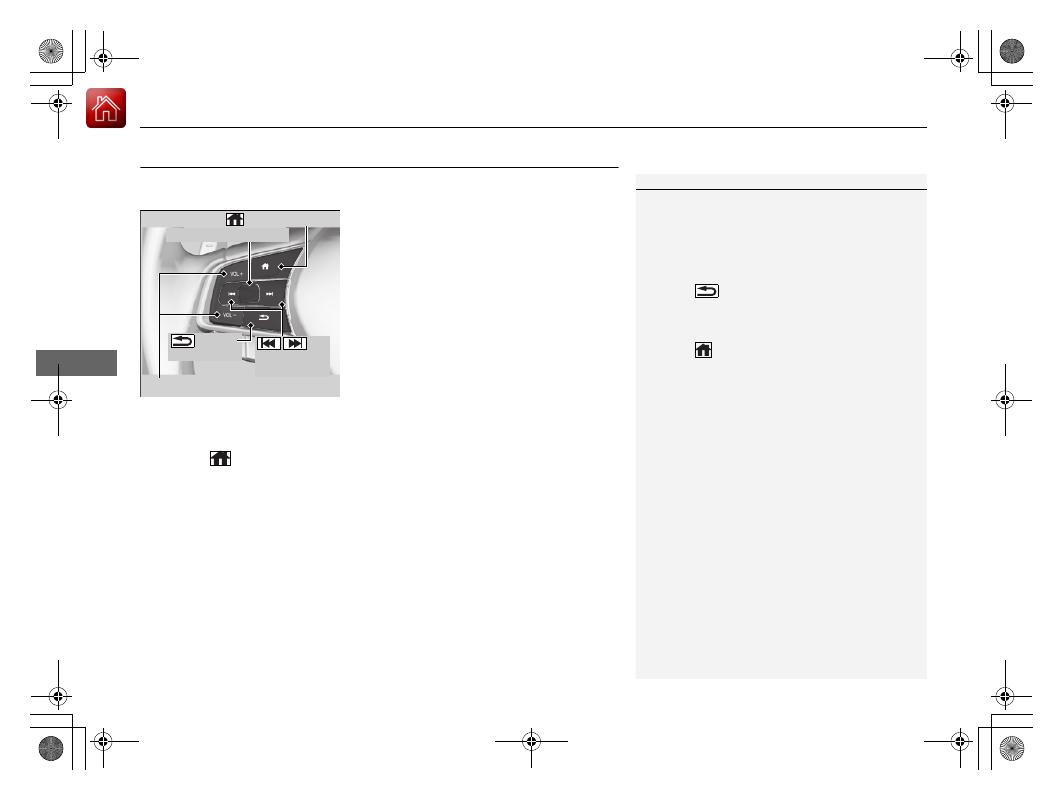
Allow you to operate the audio system while driving. The information is shown on
the driver information interface or head-up display
*
.
VOL
(
+
/VOL
(
-
(Volume) Buttons
Press VOL
(
+
:
To increase the volume.
Press VOL
(
-
:
To decrease the volume.
Left Selector Wheel
•
When selecting the audio mode
Press the
(home) button, then roll up or down to select
Audio
on the driver
information interface, and then press the left selector wheel.
1
Some modes appear only when an appropriate
device or medium is used.
Depending on the
Bluetooth
®
device you connect,
some functions may not be available.
Press the
(back) button for the driver
information interface to go back to the previous
screen or cancel a command.
Press the
(home) button to go back to the home
screen of the driver information interface.
VOL
(
+
/
VOL
(
-
(Volume) Buttons
Left Selector Wheel
(home) Button
/
(Seek/Skip)
Buttons
(back)
Button
* Not available on all models