Honda Accord Hybrid (2022 year). Manual in english - page 11
 

  Index      Manuals     Honda Accord Hybrid (2022 year). Manual in english


Search            copyright infringement  


Content      ..     9      10      11      12     ..


Honda Accord Hybrid (2022 year). Manual in english - page 11


174

Co
ntrols

Locking and Unlocking the Doors

Key

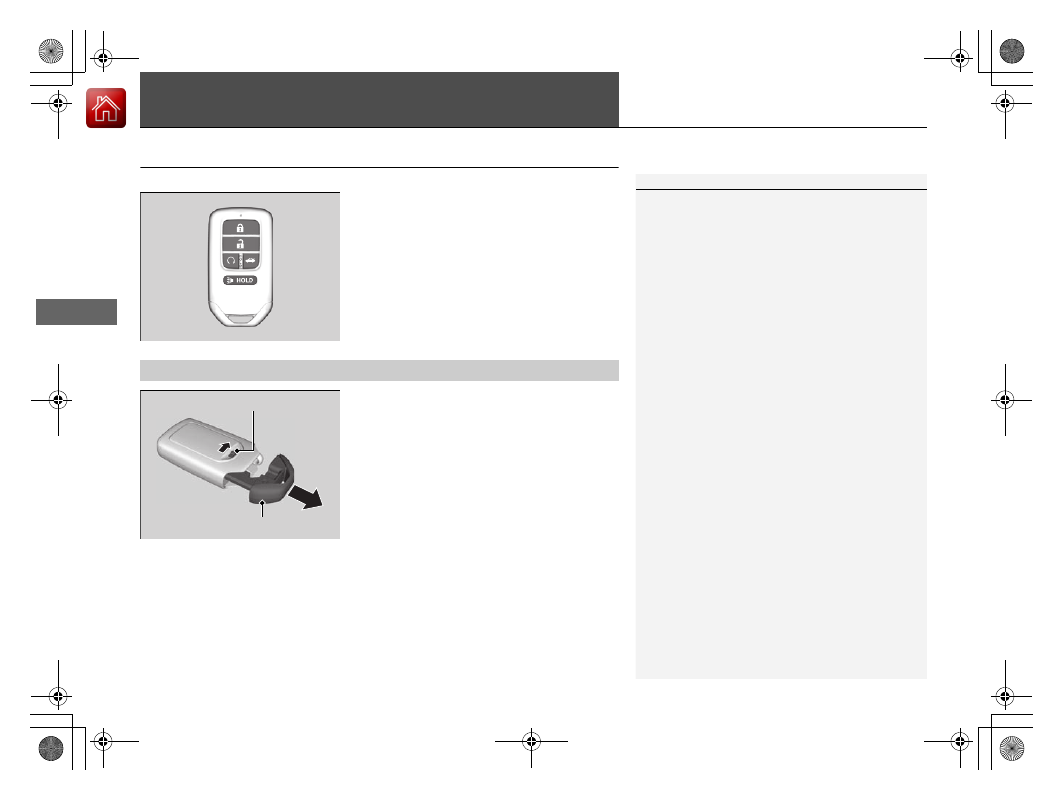
This vehicle comes with the following key:

Use the key to turn the power system on and 
off, lock and unlock all the doors and the fuel 
fill door, and open the trunk.

The built-in key can be used to lock/unlock the 
doors when the keyless remote battery 
becomes weak and the power door lock/
unlock operation is disabled.

To remove the built-in key, slide the release 
knob and then pull out the key. To reinstall 
the built-in key, push the built-in key into the 
keyless remote until it clicks.

1

Key

All the keys have an immobilizer system. The 
immobilizer system helps to protect against vehicle 
theft.

2

Immobilizer System

 P. 190

Follow the advice below to prevent damage to the 
keys:

Do not leave the keys in direct sunlight, or in 
locations with high temperature or high humidity.

Do not drop the keys or set heavy objects on them.

Keep the keys away from liquids, dust and sand.

Do not take the keys apart except for replacing the 
battery.

If the circuits in the keys are damaged, the power 
system may not activate, and the remote transmitter 
may not work.
If the keys do not work properly, have them 
inspected by a dealer.

You can remotely turn the power system on using the 
remote engine start.

2

Remote Engine Start

 P. 418

Built-in Key

Built-in Key

Release Knob

175

uu

Locking and Unlocking the Doors

u

Low Keyless Remote Signal Strength

Co
ntrols

Contains a number that you will need if you 
purchase a replacement key.

Low Keyless Remote Signal Strength

The vehicle transmits radio waves to locate the keyless remote when locking/
unlocking the doors and fuel fill door, opening the trunk, or to activate the power 
system.

In the following cases, locking/unlocking the doors and fuel fill door, opening the 
trunk, or activating the power system may be inhibited or operation may be 
unstable:

Strong radio waves are being transmitted by nearby equipment.

You are carrying the keyless remote together with telecommunications 
equipment, laptop computers, cell phones, or wireless devices.

A metallic object is touching or covering the keyless remote.

Key Number Tag

1

Key Number Tag

Keep the key number tag separate from the key in a 
safe place outside of your vehicle.
If you wish to purchase an additional key, contact a 
dealer.

If you lose your key and you cannot activate the 
power system, contact a dealer.

1

Low Keyless Remote Signal Strength

Communication between the keyless remote and the 
vehicle consumes the keyless remote’s battery.
Battery life is about two years, but this varies 
depending on regularity of use.
The battery is consumed whenever the keyless 
remote is receiving strong radio waves. Avoid placing 
it near electrical appliances such as televisions and 
personal computers.

176

uu

Locking and Unlocking the Doors

u

Locking/Unlocking the Doors from the Outside

Co
ntrols

Locking/Unlocking the Doors from the Outside

When you carry the keyless remote, you can 
lock/unlock the doors and fuel fill door, and 
open the trunk.
You can lock/unlock the doors and fuel fill 
door within a radius of about 32 inches (80 
cm) of the outside door handle.

Using the Keyless Access System

1

Locking/Unlocking the Doors from the Outside

If the interior light switch is in the door activated 
position, the interior lights come on when you unlock 
the doors.
No doors opened: The light fades out after 30 
seconds.
Doors relocked: The light goes off immediately.

2

Interior Lights

 P. 228

Continued

177

uu

Locking and Unlocking the Doors

u

Locking/Unlocking the Doors from the Outside

Co
ntrols

Locking the doors and the trunk

Touch the door lock sensor on the front door.

u

Some exterior lights flash; the beeper 
sounds; all the doors and fuel fill door, 
and trunk lock; and the security system 
sets.

1

Using the Keyless Access System

If you do not open a door within 30 seconds of 
unlocking the vehicle with the keyless access system, 
the doors and trunk will automatically relock.

You can lock or unlock doors using the keyless access 
system only when the power mode is in VEHICLE OFF.

The keyless access system will not lock the vehicle 
when a door is open.

Do not leave the keyless remote in the vehicle 
when you get out. Carry it with you.

Even if you are not carrying the keyless remote, you 
can lock/unlock the doors while someone else with 
the keyless remote is within range.

The door may be unlocked if the door handle is 
covered with water in heavy rain or in a car wash if 
the keyless remote is within range.

If you grip a front door handle or touch a door lock 
sensor wearing gloves, the door sensor may be 
slow to respond or may not respond by locking or 
unlocking the doors.

After locking the door, you have up to two seconds 
during which you can pull the door handle to 
confirm whether the door is locked. If you need to 
unlock the door immediately after locking it, wait 
at least two seconds before gripping the handle, 
otherwise the door will not unlock.

Door Lock 

Sensor

uu

Locking and Unlocking the Doors

u

Locking/Unlocking the Doors from the Outside

178

Co
ntrols

Unlocking the doors and the trunk

Grab the driver’s door handle:

u

The driver’s door and fuel fill door 
unlocks.

u

Some exterior lights flash twice and the 
beeper sounds twice.

Grab the front passenger’s door handle:

u

All the doors unlock.

u

Some exterior lights flash twice and the 
beeper sounds twice.

Press the trunk release button:

u

The trunk unlocks and opens.

u

Some exterior lights flash twice and the 
beeper sounds.

2

Using the Trunk Release Button

 P. 188

1

Using the Keyless Access System

The door might not open if you pull it immediately 
after gripping the door handle. Grip the handle 
again and confirm that the door is unlocked before 
pulling the handle.

Even within the 32 inches (80 cm) radius, you may 
not be able to lock/unlock the doors with the 
keyless remote if it is above or below the outside 
handle.

The keyless remote may not operate if it is too close 
to the door and door glass.

The light flash, beep and door unlock mode settings 
can be customized using the audio/information 
screen.

2

Customized Features

 P. 357

Trunk Release 

Button

Continued

179

uu

Locking and Unlocking the Doors

u

Locking/Unlocking the Doors from the Outside

Co
ntrols

Locking the doors and trunk (Walk 
away auto lock

®

)

When you walk away from the vehicle with all 
doors closed while carrying the keyless 
remote, the doors will automatically lock.
The auto lock function activates when all 
doors are closed, and the keyless remote is 
within about 5 feet (1.5 m) radius of the 
outside door handle.
Exit vehicle while carrying keyless remote and 
close door(s).

1.

While within about 5 feet (1.5 m) radius of 
the vehicle.

u

The beeper sounds; the auto lock 
function will be activated.

2.

Carry the keyless remote beyond about 5 
feet (1.5 m) from the vehicle and remain 
outside this range for 2 or more seconds.

u

Some exterior lights flash; the beeper 
sounds; all doors will then lock.

1

Locking the doors and trunk (Walk away auto lock

®

)

The auto lock function is set to OFF as the factory 
default setting. The auto lock function can be set to 
ON using the audio/information screen.
If you set the auto lock function to ON using the 
audio/information screen, only the keyless remote 
that was used to unlock the driver’s door prior to the 
setting change can activate auto lock.

2

Customized Features

 P. 357

After the auto lock function has been activated, 
when you stay within the locking/unlocking 
operation range, the indicator on the keyless remote 
will continue to flash until the doors are locked.

When you stay beside the vehicle within the 
operation range, the doors will automatically lock 
approximately 30 seconds after the auto lock 
function activating beeper sounds.

When you open a door after the auto lock function 
activating beeper sounds, the auto lock function will 
be canceled.

Under the following circumstances, the auto-lock 
function will not activate:

The keyless remote is inside the vehicle.

u

The beeper will not sound.

The keyless remote is taken out of its operational 
range before all the doors are closed.

u

The beeper will sound.

The activation range of 

the auto lock function is 

about 5 feet (1.5 m)

uu

Locking and Unlocking the Doors

u

Locking/Unlocking the Doors from the Outside

180

Co
ntrols

To temporarily deactivate the function:

1.

Set the power mode to OFF.

2.

Open the driver’s door.

3.

Using the master door lock switch, operate 
the lock as follows:
Lock  

Unlock  

Lock  

Unlock.

u

The beeper sounds and the function is 
deactivated.

To restore the function:

Set the power mode to ON.

Lock the vehicle without using the auto lock 
function.

With the keyless remote on you, move out 
of the auto lock function operation range.

Open any door.

1

Locking the doors and trunk (Walk away auto lock

®

)

The auto lock function does not operate when any of 
the following conditions are met.

The keyless remote is inside the vehicle.

A door or the hood is not closed.

The power mode is set to any mode other than 
OFF.

The keyless remote is not located within a radius of 
about 5 feet (1.5 m) from the vehicle when you get 
out of the vehicle and close the doors.

Auto lock function operation stop beeper

After the auto lock function has been activated, the 
auto lock operation stop beeper sounds for 
approximately two seconds in the following cases.

The keyless remote is put inside the vehicle through 
a window.

You are located too close to the vehicle.

The keyless remote is put inside the trunk.

If the warning beeper sounds, check that you are 
carrying the keyless remote. Then, open/close a door 
and confirm the auto lock activation beeper sounds 
once.

Continued

181

uu

Locking and Unlocking the Doors

u

Locking/Unlocking the Doors from the Outside

Co
ntrols

Locking the doors

Press the lock button.

Once:

u

Some exterior lights flash, all the doors 
and fuel fill door lock, and the security 
system sets.

Twice (within five seconds after the first 
push):

u

The beeper sounds and verifies the 
security system is set.

Unlocking the doors

Press the unlock button.

Once:

u

Some exterior lights flash twice, and the 
driver’s door and fuel fill door unlocks.

Twice:

u

The remaining doors unlock.

Using the Remote Transmitter

1

Using the Remote Transmitter

If you do not open a door within 30 seconds of 
unlocking the vehicle with the remote transmitter, 
the doors will automatically relock.
You can change the relock timer setting.

2

Customized Features

 P. 357

The remote transmitter uses low-power signals, so 
the operating range may vary depending on the 
surroundings.

You can lock or unlock doors using the remote 
transmitter only when the power mode in VEHICLE 
OFF.

The remote will not lock the vehicle when a door is 
open.

If the distance at which the remote transmitter works 
varies, the battery is probably low.
If the LED does not come on when you press a 
button, the battery is dead.

2

Replacing the Remote Battery

 P. 575

You can customize the door unlock mode setting.

2

Customized Features

 P. 357

LED

Unlock Button

Lock 

Button

uu

Locking and Unlocking the Doors

u

Locking/Unlocking the Doors from the Outside

182

Co
ntrols

If the lock or unlock button of the remote 
does not work, use the key instead.

Fully insert the key and turn it.

If you do not have the key on you, or if for 
some reason you cannot lock a door using the 
key, you can lock the door without it.

Locking the front doors

Push the lock tab forward 

a

 or push the 

master door lock switch in the lock direction 

b

, and close the door.

Locking the rear doors

Push the lock tab forward and close the door.

Lockout prevention system

The doors cannot be locked when the keyless remote is inside the vehicle.

Locking/Unlocking the Doors Using a Key

1

Locking/Unlocking the Doors Using a Key

When you lock the driver’s door with a key, all the 
other doors and fuel fill door lock at the same time. 
When unlocking, the driver’s door unlocks first. Turn 
the key a second time within a few seconds to unlock 
the remaining doors.

You can customize the door unlock mode setting.

2

Customized Features

 P. 357

Lock

Unlock

Locking a Door Without Using a Key

1

Locking a Door Without Using a Key

When you lock the driver’s door, all the other doors 
and fuel fill door lock at the same time.
Before locking a door, make sure that the key is not 
inside the vehicle.

183

uu

Locking and Unlocking the Doors

u

Locking/Unlocking the Doors from the Inside

Continued

Co
ntrols

Locking/Unlocking the Doors from the Inside

Locking a door

Push the lock tab forward.

Unlocking a door

Pull the lock tab rearward.

Using the Lock Tab

1

Using the Lock Tab

When you lock the door using the lock tab on the 
driver’s door, all the other doors and fuel fill door lock 
at the same time.
When you unlock the door using the lock tab on the 
driver’s door, only the driver’s door will unlock.

To unlock

Lock Tab

To lock

uu

Locking and Unlocking the Doors

u

Locking/Unlocking the Doors from the Inside

184

Co
ntrols

Pull the front door inner handle.

u

The door unlocks and opens in one 
motion.

Unlocking and opening the driver’s door from the inner handle unlocks all the other 
doors and fuel fill door.

To avoid all the doors unlocking use the lock tab on the driver’s door to unlock, then 
lock again before opening the door.

u

This setting works for one time only. If you do not want all the doors to unlock 
all the time, customize the 

Auto Door Unlock

 setting to 

OFF

 using the audio/

information screen.

2

Customized Features

 P. 357

Unlocking Using the Front Door Inner Handle

1

Unlocking Using the Front Door Inner Handle

The front door inner handles are designed to allow 
front seat occupants to open the door in one motion. 
However, this feature requires that front seat 
occupants never pull a front door inner handle while 
the vehicle is in motion.

Children should always ride in a rear seat where 
childproof door locks are provided.

2

Childproof Door Locks

 P. 185

Inner Handle

185

uu

Locking and Unlocking the Doors

u

Childproof Door Locks

Co
ntrols

Press the master door lock switch in as shown 
to lock or unlock all the doors and fuel fill 
door.

Childproof Door Locks

The childproof door locks prevent the rear doors from being opened from the inside 
regardless of the position of the lock tab.

Slide the lever in the rear door to the lock 
position, and close the door.

When opening the door

Open the door using the outside door handle.

Using the Master Door Lock Switch

1

Using the Master Door Lock Switch

When you lock/unlock either front door using the 
master lock switch, all the other doors and fuel fill 
door lock/unlock at the same time.

To unlock

Master Door 

Lock Switch

To lock

Setting the Childproof Door Locks

1

Childproof Door Locks

To open the door from the inside when the 
childproof door lock is on, put the lock tab in the 
unlock position, lower the rear window, put your 
hand out of the window, and pull the outside door 
handle.

Unlock

Lock

186

uu

Locking and Unlocking the Doors

u

Auto Door Locking/Unlocking

Co
ntrols

Auto Door Locking/Unlocking

Your vehicle locks or unlocks all doors automatically when a certain condition is met.

Drive lock mode

All doors lock when the vehicle’s speed reaches about 10 mph (15 km/h).

Driver’s door open mode

All doors unlock when the driver’s door is opened.

Auto Door Locking

Auto Door Unlocking

1

Auto Door Locking/Unlocking

You can turn off or change to another auto door 
locking/unlocking setting using the audio/
information screen.

2

Customized Features

 P. 357

187

Co
ntrols

Opening and Closing the Trunk

Precautions for Opening/Closing the Trunk

Opening the trunk

Open the trunk all the way.

u

If it is not fully opened, the trunk lid may begin to close under its own weight.

Closing the trunk

Keep the trunk lid closed while driving to: 

u

Avoid possible damage.

u

Prevent exhaust gas from leaking into the vehicle.

2

Exhaust Gas Hazard

 P. 84

Using the Trunk Opener

Press and hold the trunk opener on the 
driver’s door to unlock and open the trunk.

2

If You Cannot Open the Trunk

 P. 622

Trunk 

Opener

188

uu

Opening and Closing the Trunk

u

Using the Trunk Release Button

Co
ntrols

Using the Trunk Release Button

Push up the release button on the trunk lid 
after the doors are unlocked.

2

If You Cannot Open the Trunk

 P. 622

Even if the trunk is locked, you can open the 
trunk if you carry the keyless remote.

u

Some exterior lights flash twice and the 
beeper sounds.

Using the Remote Transmitter

Press the trunk release button for 
approximately one second to unlock and open 
the trunk.

1

Using the Trunk Release Button

If you forget the keyless remote inside, the beeper 
will sound and the trunk will not close.

A person who is not carrying the keyless remote 
can unlock the trunk if a person who is carrying it is 
within range.

If the beeper sounds after you close the trunk, 
move the keyless remote away from the trunk and 
close again.

The keyless remote may not operate if it is too close 
to the trunk.

Trunk Release 

Button

Trunk 

Release 

Button

189

uu

Opening and Closing the Trunk

u

Trunk Main Switch

Co
ntrols

Trunk Main Switch

The trunk main switch disables the trunk 
release button on the remote transmitter, 
trunk release button on the trunk lid and 
trunk opener on the driver’s door to protect 
luggage in the trunk.

1.

Make sure the rear seat-back is not folded 
down.

2.

Turn off the trunk main switch in the glove 
box.

3.

Lock the glove box.

Emergency Trunk Opener

The trunk release lever allows you to open the 
trunk from inside for your safety.

Slide the release lever in the direction of the 
arrow.

1

Trunk Main Switch

If you need to give the key to someone else, remove 
the built-in key from the keyless remote by sliding the 
release knob, and give the remote as a valet key.

ON

OFF

Main Switch

1

Emergency Trunk Opener

Parents should decide if their children should be 
shown how to use this feature.

Lever


Content      ..     9      10      11      12     ..