Honda Odyssey (2023 year). Manual in english - page 26
 

  Index      Manuals     Honda Odyssey (2023 year). Manual in english


Search            copyright infringement  


Content      ..     24      25      26      27     ..


Honda Odyssey (2023 year). Manual in english - page 26


414

uu

Customized Features

u

Features

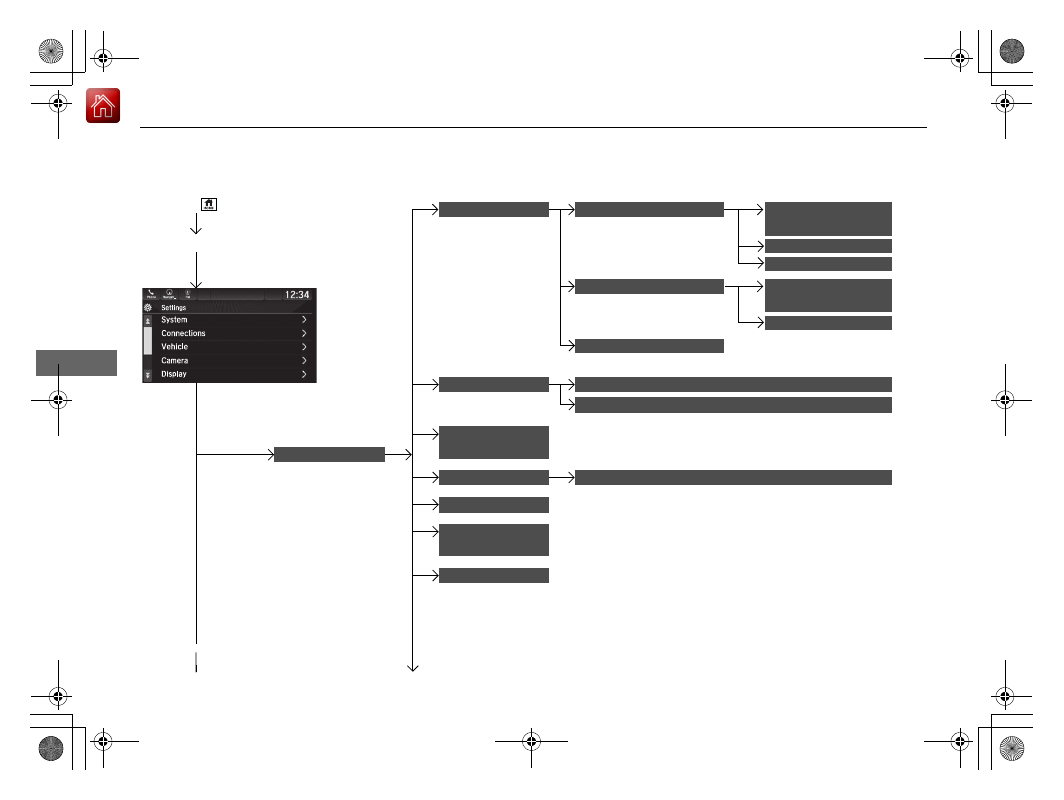
Customization flow

Select 

Settings

.

Automatic Date & 

Time

Set Date
Set Time

System

Select .

Automatic Time 

Zone

*

Select Time Format

HondaLink Subscription Status

Set Time Zone

Set Date & Time

Touch 

Sensitivity

Subscriptions

Language

Factory Data 

Reset

About

Date & Time

Select time zone

System Sounds

System Volumes

Navigation Guidance

*

* Not available on all models

415

uu

Customized Features

u

Continued

Features

Advanced 

Options

Interruption Mode

Events and 

reminders

Calls

App Manager

Recent Location 

Request from Apps

Location Setting

Interruptions

Messages

Calls/messages 

from

416

uu

Customized Features

u

Features

Connections

+ Connect New Device

Saved Devices

Change Mode

Android Auto

Apple CarPlay

Bluetooth

Wi-Fi

Available Networks

/

Devices

CabinControl

Connection 

Information

(Device list)

CabinControl

Options

417

uu

Customized Features

u

Continued

Features

Vehicle

Driving Position 

Setup

*

Seat Position Movement at Entry/Exit

Memory Position Link

Meter Setup

Adjust Outside Temp Display

Trip A Reset Timing

Trip B Reset Timing

Reverse Shift Position Beep

Adjust Alarm Volume

Turn by Turn Display

Power Tailgate 

Setup

*

Power Tailgate Keyless Open Mode

Power Tailgate Open by Outer Handle

Keyless Access 

Setup

Door Unlock Mode

Keyless Access Light Flash

Keyless Access Beep

Remote Start System On/Off

Walk Away Auto Lock

Fuel Efficiency Backlight

Hands Free Access Power Tailgate

*

Rear Seat Reminder

* Not available on all models

418

uu

Customized Features

u

Features

Lighting Setup

Interior Light Dimming Time

Headlight Auto Off Timer

Forward Collision Warning Distance

ACC Forward Vehicle Detect Beep

Auto Interior Illumination Sensitivity

Door Setup

Auto Door Lock

Auto Door Unlock

Key and Remote Unlock Mode

Keyless Lock Answer Back

Security Relock Timer

Driver Assist 

System Setup

Oil Life

Road Departure Mitigation Setting

Lane Keeping Assist Suspend Beep

Blind Spot Information

Power Slide Door Keyless Open Mode

Wireless 

Charger

*

Traffic Sign Recognition

Maintenance 

Information

Auto Headlight On with Wiper On

Auto Light Sensitivity

*

* Not available on all models

419

uu

Customized Features

u

Continued

Features

Audio Zones

*

Bass / Treble

Center / 

Subwoofer 

Volume

Camera

Default Camera View

Guidelines

Cross Traffic Monitor

Sound

Balance / Fader

Center /

Subwoofer 

Volume


(

Subwoofer 

Volume

)

DTS Neural 

Surround

*

Speed Volume 
Compensation

Notifications

Brightness

Contrast

Black Level

Display

Rear Camera

* Not available on all models

420

uu

Customized Features

u

Features

List of customizable options

*1:Default Setting

Setup 

Group

Customizable Features

Description

Selectable Settings

System

Date & Time

Set 
Date & 
Time

Automatic 
Date & 
Time

Selects 

ON

 to have the GPS automatically adjust 

the clock. Select 

OFF

 to cancel this function.

ON

*1

/

OFF

Set Date

Adjusts date.

2

Adjusting the Clock

 P. 144

Set Time

Adjusts clock.

2

Adjusting the Clock

 P. 144

Set 
Time 
Zone

Automatic 
Time Zone

*

Sets the navigation system to automatically adjust 
the clock when driving through different time 
zones.

ON

*1

/

OFF

Select time 
zone

Changes the time zone manually.

Select Time Format

Selects the digital clock display from 12H to 24H.

12H

*1

/

24H

* Not available on all models

421

uu

Customized Features

u

Continued

Features

*1:Default Setting

Setup 

Group

Customizable Features

Description

Selectable Settings

System

System 
Volumes

System Sounds

Changes the system sounds volume.

Navigation 
Guidance

*

Changes the navigation guidance volume.

Touch 
Sensitivity

Sets the sensitivity of the touch panel screen.

High

/

Low

*1

Subscriptions

HondaLink 
Subscription Status

Lists subscriptions and subscription status for 
HondaLink

®

.

Language

Changes the display language.

English

 (United 

States)

*1

/

English


(United Kingdom)/

Korean

/

French

/

Spanish

/

Arabic

Factory Data 
Reset

Resets all the settings to their factory default.

2

Defaulting All the Settings

 P. 431

Continue

/

Cancel

About

Displays the Android setting items.

* Not available on all models

422

uu

Customized Features

u

Features

*1:Default Setting

Setup 

Group

Customizable Features

Description

Selectable Settings

System

Advanced 
Options

App Manager

Displays the Android system memory and apps 
information.

Recent Location 
Request from Apps

Displays the recent location requests from apps.

Location Setting

Selects 

OFF

 not to allow apps including the 

navigation system

*

 to access the vehicle’s location.

ON

*1

/

OFF

Inter-
ruptions

Inter-
ruption 
Mode

Sets the interruption mode for allowing to notify 
when calls and notifications arrive.

Always interrupt

*1

/

Don’t interrupt

/

Allow only priority 
interruptions

Events and 
reminders

Sets priority interruptions of events and reminders.

ON

*1

/

OFF

Calls

Sets priority interruptions of calls.

ON

/

OFF

*1

Messages

Sets priority interruptions of messages.

ON

/

OFF

*1

Calls/
messages 
from

Sets priority interruptions of from who.

Anyone

*1

/

Contacts 

only

/

Starred 

contacts only

* Not available on all models

423

uu

Customized Features

u

Continued

Features

*1:Default Setting

Setup 

Group

Customizable Features

Description

Selectable Settings

Connec-
tions

Bluetooth

+ Connect New 
Device

Pairs a new phone to HFL.

2

Phone Setup

 P. 440

Saved Devices

Connects, disconnects, or deletes a paired phone.

2

Phone Setup

 P. 440

Wi-Fi

Change Mode

Changes the Wi-Fi mode.

Network

*1

/

HotSpot

/

OFF

Available Networks

/

Devices

Displays the available network(s) or current 
connected device(s).

Android Auto

Sets up the Android Auto connection.

Apple CarPlay

Sets up the Apple CarPlay connection.

CabinControl

Options

Cabin-
Control

Turns the Honda CabinControl function on and off.

ON

*1

/

OFF

Connection 
Information

Displays the Honda CabinControl connection 
information.

(Device list)

Selects functions or deletes a device.

424

uu

Customized Features

u

Features

*1:Default Setting

Setup 

Group

Customizable Features

Description

Selectable Settings

Vehicle

Driving 
Position 
Setup

*

Seat Position 
Movement at Entry/
Exit

Moves the seat rearward when you get in/get out 
of the vehicle. Changes the setting for this feature.

ON

*1

/

OFF

Memory Position 
Link

Turns the driving position memory system on and 
off.

ON

*1

/

OFF

Meter Setup

Adjust Outside Temp 
Display

Adjusts the temperature reading by a few degrees.

-5°F ~ ±0°F

*1

 ~ +5°F

(U.S.)

-3°C ~ ±0°C

*1

 ~ +3°C

(Canada)

Trip A Reset Timing

Changes the setting of how to reset trip meter A 
and average fuel economy A.

With Refuel

/

IGN 

Off

/

Manually 

Reset

*1

Trip B Reset Timing

Changes the setting of how to reset trip meter B 
and average fuel economy B.

With Refuel

/

IGN 

Off

/

Manually 

Reset

*1

Reverse Shift 
Position Beep

Turns the reverse alert tone on and off.

ON

*1

/

OFF

Adjust Alarm Volume

Changes the alarm volume, such as the buzzers, 
warnings, turn signal sound, and so on.

High

/

Mid

*1

/

Low

* Not available on all models

425

uu

Customized Features

u

Continued

Features

*1:Default Setting

Setup 

Group

Customizable Features

Description

Selectable Settings

Vehicle

Meter Setup

Turn by Turn Display

Selects whether the turn-by-turn display comes on 
during the route guidance.

ON

*1

/

OFF

Fuel Efficiency 
Backlight

Turns the ambient meter feature on and off.

ON

*1

/

OFF

Rear Seat Reminder

Turns the Rear Seat Reminder feature on and off.

ON

*1

/

OFF

Power 
Tailgate 
Setup

*

Power Tailgate 
Keyless Open Mode

Changes the keyless setting for when the power 
tailgate opens.

Anytime

*1

/

When 

Unlocked

Power Tailgate Open 
by Outer Handle

Changes the setting to open power tailgate by 
tailgate outer handle.

Off (Manual only)

/

On (Power/
Manual)

*1

Hands Free Access 
Power Tailgate

*

Changes the setting to open power tailgate by a 
swift forward in and out kicking motion under the 
rear bumper.

ON

*1

/

OFF

Keyless Access 
Setup

Door Unlock Mode

Changes which doors unlock when you grab the 
driver’s door handle.

Driver Door or 
Tailgate

*1

/

All Doors

Keyless Access Light 
Flash

Causes some exterior lights to flash when you 
unlock/lock the doors.

ON

*1

/

OFF

Keyless Access Beep

Causes the beeper to sound when you unlock/lock 
the doors.

ON

*1

/

OFF

* Not available on all models

426

uu

Customized Features

u

Features

*1:Default Setting

Setup 

Group

Customizable Features

Description

Selectable Settings

Vehicle

Keyless Access 
Setup

Remote Start System 
On/Off

Turns the remote engine start feature on and off.

ON

*1

/

OFF

Walk Away Auto 
Lock

Changes the settings for the automatic locking the 
doors when you walk away from the vehicle while 
carrying the remote.

Enable

/

Disable

*1

Driver Assist 
System Setup

Forward Collision 
Warning Distance

Changes at which distance CMBS

TM

 alerts.

Long

/

Normal

*1

/

Short

ACC Forward Vehicle 
Detect Beep

Causes the system to beep when the system 
detects a vehicle, or when the vehicle goes out of 
the ACC with Low Speed Follow range.

ON

/

OFF

*1

Road Departure 
Mitigation Setting

Changes the setting for the road departure 
mitigation system.

Normal

*1

/

Wide

/

Warning Only

/

Narrow

Lane Keeping Assist 
Suspend Beep

Causes the system to beep when the LKAS is 
suspended.

ON

/

OFF

*1

Blind Spot 
Information

Changes the setting for the blind spot information 
system.

Audible and Visual 
Alert

*1

/

Visual Alert

Traffic Sign 
Recognition

Selects whether the traffic sign icons come on the 
driver information interface.

ON

*1

/

OFF

427

uu

Customized Features

u

Continued

Features

*1:Default Setting

Setup 

Group

Customizable Features

Description

Selectable Settings

Vehicle

Door Setup

Auto Door Lock

Changes the setting for the automatic locking 
feature.

With Vehicle 
Speed

*1

/

Shift from 

P

/

OFF

Auto Door Unlock

Changes the setting for when the doors unlock 
automatically.

All Doors with 
Driver’s Door 
Opens

*1

/

All Doors 

with Shift to P

/

All 

Doors with IGN Off

/

OFF

Key and Remote 
Unlock Mode

Sets up either the driver’s door or all doors to 
unlock on the first push of the remote or built-in 
key.

Driver Door

*1

/

All 

Doors

Keyless Lock Answer 
Back

LOCK/UNLOCK- The exterior lights flash.
LOCK (2nd push)- The beeper sounds.

ON

*1

/

OFF

Security Relock Timer

Changes the time it takes for the doors to relock 
and the security system to set after you unlock the 
vehicle without opening any door.

90 sec

/

60 sec

/

30 

sec

*1

Power Slide Door 
Keyless Open Mode

Changes the keyless setting for when the power 
sliding door opens.

Anytime

*1

/

When 

Unlocked

428

uu

Customized Features

u

Features

*1:Default Setting

Setup 

Group

Customizable Features

Description

Selectable Settings

Vehicle

Lighting 
Setup

Interior Light 
Dimming Time

Changes the length of time the interior lights stay 
on after you close the doors.

60 sec

/

30 sec

*1

/

15 

sec

Headlight Auto Off 
Timer

Changes the length of time the exterior lights stay 
on after you close the driver’s door.

60 sec

/

30 sec

/

15 

sec

*1

/

0 sec

Auto Interior 
Illumination 
Sensitivity

Changes the sensitivity of the brightness of the 
instrument panel when the headlight switch is in 
the 

AUTO

 position.

Min

/

Low

/

Mid

*1

/

High

/

Max

Auto Headlight On 
with Wiper On

Changes the settings for the wiper operation when 
the headlights automatically come on while the 
headlight switch is in the 

AUTO

 position.

ON

*1

/

OFF

Auto Light 
Sensitivity

*

Changes the timing for the headlights to come on.

Max

/

High

/

Mid

*1

/

Low

/

Min

Wireless 
Charger

*

Turns the wireless charger feature on and off.

ON

*1

/

OFF

Maintenance 
Information

Oil Life

Resets the engine oil life display when you have 
performed the maintenance service.

* Not available on all models

429

uu

Customized Features

u

Continued

Features

*1:Default Setting

Setup 

Group

Customizable Features

Description

Selectable Settings

Camera

Rear Camera

Default Camera View

Changes the camera view mode when the rear 
camera monitor is turned on.

2

Multi-View Rear Camera

 P. 580

Last Used

*1

/

Normal 

View

/

Wide View

Guidelines

Selects whether the guidelines come on the rear 
camera monitor.

2

Multi-View Rear Camera

 P. 580

Dynamic

/

Fixed

/

Both

*1

/

OFF

Cross Traffic Monitor

Turns the cross traffic monitor on and off.

ON

*1

/

OFF

Display

Brightness

Adjusts the settings of the audio/information 
screen.

2

Display Setup

 P. 292

Contrast

Black Level


Content      ..     24      25      26      27     ..