Honda HR-V (2023 year). Manual in english - page 32
 

  Index      Manuals     Honda HR-V (2023 year). Manual in english


Search            copyright infringement  


Content      ..     30      31      32      33     ..


Honda HR-V (2023 year). Manual in english - page 32


uu

Braking

u

Brake System

532

Driving

Keeps the brake applied after releasing the brake pedal until the accelerator pedal is 
pressed. You can use this system while the vehicle is temporarily stopped, like at 
traffic lights and in heavy traffic.

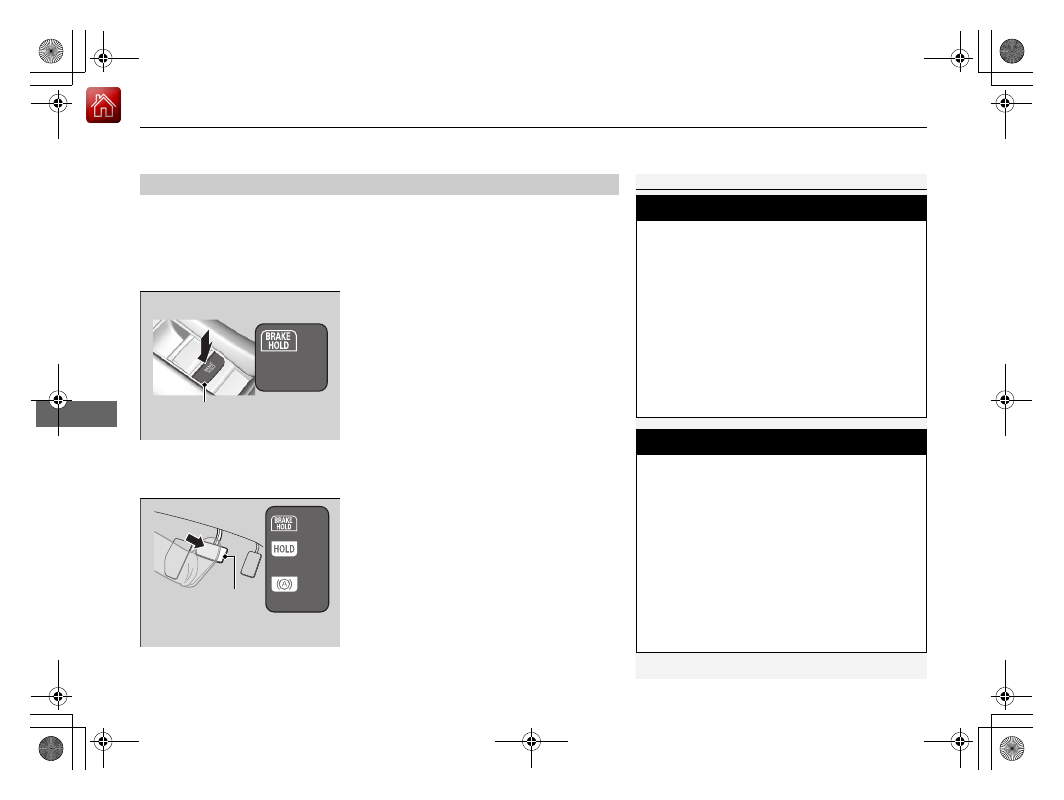
Turning on the system

Fasten your seat belt properly, then start the 
engine. Press the automatic brake hold 
button.

u

The automatic brake hold system 
indicator comes on. The system is turned 
on.

The system is in the previously selected on or 
off setting each time you fasten the driver’s 
seat belt and start the engine.

Activating the system

Depress the brake pedal to come to a 
complete stop. The transmission must not be 
in 

(

P

 or

(

R

.

u

The automatic brake hold indicator 
comes on. Braking is kept for up to 10 
minutes.

u

Release the brake pedal after the 
automatic brake hold indicator comes 
on.

Automatic Brake Hold

1

Automatic Brake Hold

3

WARNING

Activating the automatic brake hold system 
on steep hills or slippery roads may still 
allow the vehicle to move if you remove 
your foot from the brake pedal.

If a vehicle unexpectedly moves, it may 
cause a crash resulting in serious injury or 
death.

Never activate the automatic brake hold 
system or rely on it to keep a vehicle from 
moving when stopped on a steep hill or 
slippery roads.

3

WARNING

Using the automatic brake hold system to 
park the vehicle may result in the vehicle 
unexpectedly moving.

If a vehicle moves unexpectedly, it may 
cause a crash, resulting in serious injury or 
death.

Never leave the vehicle when braking is 
temporarily kept by automatic brake hold 
and always park the vehicle by putting the 
transmission in 

(

P

 and applying the parking 

brake.

Comes 
On

Automatic Brake Hold Button

On

Brake Pedal

Comes 
On

Comes 
On

U.S.

Canada

Continued

533

uu

Braking

u

Brake System

Driving

Canceling the system

Depress the accelerator pedal while the 
transmission is in a position other than 

(

P

 or 

(

N

. The system is canceled and the vehicle 

starts to move.

u

The automatic brake hold indicator goes 
off. The system continues to be on.

The system automatically cancels when:

You engage the parking brake.

You depress the brake pedal and put the transmission into 

(

P

 or 

(

R

.

The system automatically cancels and the parking brake is applied when:

Braking is kept for more than 10 minutes.

The driver’s seat belt is unfastened.

The engine is turned off.

There is a problem with automatic brake hold system.

1

Automatic Brake Hold

While the system is activated, you can turn off the 
engine or park the vehicle through the same 
procedure as you normally do.

2

When Stopped

 P. 537

You may hear an operating noise if the vehicle moves 
while the automatic brake hold system is in 
operation.

3

WARNING

When using the automatic brake hold, 
keep your foot on the brake pedal until the 
automatic brake hold indicator comes on.

If the vehicle unexpectedly moves, it may 
cause a crash resulting in serious injury or 
death.
Release your foot from the brake pedal 
after the automatic brake hold indicator 
comes on.

On

Accelerator Pedal

Goes 
Off

uu

Braking

u

Brake System

534

Driving

Turning off the automatic brake hold system

Only the automatic brake hold system 
indicator comes on: 

Press the automatic brake hold button.

u

The automatic brake hold system 
indicator goes off.

When the automatic brake hold indicator 
comes on at the same time: 

Press the automatic brake hold button with 
the brake pedal depressed.

u

The automatic brake hold system 
indicator and the automatic brake hold 
indicator go off.

1

Turning off the automatic brake hold system

Make sure to turn off the automatic brake hold 
system before using an automated car wash.

If you turn off the engine or unfasten the driver’s seat 
belt while the automatic brake hold system is on, the 
automatic brake hold system will automatically turn 
off. In this case, when the driver’s seat belt is 
fastened and the engine is restarted, the automatic 
brake hold system will turn on without needing to 
press the automatic brake hold button.

Automatic Brake 
Hold Button

Goes 
Off

Goes 
Off

535

uu

Braking

u

Anti-lock Brake System (ABS)

Driving

Anti-lock Brake System (ABS)

Helps prevent the wheels from locking up, and helps you retain steering control by 
pumping the brakes rapidly, much faster than you can.

The electronic brake distribution (EBD) system, which is part of the ABS, also 
balances the front-to-rear braking distribution according to vehicle loading.

You should never pump the brake pedal. Let the ABS work for you by always 
keeping firm, steady pressure on the brake pedal. This is sometimes referred to as 
“stomp and steer.”

ABS operation

The brake pedal may pulsate slightly when the ABS is working. Depress the brake 
pedal and keep holding the pedal firmly down. On dry pavement, you will need to 
press on the brake pedal very hard before the ABS activates. However, you may feel 
the ABS activate immediately if you are trying to stop on snow or ice.

ABS may activate when you depress the brake pedal when driving on:

Wet or snow covered roads.

Roads paved with stone.

Roads with uneven surfaces, such as potholes, cracks, manholes, etc.

When the vehicle speed goes under 6 mph (10 km/h), the ABS stops.

ABS

1

Anti-lock Brake System (ABS)

NOTICE

The ABS may not function correctly if you use a tire of 
the incorrect size or type.

If the 

ABS

 indicator comes on while driving, there 

may be a problem with the system.
While normal braking will not be affected, there is a 
possibility that the ABS will not be operating. Have 
your vehicle checked by a dealer immediately.

The ABS is not designed for the purpose of reducing 
the time or distance it takes for a vehicle to stop: It is 
designed to limit brake lockup which can lead to 
skidding and loss of steering control.

In the following cases, your vehicle may need more 
distance to stop than a vehicle without the ABS:

You are driving on rough or uneven road surfaces, 
such as gravel or snow.

The tires are equipped with snow chains.

The following may be observed with the ABS system:

Motor sounds coming from the engine 
compartment when the brakes are applied, or 
when system checks are being performed after the 
engine has been started and while the vehicle 
accelerates.

Brake pedal and/or the vehicle body vibration when 
ABS activates.

These vibrations and sounds are normal to ABS 
systems and are no cause for concern.

536

uu

Braking

u

Brake Assist System

Driving

Brake Assist System

Designed to assist the driver by generating greater braking force when you depress 
the brake pedal hard during emergency braking.

Brake assist system operation

Press the brake pedal firmly for more powerful braking.

When brake assist operates, the pedal may wiggle slightly and an operating noise 
may be heard. This is normal. Keep holding the brake pedal firmly down.

537

Driving

Parking Your Vehicle

When Stopped

1.

Depress the brake pedal firmly.

2.

With the brake pedal depressed, pull up the electric parking brake switch slowly, 
but fully.

3.

Change the shift position to 

(

P

.

4.

Turn off the engine.

u

The parking brake and brake system indicator (red) goes off in about 30 
seconds.

Always set the parking brake, in particular if you are parked on an incline.

1

When Stopped

Do not park your vehicle near flammable objects, 
such as dry grass, oil, or timber.
Heat from the exhaust can cause a fire.

NOTICE

The following can damage the transmission:

Depressing the accelerator and brake pedals 
simultaneously.

Holding the vehicle in place when facing uphill by 
depressing the accelerator pedal.

Moving the shift lever into 

(

P

 before the vehicle 

stops completely.

In extremely cold temperatures, the parking brake 
may freeze up if applied. If such temperatures are 
expected, do not apply the parking brake but, if 
parking on a slope, either turn the front wheels so 
they will contact the curb if the vehicle rolls down the 
slope or block the wheels to keep the vehicle from 
moving. If you do not take either precaution, the 
vehicle may roll unexpectedly, leading to a crash.

3

WARNING

The vehicle can roll away if left unattended 
without confirming that Park is engaged.

A vehicle that rolls away could cause a crash 
resulting in serious injury or death.

Always keep your foot on the brake pedal 
until you have confirmed that 

(

P

 is shown 

on the shift position indicator.

538

uu

Parking Your Vehicle

u

Parking Sensor System

*

Driving

Parking Sensor System

*

The corner and center sensors monitor obstacles around your vehicle, and the 
beeper, driver information interface and audio/information screen let you know the 
approximate distance between your vehicle and the obstacle.

The sensor location and range

1

Parking Sensor System

*

Even when the system is on, always confirm if there is 
no obstacle near your vehicle before parking.

The system may not work properly when:

The sensors are covered with snow, ice, mud, or 
dirt.

The vehicle has been out in hot or cold weather.

There is something nearby that emits ultrasonic 
waves or high frequency sounds.

Driving in bad weather (rain, fog, snow, etc.).

The system may not detect these obstacles:

Thin or low objects.

Sonic-absorptive materials, such as snow, cotton, 
or sponge.

Objects directly under the bumper.

The system may falsely detect obstacles in the 
following situations:

The vehicle is on uneven surface, such as grass, 
bumps, or a hill.

When close to other vehicles with sonar sensors or 
other objects that emit ultrasonic waves.

There is splashing water near the sensors due to 
heavy rains, etc.

Do not put any accessories on or around the sensors.

Front Corner Sensors

Rear Corner Sensors

Rear Center Sensors

Front Center Sensors

Within about 24 in (60 cm) or less

Front: Within about 35 in (90 cm) or less
Rear: Within about 40 in (100 cm) or less

* Not available on all models

Continued

539

uu

Parking Your Vehicle

u

Parking Sensor System

*

Driving

Parking sensor system on and off

You can turn the system on and off using the driver information interface.

2

Switching the Display

 P. 107

2

Safety Support

 P. 118

The front corner, rear corner and rear center sensors start to detect an obstacle 
when the transmission is in 

(

R

, and the vehicle speed is less than 5 mph (8 km/h).

The front corner and front center sensors start to detect an obstacle when the 
transmission is in any position other than 

(

P

 or 

(

R

, and the vehicle speed is less 

than 5 mph (8 km/h).

1

Parking Sensor System

*

When you set the power mode to ON, the system will 
be in the previously selected condition.

* Not available on all models

uu

Parking Your Vehicle

u

Parking Sensor System

*

540

Driving

Screen Operation

You can switch between split view off and 
split view on by touching the split screen tab.

1

Screen Operation

The split screen tab disappears, and the split view 
returns to the last camera view mode under the 
following conditions:

If the parking sensor system is turned off.

If there is a malfunction in the system.

Split Screen 
Tab

Split View Off

Split View On

541

uu

Parking Your Vehicle

u

Parking Sensor System

*

Driving

When the distance between your vehicle and detected obstacles becomes shorter

*1:On the driver information interface
*2:On the audio/information screen
*3:At this stage, only the center sensors detect obstacles.
To temporarily turn off the beeper, press the left selector wheel while it is sounding. Temporary OFF will be canceled when the shift 
position is switched or the vehicle speed reaches 9 mph (14 km/h) or higher.

Interval 

between 

beeps

Distance between the Bumper and Obstacle

Indicator

Driver information 

interface

Audio/Information Screen

Corner Sensors

Center Sensors

Moderate

Front: About 35-24 in 

(90-60 cm)

Rear: About 40-31 in 

(100-80 cm) 

Comes on

*1

/

Blinks

*2

 in Yellow

*3

Short

About 24-18 in 

(60-45 cm) 

About 32-25 in 

(80-65 cm) 

Comes on

*1

/

Blinks

*2

 in Amber

Very short

About 18-14 in 

(45-35 cm) 

About 25-16 in 

(65-40 cm) 

Continuous

About 14 in 

(35 cm) or less

About 16 in 

(40 cm) or less

Comes on

*1

/

Blinks

*2

 in Red

Indicators light up 
where the sensor 
detects an obstacle.

Indicators light up where the 
sensor detects an obstacle.

Indicators light up where the 
sensor detects an obstacle.

Indicators light up where the 
sensor detects an obstacle.

542

uu

Parking Your Vehicle

u

Cross Traffic Monitor

*

Driving

Cross Traffic Monitor

*

Monitors the rear corner areas using the radar sensors when reversing, and alerts 
you if a vehicle approaching from a rear corner is detected.

The system is convenient when you are backing out of a parking space.

1

Cross Traffic Monitor

*

The parking sensor system’s alerting buzzer overrides 
the Cross Traffic Monitor buzzer when the sensors 
are detecting obstacles at the closest range.

3

CAUTION

Cross Traffic Monitor cannot detect all 
approaching vehicles and may not detect 
an approaching vehicle at all.

Failure to visually confirm that it is safe to 
back up the vehicle before doing so may 
result in a collision.

Do not solely rely on the system when 
reversing; always also use your mirrors, and 
look behind and to the sides of your vehicle 
before reversing.

* Not available on all models

Continued

543

uu

Parking Your Vehicle

u

Cross Traffic Monitor

*

Driving

The system activates when:

The power mode is in ON.

The Cross Traffic Monitor is turned on.

2

Cross Traffic Monitor On and Off

 P. 544

The transmission is in 

(

R

.

Your vehicle is moving at 3 mph (5 km/h) or 
lower.

When a vehicle is detected approaching from a rear corner, Cross Traffic Monitor 
alerts you with a buzzer and a displayed warning.

The system will not detect a vehicle that approaches from directly behind your 
vehicle, nor will it provide alerts about a detected vehicle when it moves directly 
behind your vehicle.

The system does not provide alerts for a vehicle that is moving away from your 
vehicle, and it may alert for pedestrians, bicycles, or stationary objects.

How the System Works

1

Cross Traffic Monitor

*

Cross Traffic Monitor may not detect or may delay 
alerting an approaching vehicle, or may alert without 
an approaching vehicle under the following 
conditions:

An obstacle, such as another vehicle and a wall, 
near your vehicle’s rear bumper, is blocking the 
radar sensor’s scope.

Your vehicle is moving at the speed of about 3 mph 
(5 km/h) or higher.

A vehicle is approaching at the speed other than 
between about 6 mph (10 km/h) and 16 mph (25 
km/h).

The system picks up external interference such as 
other radar sensors from another vehicle or strong 
radio wave transmitted from a facility nearby.

Either corner of the rear bumper is covered with 
snow, ice, mud or dirt.

When there is bad weather.

Your vehicle is on an incline.

Your vehicle is tilted due to a heavy load in the rear.

Your vehicle is reversing towards a wall, a pole, a 
vehicle, and so on.

The rear bumper or the sensors have been improperly 
repaired or the rear bumper has been deformed. 
Have your vehicle checked by a dealer.

For proper operation, always keep the rear bumper 
corner area clean.
Do not cover the rear bumper corner area with labels 
or stickers of any kind.

Radar sensors:
Underneath the rear bumper 
corners

* Not available on all models

uu

Parking Your Vehicle

u

Cross Traffic Monitor

*

544

Driving

An arrow icon appears on the side a vehicle is approaching on the audio/information 
screen.

The system can be turned on and off on the 
audio/information screen by pressing the 
Cross Traffic Monitor icon.

You can also switch the system on and off 
from the customized feature on the audio/
information screen.

2

Customized Features

 P. 337, 345

When the System Detects a Vehicle

1

When the System Detects a Vehicle

If the 

 on the lower right changes to 

 in amber 

when the transmission is in 

(

R

, mud, snow or ice, 

etc. may have accumulated in the vicinity of the 
sensor. The system is temporarily canceled. Check the 
bumper corners for any obstructions, and thoroughly 
clean the area if necessary.

If the 

 comes on when the transmission is in 

(

R

there may be a problem with the Cross Traffic 
Monitor system. Do not use the system and have your 
vehicle checked by a dealer.

If the display remains the same with the transmission 
in 

(

R

, there may be a problem with the rear camera 

system and the Cross Traffic Monitor system.
Do not use the system and have your vehicle checked 
by a dealer.

Cross Traffic Monitor On and Off

Wide View

Normal View

Arrow Icon

Top Down View

Cross Traffic Monitor 
icon

545

Continued

Driving

Multi-View Rear Camera

About Your Multi-View Rear Camera

The audio/information screen can display your vehicle’s rear view.
The display automatically changes to the rear view when the transmission is put into 

(

R

.

You can view three different camera modes on the rearview display.

Multi-View Rear Camera Display Area

1

About Your Multi-View Rear Camera

The rear camera view is restricted. You cannot see 
the corner ends of the bumper or what is underneath 
the bumper. Its unique lens also makes objects 
appear closer or farther than they actually are.

Visually confirm that it is safe to drive before backing 
up. Certain conditions (such as weather, lighting, and 
high temperatures) may also restrict the rear view. Do 
not rely on the rearview display which does not give 
you all information about conditions at the back of 
your vehicle.

The rear camera view is displayed prior to the audio/
information screen.

If the camera lens is covered with dirt or moisture, 
use a soft, moist cloth to keep the lens clean and free 
of debris.

You can change the 

Fixed Guideline

 and 

Dynamic 

Guideline

 settings.

2

Customized Features

 P. 337, 345

Fixed Guideline
ON: 

Guidelines appear when you put the 

transmission into 

(

R

.

OFF: 

Guidelines do not appear.

Dynamic Guideline
ON: 

Guidelines move according to the steering 

wheel direction.

OFF: 

Guidelines do not move.

Approx. 39 inches (1 m)

Camera

Tailgate open range

546

uu

Multi-View Rear Camera

u

About Your Multi-View Rear Camera

Driving

If you were last using Wide view mode or Normal view mode, the same view 
mode will be activated the next time you put the transmission into 

(

R

.

If you were using Top down view mode before you turned off the engine, Wide 
view mode will be activated the next time you set the power mode to ON and put 
the transmission into 

(

R

.

If you were using Top down view mode and 10 seconds elapsed after you took 
the transmission out of 

(

R

, Wide view mode will be activated the next time you 

put the transmission into 

(

R

.

If you were using Top down view mode and put the transmission back into 

(

R


within 10 seconds after you took it out of 

(

R

, Top down view mode will be 

activated.

Bumper

Bumper

Bumper

Wide view mode

Normal view mode

Top down view mode

547

Driving

Refueling

Fuel Information

Fuel recommendation

Use of lower octane gasoline can cause a persistent, heavy metallic knocking noise 
that can lead to engine damage.

Top tier detergent gasoline

Because the level of detergency and additives in gasoline vary in the market, Honda 
endorses the use of “TOP TIER Detergent Gasoline” where available to help 
maintain the performance and reliability of your vehicle. TOP TIER Detergent 
Gasoline meets a new gasoline standard jointly established by leading automotive 
manufacturers to meet the needs of today’s advanced engines.

Qualifying gasoline retailers will, in most cases, identify their gasoline as having met 
“TOP TIER Detergent Gasoline” standards at the retail location. This fuel is 
guaranteed to contain the proper level of detergent additives and be free of metallic 
additives. The proper level of detergent additives, and absence of harmful metallic 
additives in gasoline, help avoid buildup of deposits in your engine and emission 
control system. 

For further important fuel-related information for your vehicle, or on information on 
gasoline that does not contain MMT, visit 

www.hondacars.com.

 In Canada, visit 

www.honda.ca

 for additional information on gasoline. For more information on top 

tier gasoline, visit 

www.toptiergas.com

.

Fuel tank capacity: 14.0 US gal (53 L)

Unleaded gasoline, pump octane number 87 or higher

1

Fuel Information

NOTICE

We recommend quality gasoline containing 
detergent additives that help prevent fuel system and 
engine deposits. In addition, in order to maintain 
good performance, fuel economy, and emissions 
control, we strongly recommend the use of gasoline 
that does NOT contain harmful manganese-based 
fuel additives such as MMT, if such gasoline is 
available.

Use of gasoline with these additives may adversely 
affect performance, and cause the malfunction 
indicator lamp on your instrument panel to come on. 
If this happens, contact a dealer for service.

Some gasoline today is blended with oxygenates such 
as ethanol. Your vehicle is designed to operate on 
oxygenated gasoline containing up to 15% ethanol 
by volume. Do not use gasoline containing methanol. 
If you notice any undesirable operating symptoms, try 
another service station or switch to another brand of 
gasoline.


Content      ..     30      31      32      33     ..