Honda HR-V (2023 year). Manual in english - page 25
 

  Index      Manuals     Honda HR-V (2023 year). Manual in english


Search            copyright infringement  


Content      ..     23      24      25      26     ..


Honda HR-V (2023 year). Manual in english - page 25


uu

When Driving

u

Starting the Engine

420

Driving

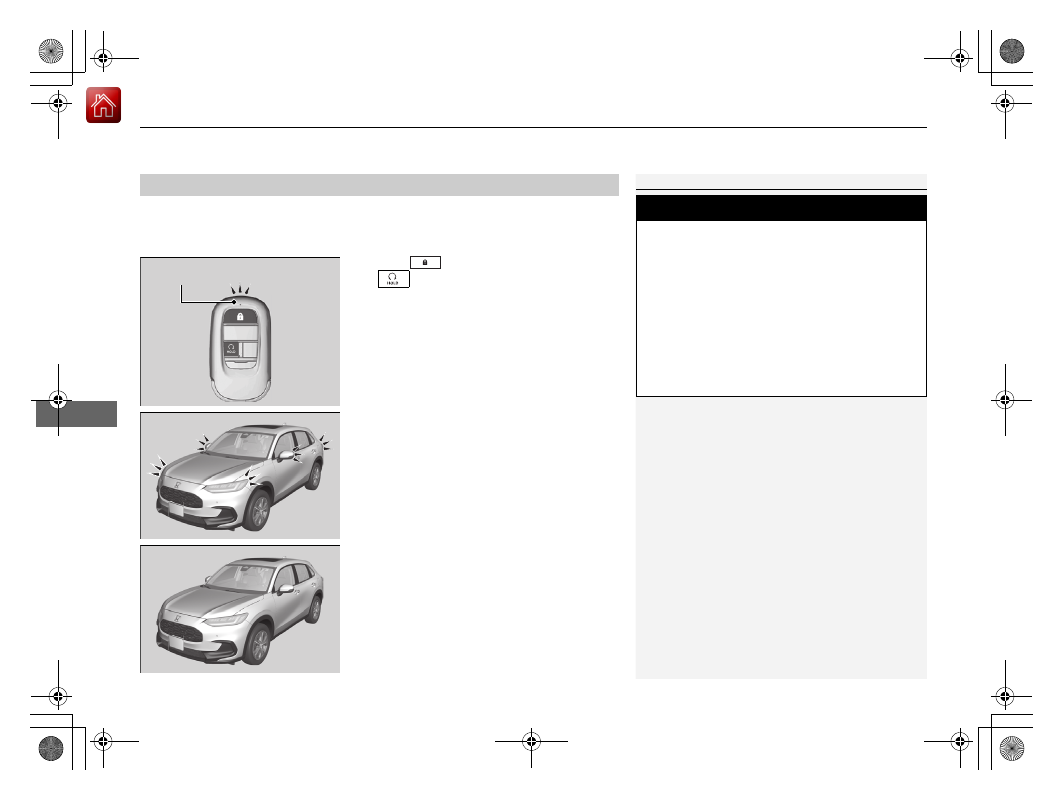
You can remotely start the engine using the keyless remote.

To start the engine

Press the 

 button, then press and hold 

the  

button.

u

Some exterior lights flash once.

If the engine starts successfully, some exterior 
lights flash six times.

If the engine does not start, exterior lights will 
not flash.

u

Go within the range, and try again.

Remote Engine Start

*

1

Remote Engine Start

*

The remote engine start may violate local laws.
Before using the remote engine start, check your 
local laws.

If there are buildings and obstacles between your 
vehicle and the remote, the range will be reduced.
This distance may vary by external electrical 
interference.

3

WARNING

Carbon monoxide gas is toxic and can 
rapidly accumulate in closed or even partly 
enclosed areas.

Breathing it can cause unconsciousness and 
even kill you.

Never use the remote engine starter with 
the vehicle parked in a garage or other 
areas with limited ventilation.

LED: Blinks when any 
button is pressed.

* Not available on all models

Continued

421

uu

When Driving

u

Starting the Engine

Driving

When started remotely, the engine automatically shuts off after 10 minutes of idling 
and/or the brake pedal and 

ENGINE START/STOP

 button have not been pressed 

simultaneously.
To extend the run time for another 10 minutes during the first run, press the 


button, then press and hold the 

 button.

u

Some exterior lights flash six times if a 10-minute extension request was 
transmitted successfully.

1

Remote Engine Start

*

The engine may not start by the remote engine start 
if:

You have disabled a remote engine start setting 
using the driver information interface

*

 or audio/

information screen

*

.

2

Settings

*

 P. 123

2

Customized Features

 P. 345

The power mode is not in VEHICLE OFF.

The transmission is in a position other than 

(

P

.

The hood is open, or any door or the tailgate is 
unlocked.

You have already used the remote twice to start 
the engine.

Another registered keyless remote is in the vehicle.

There is any antenna failure.

The door is unlocked with the built-in key.

The engine oil pressure is low.

The engine coolant temperature is extremely high.

The security system alarm is not set.

* Not available on all models

uu

When Driving

u

Starting the Engine

422

Driving

To stop the engine

Press and hold the 

 button for one 

second.

If the engine starts successfully, the exterior 
lights flash once.

When the remote is out of the keyless access 
system range, the exterior lights will not flash.
The engine will not stop.

u

Go within the range, and try again.

1

Remote Engine Start

*

The engine may stop while it is running if:

You do not start the vehicle within 10 minutes of 
starting the engine with the keyless remote.

The engine is stopped by using the keyless remote.

The security system alarm is not set.

The door is unlocked with the built-in key.

The hood is open, or any door, or the tailgate is 
unlocked.

You press the shift lever release button.

The engine coolant temperature is extremely high.

The battery is low.

The engine oil pressure is low.

The malfunction indicator lamp comes on if there is 
a problem with the emissions control systems.

While the engine is running, the vehicle will 
automatically precondition inside the vehicle.
When it is warm outside:

The climate control system is activated in 
recirculation mode.

When it is cold outside:

The defroster is activated at a moderately warm 
temperature.

The rear defogger, heated door mirrors

*

, front seat 

heaters

*

 and heated steering wheel

*

 are activated.

2

Rear Defogger/Heated Door Mirror

*


Button

 P. 176

2

Front Seat Heaters

*

 P. 202

2

Heated Steering Wheel

*

 P. 201

* Not available on all models

Continued

423

uu

When Driving

u

Starting the Engine

Driving

1.

Depress and hold the brake pedal, then press the 

ENGINE START/STOP

 button.

1.

Keeping your right foot on the brake pedal, put the transmission into 

(

D

. Select 

(

R

 when reversing.

2.

With the parking brake applied, release the brake pedal and gently depress the 
accelerator pedal.

u

Make sure the parking brake and brake system indicator (red) goes off.

2

Parking Brake

 P. 528

Hill start assist system

Hill start assist keeps the brake engaged briefly to help prevent the vehicle from 
rolling on inclines as you move your foot from the brake pedal to the accelerator.

Put the transmission into 

(

D

(

S

, or 

(

L

 when facing uphill, or 

(

R

 when facing 

downhill, then release the brake pedal.

Starting to Drive

1

Starting to Drive

The engine stops when the transmission is taken out 
of 

(

P

 before the 

ENGINE START/STOP

 button is 

pressed. Follow step 1 when starting to drive.

You can also release the parking brake by pressing 
the electric parking brake switch while depressing the 
brake pedal.
When facing downhill, you can start your vehicle 
more smoothly by manually releasing it with the 
electric parking brake switch than by releasing it with 
the accelerator pedal.

When the engine was started using the 

 button 

on the keyless remote

*

When the engine was started using the 

 button on the keyless remote

*

When the engine was started in any case

1

Hill start assist system

Hill start assist may not prevent the vehicle from 
rolling downhill on a very steep or slippery slope, and 
will not operate on small inclines.

Hill start assist will operate even when VSA

®

 is 

switched off.

Hill start assist is not a replacement for the parking 
brake.

* Not available on all models

uu

When Driving

u

Starting the Engine

424

Driving

You can turn the engine off when the vehicle is completely stopped.

1.

Put the transmission into 

(

P

.

2.

Press the 

ENGINE START/STOP

 button.

Stopping the Engine

1

Stopping the Engine

The power mode will automatically turn to VEHICLE 
OFF about 20 minutes after the following conditions 
have been met:

A door has been opened, such as when leaving the 
vehicle.

The driver’s seat belt is not fastened.

The transmission is in 

(

P

.

425

uu

When Driving

u

Precautions While Driving

Continued

Driving

Precautions While Driving

Utility vehicles have a significantly higher rollover rate than other types of vehicles.
To prevent rollovers or loss of control:

Take corners at slower speeds than you would with a passenger vehicle.

Avoid sharp turns and abrupt maneuvers whenever possible.

Do not modify your vehicle in any way that you would raise the center of gravity.

Do not carry heavy cargo on the roof.

Roof load capacity is 132 lbs (60 kg), available roof racks/carriers may have lower 
capacities. Please check accessory’s information (Honda accessory).

Avoid driving in deep water and on flooded roads. This can damage the engine or 
driveline, or cause electrical component failure.

Driving Guidelines for Your Utility Vehicle

In Rain

1

Precautions While Driving

NOTICE

Do not change the shift position while pressing the 
accelerator pedal. You could damage the 
transmission.

NOTICE

If you repeatedly turn the steering wheel at an 
extremely low speed, or hold the steering wheel in 
the full left or right position for a while, the electric 
power steering (EPS) system heats up. The system 
goes into a protective mode, and limits its 
performance. The steering wheel becomes harder 
and harder to operate. Once the system cools down, 
the EPS system is restored. Repeated operation under 
these conditions can eventually damage the system.

If the power mode is set to ACCESSORY while 
driving, the engine will shut down and all steering 
and brake power assist functions will stop, making it 
difficult to control the vehicle.

Do not select 

(

N

 while driving as you will lose engine 

braking (and acceleration) performance.

During the first 600 miles (1,000 km) of operation, 
avoid sudden acceleration or full throttle operation so 
as to not damage the engine or powertrain.

Avoid hard braking for the first 200 miles (300 km) 
after purchasing your new vehicle or replacing the 
brake pads or rotors, to allow for proper break-in.

uu

When Driving

u

Continuously Variable Transmission

426

Driving

If there is a strong impact with something under the vehicle, stop in a safe location. 
Check the underside of the vehicle for damage or any fluid leaks.

Continuously Variable Transmission

When the engine runs at higher idle speeds, the creeping force increases.
Keep the brake pedal firmly depressed when stopped.

Quickly depressing the accelerator pedal while driving uphill may cause the 
transmission to drop to a lower ratio, unexpectedly increasing vehicle speed. 
Depress the accelerator pedal carefully, especially on slippery roads and curves.

Other Precautions

Creeping

Kickdown

1

Driving Guidelines for Your Utility Vehicle

Failure to operate your vehicle correctly might result 
in a crash or a rollover.

2

Important Handling Information

 P. 36

2

Precautions While Driving

 P. 425

427

uu

When Driving

u

Shifting

Continued

Driving

Shifting

Change the shift position in accordance with your driving needs.

Shift positions

1

Shifting

You cannot change the power mode from ON to 
VEHICLE OFF unless the shift lever is in 

(

P

.

The vehicle may move forward very slightly even in 

(

N

 while the engine is cold.

Depress the brake pedal firmly and, when necessary, 
apply the parking brake.

Park

Used when parking or starting the 
engine

Reverse

Used when reversing

Neutral

Transmission is not locked

Drive

Used for normal driving

Drive (S)

Used:

For better acceleration

To increase engine braking

When going up or down hills

Release Button

Low

Used to further increase engine 
braking

Used when going up or down hills

uu

When Driving

u

Shifting

428

Driving

Shift Operation

1

Shift Operation

NOTICE

When you change the shift position from 

(

D

 to 

(

R


and vice versa, come to a complete stop and keep the 
brake pedal depressed.
Operating the shift lever before the vehicle has come 
to a complete standstill can damage the transmission.

Use the shift position indicator to check the lever 
position before pulling away.

If the transmission system indicator blinks when 
driving, in any shift position, there is a problem with 
the transmission.
Avoid sudden acceleration and have the transmission 
checked by a dealer as soon as possible.

The fuel supply may be cut off if you drive at engine 
speeds in or over the tachometer red zone (engine 
speed limit). If this happens, you may experience a 
slight jolt.

It may not be possible to operate the shift lever if the 
brake pedal is applied while the shift lever release 
button is held down.
Depress the brake pedal first.

When shifting positions in extremely low 
temperatures (-22°F/-30°C), there may be a short 
delay before the shift position is displayed. Always 
confirm you are in the correct shift position before 
driving.

Tachometer red zone

Depress the brake pedal and press 
the shift lever release button to shift.

Shift without pressing the shift lever 
release button.

Press the shift lever release button 
and shift.

Shift Position Indicator 
(Transmission system indicator)

429

uu

When Driving

u

Drive Mode Switch

Continued

Driving

Drive Mode Switch

You can choose between three modes, 

NORMAL

 mode, 

ECON

 mode and 

SNOW


mode by using the drive mode switch.
The current mode is displayed on the driver information interface, and each mode 
will appear differently.

1

Drive Mode Switch

The mode may not be able to be changed when:

The vehicle is turning.

The VSA

®

 system is activating.

There is a problem with the engine, the 
transmission, the VSA

®

, and the EPS.

Drive Mode Switch

NORMAL


Mode

ECON


Mode

SNOW


Mode

uu

When Driving

u

Drive Mode Switch

430

Driving

Balances handling and riding in all 
environments.

Helps you improve your fuel economy by 
adjusting the performance of the engine, 
transmission and climate control system.

NORMAL Mode

ECON Mode

1

ECON

 Mode

While in ECON mode, the climate control system will 
be less effective and the vehicle slower to accelerate.

431

uu

When Driving

u

Drive Mode Switch

Driving

Maximizes controllability through powertrain 
settings.

The mode for the next start-up is saved according to the following chart.

SNOW Mode

1

SNOW

 Mode

NOTICE

SNOW

 mode does not allow you to drive on snowy 

or frozen roads in all situations. There are limits to 

SNOW

 mode. 

When driving on snowy or frozen roads; mount 
winter tires or tire chains, reduce speed, and maintain 
sufficient distance between vehicles. 

Next Start-up Mode

Last Mode

Next Mode

NORMAL

NORMAL

ECON

ECON

SNOW

NORMAL

432

uu

When Driving

u

Hill Descent Control System

Driving

Hill Descent Control System

When driving down hills where engine braking is not enough to decelerate the 
vehicle, this system helps maintain a constant vehicle speed without needing to 
depress the brake pedal.

The system operates under the following conditions.

Driving at a speed between about 2-12 mph (3-20 km/h).

Driving downhill.

Accelerator pedal and brake pedal are not depressed.

The system’s operating status

Green: Activated

White: Standby

Vehicle speed display

White: Set speed

Grey: Current speed

u

Blinks when the vehicle speed is above 
the operating speed.

Hill Descent Control Operating Conditions

Driver Information Interface Display

1

Hill Descent Control System

The brake lights automatically come on while the 
system is in operation.

The system may not operate when driving down a 
gentle slope. Check the Hill Descent Control System 
indicator to see if the system is in operation.

The system may activate even when not driving 
downhill, such as when the vehicle leans while 
driving over uneven surfaces.

3

WARNING

Hill descent control cannot maintain a 
constant vehicle speed in every situation.

When driving down a very steep hill or on 
slippery road surfaces, the vehicle may not 
be able to maintain the vehicle speed and 
could cause a crash, resulting in serious 
injury or death.

Since Hill Descent Control is not designed 
to increase the limits of vehicle 
performance, the driver must always be 
aware of road surface conditions and drive 
safely.

System’s Operating Status

Vehicle Speed 
Display

Current Speed

Operating Range of Set Speed

433

uu

When Driving

u

Hill Descent Control System

Driving

To turn the system on

When the vehicle speed is less than about 
12 mph (20 km/h), press the 

 button to 

turn the system on.

u

The system goes into standby mode, and 
the Hill Descent Control System indicator 
(white) comes on.

When all the working conditions are met, the 
system activates, and the vehicle begins to 
maintain the vehicle speed when driving 
downhill.

u

The Hill Descent Control System indicator 
(green) comes on when operating.

To adjust the set speed

Depress the accelerator pedal or brake pedal 
to adjust the vehicle speed within the 
operating range. The vehicle speed at which 
you release the accelerator pedal or brake 
pedal will be the set speed.

To turn the system off

Press the 

 button to turn the system off.

How to Operate Hill Descent Control

1

How to Operate Hill Descent Control

Using the system repeatedly for a long time may 
cause the brakes to heat up and make the system go 
into standby mode temporarily.

Hill Descent Control is turned off every time you turn 
the power system off, even if it was turned on the last 
time you drove the vehicle.

The pedals may vibrate or you may hear the system 
working when in operation.

Hill Descent Control 
System Indicator

 (Hill Descent Control) Button

1

To turn the system off

When the vehicle speed is 37 mph (60 km/h) or more, 
the system turns off automatically.

434

uu

When Driving

u

Vehicle Stability Assist

TM

 (VSA

®

), aka Electronic Stability Control (ESC), System

Driving

Vehicle Stability Assist

TM

 (VSA

®

), aka Electronic 

Stability Control (ESC), System

VSA

®

 helps to stabilize the vehicle during cornering if the vehicle turns more or less 

than what was intended. It also assists in maintaining traction on slippery surfaces. 
It does so by regulating engine output and selectively applying the brakes.

When VSA

®

 activates, you may notice that the 

engine does not respond to the accelerator. 
You may also notice some noise from the 
hydraulic brake system. You will also see the 
indicator blink.

VSA

®

 Operation

1

Vehicle Stability Assist

TM

 (VSA

®

), aka Electronic Stability Control 

(ESC), System

The VSA

®

 may not function properly if tire type and 

size are mixed. Make sure to use the same size and 
type of tire, and the air pressures as specified.

When the VSA

®

 system indicator comes on and stays 

on while driving, there may be a problem with the 
system. While this may not interfere with normal 
driving, have your vehicle checked by a dealer 
immediately.

VSA

®

 cannot enhance stability in all driving situations 

and does not control the entire braking system. You 
still need to drive and corner at speeds appropriate 
for the conditions and always leave a sufficient 
margin of safety.

The main function of the VSA

®

 system is generally 

known as Electronic Stability Control (ESC). The 
system also includes a traction control function.

The Vehicle Stability Assist

TM

 (VSA

®

) system, Vehicle 

Stability Assist

TM

 (VSA

®

OFF

, Adaptive Cruise Control 

(ACC) with Low Speed Follow, low tire pressure/
TPMS

*

, parking brake and brake system and safety 

support indicators may come on in amber along with 
a message in the gauge when you set the power 
mode to ON after reconnecting the battery.
Drive a short distance at more than 12 mph (20 km/h).
Each indicator should go off. If any do not, have your 
vehicle checked by a dealer.

VSA

®

 System 

Indicator

* Not available on all models

435

uu

When Driving

u

Vehicle Stability Assist

TM

 (VSA

®

), aka Electronic Stability Control (ESC), System

Driving

This button is on the driver side control panel. 
To partially disable VSA

®

 functionality/

features, press and hold it until you hear a 
beep.

Your vehicle will have normal braking and 
cornering ability, but traction control function 
will be less effective.

To restore VSA

®

 functionality/features, press 

the  

(VSA

®


OFF

) button until you hear a 

beep.

VSA

®

 is turned on every time you start the 

engine, even if you turned it off the last time 
you drove the vehicle.

VSA

®

 On and Off

1

Vehicle Stability Assist

TM

 (VSA

®

), aka Electronic Stability Control 

(ESC), System

In certain unusual conditions when your vehicle gets 
stuck in shallow mud or fresh snow, it may be easier 
to free it with the VSA

®

 temporarily switched off.

When the 

 button is pressed, the traction control 

function becomes less effective. This allows for the 
wheels to spin more freely at low speed. You should 
only attempt to free your vehicle with the VSA

®

 off if 

you are not able to free it when the VSA

®

 is on.

Immediately after freeing your vehicle, be sure to 
switch VSA

®

 on again. We do not recommend driving 

your vehicle with the VSA

®

 system switched off.

You may hear a motor sound coming from the 
engine compartment while system checks are being 
performed immediately after starting the engine or 
while driving. This is normal.

VSA

®

 OFF Indicator


Content      ..     23      24      25      26     ..