Honda HR-V (2023 year). Manual in english - page 24
 

  Index      Manuals     Honda HR-V (2023 year). Manual in english


Search            copyright infringement  


Content      ..     22      23      24      25     ..


Honda HR-V (2023 year). Manual in english - page 24


uu

Bluetooth

®

 HandsFreeLink

®

u

HFL Menus

404

Features

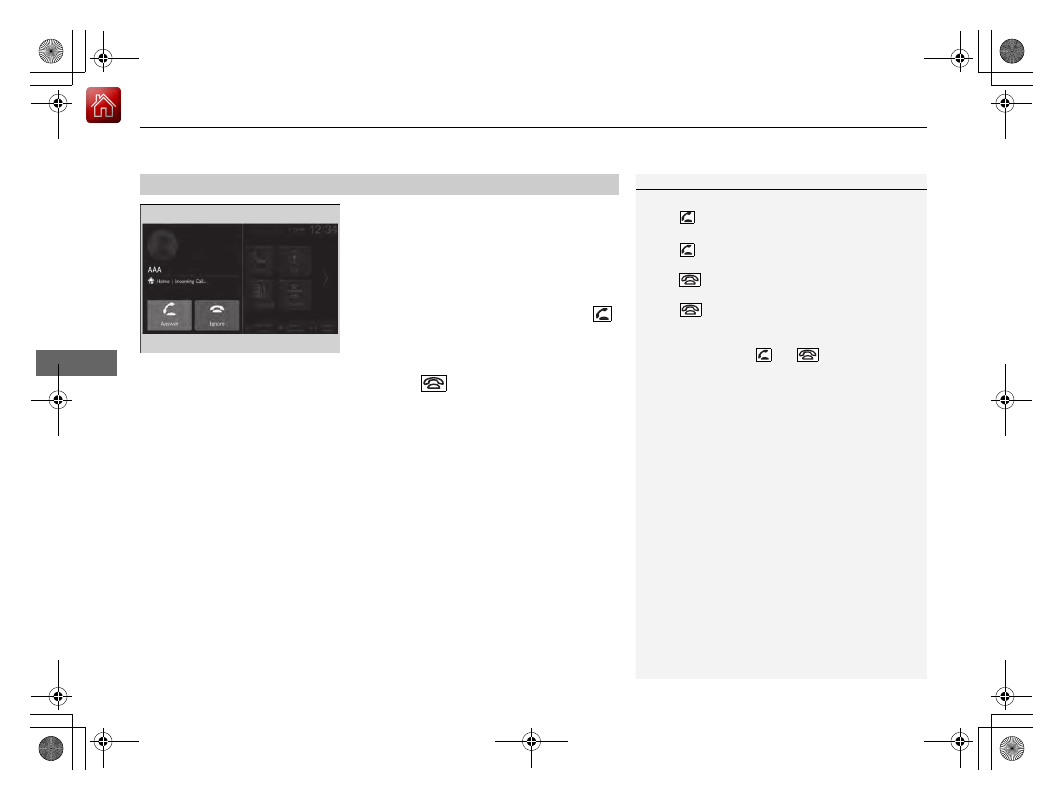
When there is an incoming call, an audible 
notification sounds (if activated) and the 

Incoming Call...

 screen appears.

You can answer the call using the left selector 
wheel.
To pick the call, roll up or down to select 


(answer) on the driver information interface 
and then press the left selector wheel.

u

If you want to decline or end the call, 
select 

 (ignore) on the driver 

information interface using the left 
selector wheel.

Receiving a Call

1

Receiving a Call

Call Waiting

Select 

 (answer) to put the current call on hold to 

answer the incoming call.

Select 

 using the left selector wheel to return to 

the current call.
Select 

 (ignore) to ignore the incoming call if you 

do not want to answer it.
Select 

 if you want to hang up the current call.

You can select the icons on the audio/information 
screen instead of the 

 and 

 on the driver 

information interface.

405

uu

Bluetooth

®

 HandsFreeLink

®

u

HFL Menus

Features

The following options are available during a call.

Mute

: Mute your voice.

Use Handheld

: Transfer a call from the system to your phone.

Keypad

: Send numbers during a call. This is useful when you call a menu-driven 

phone system.

The available options are shown on the lower 
half of the screen.

Select the option.

u

The mute icon appears when 

Mute

 is 

selected when the other source screen 
other than the phone screen is displayed. 
Select 

Mute

 again to turn it off.

Options During a Call

1

Options During a Call

Keypad

: Available on some phones.

You can select the icons on the audio/information 
screen.

406

uu

Bluetooth

®

 HandsFreeLink

®

u

HondaLink

®

 Assist

Features

HondaLink

®

 Assist

Automatic collision notification

If your vehicle’s airbags deploy or if the unit 
detects that the vehicle is severely impacted, 
your vehicle automatically will attempt to 
connect to the HondaLink operator. If 
connected, information about your vehicle, its 
location, and its condition can be sent to the 
operator

*1

; you also can speak to the operator 

when connected.

IMPORTANT: 

For vehicles equipped with HondaLink Assist, owner activation 

constitutes authorization for Honda to collect information from your vehicle needed 
to provide the service, and agreement to the Terms of Use at 

www.hondalink.com/

TermsAndConditions

. In a crash, HondaLink Assist will attempt to notify emergency 

services but NEITHER HONDA NOR ITS SERVICE PROVIDERS GUARANTEE THAT 
SUCH NOTIFICATION WILL OCCUR.

Honda reserves the right to terminate HondaLink Assist services at any time or for 
any reason, and in the future may not be able to provide services due to changes in, 
or obsolescence of, technology integral to the service or changes in governmental 
regulation.

*1: Depending on your phone and adequate cellular coverage, your vehicle’s location may not 
be sent to the operator.

In Case of Emergency

1

In Case of Emergency

Your vehicle may not be able to connect to the 
operator if the battery level is low, the line is 
disconnected, or you do not have adequate cellular 
coverage.

You cannot use this emergency service when:

You travel outside the HondaLink service coverage 
areas.

There is a problem with the connecting devices, 
such as the microphones, speakers, or the unit 
itself.

You cannot operate other phone-related functions 
using the screen while talking to the operator.
Select 

Hang Up

 to terminate the connection to your 

vehicle.

1

Automatic collision notification

If the unit fails to connect to the operator, it 
repeatedly tries until it succeeds.

407

uu

Bluetooth

®

 HandsFreeLink

®

u

HondaLink

®

 Assist

Features

To enable notification

1.

Go to the phone settings screen.

2

Phone settings screen

 P. 392

2.

Select 

HondaLink Assist

.

3.

Select 

Yes

 or 

No

.

1

To enable notification

Setting options:

Yes:

 Notification is available.

No:

 Disable the feature.

408

Features

Refuel Recommend

Your vehicle is equipped with a feature that automatically calculates when to refuel. 
This feature will notify you when refueling is recommended as well as enable you to 
search for gas stations that are located in the vicinity of your vehicle.

1.

When it is time to refuel the vehicle, a 
notification is displayed and a notification 
icon is displayed in the header. 

2.

Touch the box that contains the icon.

3.

Select 

Find Gas Station Now

.

4.

Choose a gas station from the search 
screen of the navigation system.

u

For instructions on how to use the 
navigation system, refer to the 
navigation system manual.

1

Refuel Recommend

You can turn the 

Refuel Recommend

 function on 

and off.

2

Customized Features

 P. 345

When you turn off this feature, the refuel 
recommend notification will not display.

This feature can only be used when the fuel level in 
the tank is below 30 percent.

If you select 

Find Gas Station Now

 or put more 

than 5 liters of gasoline into the gas tank, the 
notification for refueling will disappear. If you prefer 
not to be notified, select 

OFF

 in the settings for 

Refuel Recommend

When you drive on a rough road or ascend or 
descend a hill for an extended period of time, the 
notification may disappear or may not be displayed at 
all.

Models with navigation system

Notification 
icon

409

Driving

This chapter discusses driving and refueling.

Before Driving

Driving Preparation .............................. 410
Maximum Load Limit............................ 413

Towing a Trailer

Towing Behind a Motorhome............... 415

Off-Highway Driving Guidelines

..... 416

When Driving

Starting the Engine .............................. 418
Precautions While Driving..................... 425
Continuously Variable Transmission ......... 426
Shifting ................................................ 427
Drive Mode Switch............................... 429
Hill Descent Control System ................. 432

Vehicle Stability Assist

TM

 (VSA

®

), aka Electronic 

Stability Control (ESC), System ...................434

Real Time AWD with Intelligent Control System

TM

*

.. 437

Tire Pressure Monitoring System (TPMS)........... 438
Tire Pressure Monitoring System (TPMS) - 

Required Federal Explanation ............. 443

Blind Spot Information System

*

........... 445

Honda Sensing

®

................................ 449

Collision Mitigation Braking System

TM


(CMBS

TM

) ........................................... 453

Low Speed Braking Control

*

................ 465

Adaptive Cruise Control (ACC) with Low 

Speed Follow ..................................... 471

Lane Keeping Assist System (LKAS) .......491
Traffic Jam Assist

*

................................502

Road Departure Mitigation System .......511
Traffic Sign Recognition System ............519
Front Wide View Camera......................525
Sonar Sensors

*

..................................... 527

Braking

Brake System........................................528
Anti-lock Brake System (ABS)................ 535
Brake Assist System .............................. 536

Parking Your Vehicle
Multi-View Rear Camera

.................. 545

Refueling
Fuel Economy and CO

2

 Emissions

.... 550

* Not available on all models

410

Driving

Before Driving

Driving Preparation

Check the following items before you start driving.

Make sure there are no obstructions on the windows, door mirrors, exterior 
lights, or other parts of the vehicle.

u

Remove any frost, snow, or ice.

u

Remove any snow on the roof, as this can slip down and obstruct your field of 
vision while driving. If frozen solid, remove ice once it has softened.

u

When removing ice from around the wheels, be sure not to damage the wheel 
or wheel components.

Make sure the hood is securely closed.

u

If the hood opens while driving, your front view will be blocked.

Make sure the tires are in good condition.

u

Check air pressures, and check for damage and excessive wear.

2

Checking and Maintaining Tires

 P. 581

Make sure there are no people or objects behind or around the vehicle.

u

There are blind spots from the inside.

Exterior Checks

1

Exterior Checks

NOTICE

When doors are frozen shut, use warm water around 
the door edges to melt any ice. Do not try to force 
them open, as this can damage the rubber trim 
around the doors. When done, wipe dry to avoid 
further freezing.

Do not pour warm water into the key cylinder.
You will be unable to insert the key if the water 
freezes in the hole.

Heat from the engine and exhaust can ignite 
flammable materials left under the hood, causing a 
fire. If you've parked your vehicle for an extended 
period, inspect and remove any debris that may have 
collected, such as dried grass and leaves that have 
fallen or have been carried in for use as a nest by a 
small animal. Also, check under the hood for leftover 
flammable materials after you or someone else has 
performed maintenance on your vehicle.

Continued

411

uu

Before Driving

u

Driving Preparation

Driving

Store or secure all items on board properly.

u

Carrying too much cargo, or improperly storing it, can affect your vehicle’s 
handling, stability, stopping distance, and tires, and make it unsafe.

2

Maximum Load Limit

 P. 413

Do not pile items higher than the seat height.

u

They can block your view and may be thrown forward in the event of sudden 
braking.

Do not place anything in the front seat footwells. Make sure to secure the floor 
mat.

u

An object or unsecured floor mat can interfere with your brake and accelerator 
pedal operation while driving.

If you have any animals on board, do not let them move around in the vehicle.

u

They may interfere with driving and a crash could occur.

Securely close and lock all doors and the tailgate.

2

Locking/Unlocking the Doors from the Inside

 P. 149

Adjust your seating position properly.

u

Adjust the head restraint, too.

2

Seats

 P. 180

2

Adjusting the front head restraint positions

 P. 186

Adjust the mirrors and steering wheel properly.

u

Adjust them while sitting in the proper driving position.

2

Mirrors

 P. 178

2

Adjusting the Steering Wheel

 P. 177

Interior Checks

1

Interior Checks

The headlight aim is set by the factory, and does not 
need to be adjusted. However, if you regularly carry 
heavy items in the cargo area, have the aiming 
readjusted at a dealer or by a qualified technician.

412

uu

Before Driving

u

Driving Preparation

Driving

Be sure items placed on the floor behind the front seats cannot roll under the 
seats.

u

They can interfere with the driver’s ability to operate the pedals, the operation 
of the seats, or the operation of the sensors under the seats.

Everyone in the vehicle must fasten their seat belt.

2

Fastening a Seat Belt

 P. 44

Make sure that the indicators in the instrument panel come on when you start the 
vehicle, and go off soon after.

u

Always have a dealer check the vehicle if a problem is indicated.

2

Indicators

 P. 86

413

uu

Before Driving

u

Maximum Load Limit

Continued

Driving

Maximum Load Limit

The maximum load for your vehicle is 838 lbs (380 kg).
See the Tire and Loading Information label attached to the driver’s 
doorjamb.

This figure includes the total weight of all occupants, cargo, and 
accessories, and the tongue load if you are towing a trailer.

Steps for Determining Correct Load Limit -

(1)

Locate the statement “The combined weight of occupants and 
cargo should never exceed XXX kg or XXX lbs.” on your 
vehicle’s placard.

(2)

Determine the combined weight of the driver and passengers 
that will be riding in your vehicle.

(3)

Subtract the combined weight of the driver and passengers 
from XXX kg or XXX lbs.

(4)

The resulting figure equals the available amount of cargo and 
luggage load capacity. For example, if the “XXX” amount equals 
1,400 lbs. and there will be five 150 lb. passengers in your vehicle, the 
amount of available cargo and luggage load capacity is 650 lbs. 
(1,400 - 750 (5 x 150) = 650 lbs.)

1

Maximum Load Limit

Gross Vehicle Weight Rating (GVWR):
The maximum allowable weight of the vehicle, all 
occupants, all accessories and all cargo.

2

Specifications

 P. 640

Gross Axle Weight Rating (GAWR):
The maximum allowable weight of the vehicle axle.

2

Specifications

 P. 640

3

WARNING

Overloading or improper loading 
can affect handling and stability 
and cause a crash in which you 
can be hurt or killed.

Follow all load limits and other 
loading guidelines in this manual.

Label Example

uu

Before Driving

u

Maximum Load Limit

414

Driving

(5)

Determine the combined weight of luggage and cargo being 
loaded on the vehicle. That weight may not safely exceed the 
available cargo and luggage load capacity calculated in step 4.

(6)

If your vehicle will be towing a trailer, load from your trailer will 
be transferred to your vehicle. Consult this manual to 
determine how this reduces the available cargo and luggage 
load capacity of your vehicle.

In addition, the total weight of the vehicle, all occupants, 
accessories, cargo, and trailer tongue load must not exceed the 
Gross Vehicle Weight Rating (GVWR) or the Gross Axle Weight 
Rating (GAWR). Both are on a label on the driver’s doorjamb.

1

Maximum Load Limit

Towing a Trailer:
See Towing a Trailer to determine whether your 
vehicle is designed to tow a trailer.

2

Towing a Trailer

 P. 415

Load Limits Example

Example1

Max Load 

838 lbs 

(380 kg)

Passenger Weight 

150 lbs x 2 = 300 lbs 

(68 kg x 2 = 136 kg)

Cargo Weight 

538 lbs 

(244 kg)

Example2

Max Load 

838 lbs 

(380 kg)

Passenger Weight 

150 lbs x 5 = 750 lbs 

(68 kg x 5 = 340 kg)

Cargo Weight 

88 lbs 

(40 kg)

415

Driving

Towing a Trailer

Your vehicle is not designed to tow a trailer. Attempting to do so can void your 
warranties.

Towing Behind a Motorhome

Your vehicle is not designed to be towed behind a motorhome. If your vehicle needs 
to be towed in an emergency, refer to the emergency towing information.

2

Emergency Towing

 P. 634

416

Driving

Off-Highway Driving Guidelines

General Information

Your vehicle has been designed primarily for use on pavement, however, its higher 
ground clearance allows you to occasionally travel on unpaved roads. It is not 
designed for trail-blazing, or other challenging off-highway activities.

If you decide to drive on unpaved roads, you will find that it requires somewhat 
different driving skills and that your vehicle will handle somewhat differently than it 
does on pavement. Pay attention to the precautions and tips in this section, and get 
acquainted with your vehicle before leaving the pavement.

Important Safety Precautions

To avoid loss of control or rollover, be sure to follow all precautions and 
recommendations:

Be sure to store cargo properly and do not exceed your cargo load limits.

2

Maximum Load Limit

 P. 413

Whenever you drive, make sure you and your passengers always wear seat belts.

Keep your speed low, and never go faster than the conditions allow.

It’s up to you to continually assess the situation and drive within the limits.

1

Off-Highway Driving Guidelines

Failure to operate your vehicle correctly might result 
in a crash or a rollover.

2

Important Handling Information

 P. 36

2

Precautions While Driving

 P. 425

3

WARNING

Improperly operating this vehicle on or off- 
pavement can cause a crash or rollover in 
which you and your passengers could be 
seriously injured or killed.

Follow all instructions and guidelines in 
this owner’s manual.

Keep your speed low, and don’t drive 
faster than conditions permit.

417

uu

Off-Highway Driving Guidelines

u

Avoiding Trouble

Driving

Avoiding Trouble

Check Out Your Vehicle 

before you leave the pavement and make sure that all 

scheduled maintenance has been completed. Pay special attention to the 
condition of the tires, and check the tire pressures.

Remember 

the route you choose presents limits (too steep or bumpy), you have 

limits (driving skill and comfort), and your vehicle has limits (traction, stability, and 
power). Failing to recognize these limits will likely put you and your passengers in 
a hazardous situation.

Accelerating and Braking 

should be done slowly and gradually. Trying to start 

or stop too fast can cause a loss of traction and you could lose control.

Avoiding Obstacles and Debris 

in the road reduces the likelihood of a rollover 

or damage to your suspension or other components.

Driving on Slopes 

increases your risk of a rollover, particularly if you attempt to 

drive across a slope that is too steep. Going straight up or down a slope is usually 
the safest. If you can’t clearly see all conditions or obstacles on a slope, walk it 
before you drive it. If there is any doubt whether you can safely pass, don’t try it. 
Find another route. If you get stuck when climbing, do not try to turn around. 
Back down slowly following the same route you took up the hill.

Crossing a Stream 

- Avoid driving through deep water. If you encounter water 

in your route (a small stream or large puddle, for example), evaluate it carefully 
before going ahead. Make sure it is shallow, flowing slowly, and has firm ground 
underneath. If you are not sure of the depth or the ground, turn around and find 
another route. Driving through deep water can also damage your vehicle. The 
water can get into the transmission and differential, diluting the lubricant and 
causing an eventual failure. It can also wash the grease out of the wheel bearings.

If You Get Stuck

, carefully go in the direction that you think will get you 

unstuck. Do not spin the tires as this will only make things worse and could 
damage the transmission. If you are unable to free yourself, your vehicle will need 
to be towed. Front and rear tow hooks are provided for this purpose.

418

Driving

When Driving

Starting the Engine

1.

Make sure the parking brake is applied.

u

The parking brake and brake system 
indicator (red) comes on for 30 seconds 
when you pull up to electric parking 
brake switch.

2.

Check that the transmission is in 

(

P

, then 

depress the brake pedal.

u

Although it is possible to start the vehicle 
in 

(

N

, it is safer to start it in 

(

P

.

1

Starting the Engine

Keep your foot firmly on the brake pedal when 
starting the engine.

The engine is harder to start in cold weather and in 
thinner air found at altitudes above 8,000 feet (2,400 
meters).

When starting the engine in cold weather, turn off all 
electrical accessories such as the lights, climate 
control system, and rear defogger in order to reduce 
battery drain.

If you live in a region where winter is extremely cold, 
an engine block heater will improve starting and 
warming of the engine. Consult a dealer for details.

If the exhaust system sounds abnormal or you can 
smell exhaust gas inside the vehicle, have your vehicle 
checked by a dealer. There may be a problem with 
the engine or exhaust system.

Electric Parking Brake Switch

Brake Pedal

Continued

419

uu

When Driving

u

Starting the Engine

Driving

3.

Press the 

ENGINE START/STOP

 button 

without depressing the accelerator pedal.

1

Starting the Engine

Bring the keyless remote close to the 

ENGINE 

START/STOP

 button if the battery in the keyless 

remote is weak.

2

If the Keyless Remote Battery is Weak


P. 614

The engine may not start if the keyless remote is 
subjected to strong radio waves.

Do not hold the 

ENGINE START/STOP

 button to 

start the engine.
If the engine does not start, wait at least 30 seconds 
before trying again.

The immobilizer system protects your vehicle from 
theft.If an improperly coded device is used, the 
engine’s fuel system is disabled.

2

Immobilizer System

 P. 156


Content      ..     22      23      24      25     ..