Honda Pilot (2022 year). Manual in english - page 24
 

  Index      Manuals     Honda Pilot (2022 year). Manual in english


Search            copyright infringement  


Content      ..     22      23      24      25     ..


Honda Pilot (2022 year). Manual in english - page 24


Continued

381

uu

Blu-ray/DVD Rear Entertainment System

*

u

Playable Discs

Features

This unit is compatible with NTSC and PAL color TV systems. Use discs that are 
labeled as NTSC or PAL. Capability of this unit to play discs other than NTSC or PAL 
TV system (SECAM) is not guaranteed.

Some DVD/Blu-ray

TM

 discs have a region code such as 

 and this number 

shows the region the disc can be played in. Playable disc regions are restricted 
depending on the map coverage areas. If you play other discs, 

Check Disc

 message 

is displayed. In addition, some discs that do not have a region code number may still 
have a region restriction and may not be played on this unit.

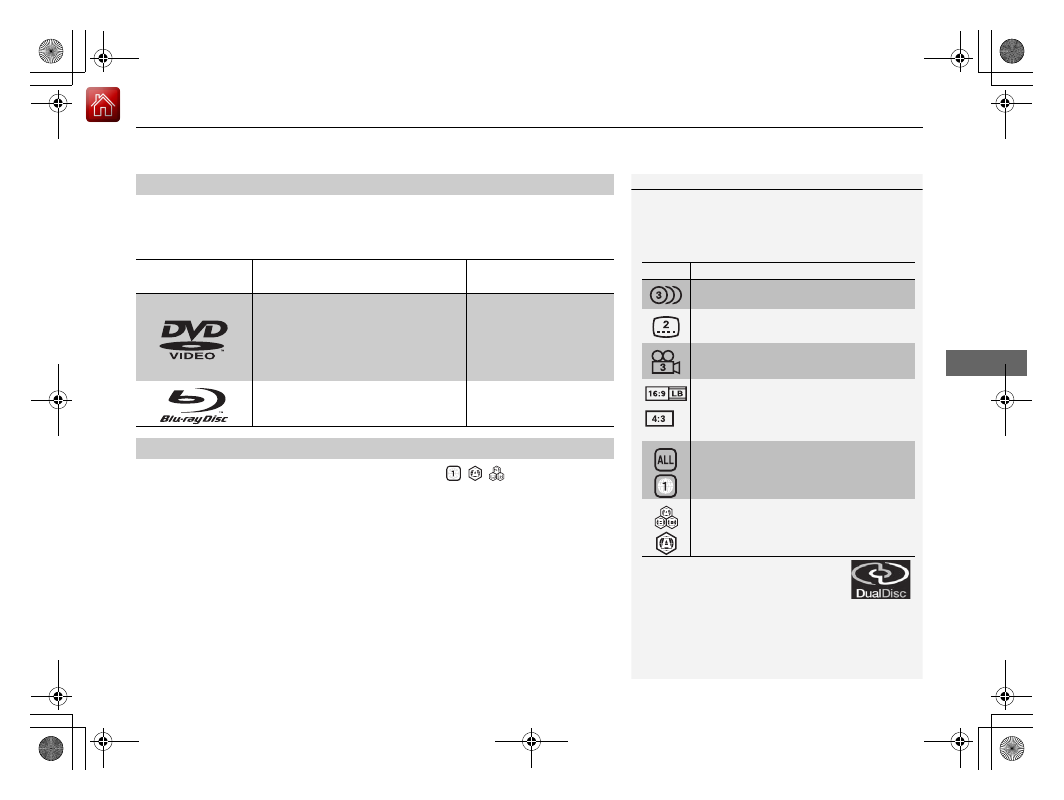
Playable Disc Types

Type and symbol 

of playable disc

Size/Playable Side

Max. play time

<MPEG 2 standard>

12 cm/single-sided

Single layer
Dual layer

133 min.
242 min.
266 min.
484 min.

12 cm/Double-sided Single layer

Dual layer

12 cm/signal-side 

Single layer
Dual layer

at 27 Mbps 123 min.
246 min.

Playable Disc Region Codes

1

Playable Disc Types

Some discs may not function as expected. Also read 
the instruction book which comes with the disc.

Disc Symbols

The following symbols appear on DVD/Blu-ray

TM

 discs 

or packing.

For Dual Disc (double sided disc with 
both a DVD layer and a non-DVD 
layer), the DVD layer can be played as a 
Video DVD if the disc has the mark 
displayed on the right. Discs without the mark and 
the non-DVD layer are not supported, and operation 
cannot be guaranteed. In addition, the discs may be 
scratched when they are inserted or ejected.

Symbol

Description

Number of available soundtracks

Number of available subtitles

Number of angles

Selectable screen aspect ratios
(TV screen’s horizontal to vertical ratio)
16:9: Widescreen
4:3: Normal screen
Selectable region codes
ALL: Region free
A number (ex. 1): Particular region code

Selectable region codes
ABC: Region free
An alphabet (ex. A): Particular region code

uu

Blu-ray/DVD Rear Entertainment System

*

u

Playable Discs

382

Features

Compression video not supported, Compression audio specification are following.

Recommended Discs

Media

CD-R/CD-RW

DVD-R/DVD-RW

DVD+R/DVD+RW

Disc format

CD-ROM Mode1

CD-ROM Mode2 Form1

DVD-ROM

File format

ISO9660 Level 1 & 2

Romeo, Joliet

Audio format

MP3

WMA

AAC

Audio format 

specification

MPEG-1 AUDIO LAYER3
MPEG-2 AUDIO LAYER3

MPEG-2.5 AUDIO LAYER3

Microsoft Windows Media 

Audio Ver7,8,9

MPEG4-AAC

m4a files created by iTunes 

(Apple)

Sampling 

frequency 

[kHz]

MPEG-1: 32/44.1/48

MPEG-2: 16/22.05/24

MPEG-2.5: 8/11.025/12

8/11.025/12/16/22.05/24/

32/44.1/48

Exceptions not supported by 

DVD Player:12/24

8/11.025/12/16/22.05/24/

32/44.1/48

Bit rate [kbps]

MPEG1: 32/40/48/56/64/

80/96/112/128/160/192/

224/256/320

MPEG2: 8/16/24/32/40/48/

56/64/80/96/112/128/144/

160

MPEG2.5: 8/16/24/32/40/

48/56/64/80/96/112/128/

144/160

5/8/16/24/32/40/48/64/80/

96/128/160/192/224/256/

320/384

Exceptions not supported by 

DVD Player: 24/224/384

8/16/20/24/28/32/40/48/56/
64/80/96/112/128/160/192/

224/256/320/384/448/512/

576

Exceptions not supported by 

DVD Player: 384/448/512/

576

File extension

.mp3/.MP3

.wma/.WMA

.m4a/.M4A

1

Recommended Discs

Large files may take longer to change audio or fast-
forward/fast-rewind.

Some CD-R/CD-RW/DVD-R/DVD-RW may not be read 
due to the discs’ encoding properties. Use discs 
recorded with disc-at-once or track-at-once for this 
unit.

“AVCHD Progressive” and the “AVCHD Progressive” 
logo are trademarks of Panasonic Corporation and 
SEC.

383

uu

Blu-ray/DVD Rear Entertainment System

*

u

DVD or Blu-ray

TM

 Player Error Messages

Continued

Features

DVD or Blu-ray

TM

 Player Error Messages

If a disc error occurs, you may see the following error messages.

Error Message in Audio/

Information Screen

Error Message in Overhead 

Screen

Cause

Solution

Problem ejecting disc from the 
player. Contact Honda dealer to 
fix this problem.

Problem ejecting disc from the 
player.
Contact Honda dealer to fix this 
problem.

Disc stuck in player

Contact a dealer and the 
player needs to be replaced.

There is a problem with the 
player. Eject and re-insert the 
disc. If this does not work, try 
another disc. If the error 
continues, contact Honda 
dealer.

There seems to be a problems 
playing this disc. Try inserting 
the disc into the Blu-ray player 
again.

Focus error
Unsupported disc error
Mechanical error
Servo error
DRM file access
Error file access
Device error

Press the 

 button and 

remove the disc, and check 
that the error message is 
cleared.

Check that the disc is not 
damaged or deformed, and 
insert the disc again.

2

Protecting CDs

 P. 315

The system has overheated. Try 
to reduce the temperature by 
tuning the audio system off 
and allowing the player to cool 
down.

The Blu-ray player is too hot 
right now.
Give it some time to cool off 
and try again later.

High temperature

Turn the audio system off and 
allow the player to cool down 
until the error message is 
cleared.

Playback stopped. The content 
being played is protected by 
Cinavia and is not authorized 
for playback on this device.

Playback stopped. The content 
being played is protected by 
Cinavia

TM

 and is not authorized 

for playback on this device.
For more information, see 
http://www.cinavia.com. 
Message Code 1.

Cinavia 1 error

Current track/file will be 
skipped. The next supported 
track/file plays automatically.

384

uu

Blu-ray/DVD Rear Entertainment System

*

u

DVD or Blu-ray

TM

 Player Error Messages

Features

Error Message in Audio/

Information Screen

Error Message in Overhead 

Screen

Cause

Solution

Audio outputs temporarily 
muted. Do not adjust the 
playback volume. The content 
being played is protected by 
Cinavia and is not authorized 
for playback on this device. For 
more information, see 
http://www.cinavia.com. 
Message Code 3.

Audio outputs temporarily 
muted. Do not adjust the 
playback volume. The content 
being played is protected by 
Cinavia

TM

 and is not authorized 

for playback on this device. For 
more information, see 
http://www.cinavia.com. 
Message Code 3.

Cinavia 3 error

Current track/file will be 
skipped. The next supported 
track/file plays automatically.

This disc cannot be played. 
Check that the disc is not 
damaged or deformed. If the 
disc is OK, see Owner’s Manual 
for information on supported 
disc types and files.

There seems to be a problem 
with this disc.
Please check if it might be 
damaged.

Region mismatch

Press the 

 button and 

remove the disc, and check 
that the error message is 
cleared.

Check the disk if region code is 
matched.

Cannot access Blu-ray Player. 
Contact Honda dealer.

DTCP certificate error

Contact a dealer and the 
player needs to be replaced.

385

Continued

Features

Customized Features

Use the audio/information screen to customize certain features.

How to customize

With the power mode in ON, select 

Settings

, then select a setting item.

1

Customized Features

When you customize settings, make sure that the 
vehicle is at a complete stop and shift to 

(

P

.

Audio/Information 
Screen

386

uu

Customized Features

u

Features

Customization flow

Select 

Settings

.

Automatic Date & 

Time

Set Date
Set Time

System

Select .

Automatic Time 

Zone

*

Select Time Format

HondaLink Subscription Status

Set Time Zone

Set Date & Time

Touch 

Sensitivity

Subscriptions

Language

Factory Data 

Reset

About

Date & Time

Select time zone

System Sounds

System Volumes

Navigation Guidance

*

* Not available on all models

387

uu

Customized Features

u

Continued

Features

Advanced 

Options

Interruption Mode

Events and 

reminders

Calls

App Manager

Recent Location 

Request from Apps

Location Setting

Interruptions

Messages

Calls/messages 

from

388

uu

Customized Features

u

Features

Connections

+ Connect New Device

Saved Devices

Change Mode

Android Auto

Apple CarPlay

Bluetooth

Wi-Fi

Connected Devices

CabinControl

Connection 

Information

(Device list)

CabinControl

Options

389

uu

Customized Features

u

Continued

Features

Vehicle

Driving Position 

Setup

*

Seat Position Movement at Entry/Exit

Memory Position Link

Meter Setup

Adjust Outside Temp Display

Trip A Reset Timing

Trip B Reset Timing

Reverse Shift Position Beep

Auto Idle Stop Display

Adjust Alarm Volume

Turn by Turn Display

Power Tailgate 

Setup

*

Power Tailgate Keyless Open Mode

Power Tailgate Open by Outer Handle

Keyless Access 

Setup

Door Unlock Mode

Keyless Access Light Flash

Keyless Access Beep

Remote Start System On/Off

Walk Away Auto Lock

Fuel Efficiency Backlight

Hands Free Access Power Tailgate

*

* Not available on all models

390

uu

Customized Features

u

Features

Lighting Setup

Interior Light Dimming Time

Headlight Auto Off Timer

Forward Collision Warning Distance

ACC Forward Vehicle Detect Beep

Auto Interior Illumination Sensitivity

Door Setup

Auto Door Lock

Auto Door Unlock

Key and Remote Unlock Mode

Keyless Lock Answer Back

Security Relock Timer

Maintenance 

Information

Driver Assist 

System Setup

Oil Life

Road Departure Mitigation Setting

Lane Keeping Assist Suspend Beep

Blind Spot Information

*

Wireless 

Charger

*

Auto Headlight On with Wiper On

Auto Light Sensitivity

*

* Not available on all models

391

uu

Customized Features

u

Continued

Features

Audio Zones

*

Bass / Treble

Camera

Show with Turn Signal

LaneWatch

*

Show Reference Line

Rear Camera

Default Camera View

Guidelines

Cross Traffic Monitor

*

Sound

Balance / Fader

Center / 

Subwoofer 

Volume

*

DTS Neural 

Surround

*

Speed Volume 
Compensation

Notifications

Brightness

Contrast

Black Level

Display

Subwoofer 

Volume

*

* Not available on all models

392

uu

Customized Features

u

Features

List of customizable options

*1:Default Setting

Setup 

Group

Customizable Features

Description

Selectable Settings

System

Date & Time

Set 
Date & 
Time

Automatic 
Date & 
Time

Selects 

ON

 to have the GPS automatically adjust 

the clock. Select 

OFF

 to cancel this function.

ON

*1

/

OFF

Set Date

Adjusts date.

2

Adjusting the Clock

 P. 124

Set Time

Adjusts clock.

2

Adjusting the Clock

 P. 124

Set 
Time 
Zone

Automatic 
Time Zone

*

Sets the navigation system to automatically adjust 
the clock when driving through different time 
zones.

ON

*1

/

OFF

Select time 
zone

Changes the time zone manually.

Select Time Format

Selects the digital clock display from 12H to 24H.

12H

*1

/

24H

* Not available on all models

393

uu

Customized Features

u

Continued

Features

*1:Default Setting

Setup 

Group

Customizable Features

Description

Selectable Settings

System

System 
Volumes

System Sounds

Changes the system sounds volume.

Navigation 
Guidance

*

Changes the navigation guidance volume.

Touch 
Sensitivity

Sets the sensitivity of the touch panel screen.

High

/

Low

*1

Subscriptions

HondaLink 
Subscription Status

Lists subscriptions and subscription status for 
HondaLink

®

.

Language

Changes the display language.

English

 (United 

States)

*1

/

English


(United Kingdom)/

Korean

/

French

/

Spanish

/

Arabic

Factory Data 
Reset

Resets all the settings to their factory default.

2

Defaulting All the Settings

 P. 403

Continue

/

Cancel

About

Displays the Android setting items.

* Not available on all models

394

uu

Customized Features

u

Features

*1:Default Setting

Setup 

Group

Customizable Features

Description

Selectable Settings

System

Advanced 
Options

App Manager

Displays the Android system memory and apps 
information.

Recent Location 
Request from Apps

Displays the recent location requests from apps.

Location Setting

Selects 

OFF

 not to allow apps including the 

navigation system

*

 to access the vehicle’s location.

ON

*1

/

OFF

Inter-
ruptions

Inter-
ruption 
Mode

Sets the interruption mode for allowing to notify 
when calls and notifications arrive.

Always interrupt

*1

/

Don’t interrupt

/

Allow only priority 
interruptions

Events and 
reminders

Sets priority interruptions of events and reminders.

ON

*1

/

OFF

Calls

Sets priority interruptions of calls.

ON

*1

/

OFF

Messages

Sets priority interruptions of messages.

ON

*1

/

OFF

Calls/
messages 
from

Sets priority interruptions of from who.

Anyone

*1

/

Contacts 

only

/

Starred 

contacts only

* Not available on all models

395

uu

Customized Features

u

Continued

Features

*1:Default Setting

Setup 

Group

Customizable Features

Description

Selectable Settings

Connec-
tions

Bluetooth

+ Connect New 
Device

Pairs a new phone to HFL.

2

Phone Setup

 P. 412

Saved Devices

Connects, disconnects, or deletes a paired phone.

2

Phone Setup

 P. 412

Wi-Fi

Change Mode

Changes the Wi-Fi mode.

Network

*1

/

HotSpot

/

OFF

Available Networks

/

Connected Devices

Displays the available network(s) or current 
connected device(s).

Android Auto

Sets up the Android Auto connection.

Apple CarPlay

Sets up the Apple CarPlay connection.

CabinControl

Options

Cabin-
Control

Turns the Honda CabinControl function on and off.

ON

*1

/

OFF

Connection 
Information

Displays the Honda CabinControl connection 
information.

(Device list)

Selects functions or deletes a device.

396

uu

Customized Features

u

Features

*1:Default Setting

Setup 

Group

Customizable Features

Description

Selectable Settings

Vehicle

Driving 
Position 
Setup

*

Seat Position 
Movement at Entry/
Exit

Moves the seat rearward when you get in/get out 
of the vehicle. Changes the setting for this feature.

ON

*1

/

OFF

Memory Position 
Link

Turns the driving position memory system on and 
off.

ON

*1

/

OFF

Meter Setup

Adjust Outside Temp 
Display

Adjusts the temperature reading by a few degrees.

-5°F

 ~ 

±0°F

*1

 ~ 

+5°F

(U.S.)

-3°C

 ~ 

±0°C

*1

 ~ 

+3°C

(Canada)

Trip A Reset Timing

Changes the setting of how to reset trip meter A 
and average fuel economy A.

With Refuel

/

IGN 

Off

/

Manually 

Reset

*1

Trip B Reset Timing

Changes the setting of how to reset trip meter B 
and average fuel economy B.

With Refuel

/

IGN 

Off

/

Manually 

Reset

*1

Reverse Shift 
Position Beep

Turns the reverse alert tone on and off.

ON

/

OFF

*1

Auto Idle Stop 
Display

Selects whether the Auto Idle Stop display comes 
on or not.

ON

/

OFF

*1

Adjust Alarm Volume

Changes the alarm volume, such as the buzzers, 
warnings, turn signal sound, and so on.

High

/

Mid

*1

/

Low

* Not available on all models


Content      ..     22      23      24      25     ..