Honda Passport (2022 year). Manual in english - page 29
 

  Index      Manuals     Honda Passport (2022 year). Manual in english


Search            copyright infringement  


Content      ..     27      28      29      30     ..


Honda Passport (2022 year). Manual in english - page 29


Continued

461

uu

Honda Sensing

®

u

Lane Keeping Assist System (LKAS)

Driving

The system can be used when the following conditions are met.

The lane in which you are driving has detectable lane markers on both sides, and 
your vehicle is in the center of the lane.

The vehicle is travelling between about 45 and 90 mph (72 and 145 km/h).

You are driving on a straight or slightly curved road.

The turn signals are off.

The brake pedal is not depressed.

The wipers are not in high speed operation.

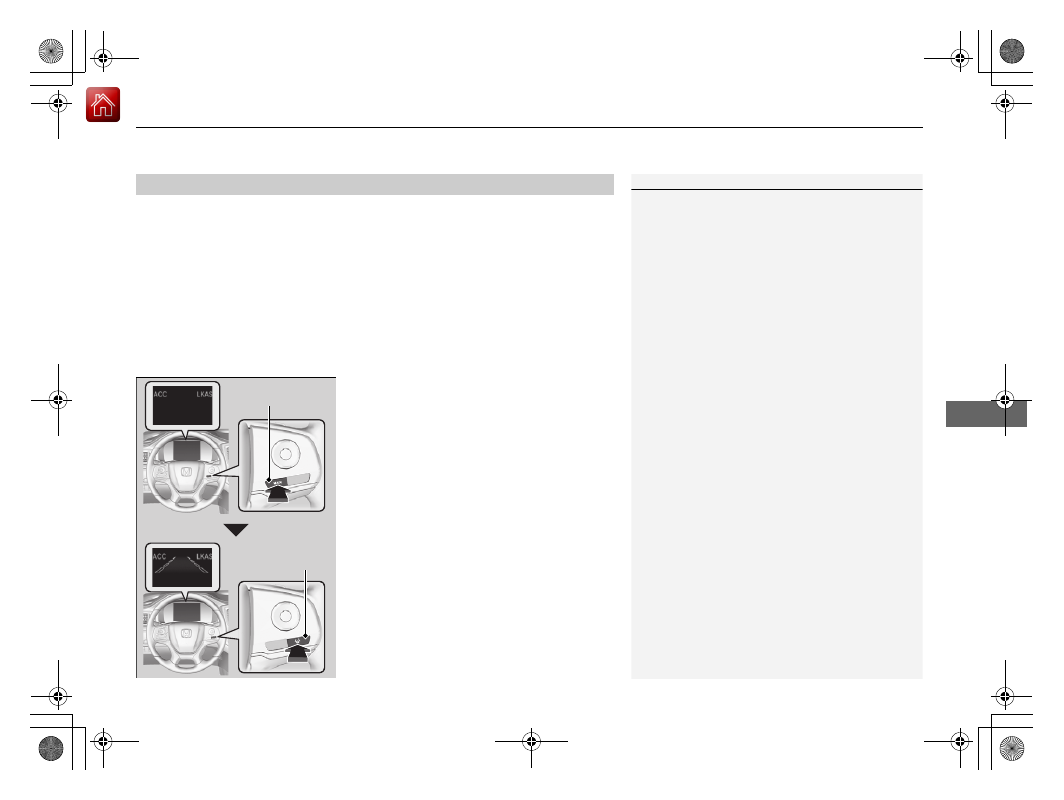
How to activate the system

1.

Press the 

MAIN

 button.

u

The LKAS is on in the driver information 
interface.
The system is ready to use.

2.

Press the LKAS button.

u

Lane outlines appear on the driver 
information interface.
The system is activated.

When the System can be Used

1

Lane Keeping Assist System (LKAS)

If the vehicle drifts toward either left or right lane line 
due to the system applying torque, turn off the LKAS 
and have your vehicle checked by a dealer.

MAIN

 Button

LKAS Button

uu

Honda Sensing

®

u

Lane Keeping Assist System (LKAS)

462

Driving

3.

Keep your vehicle near the center of the 
lane while driving.

u

The lane outlines change to solid ones 
once the system starts operating after 
detecting the left and right lane 
markings.

Press the 

MAIN

 or LKAS button.

The LKAS is turned off every time you stop the 
engine, even if you turned it on the last time 
you drove the vehicle.

To Cancel

1

To Cancel

Pressing the 

MAIN

 button also turns ACC on and off.

MAIN

 Button

LKAS Button

463

uu

Honda Sensing

®

u

Lane Keeping Assist System (LKAS)

Continued

Driving

The system operation is suspended if 
you:

Set the wipers to HI.

u

Turning the wipers off resumes the 
LKAS.

Decrease the vehicle speed to about 40 
mph (64 km/h) or less.

u

Increasing the vehicle speed to about 45 
mph (72 km/h) or more resumes the 
LKAS.

Depress the brake pedal.

u

The LKAS resumes and starts detecting 
the lane lines again once you release the 
brake pedal.

Your vehicle is driving to the right or the left 
of the lane.

Set the wiper switch to 

AUTO

 and the 

wipers operate continuously.

u

The LKAS resumes when the wipers stop 
or operate intermittently.

When the LKAS is suspended, 
the lane lines on the driver 
information interface change 
to lane outlines, and the 
beeper sounds (if activated).

Models with automatic intermittent wipers

464

uu

Honda Sensing

®

u

Lane Keeping Assist System (LKAS)

Driving

The LKAS may be automatically suspended when:

The system fails to detect lane lines.

The steering wheel is quickly turned.

You fail to steer the vehicle.

Driving through a sharp curve.

Driving at a speed in excess of approximately 90 mph (145 km/h).

Once these conditions no longer exist, the LKAS automatically resumes.

The LKAS may be automatically canceled when:

The camera temperature gets extremely high or low.

The camera behind the rearview mirror, or the area around the camera, including 
the windshield, gets dirty.

The ABS or VSA

®

 system engages.

The beeper sounds if the LKAS is automatically canceled.

465

uu

Honda Sensing

®

u

Lane Keeping Assist System (LKAS)

Continued

Driving

The system may not detect lane markings and therefore may not keep the vehicle in 
the middle of a lane under certain conditions, including the following:

Environmental conditions

Driving in bad weather (rain, fog, snow, etc.).

Sudden changes between light and dark, such as an entrance or exit of a tunnel.

There is little contrast between lane lines and the roadway surface.

Driving into low sunlight (e.g., at dawn or dusk).

Strong light is reflected onto the roadway.

Driving in the shadows of trees, buildings, etc.

Shadows of adjacent objects are parallel to lane markings.

Roadway objects or structures are misinterpreted as lane markers.

Reflections on the interior of the windshield.

Driving at night or in a dark condition such as a tunnel.

LKAS Conditions and Limitations

466

uu

Honda Sensing

®

u

Lane Keeping Assist System (LKAS)

Driving

Roadway conditions

Driving on a snowy or wet roadway (obscured lane marking, vehicle tracks, 
reflected lights, road spray, high contrast).

Driving on a road with temporary lane markings.

Faint, multiple, or varied lane markings are visible on the roadway due to road 
repairs or old lane markings.

The roadway has merging, split, or crossing lines (e.g., such as at an intersection 
or crosswalk).

The lane markings are extremely narrow, wide, or changing.

The vehicle in front of you is driving near the lane lines.

The road is hilly or the vehicle is approaching the crest of a hill.

Driving on rough or unpaved roads, or over bumpy surfaces. 

When objects on the road (curb, guard rail, pylons, etc.) are recognized as white 
lines (or yellow lines).

Faded lines

Duplicate lines

Tire tracks

Very wide or narrow traffic lane

467

uu

Honda Sensing

®

u

Lane Keeping Assist System (LKAS)

Driving

Driving on roads with double lines.

Vehicle conditions

Headlight lenses are dirty or the headlights are not properly adjusted.

The outside of the windshield is streaked or blocked by dirt, mud, leaves, wet 
snow, etc.

The inside of the windshield is fogged.

The camera temperature gets too high.

An abnormal tire or wheel condition (incorrect sizes, varied sizes or construction, 
improperly inflated, compact spare tire, etc.).

The vehicle is tilted due to a heavy load or suspension modifications.

The vehicle is towing a trailer.

Lane void of lines at exit or 
interchange

468

uu

Honda Sensing

®

u

Road Departure Mitigation (RDM) System

Driving

Road Departure Mitigation (RDM) System

Alerts and helps to assist you when the system detects a possibility of your vehicle 
unintentionally crossing over detected lane markings and/or leaving the roadway 
altogether.

The front camera behind the rearview mirror 
monitors left and right lane markings (in white 
or yellow). If your vehicle is getting too close to 
detected lane markings without a turn signal 
activated, the system, in addition to a visual 
alert, applies steering torque and alerts you 
with rapid vibrations on the steering wheel, to 
help you remain within the detected lane.

2

Customized Features

 P. 327

As a visual alert, the 

Lane Departure

 message 

appears on the driver information interface.

If the system determines that its steering input 
is insufficient to keep your vehicle on the 
roadway, it may apply braking.

u

Braking is applied only when the lane 
markings are solid continuous lines.

The system cancels assisting operations when you turn the steering wheel to avoid 
crossing over detected lane markings.

If the system operates several times without detecting driver response, the system 
beeps to alert you.

How the System Works

1

Road Departure Mitigation (RDM) System

Important Safety Reminder

Like all assistance systems, the RDM system has 
limitations.
Overreliance on the RDM system may result in a 
collision. It is always your responsibility to keep the 
vehicle within your driving lane.

The RDM system only alerts you when lane drift is 
detected without a turn signal in use. The RDM 
system may not detect all lane markings or lane or 
roadway departures; accuracy will vary based on 
weather, speed and lane marker condition. It is 
always your responsibility to safely operate the 
vehicle and avoid collisions.

You can read about handling information for the 
camera equipped with this system.

2

Front Sensor Camera

 P. 473

The RDM system may not work properly or may work 
improperly under the certain conditions:

2

RDM Conditions and Limitations

 P. 471

There are times when you may not notice RDM 
functions due to your operation of the vehicle, or 
road surface conditions.

Continued

469

uu

Honda Sensing

®

u

Road Departure Mitigation (RDM) System

Driving

The system activates when all the following conditions are met:

The vehicle is traveling between about 45 and 90 mph (72 and 145 km/h).

The vehicle is on a straight or slightly curved road.

The turn signals are off.

The brake pedal is not depressed.

The wipers are not in continuous operation.

The system makes a determination that the driver is not actively accelerating, 
braking, or steering.

How the System Activates

1

How the System Activates

The RDM system may automatically shut off and the 

 indicator comes and stays on.

2

Indicators

 P. 80

RDM system function can be impacted when the 
vehicle is:

Not driven within a traffic lane.

Driven on the inside edge of a curve, or outside of 
a lane.

Driven in a narrow lane.

uu

Honda Sensing

®

u

Road Departure Mitigation (RDM) System

470

Driving

Press the RDM button to turn the system on 
and off.

u

The indicator in the button comes on and 
the message appears on the driver 
information interface when the system is 
on.

RDM On and Off

1

RDM On and Off

When you have selected 

Warning Only

 from the 

customized options using the audio/information 
screen, the system does not operate the steering 
wheel and braking.

2

Customized Features

 P. 327

RDM Button

Indicator

471

uu

Honda Sensing

®

u

Road Departure Mitigation (RDM) System

Continued

Driving

The system may not properly detect lane markings and the position of your vehicle 
under certain conditions. Some examples of these conditions are listed below.

Environmental conditions

Driving in bad weather (rain, fog, snow, etc.).

Sudden changes between light and dark, such as an entrance or exit of a tunnel.

There is little contrast between lane lines and the roadway surface.

Driving into low sunlight (e.g., at dawn or dusk).

Strong light is reflected onto the roadway.

Driving in the shadows of trees, buildings, etc.

Shadows of adjacent objects are parallel to lane markings.

Roadway objects or structures are misinterpreted as lane markers.

Reflections on the interior of the windshield.

Driving at night or in a dark condition such as a tunnel.

RDM Conditions and Limitations

472

uu

Honda Sensing

®

u

Road Departure Mitigation (RDM) System

Driving

Roadway conditions

Driving on a snowy or wet roadway (obscured lane marking, vehicle tracks, 
reflected lights, road spray, high contrast).

Driving on a road with temporary lane markings.

Faint, multiple, or varied lane markings are visible on the roadway due to road 
repairs or old lane markings.

The roadway has merging, split, or crossing lines (e.g., such as at an intersection 
or crosswalk).

The lane markings are extremely narrow, wide, or changing.

The vehicle in front of you is driving near the lane lines.

The road is hilly or the vehicle is approaching the crest of a hill.

Driving on rough or unpaved roads, or over bumpy surfaces. 

When objects on the road (curb, guard rail, pylons, etc.) are recognized as white 
lines (or yellow lines).

Driving on roads with double lines.

Vehicle conditions

Headlight lenses are dirty or the headlights are not properly adjusted.

The outside of the windshield is streaked or blocked by dirt, mud, leaves, wet 
snow, etc.

The inside of the windshield is fogged.

The camera temperature gets too high.

An abnormal tire or wheel condition (incorrect sizes, varied sizes or construction, 
improperly inflated, compact spare tire, etc.).

The vehicle is tilted due to a heavy load or suspension modifications.

When tire chains are installed.

The vehicle is towing a trailer.

473

uu

Honda Sensing

®

u

Front Sensor Camera

Continued

Driving

Front Sensor Camera

The camera, used in systems such as LKAS, RDM, ACC, and CMBS

TM

, is designed to 

detect an object that triggers any of the systems to operate its functions.

This camera is located behind the rearview 
mirror.

To help reduce the likelihood that high interior 
temperatures will cause the camera’s sensing 
system to shut off, when parking, find a shady 
area or face the front of the vehicle away from 
the sun. If you use a reflective sun shade, do 
not allow it to cover the camera housing. 
Covering the camera can concentrate heat on 
it.

Camera Location and Handling Tips

1

Front Sensor Camera

Never apply a film or attach any objects to the 
windshield, the hood, or the front grille that could 
obstruct the camera’s field of vision and cause the 
system to operate abnormally.
Scratches, nicks, and other damage to the windshield 
within the camera’s field of vision can cause the 
system to operate abnormally. If this occurs, we 
recommend that you replace the windshield with a 
genuine Honda replacement windshield. Making 
even minor repairs within the camera’s field of vision 
or installing an aftermarket replacement windshield 
may also cause the system to operate abnormally.
After replacing the windshield, have a dealer 
recalibrate the camera. Proper calibration of the 
camera is necessary for the system to operate 
properly.

Do not place an object on the top of the instrument 
panel. It may reflect onto the windshield and prevent 
the system from detecting lane lines properly.

Front Sensor 
Camera

uu

Honda Sensing

®

u

Front Sensor Camera

474

Driving

1

Front Sensor Camera

If the 

Some Driver Assist Systems Cannot 

Operate:


Camera Temperature Too High


message appears:

Use the climate control system to cool down the 
interior and, if necessary, also use defroster mode 
with the airflow directed towards the camera.

Start driving the vehicle to lower the windshield 
temperature, which cools down the area around 
the camera.

If the 

Some Driver Assist Systems Cannot 

Operate:


Clean Front Windshield


message 

appears:

Park your vehicle in a safe place, and clean the 
windshield. If the message does not disappear after 
you have cleaned the windshield and driven for a 
while, have your vehicle checked by a dealer.

475

uu

Honda Sensing

®

u

Radar Sensor

Driving

Radar Sensor

The radar sensor is located behind the 
emblem.

1

Radar Sensor

Avoid strong impacts to the radar sensor cover.

For the CMBS

TM

 to work properly:

Always keep the radar sensor cover clean.

Never use chemical solvents or polishing powder for 
cleaning the sensor cover. Clean it with water or a 
mild detergent.

Do not put a sticker on the radar sensor cover or 
replace the radar sensor cover.

If you need the radar sensor to be repaired, or 
removed, or the radar sensor cover is strongly 
impacted, turn off the system by using the collision 
mitigation braking system

TM

 (CMBS

TM

OFF

 button 

and take your vehicle to a dealer.

2

CMBS

TM

 On and Off

 P. 437

If the vehicle is involved in any of the following 
situations, the radar sensor may not work properly.
Have your vehicle checked by a dealer:

Your vehicle is involved in a frontal collision

Your vehicle drives through deep water or is 
submerged in deep water

Your vehicle strongly strikes a bump, curb, chock, 
or embankment that could jar the radar sensor

Radar Sensor

476

Driving

Braking

Brake System

Use the parking brake to keep the vehicle stationary when parking.

To apply:

Depress the parking brake pedal down with 
your foot.

To release:
1.

Depress the brake pedal.

2.

Depress the parking brake.

Parking Brake

1

Parking Brake

NOTICE

Release the parking brake fully before driving. The 
rear brakes and axle can be damaged if you drive 
with the parking brake applied.

If you start driving without fully releasing the parking 
brake, a buzzer sounds as a warning, and 

Release 

Parking Brake

 appears on the driver information 

interface.

Always apply the parking brake when parking.


Content      ..     27      28      29      30     ..