Honda Passport (2022 year). Manual in english - page 15
Continued
237
uu
Audio System Basic Operation
u
Audio/Information Screen
Features
■
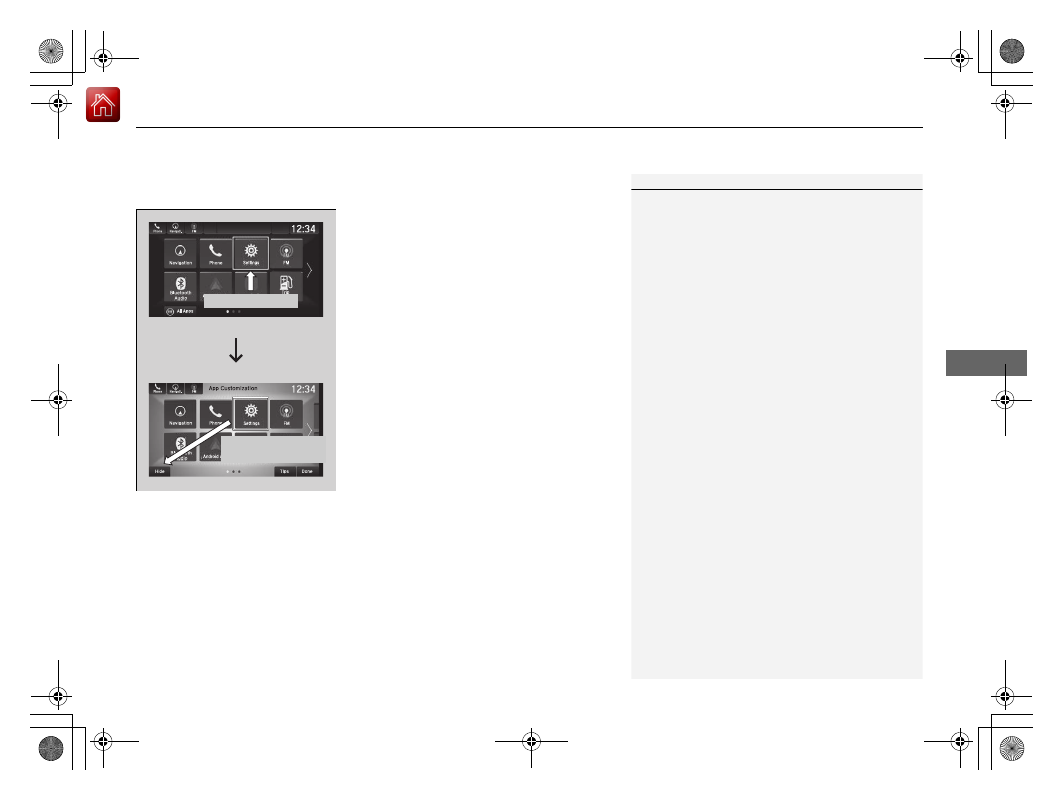
To remove icons on the home screen
You can delete the icons on the home screen.
1.
Select and hold an icon.
u
The screen switches to the customization
screen.
2.
Drag and drop the icon you want to remove
to the
Hide
icon.
u
The icon is removed from the home
screen.
3.
Select
Done
.
u
The screen will return to the home
screen.
1
To remove icons on the home screen
Apps will not be deleted by deleting the icon on the
home screen.
Select
Tips
to show tips. To hide them, select it again.
Select and hold.
Drag and drop to
Hide
icon.