Honda CR-V Hybrid (2022 year). Manual in english - page 18
Continued
285
uu
Audio System Basic Operation
u
Audio/Information Screen
Features
■
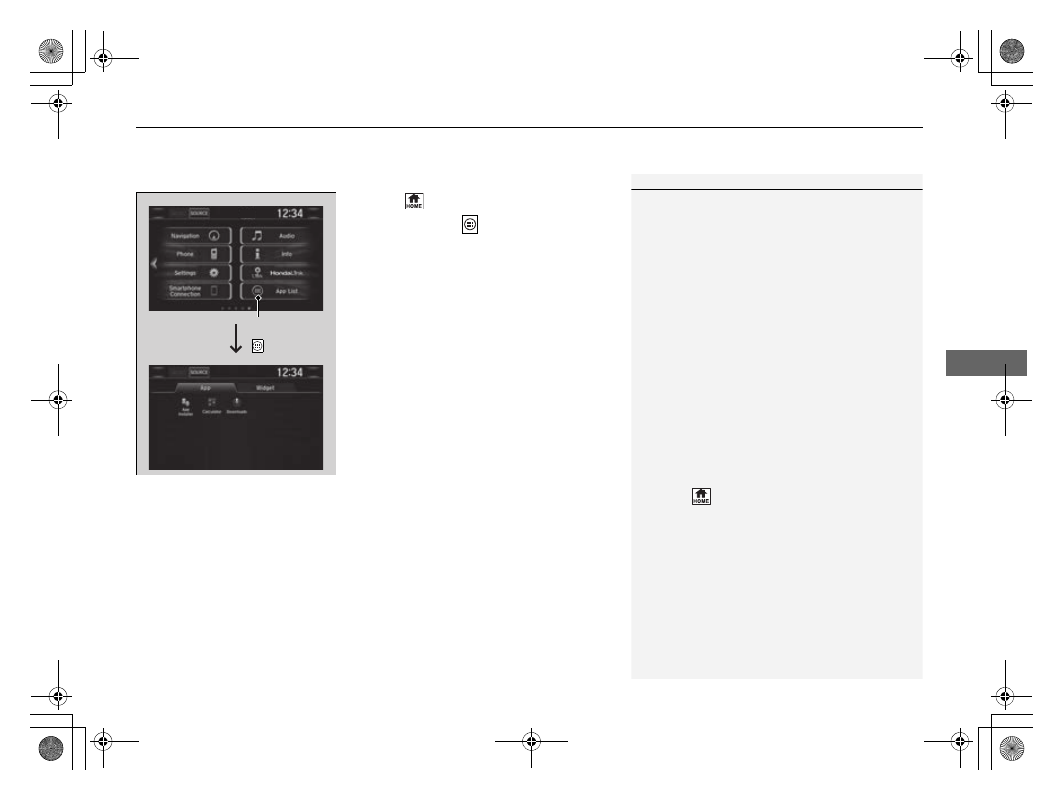
To use apps or widgets
1.
Select .
2.
Select
App List
(
).
u
The apps screen appears.
3.
Select the app or widget you want to use.
Preinstalled app list:
•
Calculator
: Displays Calculator.
•
Downloads
*1
: Displays the data
downloaded from the web browser and so
on.
•
App Installer
: Check with a Honda dealer
for apps that are available for installation.
*1: Downloads app cannot be used because there is no Browser function in this system.
1
Select and hold a selected app or widget to add that
app’s or widget’s shortcut on the home screen.
Pre-installed apps may not start up normally. If this
occurs, you need to reset the system.
2
If you perform
Factory Data Reset
, it may reset all
the settings to their factory default.
2
In case those apps still do not startup normally even
after
Factory Data Reset
, contact your dealer.
Do not install apps other than those confirmed by a
Honda dealer. Installation of unauthorized apps may
introduce data corruption risks to your vehicle's
information and your privacy.
You can delete user installed apps by the following
procedure.
1. Select .
2. Select
Settings
.
3. Select
System
.
4. Select the
Others
tab.
5. Select
Detail Information
.
6. Select an App that you want to delete.
7. Select
Delete
.
Pre-installed apps cannot be deleted.
App List
( ) Icon